dbx
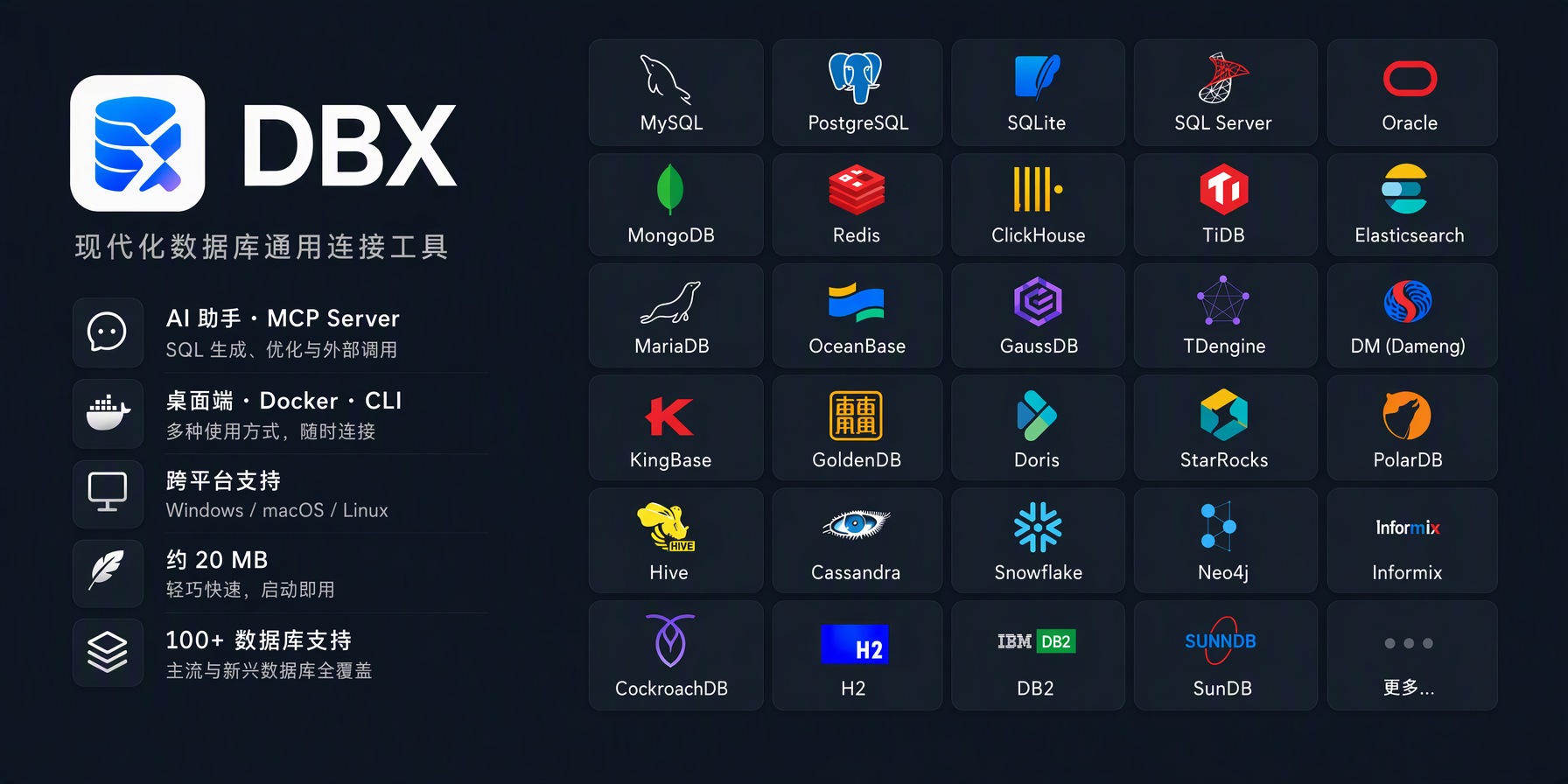
100+ databases in 25 MB. Desktop, Docker, CLI, built-in AI assistant, and MCP Server.
















English | 前往中文版本
|
JumpServer is an Open-source Privileged Access Management (PAM) platform with AI-powered capabilities, providing DevOps and IT teams a unified workspace to securely access SSH, RDP, Kubernetes, databases, websites, RemoteApp, VirtualApp, and more. Visit JumpServer |

|
RainYun is a cloud service provider offering cloud servers, physical servers, game hosting, and developer-friendly infrastructure services. Visit RainYun |

|
Jalapeño Cloud is an AI infrastructure and token compute platform, with an exclusive DBX entry offering free credits and top-up bonuses. Visit Jalapeño Cloud |

|
Special thanks to AICodeMirror for sponsoring this project! AICodeMirror provides a high-stability official relay service for Claude Code / Codex / Gemini CLI, with enterprise-grade concurrency, fast invoicing, and 7×24 dedicated support. Official-channel pricing for Claude Code / Codex / Gemini is as low as 38% / 2% / 9% of list price, with extra discounts on top-ups! AICodeMirror offers a special benefit for DBX users: register through this link to enjoy 20% off your first top-up, and enterprise customers up to 25% off. Visit AICodeMirror |

|
HuaLongAI is a model API relay built for heavy AI developers, offering 100% official-source Codex and Claude models with transparent token-level billing, enterprise contracts, and invoicing. Visit HuaLongAI |

|
HiAPI is a developer-focused API platform for image, video, audio, and text models — GPT Image 2.5 (Flare & Sunburst), OpenAI-compatible text endpoints, and Remote MCP/Agent Skills for Claude Code, Cursor, and more. Pay as you go with no minimum spend; new users get 200 Credits on signup, plus 10% bonus Credits on top-ups. Visit HiAPI |

|
UCloud is the first public cloud provider listed on China's STAR Market, with 28 global regions for cloud hosting, databases, and CDN; its AstraFlow platform offers one-click access to 200+ mainstream LLMs. Visit UCloud |

|
PackyCode is a stable, efficient API relay for mainstream AI models. Access them with one API endpoint and one API key — automatic failover keeps access fast and reliable, with dedicated high-speed routes for Codex and Claude Code. Get started with $1 in free credits, a first top-up discount, and up to 80% off eligible routes; pay in RMB with no currency conversion markups or extra top-up fees. Visit PackyCode |

|
太一智能体企业版是面向央国企的私有化智能体平台,采用“1+N+N”架构:1 个平台、N 个终端、N 个场景。可信:Java 微服务架构,私有化部署,全程留痕可审计。可控:关键操作人工审批,资料按密级管理。可达:按单位模板直接生成公文、台账和汇报材料。可复制:场景方案包化交付,便于推广和二次开发。欢迎预约演示,或在 GitHub 搜索 MateClaw。 访问太一企业版 |

|
TrustAsia provides cloud-based code signing service for DBX, enabling trusted software through automated CI/CD builds. Visit TrustAsia |

|
Atlas Cloud gives developers one unified API for 400+ AI models across chat, image, video, and audio. Visit Atlas Cloud |

|
Qiniu Cloud provides DBX with object storage, CDN, and other cloud infrastructure resources. Visit Qiniu Cloud |
🤝 Partners

|
1Panel is a modern open-source Linux server management panel and lightweight AI management platform, offering an intuitive web interface for one-stop management of AI agents, local LLMs, websites, databases, containers, files, and more. Visit 1Panel |

|
Easysearch is an enterprise-grade distributed search engine compatible with Elasticsearch APIs, combining full-text, vector, geospatial search, real-time analytics, and AI capabilities in one platform. Visit Easysearch |
Why DBX?
🪶 25 MB, zero runtime bloatNo Java JRE. No Python venv. No bundled Chromium. DBX ships as a single small binary — download, install, connect. DBeaver needs Java; TablePlus is Freemium. DBX runs everywhere with nothing extra. |
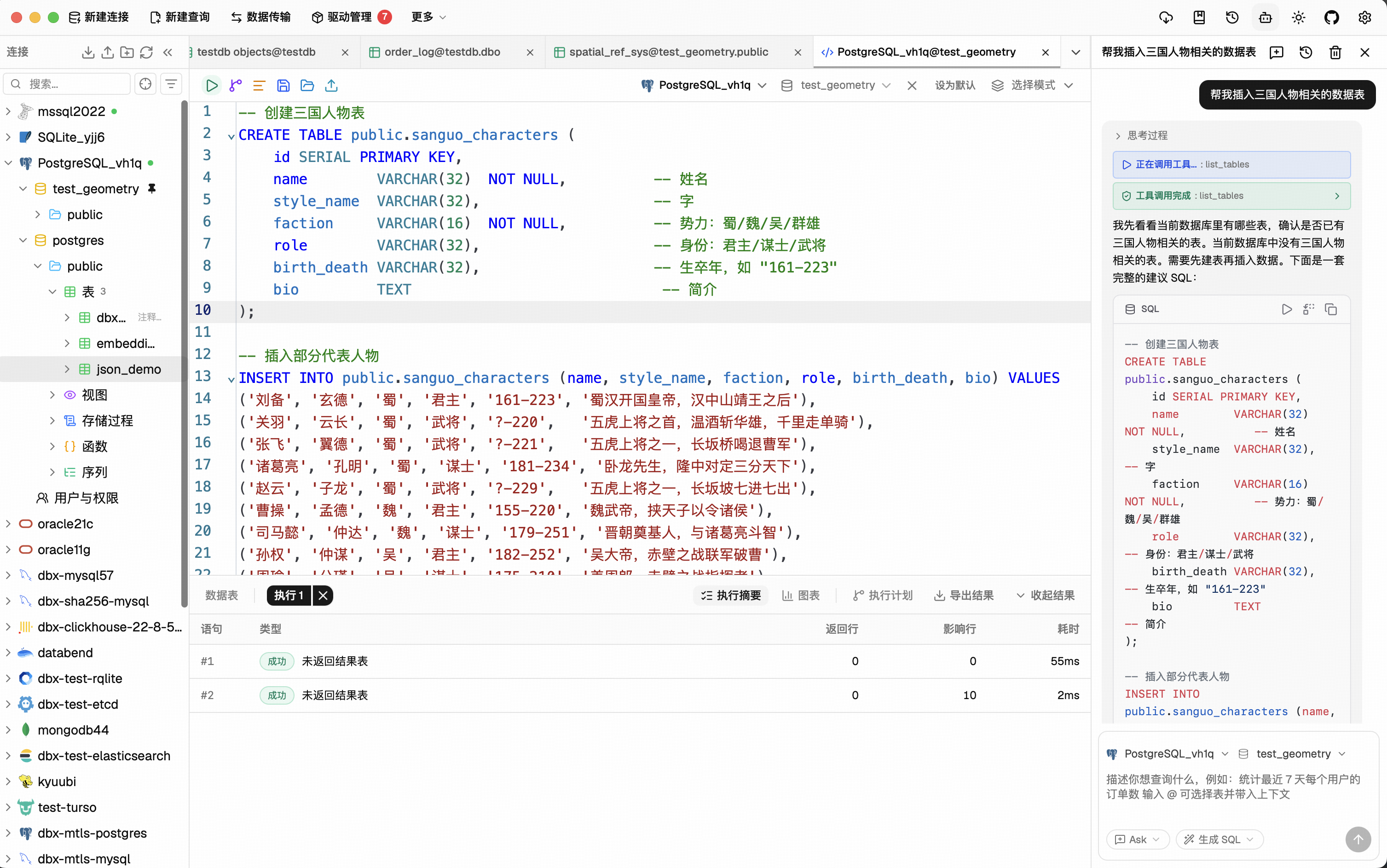
🤖 AI that lives in your editorHighlight a table, describe what you want, get SQL back — no copy-paste between tools. Works with Claude, OpenAI, or local models via Ollama. Built-in safety checks review AI-generated SQL before it runs. |
🔌 MCP: your databases, AI-readyDBX speaks the Model Context Protocol. Claude Code, Cursor, Windsurf, and other AI coding agents can query your databases through connections you already set up. One config, everywhere. |
🌐 Desktop + Docker + WebNative app on macOS, Windows, and Linux. Self-host via Docker for team access. Web version for browser-only environments. Same feature set. Same connections. |
📨 Not just databasesMessage queues and middleware get first-class consoles: Kafka, RocketMQ, RabbitMQ, Pulsar, and MQTT, plus Nacos, Consul, ZooKeeper, and etcd. Inspect topics and messages next to your databases — no extra tool. |
🧩 Plugin ecosystemExtend DBX with signed, sandboxed plugins from the built-in store — S3, Kubernetes, LDAP, and more. Build your own with the Go / TypeScript SDK. |
Features
100+ Databases, One Tool
MySQL, PostgreSQL, SQLite, Cloudflare D1, Redis, MongoDB, DuckDB, ClickHouse, SQL Server, Oracle, Elasticsearch, Easysearch, Meilisearch, CouchDB, Qdrant, Milvus, Weaviate, MariaDB, TiDB, OceanBase, openGauss, GaussDB, KWDB, KingbaseES, Vastbase, GoldenDB, Doris, SelectDB, StarRocks, Manticore Search, Redshift, DM, TDengine, XuguDB, CockroachDB, Access, HighGo, UXDB, Dolt, and more. Agent-based profiles extend DBX to H2, Snowflake, Trino, PrestoSQL, Hive, DB2, Informix, Neo4j, Cassandra, BigQuery, Cloud Spanner, Kylin, SunDB, JDBCX, and custom JDBC connections. New native and agent-driven drivers also cover Databricks, SAP HANA, Teradata, Vertica, Firebird, Exasol, YashanDB, GBase 8a/8s, Databend, RQLite, Turso, InfluxDB, QuestDB, IoTDB, etcd, ZooKeeper, Nacos, Consul KV, IRIS, and more. All in a single ~25 MB app. No bundled Chromium.
Query Editor
CodeMirror 6 with SQL syntax highlighting, metadata-aware autocomplete, Cmd+Enter execution, selected SQL execution, SQL formatting, diagnostics, and 9 editor themes. Persistent query history, saved SQL snippets, tab restore, and SQL file execution keep repeat work close at hand.
AI SQL Assistant
Describe what you want in plain language — get SQL back. DBX can explain queries, optimize SQL, fix errors, and run AI-generated SQL through built-in safety checks. Works with Claude, OpenAI, local models, or any OpenAI-compatible endpoint.
Data Grid
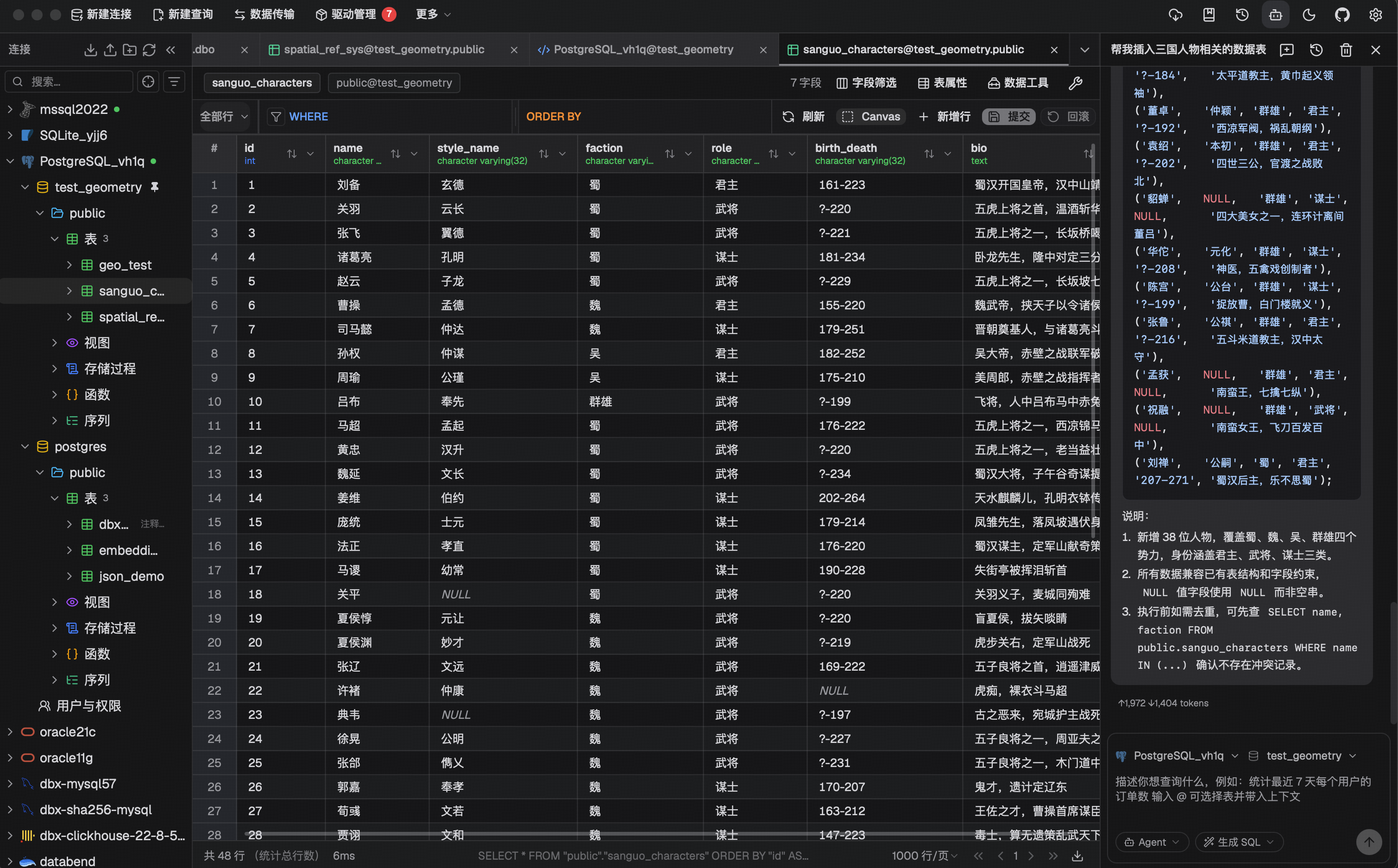
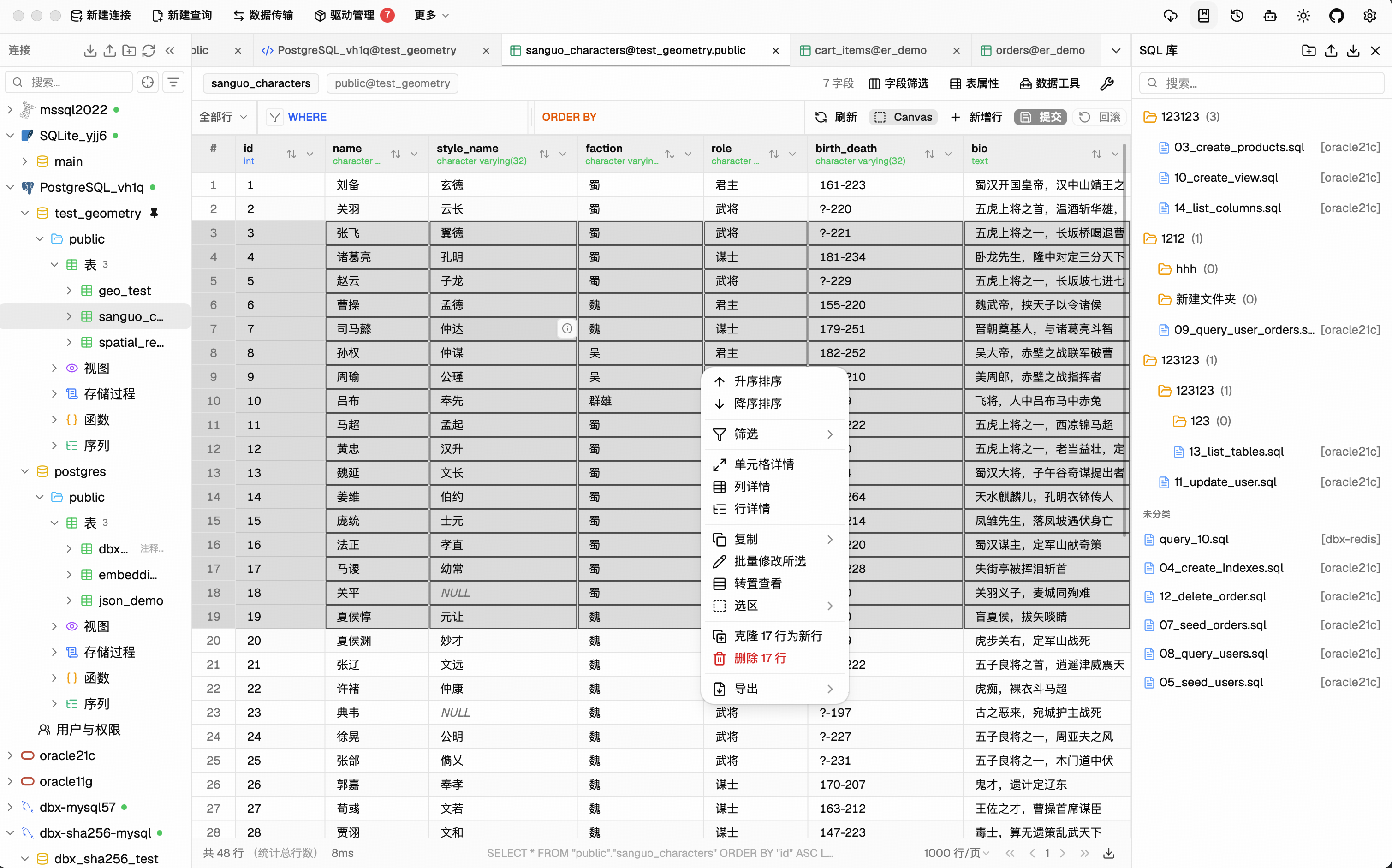
Virtual-scrolled table that handles large result sets. Inline editing, SQL preview before save, WHERE / ORDER BY controls, DataGrip-style filters, LIKE / NOT LIKE context filters, sorting, full-text search, pagination, column resize, auto-fit, row numbers, zebra stripes, and full cell details. Export or copy as CSV, JSON, Markdown, XLSX, or INSERT statements.
Schema Tools
- Schema browser — databases, schemas, tables, columns, indexes, foreign keys, triggers, with sidebar search & pin
- Object browser — grouped procedures, functions, views, and source editing where supported
- Table structure editor — reviewable column and index changes for supported engines
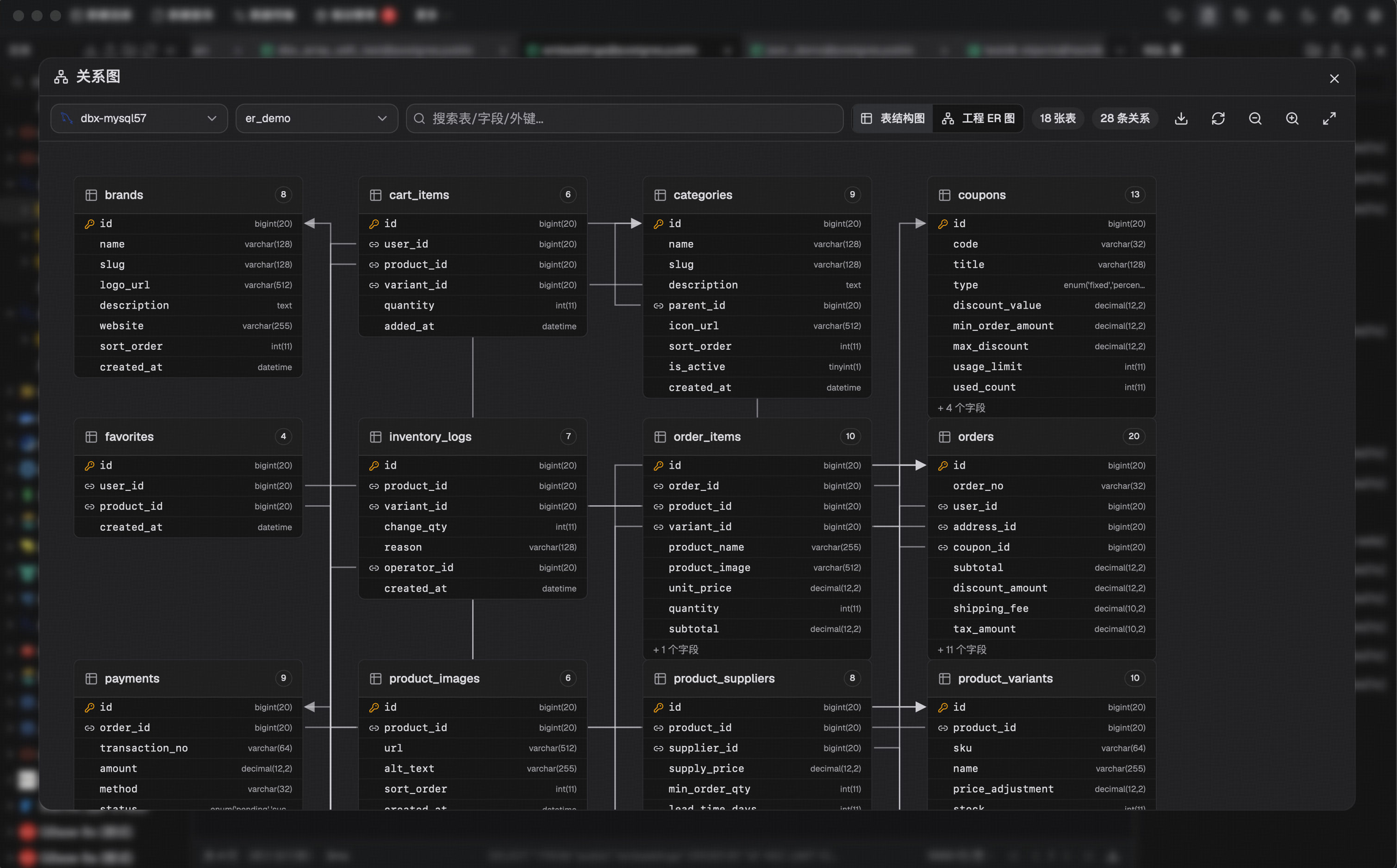
- ER diagram — visualize table relationships
- Schema diff — compare structures across connections
- Explain plan — visual query execution plan
- Field lineage — column-level lineage analysis
- Database search — find objects across large schemas
Data Operations
- Table import — CSV, Excel
- Data transfer — migrate between databases
- Database export — full database dump
- Data compare — compare table data and review synchronization output
- SQL file execution — run
.sqlfiles directly - File preview — drag & drop Parquet, CSV, JSON to preview instantly (powered by DuckDB)
- Connection import — bring connection profiles from DBeaver or Navicat
Specialized Browsers
- Redis — key pattern search, batch key operations, command runner, TTL editing, and all data types (String, Hash, List, Set, ZSet, Stream)
- MongoDB — document CRUD with pagination, Atlas & replica set URL connection
Message Queue & Middleware Consoles
- Kafka / RocketMQ / RabbitMQ / Pulsar — topics, consumer groups, message browsing, query and trace, broker monitoring, permissions and policies
- MQTT — topic tree navigation, subscribe, and publish
- Nacos / Consul / ZooKeeper / etcd — service discovery, KV / config browsing, health, and ACL
Plugin System
- Extensible by design — new connection types and tools arrive as plugins: S3 browsing, Kubernetes, LDAP, and more from the built-in store
- Signed & sandboxed — every plugin package is signature-verified before install; plugin UI runs sandboxed with its own sidecar process
- Build your own — Go / TypeScript SDKs with
npx @dbx-app/plugin-cliscaffolding; publish to the Marketplace viat8y2/dbx-store
Safety & Connectivity
SSH tunnel (key & password) · database and AI proxy settings · auto-reconnect on connection loss · confirmation dialogs for destructive operations · encrypted config export/import · color-coded connections · driver store and optional JDBC plugin
Polished UI
Dark mode with native title bar sync · 9 editor themes · English, 简体中文 & Español · layout preferences · built-in auto-update
AI Agent Integration (MCP)
DBX provides a separate Rust-powered MCP server that lets AI coding agents query databases using connections configured in DBX. The MCP server is distributed independently from the desktop application, so installing DBX does not automatically install the MCP executable.
npx @dbx-app/mcp-server
Add to your .mcp.json:
{
  "mcpServers": {
    "dbx": { "command": "npx", "args": ["-y", "@dbx-app/mcp-server"] }
  }
}
Manage the connection allowlist and the Read only, Data read/write, and Full access modes in DBX Settings → MCP. The machine-readable values remain read_only, safe_write, and high_risk_write; client configs do not need permission or connection-scope environment variables.
For upgrade compatibility, an existing DBX_MCP_ALLOW_WRITES=0 (or false) remains a read-only restriction only until a central MCP policy is saved for the first time; it can never enable writes or override a saved policy.
Windows portable builds need DBX_DATA_DIR in the MCP config, pointing to the data directory next to DBX.exe (the folder that contains dbx.db).
For DBX Web or Docker deployments, point the MCP server at the Web backend API. If the Web login page requires a password, set DBX_WEB_PASSWORD to the same password used there:
{
  "mcpServers": {
    "dbx": {
      "command": "npx",
      "args": ["-y", "@dbx-app/mcp-server"],
      "env": {
        "DBX_WEB_URL": "http://localhost:4224",
        "DBX_WEB_PASSWORD": "your-web-login-password"
      }
    }
  }
}
Works with Claude Code, Cursor, Windsurf, and any MCP-compatible agent. Supports listing connections, browsing tables, executing SQL, and opening tables directly in DBX's UI.
Precompiled native binaries are also published for macOS, Linux, and Windows in package releases. They run without Node.js and are suitable for offline or server environments. The npm installation uses the same Rust binary through a small Node.js launcher.
DBX also provides a dedicated CLI package for terminal, script, and Codex workflows:
npm install -g @dbx-app/cli
# or via Homebrew
brew tap t8y2/tap && brew install dbx-cli
dbx agent setup
dbx connections list --json
dbx query local "select 1" --json
The CLI includes the official DBX Agent Skill. dbx agent setup installs or updates it offline under ~/.agents/skills/dbx, so shell-capable AI agents know how to use DBX CLI safely.
See the MCP server README and CLI README for details.
Install
Download the latest release from the Releases page.
Homebrew (macOS):
brew install --cask dbx
Scoop (Windows):
scoop bucket add dbx https://github.com/t8y2/scoop-bucket
scoop install dbx
WinGet (Windows):
winget install t8y2.dbx
Flatpak (Linux):
flatpak remote-add --if-not-exists flatpark https://dl.flatpark.org/flatpark.flatpakrepo
flatpak install flatpark com.dbxio.dbx
Updates then arrive through the regular flatpak update. See the DBX page on FlatPark for details.
Self-Hosted (Docker)
For scheduled backups after closing the desktop app or browser, see Background Database Backups, including Windows/macOS/Linux startup and persistent container backup volumes.
DBX provides a web version that can be deployed via Docker. The examples use
the latest tag to pull the current release.
# The default keeps the key in the persistent /app/data volume.
docker run -d --pull=always --name dbx -p 4224:4224 \
  -v dbx-data:/app/data \
  t8y2/dbx:latest
This uses the cross-platform dbx-data named volume. Users in China can use
the CNB image, docker.cnb.cool/dbxio.com/dbx:latest, for faster pulls.
For Docker Compose, deploy/docker-compose.yml remains the source-build
configuration. To deploy a published image, use
deploy/docker-compose.release.yml:
docker compose -f deploy/docker-compose.release.yml up -d
services:
  dbx:
    image: t8y2/dbx:latest
    # For faster pulls in China, use the CNB image instead:
    # image: docker.cnb.cool/dbxio.com/dbx:latest
    pull_policy: always
    ports:
      - "4224:4224"
    volumes:
      - dbx-data:/app/data
    restart: unless-stopped

volumes:
  dbx-data:
Open http://localhost:4224 in your browser. Multi-arch images (amd64 / arm64) are available.
Connection, plugin, AI, and tunnel credentials are encrypted before they are
written to dbx.db. Desktop builds use the local platform credential store
(macOS Keychain, Windows Credential Manager, or Linux Secret Service).
Web/Docker and directly running dbx-web use the same managed data-directory
key by default: ${DBX_DATA_DIR}/.dbx/secret.key. The key is created only when
migration starts or the first sensitive value is written, and must be backed up
together with dbx.db. Persisting /app/data is therefore sufficient for a
normal Docker deployment. This key protects the database contents, but cannot
protect the whole data volume if the volume itself is copied or exposed.
For production deployments, replace the managed key with a Docker/Kubernetes
Secret by setting DBX_SECRET_KEY_FILE, or provide DBX_SECRET_KEY through a
secret manager. Explicit keys take precedence and must never be rotated while
encrypted data is in use. Without a usable key, business APIs remain blocked
and the browser displays the data security upgrade screen.
When running the binary directly, set DBX_DATA_DIR=/var/lib/dbx to use
/var/lib/dbx/.dbx/secret.key with the same lifecycle and backup rules.
When upgrading from a release that stored credentials in plain text, Desktop
and Web display a Data Security Upgrade wizard before opening the main
application. Choose Start upgrade to create a restricted backup, migrate
legacy database/JSON credentials, and verify that encrypted values can be
read. Failures retain the original data and backup; fix the issue shown in
the wizard and choose Retry. The backup path is shown after success.
Once you have verified your connections, Delete migration backups asks
for confirmation and removes the migration backup directory and the legacy
JSON .bak files created by that migration. Unrelated backup files are kept.
Users with no legacy data proceed directly after the initial check.
Local CLI and standalone MCP can reuse the existing platform credential
store on the same device, or read an explicitly configured
DBX_SECRET_KEY_FILE/DBX_SECRET_KEY. They do not create keys during the
startup check or automatically migrate legacy data. A
DATA_MIGRATION_REQUIRED error means that you must first open the same data
directory in Desktop or Web and complete its upgrade wizard. For headless
hosts without a platform credential store, configure the persistent key.
Cross-device exports use a separate sync passphrase and never contain the
local storage key. A direct dbx.db copy is not a cross-platform sync method:
platform keys do not move with the database. Use encrypted export/import so
the target device stores credentials using its own local key.
For the complete design, migration state machine, implementation map, troubleshooting, and test plan, see DBX Data Security Upgrade and Migration.
To publish DBX under a reverse-proxy context path such as /dbx, set the
runtime base path and proxy the same prefix to the container:
environment:
  - DBX_PUBLIC_BASE_PATH=/dbx
When building the frontend yourself with an absolute asset base, set
VITE_DBX_BASE_PATH=/dbx/ before pnpm build.
Getting Started
Prerequisites
System Dependencies
macOS:
No additional dependencies required.
Linux (Ubuntu/Debian):
sudo apt-get install -y libwebkit2gtk-4.1-dev libgtk-3-dev libappindicator3-dev librsvg2-dev patchelf libssl-dev
NIXOS/NIX :
Windows:
No additional dependencies required.
Development
make
make installs root dependencies when needed and starts the local Tauri desktop development environment.
Development builds can run alongside an installed DBX instance and share its local data, including connections and history. Avoid changing the same connection or global setting in both windows at once.
[!TIP] DuckDB compilation takes a while. If you're not working on DuckDB features, skip it to speed up local builds:
# Fast checks (skip DuckDB)
make cargo-check-fast
make cargo-test-fast

# Tauri dev without DuckDB
make dev-fast
The
--no-default-featuresflag only affects local development. Release builds (pnpm tauri build) always include DuckDB.
Web version:
make dev-web       # frontend
make dev-backend   # backend
Documentation site:
make docs
The official DBX documentation site lives in docs/. If you want to improve the website content or documentation pages, edit the files under docs/ and run make docs to preview the site locally.
Plugin authors should start with Develop and Submit DBX Plugins. Plugin source normally stays in its own repository; Marketplace listing pull requests go to t8y2/dbx-store, while plugin host, SDK, and CLI changes go to this repository.
For clean, reproducible local database instances, use the versioned Docker Compose recipes under deploy/database/:
make db-list
make db-verify DB=mysql@8.4
JDBC agent driver development projects live in agents/:
cd agents
./gradlew test
Build artifacts from agents/drivers/<db-type>/build/libs/ are picked up by local driver install flows when available.
Build
make package
The installer will be in src-tauri/target/release/bundle/.
Tech Stack
| Layer | Technology |
|---|---|
| Framework | Tauri 2 |
| Frontend | Vue 3 + TypeScript |
| UI | shadcn-vue + Tailwind CSS |
| Editor | CodeMirror 6 |
| Backend | Rust + sqlx / tiberius / redis-rs / mongodb |
Documentation
- Official docs — feature guides and tutorials
- Plugin development — create plugins and submit Marketplace listings to the correct repository
- Database Test Lab — local database recipes for development and verification
- Contributing — how to pick up issues and open PRs
- Web API reference — HTTP API for Docker/Web deployments
- Examples — CLI, MCP, Docker, and API samples
Support DBX
DBX is free and open source, but ongoing maintenance, database compatibility testing, infrastructure, and release work require sustained time and resources.
- Support DBX — voluntary donations via WeChat or Alipay
- Sponsors & Partners — sponsorship, infrastructure, tools, and community collaboration
Contributors
Community





