skylight
Skylight
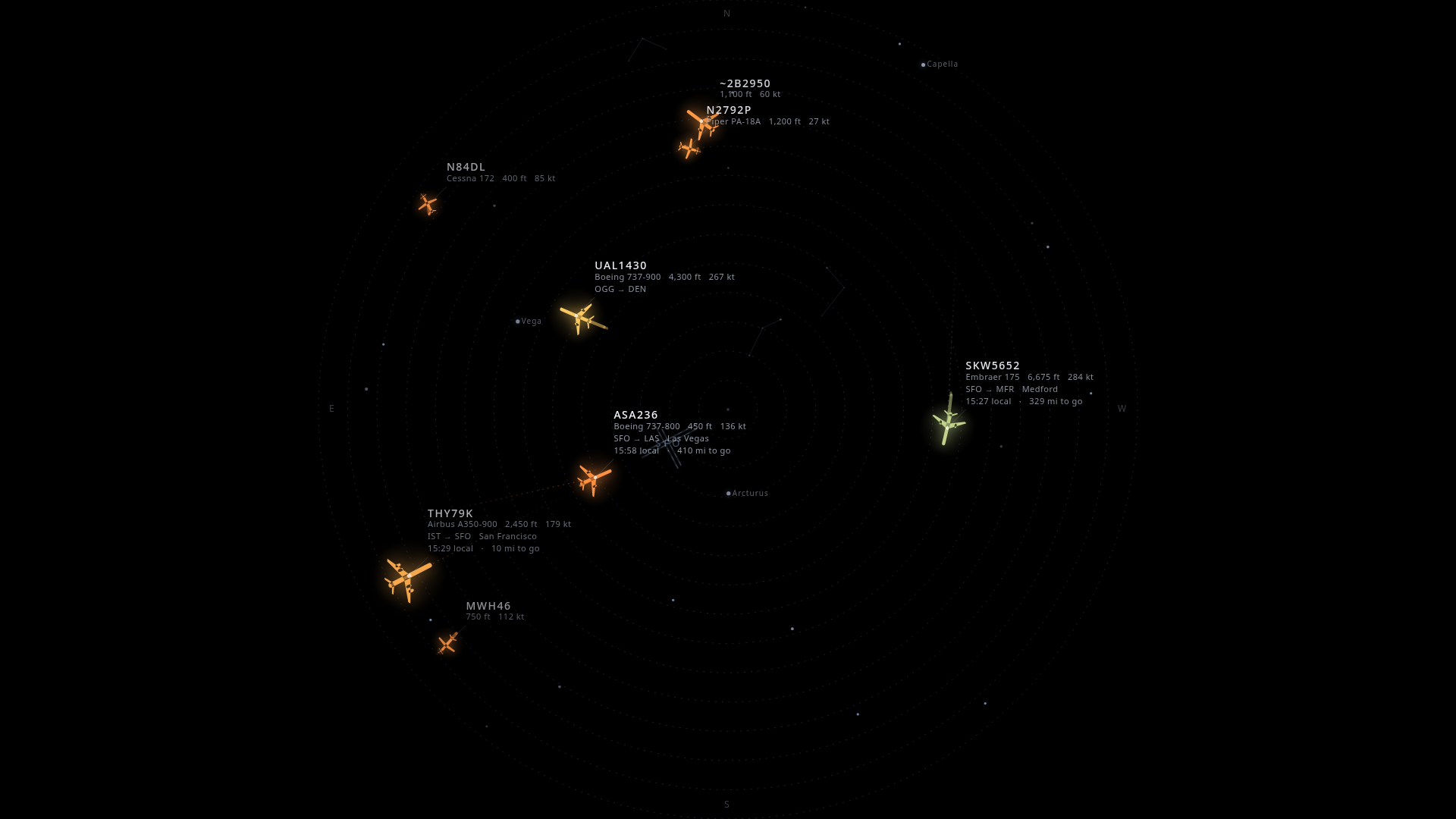
Project the aircraft passing overhead onto your ceiling, in real time - an X-ray through the roof.
🛠️ Non-technical build guide → skylightceiling.com/build
What to buy (with or without a radio), one command to install, tune it from your phone.
Setting it up with an AI assistant? Point it at skylightceiling.com/llms.txt.
https://github.com/user-attachments/assets/9256b0eb-cc27-4388-9a4f-0a6c05468304
Skylight decodes ADS-B from a cheap RTL-SDR radio and renders the planes physically flying over you onto a ceiling-pointed projector. A jet you'd hear overhead glides across your ceiling at the same moment - labeled with its airline, type, and where it's headed. Pure-black background so the projector's rectangle disappears and only the aircraft (and stars) are lit.
It also draws the real sky behind the planes - sun, moon, bright stars and constellations, and live satellites including the ISS - all at their true positions for your location and time. Tune everything from your phone.
Reference build is centered on San Francisco International (SFO), but it works anywhere - set your location in the control panel and import your airport's runways by ICAO/IATA code (worldwide, via OurAirports) and you're flying.
- Real-time overhead aircraft from a local RTL-SDR (sub-second), or from a free web API with zero code changes - handy for trying it with no radio.
- Type-aware glyphs in a luminous, swept-wing style: widebodies tower over regional jets, helicopters spin their rotors, turboprops and GA aircraft spin their props.
- Smooth motion - interpolates the ~1 Hz fixes to 60 fps by rendering slightly in the past and tweening between real positions (no teleporting).
- Comet trails, altitude-graded color, and range rings + compass for orientation.
- The airport (runways) drawn at its true position, so you watch departures and arrivals line up with the runway.
- Window to elsewhere - each routed flight shows its destination city, local time there, and miles-to-go, plus a faint great-circle arc toward where it's headed.
- Live sky layer - sun, moon (with phase), bright stars + constellation lines, naked-eye planets, and satellites / ISS computed from TLEs. Scrub time forward/back from your phone, or jump straight to the next ISS pass.
- Phone control panel - every setting (rotation, theme, palette, filters, sky toggles, …) is live-tunable over your LAN and persists across reboots.
- Optional sky camera - point a PTZ camera (VISCA-over-IP + RTSP) at the sky and
Skylight automatically films the planes it's projecting: ADS-B-driven pointing
with latency-compensated lead prediction, a hybrid vision system that locks the plane
to center, and a confidence-gated zoom ladder that punches in as the lock holds.
Includes a TV dashboard (
/tv.html) with the live feed + radar inset, and a full debug UI (/tracker.html) with jog pad, target table, and a star-capture calibration wizard. - Vision that knows a plane from a cloud - the camera tracker fuses three signals: a classical blob detector (distant specks) + a large-object detector (big overhead planes), track-before-detect that picks the target by how it moves through the world like ADS-B predicts (clouds are world-static and lose), and an optional neural airplane detector (YOLOX-Nano ONNX, downloaded at setup) for a semantic "is it an airplane?" confirmation. It also continuously self-calibrates the mount from every locked pass, so the aim re-squares itself over time.
- Appliance-ready - boots straight to a full-screen kiosk on a Raspberry Pi 5 (dual-output: projector + TV dashboard).
Hardware
| Part | Suggested | Notes |
|---|---|---|
| Receiver | Nooelec RTL-SDR v5 bundle (NESDR SMArt v5) | Tested with Skylight; comes with a magnetic antenna base and three antenna rods. Any RTL2832U stick works (the installer builds the rtl-sdr-blog driver, which covers the RTL-SDR Blog V3, V4 and the new V4L, FlightAware Pro Stick, generics). The small included antenna is plenty - planes are nearly overhead. The V4 this build used is end-of-life. |
| Compute | Raspberry Pi 5 (8 GB) | Decode + render. Active cooling for 24/7. See minimum specs for lighter setups. |
| Projector | A 1080p projector pointed up | Laser (e.g. Optoma GT2100HDR) gives the deepest blacks, but it's overkill - see the budget tip below. |
| Display link | micro-HDMI → HDMI | The Pi 5 uses micro-HDMI (not mini). |
| Mount | Rotating 1/4-20 stand, pointed up | Lower the stand for a bigger image; tape + a safety tether. |
| Sky camera (optional) | Any VISCA-over-IP PTZ with RTSP (e.g. a 4K NDI conference PTZ) | For the auto-filming tracker. Clamp the base rigidly - fast slews will walk an unclamped mount and ruin the aim calibration. |
💡 Budget tip - you don't need an expensive projector. The pricey laser short-throw is only worth it if you want the image visible in a lit room. If you're happy viewing it in a dim/dark room (the intended vibe), a cheap native-1080p LED projector like the Yaber Buffalo Pro U9 (~$150) works great:
- No short-throw needed - from the floor under an ~8 ft ceiling, even a 1.35:1 throw gives a ~5.5 ft image.
- Low brightness is fine (even better) - the content is sparse-on-black, so 200–400 lumens in a dark room actually looks deeper.
- Just verify it's native 1920×1080 (not "1080p supported"), has a quiet fan, and an HDMI input that shows on power-on.
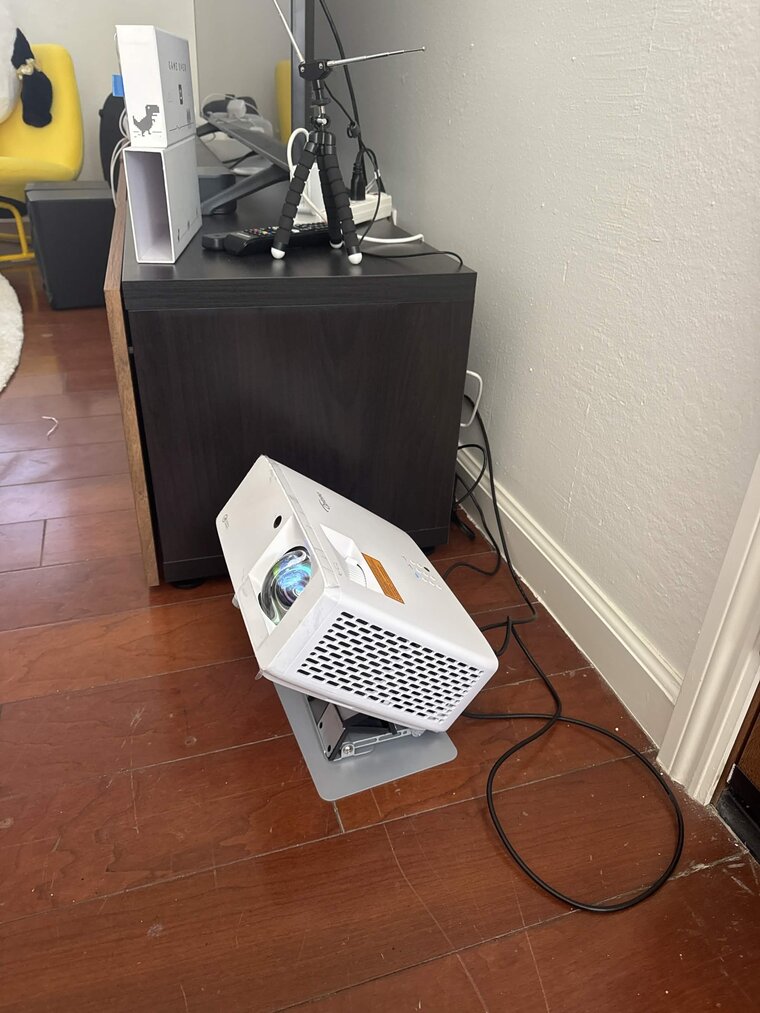
The build - short-throw projector pointing up, RTL-SDR dipole on the cabinet.
You don't need any of this to try it - see Quick start.
Minimum specs
There are two workloads, and they have very different requirements:
- Display + decode (the core ceiling piece). This is light. The server is a small
Node process; the rendering is a 2D canvas. A Pi 4 (2 GB) runs it comfortably, and a
Pi 3B / Pi Zero 2 W will work for the display if you keep the canvas modest - cap
maxFps(e.g. 30), trimtrailSeconds, and lean onDATA_SOURCE=apiso the Pi isn't also runningdump1090. 1 GB is workable but tight; 2 GB+ is the comfortable floor. - The optional sky-camera tracker (vision + neural detector). This is the heavy part and is what the Pi 5 (8 GB) recommendation is for - real-time RTSP decode plus ONNX inference. Don't expect the vision tracker to keep up on a Pi 4 or smaller.
Rule of thumb: Pi Zero 2 W / 3B = display only, Pi 4 = display + local radio, Pi 5 = everything including the camera tracker.
Quick start (local, no radio)
Runs entirely on your computer against a free public ADS-B API.
pnpm install
DATA_SOURCE=api pnpm dev
- Display: http://localhost:5173/
- Control panel: http://localhost:5173/control.html (or from your phone:
http://<your-ip>:5173/control.html) - Camera tracker debug UI: http://localhost:5173/tracker.html - runs against a built-in camera simulator, so the whole pointing pipeline (target selection, prediction, zoom, calibration) works with zero hardware.
- TV dashboard: http://localhost:5173/tv.html
Then set your location from the control panel's Location section - search a
city/airport, tap Current to use the browser's location, or type lat,lon
directly. The default is SFO, so until you change it you'll see San Francisco traffic
(or nothing, if your radius is small). Your airport's runways can be drawn too:
type its ICAO/IATA code into Location → Runways and they're imported automatically.
With a radio (locally)
scripts/install-rtlsdr-fedora.sh    # rtl-sdr-blog driver + blacklist DVB-T (Fedora; see script for Debian)
scripts/run-dump1090-local.sh       # decode + serve aircraft.json on :8080
DATA_SOURCE=radio pnpm dev
Raspberry Pi appliance
Full walkthrough in pi-setup/README.md (and a no-jargon
version at skylightceiling.com/build): flash the
SD card (or use a kit's pre-loaded one), then in the Pi's Terminal type one line. It
downloads Skylight, installs the driver + decoder (when a radio is plugged in), the
app, the service and the boot-to-kiosk display, names the Pi skylight, and reboots:
curl -sL skylightceiling.com/install | bash
The same thing without the website in the loop:
git clone https://github.com/cpaczek/skylight.git ~/skylight && cd ~/skylight && ./pi-setup/install-on-pi.sh && ./pi-setup/setup-kiosk.sh && sudo reboot
Once it's running, push updates from your dev machine with:
PI_HOST=skylight.local ./scripts/deploy-to-pi.sh
Optional: the neural airplane detector
The camera tracker works out of the box with its classical + motion-tracking vision. For an extra semantic "is it an airplane?" signal (kills cloud locks, nails big overhead planes), download the optional ONNX model on the machine with the camera:
./scripts/fetch-vision-model.sh        # YOLOX-Nano, Apache-2.0, ~3.5 MB (not committed)
sudo systemctl restart skylight-tracker
# verify: the tracker state shows vision.net.ready == true
It's fully optional - if the model (or onnxruntime-node) is absent, the tracker runs
classical-only with no errors. On a Pi 5 it adds ~0.8 to load average during a pass;
turn it off with tracker.vision.net.enabled = false or run it less often with
tracker.vision.net.everyNTicks if the Pi runs hot.
Docker (server-driven projector)
If you'd rather drive a projector from a server (no Pi, no cabling to the projector), run the server + display in a container:
docker compose up -d --build
# display:  http://<host>:3000/      ·  phone panel: http://<host>:3000/control
Out of the box it uses the free adsb.fi API, so it runs with no radio.
To use your own ADS-B receiver, set DATA_SOURCE=radio and point AIRCRAFT_JSON_URL
at an existing dump1090 / readsb / PiAware feed on your network (or just change the URL
live from the control panel's Source section):
# compose.yaml
environment:
  DATA_SOURCE: radio
  AIRCRAFT_JSON_URL: http://192.168.1.50:8080/data/aircraft.json
Config and the route/TLE caches persist in the skylight-data volume. The image is the
server + display only - the optional sky-camera tracker (which wants direct camera +
GPU access) is not containerized. If you reach the server over a custom hostname or a
tunnel rather than a LAN IP / *.local, add it to ALLOWED_HOSTS (see below).
Reaching a decoder in another container: the fetch happens from inside the Skylight container, so
localhostwon't work and a sibling container's name only resolves if both containers share a Docker network. Either use the decoder host's LAN IP (e.g.http://192.168.1.50:8080/data/aircraft.json), or attach Skylight to the decoder's network (see the commentednetworks:block incompose.yaml). The status line in/controlshows why a fetch fails (DNS, refused, timeout).
Troubleshooting
No planes, using the public API. The view is centered on SFO until you set your
location - open /control and use the Location section (search, Current, or
lat,lon). Then check the status line at the top of /control: it shows the live
source, count, and the exact failure reason if polling is failing. If you're far from
an airport, also widen the Radius slider.
source fetch failed: … in the status line. The reason in parentheses tells you
what's wrong, measured from the server:
DNS lookup failed (host)- the server can't resolve that hostname. In Docker this usually means the decoder container isn't on the same Docker network (see the Docker section above).connection refused/host unreachable/timeout- the host resolved but nothing answered on that port; check the URL's port and that the decoder's web server is up (curl http://<host>:8080/data/aircraft.jsonfrom the machine running Skylight).HTTP 429- the public API is rate-limiting; Skylight now backs off automatically and recovers on its own. Planes hold position on screen through brief outages.HTTP 403/HTTP 401on the api source - the aggregator has stopped serving the public (this is what airplanes.live did). Pick another one: API URL in/control→ Source, values in Aggregators.
Aircraft are counted in /control but none are drawn. They are being heard without
a position. Check the feed: curl -s <radio url> | grep -c '"lat"'. If that prints 0
while the list has aircraft in it, the decoder was started with the wrong receiver
location - dump1090 discards every position more than 300 NM from its --lat/--lon.
Older versions of pi-setup/install-on-pi.sh set that to SFO unless told otherwise;
pull and re-run the installer to clear it (changing the location in /control moves
the display, not the decoder). If positions are present, check the Location and
Radius in /control instead.
Pointing at an existing dump1090 / readsb / PiAware feed. Set the Radio URL in
/control → Source to your feed's aircraft.json (dump1090-fa serves it at
http://<host>:8080/data/aircraft.json) and switch the source to radio. No rebuild
needed - it applies on the next poll.
Installer fails with Unsupported architecture: armhf. You're on 32-bit
Raspberry Pi OS; Node.js no longer ships 32-bit ARM builds. Re-flash with
Raspberry Pi OS (64-bit) - every supported Pi (3/4/5, Zero 2 W) can run it.
Runways for my airport. /control → Location → Runways: enter the ICAO or
IATA code (e.g. EGLL, EDDF, SNA). Geometry comes from the public-domain
OurAirports dataset; very small airfields sometimes lack surveyed runway endpoints,
in which case you'll get a clear error.
Clock on the TV dashboard is wrong. It shows the Pi's system time - fix the
timezone with sudo timedatectl set-timezone <Region/City>.
Configuration
Config (shared/src/config.ts) is the single source of truth,
persisted to server/data/config.json and live-editable from the control panel. Key
fields:
centerLat / centerLon |
Your location - where you're looking up. Editable from the panel's Location section (type a city, airport code, or lat,lon). |
locationName |
Display name for the current location, shown in the control panel. |
locationProfiles |
Saved places (favorite airports). Switch between them from the panel's Location section - tap Save current to store the active spot, then a chip to jump back to it. |
radiusMiles |
How far out to show (default 3 - "what you could realistically see"). |
radioUrl / apiUrl |
Where aircraft come from - your decoder's aircraft.json, and the aggregator used by the api source. Both live-editable from the panel's Source section (see Aggregators). |
rotationDeg / mirrorX |
Calibration for the looking-up flip (tune against a real pass). |
theme |
ambient · telemetry · focus. |
showStars / showSun / showMoon / showSatellites / showPlanets |
Sky layer toggles. Planets (Venus, Jupiter, Mars, Saturn, Mercury) are drawn at their true positions, sized by brightness and labelled - so the display stays alive even with no traffic. |
skyTimeOffsetMin |
Scrub the sky clock for testing (0 = live). |
showDestArc / showRouteDetail |
"Window to elsewhere". |
tracker.* |
The whole camera subsystem - driver (sim/visca), camera IP, mount calibration, target selection criteria, prediction/pursuit tuning, zoom + vision behavior. All live-tunable from the tracker debug UI. |
Using it somewhere other than SFO: set your location from the control panel's
Location section (or edit centerLat/centerLon). Stars, sun, moon, and satellites
are computed for your coordinates automatically. The runway overlay is still SFO-specific
geometry - turn off Airport runways if you've moved, or replace it in
web/src/display/airports.ts with your local airport
(coordinates from OurAirports).
Location search uses the free Nominatim (OpenStreetMap) service. Set
GEOCODE_USER_AGENTto identify your deployment if you use it heavily.
Aggregators
The api source needs a public ADS-B aggregator. They all speak the same readsb JSON,
so switching is one field - API URL in /control → Source - and it applies on the
next poll, no rebuild. {lat}, {lon} and {r} (radius in nautical miles) are filled
from your current location and range.
| Provider | URL | Notes |
|---|---|---|
| adsb.fi | https://opendata.adsb.fi/api/v3/lat/{lat}/lon/{lon}/dist/{r} |
Default. Free, no key, for personal non-commercial use. Allows 1 request/second. |
| adsb.lol | https://api.adsb.lol/v2/point/{lat}/{lon}/{r} |
Free, no key (one is planned, earned by feeding). Its rate limit moves with load and was too tight for a live display when tested in October 2026 - expect 429 pauses. |
| airplanes.live | https://api.airplanes.live/v2/point/{lat}/{lon}/{r} |
Feeders only since August 2026 - returns 403 to everyone else. |
These are volunteer-run, so Skylight keeps the poll rate polite: the aggregator is asked
at most once every 2 seconds however fast the radio is polled, and a 429 backs it off
for 15 seconds. Feeding a receiver back to whichever one you use is the nice thing to
do - it's also how you keep access if they move to keyed APIs.
Server environment
| Env | Default | Meaning |
|---|---|---|
DATA_SOURCE |
radio |
radio (dump1090) or api (aggregator, no hardware) |
AIRCRAFT_JSON_URL |
http://localhost:8080/data/aircraft.json |
dump1090 feed |
API_URL |
https://opendata.adsb.fi/api/v3/lat/{lat}/lon/{lon}/dist/{r} |
Aggregator for the api source. First-run default only - the control panel's API URL wins once set. See Aggregators. |
SUPPLEMENT_API |
1 |
When on radio, merge the API too (keeps landing aircraft alive) |
PORT / HOST |
3000 / 0.0.0.0 |
HTTP + WebSocket |
ALLOWED_HOSTS |
(empty) | Extra Host/Origin allowlist entries, comma-separated. Wildcards: *.example.com. Loopback, RFC1918 LAN, IPv6 ULA / link-local, and *.local are allowed by default. |
ALLOW_PRIVATE_LAN |
1 |
Set 0 to lock the server to loopback + mDNS only (no LAN phone control) |
GEOCODE_USER_AGENT |
(skylight default) | User-Agent sent to Nominatim for location search |
Exposing Skylight on a custom hostname
Skylight binds 0.0.0.0 so the phone control panel works on your home Wi-Fi.
To stop browsers on other origins from talking to the server (e.g. a tab on
evil.com opening a WebSocket to your Pi over DNS rebinding), every request
is rejected unless its Host header (and a WebSocket's Origin header)
matches the allowlist.
The defaults cover the documented topology - localhost, 127.0.0.1,
[::1], *.local, and private LAN ranges (10/8, 192.168/16,
172.16/12, IPv6 ULA + link-local). If you publish Skylight on a public
hostname or a tunnel, add it:
ALLOWED_HOSTS=skylight.mydomain.com,*.trycloudflare.com pnpm dev
Architecture
RTL-SDR ──USB──> dump1090-fa ──> aircraft.json (:8080)
                                      │ poll ~1 Hz  (+ API supplement)
                                      ▼
                         server/  (Node · Express · ws)  :3000
                         • normalize + enrich (airline/type tables + adsbdb routes)
                         • proxy satellite TLEs (Celestrak)
                         • persist config, broadcast over WebSocket
                         ├──────────────┬──────────────┬───────────────┐
                         ▼              ▼              ▼               ▼
                   Display (/)    Control (/control)  REST /api/*   tracker/  :3001
                   canvas renderer +  phone settings UI             • target selection + az/el
                   sky engine → projector (live, two-way)             lead prediction (ECEF)
                                                                    • velocity pursuit + zoom
                                                                    • vision: sky-masked blob
                                                                      detector, lag-compensated
                                                                    • VISCA-over-IP → PTZ camera
                                                                    • RTSP → H.264 passthrough
                                                                      (/video-ws) + MJPEG
                                                                    • TV dashboard + debug UI
shared/- TypeScript types, config schema, and pure geo/projection/pointing math (ECEF az/el, mount model + calibration solver, alpha-beta trackers, FOV/zoom).server/- polls the radio (primary) and API (supplement), enriches aircraft, proxies TLEs, persists config, and pushes everything over a WebSocket.web/- Vite + React, four pages: the display (<canvas>renderer + celestial engine), the mobile control panel, the TV dashboard, and the tracker debug UI.tracker/- the camera brain: picks a target, predicts where it will be when the command actually bites (fix age + decode latency + motor latency), drives the PTZ with closed-loop velocity pursuit (sigma-delta speed dithering, soft limit guards, dead-reckoned pose), verifies the plane on-frame with a vision detector, and zooms in only while the lock holds. Runs against a simulator with zero hardware; replays recorded sessions deterministically for debugging.
Stack: TypeScript · React · Vite · Express · ws · pnpm workspaces · astronomy-engine · satellite.js.
Credits & data
- ADS-B decode: dump1090-fa · RTL-SDR Blog drivers
- Routes / aircraft enrichment: adsbdb · fallback feed: adsb.fi · adsb.lol
- Satellite elements: Celestrak · airport data: OurAirports
Updates
A Pi installed with the one-line installer follows the release branch and
updates itself nightly (skylight-update.timer, between 04:00 and 07:00 local,
fast-forward only; a failed build rolls back). Work lands on main; promote it
once it has run on your own Pi:
git push origin main:release
Turn the updater off on a Pi with sudo systemctl disable --now skylight-update.timer
(or install with AUTO_UPDATE=0). Manual update: run the install line again.
Privacy and the usage ping
Skylight only listens to aircraft; it never transmits on the radio. It talks to
the internet for the free feed (which receives your configured location), map
search, flight routes, satellite elements and airport data. Once a day it also
sends an anonymous usage ping to telemetry.skylightceiling.com: a random
install id, the version, radio or api, the CPU architecture and Pi model.
No location, no IP is stored. It exists so the project knows roughly how many
ceilings are out there. Turn it off in /control → System → Anonymous
usage ping, or with SKYLIGHT_TELEMETRY=0 in the service environment. The
ping's reply can carry a replacement aggregator URL, adopted only while you are
still on the shipped default - the remote fix for a free feed closing down. The
Worker lives in telemetry/.
Support
Skylight is free and open source and always will be. If it ends up on your ceiling and
you'd like to say thanks, tips are welcome and never expected:
Venmo @Cameron-Paczek · Bitcoin
3LK4CntB3CppQkr7o3ZMUNRwwiW9DJzJuC. Problems and questions go to the
Issues tab.
License
MIT - be excellent, point it at the sky.
