agentic-inbox
Agentic Inbox
A self-hosted email client with an AI agent, running entirely on Cloudflare Workers
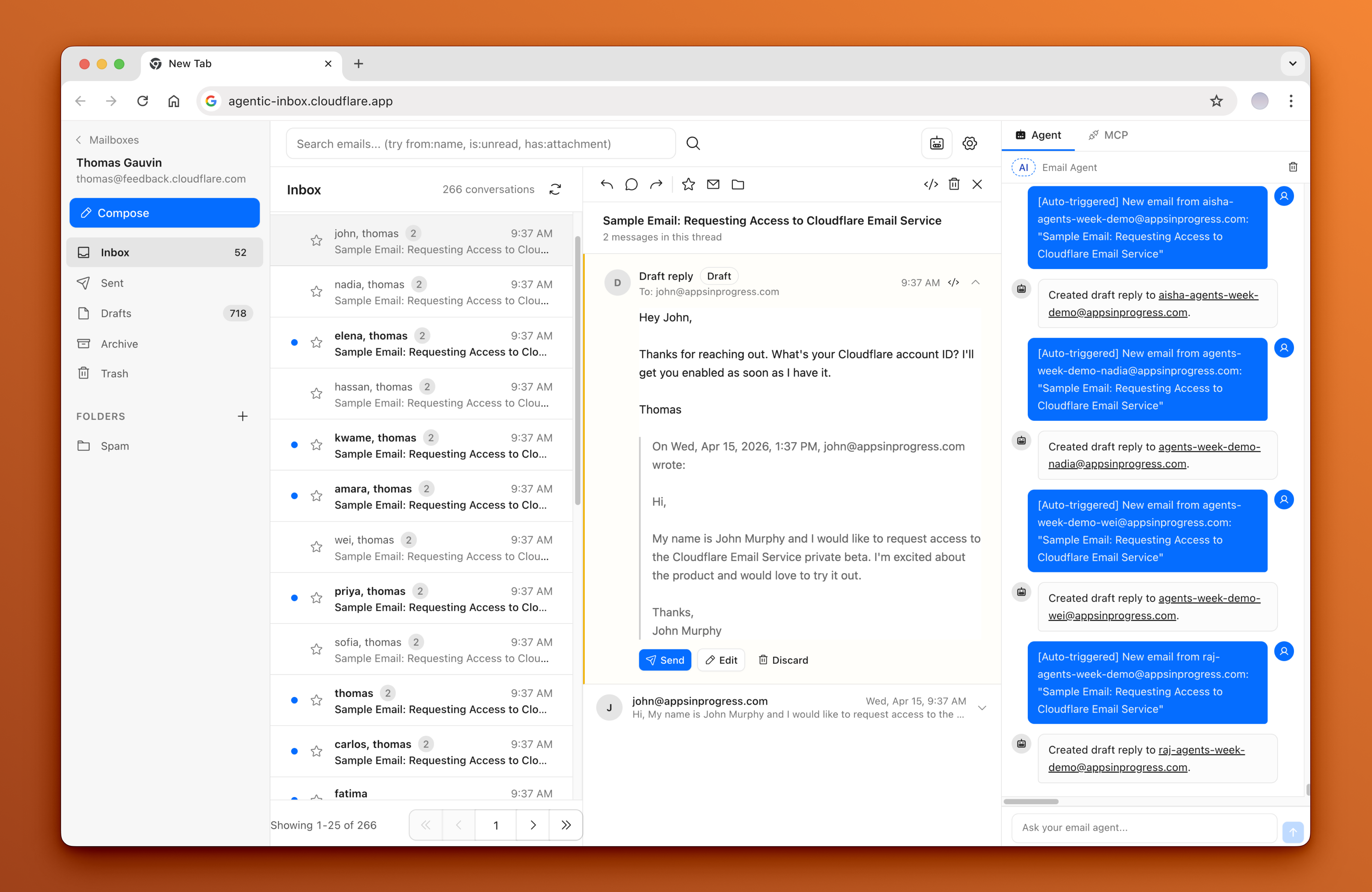
Agentic Inbox lets you send, receive, and manage emails through a modern web interface -- all powered by your own Cloudflare account. Incoming emails arrive via Cloudflare Email Routing, each mailbox is isolated in its own Durable Object with a SQLite database, and attachments are stored in R2.
An AI-powered Email Agent can read your inbox, search conversations, and draft replies -- built with the Cloudflare Agents SDK and Workers AI.
Read the blog post to learn more about Cloudflare Email Service and how to use it with the Agents SDK, MCP, and from the Wrangler CLI: Email for Agents.
Important: Clicking the 'Deploy to Cloudflare' button is only one part of the setup. You must follow the After deploying steps as well. For a full step-by-step guide with screenshots, refer to this comment: https://github.com/cloudflare/agentic-inbox/issues/4#issuecomment-4269118513
To set up
Deploy to Cloudflare. The deploy flow will automatically provision R2, Durable Objects, and Workers AI. You'll be prompted for DOMAINS, which is the domain (yourdomain.com) you want to receive emails for (email@yourdomain.com).
Configure Cloudflare Access -- Enable one-click Cloudflare Access on your Worker under Settings > Domains & Routes. The modal will show your
POLICY_AUDandTEAM_DOMAINvalues.TEAM_DOMAINcan be either your Access team URL or the full.../cdn-cgi/access/certsURL. You must set these as secrets for your Worker.Set up Email Routing -- In the Cloudflare dashboard, go to your domain > Email Routing and create a catch-all rule that forwards to this Worker
Enable Email Service -- The worker needs the
send_emailbinding to send outbound emails. See Email Service docsCreate a mailbox -- Visit your deployed app and create a mailbox for any address on your domain (e.g.
hello@example.com)
Troubleshooting Access
- If you see
Invalid or expired Access token, that usually meansPOLICY_AUDorTEAM_DOMAINsecrets are incorrect.- Resolution: turn Access off and back on for the Worker to get the Access modal again, then reset your Worker secrets to the latest
POLICY_AUDandTEAM_DOMAINvalues shown there.
- Resolution: turn Access off and back on for the Worker to get the Access modal again, then reset your Worker secrets to the latest
- If you see
Cloudflare Access must be configured in production, this application is intentionally enforcing Cloudflare Access so your inbox is not exposed to anyone on the internet.- Resolution: enable Access using one-click Cloudflare Access for Workers, then set the
POLICY_AUDandTEAM_DOMAINWorker secrets from the modal values.
- Resolution: enable Access using one-click Cloudflare Access for Workers, then set the
Features
- Full email client — Send and receive emails via Cloudflare Email Routing with a rich text composer, reply/forward threading, folder organization, search, and attachments
- Per-mailbox isolation — Each mailbox runs in its own Durable Object with SQLite storage and R2 for attachments
- Built-in AI agent — Side panel with 9 email tools for reading, searching, drafting, and sending
- Auto-draft on new email — Agent automatically reads inbound emails and generates draft replies, always requiring explicit confirmation before sending
- Configurable and persistent — Custom system prompts per mailbox, persistent chat history, streaming markdown responses, and tool call visibility
Stack
- Frontend: React 19, React Router v7, Tailwind CSS, Zustand, TipTap,
@cloudflare/kumo - Backend: Hono, Cloudflare Workers, Durable Objects (SQLite), R2, Email Routing
- AI Agent: Cloudflare Agents SDK (
AIChatAgent), AI SDK v6, Workers AI (@cf/moonshotai/kimi-k2.5),react-markdown+remark-gfm - Auth: Cloudflare Access JWT validation (required outside local development)
Getting Started
npm install
npm run dev
Configuration
- Set your domain in
wrangler.jsonc - Create an R2 bucket named
agentic-inbox:wrangler r2 bucket create agentic-inbox
Deploy
npm run deploy
Prerequisites
- Cloudflare account with a domain
- Email Routing enabled for receiving
- Email Service enabled for sending
- Workers AI enabled (for the agent)
- Cloudflare Access configured for deployed/shared environments (required in production)
Any user who passes the shared Cloudflare Access policy can access all mailboxes in this app by design. This includes the MCP server at /mcp -- external AI tools (Claude Code, Cursor, etc.) connected via MCP can operate on any mailbox by passing a mailboxId parameter. There is no per-mailbox authorization; the Cloudflare Access policy is the single trust boundary.
Architecture
┌──────────────┐     ┌──────────────────┐     ┌─────────────────┐
│   Browser    │────>│  Hono Worker     │────>│  MailboxDO      │
│  React SPA   │     │  (API + SSR)     │     │  (SQLite + R2)  │
│  Agent Panel │     │                  │     └─────────────────┘
└──────┬───────┘     │  /agents/* ──────┼────>┌─────────────────┐
       │             │                  │     │  EmailAgent DO  │
       │ WebSocket   │                  │     │  (AIChatAgent)  │
       └─────────────┤                  │     │  9 email tools  │
                     │                  │────>│  Workers AI     │
                     └──────────────────┘     └─────────────────┘
License
Apache 2.0 -- see LICENSE.
