agent-device


Mobile app automation and verification for AI coding agents. Give coding agents a live app feedback loop through a CLI, built-in MCP server, or typed Node.js API.
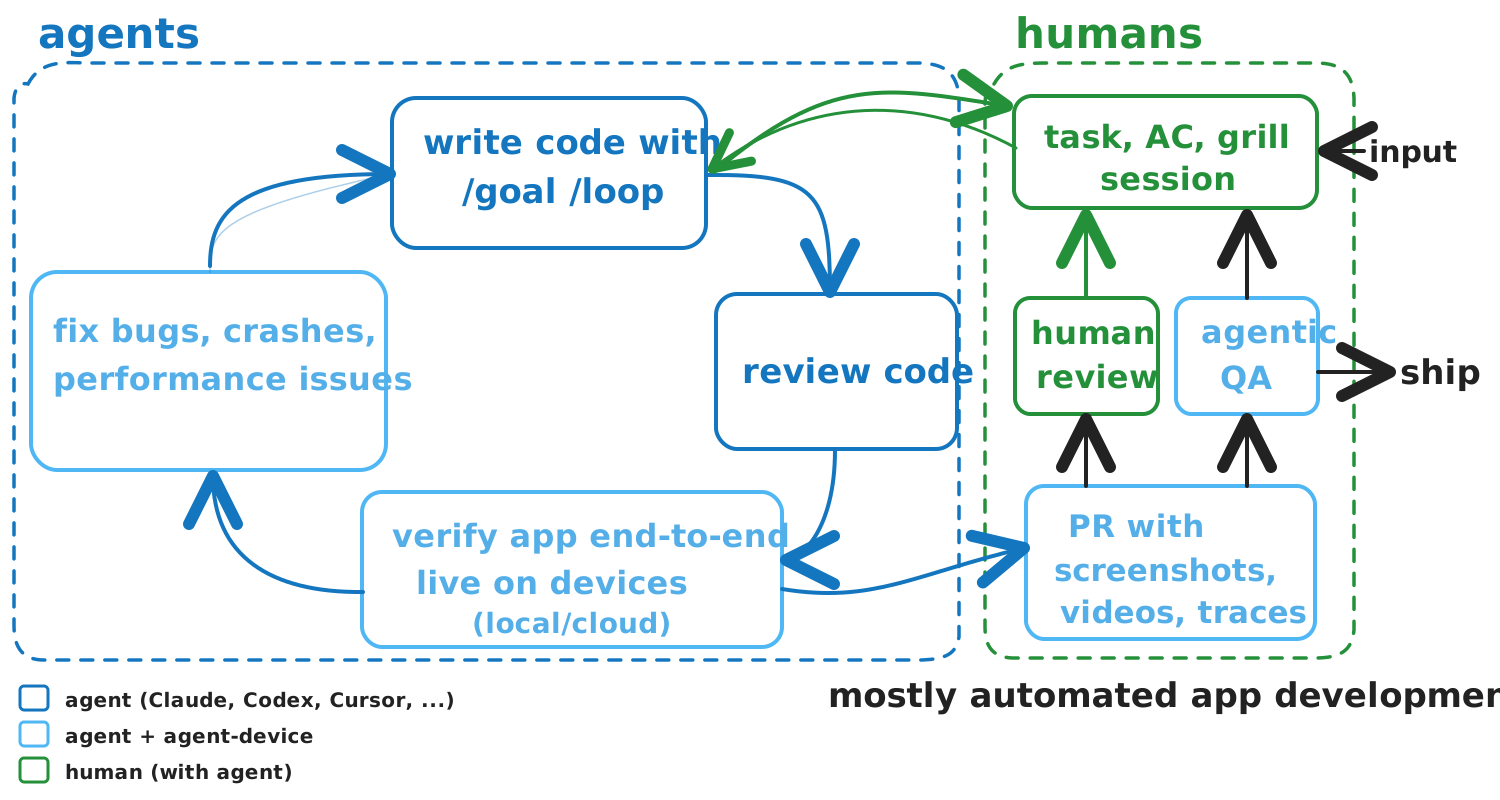
Let your coding agent verify its changes in the running app. agent-device lets agents inspect, control, debug, and verify apps on iOS, Android, and HarmonyOS (simulators, emulators, and physical devices), plus tvOS, Android TV, Amazon Vega OS TV (Vega Virtual Device), web, macOS, and Linux. Agents read token-efficient accessibility snapshots instead of reasoning over screenshots alone, act through refs and selectors, and save evidence for review. It also coordinates device access across parallel agent worktrees and connects to remote device clouds.
Works with Claude Code, Codex, Cursor, Windsurf, Cline, Goose, and any agent that can run a CLI or connect over MCP, or as the runtime under agents you build with the AI SDK or Eve. Developers at Expensify, Shopify, and others use it to verify their apps.
agent-device powers mobile automation in

 T3 Code.
Quick start
Install the CLI and check setup. It requires Node.js 22.12 or newer; web automation requires Node.js 24 or newer. See Installation for target requirements.
npm install -g agent-device@latest
agent-device doctor
agent-device help workflow
Run doctor yourself before you hand the CLI to an agent. help workflow links to the guides for debugging, replay, and profiling.
Drive an app from the CLI
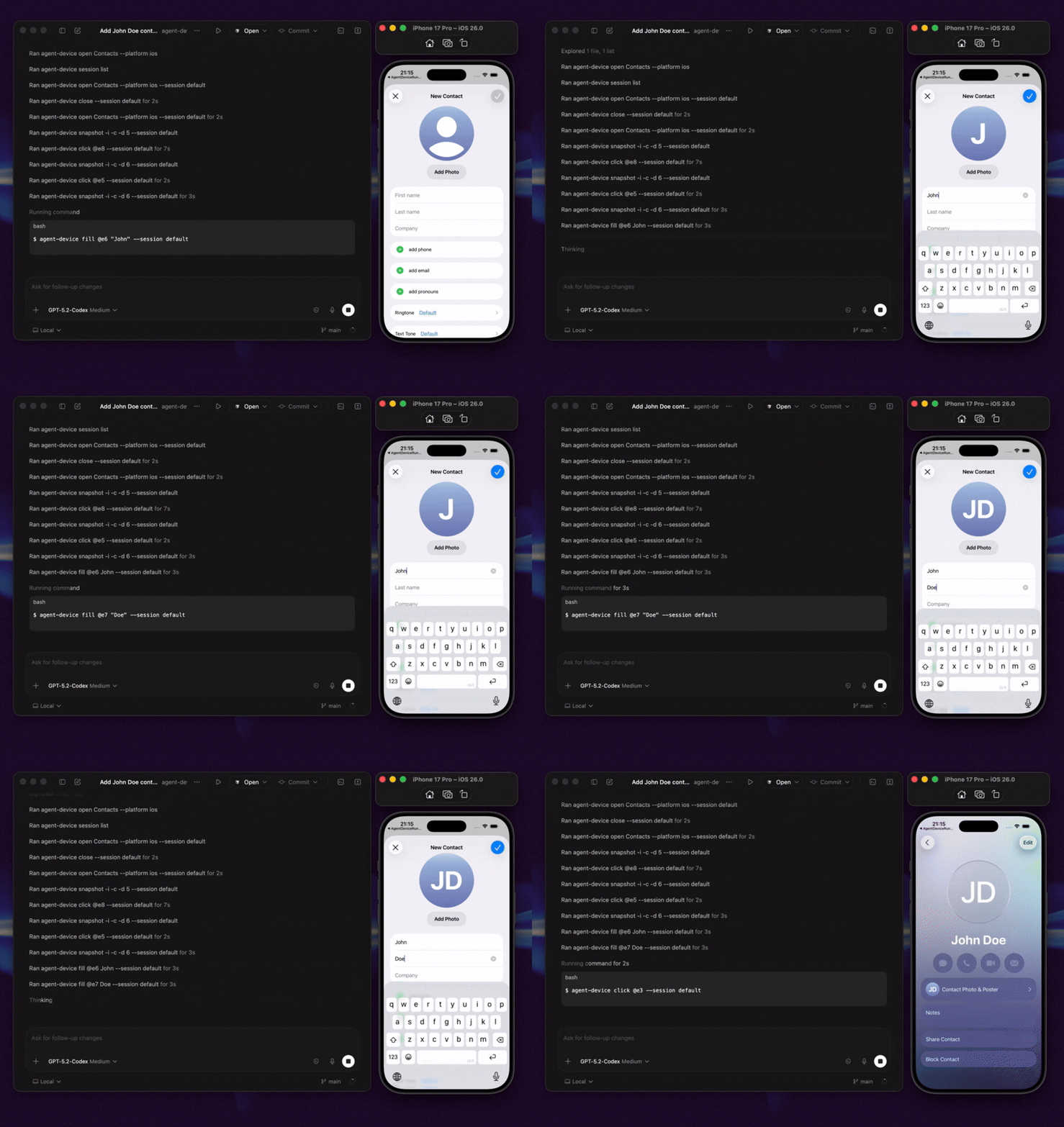
Add a contact in the built-in iOS Contacts app:
# Start a session.
agent-device open Contacts --platform ios

# Inspect the screen. The example below shows the output; refs vary.
agent-device snapshot -i
# @e2 [button] "Add"

# Use the ref and wait for the UI to settle.
agent-device press @e2 --settle
# The diff includes:
# + @e7 [text-field] "First name"

agent-device fill @e7 "Ada" --settle
# The next diff shows changed values and current refs:
# - @e7 [text-field] "First name"
# + @e14 [text-field] "Ada"
# = @e15 [text-field] "Last name"

# Capture evidence and close the session.
agent-device screenshot ./contact-form.png
agent-device close
Refs are valid only in the latest output: after a --settle command, use the refs in its diff, and take a new snapshot only if the diff omits what you need. Snapshots come from the app's accessibility tree, so clear labels, roles, and test IDs make agent runs more reliable; use screenshots and video as evidence or when accessibility data is poor.
Add MCP tools to your agent
agent-device mcp starts the official stdio MCP server, exposing the installed commands as structured tools over the same execution path as the CLI:
{
  "mcpServers": {
    "agent-device": {
      "command": "agent-device",
      "args": ["mcp"]
    }
  }
}
See AI Agent Setup for per-client setup and when to prefer plain CLI over MCP.
Script it from Node.js
createAgentDeviceClient() gives Node.js code typed access to the same commands, as model tools in your own agent or from orchestration code:
import { createAgentDeviceClient } from 'agent-device';

const client = createAgentDeviceClient({ session: 'qa-run' });
try {
  await client.apps.open({ app: 'com.apple.Preferences', platform: 'ios' });
  const snapshot = await client.capture.snapshot({ interactiveOnly: true });
  const button = snapshot.nodes.find((node) => node.role === 'button');
  if (button) await client.interactions.press({ ref: button.ref });
} finally {
  await client.sessions.close();
}
See the Node.js API, the runnable examples, and the AI SDK and Eve integration guides.
What agents can do
- Inspect app state through accessibility snapshots, refs, selectors, and React Native component trees.
- Act on visible UI by tapping or pressing elements, filling fields, scrolling, making gestures, waiting, asserting state, and handling alerts.
- Diagnose failures with screenshots, video, logs, traces, network data, performance samples, crash details, and React profiles.
- Repeat workflows by saving working steps as
.adscripts for local use or CI. Export strict Maestro YAML when needed.
See Commands for the commands and evidence each target supports.
What to ask your agent
With the CLI installed, prompts like these work end to end:
- "Implement the onboarding screen, run it on the iOS simulator and Android emulator, and attach screenshots."
- "Reproduce this crash and capture the logs that lead up to it."
- "Check whether this change causes unnecessary React Native re-renders."
- "Explore the checkout flow once, save it as a replay script, and run it in CI."
- "Verify this pull request on a physical device and attach reviewable evidence."
Next steps
- AI Agent Setup: skills, project rules, and per-client setup for Cursor, Codex, Claude Code, Windsurf, and others.
- Quick Start: open an app, read its UI, and interact with it from the command line.
- Replay & E2E and Debugging & Profiling: repeatable tests and bug hunting.
Where to run agent-device
The same session and evidence model works at every step: the agent explores the app, captures evidence, saves a replay, runs it in CI, and moves onto remote devices.
| Path | Best for | Start with |
|---|---|---|
| Local | Trying commands and debugging apps on simulators, emulators, physical devices, macOS, and Linux. | Follow the Quick Start. |
| CI/CD | Automated pull request and merge validation with replay scripts and captured artifacts. | Try the EAS workflow template. |
| Cloud / remote | Linux runners, managed devices, and remote jobs. | Set up a remote proxy, connect a device cloud (BrowserStack, AWS Device Farm, TestMu AI, Limrun), or contact Callstack for team QA. |
How it works
agent-device keeps device state in sessions. It uses a local accessibility bridge for iOS Simulator snapshots and XCTest for iOS interactions, physical iOS, and tvOS; ADB and the snapshot helper on Android; HDC and ArkUI uitest on HarmonyOS; Vega CLI/VDA on the Vega Virtual Device; a local helper on macOS; and AT-SPI on Linux.
Support depth varies by target. Some backends, such as HarmonyOS and Vega OS, cover a subset of commands; run agent-device capabilities --platform <platform> to see what a target supports.
Sessions are scoped to the caller's git worktree, and host-local device claims stop parallel agents from taking over each other's simulators and emulators. Run agent-device device status to inspect ownership without a daemon, and agent-device device release --stale to release claims whose owner is provably no longer running. The same commands drive hosted devices on BrowserStack, AWS Device Farm, TestMu AI, and Limrun.
agent-device uses the inspect-act-verify process from Vercel's agent-browser for mobile, TV, and desktop apps. Basic --platform web support runs agent-browser in the same session and replay system.
FAQ
What is agent-device?
agent-device is a command-line tool and MCP server that lets AI coding agents inspect, control, and verify mobile apps and save evidence for review. It supports iOS, Android, HarmonyOS, TV, web, macOS, and Linux.
Is there an MCP server for mobile app automation?
Yes. agent-device mcp starts the official stdio MCP server. The Quick start above has the client config, and AI Agent Setup covers per-client details.
Does it work with React Native, Expo, Flutter, and native apps?
Yes. agent-device supports native iOS and Android apps, plus React Native, Expo, and Flutter apps on supported targets. The commands and evidence vary by target.
How is it different from mobile MCP servers?
The MCP server is one entry point to the same runtime used by the CLI and typed Node.js API. Sessions, device ownership, selectors, evidence, replay, CI workflows, and cloud routing stay consistent across all three.
Can I build my own agent or QA product on agent-device?
Yes. The typed Node.js client is a public surface over that same runtime, so an agent you build inherits everything above. Start from the Node.js API, AI SDK, or Eve guides.
How is it different from Appium, Detox, or Maestro?
With agent-device, an agent reads app state and chooses each command at run time. Teams use Appium, Detox, and Maestro to write and maintain test suites. agent-device can complement them by saving its runs as .ad scripts or exporting them as strict Maestro YAML.
Can agent-device run in CI?
Yes. Record a run as an .ad script, replay it in CI, and keep the screenshots and logs as artifacts; the EAS workflow template is a working example.
Articles and videos
Articles
- Build an AI QA agent for Expo apps with EAS Workflows
- Agent Device: iOS & Android automation for AI agents
- Building mobile QA agents with Vercel Eve
- How we optimized Agent Device for mobile app automation
Videos
- Verifying mobile apps with agent-device
- Using agent-device in an AI coding workflow
- Cloud agents that test mobile apps on real devices
Who uses agent-device?
Teams and developers at Callstack, JPMorgan Chase, Expensify, Shopify, Kindred, Total Wine & More, LegendList, HerLyfe, App & Flow, and others use agent-device.
Documentation
Contributing
See CONTRIBUTING.md.
Made at Callstack
agent-device is open source under the MIT license. Visit agent-device.dev or contact Callstack.
