hermes-web-ui
Ekko Studio 中文
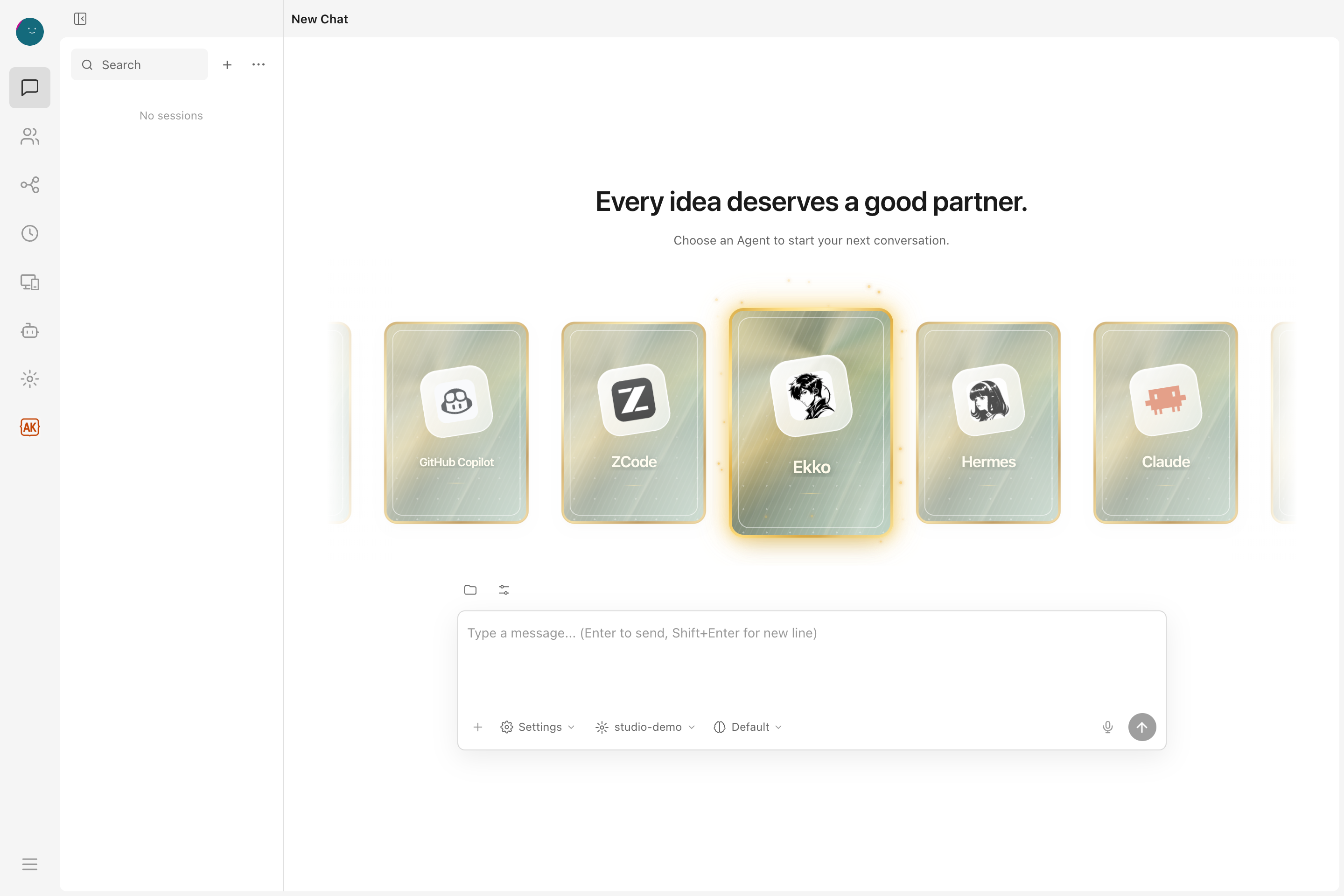
A local-first AI workspace for multi-agent chat, coding, and visual workflows.
Available as a desktop app and self-hosted web console, with support for
Hermes Agent, Ekko Agent, and 14 coding-agent integrations, including Claude Code and Codex.
Bring conversations, group collaboration, voice, files, and devices together in one place.
Download Ekko Studio Desktop
·
Documentation
·
npm install -g ekko-studio && ekko-studio-web start



Ekko Studio was previously named Hermes Studio / Hermes Web UI. The GitHub
repository is EKKOLearnAI/ekko-studio. The primary npm package is
ekko-studio, with the ekko-studio-web command. The legacy hermes-web-ui
package and command remain supported and receive the same releases.
Captured from the v0.7.33 client on 2026-10-10. Chat, workflows, and Skills use demo data; Agent versions reflect a local installation. See capture notes.
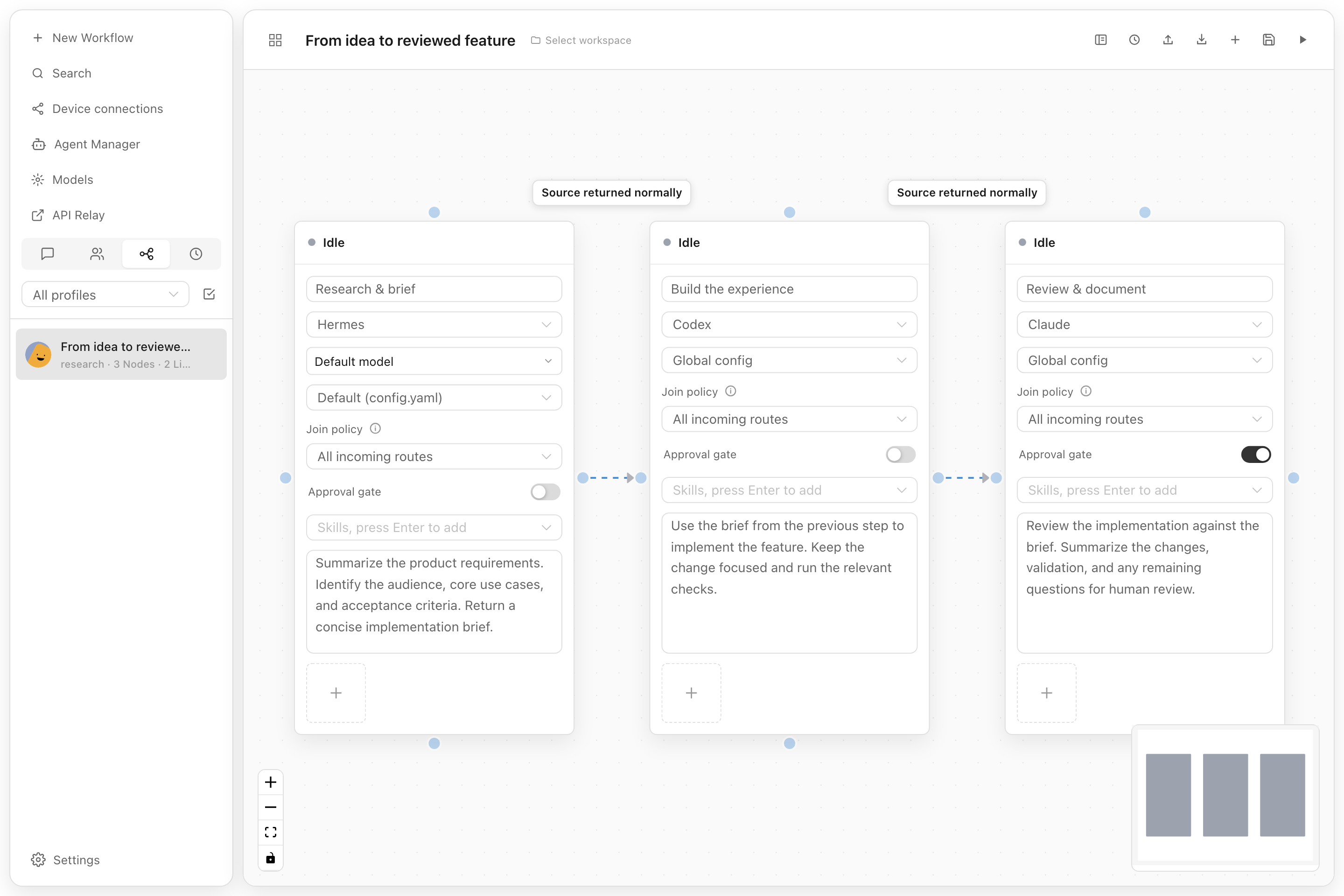
| Visual workflows | Agent Manager |
|---|---|
 |
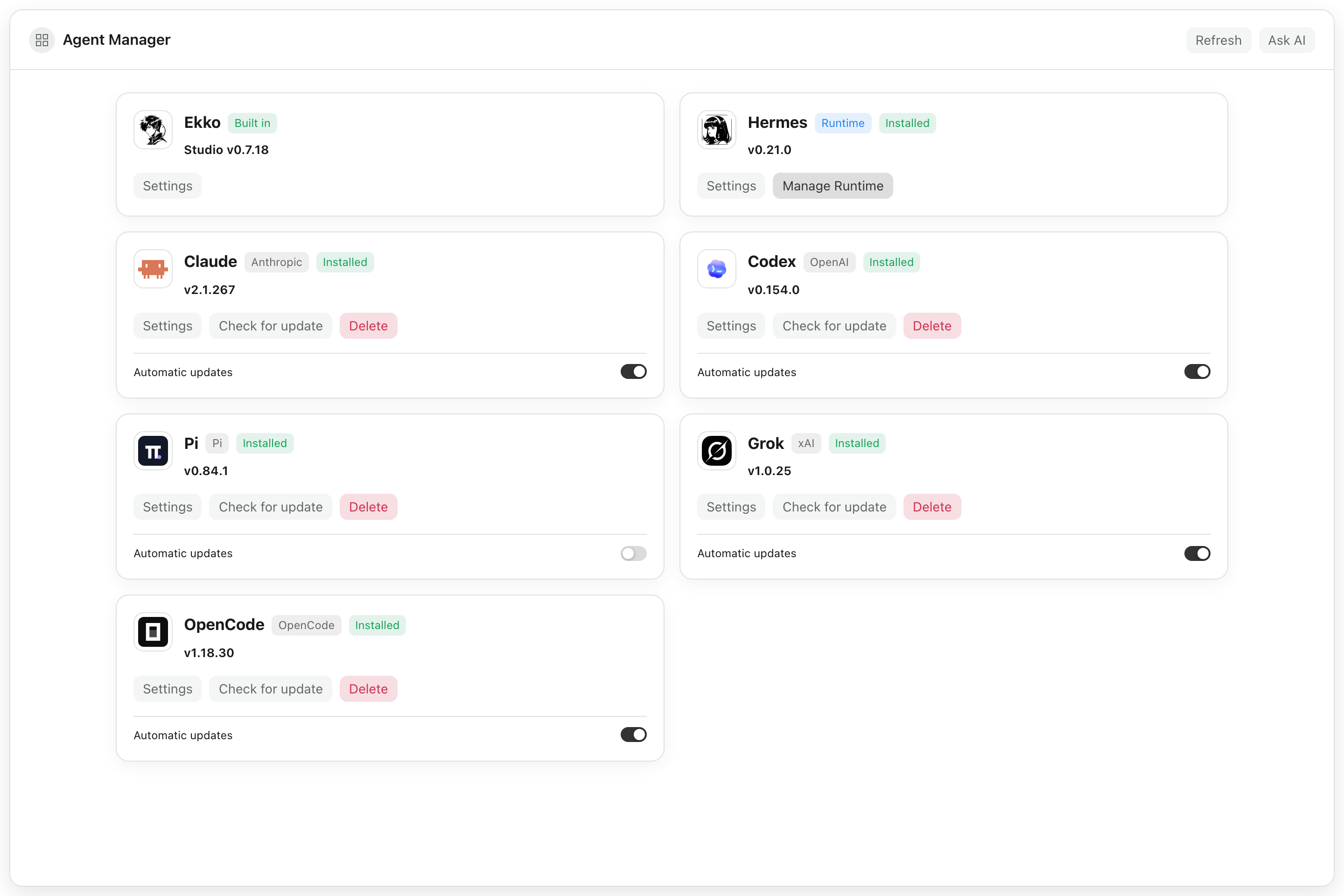 |
| Connect agent steps and add a human approval gate. | Manage agent installations, settings, and updates in one place. |
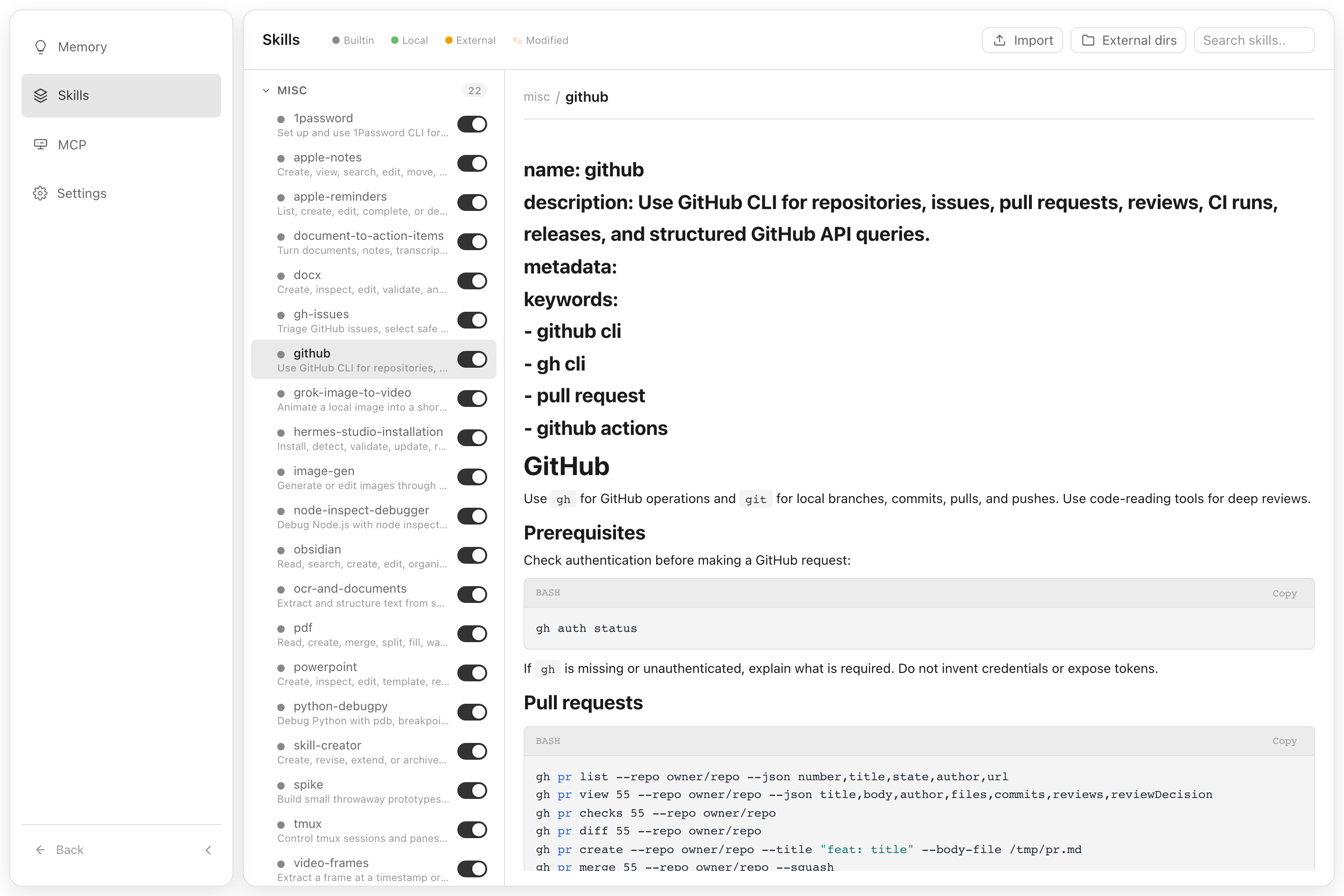
Explore chat progress and Skills
Follow a task in the conversation, including its plan and per-turn usage.
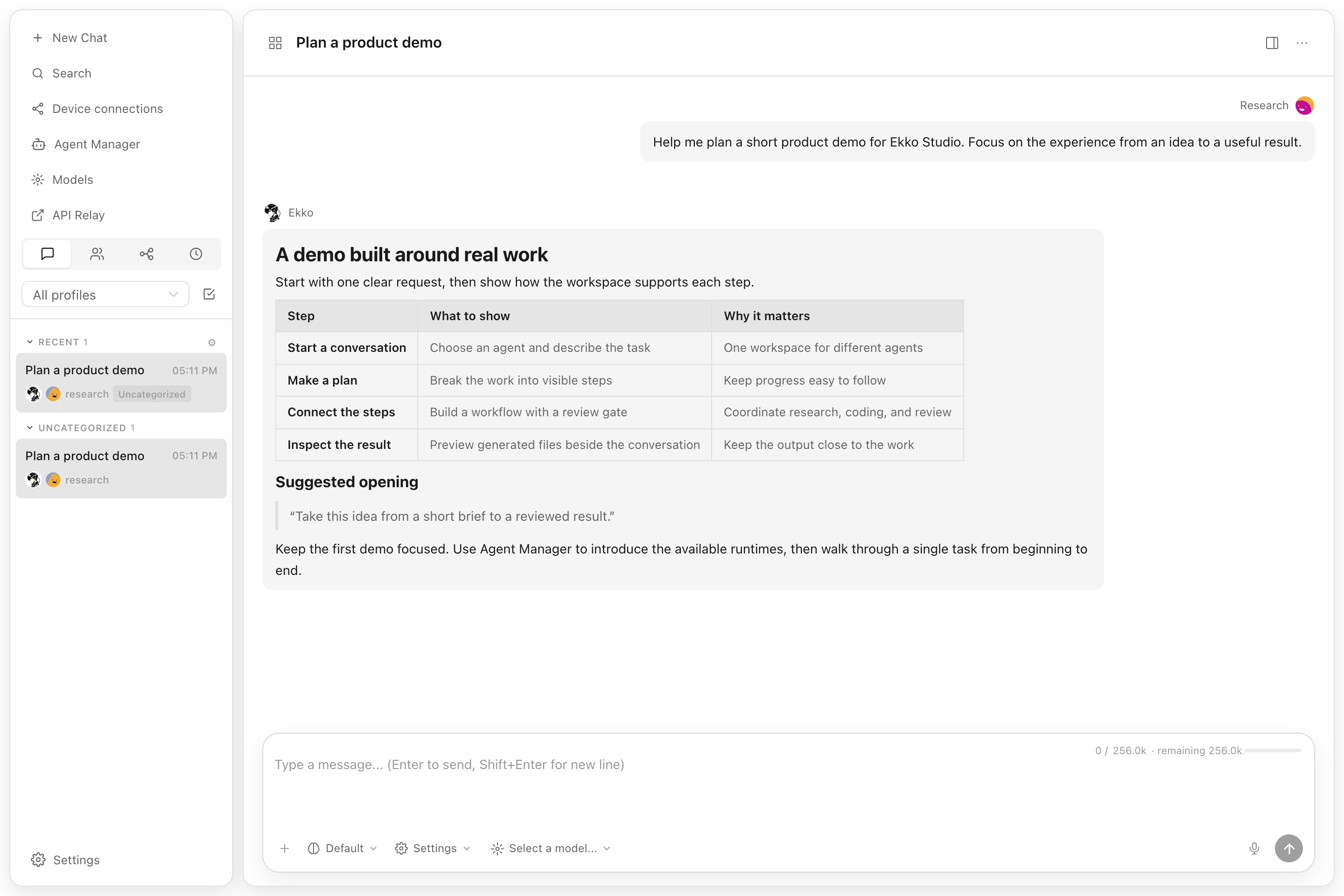
Browse installed skills, read their instructions, and enable them as needed.
Core Capabilities
| Area | What Ekko Studio does |
|---|---|
| Multi-agent runtime | Connects the agents listed below with streaming responses, tool traces, generated-file previews, persistent sessions, and standalone desktop chat windows. |
| Studio workspace | Provides shared chats, group chat, global-agent runs, workflows, files, voice, media, devices, themes, logs, usage, and App connectivity across agent runtimes. |
| Agent control planes | Keeps Hermes profiles, providers, models, memory, skills, plugins, jobs, Kanban, channels, and runtime management in their owning agent module. |
| Automation | Builds executable visual workflows and connects the supported runtimes through schedules, approval gates, group-chat rooms, platform channels, and MCP servers. |
| Workspace tools | Provides a file browser, web terminal, Desktop Agent Browser, screenshot capture, voice input/output, coding-agent runners, device discovery, Journey graph, and performance views. |
| Distribution | Ships as a desktop app for Windows/macOS/Linux, an npm CLI package, and a Docker image. |
Supported Agents
Single chat, group chat, and workflows share the same Agent catalog. Coding agents run on the machine hosting the Studio backend; their CLI must be installed there.
| Agents | Configuration and installation |
|---|---|
| Ekko Agent, Hermes Agent | Ekko is built in. Desktop and Docker bundle a Hermes runtime; npm installations discover an existing Hermes installation. |
| Claude Code, Codex, Pi, Grok, OpenCode, DeepSeek Harness (DSH) | Studio-scoped or native global configuration; installation and supported updates through Agent Manager. |
| Qwen Code, Kimi Code, CodeBuddy, GitHub Copilot CLI, ZCode | Studio-scoped or native global configuration. ZCode requires manual installation; the others support npm installation through Agent Manager. |
| Cursor, Qoder, Antigravity | Cursor and Qoder use native global configuration. Antigravity supports scoped and global launches. Cursor and Antigravity require manual installation. |
Scoped mode uses isolated session configuration; supported runtimes can use the selected Studio provider/model. Global mode uses the CLI's existing configuration and sign-in. Available models, tools, and context controls depend on the runtime. See native coding agents, Antigravity CLI, and DSH setup for details.
Features
AI Chat
- Start a conversation from responsive Agent cards; Ekko is the initial default, and Studio remembers the last agent, model, workspace, launch mode, and reasoning options
- Real-time chat streaming over Socket.IO
/chat-run; Studio dispatches each run to the selected runtime adapter - Multi-session management — create, rename, delete, switch between sessions
- Self-built session database — local SQLite storage for Studio sessions; Hermes state.db remains a read-only source for Hermes history APIs
- Session grouping by source (Telegram, Discord, Slack, etc.) with collapsible accordion
- Active session indicator — live sessions pin to top with spinner icon
- Sessions sorted by latest message time
- Markdown rendering with syntax highlighting and code copy
- Tool call detail expansion (arguments / result)
- Profile-scoped file uploads, clipboard image/file paste, and workspace attachments
- File download support — download uploaded files and agent-generated files by resolved path across local, Docker, SSH, and Singularity backends
- Inline previews for generated HTML, PDF, DOCX, PPTX, XLSX, CSV, images, Markdown, and source files
- Session search — Ctrl+K search across the Studio local session database; read-only Hermes history sessions are not included
- Session categories, message references, compression progress, and durable background delegation results
- Persistent task cards with live step progress, approval prompts, and clarification questions
- Profile-aware model selector with runtime-specific provider/model availability
- Per-turn token usage, cache hits, estimated cost, and generation speed; supported runtimes also expose context usage and compression controls
Platform Channels
Unified configuration for 10 platforms in one page:
| Platform | Features |
|---|---|
| Telegram | Bot token, mention control, reactions, free-response chats |
| Discord | Bot token, mention, auto-thread, reactions, channel allow/ignore lists |
| Slack | Bot token, mention control, bot message handling |
| Enable/disable, mention control, mention patterns | |
| Matrix | Access token, homeserver, auto-thread, DM mention threads |
| Feishu (Lark) | App ID / Secret, mention control |
| DingTalk | Client ID / Secret, mention control |
| QQBot | App ID / Secret, mention control |
| QR code login (scan in browser, auto-save credentials) | |
| WeCom | Bot ID / Secret |
- Credentials and channel behavior settings write to
.envandconfig.yamlunder the selected Hermes profile - Per-platform configured/unconfigured status detection
- Gateway autostart is opt-in under Hermes settings; ordinary Studio chat does not require a platform Gateway
Usage Analytics
- Total token usage breakdown (input / output)
- Session count with daily average
- Estimated cost tracking & cache hit rate
- Model usage distribution chart
- 30-day daily trend (bar chart + data table)
Scheduled Jobs
- Create, edit, pause, resume, delete cron jobs
- Trigger immediate execution
- Cron expression quick presets
Kanban
- Profile-aware Kanban board for planning and tracking agent work
- Task creation, updates, and status movement from the dashboard
- Uses the Hermes Kanban CLI and its task storage, with Studio authentication and profile access controls
Visual Workflows
- Vue Flow canvas for the supported Agent catalog, with file/image attachments and runtime-specific launch settings
- Directed edges, structured conditions, success/failure routes, loops, and approval gates
- Import/export for portable workflow definitions and profile-aware workspaces
- Run budgets, deadlines, stop/rerun controls, and persisted execution history
- Frozen run snapshots, node conversations, edge decisions, and evidence playback on the canvas
Model Management
- Auto-discover models from credential pool (
~/.hermes/auth.json) - Fetch available models from each provider endpoint (
/v1/models) - Add, update, and delete providers (preset and custom OpenAI-compatible)
- OAuth/device flows for OpenAI Codex, Nous Portal, xAI, Claude, and GitHub Copilot
- Provider URL auto-detection for non-v1 API versions (e.g.
/v4) - Provider-level model grouping, visible-model controls, aliases, refresh, and default switching
- Separate STT and TTS provider catalogs under Models
Multi-Profile
- Create, rename, delete, and switch between Hermes profiles
- Clone existing profile or import from archive (
.tar.gz) - Export profile for backup or sharing
- Profile-scoped configuration, cache, uploads, sessions, jobs, usage, memory, skills, plugins, providers, and model visibility
- Account-bound profile access: super administrators can manage every profile; regular administrators only see and use profiles assigned to their account
File Browser
- Browse files on remote backends (local, Docker, SSH, Singularity)
- Upload, download, rename, copy, move, and delete files
- Store uploaded files under the selected/requested Hermes profile while keeping downloads path-based for agent-generated artifacts outside the upload directory
- Create directories
- Preview and edit supported files with syntax highlighting, then attach workspace files back to a chat
Group Chat
- Multi-agent chat rooms with real-time messaging via Socket.IO
- @mention routing — mention an agent to trigger a contextual reply
- Context compression — automatic conversation summarization when history exceeds token threshold
- Typing status and reply progress indicators
- Room creation, deletion, and invite code management
- Agent management — add/remove agents from rooms with per-agent profiles
- SQLite message persistence
- Mobile responsive with collapsible sidebar
Coding Agents
- Detect, configure, launch, and monitor the 14 coding-agent integrations listed above; install and update supported CLIs from Agent Manager
- Built-in coding-agent terminal, session history, workspace selection, images, and file diffs
- Dedicated proxy routes and API modes for provider/model compatibility
- Standalone desktop chat windows and persisted output/reasoning metadata
- Shared
~/.agents/skillsentries are read-only in Coding Agent pages; runtime-specific settings, private skills, and MCP controls vary by agent
DeepSeek Harness (DSH)
- Use DSH in single chats, group-chat rooms, and workflow nodes, with Studio-selected providers/models or native global configuration.
- Select an Agent preset when creating a chat, adding a group member, or configuring a workflow node; resumed conversations retain their selected preset.
- Reuse the native
webprofile’s plugins. Plugin configuration embeds the plugins’ own settings UI with light/dark theme support; Plugin list manages installed packages. Agent presets have a separate Studio management page. - Manage DSH settings, instructions, MCP, and private skills. Shared
~/.agents/skillsentries are display-only in every Coding Agent page; editing and deletion are blocked.
Install DSH on the machine running the Studio backend through Agent Manager. Native plugin installation requires pnpm on that machine’s PATH. See DSH setup, profiles, and compatibility for details.
Desktop Agent Browser
- Desktop-only multi-tab browser that agents can navigate through the managed MCP server
- Isolated browser profiles, per-tab control leases, proxy settings, downloads, cookies, and permissions
- Accessibility snapshots, screenshots, console logs, and page annotations for agent-assisted browsing
- Bounded page queries and sequential action batches, with observations of changed text, selected values, and newly opened tabs
Mobile App & Session Sharing
- Connect the App over LAN, authenticated direct transport, or cloud relay, with relay fallback when a direct connection is unavailable
- Follow single-chat, group-chat, and workflow progress through task cards and notifications; supported iOS builds also show Live Activities
- Share a single conversation with an App account, configure its input/file/voice/terminal permissions, and revoke access
- Use persistent terminal sessions from the App
See App connectivity and session sharing for setup and permission boundaries.
JEV Evaluation
- Profile-scoped evaluation settings for memory recall, skill matching, and learning
- Optional browser-action, group-chat, and workflow assessments with independent controls
See JEV configuration and integration status.
Skills & Memory
- Browse and search installed skills
- View skill details and attached files
- Install and manage Skill Bundles with profile-aware usage statistics
- User notes, persistent Ekko Agent memory, and profile-scoped memory management
- Interactive Journey graph for skill/memory relationships, category filtering, detail inspection, and playback
Theme Customization
- Light/dark mode, interface style, base font size, text color, and active color
- Per-account background images and live preview across the workspace
Logs
- View agent / server / error logs
- Filter by log level, log file, and keyword
- Structured log parsing with HTTP access log highlighting
Admin & Runtime Management
- Device and LAN peer views for local-network discovery and peer tooling
- MCP manager for the managed
ekko-studio-*servers, profile injection, andapi/browser/devices/use/plantoolsets; task plans and clarification use the dedicatedekko-studio-interactionserver - Runtime version and version-preview tooling for testing newer builds in isolation
- Performance monitor views for super administrators
Authentication
- Token-based auth (auto-generated on first run or set via
AUTH_TOKENenv var) - Username/password login with account management in Settings
- Default bootstrap credentials are
admin/123456; users are prompted after login to change the default username and password - Super administrators can manage users and profile bindings; regular administrators can manage their own account details
CLI maintenance commands:
# Delete persisted login IP lock records
ekko-studio-web clear-login-locks

# Delete login locks and restart the running Studio server
ekko-studio-web clear-login-locks --restart

# Create or reset the default super administrator login to admin / 123456
ekko-studio-web reset-default-login
clear-login-locks removes ${HERMES_WEB_UI_HOME:-~/.hermes-web-ui}/.login-lock.json. If the server is running, restart it to clear in-memory lock state. reset-default-login updates the Studio account database; if an admin user already exists, its password is reset to 123456 and the account is enabled as a super administrator.
Settings
- Display (streaming, compact mode, reasoning, cost display)
- Agent (max turns, timeout, tool enforcement)
- Memory (enable/disable, char limits)
- Session reset (idle timeout, scheduled reset)
- Privacy (PII redaction)
- Model settings (default model & provider)
- Profile and provider configuration
Voice / TTS / STT
- Manage voice providers under Models → STT and Models → TTS; existing Settings → Voice links redirect there.
- TTS adapters: Edge, OpenAI-compatible, MiMo, Doubao, ElevenLabs, Gemini, xAI, Mistral, MiniMax, and DeepInfra.
- STT adapters: Browser, OpenAI-compatible, Doubao, Groq, Mistral, xAI, ElevenLabs, and DeepInfra.
- Use editable turn-based voice input from the chat mic, or open the full-screen real-time voice stage for a continuous voice-focused experience.
- Provider keys and MiMo voice-clone audio stay server-side; the browser receives only masked secret status.
- Starting a new voice turn stops current assistant playback first, but does not implicitly cancel an active agent run.
- For supported settings, security notes, and current non-goals, see
docs/voice-dialogue.md. - The real-time stage does not claim simultaneous full-duplex listen/speak; telephony and always-on wake-word listening remain out of scope.
Web Terminal
- Integrated terminal powered by node-pty and @xterm/xterm
- Multi-session support — create, switch between, and close terminal sessions
- Real-time keyboard input and PTY output streaming via WebSocket
- Window resize support
Desktop App & Updates
- Native Electron shell for Windows, macOS, and Linux
- Bundles the Studio runtime and starts the local server automatically
- Capture a screen region, annotate it, and attach it to single or group chat; configure an optional global screenshot shortcut
- Hide Studio during capture on supported Windows/macOS setups; Linux capture uses X11 or the system Screenshot Portal according to the desktop environment
- Uses Cloudflare download endpoints for desktop auto-update metadata and assets first
- Falls back to GitHub Releases
latestassets if the Cloudflare update feed is unavailable - Windows upgrades attempt to close an existing Ekko Studio process before replacing files
Quick Start
Desktop App (Recommended)
Download the latest Ekko Studio desktop installer from GitHub Releases.
Desktop builds are published for macOS, Windows, and Linux, with separate
architecture assets where applicable. The desktop app bundles the Studio
runtime and stores Hermes Agent data in ~/.hermes on Windows, macOS, and Linux.
The desktop wrapper stores its own Studio state separately in
~/.hermes-web-ui unless HERMES_WEB_UI_HOME is set.
After the packaged desktop app starts, it installs managed command shims so the desktop app, bundled Hermes Agent CLI, and bundled server CLI do not conflict:
| Command | Description |
|---|---|
ekko-studio |
Open the Ekko Studio desktop app |
ekko-studio cli ... |
Run the bundled Hermes Agent CLI |
ekko-studio web ... |
Run the bundled hermes-web-ui command |
ekko-studio -h |
Show wrapper help |
ekko-studio-mcp [api|browser|devices|use|plan] |
Run one managed Studio MCP toolset |
The desktop command is ekko-studio; the previous managed hermes-studio
command is removed when the new shim is installed. No compatibility alias is created.
Use ekko-studio cli -h for Hermes Agent CLI help and
ekko-studio web -h for server CLI help. ekko-studio-mcp defaults to the
api toolset; choose browser, devices, use, or plan to keep the exposed MCP
surface focused on the current task.
Desktop auto-updates read the latest feed from
https://download.ekkolearnai.com/latest first. If that endpoint is
unavailable, the updater falls back to
https://github.com/EKKOLearnAI/ekko-studio/releases/latest/download.
npm
npm install -g ekko-studio
ekko-studio-web start
The legacy package hermes-web-ui continues to receive the same releases.
Both packages expose ekko-studio-web and the existing commands. Install either
package; their global command aliases overlap. To switch, uninstall the old
package before installing the other. User data remains in ~/.hermes-web-ui.
Requires Node.js 23 or newer. Ekko Agent is included; to use Hermes Agent, install its runtime on the same machine or use the bundled Desktop/Docker distribution.
Docker Compose
Single-container deployment with integrated Hermes Agent:
# Use pre-built image (Recommended)
WEBUI_IMAGE=ekkoye8888/hermes-web-ui docker compose up -d

# Or build from source
docker compose up -d --build

docker compose logs -f hermes-webui
- Persistent Hermes data is stored in
./hermes_data - Studio auth token is stored in
./hermes_data/hermes-web-ui/.token - On first run with auth enabled, the token is printed to container logs
- All runtime settings are environment-variable driven in
docker-compose.yml
For detailed notes and troubleshooting, see docs/docker.md.
Hermes Agent Runtime Discovery
When Studio starts backend chat features, it prefers a source checkout that
contains run_agent.py such as ~/.hermes/hermes-agent. If no source checkout
is found, it falls back to the Python environment used by the installed
hermes command, then the system Python. This supports both source installs
and package installs such as pip install hermes-agent.
Studio Environment Variables
These variables configure Ekko Studio, its local Hermes runtime integration, and development/preview helpers. Provider API keys and Hermes Agent settings are normally managed through Hermes profiles; environment variables here are process-level overrides.
| Variable | Default | Description |
|---|---|---|
PORT |
8648 |
Studio server listen port. |
BIND_HOST |
0.0.0.0 |
Studio server bind host. Set :: explicitly for IPv6. |
HERMES_LAN_ADVERTISE_URL |
unset | Reachable Studio origin used in App LAN QR codes. Set this to the Docker host's LAN URL when Studio is opened through localhost, for example http://192.168.1.20:6060. |
HERMES_APP_ENTITLEMENT_REQUIRED |
true |
Require a valid cloud-signed App entitlement before accepting a LAN App relay connection. Set false only for temporary compatibility diagnostics. |
HERMES_APP_ENTITLEMENT_PUBLIC_KEY |
built in | Optional PEM public-key override for RS256 App entitlements. The expected issuer is hermes-studio-server and audience is ekko-studio. |
HERMES_WEB_UI_HOME |
~/.hermes-web-ui |
Studio data home for auth token, credentials, logs, DB, and default uploads. HERMES_WEBUI_STATE_DIR is also supported as a compatibility alias. |
HERMES_WEBUI_STATE_DIR |
unset | Compatibility alias for HERMES_WEB_UI_HOME. |
HERMES_WEB_UI_DISABLE_MCP_AUTOINJECT |
unset | Disable startup injection of the managed ekko-studio-* MCP servers into Hermes profile configs. |
HERMES_WEB_UI_ALLOW_TRANSIENT_MCP_AUTOINJECT |
unset | Allow managed MCP injection when HERMES_WEB_UI_HOME is under a temporary directory, such as Version Preview runtimes. |
UPLOAD_DIR |
$HERMES_WEB_UI_HOME/upload |
Upload root override. Files are stored below profile-scoped subdirectories. |
CORS_ORIGINS |
same host only | Comma- or space-separated cross-origin allowlist for HTTP, Socket.IO, and WebSocket requests. Set * only when you intentionally need legacy wildcard CORS. |
AUTH_TOKEN |
auto-generated | Explicit bearer token. If unset, Studio creates one under HERMES_WEB_UI_HOME. |
AUTH_JWT_SECRET |
AUTH_TOKEN |
JWT signing secret override for username/password sessions. |
HERMES_WEB_UI_AUTH_JWT_EXPIRES_IN |
30d |
Username/password session JWT lifetime. Accepts seconds or s/m/h/d suffixes, for example 12h or 7d. |
PROFILE |
default |
Startup/default Hermes profile. Runtime requests use the profile selected by the frontend and authorized for the current account. |
LOG_LEVEL |
info |
Server log level. |
BRIDGE_LOG_LEVEL |
$LOG_LEVEL or info |
Bridge log level. |
MAX_DOWNLOAD_SIZE |
200MB |
Maximum file download size. |
MAX_EDIT_SIZE |
10MB |
Maximum editable file size. |
WORKSPACE_BASE |
current user's home directory | Base directory for workspace browsing. |
HERMES_HOME |
~/.hermes |
Hermes data home on Windows, macOS, and Linux. |
HERMES_BIN |
hermes |
Custom Hermes CLI binary path. |
HERMES_AGENT_ROOT |
auto-discovered | Hermes Agent source checkout containing run_agent.py. |
HERMES_AGENT_BRIDGE_PYTHON |
auto-discovered | Python interpreter used to launch the agent bridge. |
HERMES_AGENT_BRIDGE_UV |
auto-discovered | uv executable used to launch the agent bridge when available. |
UV |
auto-discovered | Fallback uv executable path. |
PYTHON |
auto-discovered | Fallback Python executable for the agent bridge. |
HERMES_AGENT_BRIDGE_ENDPOINT |
platform default | Agent bridge broker endpoint. Windows defaults to tcp://127.0.0.1:18765; macOS/Linux defaults to ipc:///tmp/hermes-agent-bridge.sock. |
HERMES_AGENT_BRIDGE_TIMEOUT_MS |
120000 |
Timeout for Node requests to the bridge broker. |
HERMES_AGENT_BRIDGE_CONNECT_RETRY_MS |
5000 |
Short retry window for connecting to the bridge socket. |
HERMES_AGENT_BRIDGE_STARTUP_TIMEOUT_MS |
120000 |
Timeout while waiting for the Python bridge to become ready. |
HERMES_AGENT_BRIDGE_STOP_ON_SHUTDOWN |
enabled | Stop the bridge broker during Studio shutdown and restart. Set 0, false, no, or off to keep the bridge across restarts. |
HERMES_AGENT_BRIDGE_AUTO_RESTART |
enabled | Auto-restart the bridge broker after unexpected exit. Set 0, false, no, or off to disable. |
HERMES_AGENT_BRIDGE_RESTART_DELAY_MS |
1000 |
Base delay for bridge auto-restart backoff. |
HERMES_AGENT_BRIDGE_PLATFORM |
cli |
Platform identity passed to Hermes Agent. |
HERMES_AGENT_BRIDGE_WORKER_TRANSPORT |
platform default | Profile worker transport. Set tcp for loopback TCP or ipc/unix for Unix domain sockets; defaults to Windows TCP and macOS/Linux IPC. |
HERMES_AGENT_BRIDGE_WORKER_PORT_BASE |
18780 |
Base port for TCP worker endpoints. |
HERMES_BRIDGE_PROVIDER |
profile/default | Provider override for bridge runs. |
HERMES_BRIDGE_TOOLSETS |
profile/default | Toolset override for bridge runs. |
HERMES_BRIDGE_MAX_TURNS |
profile/default | Maximum turn override for bridge runs. |
HERMES_BRIDGE_SUPPRESS_PLATFORM_HINT |
cli |
Controls bridge platform hint suppression passed to Hermes Agent. |
HERMES_OPENROUTER_APP_REFERER |
https://ekkostudio.xyz |
OpenRouter attribution referer sent by bridge runs. |
HERMES_OPENROUTER_APP_TITLE |
Ekko Studio |
OpenRouter attribution title sent by bridge runs. |
HERMES_OPENROUTER_APP_CATEGORIES |
cli-agent,personal-agent |
OpenRouter attribution categories sent by bridge runs. |
HERMES_WEB_UI_MANAGED_GATEWAY |
enabled | Controls Studio-managed Hermes gateway process handling. Set 0, false, no, or off to use hermes gateway start instead. |
HERMES_WEB_UI_DISABLE_GATEWAY_AUTOSTART |
unset | Override the opt-in Hermes Gateway autostart policy. Set 1, true, yes, or on to disable startup checks and configuration-driven reconciliation even when enabled in settings. |
HERMES_WEB_UI_DISABLE_SKILL_INJECTION |
unset | Skip startup bundled skill injection. Set 1, true, yes, or on when bundled skills are managed outside Studio. When injection is enabled, Studio updates only skills it previously installed or identical existing bundled copies; local edits and user-owned same-name skills are skipped. |
HERMES_WEB_UI_STOP_GATEWAYS_ON_SHUTDOWN |
enabled | Controls whether Studio shutdown also stops only the gateway processes started and tracked by this Studio process. Set 0 or false to detach them; externally discovered gateways are never adopted or stopped. |
HERMES_WEB_UI_SHUTDOWN_FORCE_EXIT_MS |
10000 |
Short cleanup budget before Studio force-stops its owned process trees and exits. |
HERMES_DESKTOP_STOP_TIMEOUT_MS |
20000 |
Desktop host's existing outer deadline before it force-stops the complete Web UI process tree; independent from the Web UI's 10-second cleanup budget. |
HERMES_GATEWAY_URL / GATEWAY_URL |
unset | Explicit Hermes gateway upstream URL for proxy routes. |
GATEWAY_HOST |
127.0.0.1 |
Default Hermes gateway upstream host for proxy routes. |
GATEWAY_PORT |
8642 |
Default Hermes gateway upstream port for proxy routes. |
HERMES_WEB_UI_PREVIEW_REPO |
package repository | GitHub repository used by Version Preview. |
HERMES_WEB_UI_PREVIEW_AGENT_BRIDGE_TRANSPORT |
platform default | Version Preview broker transport. Set tcp to use loopback TCP for Preview on macOS/Linux; when unset, Preview follows HERMES_AGENT_BRIDGE_WORKER_TRANSPORT=tcp. |
HERMES_WEB_UI_PREVIEW_AGENT_BRIDGE_ENDPOINT |
isolated preview endpoint | Directly overrides the Version Preview broker endpoint. |
HERMES_WEB_UI_BACKEND_PORT |
8648 |
Backend port used by the Vite dev proxy. |
HERMES_WEB_UI_FRONTEND_PORT |
8649 |
Frontend Vite dev server port. |
CLI Commands
hermes-web-ui remains an alias for the ekko-studio-web commands below.
| Command | Description |
|---|---|
ekko-studio-web start [port] |
Start in background; accepts a positional port or --port <port> |
ekko-studio-web client [port] |
Start for a remote client with gateway autostart disabled and permissive CORS |
ekko-studio-web restart [port] |
Restart; stops the bridge by default |
ekko-studio-web stop |
Stop the background process |
ekko-studio-web status |
Check if running |
ekko-studio-web clear-login-locks [--restart] |
Clear persisted login locks, optionally restart |
ekko-studio-web reset-default-login |
Create or reset the default administrator login |
ekko-studio-web update / upgrade |
Update to the latest version and restart |
ekko-studio-web version / -v |
Show the version |
ekko-studio-web -h |
Show help |
hermes-web-ui-mcp [api|browser|devices|use|plan] |
Run one managed Studio MCP toolset (same as ekko-studio-mcp) |
Add --no-open to start or client when no browser should open.
restart, update, and upgrade stop the Agent Bridge broker by default so restarted or updated servers do not reuse stale Python bridge processes. Set HERMES_AGENT_BRIDGE_STOP_ON_SHUTDOWN=0 before restarting only when you explicitly want to keep the bridge broker and running bridge sessions alive.
update / upgrade first attempt npm cache clean --force, then install the latest version of the running package (ekko-studio@latest or hermes-web-ui@latest) and restart that package. The Web UI version check uses the same package identity. Cache cleanup is best-effort; if it fails, the updater continues with the install.
Auto Configuration
On startup the BFF server automatically:
- Initializes Studio data directories, local databases, and bundled skills
- Starts the Hermes agent bridge when a Hermes runtime is available; Gateway autostart follows the opt-in Hermes setting
- Opens a browser on successful startup unless
--no-openis set
Development
git clone https://github.com/EKKOLearnAI/ekko-studio.git
cd ekko-studio
npm install
npm run dev
- Frontend: http://localhost:8649
- BFF Server: http://localhost:8647
npm run harness:check
npm run test
npm run build   # outputs to dist/
See DEVELOPMENT.md for contributor commands and ARCHITECTURE.md for the complete package and state model.
Architecture
Browser / Desktop / App
          │ HTTP + Socket.IO
          ▼
Koa bootstrap (composition only)
          │
          ├─ Studio platform ── chat, groups, global agent, workflows,
          │                    sessions, files, voice, devices, webhooks
          ├─ Hermes family ─── profiles, models, skills, memory, jobs,
          │                    Kanban, channels, terminal, Hermes bridge
          ├─ Ekko family ───── Ekko runtime and agent-owned services
          └─ Coding family ─── coding-agent adapters, scoped config, native CLI execution
The server is organized by business ownership under
packages/server/src/modules/{studio,hermes,ekko,coding-agents}. Routes stay
thin, controllers own HTTP concerns, services own reusable behavior, and only
packages/server/src/bootstrap may compose concrete modules and adapters.
Cross-agent code belongs to Studio; an agent module must not absorb a shared
product surface merely because it uses that agent today.
Studio state and Hermes Agent state remain separate. Studio defaults to
~/.hermes-web-ui; Hermes profile data remains under the Hermes home. For the
full ownership tree, dependency rules, and API migration contract, see
docs/harness/server-module-boundaries.md.
Tech Stack
Frontend: Vue 3 + TypeScript + Vite + Naive UI + Pinia + Vue Router + vue-i18n + SCSS + markdown-it + highlight.js
Backend: Koa 2 + Socket.IO + SQLite + node-pty
License
The license covers Ekko Studio, the hermes-web-ui npm package and CLI,
desktop applications, firmware, release
artifacts, documentation, and associated files in this repository.
The MCP entry point is bin/ekko-studio-mcp.mjs; tools use the ekko_studio_* prefix. Existing hermes-studio-mcp / hermes-web-ui-mcp commands and hermes_studio_* calls remain compatible. Restart the MCP client to discover the new tool names. Studio migrates managed server configurations to ekko-studio-api, ekko-studio-browser, ekko-studio-devices, ekko-studio-use, and ekko-studio-interaction.
