noop

NOOP
Your strap. Your data. Your machine. Offline, on-device, no cloud.
Now in the all-new Liquid Metal design: one living look across iPhone, Android and Mac.








GitHub down? Every release is mirrored at noop.fans — same downloads, release for release, as a fallback.



NOOP is free, account-free and ad-free — and it costs us real money to keep running (servers + development time). Only a handful of people chip in. If NOOP’s earned a place on your wrist, buy us a coffee ☕ — it genuinely keeps the lights on.
♥ Support · ⬇ Download · 🪞 Mirror · ❓ FAQ · 💬 Discord · 👽 Reddit · Features · Protocol · Contact

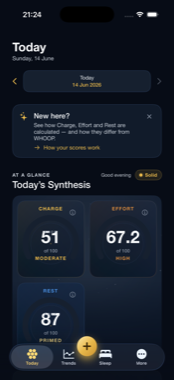


The all-new Liquid Metal look: living liquid scores, a sky that moves with your day, rebuilt on every screen. The same Today on iPhone and Android, and a metric’s own trend. One design across iPhone, Android & Mac.
NOOP is free, forever — no account, no cloud, no subscription, every feature unlocked, no nag. That doesn't change.
But here's the honest reality, up front: NOOP is built and maintained by one person, out of pocket. Building interoperability support for WHOOP's hardware — and keeping up as its firmware changes — takes real time and real test hardware. The project continues if the people who use it help fund it. If that doesn't happen, it can't. No drama, no guilt — just the maths of an unfunded project.
📰 Featured in AOL · Yahoo · Android Authority · TechRadar · BGR · Android Central · Android Police · Notebookcheck · Trusted Reviews — and used by thousands. If even a small fraction of them tipped, NOOP's future would be secure for a long time to come.
If NOOP saves you a subscription, or you just want WHOOP 5.0/MG support finished and the work to keep going, chipping in is what genuinely decides that. It's optional, one-off, and tied to nothing about your data or access — there's no server and no record of who has or hasn't.
How to donate — 2 minutes, even if you've never touched crypto
Donations are crypto-only, on purpose: staying anonymous (for the project and for you) rules out PayPal, Patreon, or anything with a name attached. If you don't already hold any:
- Install a mainstream exchange app — Coinbase, Binance, Kraken, or Cash App (Cash App handles Bitcoin directly).
- Buy some Bitcoin (BTC) or Ethereum (ETH) — a suggested $50+ genuinely keeps the project alive (it's a fraction of a year's WHOOP subscription). Anything is appreciated, but $50+ is what moves the needle.
- Tap Send / Withdraw, paste the matching address below, and send. That's it. (Only ever send a coin to its own network.)
| Coin | Network | Address |
|---|---|---|
| BTC | Bitcoin | bc1qn2gkl7wslwpws06mvazjn2uu689zlkv7kg3kf5 |
| ETH | Ethereum | 0xd64D508b531c4b1297Ca4023C774e0E97aA67B7F |
| ADA | Cardano | addr1qxsju3y0mlke2h6h2g6qgnq4r3jstngtyjxs0nnp5zrv28zv8p5rgzruxyjz33j9k23pffta8z639e2snjdd4vcetfqsn4vwr3 |
| XRP | XRP Ledger | rpvijHi2nVY9WWAJhojsAX5tJmHdmLtFhq⚠️ Destination Tag: 3338312747 (required) |
⚠️ XRP donors: this address requires the destination tag
3338312747. XRP sent without the tag cannot be credited and may be lost — most wallets and exchanges have a "Destination Tag" field, paste it there.
Each address also has a scan-to-donate QR code in the app under Support (and they're listed in docs/DONATIONS.md). Always copy the full address and double-check the first and last characters; crypto transactions are irreversible, and only ever send a coin to its own network.
Can't or would rather not? Also genuinely valued: ⭐ star this repo, file a good bug report, share a strap log, test on hardware you own, or just tell another WHOOP user. That moves NOOP forward too. Want to help directly? → Roadmap & help wanted lists exactly what we need — some of NOOP's biggest blockers are data only your strap can provide (a single raw frame capture can unlock a feature for everyone on that firmware).
Download
Pre-built apps you can run right now:

| Platform | Build | Notes |
|---|---|---|
| macOS | NOOP.app (see Releases) or Homebrew: brew tap noopapp/noop && brew trust noopapp/noop && brew install --cask noop |
Apple Silicon + Intel. Drag to Applications. Not notarized — see First launch on macOS below. The one-time brew trust noopapp/noop is needed on Homebrew 6.0+ (harmless on older versions) — see Homebrew docs. |
| Android | NOOP-full.apk (see Releases) |
The full app. minSdk 26 (Android 8+). Sideload — enable "install unknown apps". Blocked by Play Protect? See Installing on Android below. |
| iOS | NOOP-vX-ios.ipa (see Releases) — sideload with AltStore/SideStore |
Now a direct download. The .ipa is unsigned; you sign it on your iPhone with your own free Apple ID (no App Store, no developer account — NOOP stays anonymous). Re-signs every 7 days (AltStore automates it); Apple Health + Live Activity widgets may be limited under a free signing identity. See docs/IOS.md. Or build from source in Xcode. |
First launch on macOS. NOOP is not notarized by Apple — notarization needs a paid Apple Developer ID tied to a real identity, which doesn't fit an anonymous, free project. The app is sandboxed and ad-hoc code-signed, and the full source is here to inspect. Because it isn't notarized, macOS Gatekeeper blocks it on first open (you may see "damaged" or "unverified developer" — that's the download quarantine flag, not real damage). To open it, do one of these once:
- Terminal (most reliable): drag
NOOP.appto Applications, then runxattr -dr com.apple.quarantine /Applications/NOOP.appand open NOOP normally.- No Terminal: double-click NOOP (it'll be blocked), then open System Settings → Privacy & Security, scroll to the bottom, and click "Open Anyway" next to NOOP. (On macOS 14 and earlier you can also right-click the app → Open.)
Prefer to avoid this entirely? Build from source — see Quickstart.
Installing on Android (Play Protect blocked it?). NOOP isn't on the Play Store — it's an unsigned, source-available APK you sideload, because the project is anonymous and has no paid Play identity to publish or sign under. So Android treats it as an "unknown app" and Google Play Protect may warn or block on install (most stubbornly on stock Pixel / recent Android). Nothing is wrong with the file — it's just missing a Play signature. To get it on:
- Tap "Install anyway." When the warning appears, choose More details → Install anyway.
- No "Install anyway" button? It can vanish after a first install + uninstall. Grant the source directly: Settings → Apps → Special app access → Install unknown apps, pick the browser or file manager you're installing from, turn on "Allow from this source", then open the APK again.
- Still blocked by Play Protect? It's your call to make for an unsigned app you trust: open the Play Store → your profile icon → Play Protect → ⚙ Settings, toggle "Scan apps with Play Protect" off, install NOOP, then switch it back on.
- Reinstalling is safe. Uninstalling and installing again won't hurt anything — NOOP keeps all data on-device with
allowBackup=false, so a reinstall simply starts fresh. There's no cloud copy to lose either way.
Prefer to build it yourself? See docs/BUILD.md.
Everything runs offline. The only feature that ever uses the network is the optional AI Coach, and only with your own API key.
NOOP is a standalone, fully offline companion app for WHOOP straps (4.0 and 5.0). It pairs directly with the strap over Bluetooth, stores everything on your own device in SQLite, imports your existing WHOOP and Apple Health history, and computes recovery, strain, HRV, and sleep locally, with no WHOOP account and no WHOOP cloud.
It is built on prior community interoperability work and exists for one reason: to let someone who owns a WHOOP strap read their own biometric data from their own device, on a machine they control.
Not affiliated with WHOOP. NOOP is an independent, unofficial interoperability project. It is not affiliated with, endorsed by, or connected to WHOOP, Inc. "WHOOP" is used only to identify the hardware NOOP talks to. Use it only with a device you own, and not in breach of any agreement that applies to you. NOOP is not a medical device; every derived metric is an approximation, not clinical data. See
DISCLAIMER.md.
Contents
- Why NOOP
- Features
- Platform status
- Architecture
- Quickstart (macOS)
- How your data flows
- Privacy
- Attribution
- Support (optional)
- Disclaimer
- License
- Docs
Why NOOP
You bought the strap. The biometric stream it produces is yours. NOOP is built on that premise:
- Own your data. NOOP reads heart rate, R-R intervals, SpO₂, skin temperature, respiration, accelerometer/gravity, battery, and event data straight off the strap over Bluetooth and writes it to a local SQLite database. Nothing is uploaded anywhere.
- Account-free and local. NOOP never logs into a WHOOP account and never hits a WHOOP server. It does not bypass any login, paywall, or DRM; it simply talks to a device you own and reads data you generated.
- Bring your history. Already have years of data in the official app or in
Apple Health? Import the WHOOP CSV export and/or your Apple Health
export.xmlonce, and it's permanently on your machine. - Transparent math. Recovery, strain, HRV, and sleep are recomputed on-device from documented, citable methods (Task Force 1996 HRV, Karvonen %HRR, Edwards / Banister TRIMP, Tanaka HRmax, and so on). The algorithms are approximations of — not reproductions of — any proprietary model, and every analyzer file documents exactly what it does.
Features
The macOS reference app organizes everything behind a single sidebar
(Strand/App/RootView.swift). Each item below is a real screen in
Strand/Screens/. The same feature set ships on macOS, Android, and iOS via the
shared cross-platform code.
| Screen | What it does |
|---|---|
| Today (Control Center) | Home dashboard: recovery ring, a "today's synthesis" insight, a grid of stat tiles (recovery, strain, sleep, HRV, RHR, SpO₂, respiratory, steps, weight, calories) each with a 14-day sparkline, live strap battery % and HR trend, recent workouts, and a data-sources footer. |
| Readiness | An on-device "should you push today?" read that synthesizes established sports-science signals from your own history — HRV vs your baseline (Plews/Buchheit), resting-HR drift (Lamberts), sleeping respiratory-rate drift, training-load balance (acute:chronic workload ratio, Gabbett) and training monotony (Foster) — into a single headline (Primed / Balanced / Strained / Run down) with the drivers behind it. Pure local math, not medical advice. |
| Live | Real-time view of the connected strap — heart rate and frame stream as they arrive (~1 Hz). |
| Breathe | HRV haptic breathing biofeedback. The strap both measures HRV (R-R intervals) and buzzes its haptic motor, so NOOP paces your breath with felt cues (one buzz inhale, two exhale) and shows live HR + rolling RMSSD responding as the session deepens. Presets: Relax 4-6, Coherence 5.5, Box 4-4. Each session reports a pre/post HRV outcome so you can see how much you settled. |
| Intervals | Silent haptic HIIT timer. The strap buzzes every transition (triple-buzz into WORK, single into REST, 3-2-1 tick at phase ends, long buzz on finish) so you train hands-free. Falls back to a glanceable visual timer with no strap. |
| Explore (Metric Explorer) | Interrogate any single metric over time, built from the metric catalog (Strand/Data/MetricCatalog.swift). |
| Compare | Plot two metrics together / against each other over a shared timeline. |
| Insights | Behavioral and correlational insights derived from your own series — including Activity Cost, which learns what each activity type typically costs your next-morning recovery (and how long you take to bounce back) from your own history. |
| Sleep | Sleep sessions with a hypnogram, stage breakdown, efficiency, resting HR, and HRV — computed by the on-device sleep stager. Browse back through past nights, not just last night. |
| Trends | Long-range trends across recovery, strain, sleep, and biometrics — and a shareable one-page PDF report (recovery / sleep / HRV / resting HR / strain over a range you choose), rendered entirely on-device for a doctor, coach, or your own records. |
| Workouts | Detected and manual exercise sessions with strain and heart-rate detail. Tap any session for a full detail view — its HR curve over the workout, time in each HR zone, duration, avg/max HR, and the Effort it added. |
| Health | Biometric overview (HR, HRV, SpO₂, skin temperature, respiratory rate, etc.). |
| Stress | Day-level stress / autonomic load visualization. |
| Mind | A quick daily mood check-in that correlates how you feel against your own recovery, sleep and HRV over time — so you can see what actually moves your mood. On-device and non-clinical: a self-reflection log, not a mental-health assessment. |
| Apple Health | Browse and reconcile data imported from your Apple Health export. |
| Data Sources | One-tap import of a WHOOP CSV export, an Apple Health export, or a nutrition CSV (Cronometer / MacroFactor), plus live-strap status. "Bring your history in once, then it's yours." |
| Notifications | Configure local notifications and thresholds (Strand/Data/NotificationSettingsStore.swift). |
| Automations | Turn the strap's physical inputs and live biometrics into Mac actions — all on-device (see below). |
| Coach | An optional AI Coach you can ask about your data in plain language. It's the one feature that can ever use the network: off until you add your own key — Anthropic, OpenAI, or any OpenAI-compatible endpoint including a local/self-hosted model (Ollama, LM Studio) — and it sends only a short text summary of recent metrics plus your question, never raw streams or identifiers. With a local model the conversation never leaves your machine. Available on macOS, Android, and iOS. See docs/PRIVACY_SECURITY.md. |
| Settings | Profile, preferences, step calibration (tune the stride/step estimate to your own walking), unit choices, the in-app What's new changelog, and an opt-in Experimental section (WHOOP 5/MG protocol probes). On iOS, also Export for Shortcuts — a HealthKit-free path that hands your metrics to Apple Health via the Shortcuts app. |
| Support | Attribution + optional crypto donations. The whole app works without them. |
There is also a menu-bar extra (Strand/MenuBar/MenuBarContent.swift) with a
glanceable live HR readout and a compact popover, a first-run onboarding wizard
that sets expectations (independent/experimental, WHOOP 4.0 vs 5/MG, on-device only),
and an in-app "What's new" changelog shown after each update.
Automations (on-device)
Strand/Screens/AutomationsView.swift + Strand/System/MacActions.swift:
- Double-tap → Mac action. Double-tap the strap to lock the Mac, buzz back to
confirm, mark a moment, do nothing, or run any macOS Shortcut by name (via
the
shortcuts://URL scheme, so it's sandbox-friendly). - Wear & presence. Lock the Mac (or run a Shortcut) the moment the strap leaves your wrist; run a Shortcut when it goes back on. (macOS reserves true auto-unlock for Apple Watch — NOOP can lock, not unlock.)
- Haptic coaching. HR-zone coaching and an experimental resting-stress nudge — the strap buzzes so you don't have to watch a screen.
- Inactivity reminder. An optional gentle wrist buzz after you've been sitting still too long — your idle threshold, your active hours, a re-nudge cooldown, respects quiet hours, off by default.
- Smart alarm. Arms the strap's own firmware alarm to buzz at your wake time (still fires if the Mac is asleep or NOOP is closed), with an optional light-sleep wake window when the Mac stays awake and connected.
Platform status
NOOP's logic lives in cross-platform Swift packages, and the same protocol, storage, analytics, and scoring is ported to Kotlin on Android. Both apps pair with the strap and score recovery, strain and sleep on your own device — no import required.



| Platform | Status |
|---|---|
| macOS | ✅ Full app (Strand/, SwiftUI, macOS 13+). Pairs over BLE, offloads the strap's history, and scores recovery / strain / sleep on-device. The complete feature set above runs here. |
| Android | ✅ Full app (android/, Jetpack Compose, Android 8+). Pairs over BLE, persists and scores on-device, and imports WHOOP / Apple Health / Health Connect. Grab the APK from Releases. |
| iOS | 📲 Direct download: an unsigned .ipa you sideload with AltStore/SideStore — it signs on your iPhone with your own free Apple ID, so there's an anonymous install path with no App Store / developer account (see docs/IOS.md). Also still builds from source in Xcode. Shares the cross-platform Swift packages, so scoring matches macOS. Newer and less battle-tested than macOS/Android — live BLE on a real iPhone is still being validated; Apple Health + Live Activity widgets can be limited under a free signing identity. |
Strap support
NOOP is an independent, experimental project — capable, but a work in progress.
| Strap | Status |
|---|---|
| WHOOP 4.0 | ✅ The tested, supported path. Live HR, recovery, strain, sleep, history offload — the full experience. (v1.95 also unlocked sleep + recovery on the newer "v25" 4.0 firmware layout that earlier versions could only read live HR from.) |
| WHOOP 5.0 / MG | 🧪 Live heart rate works (confirmed on real hardware). Pick "WHOOP 5.0 / MG" before connecting — and see the pairing note below, because you can't just scan for it. Deeper 5/MG metrics (recovery, strain, sleep) are still being mapped; there's an opt-in Settings → Experimental toggle for 5/MG owners who want to help document the protocol. |
WHOOP 5.0 / MG analysis limits
NOOP's analysis screens and algorithms can only be as complete as the sensor inputs it can reliably decode. On WHOOP 5.0 / MG, important overnight inputs remain unavailable or incomplete:
Input / output Current direct-from-strap status Sleep duration / detection Experimental; can fall back to heart rate when motion is sparse Sleep stages Approximate and not reliable while full overnight motion and cardiorespiratory inputs remain incomplete Skin temperature Raw values decode on supported historical layouts; not available consistently across 5/MG firmware Blood oxygen / SpO₂ Not recoverable offline from current time-multiplexed PPG data Overnight HRV and respiratory rate Incomplete unless sufficient R-R intervals are captured In short: seeing the Sleep, Health, Readiness, or Insights screens doesn't mean their deepest analysis is available from a WHOOP 5.0 / MG alone yet — scoring and correlations can't conjure a measurement the strap hasn't given up. Decoding these inputs reliably is what we're working on, and it's the prerequisite for the full 5/MG picture. We'd always rather tell you that straight.
Pairing a WHOOP 5.0 / MG — read this first
A WHOOP strap holds an encrypted Bluetooth bond with only one device at a time, and yours is normally bonded to the official WHOOP app on your phone. You can't just scan for it in NOOP — if the strap is still bonded to the WHOOP app, NOOP's pairing is refused and the strap log shows "Encryption is insufficient" / "bond refused." (Live heart rate is the exception — it rides the standard Bluetooth heart-rate profile, so it streams without a bond. But pairing — needed for the deeper features — does not.)
To pair properly:
- Close the official WHOOP app on your phone (fully quit it, or turn that phone's Bluetooth off) so it isn't holding the bond.
- Put the strap in pairing mode — on a 5.0/MG, tap the band repeatedly (firm taps on the sensor) until the LEDs flash blue.
- In NOOP: Live → choose "WHOOP 5.0 / MG" → Scan & Connect. Success looks like "CLIENT_HELLO acked — link established" in the strap log (not "bond refused"). It can take a couple of attempts.
Only one device at a time. Because the strap holds a single bond, don't leave it connected to your phone and your Mac (or the WHOOP app) at once — live heart rate will still show on all of them (that rides the bond-free standard profile), but none of them will have the real encrypted bond. If HR streams fine yet buzz, alarm, double-tap and history don't work, that's the tell: the strap isn't truly bonded to this device. Free it from everything else, then pair here.
Bonding to NOOP may take the strap's bond away from the WHOOP app, so the official app might need to re-pair afterwards. This is the hardest part of 5/MG support — if it refuses, you're almost certainly still bonded to the WHOOP app (or another device); free the strap and retry.
The app always tells you what's live now versus still building, both in onboarding and on each screen.
What to expect when you start
NOOP computes your scores on your own device, so like any recovery wearable it needs a little data before everything fills in:
- Live heart rate shows the moment the strap connects.
- Strain and sleep appear after you've worn it and synced — the strap's last ~14 days offload automatically over the first few minutes.
- Recovery needs a few nights for the app to learn your personal baseline, then sharpens each night. WHOOP makes you wait for the same reason.
- In a hurry? Import your WHOOP export in Data Sources and your full history fills in about a minute.
Architecture
The repository is split into platform-pure Swift packages plus a macOS app target.
All packages declare both .iOS(.v16) and .macOS(.v13); framework-specific UI is
guarded with #if canImport(UIKit) / #if canImport(AppKit).
Strand/                  macOS SwiftUI reference app (this is what you build)
Packages/
  WhoopProtocol/         BLE frame parsing, CRC, command/event/packet decode
  WhoopStore/            GRDB/SQLite persistence (migrations, streams, caches)
  StrandAnalytics/       HRV / recovery / strain / sleep / correlation math
  StrandImport/          WHOOP CSV + Apple Health importers
  StrandDesign/          SwiftUI design system (palette, components, charts)
Tools/Backfill/          CLI tool for backfilling decoded data
Fixtures/                sample WHOOP export for tests
WhoopProtocol — the protocol-support core
Platform-pure (no CoreBluetooth import) so it runs in tests and CLI tools unchanged. It implements the on-wire frame format for both strap generations, so NOOP can speak to a device you own:
public enum DeviceFamily: String, Sendable, CaseIterable {
    case whoop4   // CRC8 (poly 0x07) header check; service 61080001-…
    case whoop5   // CRC16-Modbus header check, "puffin" packet types; service fd4b0001-…
}
Decoding is schema-driven (Resources/whoop_protocol.json) and includes CRC8,
CRC16-Modbus, and zlib CRC-32 implementations, frame framing, value
interpretation, and historical-stream reassembly. The app layer (Strand/BLE/,
Strand/Collect/) wraps these UUID strings in CBUUID and handles bonding,
offload, and live notifications.
WhoopStore — local SQLite via GRDB
Everything is stored on-device in SQLite (using
GRDB.swift). The schema is a versioned
migrator (Database.swift, currently through v9). Examples of decoded-stream
tables created in v1–v3:
CREATE TABLE hrSample      (deviceId TEXT, ts INTEGER, bpm INTEGER, PRIMARY KEY(deviceId, ts));
CREATE TABLE rrInterval    (deviceId TEXT, ts INTEGER, rrMs INTEGER, PRIMARY KEY(deviceId, ts, rrMs));
CREATE TABLE spo2Sample    (deviceId TEXT, ts INTEGER, red INTEGER, ir INTEGER, PRIMARY KEY(deviceId, ts));
CREATE TABLE skinTempSample(deviceId TEXT, ts INTEGER, raw INTEGER, PRIMARY KEY(deviceId, ts));
CREATE TABLE respSample    (deviceId TEXT, ts INTEGER, raw INTEGER, PRIMARY KEY(deviceId, ts));
Later migrations add server-derived metric caches (sleepSession, dailyMetric),
cursors, a raw frame outbox, and more.
StrandAnalytics — transparent, on-device math
Pure, database-free analyzers. Each is documented and grounded in published methods (and is explicitly an approximation, not a reproduction of any proprietary model):
| File | Computes |
|---|---|
HRVAnalyzer.swift |
RMSSD + SDNN from R-R intervals (Task Force 1996), with range + Malik ectopic filtering. |
RecoveryScorer.swift |
A 0–100 recovery score: HRV-dominant z-score + logistic composite vs personal baselines. |
StrainScorer.swift |
A 0–21 logarithmic strain scale from %HRR (Karvonen) and Edwards / Banister TRIMP. |
SleepStager.swift |
Sleep/wake detection + approximate 4-class staging from cardiorespiratory + gravity features. |
CorrelationEngine.swift |
Pearson r, OLS regression, day-aligned and lagged correlations between two series. |
WorkoutDetector.swift, Baselines.swift, BehaviorInsights.swift, AnalyticsEngine.swift |
Workout detection, rolling baselines, behavioral insights, and the per-day orchestrator. |
StrandImport — bring your own history
- WHOOP CSV export (
WhoopExportImporter.swift): header-name-driven, tolerant parser forphysiological_cycles.csv,sleeps.csv,workouts.csv, andjournal_entries.csv, from a folder or.zip. The same schema covers WHOOP 4 / 5 / MG. - Apple Health export (
AppleHealthImporter.swift): a streaming SAX parser (XMLParser) forexport.xml(which can exceed 1 GB), with correlation-dedupe, unit normalization (e.g. SpO₂ fraction → %), and sleep-stage mapping. - Nutrition CSV — a tolerant importer for daily-nutrition exports from Cronometer and MacroFactor, so calories and macros line up alongside your recovery and sleep on a shared timeline.
StrandDesign — the SwiftUI design system
Palette, typography, motion, and reusable components/charts (RecoveryRing,
StrainGauge, Hypnogram, Sparkline, TrendChart, YearHeatStrip,
StrandCard, StatePill, …) — no external UI dependencies.
Quickstart (macOS)
Requirements: macOS 13+, Xcode 15+ (Swift 5.9), and a Mac with Bluetooth. To pair live, you need your own WHOOP strap; to just explore, you can import a CSV / Apple Health export instead.
The Xcode project is generated from project.yml with
XcodeGen.
# 1. Clone
git clone <your-fork-url> NOOP
cd NOOP

# 2. (Re)generate the Xcode project from project.yml
brew install xcodegen   # if you don't have it
xcodegen generate

# 3. Open and run
open Strand.xcodeproj
# Select the "Strand" scheme → Run (⌘R). The built app is named NOOP.
Notes:
- Bundle id
com.noopapp.noop, product name NOOP, sandboxed with the Bluetooth and user-selected-files entitlements. - Swift Package Manager resolves the only third-party dependencies automatically: GRDB.swift (SQLite) and ZIPFoundation (export unzip).
- Run the tests from Xcode (the
StrandTeststarget + each package's test target), or per-package withswift testinsidePackages/<Name>/.
To explore without an Xcode project, the packages build on their own:
cd Packages/WhoopProtocol && swift build && swift test
How your data flows
WHOOP strap ──BLE──▶ Strand/BLE + Strand/Collect ──▶ WhoopProtocol (decode)
                                                          │
WHOOP CSV   ─┐                                            ▼
Apple Health ├─▶ StrandImport (parse) ──────────▶ WhoopStore (local SQLite)
Nutrition CSV┘                                            │
                                                          ▼
                                            StrandAnalytics (recovery/strain/
                                            HRV/sleep, on-device)
                                                          │
                                                          ▼
                                          Strand (SwiftUI) + StrandDesign
Every arrow stays on your machine.
Privacy
Offline by design. NOOP has no server, no telemetry, and no account. Your strap data, imports, and computed metrics live in a local SQLite database on your device and never leave it.
Attribution
NOOP stands on community interoperability and protocol-documentation work. With thanks:
johnmiddleton12/my-whoop— the WHOOP 4.0 BLE protocol; theWhoopProtocolandWhoopStorepackages and the collection logic are adapted from this work.b-nnett/goose— the WHOOP 5.0 / MG BLE protocol documentation (thefd4b0001-…service family, CRC16-Modbus header, and "puffin" packet types) that NOOP's WHOOP 5.0 path is ported from.groue/GRDB.swift— SQLite persistence.weichsel/ZIPFoundation— export unzipping.
NOOP contains no WHOOP proprietary code, firmware, logos, or assets, and performs
no DRM circumvention. Full detail in ATTRIBUTION.md.
Support (optional)
NOOP is free and always will be, and never gates a feature behind payment. If it's
useful to you and you want to help with the development and testing costs, optional
crypto donation addresses are shown on the in-app Support screen and listed in
docs/DONATIONS.md. Donations are 100% optional and the app
never asks twice.
Community: questions, setup help, tips, and release news → r/NOOPApp. Bug reports: please use GitHub Issues — there's a template, and they're tracked, deduped and linked to fixes (include a strap log). Contact: thenoopapp@gmail.com
Disclaimer
NOOP is an independent, unofficial, non-commercial interoperability project. It is not affiliated with, endorsed by, or connected to WHOOP, Inc. All references to "WHOOP" are nominative — used only to identify the third-party hardware NOOP interoperates with.
NOOP is not a medical device. Heart rate, HRV, recovery, strain, sleep stages, SpO₂, respiratory rate, and skin temperature are approximations computed from published methods. They are not clinically validated and are not medical advice. Do not use them to diagnose, treat, or make health decisions — consult a qualified professional.
Provided as-is, with no warranty, for personal and educational use. You
use it at your own risk. Read the full notice in DISCLAIMER.md.
License
NOOP is source-available under the PolyForm Noncommercial License 1.0.0: free for personal and other non-commercial use — read it, run it, fork it, and contribute. Commercial use is not granted by this license. (PolyForm Noncommercial is a proper software license with patent terms; it is deliberately not an OSI "open-source" licence, because that would permit the commercial use this project's non-commercial nature rules out.)
The license covers NOOP's own original code and docs. Protocol facts (frame layouts,
command numbers, byte offsets) are uncopyrightable and free to reuse; bundled
dependencies keep their own licenses (GRDB.swift and ZIPFoundation are MIT — see
NOTICE). By opening a pull request you agree your contribution is licensed
under the same terms — see docs/CONTRIBUTING.md.
Mirroring & forking
NOOP is public and built to be hard to erase. Clone it freely — git clone https://github.com/NoopApp/noop.git — and you're welcome to mirror or fork it to Codeberg, GitLab or your own server. More copies make the project more resilient, which is the whole point after being deplatformed.
Two simple asks:
- Keep it non-commercial and keep the
LICENSE+Copyright 2026 NoopAppnotice intact (PolyForm Noncommercial — mirror and use freely, just don't sell it or ship it in a paid product). - Point people back to the canonical home, github.com/NoopApp/noop (also mirrored at noop.fans), so everyone lands on the current code and releases rather than a stale fork.
That's it — copy away.
Docs
CHANGELOG.md— release history and what to expect (also shown in-app under What's new).DISCLAIMER.md— trademark, interoperability, and medical/legal notice.ATTRIBUTION.md— full credits and licensing notes.docs/DONATIONS.md— optional donation addresses (also in-app under Support).project.yml— XcodeGen project definition (source ofStrand.xcodeproj).
Activity
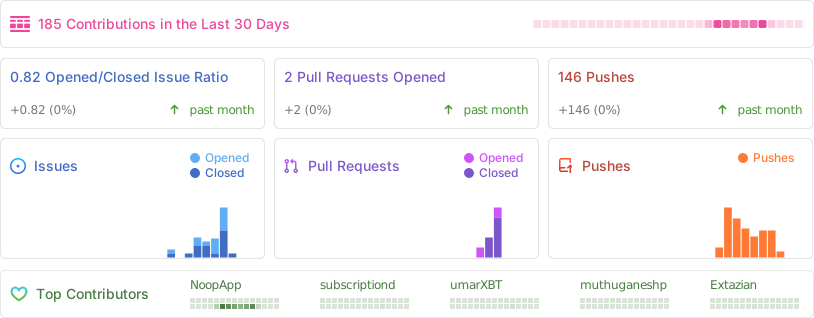
A live snapshot of the last 30 days — issues, pull requests, pushes, and the people moving NOOP forward. Huge thanks to everyone filing reports, sharing strap logs, and reverse-engineering the protocol alongside us — this project is built on it.


Star history
If NOOP's useful to you, a ⭐ genuinely helps it reach more WHOOP users — and it's the single best free way to support the project.
