misterdownloadmanager

Downloads faster than IDM. Free, forever.
🌐 misterdownloadmanager.com: the official website, with the downloads, help and news. Liked MDM? Rate it there, one to five stars.



🧩 Browser extension:

The Chrome Web Store's is for
 Edge,
 Brave,
 Opera, Vivaldi and Helium too (how).

⭐ Like it? Give it a star. MDM has no ads and no marketing budget: stars are how people find it.

Windows 10 and 11 (x64, ARM64, 32-bit) · Linux (Ubuntu, Debian, Mint, Fedora, openSUSE, Arch and more; x86-64 and ARM64) · macOS (Apple Silicon and Intel, experimental)
87 languages · no ads, no trial, no sign-up
 5×Fastera 1 GB file: 1 s instead of 5.5 s, on a local test server |
 +47More languages87 instead of IDM's 40 |
 100%Cheaper (free!)no licence, no trial, ever |
 TorrentSupported fullymagnet links, .torrent files, seeding |








| 🚀 Download | ⚡ Why switch | 🖼️ Screenshots | ✨ Getting started | 📜 Help and tutorials |
|---|
Why switch from IDM?
Same window you know. Your downloads finish sooner. And it costs nothing.

| Mister Download Manager | IDM 6.42 | |
|---|---|---|
| Download a big file (1 GB) | 1 second | 5.5 seconds |
| Download a small file | instantly | 3.1 seconds |
| Download over a shaky connection | 1.6 seconds | 5.4 seconds |
| Wait before a download starts | instantly | 3.1 seconds |
| Price | Free, forever | Paid, after a 30-day trial |
| Ads, nag screens, sign-up | None | Registration needed |
| Open source | Yes (GPL) | No |
Nothing new to learn: the toolbar, the categories, the list of downloads, the progress window and the browser button are where you expect them. Measured on the same computer, downloading from a test server on that computer (a loopback test: it times the programs, not an internet connection), same files, both programs at their default settings (how we measured).
Download
On the download page, pick one:
| File | Choose it when |
|---|---|
...-setup.exe |
Not sure? Take this one. It installs MDM, connects it to your browser and asks your language. |
...-portable.zip |
You want MDM on a USB stick or without installing: unzip and run. Everything stays in its folder. |
...-x64.zip |
You want the plain programs without an installer. |
...-setup-arm64.exe, ...-portable-arm64.zip, ...-arm64.zip |
The same three for Windows on ARM (Snapdragon and other ARM PCs). |
...-setup-x86.exe, ...-portable-x86.zip, ...-x86.zip |
The same three for 32-bit Windows 10. There, choose your own ffmpeg in Helpers for the best video qualities: none is built for it that MDM can check. |
...-extension-chromium.zip |
You want to add the browser extension by hand (Chrome, Edge, Brave, Opera, Vivaldi). From the stores is easier: Add to Chrome, Add to Firefox. |
The ARM64 and 32-bit files come with every release from 0.6.0; Check for updates keeps each copy on its own processor's files.
[!NOTE] Windows may say "Windows protected your PC" the first time, because this early version isn't code-signed yet. Click More info, then Run anyway.
Your antivirus flags it? See My antivirus flags MDM: how to check that your copy is ours, and report the false alarm.
Or with WinGet, Windows' package manager: in a terminal, the first line installs MDM and the second updates it.
winget install AhmedNefzaoui.MisterDownloadManager
winget upgrade AhmedNefzaoui.MisterDownloadManager
Or from SourceForge, an automatic, exact copy of the GitHub releases (SourceForge shows ads around its downloads), where MDM has SourceForge's Users Love Us award:


Code signing policy
Free code signing provided by SignPath.io, certificate by SignPath Foundation. Which Windows files are signed, who reviews and approves them, and what MDM sends over the network: code signing policy.
On Linux
MDM runs on Linux too, tested on Ubuntu 24.04, Debian 12 and Fedora with GNOME, KDE Plasma, Xfce
and Cinnamon, on X11 and in Wayland sessions: the tray, dark mode, browser integration (Ubuntu's
Snap Firefox included) and the packages' installs. Not there yet: screen readers (Orca) don't
read its windows, and Flatpak browsers can't reach it (more).
Running downloads show their progress on MDM's icon in the dock (Ubuntu Dock, KDE Plasma and
other docks that can show it), as they do on the Windows taskbar and in the macOS Dock.
Up to version 0.2.4, the files' names end in -experimental.
| File | For |
|---|---|
...-linux-x86_64.deb |
Ubuntu, Debian, Mint, Pop!_OS: sudo apt install ./<file>.deb. |
...-linux-x86_64.rpm |
Fedora, openSUSE, RHEL: sudo dnf install ./<file>.rpm. |
...-linux-x86_64.AppImage |
Any Linux. Make it executable and run it. |
...-linux-x86_64.tar.gz |
The plain programs, for any distribution. |
...-linux-arm64.* |
The same four for 64-bit ARM computers, from version 0.6.0 (built and tested on GitHub's ARM machines). |

On a Mac? Be the first to try it
Fresh builds for macOS (Apple Silicon and Intel) are on the same download page, marked
-experimental: we haven't tried them on a Mac ourselves yet. Give them a go and
tell us how it went; you'll
help make them as solid as the Windows and Linux versions.
| File | For |
|---|---|
...-macos-arm64-experimental.dmg |
Mac with Apple Silicon (M1 or later). Open it and drag MDM to Applications. The first time, right-click the app and choose Open. |
...-macos-x86_64-experimental.dmg |
Mac with an Intel processor, the same way. |
On Android: a preview, built from source
MDM runs on Android phones too, with its own interface laid out for a finger, downloads that go on in the background with their notifications, and links shared to it from other apps. It isn't in the releases yet: to try it now, build it from source (android/README.md).
🌍 In your language
Every language Windows 11 offers, 87 in all. MDM asks on its first start, and you can change it any time in View → Language. Arabic, Hebrew, Persian, Urdu and Uyghur get a fully mirrored, right-to-left window.
















































Screenshots
 One click on YouTube: the Download video button appears with the video. |
 Any video on any page: drag the button where you like, it stays there. |
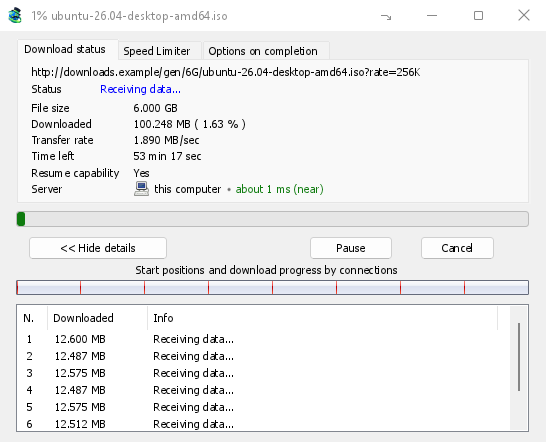 Watch it fly: every connection's share of the file, live speed and time left. |
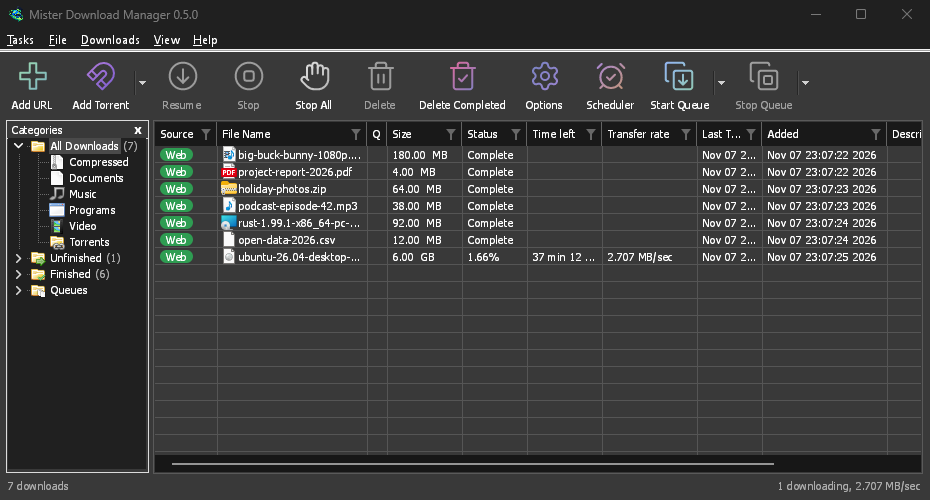 Dark mode that follows Windows. |
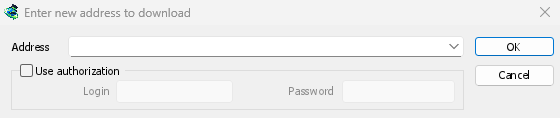 Add a download: paste a link, or let MDM catch it from your browser. |
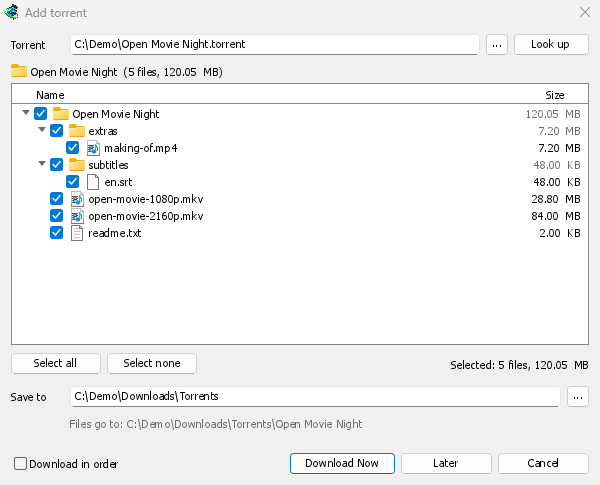 Torrents and magnet links: pick the files you want, skip the rest. |
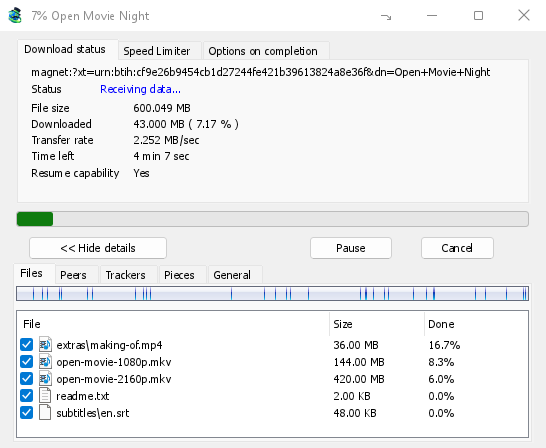 A torrent's progress: its files, peers, trackers and pieces, in tabs. |
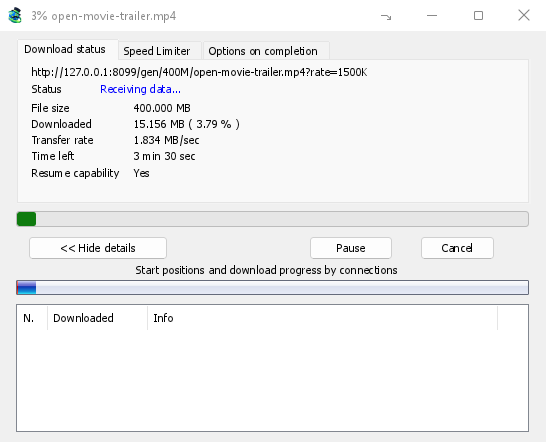 A video's progress: speed and time left while yt-dlp brings it in. |
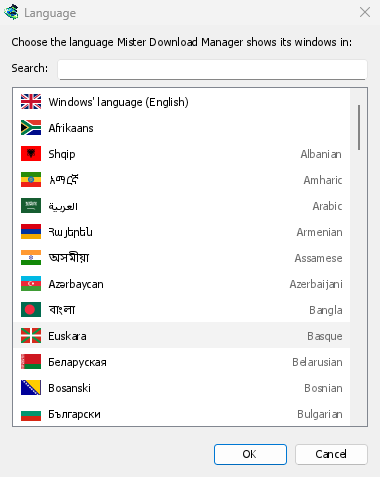 87 languages, chosen by flag on the first start. |
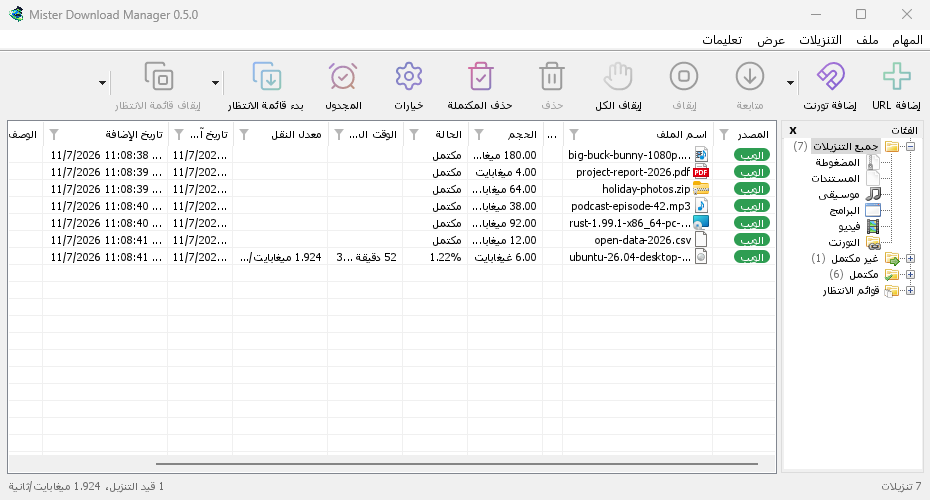 Right to left for Arabic, Hebrew, Persian, Urdu and Uyghur. |
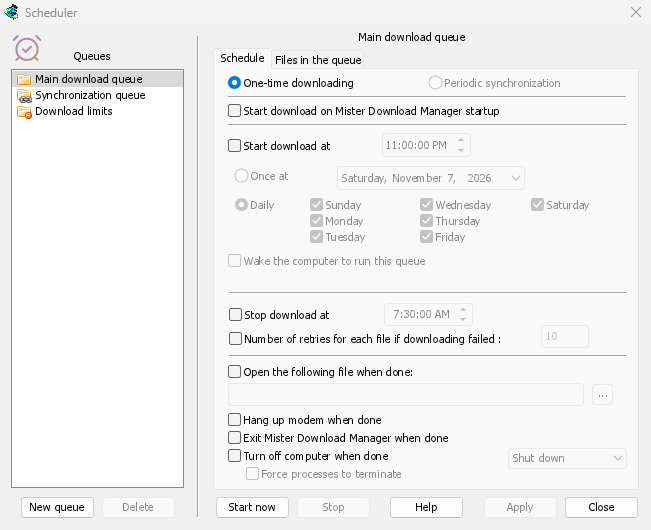 Download overnight: queues that start and stop on their own. |
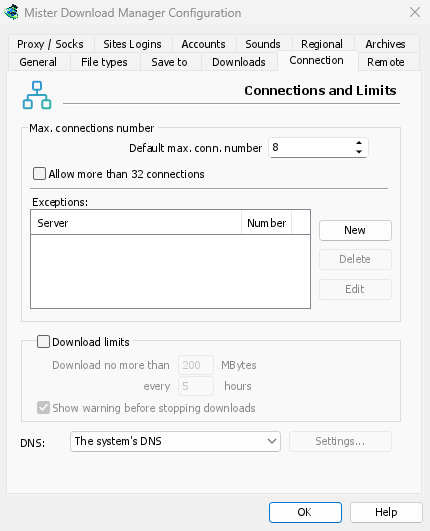 Options where you expect them, every control working. |
What it does
- Speeds up every download by fetching parts of the file at the same time, and keeps re-balancing until the last byte.
- Resumes after a crash, a restart or a dropped connection, without starting over.
- Site rules: a User-Agent, extra request headers, a number of connections, "connect the
way a browser does" and a proxy (none, or one of its own) for every download from a site
(
*.example.com): only the sites that need a proxy go through one. A stopped download's Properties change its own headers, proxy and connections, and MDM checks it is still the same file before it goes on (how). - Catches downloads from Firefox, Chrome, Edge, Brave, Opera, Vivaldi and Helium (the extension is on Firefox Add-ons and the Chrome Web Store), and gives them back to the browser when MDM isn't running. Its toolbar button finds all the images on a page, at the largest size the page lists, filtered by size and type, and sends them to the Link grabber; the right-click menu's Download all links brings the page's pictures too, hidden until you ask.
- Downloads videos from web pages (a button appears just above the video, never over the picture, on many pages before it plays, dark or light as the site is; playlists, subtitles, the sound alone), image galleries with gallery-dl, and torrents and magnet links (sequential order, RSS feeds, sharing limits, your own trackers and an optional public tracker list for more peers).
- Many links at once: the Link grabber sorts them into packages and extracts the archives
(zip, 7z, rar) when they're in. Give it an FTP folder or a web server's "Index of" page and it
lists every file in it and its subfolders, keeping the folder tree when they download; paste a
Hugging Face model or dataset or a GitHub release and it lists their files, each checked
against the digest the site publishes. For a big
.zipon a server, Preview lists the files inside and downloads only the ones you tick. It takes Click'n'Load from link sites, asking once per site, and unwrapsthunder://,flashget://andqqdl://links to the address inside them. Debrid accounts (Real-Debrid, AllDebrid, Premiumize, TorBox, Mega-Debrid; experimental) download file-host links through your own account. - Sorts downloads into categories by file type, each with a folder of its own, or every download in one folder if you prefer, the categories still sorting the list (how).
- A list laid out your way: show, move, resize and sort its columns, Save To (the folder each download is in) and optional Download duration (active time per download) among them, choose them and their order in the Columns window (from the keyboard too), and filter any column (how).
- Downloads overnight with queues and a scheduler that can wake the computer, then shuts it down if you like.
- Through your VPN only, if you want: hold every download to one network adapter, with a kill switch, and choose an encrypted DNS. Each download shows its server's country.
- From your phone, or on a server: control MDM from a phone on your home network, or run it without a window on a NAS (Docker, Unraid) (how). Send to ▸ hands a download, or its finished file, to another MDM on your network, found without typing an address (how). On a Windows Server or a virtual machine with no graphics card, it offers a lighter software renderer (Mesa's llvmpipe), downloaded only if you say yes (how).
- Works from scripts too: IDM's command-line switches, a command-line tool, and a local API for other programs (how).
- Works with your AI assistant: an MCP server lets Claude, Cursor or VS Code list, add, pause and remove your downloads (set it up).
- Leaves you some speed: limit one download or all of them, only while you're at the computer.
- Stays out of your game: while a full-screen game, video or presentation is on, or the screen is locked, Download complete and MDM's other pop-ups wait, and show when you're back (how).
- Day and dark mode, and themes: Classic, Native, High contrast, Metro, Adwaita, Breeze, Luna, Aero and Aqua, or your own in a text file (how). Everything larger, up to 200 %, with View → Interface size. 87 languages, and a portable version for USB sticks.
- Works from the keyboard and with screen readers (Narrator, NVDA): every window, dialog and menu (the keys).
- No ads, no trial, no account. Free and open source.
Step by step: your first download · catch every browser download · download overnight · download a video · all help pages
The benchmark in detail
Both programs downloaded the same files from the same local test server (labserver), with the network trouble each scenario names: seven runs each, both at their default settings. MDM finished first in all seven scenarios; every difference is statistically significant (Mann-Whitney p < 0.001), and MDM used less CPU in every one.

On a server that allows only two connections, MDM used 2 and still finished first; IDM opened 480. The full table, the machine and the raw data: docs/bench/run5/REPORT.md. The harness is in tools/bench, so anyone can run it again.
Not a reverse-engineering project
MDM is an independent, clean-room program. It is a new implementation of a familiar way of working, not a copy of anyone's software.
- No one else's code or assets. It contains no code, binaries, artwork, icons, sounds or text from Internet Download Manager, nor code from any other download manager. The app icon was made for MDM with ChatGPT (OpenAI's image generation); the other icons come from openly licensed sets (ATTRIBUTION.md).
- Nothing taken apart. No IDM file was ever disassembled, decompiled, debugged, patched or inspected below its user interface, and its licensing, trial and registration were never touched or bypassed.
- Learned as a user learns. What MDM does was learned from IDM's public documentation and help pages, its public screenshots, and by using a licensed copy as a black box: downloading test files from our own test server (labserver) and watching what reached the network and the screen.
- Built on public standards. The download engine follows the HTTP specifications (RFC 9110, RFC 9112) and was designed, tested and measured independently. Its speed comes from its own design, which the benchmark shows.
- Not affiliated. MDM isn't affiliated with, endorsed by or connected to Tonec Inc. "Internet Download Manager" and "IDM" are trademarks of their owner, named here only to describe the layout people already know and to compare the two programs.
For developers
Build from source
Requires Rust stable 1.98 or later (the MSVC toolchain on Windows), and for the engine's
browser-like connection (BoringSSL, built from source): CMake, LLVM's libclang and, on Windows,
NASM (winget install Kitware.CMake LLVM.LLVM NASM.NASM; on Linux cmake and
libclang-dev; on macOS Xcode's command line tools and cmake).
cargo build -p mdm-app --no-default-features builds the app without it (a site that refuses MDM's
own connection then stays refused).
cargo build --release
cargo test
This makes misterdownloadmanager.exe (the app), misterdownloadmanager-cli.exe (headless
command line), misterdownloadmanager-mcp.exe (the MCP server for AI assistants) and
misterdownloadmanager-nmhost.exe (the browser host) in target\release\.
tools\installer\build.ps1 builds the installer and both zips into target\dist\ (needs
Inno Setup 6.3 or later), for x64; -Arch arm64 or
-Arch x86 for Windows on ARM or 32-bit Windows (after rustup target add aarch64-pc-windows-msvc or i686-pc-windows-msvc). tools/installer/build-linux.sh builds the
Linux files for the machine's own processor (x86-64 or ARM64). A vX.Y.Z tag does all of them
on GitHub Actions and publishes the release.
Browser integration from a build: register the native messaging host with
target\release\misterdownloadmanager-nmhost.exe --register (undo with --unregister), then in
chrome://extensions or edge://extensions turn on Developer mode, Load unpacked and pick
the extension/ folder (its ID is always oogbclbbninliongijffeeggalppliok).
Layout and tools
A Cargo workspace (edition 2024); docs/ARCHITECTURE.md explains how the pieces fit.
| Crate | What it is |
|---|---|
mdm-engine |
The download engine: segmentation, connections, resume, limits |
mdm-app |
The desktop app (egui), and --headless for servers |
mdm-cli |
Headless downloads from the command line |
mdm-mcp |
The MCP server, for AI assistants |
mdm-nmhost |
The browser's native messaging host |
mdm-ipc |
Talking to a running app; shared capture rules; the extension's IDs |
mdm-remote |
The remote control: the HTTPS server and page a paired phone uses, and Send to device (pairing with another MDM, discovery, file handover) |
mdm-crash |
Crash and freeze reports: the monitor, minidumps, stacks |
mdm-debrid |
Debrid accounts through the services' official APIs |
mdm-extract |
Archive extraction (zip, tar, gz, xz; 7z and RAR through 7-Zip; in place through HatchZip) |
mdm-geo |
A server's country, from an IP table on this computer |
mdm-tools |
yt-dlp and ffmpeg for video pages, gallery-dl for galleries |
mdm-torrent |
BitTorrent through librqbit |
mdm-labserver |
An HTTP test server with fault injection, for tests and benchmarks |
| Tool | What it does |
|---|---|
tools\dev\check-cross.ps1 |
Checks the code for Linux and macOS from Windows (with Zig as the C compiler) |
node tools/extension/e2e.mjs |
The browser extension in real Chrome, Brave, Edge and Firefox, headless: a link's download must reach MDM (or another MDM, a server); on Windows and Linux |
python tools/i18n/extract.py |
Lists every interface text in i18n/en.tsv (CI checks it matches the code) |
python tools/i18n/translate.py |
Translates what the catalogs lack (checks every row in code) |
python tools/installer/languages.py |
The installer's messages in every language |
node tools/readme/build.mjs |
This page's pictures, comparison table and flags, from the benchmark data |
tools\lab\docs-shots.ps1 |
The screenshots, from a separate test instance (/show <window> opens each window), off the screen |
python tools/shots/make.py |
The help pages' pictures, from one list (tools/shots/shots.toml): shot, cropped, annotated, lossless WebP; make.py check keeps them in step |
tools/lab/wsl/ |
A WSL2 machine that builds MDM for Linux in minutes and shoots its windows on a virtual screen (README) |
tools\lab\progress-shots.ps1 |
The progress window of a video (yt-dlp) and of a torrent, from a swarm on this computer (cargo run -p mdm-torrent --example swarm) |
python tools/website/build.py --serve |
misterdownloadmanager.com into target/site (help pages from docs/, news from the CHANGELOG, FAQ and legal pages from website/content/), served on http://127.0.0.1:8765; GitHub Pages publishes it (pages.yml) |
website/ratings/, website/markdown/ |
The website's two Cloudflare Workers: the visitors' star ratings (README), and Markdown for AI tools and agents (README). Every page of the site also has a Markdown version (/download.md beside /download.html), and the site publishes llms.txt, an API catalog and an MCP server card: For AI tools and agents |
python tools/readme/social.py |
The repository's social preview card (docs/images/social-preview.png) |
MDM_FIT_AUDIT=<file> |
Lists every text that doesn't fit its window or runs over another, for checking a translation |
MDM_OFFSCREEN=1 |
Opens every window off the screen, without focus, tray icon or sound (screenshots and checks) |
MDM_TEST_TRASH_DIR=<folder> |
Tests only: archives deleted after extracting go into this folder, never into the real Recycle Bin or Trash |
MDM_TEST_7ZIP=<program>|none |
Tests only: the 7-Zip program to use for 7z and RAR archives, or none to act as if 7-Zip weren't installed |
MDM_TEST_HATCHZIP=<program>|none |
Tests only: the HatchZip program to use (extraction in place), or none to act as if HatchZip weren't installed |
Status and helping out
MDM is young: the engine, the main window and the browser integration are solid on Windows and Linux, and some corners are still "good enough for now".
- Translations are machine-made. Rows marked
#, machineini18n/wait for a native speaker; fixing one is a one-line pull request (how). Malay's menus, toolbar and download-list columns have been reviewed by a native speaker. - Not yet: code signing. The macOS builds are untested; on Linux, screen readers (Orca) and Flatpak browsers aren't supported yet.
Bug reports are welcome in Issues: Help → Report a problem in the app fills in your version and system. Ideas are welcome in Discussions. Pull requests are accepted under the same licence: start with CONTRIBUTING.md. How the project is run, from reviews to releases, is in GOVERNANCE.md, and everyone who takes part follows the Code of conduct.
Made possible by these amazing humans
Everyone who sent a pull request, opened an issue or joined a conversation here: thank you. People with pull requests first, then issues, then comments; the website shows what each one did.


⭐ Star history
If MDM saves you time, a star is the quickest way to say so, and it helps the next person find a free download manager. Star it on GitHub.
Support MDM
MDM is free and always will be. If it saves you time, you can support its creator on GitHub Sponsors. It's optional: nothing in the app changes or unlocks, and there is no paid edition.
Licence and credits
Copyright (c) 2026 Ahmed Nefzaoui. Mister Download Manager is free software under the GNU General Public License, version 3 or (at your option) any later version.
Built on egui through storytold's forks and storytold/craft-libs (MIT OR Apache-2.0), librqbit (Apache-2.0), zip (MIT), and yt-dlp (Unlicense, run as a separate program; as are 7-Zip for 7z and RAR archives, and HatchZip (MIT OR Apache-2.0) when installed). Flags from flag-icons (MIT); pictures drawn with rough.js (MIT) in Patrick Hand (SIL OFL) and Vega-Lite (BSD-3). Bundled icons and artwork keep their own licences, listed in ATTRIBUTION.md.