zed-android-port
Zdroid
Zed on Android.
Started as a joke. Rust on aarch64, sounded portable. Laughed about it. Kept going. Couldn't stop. There's an APK.



Zdroid is an independent port of Zed for Android, not affiliated with Zed Industries. Upstream's Editor, Workspace, Project, Search, GitGraph, Extensions, and Terminal crates run unchanged on a custom gpui_android platform backend that composites every pixel via the Adreno Vulkan driver, targeting Android 9+ with a hardware keyboard. A stock Ubuntu rootfs bundled in the APK runs every tool (apt, bash, git, ssh, node, go, rust-analyzer, gdb) through the app's own userland chroot engine: a static loader and a seccomp trap path translator, no root, no patched packages, native speed.
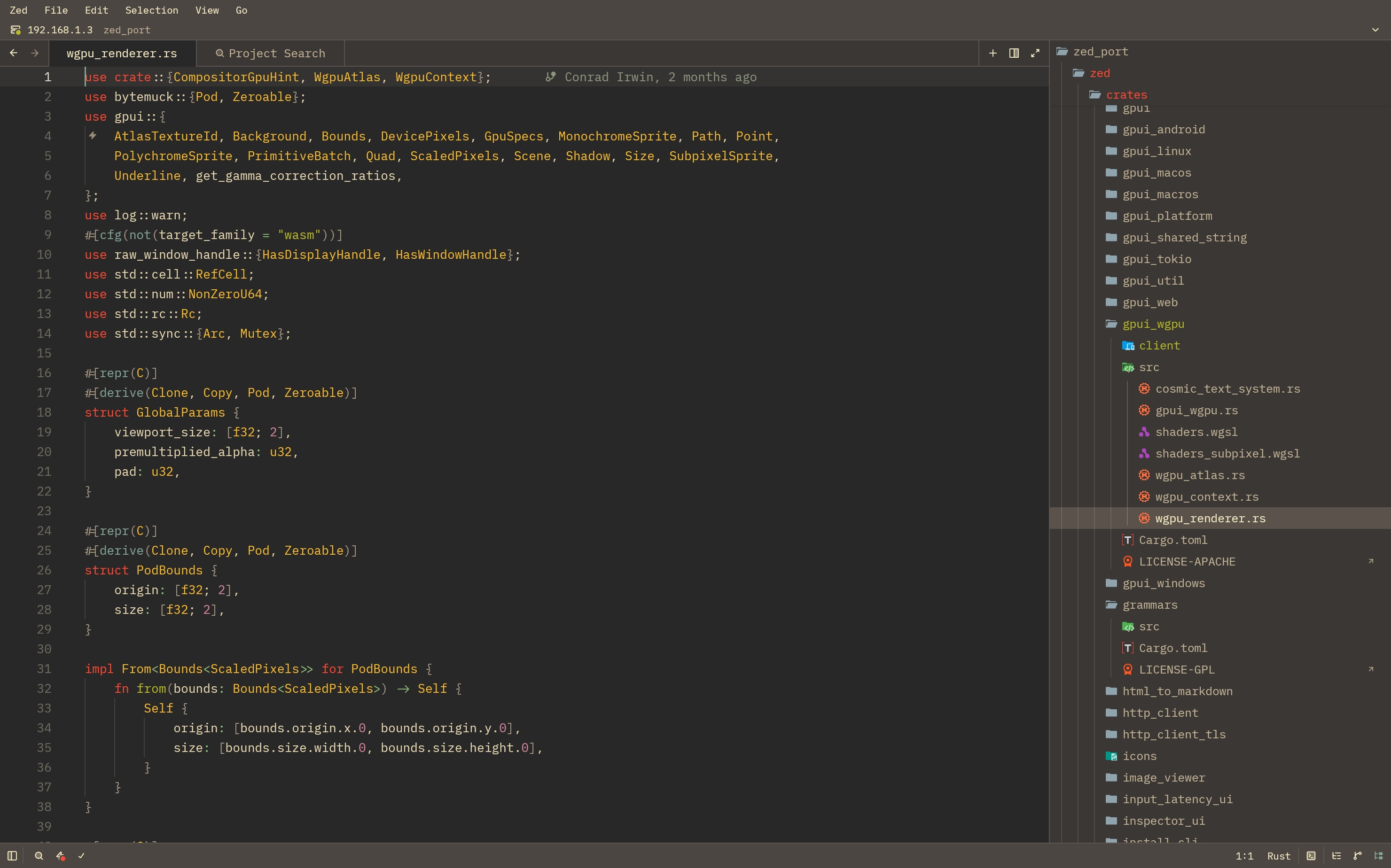
Vulkan via wgpu. AChoreographer-driven vsync, no JNI hop per frame. Opt-in 120Hz with Mailbox present mode. Glyph fallback into /system/fonts so Powerline arrows and CJK render without bundling fonts. The Editor, Workspace, Project, MultiWorkspace, Search, GitPanel, GitGraph, Extensions, and Terminal crates run unchanged. The Rust .so is the app process. gpui composites every pixel (yes, you read that right) straight into the Adreno Vulkan driver. Multi-Activity OS-chromed extra windows so DeX freeform renders Settings and secondary editors with real chrome.
A userland chroot without root or ptrace: the kernel only ever execs a 500 KB static loader shipped in the APK, which maps the Ubuntu binary and glibc's ld.so itself, installs a seccomp filter that traps path syscalls, and rewrites every guest path into the rootfs from an in-thread SIGSYS handler, three microseconds per translated syscall. Static binaries, Go, cargo, strace and lldb all run as on Linux because real ptrace stays free. Same engine answers the syscalls Android's own app filter refuses, which is why stock glibc starts at all. SurfaceControl-composited hardware cursor sprite on a sibling overlay, separate from the wgpu frame. Pointer-capture trackpad that consumes historical motion samples so finger drags don't lose 80% of their travel to event batching. SAF DocumentsProvider exposing ~/ as a system volume. Native Android trust via rustls-platform-verifier. In-app updater pulling signed APKs from GitHub Releases. Everything else is upstream. Deep-dives for the platform layer live in crates/gpui_android/docs/workarounds/.
Grab the latest Zdroid-X.Y.Z.apk from the releases page and open it in your file manager. Android prompts for unknown-source installs the first time; grant it. Reinstalls upgrade in place because every release ships from the same signing cert.
First launch
- Access to /sdcard. Projects under the app's own files need no permission. For anything under
/sdcardthe first launch opens Android's "All files access" toggle for Zdroid (on Android 8 to 10 it is a permission dialog instead); turn it on, or later from Settings → Android Runtime → Allow access to /sdcard. - Runtime. The Ubuntu base image bundled in the APK is extracted into the app's private data dir behind the splash, a few seconds, no network. Then
gitand the CA certificates are installed with apt in the background; a notification shows progress and needs a network. If that step fails, Settings → Android Runtime → Install git and certificates runs it again. - Notifications and battery. Language servers and terminals keep running while Zdroid is in the background through a foreground service. Android asks once whether Zdroid may post notifications; declining keeps the service running with its notification hidden. Some skins (One UI's sleeping apps) still stop background apps unless Zdroid is excluded; Settings → Android Runtime → Allow background activity asks for the exemption.
Setting up your shell environment
Open the integrated terminal. You are root in a stock Ubuntu 26.04 (the ubuntu-base image: apt, dpkg, bash, perl, no compiler yet). Everything installs the Ubuntu way:
apt update
apt install -y build-essential curl python3 gdb
curl --proto '=https' --tlsv1.2 -sSf https://sh.rustup.rs | sh -s -- -y --profile minimal -c rust-analyzer
Zed downloads its own Node for the Node-based language servers (vtsls, eslint, json, tailwind), so npm-based tools work without installing Node; apt install -y nodejs npm gives you a system one for the terminal. Claude Code, for example:
apt install -y nodejs npm
npm install -g @anthropic-ai/claude-code
Go comes from the official linux-arm64 tarball unpacked into /usr/local; gopls, delve, clangd and the rest install the way their docs say for Linux. Anything that lands in /usr/bin, /usr/local/bin, ~/.cargo/bin or ~/.local/bin shows up on the editor's PATH within a couple of seconds, so language servers start from the editor without configuration.
Settings → Android Runtime → Reset runtime extracts the bundled image again when you want a clean slate; projects and editor settings stay.
Working with projects
Two storage realms underneath, with different exec rules.
/data/data/com.zdroid/files/ (surfaced as ~/) is exec-mounted. cargo, go, node, anything you build can execve and run. This is where projects should live. ~/projects/<name> is the default workspace root; ZedDocumentsProvider exposes ~/ to other Android apps via the SAF sidebar (look for Zdroid in any system file picker).
/storage/emulated/0/ (a.k.a. /sdcard/) is FUSE-mounted with noexec. Read, edit, and save all work; the kernel refuses to execute binaries written here. cargo run against a binary under /sdcard/... returns EACCES and there's no remount workaround (see docs/workarounds/android-noexec-mount.md for why).
Three workflows that work with this constraint:
- Project root under
~/projects/is the happy path.git clone,cargo new, builds, debugs, terminal subprocesses all run. Browse there from any Android app via the Zdroid → projects SAF sidebar entry. - Open a folder anywhere on
/sdcard/is fine if you're only reading or editing. The title bar shows a yellow Builds won't run · Move chip; one tap pops a confirm dialog that copies the project into~/projects/<basename>and reopens it from the exec side. ~/storage/{shared,downloads,dcim,documents,…}are curated symlinks into/sdcard. Use them for "open and edit a single file" workflows where you don't want to copy a whole tree.
 Gestures & input
Each surface toggles in Settings → Android Input (or on the first-run onboarding card).
Touch (default)
- Tap to position the cursor
- Tap and drag to scroll
- Two-finger tap for right-click
- Long-press to select a word
- Long-press and drag to extend the selection
- Scrollbar tap and drag snaps the thumb to your finger and follows
Virtual trackpad mode
Toggle the crosshair icon in the tab bar to turn touch into a pointer. Direct touch is disabled while it's on.
- One-finger drag moves the cursor
- Tap for left click, two-finger tap for right click
- Hold then drag for text selection
- Two-finger drag to scroll the content
Hardware mouse / trackpad
Plug in or pair a mouse, trackpad, or Book Cover Keyboard and it just works.
- Scroll wheel and two-finger trackpad scroll to scroll
- Right-click anywhere for context menus
- The cursor hides when you switch to touch or typing and comes back on the next pointer event
Working on Samsung tablets and most Android devices we've tested. If your mouse pairs but doesn't move the cursor (seen on some OnePlus / Oppo Pad ColorOS builds), open an issue with
adb shell dumpsys inputoutput so we can triage.
Soft keyboard
Auto-opens on tap into the editor or terminal. The pane tab bar has a keyboard toggle if you want it off.
- Programming keys row above the keyboard with
Esc,Tab,Ctrl,Alt, and arrows.CtrlandAltare sticky: tap once for the next key, double-tap to lock. Ctrl+ letter combos work in the terminal:Ctrl+Csends^C, just like a hardware keyboard.
Multi-window
Settings and any other spawned window each open as their own Recents entries and get their own soft keyboard and input.
 Userland
The editor is bionic-linked and runs as the Android app process. Every subprocess it spawns (bash, apt, language servers, debug adapters, formatters, terminal shells, git, ssh) runs inside a stock Ubuntu 26.04 rootfs extracted from the APK into the app's private data dir. No root, no Magisk, no second app.
How that is possible without root: a distro binary bakes /usr, /lib and /etc into its rodata and its PT_INTERP, and no app-writable Android path is that short, so the rewrite cannot happen in the file. It happens at the syscall. The kernel only ever execs libzdload.so, a static loader that maps the Ubuntu binary and glibc's own ld.so, installs a seccomp filter that traps the path syscalls (openat, execve, stat, readlink, bind and the rest) and translates the guest path into the rootfs from an in-thread SIGSYS handler, then re-issues the syscall from inside the loader's own text, which the filter lets through. That is proot's idea driven by the kernel's trap instead of a second process and ptrace: three microseconds per translated path syscall instead of two cross-process stops, static binaries run, and real ptrace stays free, so gdb, lldb and strace work inside. The same handler answers the syscalls Android's own app filter refuses (rseq, set_robust_list, the termios2 ioctls, hard links on app data, netlink audit), which is why unmodified glibc, apt and dpkg run at all. Writeups: rootfs-engine-integration.md, rootfs-guest-env.md.
Inside, you are root (a virtual identity the engine keeps for apt and dpkg; the files belong to the app uid), $HOME is /root, the app's files dir is visible at the same absolute path on both sides so project paths mean the same thing to the editor and to the tools, and /sdcard and /storage are bound through.
Background survival: a foreground service holds the process out of Android's cached state while a language server or terminal is alive, children are reaped when you quit or swipe the task away, and a language server killed from outside is restarted up to three times in ten minutes before it stays stopped with a hint. Keep Awake in Settings → Android Runtime adds a wake lock so builds continue with the screen off. The device-wide phantom process cap (32 on Android 12+) cannot be lifted from an app; Android 14+ has a Developer Options toggle, and over adb settings put global settings_enable_monitor_phantom_procs false.
Not in the engine: SysV IPC (PostgreSQL), 32-bit guests, mount or user namespaces. /proc/self/maps and mountinfo still show host paths.
 What works
 |
 |
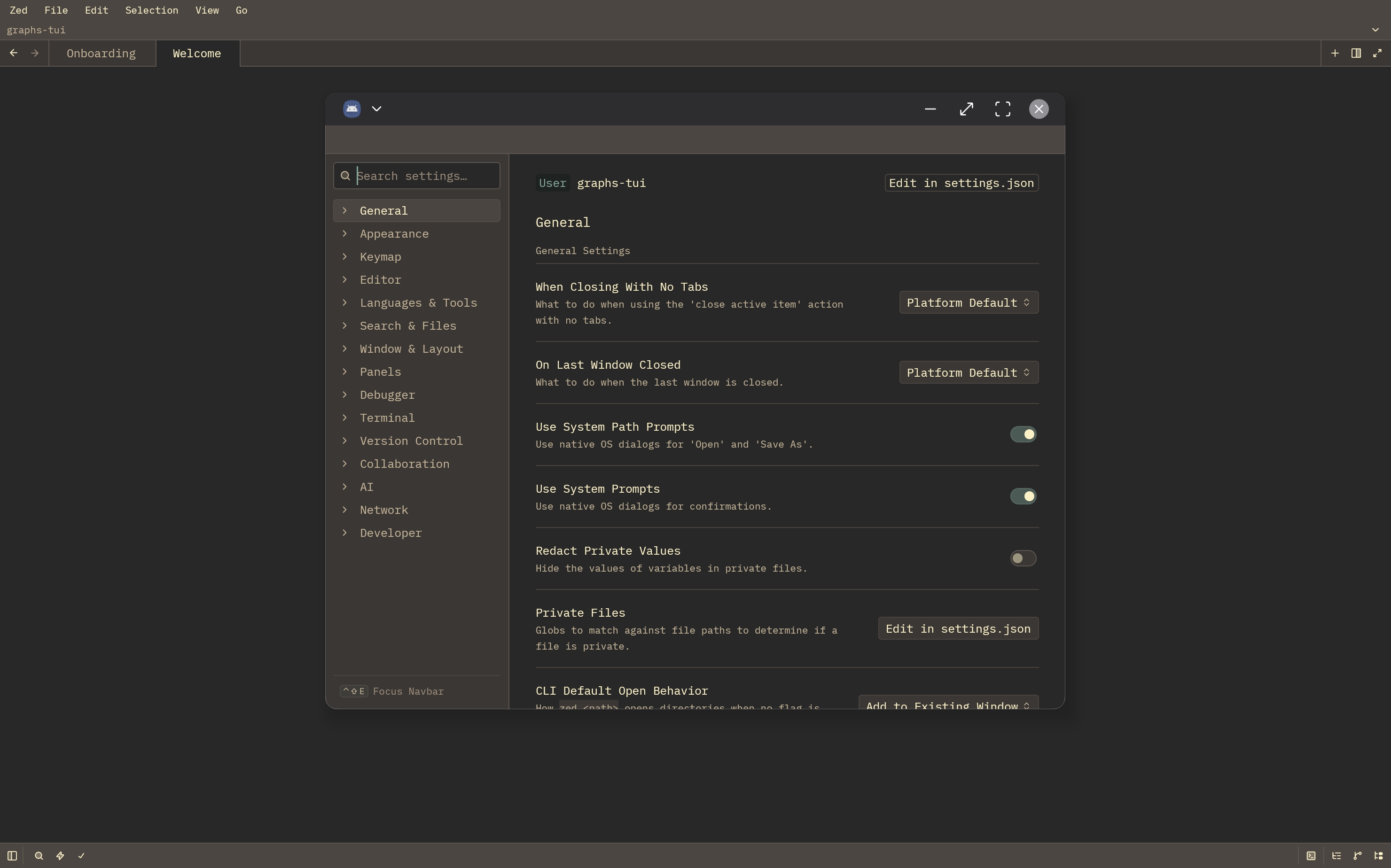 |
- Editor. Vulkan rendering, multi-pane workspace, vim mode, syntax highlighting, project panel, fuzzy file finder, command palette, buffer + project search.
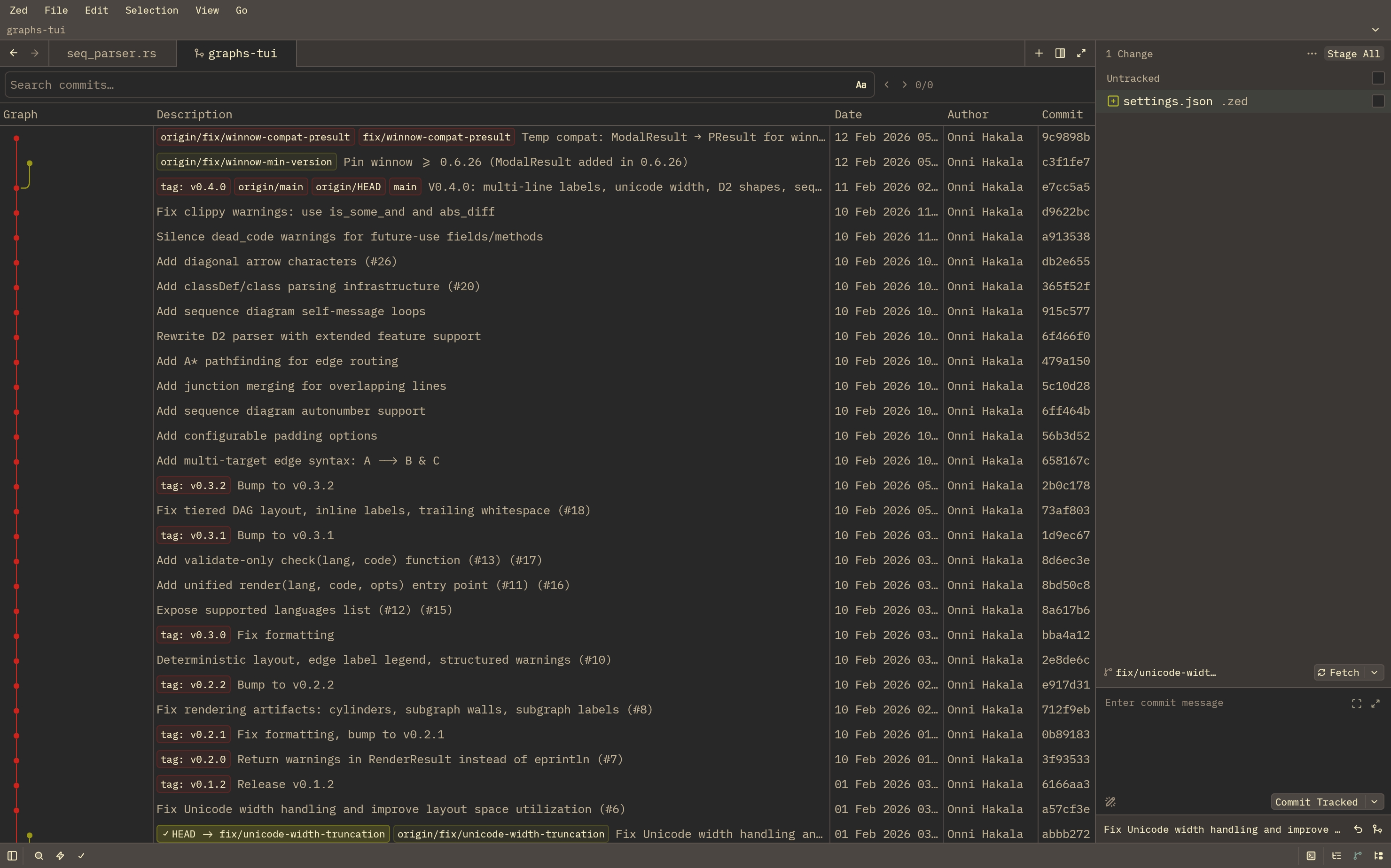
- Git. Git panel with staging, full git-graph commit history, diff view.
- LSPs and debuggers. Whatever you install in the rootfs is on the editor's PATH: rust-analyzer via rustup, gopls, pyright, clangd, jdtls. Zed's own managed Node runs vtsls, eslint and friends. CodeLLDB debugs Rust with real breakpoints.
- Extensions. Browse, install, manage. Themes, language configs, grammars, slash commands.
- Remote SSH. Server-picker pill in the title bar, persisted server list, native askpass.
- Multi-window. Android freeform and DeX, each extra window is a real Activity with OS chrome.
- Edge-to-edge rendering with content under the display cutout.
- App menu bar with nested submenus (Settings, Keymap, Themes, Extensions).
- Theme follow for system light/dark.
ZedDocumentsProviderexposes the project root as a SAF volume, so other Android apps can browse Zed's worktrees.
 Build from source
You'll need:
- Rust toolchain with
aarch64-linux-android(rustup target add aarch64-linux-android) cargo-ndk(cargo install cargo-ndk)- Android NDK r27 (
sdkmanager "ndk;27.0.12077973") - Gradle 8+,
adbon$PATH - A device with USB debugging on
cd crates/gpui_android/examples/zed_android

ANDROID_NDK_HOME=/path/to/ndk/27.0.12077973 \
  cargo ndk -t arm64-v8a -P 26 -o android/app/src/main/jniLibs build

cd android
gradle assembleDebug
adb install -r app/build/outputs/apk/debug/app-debug.apk
adb shell am start -n com.zdroid/.MainActivity

adb logcat -d | grep -E "zed_android|RustPanic|FATAL"
First build is around 10 minutes. Incremental Rust rebuilds are 20 seconds, Gradle re-pack a few seconds.
 Tested on
Samsung Galaxy Tab S9 Ultra (Snapdragon 8 Gen 2 / Adreno 740, Android 16, One UI 8) is the daily driver. Compiles for any aarch64 Android 9+ with Vulkan 1.1, but only Adreno is exercised. Mali / Xclipse will run but may want shader tweaks.
A hardware keyboard is the supported config. Tablet plus Bluetooth keyboard, foldable in tablet mode, or DeX/desktop-mode with monitor and peripherals all work. Phones technically run but are de-prioritized; see docs/workarounds/deferred-phone-form-factor-polish.md.
 License
GPL-3.0-or-later, same as upstream Zed. The engine crates crates/zd_engine_core and crates/zd_loader are MIT. The APK bundles the unmodified Ubuntu 26.04 base image (ubuntu-base, from cdimage.ubuntu.com), whose packages carry their own licenses (GPL, LGPL, BSD, MIT and others); the source of every package is in the Ubuntu archive, and nothing in the image is modified.
© Dylan Murzello, distributed under GPL-3.0-or-later. Zed itself is © Zed Industries.
 Acknowledgments
- Zed Industries for
gpuibeing platform-agnostic enough that an Android port is plumbing rather than a rewrite. - The
wgpuandblade-graphicsmaintainers for a Vulkan abstraction that just works on Adreno. - The Termux project for a decade of Linux-on-Android, and proot for the path-translation design the engine descends from; gVisor's systrap for showing that seccomp's trap return is a platform.
- Ubuntu for publishing a base image small enough to ship inside an APK.
 So why this ?
Zed Industries' position on a mobile/tablet port: not planned.
- #12039 IOS/Android Port, open since May 2024.
- #34633 start of termux build, closed as "not planned" in Jul 2025.
- #43207 gpui: On Android, open in the GPUI Roadmap as "Wide Scope" since Nov 2025.
This repo is what those threads were asking for, built independently. The Termux build attempt failed because the upstream wasmtime/cranelift deps don't compile inside Termux. We sidestep that by building the APK on a desktop with cargo-ndk and running a stock Ubuntu userland through our own ptrace-free chroot engine. No fork of upstream-Zed-with-android-cfg is needed; the Editor, Workspace, Project, Search, GitGraph, Terminal, Extensions crates run unchanged. The work is at the platform boundary, documented in crates/gpui_android/docs/workarounds/.