Frukah
Is a Frida/Gui tool used for dynamic analysis on android applications. The tool allows you to inject/hook javascript to various java methods. This will allow you to follow/modify the applications logic. This tool is normally used for pentesting mobile/android applications.
This tool does require Frida and PySimpleGui. Go to(https://frida.re/docs/android/) to install Frida use pip to install PySimpleGui. Tool at the moment has not been tested on a windows environment.
At the moment, this application will only work on Android Studio Emulator. Future releases will work on any mobile device and any thick client (.exe)
To start using:
- Open a virtiual device in Android - Make sure Frida Server is running (see https://frida.re/docs/android/)
- Open the app (e.g., DIVA) you want to Hook/Frukah into
- In the Command line enter "$python3 frukah.py"
- In Frukah, enter the App name such as for DIVA as shown in the provided screen capture. Note, click on "Show Avail Apps" to see loaded applications
- Click on "Hook App"
- Select modules/classes you want to Hook/Frukah such as Database, File Access, Shared Preferences, and HTTP
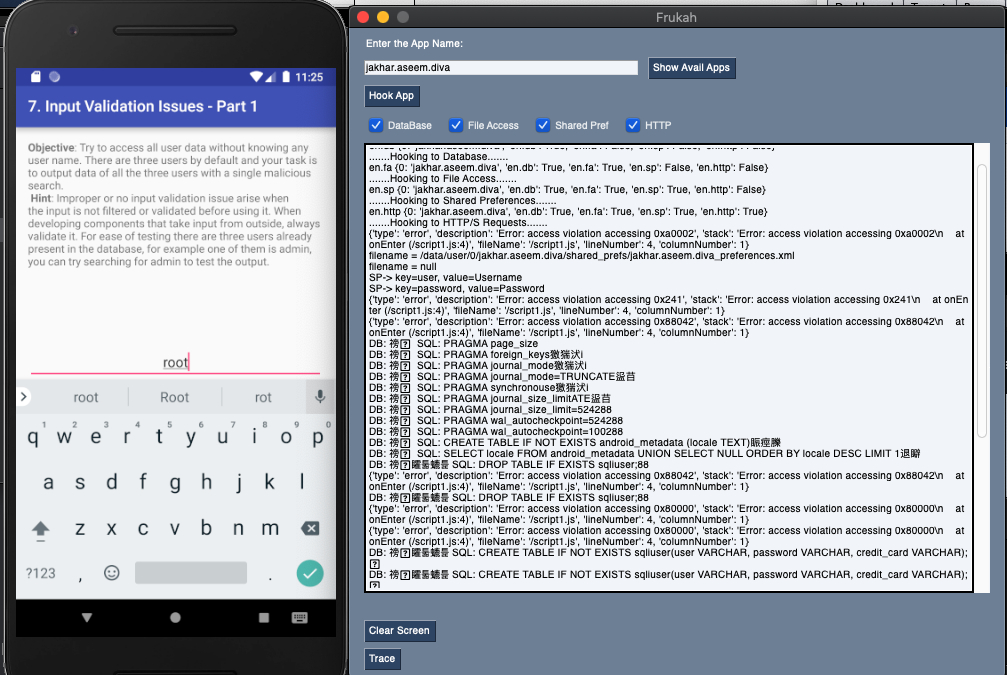
Frukah Memory
This is a Frida/Gui tool used for searching string patterns in memory then used to modify the content. (see screen capture)
This tool does require Frida and PySimpleGui. Go to(https://frida.re/docs/android/) to install Frida use pip to install PySimpleGui. Tool at the moment has not been tested on a windows environment.
To start using:
- Open a virtiual device in Android - Make sure Frida Server is running (see https://frida.re/docs/android/)
- Open the app (e.g., DIVA) or app you want to Hook/Frukah Memory into
- In the Command line enter "$python3 frukah_memory.py"
- In Frukah, enter the App PID such as for 4507 as shown in the provided screen capture. Note, click on "Show Avail Apps" to see loaded applications
- Click on "Hook App"
- Start searching for strings in memory then modify the string by providing the correct memory location.

