BMCU-Flasher
If BMCU Flasher or my other open-source projects are useful to you and you would like to support further development:


Cross-platform flasher for BMCU (WCH ISP protocol).
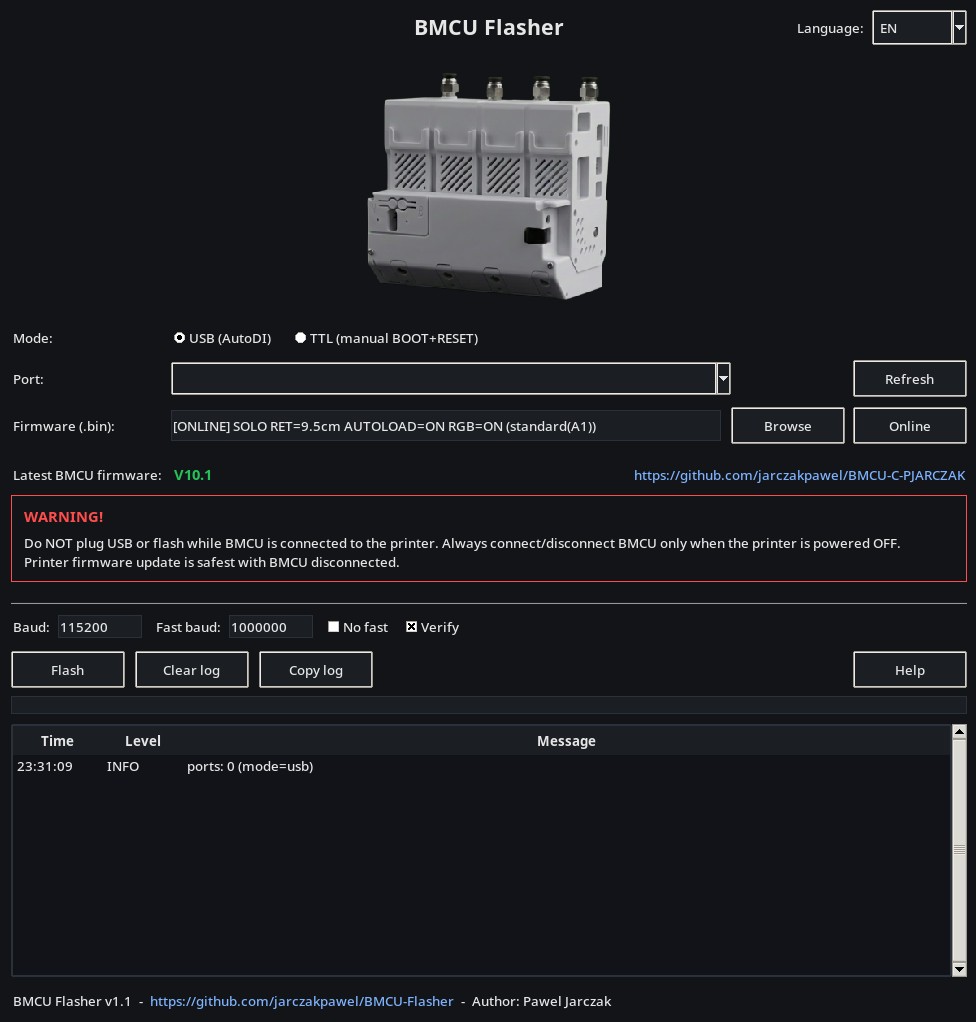
- OS: Linux / Windows / macOS / Android
- Modes:
- USB (BMCU with CH340 on board, AutoDI)
- Native USB (Toaiot BMCU built-in USB, no CH340)
- TTL (pin header / external USB-Serial, manual BOOT entry)
- Android:
- USB (CH340 + USB OTG)
- Native USB (Toaiot built-in USB + USB OTG)
- TTL (external USB-Serial, manual BOOT entry)
- Online Bambu / Klipper firmware selection
- Local .bin file flashing
- App language follows system language
Download
Download prebuilt binaries from Releases.
Main builds:
- Windows x64: BMCU-Flasher-windows-x64.zip
- Windows x86: BMCU-Flasher-windows-x86.zip
- macOS Apple Silicon (arm64): BMCU-Flasher-macos-arm64.zip
- macOS Intel (x86_64): BMCU-Flasher-macos-x86_64.zip
- Linux x64: BMCU-Flasher-linux-x64.tar.gz
- Linux arm64: BMCU-Flasher-linux-arm64.tar.gz
- Android APK: BMCU-Flasher-android.apk
Legacy / experimental / community (older OS, best-effort):
- Windows legacy (older Windows): BMCU-Flasher-windows-legacy-x64.zip, BMCU-Flasher-windows-legacy-x86.zip
- macOS Catalina 10.15 (Intel): BMCU-Flasher-catalina-1.2.1.zip (community build by Doyle4, tested on Catalina)
- macOS legacy try (CI attempt): BMCU-Flasher-macos-x86_64-legacy-try.zip (may not run on Catalina)
Run from source
Install the Python dependencies:
python -m pip install -r requirements.txt
Then start the GUI:
python bmcu_flasher_gui.py
On some Linux distributions, Tkinter may need to be installed separately (for example python3-tk on Debian/Ubuntu).
Android requirements
- Android 5.0+ (API 21+) (minSdk=21)
- USB OTG + USB host mode
- CH340 supported for USB mode
- Toaiot Native USB supported through the CH32V203 USB ISP bootloader
- External USB-Serial adapters supported for TTL mode
- TTL automatically retries the full flash at 115200 baud if the fast transfer fails
- Do NOT plug USB or flash while BMCU is connected to the printer
Firmware
Latest firmware:
- Bambu: https://github.com/jarczakpawel/BMCU-C-PJARCZAK
- Klipper: https://github.com/jarczakpawel/BMCU-Klipper
GUI has "Online" firmware selection:
- choose Bambu or Klipper
- Bambu: choose mode, AMS_AUTO (recommended) / legacy AMS_A-D, retract length, AUTOLOAD and RGB
- Klipper: the latest single firmware.bin is downloaded automatically
- both desktop and Android can also flash a local .bin file
Drivers (CH340)
In USB mode (CH340), drivers may be required on Windows. Linux and macOS usually work out-of-the-box.
TTL bootloader entry
For the initial TTL bootloader entry:
- Disconnect the USB cable from the USB-Serial adapter/BMCU.
- Hold the BOOT button.
- While holding BOOT, connect the USB cable.
- Release BOOT only when the LED on the BMCU main board lights up.
If the flasher later asks you to re-enter the bootloader during the same flash:
- Keep USB connected.
- Hold BOOT.
- Tap RESET once.
- Release BOOT.
TTL is wired as RX/TX crossed, 3V3 to 3V3 and GND to GND. Do not connect 24V while flashing through the TTL adapter.
Usage
GUI (recommended):
- Run the app
- Click "Online" to pick the exact firmware variant (mode / slot / retract / autoload / RGB)
- Click "Help" inside the app (wiring + bootloader steps)
Android:
- Install APK
- Choose USB, Native USB or TTL mode
- Choose Online or a local .bin file
- Online: choose Bambu or Klipper
- Click "Flash"
CLI (optional):
- USB (auto port by VID/PID):
python3 bmcu_flasher.py firmware.bin --mode usb
- TTL (manual bootloader entry, port required):
python3 bmcu_flasher.py firmware.bin --mode ttl --port /dev/ttyUSB0
- Native USB (Toaiot built-in USB, no serial port):
python3 bmcu_flasher.py firmware.bin --mode native_usb
Credits
Native USB support is based on the implementation and hardware testing from the Toaiot BMCU-Flasher fork.
License
MIT - see LICENSE.
