phone-harness


Enable Claude Code, Codex, or any agent to use your real phone. The agent can scroll, tap, type, and read your phone with no jailbreak, no Xcode, and nothing installed on the phone.
iPhone through the Mac's iPhone Mirroring window
Android over adb from macOS, Linux or Windows
Phone Harness Cloud phone: an Android over adb, or an iPhone over HTTPS
  ● agent: wants to open Weather
  │
  ● find_text("Weather") → (400, 468)
  │
  ● tap(400, 468) → reads the screen → forecast is up
  ✓ done
Try Phone Harness Cloud → Hosted iPhones and Androids with stealth, real numbers, 2FA, and unlimited devices
Get started by sending the setup prompt to your coding agent.
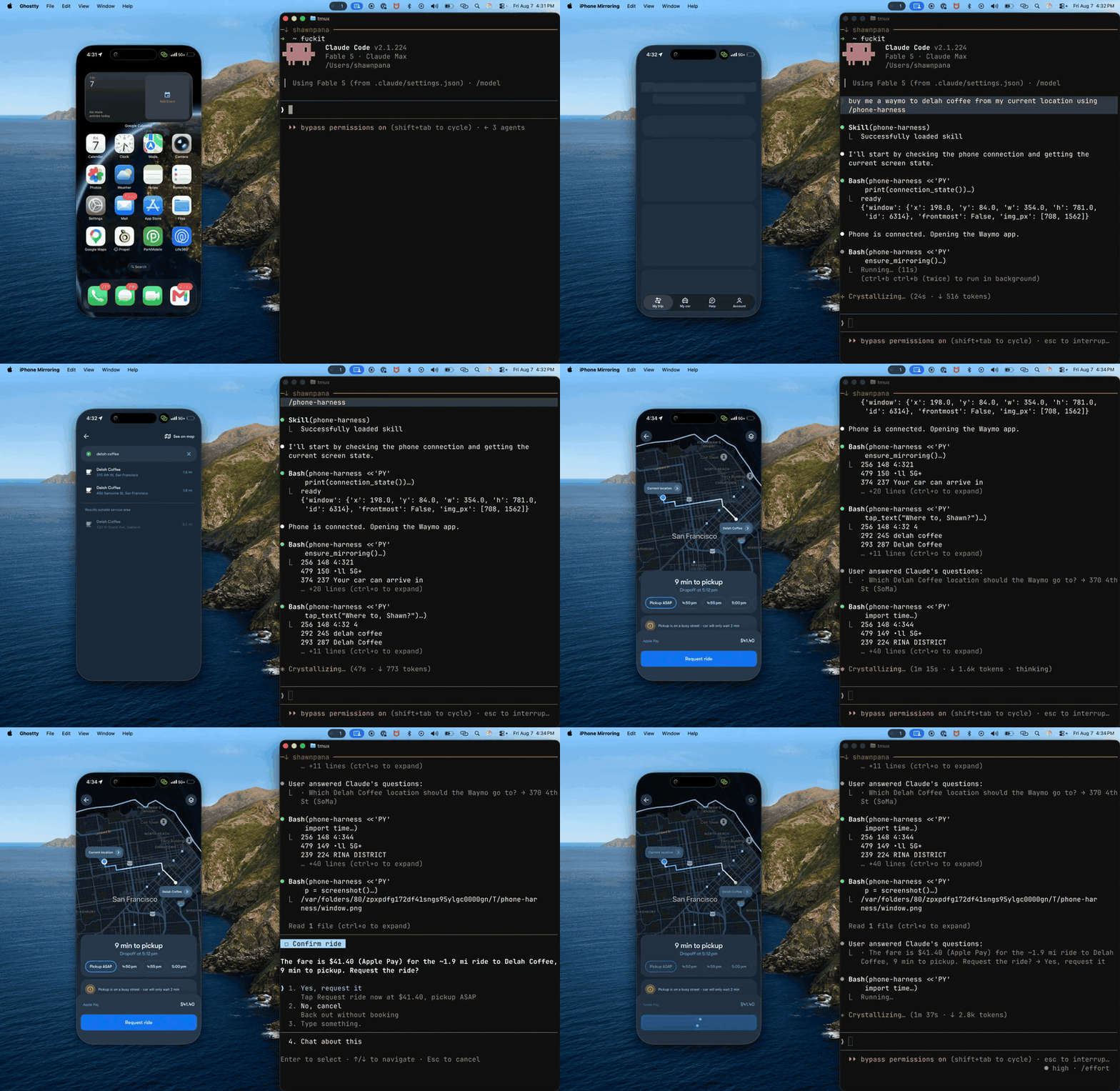
Task: "Buy me a Waymo to Delah Coffee from my current location."
Setup
For the CLI, send this setup prompt to your agent (Claude Code, Codex, Grok Bot, and more):
Install or upgrade phone-harness to the latest stable version with uv using Python 3.12, register the skill from `phone-harness skill`, then read https://github.com/phone-harness/phone-harness/blob/main/onboarding.md and walk me through it. Follow https://github.com/phone-harness/phone-harness/blob/main/install.md if setup or connection fails.
The agent installs the CLI, asks which phone to use, and walks you through the steps that need your hands. What each phone needs:
| Phone | Needs |
|---|---|
| iPhone | macOS 15+, iPhone Mirroring paired to an iOS 18+ iPhone, Accessibility and Screen Recording permission |
| Android | adb and USB debugging, on macOS, Linux or Windows |
| Cloud Android / iPhone | Phone Harness Cloud account; cloud Android also needs adb |
phone-harness doctor checks the setup. Full details: install.md and setup/.
MCP: add https://mcp.phone-harness.com/mcp to any MCP client (setup). Cloud Android and iPhone only for now.
Hermes Agent: hermes plugins install phone-harness/phone-harness/integrations/hermes. See integrations/hermes.
OpenClaw: openclaw plugins install clawhub:phone-harness. See integrations/openclaw.
Usage
phone-harness <<'PY'
open_app("Notes")
tap_text("New Note")
type_text("hello from the harness")
print([o["text"] for o in screen()][:10])
PY
Helpers are pre-imported; helpers.py has the full list. The agent saves its own helpers in ~/.phone-harness/agent-workspace.
Phone Harness Cloud
No phone on your desk, or need more than one? Phone Harness Cloud hosts them for you:
- Android phones on demand: a fresh one per session, or a saved phone that keeps its apps and logins.
- Dedicated real iPhones, driven over HTTPS from any OS.
- A live view of the phone in your browser while the agent works.
phone-harness cloud login            # once: approve in your browser
phone-harness cloud ls               # phones on the account, and any live session
phone-harness cloud start            # cloud.phone if set, else a temporary Android; 15 min (--for 90s, 15m)
phone-harness cloud start ios        # the account's iPhone, when only one is listed
phone-harness <<'PY'
print(screenshot())
PY
phone-harness cloud stop             # ends the session; a saved Android is written back
The same helpers drive a cloud phone: an Android over adb, an iPhone over HTTPS. cloud start takes a phone's name or id from cloud ls, or ios / android; with none it starts a temporary Android. phone-harness cloud lists every command.
How it works
Every phone sits behind the same helpers, so a script written for one runs on the others.
- iPhone: captures the iPhone Mirroring window, reads it with Apple's Vision OCR, and sends taps, swipes and typing as input events.
- Android: adb for screenshots and input, the accessibility tree for text. USB or Wi-Fi.
- Cloud Android: the same as Android, over adb to a hosted phone.
- Cloud iPhone: ops over HTTPS.
phone-harness config set platform ios|android picks the default phone. phone-harness update upgrades the CLI, and it prints one line when a new version is out (PHONE_HARNESS_NO_UPDATE_CHECK=1 silences it).
Limits
- Unlocking the iPhone pauses mirroring; a PIN-locked Android needs the user.
- OCR sees text, not icons. Unlabeled controls need a screenshot and a vision-capable model.
- No multi-touch, no camera or Face ID flows. DRM video renders black.
- Connecting the phone is always the user's job.
Sponsor
phone-harness is free and maintained in my own time. Sponsoring keeps it that way.
