Qwen-MM-Plugins
English · 中文
Native multimodal plugins for Qwen models. Make any agent harness multimodal-native.



📰 News
- 2026-09-22: 💬 Join our WeChat group or Slack community to discuss workflows, share projects, and suggest new features.
- 2026-09-20: 🚀 Added MHS for operating physical hardware and video-spatio for 3D spatial reasoning over images and video.
- 2026-09-16: 🛠️ Added omni-skill-creator to turn demonstration videos into reusable Agent Skills.
Earlier updates
- 2026-09-10: 🎬 Added omni-chatcut for music videos, movie commentary, and video translation, plus omni-video2note for turning tutorial videos into illustrated PDFs.
- 2026-09-10: 🌐 Added the Plugin Hub to browse plugins, documentation, and cookbook examples with videos and interactive demos.
- 2026-09-03: 🧠 Added omni-memory to build and query audio-visual memory across long videos, including speakers, dialogue, sounds, and events.
- 2026-08-11: 🧩 Introduced standalone api and search plugins, separating Qwen VL/Omni model services and web search from local multimodal tools.
- 2026-08-03: 🎉 Initial release! core brings native image, video, document, and 3D file reading; video-memory enables long-video QA; video-edit handles media generation and editing; Blender and FreeCAD support 3D modeling and parametric CAD; and edu-agent creates educational videos and interactive explainers.
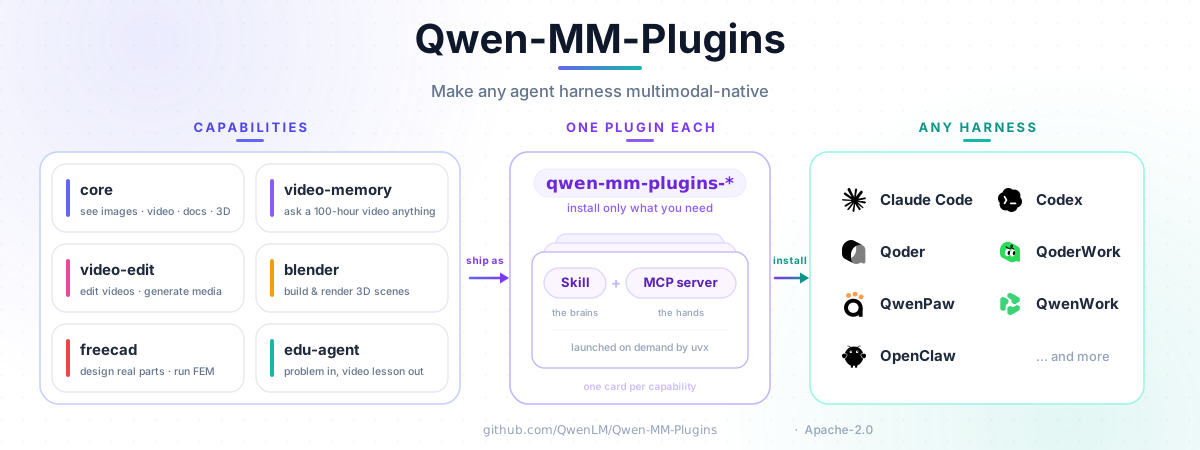
Architecture
Install
For agents
Ask your agent (replace core and api with the plugins you need):
Install the core and api plugins following https://raw.githubusercontent.com/QwenLM/Qwen-MM-Plugins/main/docs/en/installation.md
For users
The guided installer supports Claude Code, CodeBuddy, Codex, Qoder, OpenClaw, Qwen Code, and Gemini
CLI. Shared configuration lives in ~/.qwen-mm-plugins/config.
In-app setup for WorkBuddy, QoderWork, and QwenWork, plus manual setup for DeepSeek Harness, Hermes Agent, opencode, pi, and QwenPaw, is documented in the other harness guide.
curl -fsSL https://raw.githubusercontent.com/QwenLM/Qwen-MM-Plugins/main/install.sh | bash
Update the capabilities already installed in one harness:
curl -fsSL https://raw.githubusercontent.com/QwenLM/Qwen-MM-Plugins/main/install.sh | bash -s -- update
Released capabilities use independent, immutable tags. For local checkout installs, rollback, manual skill + MCP setup, dependencies, and Windows/WSL2, see the installation guide.
Capabilities
Each capability is installed independently as a Skill plus an optional MCP server, named
qwen-mm-plugins-<capability>. Pick by your agent's main model. We strongly recommend the core
plugin for multimodal models: it lets the main model read images, video and files natively, rather
than routing them through a separate API or ad-hoc shell commands.
General:
| Capability | Use case | Cookbook |
|---|---|---|
core |
Reads local images and video frames, and visualizes documents, code, data, and 3D models for the agent to inspect. Includes media metadata, cropping, bounding-box annotation and page/frame export. No API key in the default native mode. | Cookbook |
nifti |
Inspects NIfTI header metadata and renders configurable source-axis slices with volume-level intensity normalization, explicit window presets and effective-configuration reporting. | Cookbook |
api |
Calls model services to understand images, video and audio: VL vision chat/OCR/grounding, Omni transcription/diarization/captioning/event analysis, dedicated ASR and SAM3 segmentation. Uses DashScope or compatible self-hosted services, configured per model family. With DashScope, oversized local audio and video can use model-bound temporary OSS automatically. | Cookbook |
search |
For any model. Web search and page extraction with Serper, Exa, Tavily or Serply; reverse-image search uses Serper. | Cookbook |
mhs |
For any model. Operates real hardware — cameras, sensors, lamps, arms, lab equipment — through Model Hardware Standard adapters, with host-side safety-limit enforcement and an emergency stop. Adapters are run by the hardware's owner; no cloud key. | Cookbook |
Qwen VL series model (e.g. Qwen3.8-Max, Qwen3.7-Plus):
| Capability | Use case | Cookbook |
|---|---|---|
video-memory |
Builds a hierarchical memory of a long video, so questions about it are answered from the memory instead of re-watching. Needs a DashScope key and ffmpeg. | Cookbook |
video-edit |
Generates images, video and audio, and runs editing workflows over them. Needs a DashScope key, ffmpeg and Node. | Cookbook |
video-spatio |
Answers 3D questions about images and video — distance, size, orientation, left/right/front/behind, camera motion, 3D counting. The model does the perception; stateless geometry tools do the math. No API key for the geometry tools. | Cookbook |
blender |
Drives a running Blender: modelling, materials, lighting and rendering. Needs Blender installed. | Cookbook |
freecad |
Drives a running FreeCAD: parametric CAD, STEP/STL and FEM. Needs FreeCAD installed. | Cookbook |
edu-agent |
Creates Chinese math and science explainer videos and interactive pages. Skill-only; needs Node and ffmpeg. | Cookbook |
Qwen Omni series model (e.g. qwen3.8-omni-flash):
Most harnesses cannot yet feed audio to the main model natively. For now, audio is handled through the API instead.
| Capability | Use case | Cookbook |
|---|---|---|
omni-chatcut |
Video-creation Skill collection for Music-to-MV, movie commentary, and speaker-preserving video translation. Needs the relevant generation/Omni services, ffmpeg/ffprobe, and an optional external dubbing service for translated voice output. | Cookbook |
omni-video2note |
Converts a local tutorial video into an illustrated PDF using Omni audio-video understanding, with review feedback. Needs a DashScope key and ffmpeg. | Cookbook |
omni-skill-creator |
Turns a demonstration video into a reusable Agent Skill. Needs a DashScope key and ffmpeg. | Cookbook |
omni-memory |
Builds an audio-visual memory of a long video: who is present, who said what, how they said it, and what it sounded like. The Omni model reads the video together with its audio track. Needs a DashScope key and ffmpeg. | Cookbook |
omnidr |
Conducts deep research around a video and the user's question, drawing on related webpages, videos, documents, and other external sources to produce an HTML report. | Cookbook |
Exact versions and optional extras are in the installation guide.
Try it
After installing a capability, reference a file and ask naturally; the Skill selects the relevant MCP tool.
@report.pdf          Summarize page 3 and extract its table.
@meeting.mp4         Transcribe this with speaker labels and timestamps.
@place.jpg           Identify where this photo was taken and verify it on the web.
@lecture-2h.mp4      List the main points with timestamps.
@tutorial.mp4        Create an illustrated PDF note at /absolute/path/tutorial-notes.pdf.
core reads media at dynamic resolution, so manual resizing is normally unnecessary.
For NIfTI header metadata, use the dedicated nifti plugin's nifti_inspect tool. Use
nifti_render_slices directly for configurable viewing; inspection is not a prerequisite.
It defaults to three interior slices on source axis 2 with a shared volume-level P1–P99 range.
To try nifti before its first release, follow the source development loop.
Requirements and configuration
uvprovidesuvx, which installs Python dependencies on demand.- Local
coretools need no API key in the default native-image mode. Text-only caption fallback, cloud, and search capabilities need their provider credentials. - Video, document, browser, Blender, and FreeCAD workflows may need system applications.
Run the installer's Configure and Verify actions to set credentials and check dependencies. See Installation for prerequisites and the configuration reference for every setting.
Documentation
- Installation
- Configuration
- Contributing · Local development
- Add a new plugin · Hub authoring · Testing
Citation
If you find this project useful in your research or work, please consider citing it:
@misc{qwen_mm_plugins2026,
  title  = {Qwen-MM-Plugins: Make any agent harness multimodal-native},
  author = {{Qwen Team}},
  year   = {2026},
  url    = {https://github.com/QwenLM/Qwen-MM-Plugins}
}
License
Apache-2.0 — see LICENSE.
