hermes-browser-extension
Browser-native side panel for Hermes Agent — connect active web context through a local gateway, Hermes Cloud, or a self-hosted remote gateway.
Created by Jon Komet (
@abundantbeing). Community extension for Hermes Agent by Nous Research. MIT licensed.
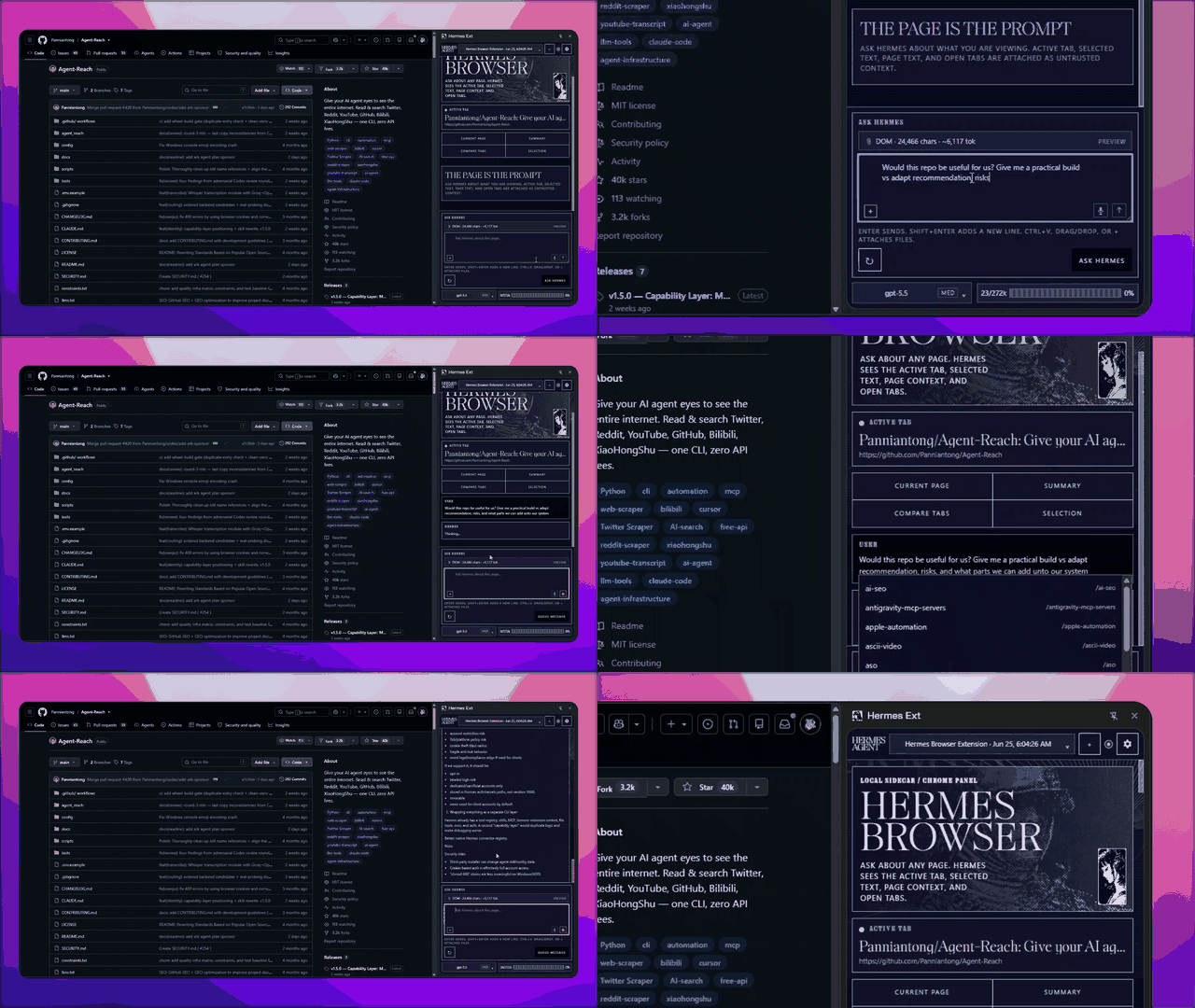
v0.4.0 · Chromium and Firefox · Local / Hermes Cloud / Remote · Full Hermes runtime tools











What it is
Hermes Browser Extension is not a browser chatbot. It is a Chromium side panel or Firefox sidebar for the real Hermes Agent runtime; tab control is Chromium-only. Choose a local gateway, attach to a signed-in Hermes Cloud agent tab, or connect to a self-hosted remote API/dashboard. Local and remote API connections can use the models, tools, skills, sessions, memory, and MCP servers already configured in Hermes; Cloud and dashboard-ticket connections are intentionally Chat-only.
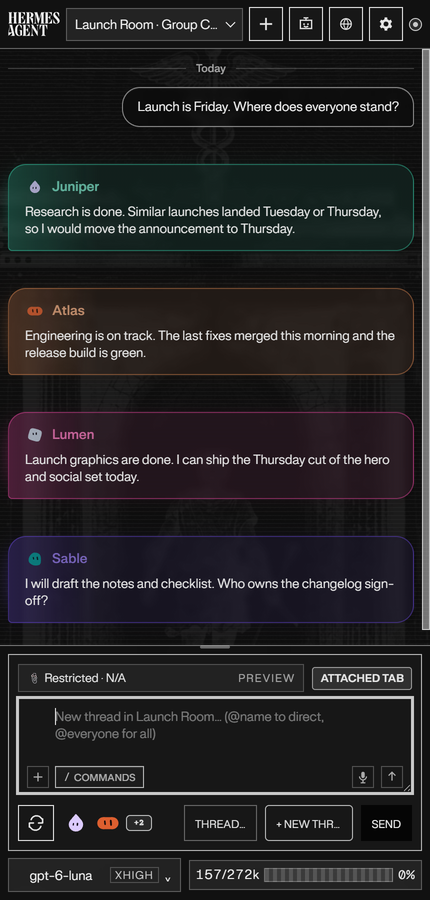
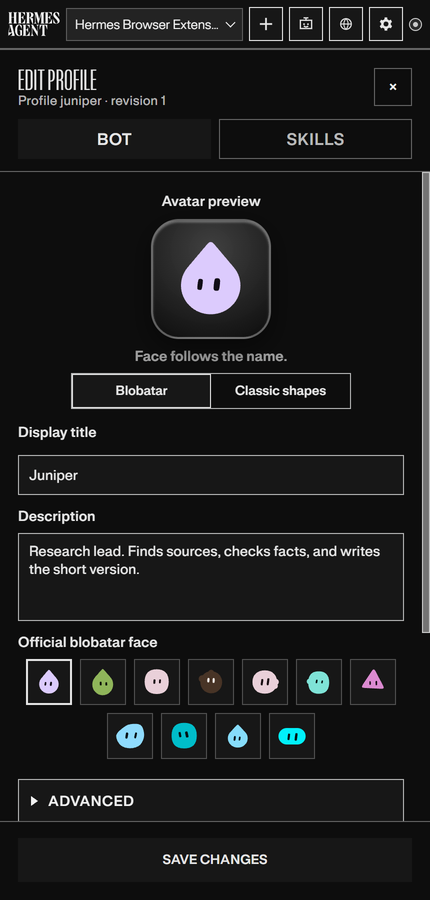
- Bot Mode brings your Hermes agent roster into the panel: switch agents, edit profiles, and run group chats where several agents reply in one room. Current group-chat limitation: page-context delivery is not yet reliable; do not assume group bots can see the active page. Hermes Control is not shown in group chats. Individual bot chats retain their existing page-context and control behavior. Chat-only and remote group turns do not capture page context.
- File attachments show one card per file per message. Open previews the file, Open on computer reveals the original file's containing folder through local Hermes, and Save downloads a copy.
- Tab screenshot stages the visible, approved page as an image attachment when you choose it from the attachment menu. Screenshots are never captured automatically.
- Hermes Control sets which tabs Hermes may operate: This tab, Selected tabs, or a Task set of tabs you pick explicitly.
- Live sessions: running chats are highlighted in Sessions. On gateways that expose live sessions, reopen a working chat to follow its reply and tool activity. Supported live sessions offer Steer, Queue, and Stop instead of idle send controls, and steers sent from another client appear in the followed transcript. On gateways with session authority, chats running in the CLI, Desktop or another window are listed too, and Stop is aimed at the run it was started for.
- Projects: on a dashboard connection to a gateway with session authority, the sessions drawer has a Recents | Projects strip. List projects, open one, start a session in its folder, create a project from a folder path on the machine running Hermes, or move a session to another project or folder. Where the gateway cannot do this, the tab says why and Recents keeps working.
- Response style and chat layout: Vivid UI (cards, tables and charts when they help), Rich text or Plain text, with bubbles on both sides or for your messages only. First-time setup walks through theme, font, style and layout, and ends with Connect to Hermes. Settings > Appearance & Themes can run it again. See guides/haui-v1.md.
- Context: each session's own context window, read from the gateway, with a ring in the composer. On gateways with session authority, Compact context replaces older messages with a summary and reads the session back before it says it worked.
- Capability states: Settings > About & Diagnostics shows what this connection can do (available, cached, unsupported and so on), with the reason, source and age, and the support report prints the same rows.
- Tool activity: a compact expandable list keeps calls out of the reply. Inspect individual calls, close the list without hiding thinking, and keep your place while activity updates.
- Message tools: Copy, Edit, and Restore checkpoint on supported turns, with day dividers, message times, and theme-aware bubbles. History refreshes keep the current question in place when Hermes merges older and newer turns, without hiding genuine repeated messages.
- Reasoning effort: a slider with tick marks, or buttons if you prefer. The choice is remembered. In a group chat each bot keeps its own effort.
- Hermes Assist drafts beside supported text composers and never sends, posts, or submits for you.
- Page comments: pick an element, write a note, and queue pins beside Ask Hermes.
- Settings: a category home opens one section at a time, with Back navigation, edited-category markers, and direct links from related controls.
- Appearance: Light, Dark, or System mode, twelve themes, text zoom, and a font list. Everforest has forest greens and warm parchment; Classic Hermes has amber gold and navy; Anti-Nous has crimson, navy reading panels, and fine gold trim. Nous Light keeps its white shell and Nous Blue accents. Centered background artwork changes when you open the panel and scales with its width; sidecar illustrations rotate independently.
The full list of changes per version lives in the changelog and the releases.
Visual tour
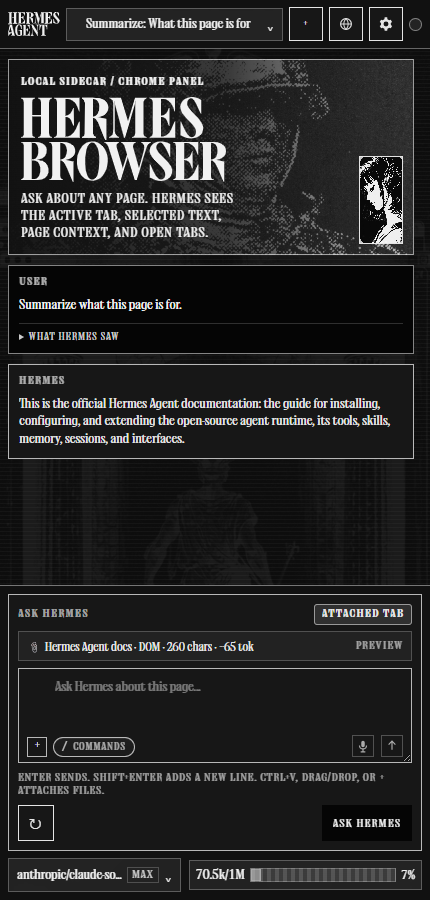
Screenshots use the Mono theme in Dark mode.
| Side panel | Bot chats | Edit a bot |
|---|---|---|
 |
 |
 |
| Theme settings | Local agents | Hermes Control |
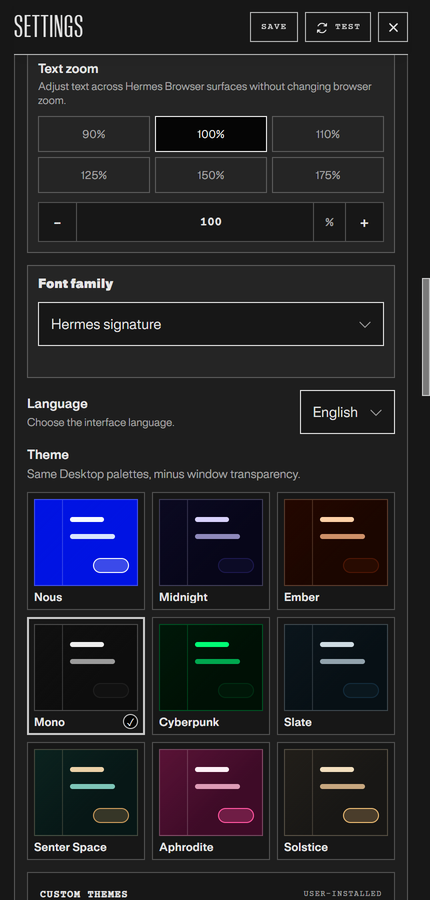 |
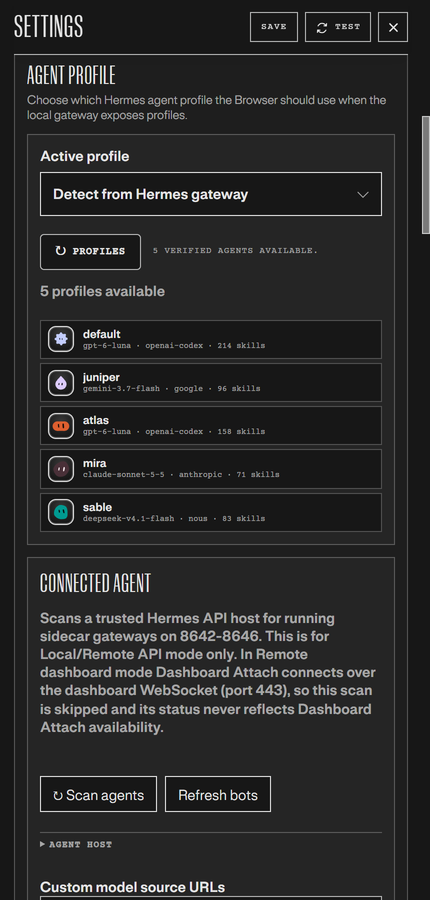 |
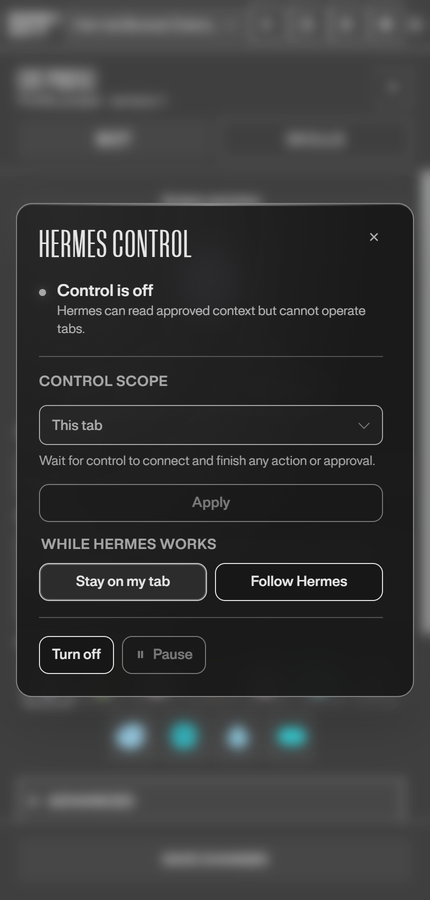 |
Requirements
- Hermes Agent installed and working.
- For Local or Remote API mode: Hermes Gateway/API server enabled locally or on a reachable remote machine. Hermes Cloud instead requires a signed-in HTTPS agent tab.
- Node.js 20+.
- Chrome, Edge, Brave, Comet, or another Chromium browser with Side Panel API support (Chrome 116+ baseline). Firefox 142+ is supported via AMO, the Mozilla Add-ons listing.
npm run build:firefoxis for local/dev Firefox builds only.
Firefox scope
Hermes Browser Extension on Firefox is a chat-and-context client: pairing, the sidebar (declared with sidebar_action, not the Chromium side panel), streaming replies, attachments, and page-context capture all work, but real-tab attach ("Hermes Control") is Chromium-only. Firefox WebExtensions have no equivalent to Chromium's debugger API, so the Firefox package omits that permission and the panel reports Control unavailable with an explanation instead of failing silently. That also means no trusted input and no control of controls inside frames on Firefox. The newer panel screens (first-time setup, Projects, capability states, Compact context) use no Chromium-only API, but they were not exercised in the Firefox sidebar for this release.
If you need Hermes to click, type, scroll, or operate tabs on your behalf, load the extension in Chrome, Edge, Brave, or another Chromium browser. The full compatibility matrix is in guides/connection-guide.md.
Hermes Control
Hermes Control lets Hermes operate a tab you attach. It is opt-in, off until you turn it on, and Chromium-only.
- Current Hermes needs the extension's Hermes plugin for it. Hermes 0.22.5 and earlier carry Hermes Control themselves. Hermes builds from October 24, 2026 on (canary, and every release after 0.22.5) get it from the
hermes-browser-extensionplugin: runhermes plugins install https://github.com/abundantbeing/hermes-browser-extension.git#companion-plugin --enable(add--profile <name>per bot) and restart the gateway. companion-plugin/README.md lists everything it needs. - Several tabs at once. Hermes can list the tabs it may use, open pages in new background tabs, act in any of them by tab id without changing what you are looking at, close tabs (after asking you), and group the ones it opened. A link Hermes clicks that opens a new tab becomes a tab it can use, and every result says which tab it ran in.
- The attached tab is announced to the model. Each turn tells Hermes the tab is ready and lists its interactive elements with refs, so the first click works without a separate snapshot or navigate step.
- Every action returns the updated page. Click, type, scroll, and navigate give back a compact, redacted view of the page with fresh refs, so Hermes can chain steps.
- One debugger session per attached tab. Chrome shows its debugging banner while a tab is attached. The session detaches when you detach the tab, pause or turn off control, or after 60 seconds without a command.
- Approvals still gate risky actions. Consequential or privileged actions wait for your approval, and restricted pages and sensitive fields stay blocked.
- Frames are read and judged again at action time. Hermes can reach controls inside same-site frames of an attached page, such as a live chat box. A frame on a restricted page is never read, and a click, type or hover is refused if the frame it would land in has moved to a restricted address since the page was read or is covered by one. Frames from another site, which Chrome runs in their own process, are not read or acted on.
Quick start
1. Clone and build
git clone https://github.com/abundantbeing/hermes-browser-extension.git
cd hermes-browser-extension
npm install
npm run build
The loadable extension is generated at:
dist/
2. Load unpacked in Chrome/Edge
- Open
chrome://extensionsoredge://extensions. - Enable Developer mode.
- Click Load unpacked.
- Select this repo's
dist/folder — not the repo root and notextension/. - Pin/click the Hermes extension icon to open the side panel.
After code updates, run npm run build again and click Reload on the Hermes Browser Extension card in the browser extensions page.
3. Install in Firefox
- Open AMO in Firefox.
- Click Add to Firefox and confirm the permission prompt.
- The extension opens in the Firefox sidebar (Ctrl+Shift+H).
Because this package is Mozilla-hosted on AMO, Firefox receives future signed updates through AMO automatically. No separate update manifest or manual reinstall is required.
Do not sideload the GitHub source zip/tar.gz. Those are source archives, not a Firefox add-on.
Connect to Hermes
Settings exposes the same three product-level choices as Hermes Desktop:
| Connection mode | Use it for | Transport and boundary |
|---|---|---|
| Local gateway | Hermes running on this machine | Local API server, default http://127.0.0.1:8642, with a scoped browser token or API_SERVER_KEY. |
| Hermes Cloud | A signed-in Hermes Cloud agent open in a normal browser tab | Trusted Dashboard Attach mints a short-lived, single-use WebSocket ticket from the active HTTPS agent tab. Chat-only; no page text, selected text, open-tab context, or attachments are sent. |
| Remote gateway | A self-hosted Hermes backend on another machine or behind a trusted proxy | With a key: remote API server. Without a key: signed-in HTTPS dashboard ticket/WebSocket. |
Existing installations migrate automatically: prior local-api settings become Local gateway, while prior remote-api and remote-dashboard settings remain Remote gateway. A legacy remote dashboard is never silently relabeled as Hermes Cloud.
Local API server
Local-only is the safest default. Put this in your Hermes .env on the machine running Hermes: %LOCALAPPDATA%\hermes\.env on native Windows, ~/.hermes/.env on Linux/macOS/WSL, or $HERMES_HOME/.env if you relocated the data dir or use a named profile:
API_SERVER_ENABLED=true
API_SERVER_HOST=127.0.0.1
API_SERVER_PORT=8642
API_SERVER_KEY=<your-api-server-key>
API_SERVER_CORS_ORIGINS=chrome-extension://<your-extension-id>
On Firefox the extension origin is moz-extension://<extension-uuid>, not chrome-extension://<id>. Use that form in API_SERVER_CORS_ORIGINS instead. Copy the exact value from Settings → Support diagnostics (Extension origin). Firefox assigns the UUID when the extension is installed, so copy it again after a reinstall.
Start or restart the gateway:
hermes gateway run
Verify the API server:
HERMES_GATEWAY_URL=http://127.0.0.1:8642
HERMES_API_TOKEN='<your-api-server-key-or-browser-token>'
curl "$HERMES_GATEWAY_URL/health"
curl -H "Authorization: Bearer $HERMES_API_TOKEN" "$HERMES_GATEWAY_URL/v1/models"
Then in the extension side panel:
- Click Connect to Hermes, the last step of first-time setup or the pop-up that opens when the panel is not paired, and approve locally if your Hermes Desktop/gateway supports the approval flow. Connect later or the pop-up's X dismisses it.
- If approval is not available yet, click Manual setup.
- Choose Local gateway.
- Use Gateway URL
http://127.0.0.1:8642. - Paste your scoped browser token or
API_SERVER_KEY. - Click Test connection, then Save settings.
- Open a normal
https://page and ask:Summarize this page in one sentence.
Remote and Cloud
For a remote machine, bind the API server to a reachable trusted interface and keep CORS narrow. Use a private same-LAN/Tailscale/VPN host with HTTP, or put the API server behind a trusted HTTPS reverse proxy. Do not expose the Hermes API server naked to the public internet.
Hermes Cloud uses Trusted Dashboard Attach: open your Hermes Cloud agent in a normal browser tab, sign in, choose Hermes Cloud in Settings, and click Connect to Hermes. The ticket stays in memory only and is never persisted or logged. Cloud is Chat-only in this release.
Full setup for remote API servers, self-hosted dashboards, and what syncs after connection is in guides/connection-guide.md.
Security model
Hermes Browser Extension is intentionally conservative:
- Local gateway by default; remote API server support requires an explicit URL, token, and CORS allowlist.
- Hermes Cloud and self-hosted dashboard attach require an explicit HTTPS origin, the exact active signed-in tab, and a short-lived single-use WebSocket ticket kept only in memory.
- Cloud/dashboard-ticket connections are Chat-only and cannot send browser page text, selected text, open-tab context, or attachments.
- Strong bearer/API key required for API access.
- Page content is wrapped as untrusted context before it reaches Hermes.
- Credential-bearing URLs are omitted from active, selected, open-tab, pinned-scope, prompt, receipt, and payload-hash surfaces.
- Page context capture is read-only. Page control exists only through opt-in Hermes Control on Chromium, which acts on tabs you attach and pauses risky actions for approval. Hermes Assist may insert a reviewed draft into a supported focused composer only after an explicit user action; it never clicks Send/Post/Submit, navigates, checks out, or performs browser-control workflows.
- Chromium builds request
debuggerfor opt-in Hermes Control; Firefox builds omit it. NonativeMessaging,cookies,history, orbookmarkspermissions.downloadsis limited to explicit user-requested generated-image/artifact saves. - Restricted pages include browser internals, extension pages, and obvious banking/crypto/password/payment/health/government-tax categories.
See SECURITY.md, PERMISSIONS.md, DATA-FLOW.md, and PRIVACY.md for details.
Troubleshooting
Optional web search through MCP
For Local or Remote API connections, follow the Parallel Search MCP guide to add free web search and page fetching to the connected Hermes runtime without a Parallel API key.
I loaded the extension but nothing works
Make sure you loaded dist/, not the repo root. The selected folder must contain manifest.json directly.
Chrome still shows an older version after updating
The browser is still using an old unpacked folder or an unpacked extension card that was not reloaded. For v0.4.0, the source manifest, built dist/ manifest, and release archive should all contain manifest.json version 0.3.4.
Fix:
- Extract/download the v0.4.0 release or run
npm run buildlocally. - Open
chrome://extensionsoredge://extensions. - On the Hermes Browser Extension card, click Reload.
- If it still shows an older version, click Remove, then Load unpacked again and select the fresh v0.4.0
dist/folder. - Click service worker / Inspect views only for debugging; it is not the version source.
Skills or profiles do not load
Startup shows Skills and Profiles separately. A current Hermes connection can load profiles and skills through its API routes when no dashboard is available. Older connections keep the dashboard path, and a missing route preserves the last loaded details instead of clearing them. A connected gateway does not guarantee that every catalog route is available, and each route is advertised on its own.
Images attached earlier in a session load again when the gateway serves its stored files. On a gateway that does not, the panel keeps the previews it still has and shows the file names for the rest.
After the Hermes backend is responding again, reopen the panel or use Test connection to retry. Existing skills and profiles are not deleted by a catalog timeout.
Voice dictation records but no text appears
Hermes transcription needs an advertised API transcription route or a reachable dashboard transcription route. If neither is available, the panel uses browser speech when that browser supports it. A slow or unavailable browser speech download now falls through instead of leaving the click waiting, but browser speech itself depends on the browser.
Filing a support issue
Open Settings → Support diagnostics → Copy Diagnostics and paste the report into the GitHub issue or support thread.
The copied block includes version/build, browser family, gateway origin, connection state, each capability's state, source, age and reason, selected model/provider, context mode, extractor mode, last visible error, and a bounded gateway failure classification when available. It intentionally excludes API keys, bearer tokens, cookies, page text, selected text, tab titles, raw tracebacks, local paths, and full tab URLs.
The side panel says it cannot connect
Check that Hermes Gateway/API server is running and reachable from the browser:
curl http://127.0.0.1:8642/health
# or, for remote mode:
curl http://<trusted-remote-host>:8642/health
If /v1/models fails, check API_SERVER_KEY, the extension's stored API key/browser token, and API_SERVER_CORS_ORIGINS. For remote mode, the browser extension origin (chrome-extension://<id>, or moz-extension://<extension-uuid> on Firefox) must be allowlisted on the Hermes machine. A session request that fails with HTTP 403 and no error body is the same CORS gate. The side panel then names the exact origin and the API_SERVER_CORS_ORIGINS= line to add to the Hermes .env, and your draft stays in the composer.
If the browser only reports a failed fetch, it cannot prove whether the gateway refused the connection, blocked the request, or received a turn before the response was lost. The side panel keeps the draft and offers Check connection. It never resends automatically. Check the session history before manually sending again, since a dropped response can leave delivery unconfirmed and a second send could duplicate the turn. An answered /health probe confirms reachability at probe time, not that the earlier turn failed because of CORS.
More troubleshooting, including runtime warnings and native Hermes computer use, is in guides/troubleshooting.md.
Development
npm test
npm run check:js
npm run check:manifest
npm run verify
npm run build
npm run package
extension/          MV3 source: sidepanel, background worker, content scripts, lib/
companion-plugin/   the Hermes plugin (hermes-browser-extension): Hermes Control on current Hermes, browser-context tools and hooks (see its README.md and install.md)
scripts/            build, Firefox packaging, manifest checks
tests/              node:test suite
dist/               generated unpacked build (load this one)
Relationship to Hermes Agent
Hermes Agent is an open-source project by Nous Research. Hermes Browser Extension is a community extension by Jon Komet that connects through a local gateway, Hermes Cloud agent tab, or self-hosted remote gateway. It is designed to live at the edge of the ecosystem without adding core tool-schema footprint.
Useful links:
- Hermes docs: https://hermes-agent.nousresearch.com/docs
- Hermes API server docs: https://hermes-agent.nousresearch.com/docs/user-guide/features/api-server
- Hermes upstream repo: https://github.com/NousResearch/hermes-agent
Star History
Contributors
External contributions that have shipped are credited in CONTRIBUTORS.md. Interface icons are pixelarticons (MIT); its licence ships in extension/assets/icons/pixel/. Rules signature typefaces (Blaze Type) ship under Nous Research's commercial license; see extension/assets/fonts/README.md.
Author
Built by Jon Komet (@abundantbeing). If this extension saves you time, support the work on Ko-fi.
License
MIT. See LICENSE.
