skills
Small, composable skills for your favorite agent.
Quick install recommended skills
npx @agent-native/skills@latest add
See the full CLI docs below.
Skills At A Glance
/factory(experimental) - Configure connected sources, prompts, schedules, and delivery policies./factory-collect- Collect feedback, product telemetry, errors, and issues./factory-babysit-pr- Follow one authorized PR through checks and review./factory-review-prs- Review a PR queue with separate reply, approval, and merge criteria./factory-ship- Publish delivery work under configured verification and merge policies./factory-lookback- Find recurring signals and systemic fixes across a chosen time window./factory-human-digest(experimental) - Summarize work that still needs human judgment across configured sources./factory-watchdog- Find stalled delivery work and notify when a concrete next step is due./factory-recover- Resume interrupted work when its authorization and worktree are still valid.
/an- Open and operate Agent-Native apps beside the conversation./webmcp- Open web apps in the built-in browser and use MCP tools first./visual-plan- Turn text plans into rich visual plans./visual-recap- Turn diffs into interactive visual recaps./visual-edit- Open a running local app for visual editing./rewind- Recover recent local screen context through Clips Desktop./agent-watchdog- Audit another agent's work./plan-arbiter- Compare competing plans and choose a direction./plow-ahead- Keep working through ordinary ambiguity./efficient-fable- Orchestrate Fable with cheaper helper agents./efficient-frontier- Preserve high-cost models for judgment./stay-within-limits- Track usage limits before long-running work./quick-recap- End work with a clear status signal./read-the-damn-docs- Check authoritative docs before guessing./turn-into-app- Turn a thread, skill, spreadsheet, or Claude/ChatGPT project into a visual Agent-Native app.
Skill Details
/factory
Experimental. Start with the Factory guide, then open the full Factory skill for agent instructions.
Factory is an experimental set of agent skills for turning feedback, product telemetry, errors, and delivery signals into policy-gated software changes. The modules can collect current reports, look back for recurring failures, and review or ship changes. Configure schedules and separate rules for fixing, replying, reviewing, approving, merging, deploying, and closing.
flowchart LR
    sources["Feedback and telemetry"] --> collect["/factory-collect"]
    sources --> lookback["/factory-lookback<br/>recurring patterns"]
    collect --> agent["Factory workflow"]
    lookback --> agent
    agent -->|"policy allows"| fix["Isolated fix<br/>checks and verification"]
    agent -->|"unclear or out of scope"| human["Human decision"]
    fix --> pr["Pull request"]
    pr -->|"approval and merge rules"| ship["Ship"]
    pr -->|"needs judgment"| human
    ship -->|"if allowed"| source["Reply or close source item"]
Configuration at a glance
This abbreviated example uses placeholder scopes and connected tools. Factory does not install these integrations or create the schedule for you.
version: 1
timezone: UTC

sources:
  - id: support
    provider: slack
    scope: channel-id
  - id: errors
    provider: sentry
    scope: organization/project

repositories:
  - id: app
    provider: github
    remote: example/project

workflows:
  collect:
    enabled: true
    sources: [support, errors]
    reply:
      mode: criteria
      require: [one missing detail blocks triage or verification]
      tone: warm and direct
      guidance: Ask one targeted question, then re-triage when an answer arrives.
  lookback:
    enabled: true
    schedule: monthly
    window: last 30 days
    sources: [support, errors]
    implement:
      mode: manual
  human-digest:
    enabled: true
    schedule: weekly
    window: last 7 days
    repositories: [app]
    sources: [support, errors]
    include: [pull-requests, issues, feedback, errors]
    granularity: balanced

skill_prompts:
  factory-ship: |
    Keep release summaries concise and link the verified change.
  factory-human-digest: |
    Group repeated UX concerns, but include a link to every source item.
Each Factory skill reads its own optional prompt entry as additional project guidance. Prompt text cannot authorize an action that its separate policy blocks.
The configuration reference explains the available YAML fields, source patterns, policies, and host limitations.
/factory-collect
Start with the Factory guide, then read the full collect skill.
/factory-babysit-pr
Start with the Factory guide, then read the full PR babysitting skill.
/factory-review-prs
Start with the Factory guide, then read the full PR review skill.
/factory-ship
Start with the Factory guide, then read the full shipping skill.
/factory-lookback
Start with the Factory guide, then read the full lookback skill.
/factory-human-digest
Experimental. Start with the Factory guide, then read the full human digest skill. It defaults to all configured human-pending work from the last 7 days at balanced detail; ask for a narrower source type, another date range, or brief or detailed output.
/factory-watchdog
Start with the Factory guide, then read the full watchdog skill.
/factory-recover
Start with the Factory guide, then read the full recovery skill.
/an
Open a granted Agent-Native app in the host's inline MCP App or built-in browser
surface, then keep the agent connected to the app's live UI and screen state.
For example, run /an slides to open Slides, sign in in that browser
surface, and then ask the agent to create or update the deck. Focused requests
such as make this bigger use the Slides selection state and a bounded
readback-verified edit.
The plugin registers Dispatch MCP automatically for Claude and Codex at
https://dispatch.agent-native.com/mcp. In ChatGPT, add that same URL as
an OAuth custom connector. The host may need a reload or connector rescan after
installation.
/webmcp
Open a requested URL in the host's built-in browser and use the page's MCP or
WebMCP tools before browser UI automation for app communication or edits. For
example, run /webmcp slides.agent-native.com make me a new deck about onboarding
to open Slides and complete the request in that tab. The skill waits for the
user to sign in when needed, then calls the page's window.__agentNativeWebMcp
helper from the host's JavaScript evaluator (or a host WebMCP bridge when one
is exposed): one screen read, one smallest mutation, one readback. If neither
is available, it stops before a state-changing click or type fallback and
reports the limitation.
/visual-edit
Open a running local app in Design as URL-backed iframe screens for visual inspection, route-state exploration, and source-backed editing.
Unlike a static mockup, the canvas stays connected to the app's real routes and
the local bridge. Use /visual-edit when a UI needs to be reviewed or changed
in context, including responsive states and multi-screen flows.
Install the skill and Design connector from your app repository:
npx @agent-native/core@latest skills add visual-edit
Try it on one screen, several routes, a complete flow, or responsive sizes:
/visual-edit the dashboard at desktop size/visual-edit compare the dashboard, settings, and reports pages side by side/visual-edit the onboarding flow from welcome through account created/visual-edit show the dashboard at desktop, tablet, and mobile widths
Read the public Visual Edit README for a hands-on example, and the Agent-Native guide for the full workflow.
/rewind
Use local Clips Rewind screen memory to recover a recent moment: what was said, what appeared on screen, or what happened just before the current task. It searches bounded local chapters, transcripts, OCR, and frames first; it is not a hosted recording archive and does not upload raw local media by default.
Rewind requires macOS, the signed
Clips Desktop app, and a compatible
agent with the local clips-screen-memory MCP connection. If you invoke Rewind
before installing Clips, the skill asks permission to open the official install
flow instead of silently installing capture software. Follow the Rewind setup
and first-test guide.
/visual-plan
Turn ordinary text plans into rich interactive visual plans with diagrams, file maps, annotated code, open questions, and UI/prototype review when useful.
Solves for plans that are too important to bury in chat. The output is scannable, commentable, and intuitive enough for a human to approve before code changes start.
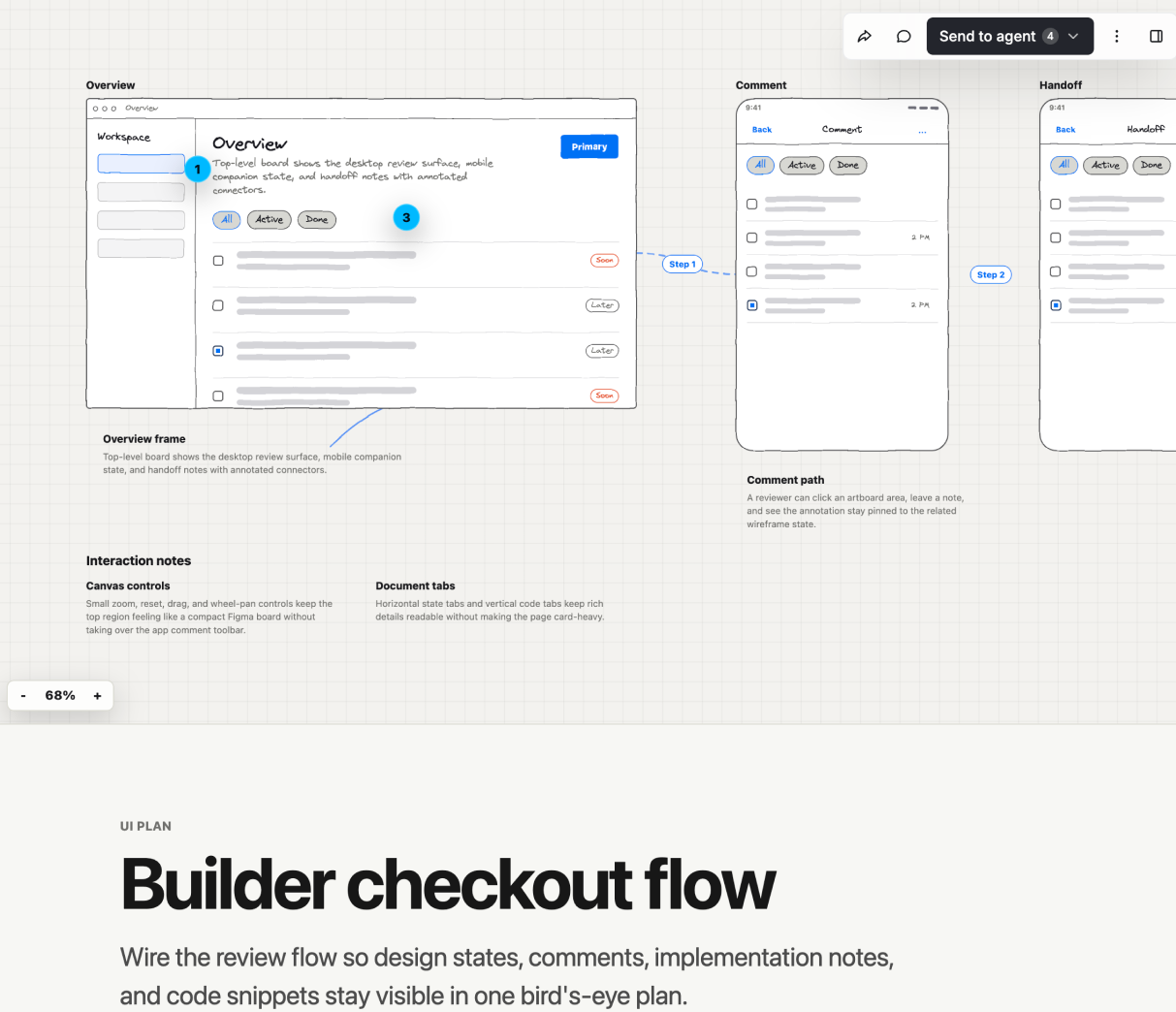
Visual plans are MDX, customizable with your own components, and are viewed with the Agent-Native plans app. In local-files mode, /visual-plan writes and serves MDX locally through a localhost bridge instead of uploading plan content to the hosted database. Source here
/visual-recap
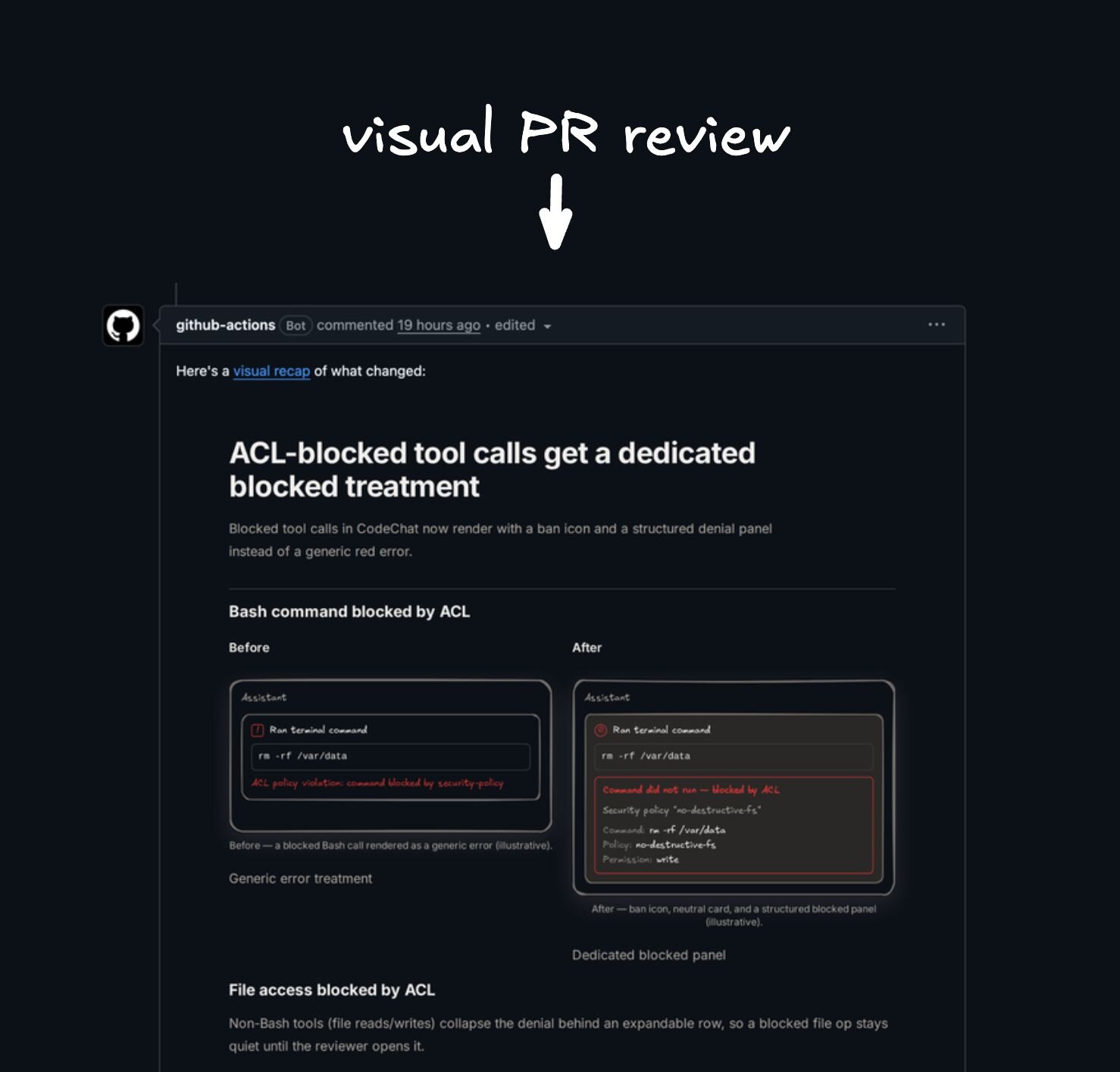
Turn a branch, commit, or PR diff into an interactive visual recap with annotated diffs, diagrams, API/schema summaries, file maps, UI state summaries, and focused review notes.
Solves for diffs that hide the shape of the change. Reviewers can understand contracts, architecture moves, schema changes, and UI impact before diving into raw line-by-line review.
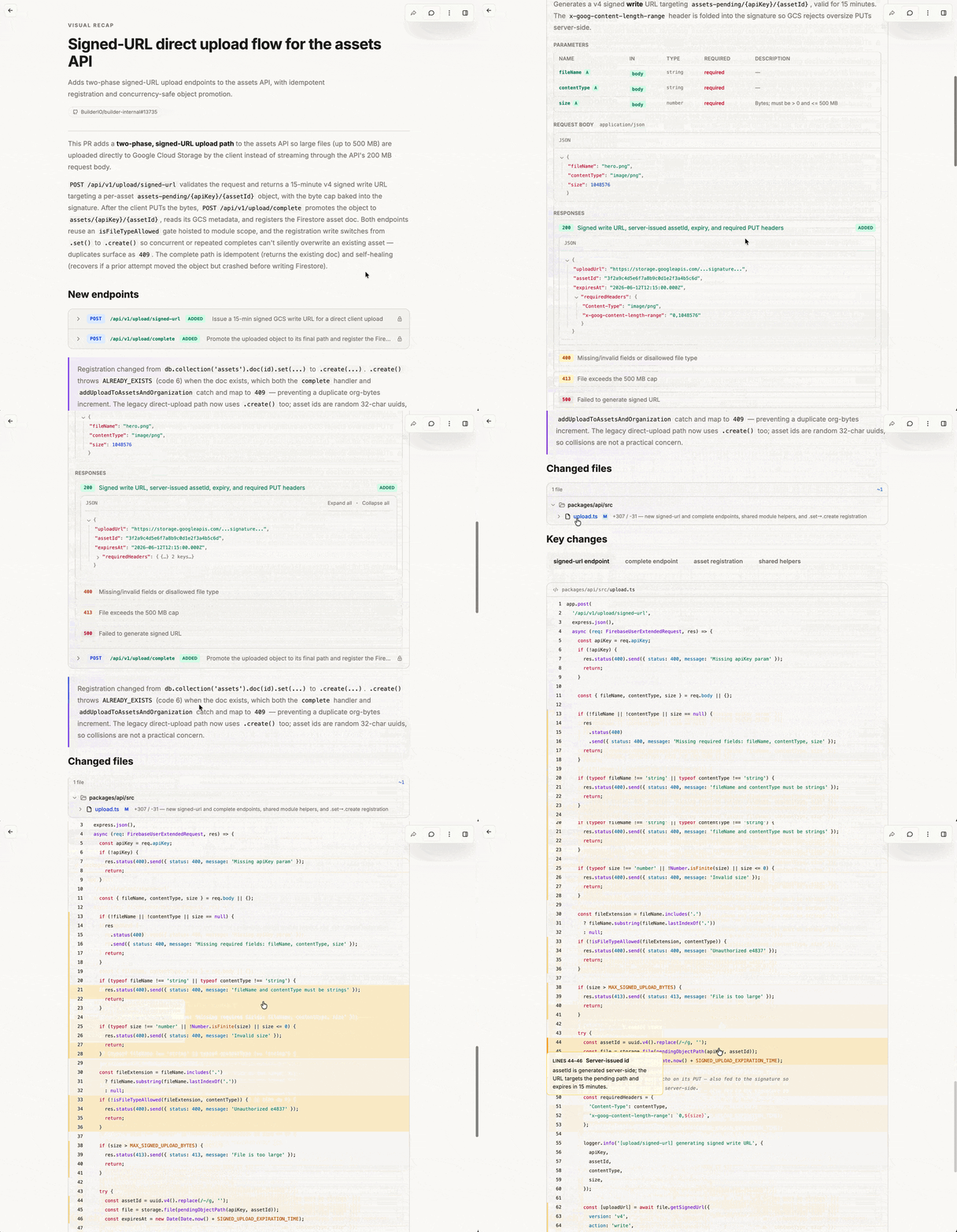
Visual recaps are MDX, customizable with your own components, and are viewed with the Agent-Native plans app. Source here
You can also install a GitHub action for these to be automatically generated for every PR with
npx @agent-native/skills@latest add
/agent-watchdog
Audit another agent's work from a Codex session, Claude Code transcript, PR, branch, or run summary.
Solves for cross-agent handoffs: watch until done, reconstruct what was asked, check what actually changed and verified, report gaps, and optionally make narrow fixes.
/plan-arbiter
Compare competing agent plans and choose one executable direction.
Solves for multi-agent planning loops where Codex, Claude Code, or other agents produce separate strategies. The output is a decision memo with the winning or hybrid plan, rejected alternatives, verification gates, and executor recommendation.
/plow-ahead
Keep working through ordinary ambiguity and finish with a clear decision recap.
Solves for explicit autonomy requests: the agent converts routine questions into assumptions, proceeds with conservative choices, validates the work, and recaps the decisions it made without stopping.
/efficient-fable
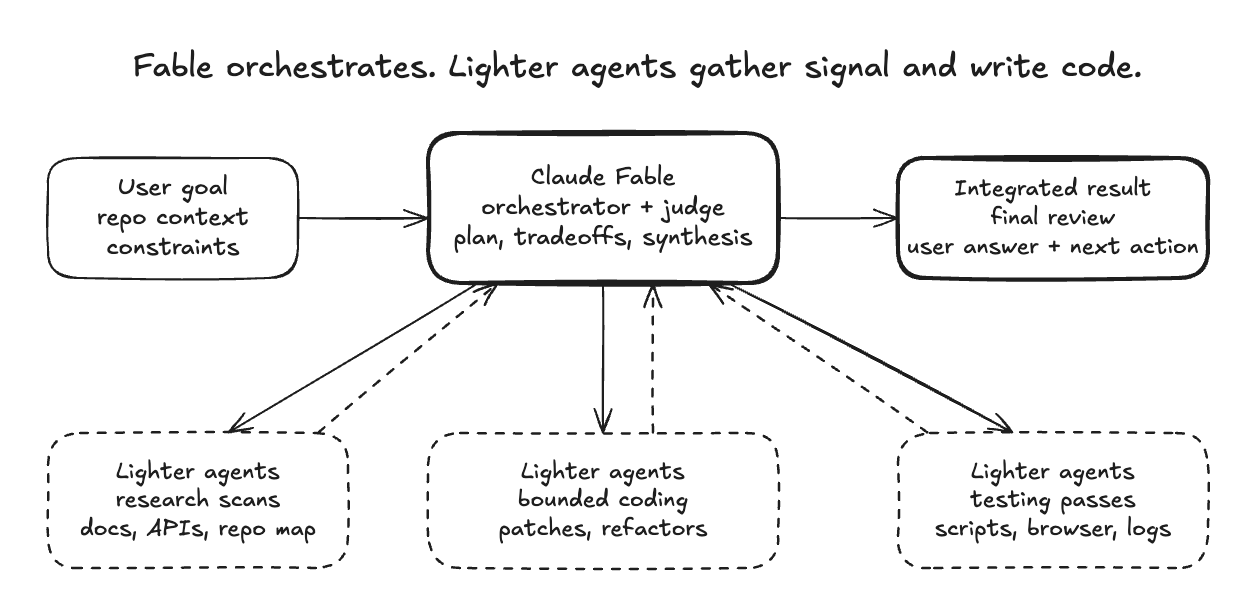
Use Claude Fable as the orchestrator, architect, synthesizer, and final judge while lighter agents handle token-heavy research, coding, testing, and log reduction.
Solves for expensive-model waste: Fable should spend tokens on judgment, not on reading every file, reducing every log, or manually running every browser check.
/efficient-frontier
Apply the same orchestration as /efficient-fable to any high-cost frontier
model: preserve the expensive model for planning, tradeoffs, integration,
validation strategy, and final review; use cheaper agents for bounded heavy
lifting.
Solves for broad work that can be parallelized without asking the most expensive model to do every scan and every edit itself.
/stay-within-limits
Check current 5-hour and weekly usage before substantial work and between parallel waves, then pause new execution at 95% until the active window is clear enough to continue.
Solves for long-running agent sessions that accidentally exhaust the current budget window mid-task instead of pausing cleanly and resuming with a self-contained plan.
/quick-recap
Add a concise final status block convention so every completed response ends with a clear green, yellow, or red work-state signal.
Solves for ambiguity at the end of agent work: done, pending a specific non-routine step, or blocked on the user.
Example green status:
🟢 Updated quick recap docs with output examples
Example yellow status:
🟡 Code updated, set PROVIDER_WEBHOOK_SECRET before testing webhooks
/read-the-damn-docs
Make agents web-search for authoritative docs before they guess from stale model memory.
Solves for version drift and API folklore: package installs, framework config, SDK imports, provider limits, auth, security, billing, data, migrations, deploys, and repo-specific contracts all require a docs pass before implementation. For external APIs and current product behavior, web search for official docs is usually the first move.
/turn-into-app
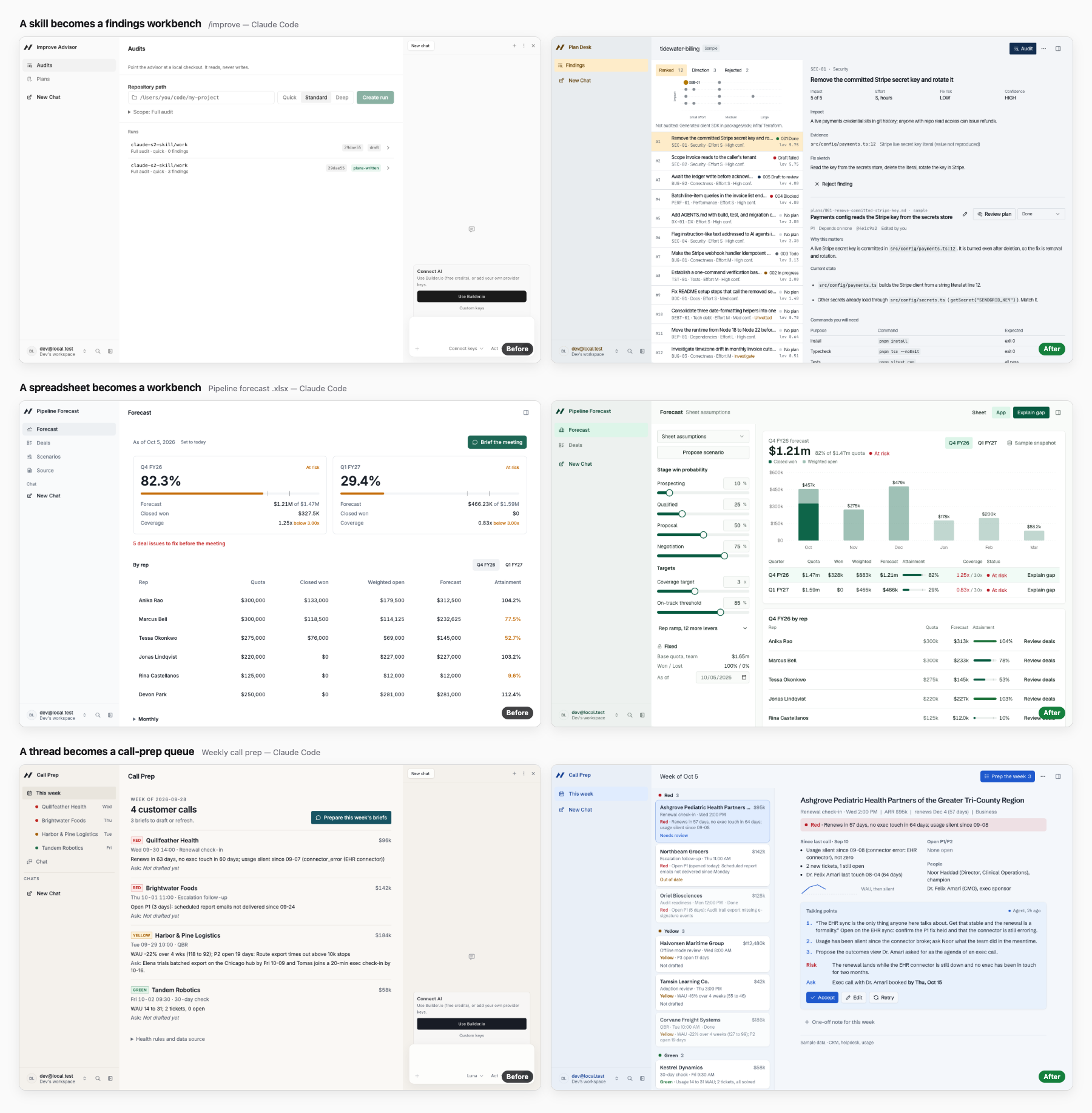
Give a workflow you have already proven the face of an app and the brain of an agent. Turn a thread, a skill, a spreadsheet, or a Claude or ChatGPT project into a visual Agent-Native app that opens on your world, populated: a week grid for scheduling work, a board for stages, a live workbench for a spreadsheet model, a triage queue with a drafted reply. Buttons sit on the objects they act on, so you click, watch the agent work, and see the result land back in the app.
A form under a step bar is the failure it is built to avoid. The skill picks the app's shape from the source, commits to a visual direction with real light and dark tokens, seeds realistic sample data, builds the agent moments into the objects, and reviews its own screenshots at desktop and phone sizes before it hands the app back.
Install it, then try one of these:
npx @agent-native/skills@latest add --skill turn-into-app
/turn-into-appat the end of a thread/turn-into-app /some-skillto package a skill/turn-into-app ./forecast.xlsxto turn a spreadsheet into a workbench/turn-into-app ./project-export/to turn a Claude or ChatGPT project into an app
It builds and verifies locally in Claude Code, Codex, Cursor, and other coding agents; Claude and ChatGPT on the web hand a bounded brief to Builder through Dispatch. Read the full guide.
Install
Run the installer:
npx @agent-native/skills@latest add
The picker shows the full catalog, with the recommended skills preselected. Toggle any additional skills you want.
The installer walks you through the choices:
- Which skills to install.
- Where visual plans and recaps should live: hosted shareable links (recommended), local files only, or a self-hosted/custom Plan app.
- Agent Skills through the shared
.agentspath for Codex, Pi, Cursor, OpenCode, GitHub Copilot / VS Code, and similar agents, plus Claude Code's native skills path when selected. - User-level or project-level install.
- Whether to add managed
AGENTS.md/CLAUDE.mdinstruction blocks when the selected skills have always-on guidance. - Whether to add the PR Visual Recap GitHub Action when
/visual-recapis selected. - Whether to configure a compatible local agent connection when
/rewindis selected. The installer does not install Clips Desktop. If it is missing, invoking Rewind asks permission to open the official download flow; capture remains disabled until you turn it on in the Clips tray.
Skip the picker with --skill:
npx @agent-native/skills@latest add --skill quick-recap
npx @agent-native/skills@latest add --skill visual-recap --with-github-action
npx @agent-native/skills@latest add --skill rewind
npx @agent-native/skills@latest add --skill webmcp
You can also use Vercel's skills CLI for a plain skill-folder copy:
npx skills@latest add BuilderIO/skills --skill quick-recap
Do not use the plain-copy installer for Rewind: it cannot configure the local
clips-screen-memory connection. Use @agent-native/skills or
@agent-native/core for a complete Rewind setup.
That installer is useful for quick copying, but it does not add the managed
AGENTS.md / CLAUDE.md instruction blocks or the PR Visual Recap GitHub
Action that pair well with these skills.
Install in Claude Cowork
This repo is also a Claude plugin marketplace for Cowork. To install the shareable, updatable plugin in Cowork:
- Open
Customize>Plugins>Add marketplace. - Enter
BuilderIO/skills(orhttps://github.com/BuilderIO/skills). - Install
Builder Skillsand enable thewebmcpskill.
Invoke the installed skill with its plugin namespace:
/builder-skills:webmcp slides inspect the current screen without editing
For Team and Enterprise workspaces, an organization admin can provision the
marketplace or plugin for everyone. Cowork does not currently expose a
supported CLI command for installing an account-level plugin; the marketplace
is shared through Git, while each Cowork user installs it from Customize.
Install in Claude Code
This repo is also a Claude Code plugin marketplace. To install all of the skills as a managed, updatable plugin, run these inside Claude Code:
/plugin marketplace add BuilderIO/skills
/plugin install builder-skills@builder-skills
The skills are then namespaced under the plugin (for example,
/builder-skills:quick-recap). Pull future updates with:
/plugin marketplace update builder-skills
The plugin installs Rewind's instructions only; it cannot configure the local Clips Screen Memory MCP connection. When invoked, Rewind can ask permission to open the official Clips Desktop installer, but it must not install or enable capture silently. After Clips is installed and Rewind is enabled, also run:
npx @agent-native/core@latest skills add rewind --client claude-code --scope user --yes
Treat Rewind as unavailable until screen_memory_status succeeds.
This path does not add the managed AGENTS.md / CLAUDE.md instruction blocks
or the PR Visual Recap GitHub Action; use the npx @agent-native/skills
installer above if you want those.
