ecapture

eCapture (旁观者)
Capture SSL/TLS plaintext with eBPF—no MITM proxy or custom CA installation.
English · 汉字



[!IMPORTANT] Supports Linux on x86_64 (kernel 4.18+), aarch64 (kernel 5.5+), and LoongArch64
loong64(kernel 6.6+). Android supports x86_64 and aarch64 with the existing kernel minimums. Requires root privileges or specific Linux capabilities. Does not support Windows or macOS.
- Captures plaintext TLS/SSL traffic from OpenSSL, LibreSSL, BoringSSL, GnuTLS, and NSS/NSPR libraries.
- Supports plaintext capture for Go TLS programs, including HTTPS/TLS traffic in Go applications.
- Audits bash and zsh command history for host security monitoring.
- Audits MySQL queries and supports MySQL 5.6/5.7/8.0 and MariaDB.
Getting started
Download
ELF binary file
[!TIP] Supports Linux on x86_64, aarch64, and LoongArch64; Android supports x86_64 and aarch64.
Download the ELF binary package from the releases page, extract it, and run:
sudo ecapture --help
Docker image
[!TIP] Linux only.
# Pull the Docker image
docker pull gojue/ecapture:latest

# Run it
docker run --rm --privileged=true --net=host -v ${HOST_PATH}:${CONTAINER_PATH} gojue/ecapture ARGS
⚠️ Security note:
--privileged=truegrants full host access. For production use, prefer specific capabilities instead. See the Minimum Privileges Guide.
See Docker Hub for more information.
Capture OpenSSL plaintext data
sudo ecapture tls
eCapture automatically detects the system's OpenSSL library and starts capturing plaintext traffic. When you make an HTTPS request, such as curl https://google.com, the captured request and response are displayed:
...
INF module started successfully. moduleName=EBPFProbeOPENSSL
??? UUID:233851_233851_curl_5_1_172.16.71.1:51837, Name:HTTP2Request, Type:2, Length:304
header field ":method" = "GET"
header field ":path" = "/"
header field ":authority" = "google.com"
...
📄 For complete output examples, see docs/example-outputs.md.
Modules
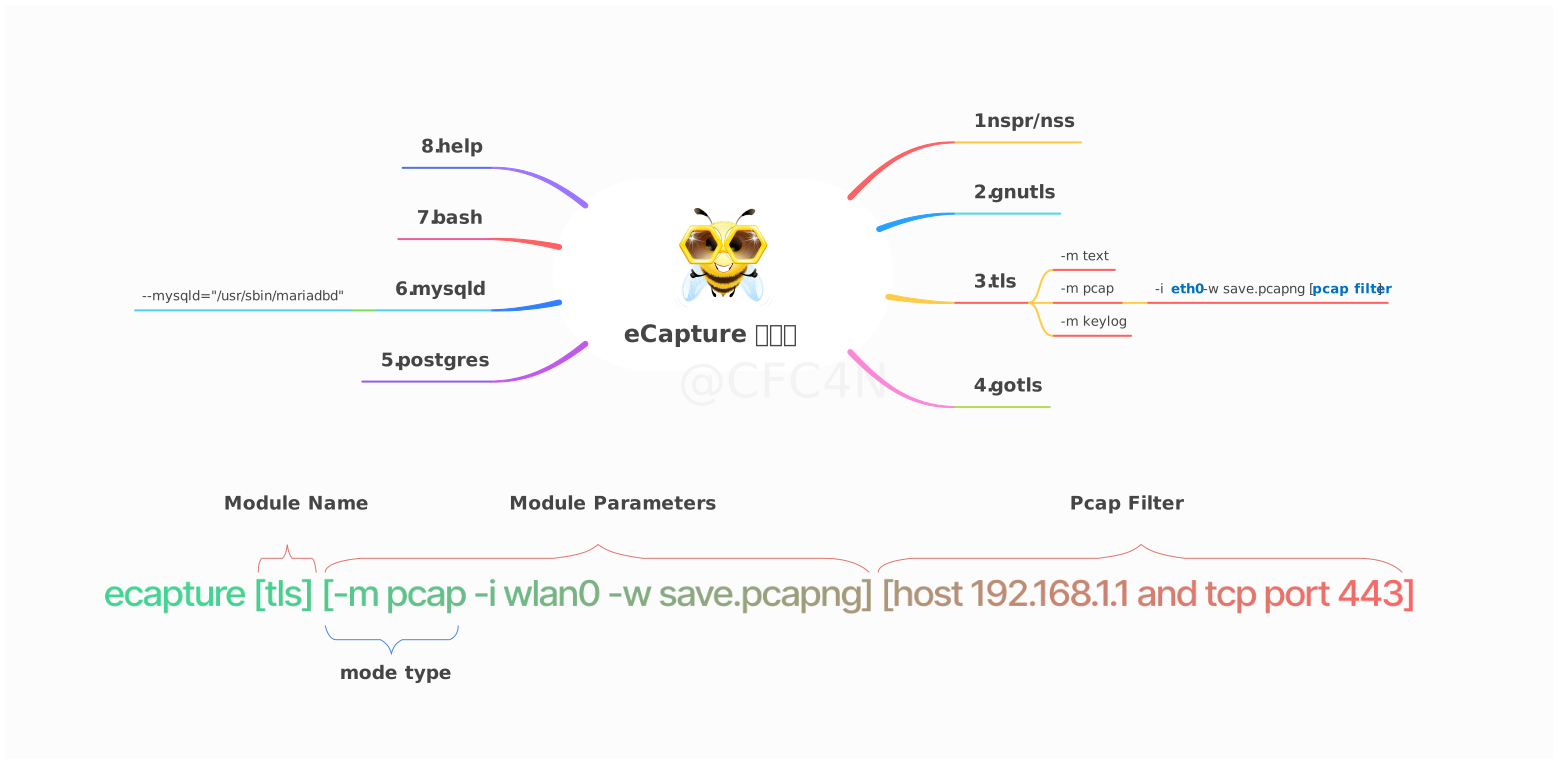
The eCapture tool includes 8 modules that can capture plaintext data from TLS/SSL libraries such as OpenSSL, GnuTLS, NSS/NSPR, BoringSSL, and GoTLS. It also supports auditing commands and queries from Bash, MySQL, and PostgreSQL applications.
- bash: captures bash commands
- zsh: captures zsh commands
- gnutls: captures plaintext from GnuTLS libraries without needing a CA certificate
- gotls: captures plaintext communication from Go programs using TLS/HTTPS
- mysqld: captures SQL queries from MySQL 5.6/5.7/8.0 and MariaDB
- nss: captures plaintext from NSS/NSPR libraries without needing a CA certificate
- postgres: captures SQL queries from PostgreSQL 10+
- tls: captures plaintext TLS/SSL traffic without a CA certificate (supports OpenSSL 1.0.x/1.1.x/3.0.x and newer)
You can use ecapture -h to view the full list of subcommands.
OpenSSL module
eCapture searches the default library paths from /etc/ld.so.conf to locate shared libraries and detect the OpenSSL library location. You can also set the library path explicitly with the --libssl flag.
If the target program is statically linked, you can set the program path directly as the value of the --libssl flag.
The OpenSSL module supports three capture modes:
pcap/pcapngmode stores captured plaintext data inpcap-NGformat.keylog/keymode saves TLS handshake keys to a file.textmode captures plaintext data directly, either writing it to a file or printing it to the console.
For OpenSSL, GoTLS, and GnuTLS, --eventaddr is the uniform primary event
destination. It accepts stdout, a plain path or file:// URI,
tcp://host:port, and ws:///wss:// (ordered binary frames). The mode
selects text, NSS Key Log, or pcapng representation; the address selects only
the transport. --keylogfile and --pcapfile remain compatible primary-file
aliases in their respective modes. Setting --eventaddr together with the
corresponding alias is an error. In pcapng mode, --keylogfile is a separate
optional keylog artifact.
--logaddr carries eCapture runtime logs only. Console runtime logs use
stderr, while captured stdout contains only event bytes. eCaptureQ is additive:
enabling it does not replace --eventaddr or --logaddr.
Pcap mode
Supports TLS-encrypted HTTP 1.0/1.1/2.0 over TCP and HTTP/3 (QUIC) over UDP.
You can specify -m pcap or -m pcapng together with --pcapfile and -i. The current compatible default value of --pcapfile is save.pcapng.
sudo ecapture tls -m pcap -i eth0 --pcapfile=ecapture.pcapng tcp port 443
This command saves captured plaintext packets as a pcapng file, which can be opened with Wireshark.
📄 For complete pcapng mode output, see docs/example-outputs.md.
Keylog mode
You can specify -m keylog or -m key together with the --keylogfile option. The current compatible default output file is ecapture_openssl_key.log.
The captured OpenSSL TLS master secret is saved to --keylogfile. You can also enable tcpdump capture and then open the file in Wireshark, setting the master secret path to view plaintext packets.
sudo ecapture tls -m keylog -keylogfile=openssl_keylog.log
You can also use tshark for real-time decryption and display:
tshark -o tls.keylog_file:ecapture_masterkey.log -Y http -T fields -e http.file_data -f "port 443" -i eth0
Text mode
sudo ecapture tls -m text
This outputs all plaintext data packets.
GoTLS module
Similar to the OpenSSL module.
gotls command
Capture TLS plaintext data.
Step 1:
sudo ecapture gotls --elfpath=/home/cfc4n/go_https_client --hex
Step 2:
/home/cfc4n/go_https_client
More help
sudo ecapture gotls -h
Other modules
Modules such as bash, mysqld, and postgres can also be used. You can view the full list with ecapture -h.
Videos
- YouTube video: How to use eCapture v0.1.0
- eCapture: supports capturing plaintext of Go TLS/HTTPS traffic
eCaptureQ GUI application
eCaptureQ is a cross-platform graphical client for eCapture that visualizes eBPF-based TLS capture capabilities. Built with Rust + Tauri + React, it provides a responsive, real-time interface for analyzing encrypted traffic without needing a CA certificate. It simplifies complex eBPF capture workflows and makes them easier to use.
It supports two modes:
- Integrated mode: unified Linux/Android execution
- Remote mode: Windows/macOS/Linux clients connect to a remote eCapture service
Event forwarding
Video demonstration
https://github.com/user-attachments/assets/c8b7a84d-58eb-4fdb-9843-f775c97bdbfb
Protobuf protocols
For details of the Protobuf log schema used by eCapture/eCaptureQ, see:
Star History
Security & operations
- Security policy — vulnerability reporting and supported versions
- Minimum privileges — required Linux capabilities and least-privilege configuration
- Defense & detection — how to detect and defend against unauthorized usage
- Performance benchmarks — repeatable overhead and event-loss measurements
- Release verification — how to verify the integrity of release artifacts
Contributing
See CONTRIBUTING for details on submitting patches and the contribution workflow.
Compilation
Custom compilation
You can customize the features you want, such as setting the uprobe offset address to support statically linked OpenSSL libraries. Refer to the compilation guide for detailed instructions.
Loong64 releases are cross-built on Ubuntu 24.04 x86_64 with LLVM 18. Use
TARGET_ARCH=loong64; the sysroot, BTF, verification steps, and current runtime
validation limits are documented in Loong64 build and validation.
Remote configuration updates
After eCapture is running, you can dynamically modify configurations through HTTP interfaces. Refer to the HTTP API documentation.
Event forwarding
eCapture supports multiple event-forwarding methods. You can forward events to packet capture software such as Burp Suite. For details, refer to the Event Forwarding API documentation.
