SharpView
Introduction: 安卓带有尖角气泡的控件(TextView,ImageView,EditText,Layout),支持渐变色,圆角等自定义属性
Tags:

custom TextView,LinearLayout,RelativeLayout with sharp
Screenshots
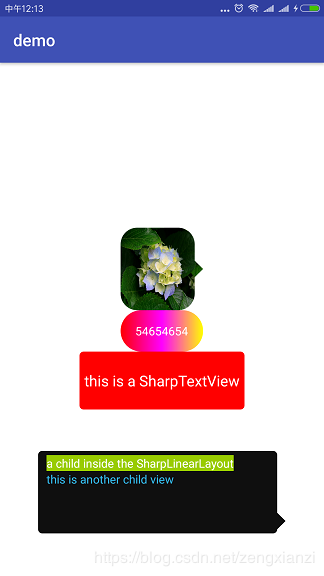
Import
 Step 1. Add the JitPack repository to your build file
 Add it in your root build.gradle at the end of repositories:

    allprojects {
        repositories {
            ...
            maven { url "https://jitpack.io" }
        }
    }


Step 2. Add the dependency

    dependencies {
            compile 'com.github.zengzhaoxing:SharpView:v2.4.4'
    }
Maven
Step 1. <repositories>
   <repository>
      <id>jitpack.io</id>
      <url>https://jitpack.io</url>
   </repository>
</repositories>

Step 2. Add the dependency
<dependency>
    <groupId>com.github.zengzhaoxing</groupId>
    <artifactId>SharpView</artifactId>
    <version>v2.4.4</version>
</dependency>
Directions
- custom properties
| name | format | instructions |
|---|---|---|
| radius | dimension | 圆角大小 |
| backgroundColor | color | 背景颜色(注意不要是用安卓原生的背景相关的属性(如:background,backgroundResource 等)) |
| arrowDirection | enum | 尖叫汽包相对位置(top,left,right,bottom) |
| relativePosition | fraction | 尖叫汽包相对位置,百分比 |
| sharpSize | dimension | 尖叫汽包大小,为 0 表示不显示尖角,默认是 0 |
| border | dimension | 边框大小,默认是 0 |
| borderColor | color | 边框颜色 |
| startBgColor | color | 渐变初始颜色(渐变时必选) |
| middleBgColor | color | 渐变中间颜色(渐变时可选) |
| endBgColor | color | 渐变结束颜色(渐变时必选) |
渐变颜色只有在 sharpSize 为 0 时(没有尖角)有效
Usage
- 1.In the XML
       <com.zhaoxing.view.sharpview.SharpTextView
           android:layout_width="200dp"
           android:layout_height="70dp"
           android:textColor="@android:color/white"
           android:text="this is a SharpTextView"
           android:gravity="center"
           android:textSize="18sp"
           app:radius="5dp"
           app:arrowDirection="top"
           app:backgroundColor="#f0000000"
           app:relativePosition="20%"
           app:sharpSize="10dp"
           />

       <com.zhaoxing.view.sharpview.SharpLinearLayout
           android:id="@+id/sharp_ll"
           android:layout_width="300dp"
           android:layout_height="100dp"
           android:orientation="vertical"
           android:paddingBottom="5dp"
           android:paddingTop="5dp"
           android:paddingLeft="10dp"
           android:layout_marginTop="50dp"
           app:radius="5dp"
           app:arrowDirection="right"
           app:backgroundColor="#f0000000"
           app:relativePosition="100%"
           app:sharpSize="10dp">


       </com.example.xianzi.sharpview.SharpLinearLayout>
- 2.In the code
SharpLinearLayout sharpLinearLayout = (SharpLinearLayout) findViewById(R.id.sharp_ll);
//get the SharpViewRenderProxy of the sharpView to refresh sharp)
sharpLinearLayout.getRenderProxy().setArrowDirection(SharpView.ArrowDirection.BOTTOM);
sharpLinearLayout.getRenderProxy().setSharpSize(50);
sharpLinearLayout.getRenderProxy().setRelativePosition(0.8f);
sharpLinearLayout.getRenderProxy().setRadius(20);
sharpLinearLayout.getRenderProxy().setBackgroundColor(0xff000000);//注意不要使用安卓原生的设置背景的相关方法(如 setBackground,setBackgroundResource 等)
Usage
目前支持的气泡尖角或圆角控件和安卓原生控件继承关系如下
public class SharpEditText extends EditText
public class SharpTextView extends TextView
public class SharpLinearLayout extends LinearLayout
public class SharpRelativeLayout extends RelativeLayout
public class SharpImageView extends ImageView
Author
name : 曾宪梓
email : 1071481464@qq.com
License
Copyright 2017 zengzhaoxing
Licensed under the Apache License, Version 2.0 (the "License"); you may not use this file except in compliance with the License. You may obtain a copy of the License at
http://www.apache.org/licenses/LICENSE-2.0
Unless required by applicable law or agreed to in writing, software distributed under the License is distributed on an "AS IS" BASIS, WITHOUT WARRANTIES OR CONDITIONS OF ANY KIND, either express or implied. See the License for the specific language governing permissions and limitations under the License.
