klokk
Introduction: 🕒 A kinetic wall clock, built using Compose Desktop
Tags:




A kinetic wall clock, built using Compose Multiplatform. Available on Android, Android TV, and Desktop (Windows, macOS, Linux).
📦 Download
Download the latest release for your platform from the Releases page:
- Android Mobile - APK file
- Android TV - Same APK, optimized for TV experience
- Windows - MSI installer
- macOS - DMG package
- Linux - DEB package
🔮 Demo
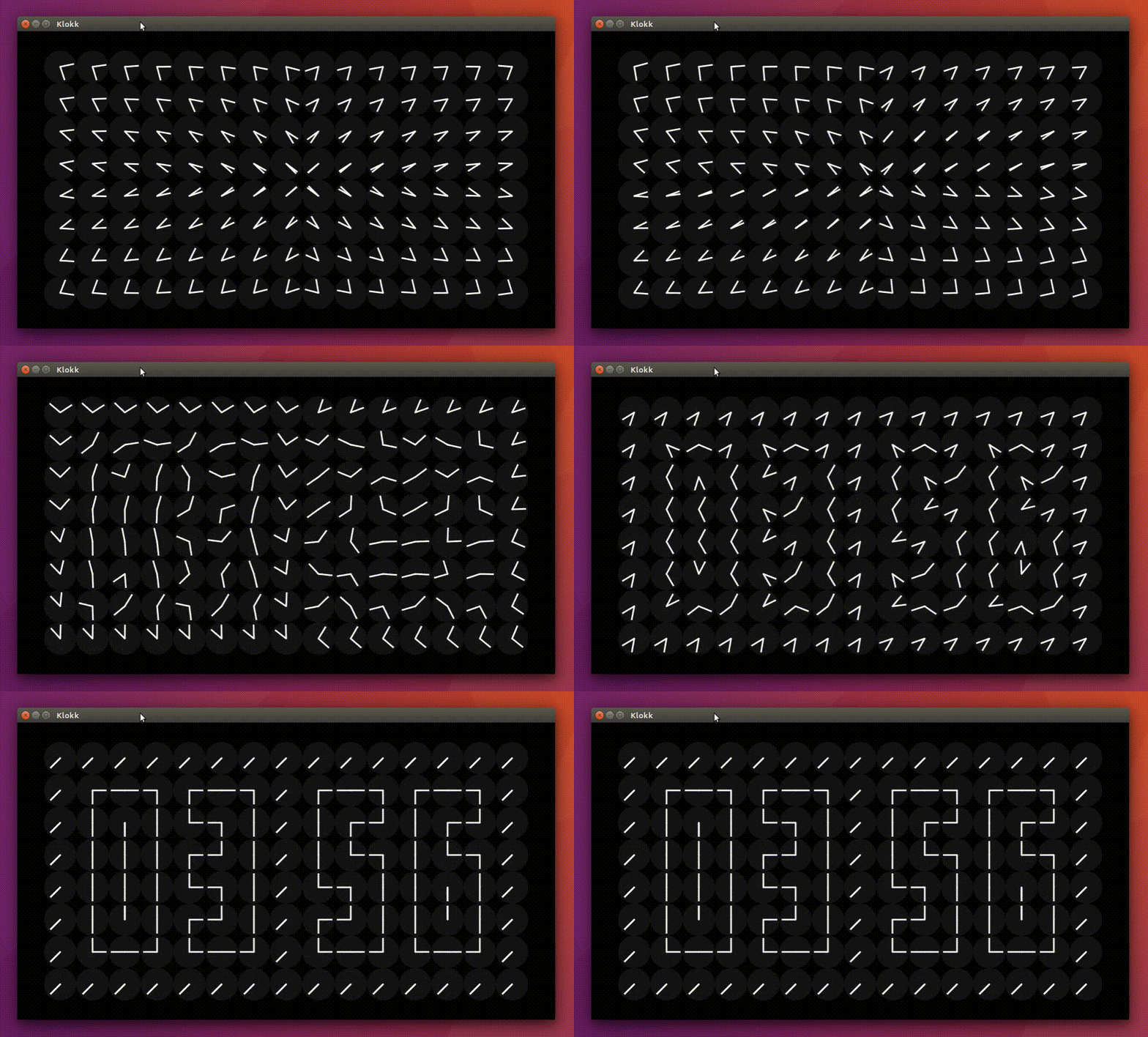
- Watch full demo
- Watch Development - Behind the Scenes - Part 1
- Watch Development - Behind the Scenes - Part 2
🏃♂️ Build & Run
Android
# Install on connected device
./gradlew :app:installDebug

# Or build APK
./gradlew :app:assembleDebug
# APK location: app/build/outputs/apk/debug/app-debug.apk
Desktop
# Run directly
./gradlew :desktopApp:run

# Create installer packages
./gradlew :desktopApp:packageDmg      # macOS
./gradlew :desktopApp:packageMsi      # Windows
./gradlew :desktopApp:packageDeb      # Linux
✨ Platform Features
| Feature | Android Mobile | Android TV | Desktop |
|---|---|---|---|
| Immersive Mode | ✅ | ✅ | ➖ |
| D-pad Navigation | ➖ | ✅ | ➖ |
| Touch Controls | ✅ | ➖ | ➖ |
| Mouse/Keyboard | ➖ | ➖ | ✅ |
| Landscape Lock | ✅ | ✅ (default) | ➖ |
| Screen Always On | ✅ | ✅ | ✅ |
💡 Inspiration
- Nezih Yılmaz's kinetic countdown timer
- A million times humans since 1982
✍️ Author
👤 theapache64
- Twitter: @theapache64
- Email: theapache64@gmail.com
Feel free to ping me 😉
🚀 Creating Releases
This project uses GitHub Actions to automatically build and release packages for all platforms.
How to Create a Release:
- Update version in
app/build.gradle.kts - Commit your changes:
git commit -m "Release v1.0.2" - Create and push a tag:
git tag v1.0.2 && git push origin v1.0.2 - GitHub Actions will automatically build and create a release
See .github/RELEASE_SETUP.md for detailed setup instructions.
🤝 Contributing
Contributions are what make the open source community such an amazing place to be learn, inspire, and create. Any contributions you make are greatly appreciated.
- Open an issue first to discuss what you would like to change.
- Fork the Project
- Create your feature branch (
git checkout -b feature/amazing-feature) - Commit your changes (
git commit -m 'Add some amazing feature') - Push to the branch (
git push origin feature/amazing-feature) - Open a pull request
Please make sure to update tests as appropriate.
❤ Show your support
Give a ⭐️ if this project helped you!



☑️ TODO
- Dark Theme Support
- Wave Movement
- Tornado Movement
- Background Music
- Add second movement to border clocks
- Add alphabets
📝 License
Copyright © 2021 - theapache64

Licensed under the Apache License, Version 2.0 (the "License");
you may not use this file except in compliance with the License.
You may obtain a copy of the License at

   http://www.apache.org/licenses/LICENSE-2.0

Unless required by applicable law or agreed to in writing, software
distributed under the License is distributed on an "AS IS" BASIS,
WITHOUT WARRANTIES OR CONDITIONS OF ANY KIND, either express or implied.
See the License for the specific language governing permissions and
limitations under the License.
This README was generated by readgen ❤
