reveal




Reveal effect (also known as coach mark, onboarding, tutorial, walkthrough, etc.) with a beautiful API for Compose Multiplatform targeting Android, iOS, Desktop and Web.
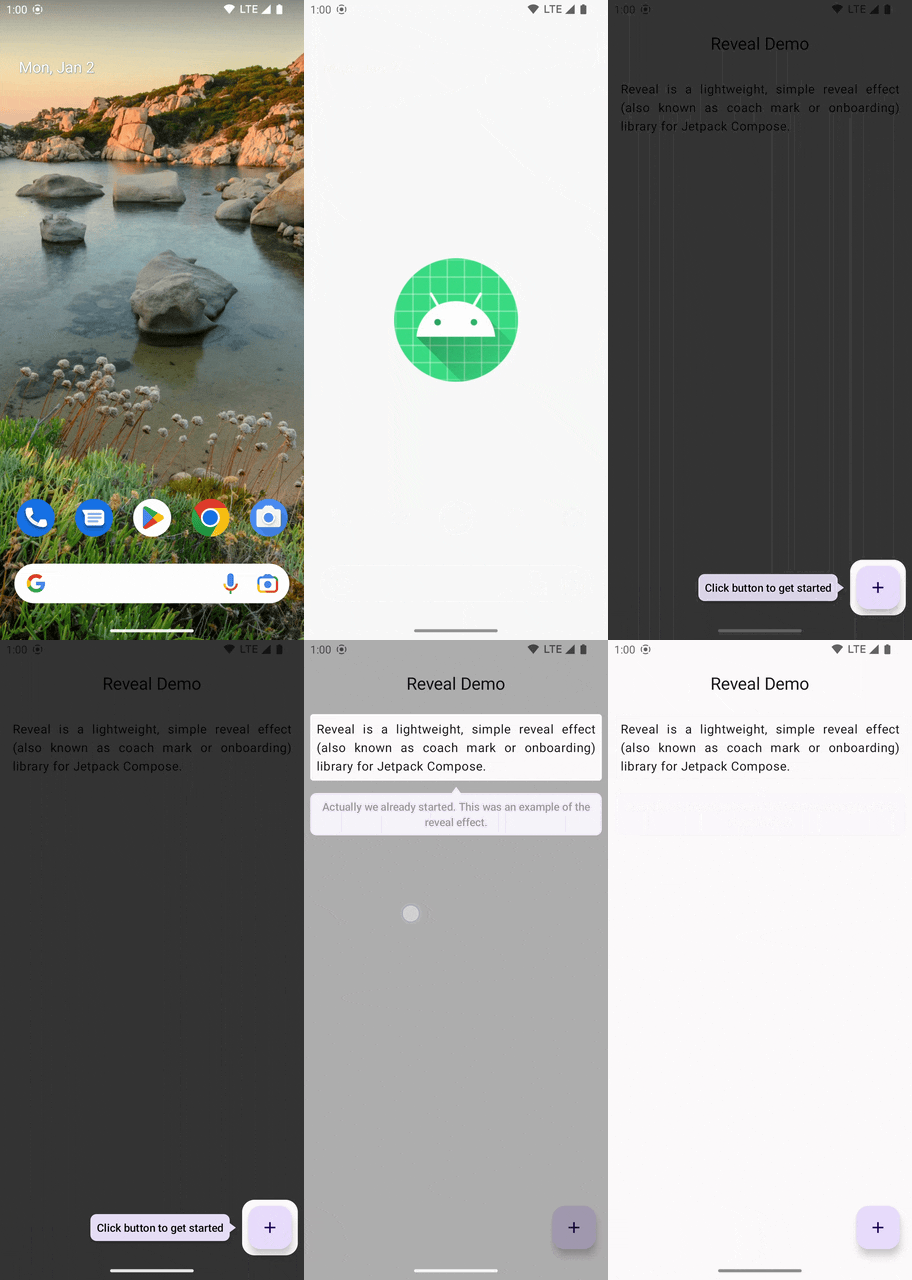
| Term | Description |
|---|---|
| Revealable | An element which is revealed on the screen. |
| Reveal area | The area which is revealed around the revealable. Usually with a slight padding. |
| Overlay | The overlay which greys out all contents except revealable. Can contain explanatory items. |
Getting started
Compose Multiplatform
As of version 3.0 Reveal is based on Compose Multiplatform targeting Android, iOS, Desktop and
Web. However please note that except Android the other platforms are currently not well tested and
some of the targets are still alpha or experimental.
When using Reveal on Android, please make sure that the version of Google's Jetpack Compose is compatible with the version of Compose Multiplatform that Reveal uses, which you can find here.
Installation
The minimum supported Android SDK is 23 (Android 6.0), which is a requirement of Jetpack Compose. Add Reveal as a dependency to your project. It's available on Maven Central.
dependencies {
    implementation("com.svenjacobs.reveal:reveal-core:$REVEAL_VERSION")
}
Artifacts
| Name | Description |
|---|---|
reveal-core |
Contains core classes. You need this 🙂 |
reveal-shapes |
Additional shapes for explanatory items |
Compose
The Reveal composable is responsible for registration of, interaction with and rendering the
effect for revealable items. There can be many Reveal instances; usually there should be at most
one Reveal per "screen" of an application. The overlay effect is rendered in a full screen popup,
so Reveal can be placed anywhere in the Compose hierarchy, including inside a ModalBottomSheet
or Dialog, and the effect is always drawn above the rest of that window's content.
@Composable
fun App() {
    MainScreen()
}

@Composable
fun MainScreen() {
    val revealState = rememberRevealState()

    // Usually one instance per screen
    Reveal(
        revealState = revealState,
        onRevealableClick = {},
        onOverlayClick = {},
    ) {
        // Contents
    }
}
Inside Reveal specify revealable items via the revealable modifier.
enum class Keys { HelloWorld }

Column {
    Text(
        modifier = Modifier.revealable(key = Keys.HelloWorld),
        text = "Hello world",
    )
}
Now launch the reveal effect via revealState.reveal(Keys.HelloWorld).
Nice, you just launched your first reveal effect. But what is missing is some explanatory item like text or image next to the reveal area. So let's add one.
Explanatory items are specified via overlayContent of the Reveal composable.
Reveal(
    overlayContent = { key ->
        when (key) {
            Keys.HelloWorld -> {
                Surface(
                    modifier = Modifier
                        .align(horizontalArrangement = RevealOverlayArrangement.Horizontal.Start)
                        .padding(8.dp),
                    shape = RoundedCornerShape(4.dp),
                    color = Color.White,
                ) {
                    Text("This is an explanation")
                }
            }
        }
    }
) {
    // Contents
}
The scope of the overlay content composable provides align() modifiers to align the item either to
the start, top, end or bottom of the reveal area. align() must be applied to a direct child of the
overlay content; it has no effect on elements nested further down the tree.
Reveal provides two click listeners: onRevealableClick is called when a reveal area is clicked
with the key of the clicked revealable as the first argument. onOverlayClick is called when the
overlay is clicked somewhere, also with the key argument. Use any of these click listeners to reveal
the next item, for example for some kind of tutorial, or to hide the effect via
revealState.hide().
Multiple elements at once
reveal() also accepts several keys, which reveals all of those elements at the same time. The
overlay content is then called once per revealed element, so each of them can have its own
explanatory item:
enum class Keys { First, Second }

revealState.reveal(Keys.First, Keys.Second)
// or from a collection: revealState.reveal(listOf(Keys.First, Keys.Second))
Reveal(
    overlayContent = { key ->
        when (key) {
            Keys.First -> Text("This one …")
            Keys.Second -> Text("… and this one.")
        }
    },
) {
    // Contents
}
Either all elements are revealed or none: reveal() throws an IllegalArgumentException naming
the keys which are unknown, tryReveal() returns false in that case. currentRevealableKeys
holds the keys of all currently revealed elements, while currentRevealableKey remains the first
of them.
Two details are worth knowing when revealing multiple elements:
onOverlayClickis called with the key of the first revealed element, since a click outside of all reveal areas doesn't belong to a specific one.onRevealableClickalways reports the element which was actually clicked.OnClick.Passthroughis a property of the whole overlay window, so it only takes effect when all revealed elements declare it.
Bottom sheets and dialogs
Because the overlay is rendered in a popup attached to whichever window Reveal is composed in,
revealables inside a ModalBottomSheet or Dialog work as long as Reveal itself (and its
revealables) are placed inside that sheet's or dialog's content, with their own RevealState:
ModalBottomSheet(onDismissRequest = { /* ... */ }) {
    val revealState = rememberRevealState()

    Reveal(revealState = revealState) {
        // Sheet contents, revealable via Modifier.revealable(...)
    }
}
A Reveal placed outside the sheet cannot reveal items inside it, since they live in different
windows.
That's it for now. For more details have a look at the demo application and the JavaDoc. The library is well documented 😉
Migrating from a previous version
See MIGRATION.md for breaking changes between major versions.
Frequently Asked Questions
See FAQ.md
Contributing
Contributions are welcome! See CONTRIBUTING.md for how to set up the project, our coding and commit message conventions, and how to report bugs.
