SpEditTool
Introduction: 用于输入@xxx #话题#等特殊字符的自定义 EditText
Tags:
An efficient and scalable library for inputing and displaying gif or @mention on graph-text mixed TextView/EditText
ScreenShot
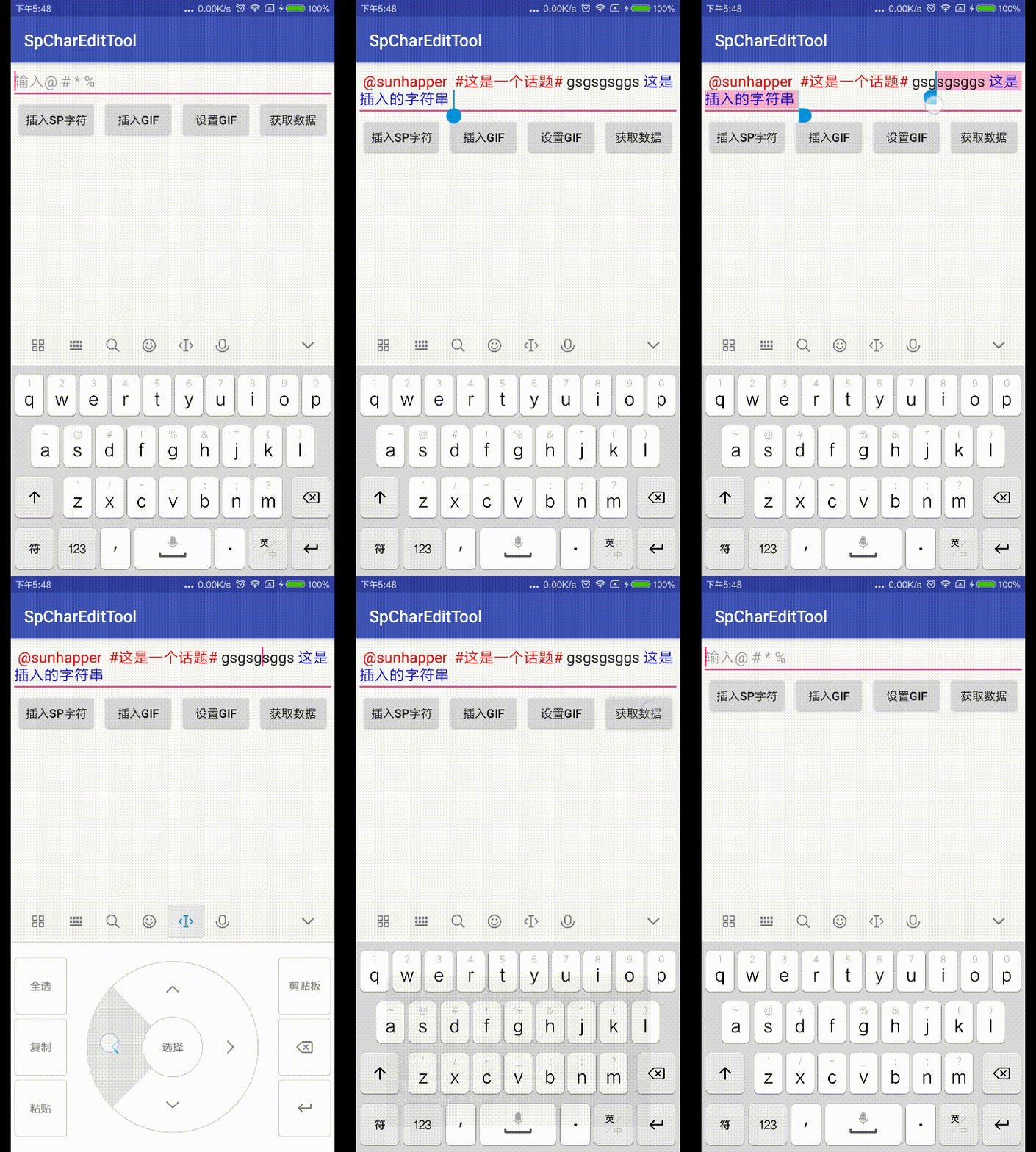

feature
- fully removed special content
- part removed special content
- custom style
- show gif on text
- load gif with AndroidGifDrawable
- load gif with Gidle
todo
- load gif with Fresco
- more styles of ImageSpan
change log
1.0.1-1.0.4
- fix bug
1.0.0
- use more elegant implementation of @mention(special thanks to iYaoy)
- clearer package structure
- library for supporting Glide/AndroidGifDrawable
Usage
Gradle
- root build.gradle
    allprojects {
        repositories {
            ...
            maven { url 'https://jitpack.io' }
        }
    }
- dependency

dependencies {
            implementation 'com.github.sunhapper.SpEditTool:SpEditText:{last version}'
            //help to create gif drawable use Glide
            implementation 'com.github.sunhapper.SpEditTool:SpGlideDrawable:{last version}'
            //help to create gif drawable use AndroidGifDrawable
            implementation 'com.github.sunhapper.SpEditTool:SpGifDrawable:{last version}'
    }
xml
EditText
- CustomInputConnectionWrapper to accept keyEvent,because setOnKeyListener may not react KeyEvent when use Google input method
- SpanChangedWatcher to handle @mention content
- GifWatcher to display gif on text
<com.sunhapper.x.spedit.view.SpXEditText
    android:layout_width="match_parent"
    android:layout_height="wrap_content"/>
TextView
<com.sunhapper.x.spedit.view.SpXTextView
    android:layout_width="match_parent"
    android:layout_height="wrap_content"/>
java
- create @mention Spannable
//IntegratedSpan will be fully removed
public class MentionUser implements IntegratedSpan {
    public String name;
    public long id;

    public Spannable getSpannableString() {
        SpannableString spannableString = new SpannableString(getDisplayText());
        spannableString.setSpan(new ForegroundColorSpan(Color.MAGENTA), 0, spannableString.length(),
                Spannable.SPAN_EXCLUSIVE_EXCLUSIVE);
        spannableString.setSpan(this, 0, spannableString.length(),
                Spannable.SPAN_EXCLUSIVE_EXCLUSIVE);
        SpannableStringBuilder stringBuilder = new SpannableStringBuilder();
        return stringBuilder.append(spannableString).append(" ");
    }
}
- delete style span when BreakableSpan was broken
//BreakableSpan can be  part removed
public class Topic implements BreakableSpan {

    ...
    /**
     * @return true the BreakableSpan will be removed
     * you can remove custom style span when content broken
     */
    @Override
    public boolean isBreak(Spannable text) {
        int spanStart = text.getSpanStart(this);
        int spanEnd = text.getSpanEnd(this);
        boolean isBreak = spanStart >= 0 && spanEnd >= 0 && !text.subSequence(spanStart, spanEnd).toString().equals(
                getDisplayText());
        if (isBreak && styleSpan != null) {
            text.removeSpan(styleSpan);
            styleSpan = null;
        }
        return isBreak;
    }
}
- load gif with AndroidGifDrawable
Drawable drawable = new TextGifDrawable(emojiconFile);
Spannable spannable = SpUtil.createGifDrawableSpan(gifDrawable,"text");
- load gif with Glide
//placeholder drawable
GifDrawable gifDrawable = new TextGifDrawable(getResources(), R.drawable.a);
ProxyDrawable proxyDrawable = new ProxyDrawable();
GlideApp.with(this)
        .load(gifurl)
        .placeholder(gifDrawable)
        .into(new DrawableTarget(proxyDrawable));
return SpUtil.createResizeGifDrawableSpan(proxyDrawable, "text");
- custom Factory
- you can create your own SpanWatcher and Spannable.Factory/Editable.Factory
- use
setSpannableFactory/setEditableFactoryinstead of using SpXTextView or SpXEditText
proguard
-keep class com.sunhapper.x.spedit.**{*;}
more detail info and guidance,please see the app demo
welcome to star,PR and issue
