CoCo
Introduction: 基于 kotlin、简洁易用的调用系统拍照或图片选择库
Tags:




中文版说明
An delicate lib for System Capture, Pick and Crop in Android 🐵
- Provided the function of image capture or album selection or cropping from system application just need one code
- The inner adjust the FileProvider in Android 7.0 and above
- The default image disposer provided two strategy to compress the image, it can also can be customed
- Both Activity and Fragment supported,the asynchronous dispose of image will bind their lifecycle automatic
- The new designed api, easy to understand
- Fully based on kotlin, also can worked with java
- Already migrated to AndroidX, simplify to use
- Android Scoped-Storage Support and can work on Android 11 and higher
Installation:

dependencies {
    implementation 'com.github.soulqw:CoCo:1.1.6'
}
The new in Release :
- The Pick function in the Range.PICK_CONTENT model can filter the specific file type such as PNG、JPG、GIF and so on, the default config is no filter
- Add the default abstract class CoCoAdapter
Usage:
basic usage
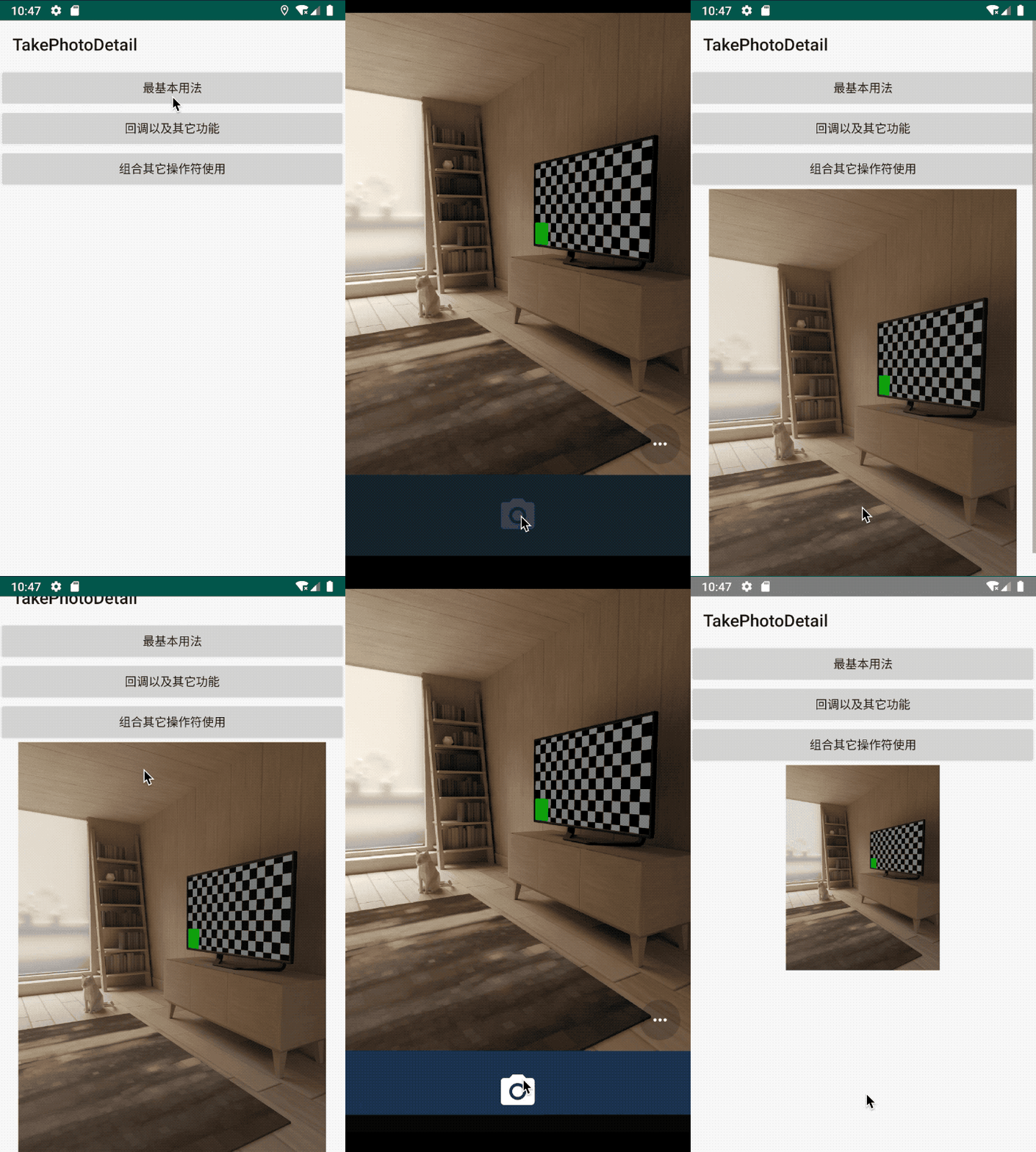
- Capture an image from system camera
       CoCo.with(this@MainActivity)
                       .take(createSDCardFile())
                       .start(object : CoCoAdapter<TakeResult>() {

                           override fun onSuccess(data: TakeResult) {
                               iv_image.setImageBitmap(Utils.getBitmapFromFile(data.savedFile!!.absolutePath))
                           }
                       })
image sample:
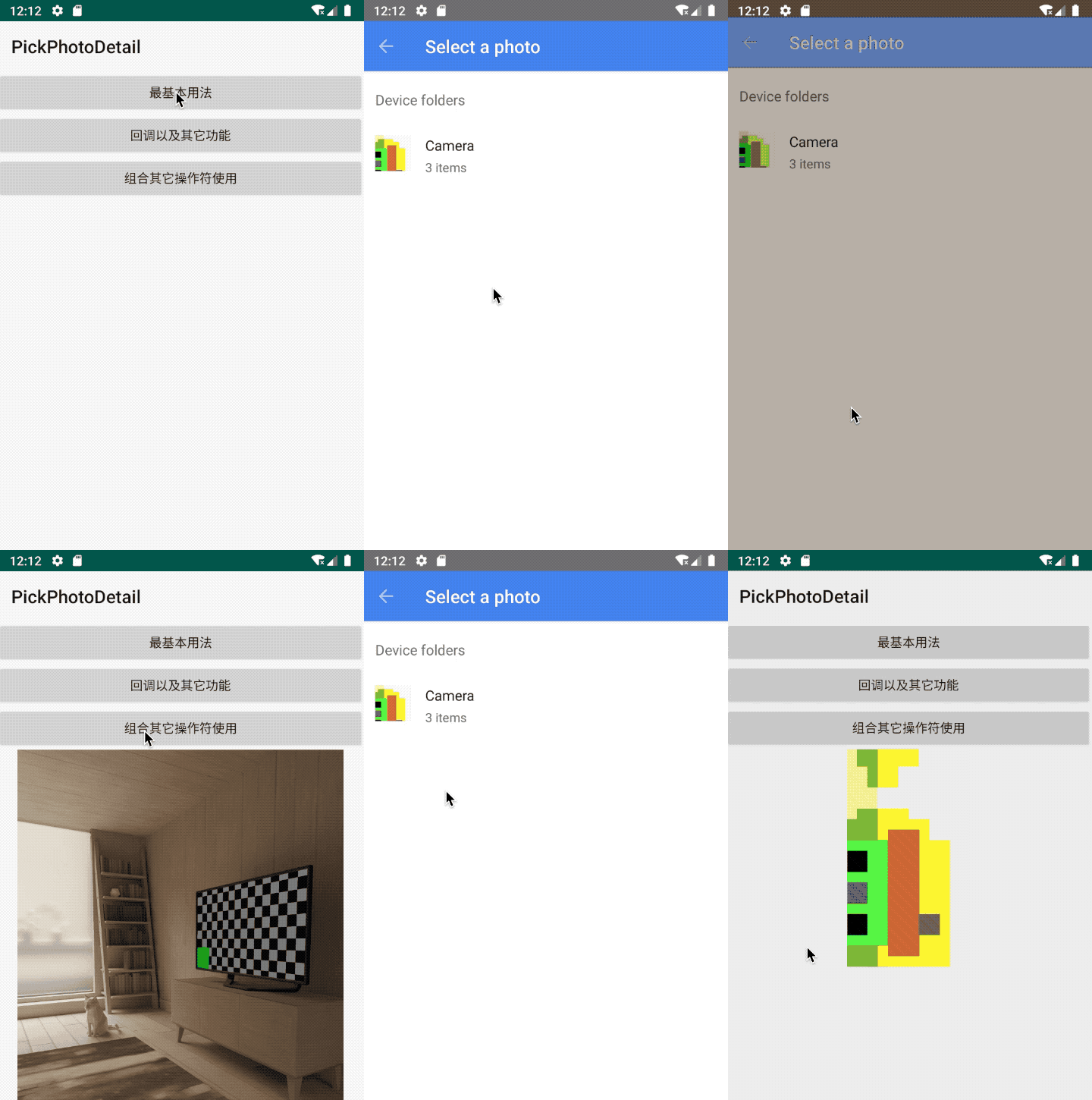
- Pick an image from system Gallery:
        CoCo.with(this@MainActivity)
                    .pick()
                    .start(object : CoCoAdapter<PickResult>() {
                        override fun onSuccess(data: PickResult) {

                        iv_image.setImageURI(data.originUri)

                        }
                    })
image sample:
- Dispose the origin image: Generally speaking, we may need dispose the origin image such as compress and so on, so CoCo provide the operator of dispose, we can use it to dispose the image
        //pick then dispose
         CoCo.with(this)
                .pick()
                //switch the operator
                .then()
                .dispose()
                .start(object : CoCoAdapter<DisposeResult>() {
                    override fun onSuccess(data: DisposeResult) {
                        iv_image.setImageBitmap(data.compressBitmap)
                    }
                })
We use the "then" method to switch the operator, it can also combination the another operators
dispose operator:
dispose operator can dispose the file in background thread automatic, it can also bind the related container,s lifecycle in method "with()"
It not only can works with other operators:
 CoCo.with(this)
                .take(createSDCardFile())
                .then()
                .dispose()
                .start(object : CoCoAdapter<DisposeResult>() {

                    override fun onSuccess(data: DisposeResult) {
                        iv_image.setImageBitmap(Utils.getBitmapFromFile(data.savedFile!!.absolutePath))
                    }
                })
It also can works separately:
        CoCo.with(this)
                .dispose()
                .origin(imageFile.path)
                .start(object : CoCoAdapter<DisposeResult>() {

                    override fun onSuccess(data: DisposeResult) {
                        iv_image.setImageBitmap(data.compressBitmap)
                    }
                })
We can use customDisposer to dispose the image,we can also custom the disposer:
              CoCo.with(this)
                .dispose()
                .disposer(CustomDisposer())
              //.disposer(DefaultImageDisposer())
                .origin(imageFile.path)
                .start(object : CoCoAdapter<DisposeResult>() {

                    override fun onSuccess(data: DisposeResult) {
                        iv_image.setImageBitmap(data.compressBitmap)
                    }
                })

                            /**
             * custom disposer
             * rotation image
             */
            class CustomDisposer : Disposer {
                override fun disposeFile(originPath: String, targetToSaveResult: File?): DisposeResult {
                    return DisposeResult().also {
                        var bitmap = QualityCompressor()
                            .compress(originPath, 80)
                        val m = Matrix()
                        m.postRotate(90f)
                        bitmap = Bitmap.createBitmap(
                            bitmap!!, 0, 0, bitmap.width,
                            bitmap.height, m, true
                        )
                        it.savedFile = targetToSaveResult
                        it.compressBitmap = bitmap
                    }
                }
            }
The Crop operator:
We can provide an image to system Crop:
    CoCo.with(this@CropActivity)
                .crop(imageFile)
                .start(object : CoCoAdapter<CropResult>() {

                    override fun onSuccess(data: CropResult) {
                        iv_image.setImageBitmap(data.cropBitmap)
                    }

                })
Of course, it can works with other combinations:
  CoCo.with(this@MainActivity)
                    .pick()
                    .then()
                    .crop()
                    .start(object : CoCoAdapter<CropResult>() {

                        override fun onSuccess(data: CropResult) {
                            iv_image.setImageBitmap(data.cropBitmap)
                        }
                    })
image sample:

- Another functions:
every operator can add the call backs:
  CoCo.with(this@PickPictureActivity)
                .pick()
                .range(Range.PICK_CONTENT)
//                .range(Range.PICK_DICM)
                .callBack(object : PickCallBack {

                    override fun onFinish(result: PickResult) {
                        Log.d(MainActivity.TAG, "pick onFinish${result}")
                    }

                    override fun onCancel() {
                        Log.d(MainActivity.TAG, "pick onCancel")
                    }

                    override fun onStart() {
                        Log.d(MainActivity.TAG, "pick onStart")
                    }

                }).start(object : CoCoCallBack<PickResult> {

                    override fun onSuccess(data: PickResult) {
                        iv_image.setImageURI(data.originUri)
                    }

                    override fun onFailed(exception: Exception) {}
                })
- the flow image:
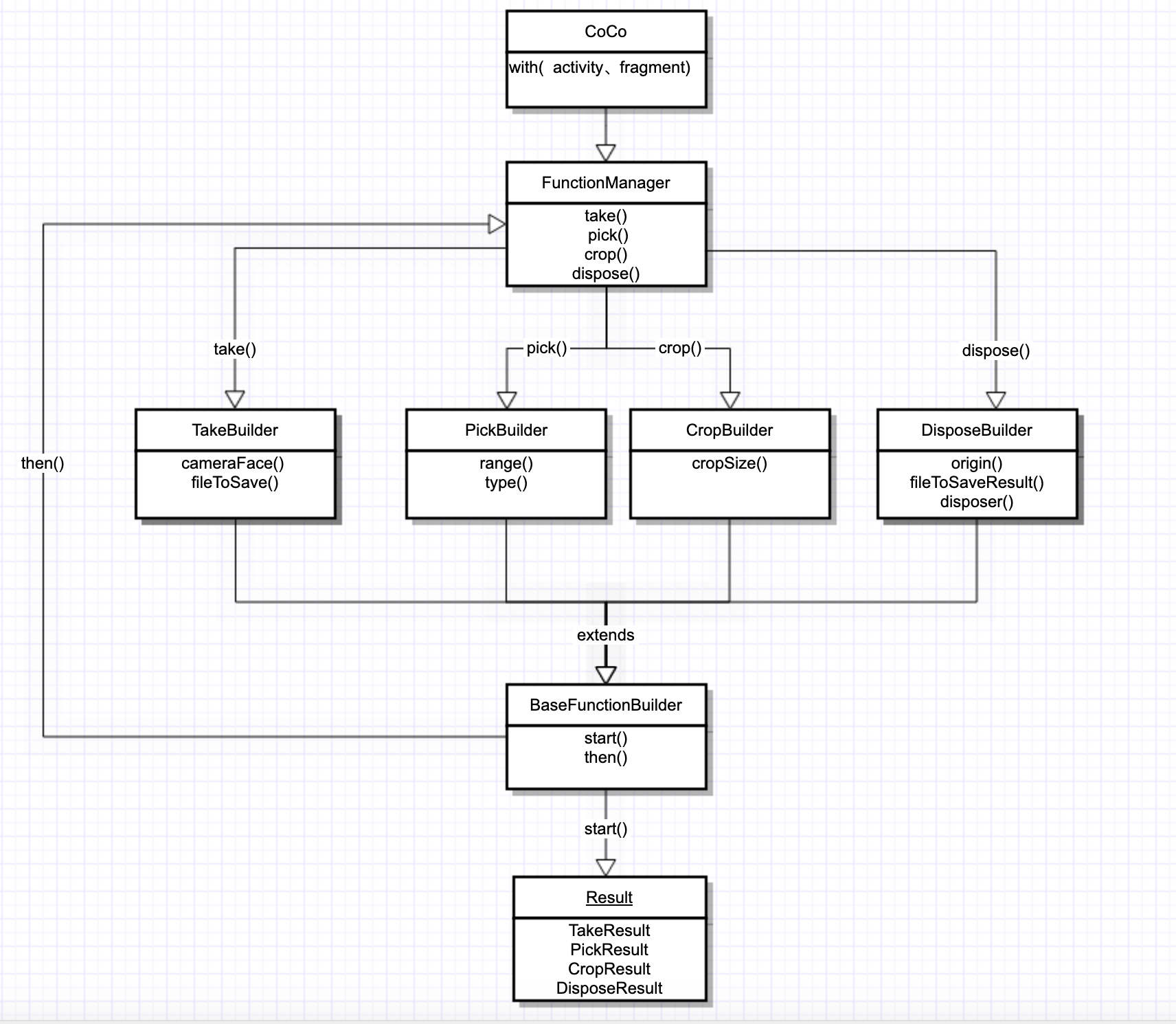
More detail can use the demo
The screenshot: