sirix
SirixDB - The Bitemporal Database System
Query any revision as fast as the latest




🟢 Live Demo · Why SirixDB · Docs · Website · Discord · Forum · Web UI
Status: 1.0.0-beta — usable today and actively developed. The on-disk format and public APIs are stabilizing toward a 1.0 release; feedback from real use is exactly what we're looking for.
You update a row in your database. The old value is gone.
To get history, you bolt on audit tables, change-data-capture, or event sourcing. Now you have two systems: one for current state, one for history. Querying the past means replaying events or scanning logs. Your "simple" audit requirement just became an infrastructure project.
Git solves this for files—but you can't query a Git repository. Event sourcing preserves history—but reconstructing past state means replaying from the beginning.
The Solution
SirixDB is a database where every revision is a first-class citizen. Not an afterthought. Not a log you replay.
// Query revision 1 - instant, not reconstructed
session.beginNodeReadOnlyTrx(1)

// Query by timestamp - which revision was current at 3am last Tuesday?
session.beginNodeReadOnlyTrx(Instant.parse("2024-01-15T03:00:00Z"))

// Both return the same thing: a readable snapshot, as fast as querying "now"
This works because SirixDB uses structural sharing with sub-page versioning. Unchanged pages are shared between revisions via copy-on-write — and versioning continues below the page: a commit writes page fragments containing only the changed records, and the sliding-snapshot algorithm guarantees any page is reconstructible from at most N fragments. Block-level COW (ZFS-style) copies a whole page when one byte in it changes; delta-based systems make reads replay ever-growing diff chains. SirixDB pays neither cost. Revision 1000 doesn't store 1000 copies—it stores the current state plus pointers to shared history.
The result:
- Storage: O(changed records per revision), not O(total size × revisions) — and not O(changed pages) either
- Read any page from any revision: O(N) page fragment reads, where N is the configurable snapshot window (default 3)
- No event replay, no log scanning—direct page access
Bitemporal: Two Kinds of Time
Most databases (if they version at all) track one timeline: when data was written. SirixDB tracks two:
- Transaction time: When was this committed? (system-managed)
- Valid time: When was this true in the real world? (user-managed)
Why does this matter?
January 15: You record "Price = $100, valid from January 1"
January 20: You discover the price was actually $95 on January 1

After correction, you can ask:
  "What did we THINK the price was on Jan 16?"  →  $100 (transaction time)
  "What WAS the price on Jan 1?"                →  $95  (valid time)
Both questions have correct, different answers. Without bitemporal support, the correction destroys the audit trail.
Core Properties
- Append-only storage: Data is never overwritten. New revisions write to new locations.
- Structural sharing: Unchanged pages and nodes are referenced between revisions via copy-on-write.
- Snapshot isolation: Readers see a consistent view; one writer per resource.
- Embeddable: a single self-contained JAR (third-party dependencies shaded in) — embed it in-process, or run it as a REST server.
Performance
History is not a tax. Reading an old revision is a direct page lookup, not a replay — any revision reads as fast as the latest, and session-open cost is flat regardless of how much history exists (0.18 ms at 10,000 revisions).
A few measured receipts (we benchmark against ourselves and publish the losses, methodology in WHY-SIRIX.md and the linked comparison docs):
- Concurrent reads under a committing writer — on a 12,800-revision database, 16 reader threads + 1 writer over REST went from 361 to 11,198 reads/s with reader p99 334 ms → 4.8 ms and zero errors, after fixing a page-lifecycle bug and an O(history) open cost (
BENCHMARKS.md). The aged database now outruns the pre-fix fresh one. - Semantic diffs — node-level insert/update/delete between two revisions (with stable keys) in ~0.3 ms, not a text diff.
- Analytics — the vectorized, fail-closed execution path runs the group-by/aggregate suite head-to-head with DuckDB 1.5.2 at 100M records: ahead on three of nine query shapes, within 1.1–2.5× on all others except count-distinct (~4.2×); the GraalVM native binary runs 7–17× faster than the JVM on warm analytical queries (
COMPARISON_DUCKDB.md,NATIVE_IMAGE.md). The standalone query engine, brackit, beatsjqseveral-fold on its own benchmark suite. - Honest loss vs PostgreSQL (
COMPARISON_POSTGRES.md, re-run 2026-07) — PostgreSQL with a trigger-maintained history table still wins raw small-document ingest (1,093 vs 169 durable commits/s same-machine, both verified fsync-bound) and total storage (~2×, down from ~3× after recent storage work). SirixDB wins semantic diffs (0.58 ms node-level patch vs a top-level-only compare), now ties history listing, and offers sub-document time travel PostgreSQL doesn't have. Durability settings verified equivalent before measuring; the fsync floor of the box is published alongside the numbers.
Every fast path is fail-closed: a kernel only runs when the optimizer can prove the query's shape matches what it emits, and a differential suite requires byte-identical output against the general path. Wrong-but-fast is a bug class, not a setting.
How Versioning Works
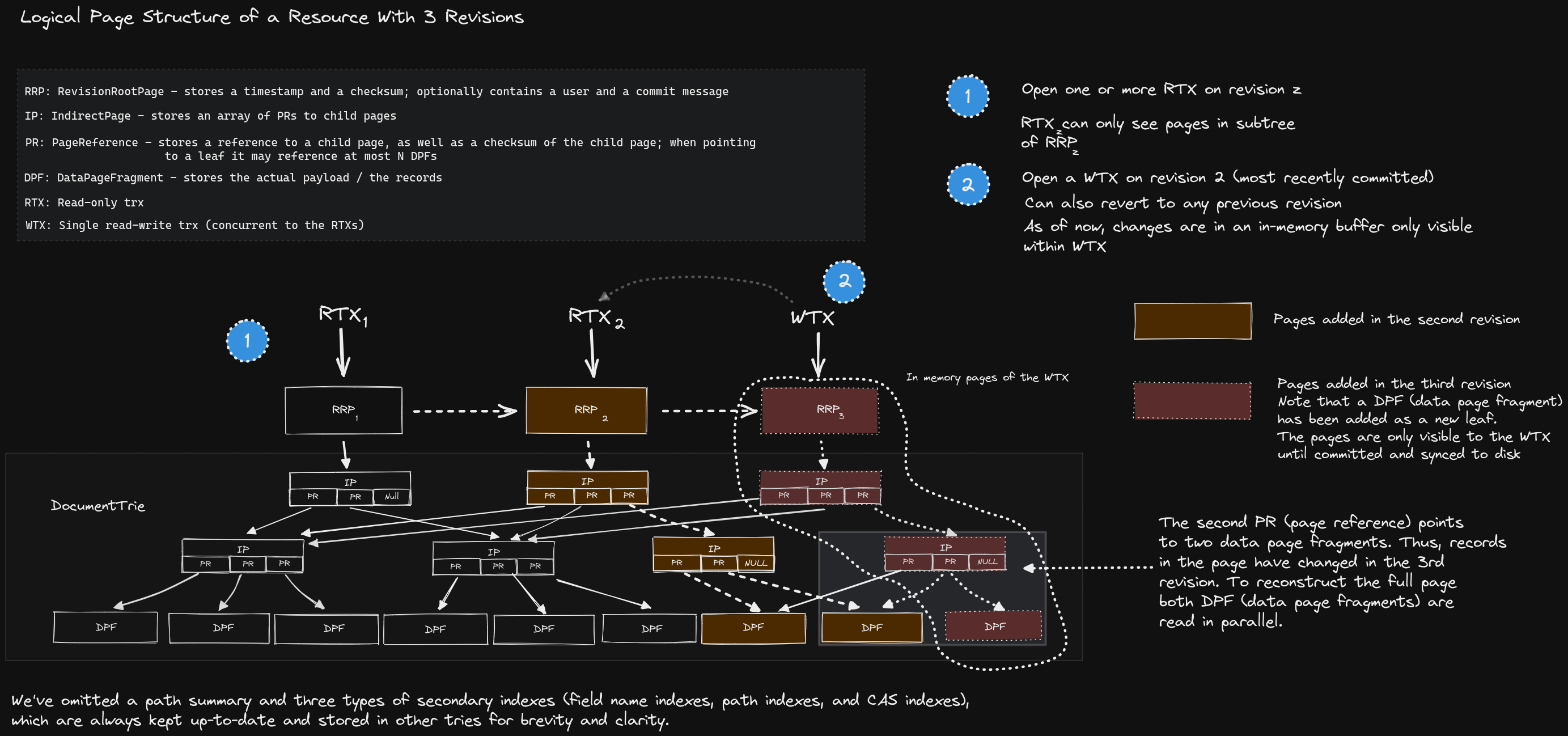
Logical page structure of a resource with 3 revisions — read-only transactions (RTX) can open any revision, while a single write transaction (WTX) appends to the latest.
SirixDB stores data in a persistent tree structure where revisions share unchanged pages and nodes. Traditional databases overwrite data in place and use write-ahead logs for recovery. SirixDB takes a different approach:
Physical Storage: Append-Only Log
All data is written sequentially to an append-only log. Nothing is ever overwritten.
Physical Log (append-only, sequential writes)
┌────────────────────────────────────────────────────────────────────────┐
│ [R1:Root] [R1:P1] [R1:P2] [R2:Root] [R2:P1'] [R3:Root] [R3:P2'] ...    │
└────────────────────────────────────────────────────────────────────────┘
     t=0      t=1     t=2      t=3      t=4       t=5       t=6    → time
Logical Structure: Persistent Trie
Each revision has a root node in a trie. Unchanged pages are shared via references.
  [Rev 1]           [Rev 2]         [Rev 3]
     │                 │               │
     ▼                 ▼               ▼
  [Root₁]           [Root₂]         [Root₃]
   │   │             │   │           │   │
   │   └──────────┐  │   └────────┐  │   └─────────┐
   ▼              ▼  ▼            ▼  ▼             ▼
┌──────┐        ┌──────┐        ┌──────┐        ┌──────┐
│  P1  │        │  P2  │        │ P1'  │        │ P2'  │
└──────┘        └──────┘        └──────┘        └──────┘
 Rev 1          Rev 1+2         Rev 2+3          Rev 3
                (shared)        (shared)
Rev 2 modified only P1 (writing P1') and still shares P2 with Rev 1; Rev 3 modified only P2 (writing P2') and still shares P1' with Rev 2 — matching the physical log above.
Page Versioning Strategies
How page versions are stored is configurable per resource:
| Strategy | Page fragments per read | Write cost | Notes |
|---|---|---|---|
| FULL | 1 | full page per change | fastest reads, largest storage |
| INCREMENTAL | up to N−1 diffs | small diffs + periodic full snapshot | write spikes at snapshot points |
| DIFFERENTIAL | 2 | diffs grow between snapshots | bounded reads, uneven writes |
| SLIDING_SNAPSHOT (default) | ≤ N (default 3) | small diffs, out-of-window records rescued into the newest fragment | no full-snapshot spikes, best balance |
Modifying data copies only the affected pages (copy-on-write); unchanged pages are referenced
from the new revision, and the old revision remains intact and queryable. Storage cost is
O(changed records) per revision. Read cost: opening a revision is O(1) by number, O(log R)
by timestamp; each page read combines at most N fragments. The full strategy walkthrough is in
docs/ARCHITECTURE.md.
Quick Start
Platform support: Linux, macOS, and Windows are CI-tested on every pull request. Linux additionally gets native binaries and the Docker images; known limitations are listed in
docs/KNOWN_LIMITATIONS.md.
Using the CLI (Native Binaries)
SirixDB provides two CLI tools, both available as instant-startup native binaries:
| Binary | Module | Description |
|---|---|---|
sirix-cli |
sirix-kotlin-cli | Full-featured CLI for database operations |
sirix-shell |
sirix-query | Interactive JSONiq/XQuery shell |
Build native binaries with GraalVM:
# Build both CLIs as native binaries (requires GraalVM with native-image)
./gradlew :sirix-kotlin-cli:nativeCompile  # produces: sirix-cli
./gradlew :sirix-query:nativeCompile -Pnative.mainClass=io.sirix.query.Main -Pnative.imageName=sirix-shell

# Or run via JAR
./gradlew :sirix-kotlin-cli:run --args="-l /tmp/mydb create"
The whole create/update/time-travel loop from the shell (-l names the database path):
sirix-cli -l /tmp/mydb create json -r myresource -d '{"name": "Alice", "role": "admin"}'
sirix-cli -l /tmp/mydb update -r myresource '{"team": "engineering"}' -im as-first-child
sirix-cli -l /tmp/mydb query  -r myresource '$$.name'   # $$ is the document root
sirix-cli -l /tmp/mydb query  -r myresource -rev 1      # query a previous revision
sirix-cli -l /tmp/mydb resource-history myresource
sirix-shell is a JSONiq/XQuery REPL over the same data (jn:store(...), jn:doc(...) —
multi-line queries, empty line executes, Control-D exits).
JSONiq array access uses zero-based positions. Negative positions count from the end of
each containing array: jn:doc('mydb','myresource').numbers[-1].v reads the last
element's v field. A position below minus the array length raises FORG0006, including
negative access on an empty array; a nonnegative position at or beyond the length returns
an empty sequence. Indexed queries follow the same rules, including consecutive accesses
such as .root.numbers[-2][-1].
XML imports from constructed nodes preserve element and attribute namespace URIs and local namespace declarations:
xn:store('names', (), <root>
  <item xmlns='urn:a'>a</item>
  <item xmlns='urn:b'>b</item>
  <p:item xmlns:p='urn:a'>alias</p:item>
  <item>plain</item>
</root>)
xn:load reads XML documents from URI strings, including a sequence of URIs. For example,
xn:load('names', (), ('file:///tmp/first.xml', 'file:///tmp/second.xml'), false()) adds
documents to an existing collection, or creates it if absent. An empty resource-name argument
assigns names starting at resource followed by the current document count plus one. A failed
addition reports the import error without replacing the collection or its existing documents.
XML serialization escapes default and prefixed namespace declaration values, attribute values,
and text at output; stored values and query namespace scopes remain decoded. For example, the
stored URI https://example.test/ns?a=1&b=2 is written as
xmlns="https://example.test/ns?a=1&b=2", so reparsing preserves the URI. Standalone element
query results also carry inherited namespace bindings, including unused and attribute-only
prefixes; nearer declarations take precedence, including default-namespace undeclarations.
When creating a collection from a sequence, xn:store and xn:load import documents
concurrently and return successfully only after every import has committed and closed its write
transaction. The query context can then be closed immediately. Import or stream failures reach
the caller after submitted workers finish; interruption interrupts and drains the workers and
preserves the caller's interrupt flag. Failed creation does not roll back imports that already
committed. These semantics also apply to BasicXmlDBStore.create(String, Stream<NodeSubtreeParser>).
Using the REST API
Start SirixDB and its bundled OAuth2 provider (Keycloak) with Docker:
git clone https://github.com/sirixdb/sirix.git
cd sirix
docker compose up
This starts the REST server on http://localhost:9443 plus a Keycloak instance seeded with
demo users admin/admin and viewer/viewer. All endpoints are OAuth2-protected:
TOKEN=$(curl -s -X POST http://localhost:9443/token \
  -H "Content-Type: application/json" \
  -d '{"username":"admin","password":"admin","grant_type":"password"}' | jq -r .access_token)

curl -X PUT http://localhost:9443/mydb/myresource \
  -H "Authorization: Bearer $TOKEN" -H "Content-Type: application/json" \
  -d '{"name":"Alice","role":"admin"}'

curl http://localhost:9443/mydb/myresource -H "Authorization: Bearer $TOKEN"
For local development, auth.mode=none (docker run -e SIRIX_AUTH_MODE=none ...) skips
Keycloak entirely (loud warning, admin-for-all). → docs/QUICKSTART.md
walks the whole loop — create, query, commit, time-travel read, diff — with verified commands;
the REST API documentation has the full endpoint
reference.
Security note: the bundled Keycloak realm, demo users, client secret, and self-signed TLS certificate are for local development only — see
docs/operations.mdbefore any public deployment.
Using the MCP Server (for AI Agents)
SirixDB ships a native Model Context Protocol server, so AI agents (Claude, Cursor, Windsurf, or any MCP client) can talk to it directly. Because every revision is copy-on-write, agents get O(1) disposable snapshots, time-travel reads, and structural diffs for free — branch, experiment, then discard or promote, with a human-reviewable diff. Read-only by default, with access control, output sanitization, and an audit log.
./gradlew :sirix-mcp:installDist # creates build/install/sirix-mcp/bin/sirix-mcp
Register that binary in your MCP client with --database-path /path/to/data (add
--read-write to allow mutations). Full tool reference:
docs/MCP_SERVER_DESIGN.md.
As an Embedded Library
<dependency>
  <groupId>io.sirix</groupId>
  <artifactId>sirix-core</artifactId>
  <version>1.0.0-beta7</version>
</dependency>
// Gradle (Kotlin DSL)
implementation("io.sirix:sirix-core:1.0.0-beta7")
var dbPath = Path.of("/tmp/mydb");

// Create database and resource
Databases.createJsonDatabase(new DatabaseConfiguration(dbPath));
try (var database = Databases.openJsonDatabase(dbPath)) {
    database.createResource(ResourceConfiguration.newBuilder("myresource").build());

    // Insert JSON data (creates revision 1)
    try (var session = database.beginResourceSession("myresource");
         var wtx = session.beginNodeTrx()) {
        wtx.insertSubtreeAsFirstChild(JsonShredder.createStringReader("{\"key\": \"value\"}"));
        wtx.commit();
    }

    // Update creates revision 2 (revision 1 remains unchanged)
    try (var session = database.beginResourceSession("myresource");
         var wtx = session.beginNodeTrx()) {
        wtx.moveTo(2);  // Move to the "key" node
        wtx.setStringValue("updated value");
        wtx.commit();
    }

    // Read from revision 1 - still accessible
    try (var session = database.beginResourceSession("myresource");
         var rtx = session.beginNodeReadOnlyTrx(1)) {
        rtx.moveTo(2);
        System.out.println(rtx.getValue());  // Prints: value
    }
}
For XML collections, the sirix-query module provides
BasicXmlDBStore.
Its builder's resource settings, including versioningType(...), apply to direct imports and
resources added to collections returned by create or lookup — through collection.add(...),
xn:store(..., false()), or xn:load(..., false()). Reopening a collection with different store
settings affects future additions; existing resources retain their persisted configuration.
The numberOfNodesBeforeAutoCommit(...) threshold applies only to direct store imports.
The single-argument create(name) overload of the XML store and
BasicJsonDBStore
creates an empty collection. It rejects an existing database without replacing it and reports
filesystem creation failures separately from duplicates.
JSON imports from a Path, through the store or collection.add(path), close the reader they
open on both success and failure. Callers retain ownership of readers they supply directly.
Query Updates
XML pending-update lists applied through
SirixQueryContext
use private writer nodes. Cached revision nodes keep reading their original snapshot,
including during nested or concurrent queries. Collection aliases identify the same node
when database, resource, revision and node key match.
Count-based and scheduled auto-commits cannot publish an XML list partway through
application. Adjacent text nodes are merged and empty text nodes removed after all
operations have run, before publication. CommitStrategy.AUTO commits and closes each
affected XML writer after successful application; EXPLICIT ends application without
committing. A failed list marks every participating XML writer rollback-only; roll back
before making further changes or committing. The publication-scope API contract is in
XmlNodeTrx.
XQuery insert nodes preserves the source sequence order at every insertion position:
as first into, as last into, plain into, before, and after. For example,
insert nodes (<a/>, <b/>) as first into $parent places <a/> before <b/>, ahead
of the parent's existing children. Copied elements retain local namespace bindings,
including prefix rebinding and default namespace undeclarations on descendants.
XQuery replace value of node $element with $value replaces the element's children
with the atomized source text, preserving the element, its attributes and namespace
bindings. An empty value removes all children. XML-illegal characters are rejected
before the replacement is queued. XML pending operations whose targets were already
removed have no effect; their identities still participate in pending-list conflict checks.
JSONiq insert json $value into $array at position $index uses zero-based positions
from 0 through the array length; the length appends, including position 0 for an
empty array. Omitting at position also appends. A sequence inserted as one array
member retains its internal order.
Time-Travel Queries
SirixDB extends JSONiq/XQuery (via Brackit) with temporal axis and functions.
Access by Revision Number or Timestamp
(: Open specific revision :)
jn:doc('mydb','myresource', 5)

(: Open by timestamp - returns revision valid at that instant :)
jn:open('mydb','myresource', xs:dateTime('2024-01-15T10:30:00Z'))
JSONiq/XQuery timestamp inputs for temporal queries and commits honor explicit timezone
offsets: 2024-01-15T12:30:00+02:00 denotes the same instant as 2024-01-15T10:30:00Z.
Offsets must be whole minutes from -14:00 through +14:00. Inputs without a timezone
are converted as UTC, independently of the query's implicit timezone.
The query context captures current-dateTime() on first use with the JVM's timezone
offset at that instant. current-date(), current-time(), and implicit-timezone()
derive from that same snapshot, which remains stable for the context's lifetime.
Temporal Axis Functions
Navigate a node's history across revisions — jn:previous, jn:next, jn:first, jn:last,
jn:first-existing, jn:last-existing, jn:past, jn:future, jn:all-times:
(: iterate through all versions of a node :)
for $version in jn:all-times(jn:doc('mydb','myresource').users[0])
return {"rev": sdb:revision($version), "data": $version}
Diff Between Revisions
(: Structured diff between any two revisions :)
jn:diff('mydb','myresource', 1, 5)

(: Diff with optional parameters: startNodeKey, maxLevel :)
jn:diff('mydb','myresource', 1, 5, $nodeKey, 3)
See the JSON revision-diff sidecar contract for stored change tracking and fallback behavior. With hashes enabled, changed revisions of a node can also be found by comparing sdb:hash across jn:all-times.
Bitemporal Queries
Query both time dimensions (see Bitemporal: Two Kinds of Time above for why this matters).
Configure a resource with valid time paths (also settable via REST query parameters). The JSONiq and REST store layers create a VALIDTIME interval index and dateTime CAS indexes automatically; configuration through the core API alone does not create indexes:
var resourceConfig = ResourceConfiguration.newBuilder("employees")
    .validTimePaths("validFrom", "validTo")   // or .useConventionalValidTimePaths()
    .buildPathSummary(true)
    .build();
(: valid time: records valid at a point in real-world time :)
jn:valid-at('mydb','myresource', xs:dateTime('2024-07-15T12:00:00Z'))

(: true bitemporal: "what records were KNOWN on Jan 20 and VALID on July 15?" :)
jn:open-bitemporal('mydb','myresource',
    xs:dateTime('2024-01-20T10:00:00Z'),   (: transaction time - opens revision :)
    xs:dateTime('2024-07-15T12:00:00Z'))   (: valid time - filters via index :)
jn:open-bitemporal uses half-open validity (validFrom <= V < validTo): a record starting at
V is included and a record ending at V is excluded. jn:valid-at and the explicit two-argument
valid-time index scan retain closed containment.
For lazy key slices, strict endpoint predicates, and obsolete-index handling, see Valid-time key slices.
Revision metadata (sdb:revision, sdb:timestamp, sdb:item-history, author tracking,
commit messages) and optional per-node Merkle hashes (sdb:hash — tamper detection and
fast change detection on subtrees) round out the temporal API. See the
query documentation for the full function reference.
Web Interface
The SirixDB Web GUI provides visualization of revision history and diffs:
git clone https://github.com/sirixdb/sirixdb-web-gui.git
cd sirixdb-web-gui
docker compose -f docker-compose.demo.yml up
Open http://localhost:3000 (login: admin/admin)
Architecture
JSON Tree Encoding
SirixDB shreds JSON into a typed node tree where each node has a stable key across revisions:
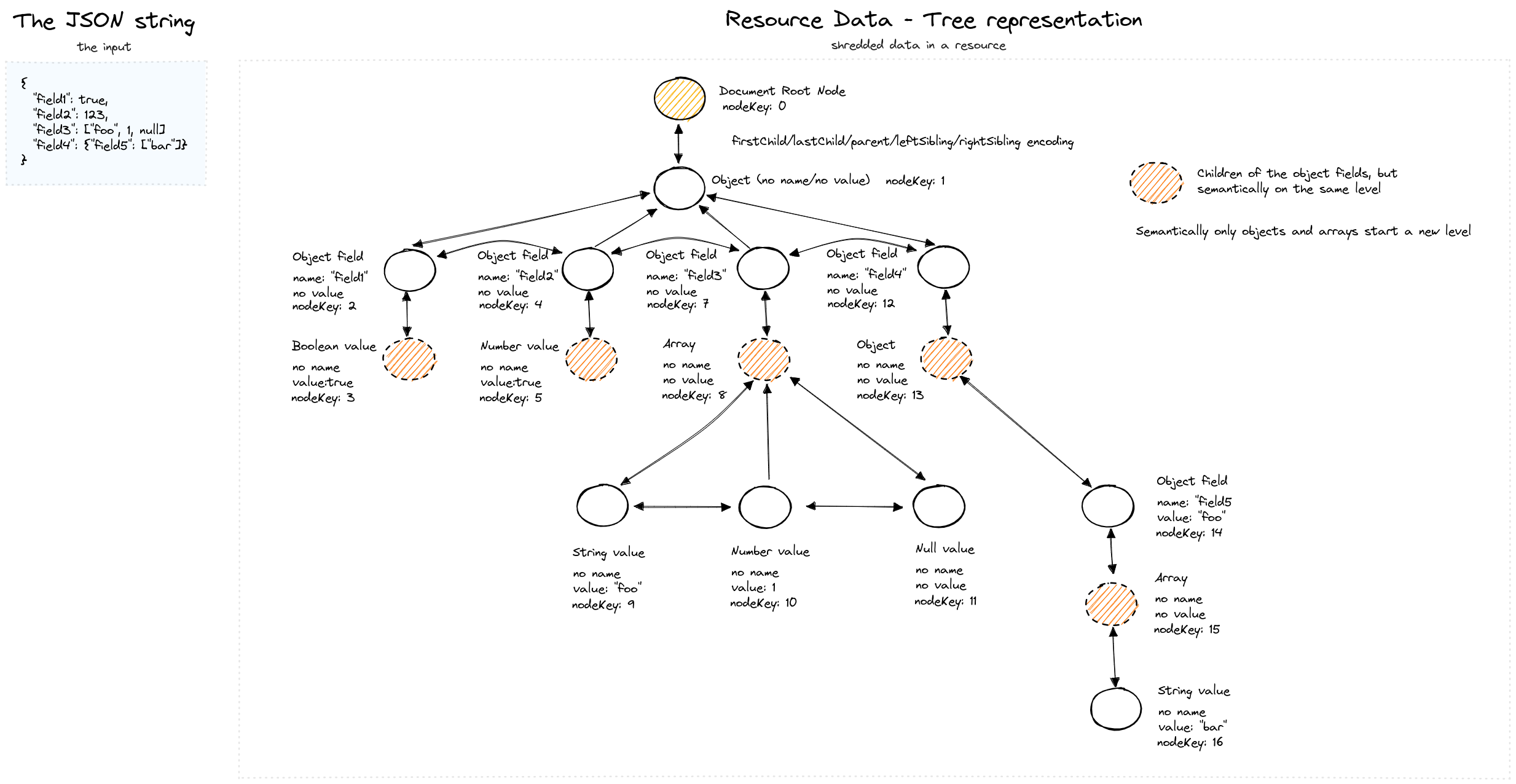
A JSON document and its internal tree representation — each node carries a stable key (nodeKey) for identity tracking across revisions.
Document Storage and Path Summary
When JSON is stored, SirixDB also builds a path summary — a compact trie capturing all unique paths in the document. This powers the path and CAS indexes:
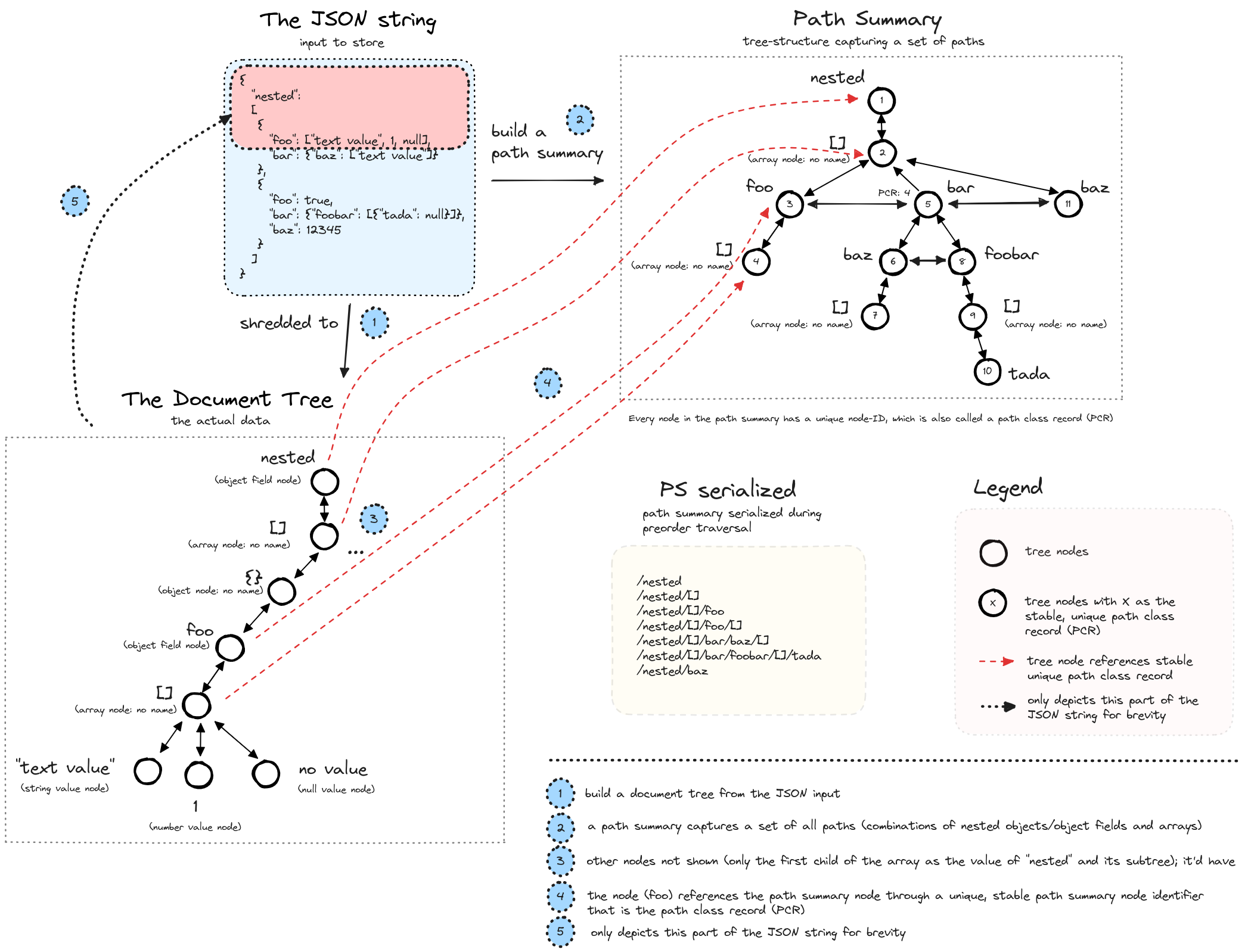
Left: the document tree. Right: the path summary trie with stable path class records (PCR) used for indexing.
On-Device Layout
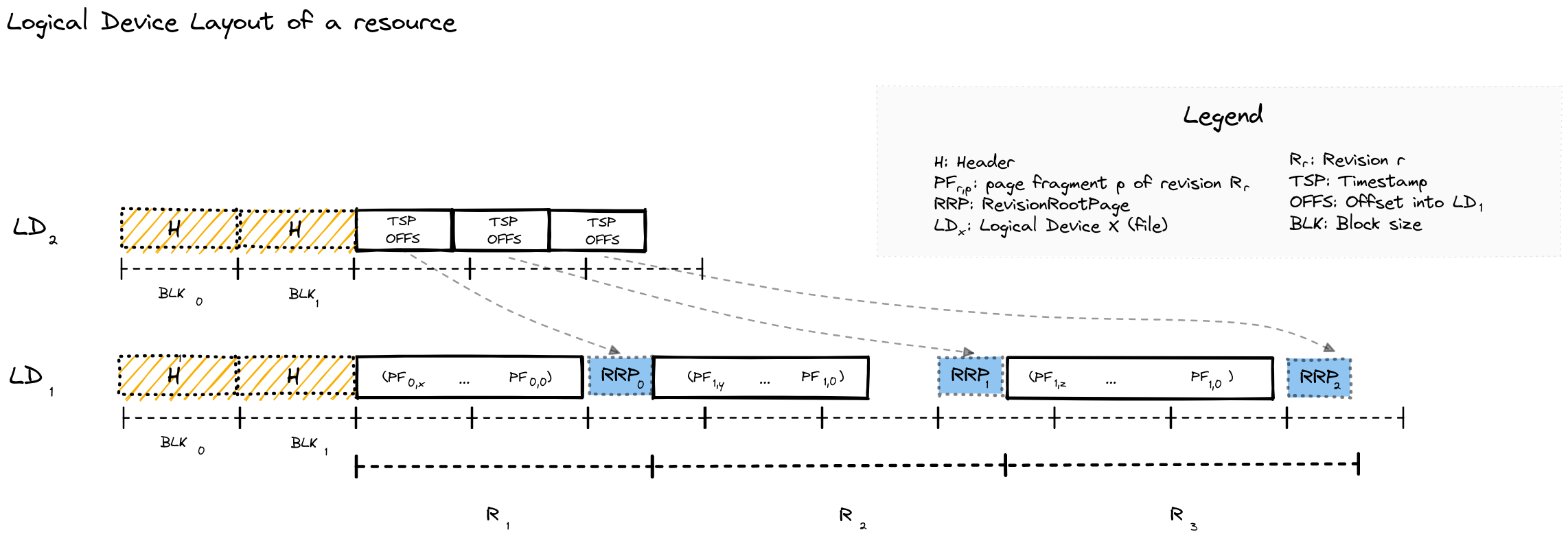
Physical layout on disk — data is split across two logical devices (LD₀ for metadata offsets, LD₁ for page data), written sequentially per revision.
Storage Model
Database (directory)
└── Resource (single JSON or XML document with revision history)
    └── Revisions (numbered 1, 2, 3, ...)
        └── Pages (variable-size blocks containing node data)
- Database: Directory containing multiple resources
- Resource: One logical document with its complete revision history
- Page: Unit of I/O and versioning. Variable-size, immutable once written.
Key Design Decisions
| Aspect | Design | Trade-off |
|---|---|---|
| Write pattern | Append-only | No in-place updates; simpler recovery; larger storage footprint |
| Consistency | Single writer per resource | No write conflicts; readers never blocked |
| Index updates | Synchronous | Queries always see current indexes |
| Node IDs | Stable across revisions | Enables tracking node identity through time |
Indexes
The path, CAS and name indexes are updated synchronously inside the writing transaction — queries never see a stale index:
- Path index — index specific JSON or XML paths for faster navigation. XML indexes cover elements, attributes, namespace declarations, and processing instructions.
- CAS index (Content-And-Structure) — index values with type awareness; supports equality and
range predicates. The persisted
uniqueflag is metadata only and does not enforce uniqueness. XML indexes cover attribute, text, comment, and processing instruction values. Attributes and processing instructions use their own paths; text and comments use their parent's path (the document path at the root). - Name index — index literal JSON object keys, XML element and attribute expanded names, and processing instruction target names. Namespace declarations are excluded.
All three use one canonical Height-Optimized Trie representation over off-heap leaf pages. Create an index before inserting nodes or over a populated resource, including nodes inserted in the current uncommitted transaction; both cover the same node kinds. Initial creation may bulk-build a virgin tree; later insert, update, and delete operations maintain the affected posting list. The authoritative CAS/VALIDTIME posting layout describes delta updates and folded side pages. There is no per-resource backend selector or alternate mutation route. For PATH and CAS scans, an empty path filter imposes no path restriction; supplied paths that match no path classes return no nodes.
Like the rest of the engine, indexes are fully versioned: opening an index at revision N
returns the index state as of N—never a later commit's. This is verified across point and range
reads, session close/reopen, and a concurrent pinned-reader-vs-writer (see
HOTMultiVersionInvariantsTest).
Sirix XML functions use the xn: prefix for https://sirix.io/xml, including xn:doc,
xn:store and xn:open. The reserved xml: prefix always refers to
http://www.w3.org/XML/1998/namespace for attributes such as xml:lang, xml:space and xml:id.
There is no compatibility alias for the former XML function prefix.
Automatic JSON index routing and its fallback rules are documented in Runtime revision routing for CAS lookups.
XML NAME indexes match by namespace URI and local name. Different namespaces have separate postings; prefix aliases share a posting. Selective index definitions, exact lookups, and include/exclude filters all use this identity. JSON field names remain literal, including colons or braces in a key.
xn:scan-name-index($doc, $index, $names) accepts a sequence of xs:QName values. Construct a
namespaced name with fn:QName('urn:a', 'item'), or use xs:QName('a:item') with prefix a
declared. A QName with an empty namespace matches only namespace-free names. Pass () to
scan all names covered by the index. With an index covering both namespaces:
let $doc := xn:doc('mydb', 'resource1')
let $index := xn:find-name-index($doc, fn:QName('urn:a', 'item'))
return xn:scan-name-index($doc, $index,
    (fn:QName('urn:a', 'item'), fn:QName('urn:b', 'item')))
The NAME key format documents storage compatibility and encoding.
Projection indexes (experimental, analytical)
A columnar index type accelerates analytical queries — aggregates, filtered counts, group-bys, count-distinct — over homogeneous record sets. A projection index extracts declared fields into column-oriented leaves (frame-of-reference numerics, string dictionaries, presence bitmaps) that the vectorized executor scans with SIMD kernels instead of walking the document tree. Projections are fully versioned copy-on-write pages like everything else and served automatically — eligible plain JSONiq queries route through them with no scan function, both embedded and over REST (behind a fail-closed allowlist gate). Inserts, updates and deletes are maintained incrementally in the writing commit: only the touched units are rewritten, never the whole index. Anything a projection cannot serve exactly falls back to the regular pipeline, so results are always identical with or without the index.
(: project (age, active, dept, city) over a record set, then plain JSONiq uses it :)
let $doc := jn:doc('mydb', 'sales.jn')
let $idx := jn:create-projection-index($doc, '/[]',
    ('/[]/age', '/[]/active', '/[]/dept', '/[]/city'),
    ('long', 'boolean', 'string', 'string'))
return {"revision": sdb:commit($doc)}
Usage guide, maintenance semantics, REST gate, and current limits:
docs/PROJECTION_INDEXES.md; internals:
docs/PROJECTION_INDEX_DEEP_DIVE.md.
For grouped aggregates at a valid-time point, a covering projection can also back a versioned temporal aggregate index. That reference owns its declaration API, maintenance and query fallback rules.
Correctness & Formal Verification
A versioned storage engine is only useful if old revisions are exactly what was written. We take correctness seriously and treat it as a first-class, reviewable artifact:
- An invariant catalog —
docs/formal-verification.mdstates the load-bearing invariants of the engine (temporal arithmetic, DeweyID encoding, page-fragment reconstruction, checksums, the HOT index) as precise pre/post-conditions, each with a proof sketch tight enough to falsify by reading and a pointer to the test that discharges it. - Executable verification tests that fail CI if an invariant breaks — e.g.
DeweyIDEncodingVerificationTest,ChecksumVerificationTest,FragmentCacheVerificationTest, and theHOTFormalModelTest/HOTFormalVerificationTestmodel-based suite (a formal model checked against the implementation). - Property-based & fuzz testing — a SQLite-
fuzzcheck-style random JSON round-trip property test, plus a long-running bitemporal soak stress test.
The aim isn't Coq-grade proof; it's that every behavioral claim about the storage engine is stated precisely and guarded by a test.
Comparison with Alternatives
| Feature | SirixDB | Postgres + Audit | Git + JSON | Event Sourcing | Datomic |
|---|---|---|---|---|---|
| Query past state | Direct page access | Scan audit log | Checkout + parse | Replay events | Direct segment access |
| Storage overhead | O(changes) | O(all writes) | O(file × revs) | O(all events) | O(changes) |
| Granularity | Node-level | Row-level | File-level | Event-level | Fact-level |
| Bitemporal | Built-in | Manual | No | Manual | Built-in |
| Embeddable | Yes | No | Yes | Varies | No |
| Query language | JSONiq/XQuery | SQL | None | Varies | Datalog |
Building from Source
git clone https://github.com/sirixdb/sirix.git
cd sirix
./gradlew build -x test
Requirements:
- Java 25+
- Gradle 9.1+ (or use included wrapper)
JVM flags (required for running):
--enable-preview
--add-exports=java.base/jdk.internal.ref=ALL-UNNAMED
--add-exports=java.base/sun.nio.ch=ALL-UNNAMED
--add-exports=jdk.unsupported/sun.misc=ALL-UNNAMED
--add-opens=java.base/java.lang=ALL-UNNAMED
--add-opens=java.base/java.lang.reflect=ALL-UNNAMED
--add-opens=java.base/java.io=ALL-UNNAMED
--add-opens=java.base/java.util=ALL-UNNAMED
Build native binaries (requires GraalVM):
For the CLI build commands, see Using the CLI (Native Binaries).
For benchmark image builds and their options, see
docs/NATIVE_IMAGE.md.
./gradlew :sirix-rest-api:nativeCompile # REST API server
Project Structure
bundles/
├── sirix-core/          # Core storage engine and versioning
├── sirix-query/         # Brackit JSONiq/XQuery integration + sirix-shell
├── sirix-rest-api/      # Vert.x REST server
├── sirix-kotlin-cli/    # Command-line interface (sirix-cli)
├── sirix-kotlin-api/    # Kotlin coroutine-based API
├── sirix-mcp/           # Model Context Protocol server for AI agents
├── sirix-examples/      # Runnable usage examples
└── sirix-benchmarks/    # JMH and scale benchmarks
Use Cases
- Audit trails: Regulatory requirements for complete data history (finance, healthcare)
- Document versioning: Track changes to configuration, contracts, or content
- Debugging: Query production state at the time a bug occurred
- Temporal analytics: Analyze how data evolved over time windows
- Undo/restore: Revert to or query any historical state
Community
- Discord — Quick questions and chat
- Forum — Discussions and support
- GitHub Issues — Bug reports and feature requests
Contributing
Contributions welcome! See CONTRIBUTING.md for guidelines, and please review our Code of Conduct.
For security vulnerabilities, see SECURITY.md.
Contributors
SirixDB is maintained by Johannes Lichtenberger and the open source community.
The project originated from Treetank, a university research project by Dr. Marc Kramis, Dr. Sebastian Graf and many students.


Sponsors
Support SirixDB development on Open Collective.
