VideoClipEditViewTest
VideoClipEditViewTest is an Android native video editing demo project. It shows how to build local video playback, trimming, filters, effects, frame thumbnail preview, and real-time camera preview filters without relying on FFmpeg. The project is built around Android media APIs and OpenGL.
This repository is useful for Android developers who want to learn or implement native mobile video editing pipelines, including:
- Decoding, trimming, transcoding, and exporting local video with
MediaExtractor,MediaCodec, andMediaMuxer. - Rendering video frames through OpenGL ES and EGL.
- Building short-video editing UI patterns such as timelines, frame thumbnails, trim handles, preview seeking, and export progress.
- Applying beauty filters, color filters, and time-based OpenGL effects to preview and exported videos.
- Applying real-time filters to Camera2 preview frames.
Features
- Video playback: select a local video from the system gallery and preview it in the demo app.
- Video trimming: choose start and end times on a timeline and export a new video file.
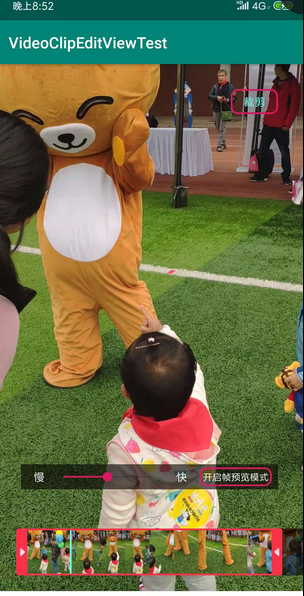
- Frame thumbnail timeline: extract frames from the source video and display them in a horizontal editing timeline.
- Dynamic trim range selection: drag left and right trim handles with minimum and maximum duration constraints.
- Playback preview: drag the progress indicator to preview different moments inside the selected range.
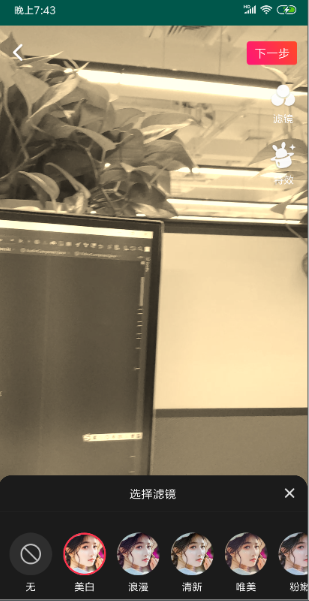
- Video filters: apply filters to local videos and render the filtered output to a new MP4 file.
- Beauty processing: includes OpenGL shader examples for beauty, blur, high-pass, and skin adjustment effects.
- OpenGL effects: includes flash, shake, soul-out, split-screen, scale, and other motion-style effects.
- Time-based effects: use
GlFilterListandGlFilterPeriodto apply different effects to different time ranges. - Camera2 preview filters: switch filters during live camera preview on Android Lollipop and newer devices.
Screenshots
Project Structure
.
├── app/             Demo app, activities, UI, video clip/edit flows
├── library/         Shared playback, thumbnail, utility, and video helper code
├── epf/             OpenGL video preview, filters, effects, EGL, and MP4 compose code
├── filterlibrary/   Additional image/video filter implementations and shader assets
└── mp4compose/      Legacy MP4 compose module kept for reference
app
The demo application contains the main user flows:
MainActivity: entry point, video picker, and feature navigation.VideoClipActivity: video trimming UI, thumbnail timeline, preview, and clip export.VideoEditActivity: local video filter/effect editing.VideoProgressActivity: video generation progress screen.CameraEffectActivity/Camera2BasicFragment: Camera2 preview with OpenGL filters.ClipContainer: custom timeline view for trim handles, shadows, and playback progress.
library
Common media and UI helper layer:
- ExoPlayer / MediaPlayer playback wrappers.
- Thumbnail extraction and thumbnail preview view.
- Video metadata and utility helpers.
- Basic video item model and shared extensions.
epf
The main OpenGL and video processing module:
- OpenGL filter base classes and custom filters.
- EGL rendering helpers.
Mp4Composerpipeline for decode, render, encode, and mux.- Time-aware filter configuration through
GlFilterList,GlFilterPeriod, andGlFilterConfig. - Video process configuration classes used by the demo app.
filterlibrary
Additional shader and native filter experiments:
- GLSL shaders for color filters, mosaic, blur, beauty, stickers, and effects.
- C++ / JNI image filter implementations.
- Filter thumbnails and lookup texture assets.
Technology Stack
Android Media APIs
MediaExtractor: reads video/audio tracks and samples from local media files.MediaCodec: decodes and encodes video frames through Android native codecs.MediaMuxer: writes encoded audio/video samples into an output MP4 file.MediaMetadataRetriever: reads duration, resolution, rotation, and frame metadata.Surface/SurfaceTexture: passes decoded frames into the rendering pipeline.
Rendering and Image Processing
- OpenGL ES 2.0 for video frame rendering and shader effects.
- EGL for creating and managing rendering contexts and surfaces.
- GLSL fragment and vertex shaders for filters, blur, mosaic, beauty, lookup-table color effects, and motion-style effects.
- FBO-based processing for offscreen rendering during preview and export.
Camera and Playback
- Camera2 API for live camera preview and camera switching.
- ExoPlayer 2.17.1 for playback and thumbnail preview support.
- Android
MediaPlayerwrapper for alternate playback paths.
App and Build
- Kotlin and Java mixed Android project.
- Android Gradle Plugin 7.0.4.
- Kotlin 1.5.20.
compileSdkVersion 31,targetSdkVersion 31,minSdkVersion 21.- CMake / JNI are used by native filter modules.
Main Workflows
Video Trimming
- Select a local video from the system gallery.
- Load video duration and prepare the playback view.
- Generate timeline thumbnails.
- Drag the left and right trim handles to select a valid time range.
- Use
Mp4Composer.clip(startMs, endMs)to render the selected segment. - Write the generated video to the configured output path.
Video Filters and Effects
- Select a local video and enter the edit screen.
- Pick a global filter, or press and hold an effect to apply it to a time range.
- Store selected filters as
GlFilterConfig. - Recreate the filter timeline in
VideoProgressActivity. - Use
Mp4Composer.filterList(...)to render the result into a new MP4.
Camera Preview Filters
- Open the Camera2 preview screen on Android Lollipop or newer.
- Create a camera preview session.
- Send camera frames through an OpenGL renderer.
- Select a filter and update the renderer in real time.
Getting Started
Requirements
- Android Studio compatible with Android Gradle Plugin 7.0.x.
- Android SDK 31.
- Android device or emulator with API 21 or newer.
- Camera preview filter mode requires Android 5.0+ and Camera2 support.
Run the Demo
Clone the repository.
git clone https://github.com/shaopx/VideoClipEditViewTest.git
cd VideoClipEditViewTest
Open the project in Android Studio.
Sync Gradle and install the
appmodule on an Android device.Grant storage and camera permissions when prompted.
Use the main screen to choose one of the demo flows:
- Video clip
- Local video edit
- Camera preview filter
Output File
The demo writes processed video to:
/storage/emulated/0/movies/process.mp4
This path is defined in Config.DEFAULT_TEMP_VIDEO_LOCATION. If the output fails, confirm that the app has storage permissions and that the target directory exists on the device.
Notes and Limitations
- The project is a research/demo implementation for Android native video processing, not a polished production SDK.
- The current Gradle configuration requires API 21+, although older notes in the project history mentioned lower Android versions.
- Some modules and classes are experimental and kept for learning/reference purposes.
- The repository currently has no explicit open-source license file. If you plan to reuse the code, add or confirm a license first.
- Newer Android versions have stricter scoped storage behavior, so storage permission and output-path handling may need modernization.
- The original author noted that video recording features may not continue to be maintained.
References and Special Thanks
- Mp4Composer-android
- android-transcoder
- android-transcoder Japanese blog
- android-gpuimage
- Android MediaCodec stuff
- grafika
- libstagefright
Related Article
The author also wrote a related summary article about this video processing work:
