feed-flow

FeedFlow
Minimal, fast RSS reading without the clutter.
FeedFlow is an RSS reader project with apps for Android, iOS, macOS, Windows, and Linux. It uses Kotlin Multiplatform for shared logic, Compose Multiplatform for Android and Desktop, and SwiftUI for iOS-specific UI.
It focuses on a clean timeline, flexible reading modes, and control over sync and storage.
Website · Latest release · Issues · Translate



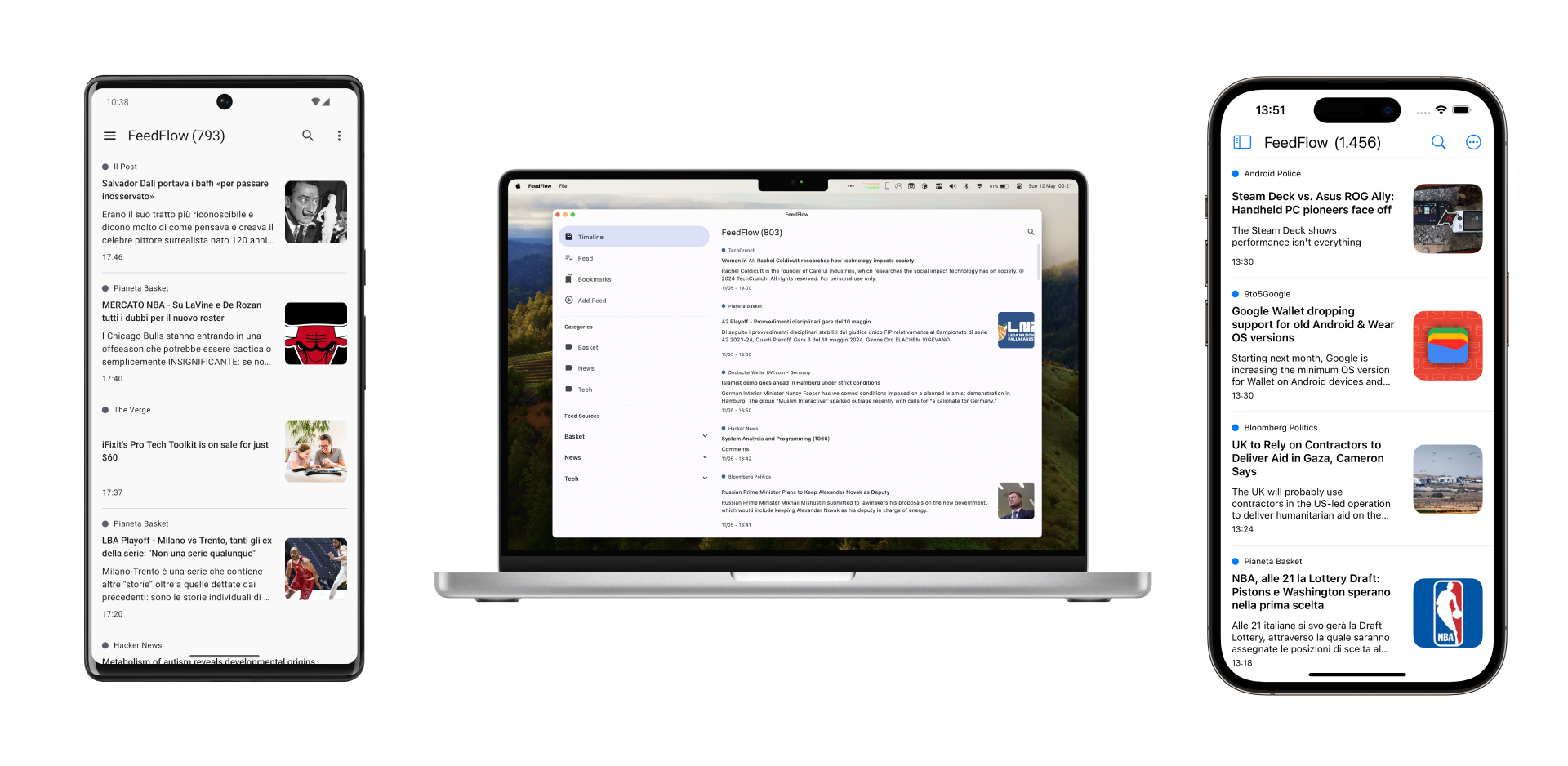
- Read articles the way you want: Reader Mode, the in-app browser, or your preferred browser
- Keep your library local, sync it through cloud storage, or connect directly to reader services
- Organize a busy timeline with bookmarks, filters, and blocked words
- Move data in and out easily with OPML feed import/export and CSV article import/export
Highlights
- Dedicated apps for Android, iOS, macOS, Windows, and Linux
- Flexible reading modes: Reader Mode, the in-app browser, or your preferred browser
- Flexible sync and storage options: local library, Dropbox, Google Drive, iCloud, FreshRSS, Miniflux, Feedbin, and BazQux Reader
- Offline reading by saving article content during sync
- Timeline, read status, bookmark, source, and category filters
- Blocked words to hide articles containing specific keywords or phrases
- Curated feed suggestions across different topics
- Theme modes for system, light, dark, and OLED
- Widgets for Android and iOS
Download
| Platform | Get FeedFlow |
|---|---|
| Android | Google Play or F-Droid |
| iPhone and iPad | App Store |
| macOS | Mac App Store, Homebrew, or GitHub Releases |
| Windows | Microsoft Store or GitHub Releases |
| Linux | Flathub or GitHub Releases |
What You Can Do With FeedFlow
Read Your Way
FeedFlow does not lock you into a single article view. Open links in Reader Mode, use the in-app browser, or send them to your preferred browser. Reader Mode also includes extras like opening comments directly and sharing articles without leaving your reading flow.
Keep Control Over Sync and Storage
You can keep everything local, use storage backends like Dropbox, Google Drive, or iCloud, or connect directly to reader services such as FreshRSS, Miniflux, Feedbin, and BazQux Reader.
Stay on Top of a Busy Timeline
Use bookmarks, read and unread states, timeline filters, source and category views, and blocked words. FeedFlow also supports auto-saving article content for offline reading and includes cache cleanup tools.
Discover New Feeds Faster
Feed suggestions are built into the app, with curated sources across ten categories, so a fresh install does not have to start from zero.
Building From Source
Prepare Local Config
Android:
cp config/dummy-google-services.json androidApp/src/debug/google-services.json
cp config/dummy-google-services.json androidApp/src/release/google-services.json
iOS:
cp config/dummy-google-service.plist iosApp/GoogleService-Info-dev.plist
cp config/dummy-google-service.plist iosApp/GoogleService-Info.plist
cp config/dummy-config.xcconfig iosApp/Assets/Config.xcconfig
brew install xcodegen
cd iosApp && ./.scripts/generate-project.sh
If you want to test real iOS sync providers locally, start from iosApp/Assets/Config.xcconfig.template
instead of the dummy config and fill in your own keys.
The iOS Xcode project is generated from iosApp/project.yml and is not committed.
The generation script also creates the ignored iosApp/Assets/Config-Debug.xcconfig
from its tracked template when it is missing.
Regenerate the project whenever iosApp/project.yml, iOS source structure, xcconfig files,
entitlements, or SwiftPM dependencies change.
Optional local keys:
keystore.propertiesfor Android/Desktop Dropbox keysdesktopApp/src/jvmMain/resources/props.propertiesfor Desktop Dropbox keysiosApp/Assets/Config.xcconfigfor iOS Google Drive and Dropbox configiosApp/Assets/Config-Debug.xcconfigfor iOS debug Google Drive overrides
Tech Stack
- Kotlin Multiplatform for shared business logic
- Compose Multiplatform for Android and Desktop UI
- SwiftUI for iOS-specific UI
- SQLDelight-backed local storage
- RSSParser for feed parsing
Translating
If you want to help translate FeedFlow, use Weblate or open a pull request with:
- a new
strings.xmlfile underi18n/src/commonMain/resources/locale/values-<language-code>/ - matching store copy under
assets/storecopy/<language-code>/
Contributing
Issues and pull requests are welcome. If you are proposing a larger feature or a platform-specific change, opening an issue first is usually the fastest way to align on scope.
License
FeedFlow is released under the Apache 2.0 License.
