LazyKeyboard


LazyKeyboard is a lightweight security keyboard for Android. It replaces the system IME on sensitive fields (passwords, PINs, ID numbers…) with an in-app keyboard, so what the user types never passes through a third-party input method.
Preview

| Letter | Symbol | Number (randomized) | Custom colors |
|---|---|---|---|
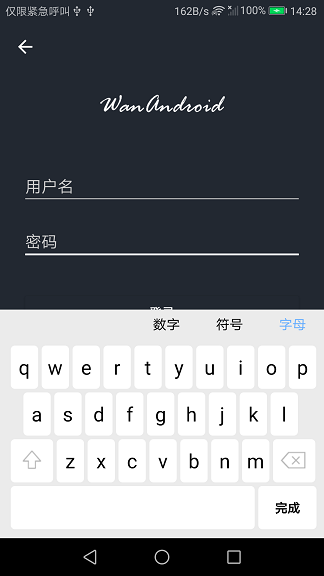 |
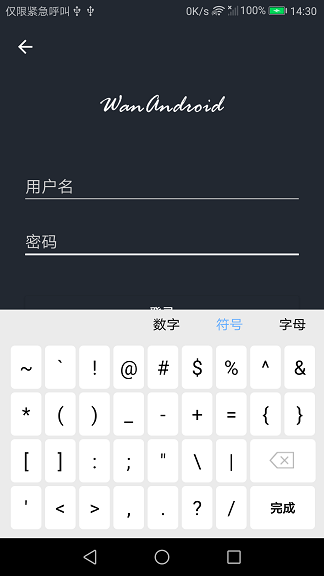 |
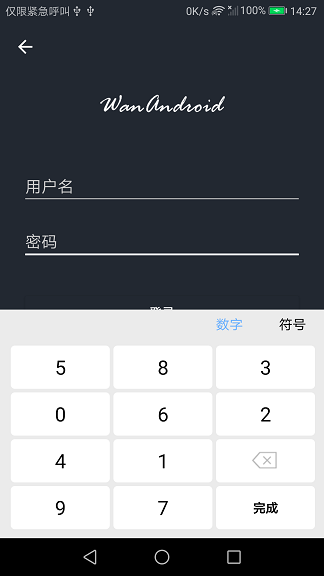 |
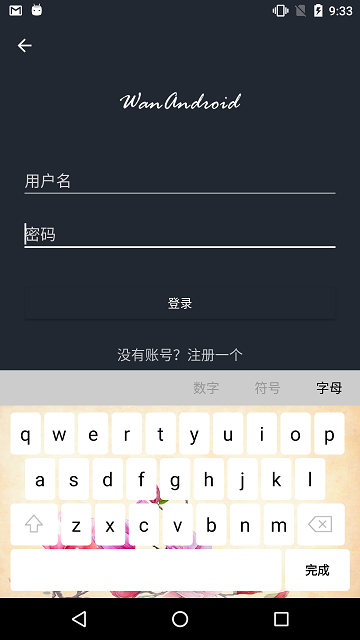 |
Why not the system keyboard?
Any installed IME — including third-party ones with full network access — can read every keystroke typed into a normal EditText. For sensitive input, apps in finance, government and healthcare are commonly required to keep input inside the app.
LazyKeyboard shows its own bottom keyboard and inserts characters directly into the field. The system IME is never invoked, and the number pad reshuffles its digits every time it is shown, defeating shoulder-surfing and casual screen recording.
Features
- Drop-in usage — swap
EditTextforSecurityEditTextin your layout. The keyboard shows on focus and hides on blur; the back key dismisses it. - Hard IME block — the field never creates an
InputConnection, so no system keyboard can bind to it, not even via long-press selection or explicitshowSoftInputcalls from app code. - Anti-cover pan — if the keyboard would cover the field, the screen content pans up automatically and glides back when the keyboard closes.
- Three layouts — letter / symbol / number with a chooser bar, landscape layouts included.
- Randomized number pad — enabled by default.
- Customizable — chooser colors, chooser and keyboard backgrounds, key preview toggle.
- Pure Java, small footprint — no Kotlin runtime required; only AndroidX appcompat + constraintlayout as transitive dependencies.
Requirements
- minSdk 23, compileSdk 35+
- v1.8 adds the optional
LazyKeyboard.lazykeyboard-composeartifact and built-in English strings; the core stays pure Java. - v1.7 replaced the rendering layer with a self-drawn view and added the key-input callback (
OnSecurityKeyListener) — no breaking API changes. - v1.6 raised minSdk from 19 to 23 (required by AndroidX). Stay on v1.5 if you must support Android 5.x.
Installation
Step 1. Add the JitPack repository to your settings.gradle(.kts):
dependencyResolutionManagement {
    repositories {
        google()
        mavenCentral()
        maven(url = "https://jitpack.io")
    }
}
Step 2. Add the dependency:
dependencies {
    implementation("com.github.onlyloveyd:LazyKeyboard:v1.8")
}
Quick start
Just use SecurityEditText wherever the user types sensitive content:
<com.gs.keyboard.SecurityEditText
    android:id="@+id/login_input_password"
    android:layout_width="match_parent"
    android:layout_height="wrap_content"
    android:hint="密码"
    android:inputType="textPassword"
    app:chooserBackground="@color/iron"
    app:chooserSelectedColor="#000000"
    app:chooserUnselectedColor="#999999"
    app:keyPreview="true"
    app:keyboardBackground="@drawable/keyboard_bg" />
That's it — no Java code needed. See the app module for a working login-screen sample.
Attributes
All attributes are optional.
| Attribute | Format | Usage |
|---|---|---|
chooserSelectedColor |
color | text color of the selected keyboard type tab |
chooserUnselectedColor |
color | text color of the unselected tabs |
chooserBackground |
color / drawable | background of the keyboard type chooser bar |
keyboardBackground |
color / drawable | background of the keyboard area |
keyPreview |
boolean | whether to show the key preview popup when a key is tapped |
Key input callback
OnSecurityKeyListener reports every key press before it is applied to the field, so you can maintain your own encrypted copy of the input or audit the key sequence:
SecurityEditText editText = findViewById(R.id.login_input_password);
editText.setOnSecurityKeyListener((primaryCode, label) -> {
    if (primaryCode == OnSecurityKeyListener.KEYCODE_DELETE) {
        // delete one char from your own encrypted buffer
    } else if (primaryCode >= 0) {
        // append the character to your own encrypted buffer
    }
});
Functional keys (shift / done / delete) arrive as negative codes — the constants live on the listener interface.
Compose
For Compose apps, add the optional lazykeyboard-compose artifact (the core stays pure Java with zero Kotlin runtime — only add this if you use Compose):
dependencies {
    implementation("com.github.onlyloveyd.LazyKeyboard:lazykeyboard-compose:v1.8")
    implementation("com.github.onlyloveyd.LazyKeyboard:v1.8")
}
SecurityTextField wraps SecurityEditText via interop and exposes the input as observable Compose state:
val passwordState = rememberSecurityInputState()

SecurityTextField(
    state = passwordState,
    hint = "Password",
    isPassword = true,
)

Text("Entered ${passwordState.text.length} characters")
A working demo is included in the sample app (app module).
Localization
Default strings ship in Chinese with an English variant (values-en) included — the chooser labels (ABC / Sym / 123) and the done key localize automatically on English devices. To add more languages, override title_letter, title_symbol, title_number and key_done in your app's values-<locale> folders.
Known limitations
- The keyboard is rendered by the library's own self-drawn view (
SecurityKeyboardView); it no longer depends on the frameworkKeyboardViewthat Android deprecated in API 29. Each key owns an independent background drawable instance, so animated selectors no longer corrupt the rendering. - Because the field rejects all IMEs, IME-driven text composition (and on Android 6–8, clipboard paste via long-press) will not work on
SecurityEditText— that is the intended security trade-off. - This is UI-layer protection: it stops IME capture and casual shoulder-surfing. It does not encrypt input or protect a compromised device — for regulated deployments, pair it with your own encryption of the submitted value.
License
MIT © 易冬 (onlyloveyd)
