DateTimePicker
Introduction: :star::tada:一个简约、漂亮的日期时间选择器
Tags:



中文 | English
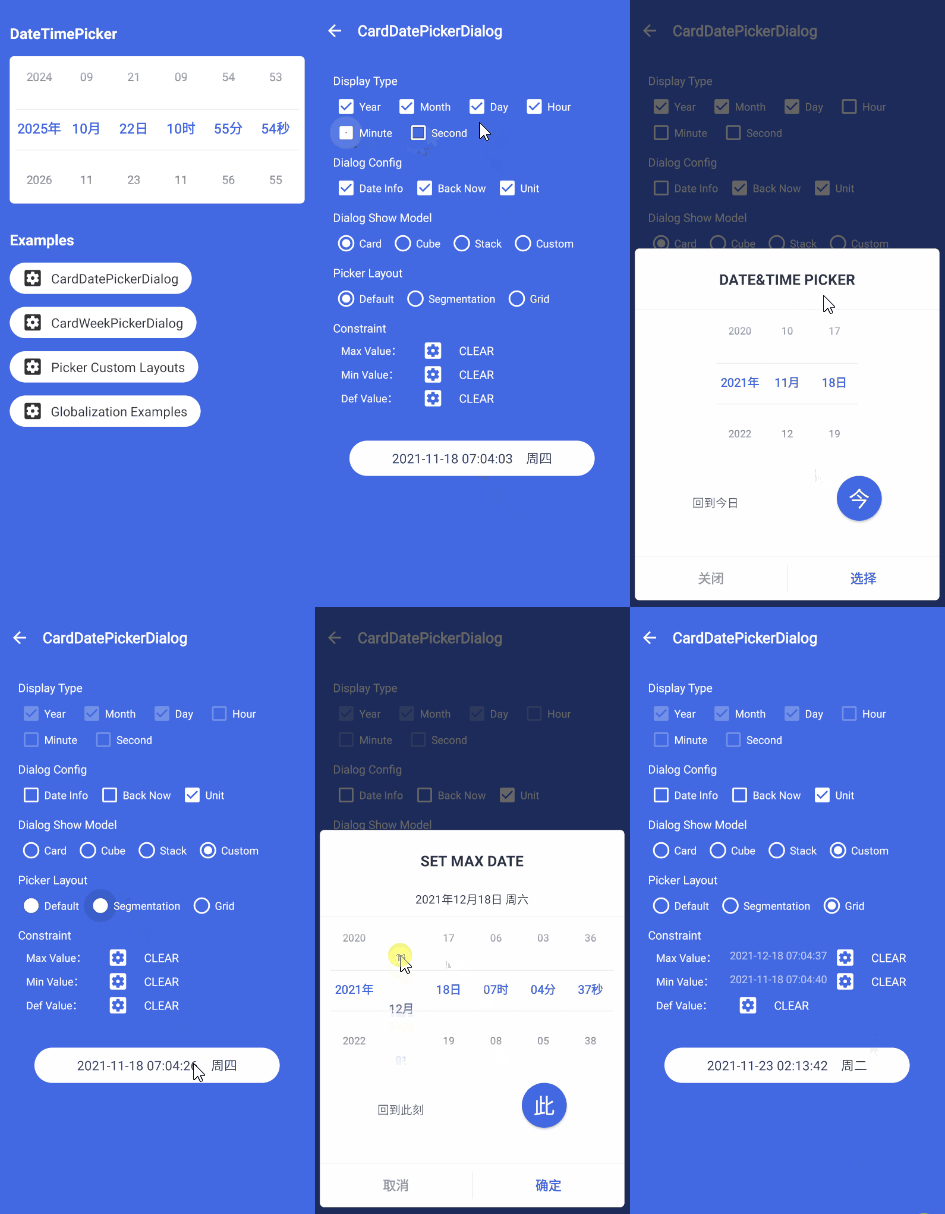
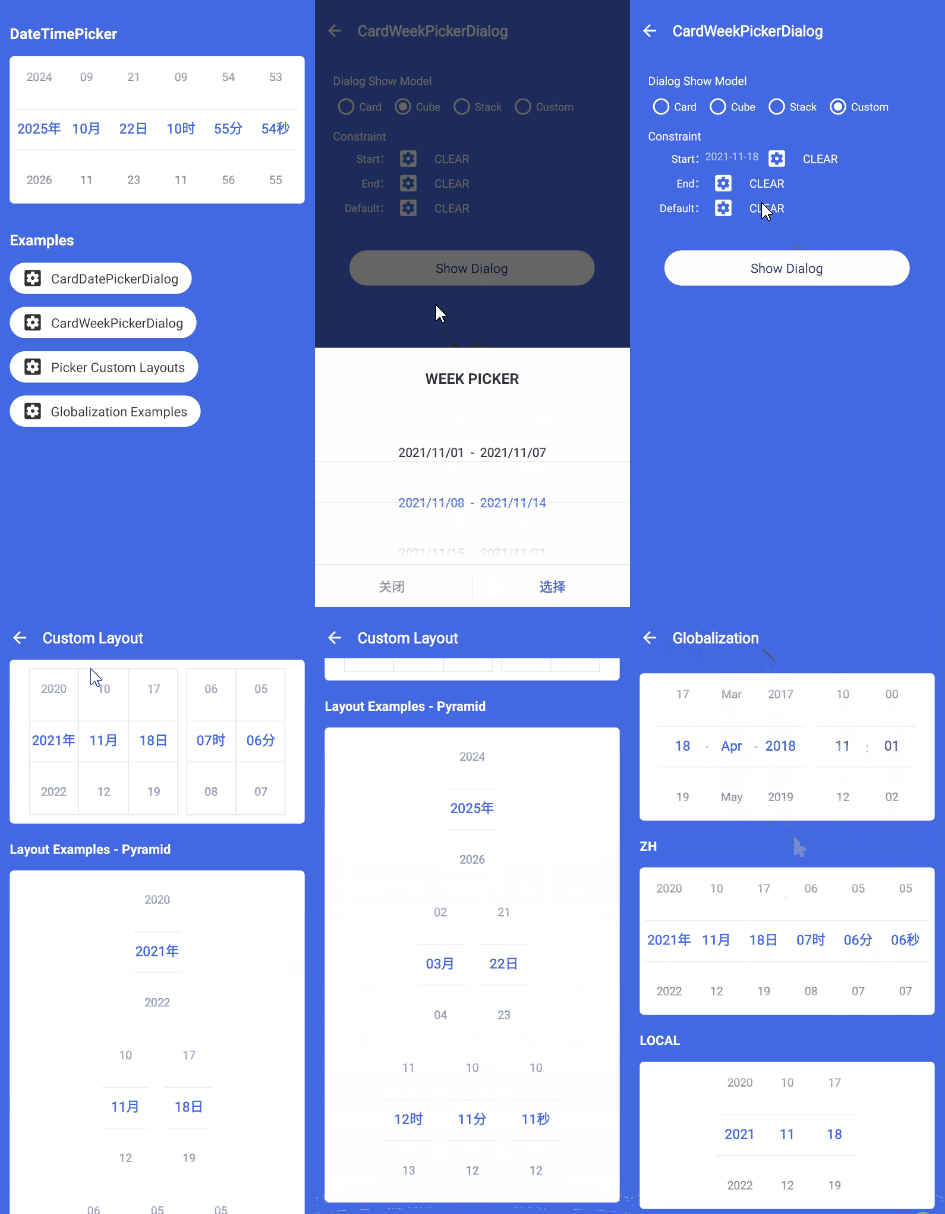
⭐🎉一个高颜值日期时间选择器;极简 API,内置弹窗,支持农历日期显示,简单适配深色模式,可动态配置样式及主题,选择器支持完全自定义 UI。
预览
加载不出图片可以前往 掘金 查看
快速体验

或者 点击下载
如何引入
Step 1. 添加 JitPack repository
allprojects {
    repositories {
        ...
        maven { url "https://jitpack.io" }
    }
}
Step 2. 添加 Gradle 依赖
dependencies {
    ...
    implementation 'com.google.android.material:material:1.1.0' //为了防止不必要的依赖冲突,0.0.3 开始需要自行依赖 google material 库
    implementation 'com.github.loper7:DateTimePicker:0.6.3'//具体版本请看顶部 jitpack 标识,如 0.6.3,仅支持 androidx
}
如何使用
日期时间选择控件
DateTimePicker 使用说明
卡片弹窗
CardDatePickerDialog 使用说明
自定义选择器
DateTimePicker 自定义
周选择弹窗
CardWeekPickerDialog 使用说明
更新日志
v0.6.2 -> v0.6.3
- DateTimePicker 支持继承
- 调用 numberpicker.setSelectedTextColor 等方法会立即重绘 view,解决 view 显示中需要改变 UI 的需求
v0.6.1 -> v0.6.2
- fix issues 75
v0.6.0 -> v0.6.1
v0.5.8 -> v0.6.0
/**
 * 设置 dialog 选中日期信息展示格式
 * @param value 1:LUNAR 0:DEFAULT
 * @return Builder
 */
 fun setChooseDateModel(value: Int): Builder {
     this.chooseDateModel = value
        return this
 }
- 适配深色模式
//由于背景、DateTimePicker 以及主题色均可由开发者灵活配置,为了兼容这些配置,所以适配深色模式需要调用以下几个方法进行设置。

//1.自定义 dialog 背景,为 light/dark 模式设置不同的值
builder.setBackGroundModel(if(isDark) R.drawable.shape_bg_dialog_dark else R.drawable.shape_bg_dialog_light)
//2.自定义 dialog 辅助文字颜色
.setAssistColor(if(isDark) darkColor else lightColor)
//3.自定义 dialog 分割线颜色
.setDividerColor(if(isDark) darkColor else lightColor)

//这样深色模式就适配完成了,当然,以上三个方法的作用不仅可以用于适配深色模式,也可以传入更契合 app 主题的颜色,用于与 app 统一 UI 风格。
v0.5.7 -> v0.5.8
- fix issues 57
v0.5.3 -> v0.5.7
v0.5.2 -> v0.5.3
v0.5.1 -> v0.5.2
- fix issues 44
CardDatePickerDialog支持设置touchHideable, 用以控制是否允许滑动手势关闭弹窗
    /**
         * 是否可以滑动关闭弹窗
         * @param touchHideable 默认为 true
         */
        fun setTouchHideable(touchHideable:Boolean = true):Builder{
            this.touchHideable = touchHideable
            return this
        }
CardWeekPickerDialog支持设置formatter,可自定义格式化展示样式
    /**
         * 设置格式化
         * @param datas 数据
         * @return Builder
         */
        fun setFormatter(formatter: (MutableList<MutableList<Long>>) -> NumberPicker.Formatter?): Builder {
            this.formatter = formatter
            return this
        }
v0.5.0 -> v0.5.1
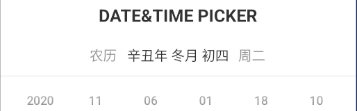
- 支持农历日期转换
var lunar = Lunar.getInstance(calendar)
lunar?.apply {
   Log.d("lunar",lunar.toString())
}
CardDatePickerDialog内原标题下日期信息变更为农历日期信息
v0.4.1 -> v0.5.0
v0.3.4 -> v0.4.1
- fix issues 29
- fix issues 30
- fix issues 32
- fix issues 34
- fix issues 35
- DateTimePicker 新增 getMillisecond() 方法
- 新增选择周功能弹窗
v0.3.3 -> v0.3.4
支持设置国际化日期选择格式
DateTimePicker 新增如下方法,CardDatePickerDialog 不受任何影响。
- 设置国际化日期显示格式
    /**
     * 设置国际化日期格式显示 如果没有自定义 layout 且需要设置的日期格式为 dd-MM(单词缩写)-yyyy HH:mm:ss,此方法会改变年月日的顺序,及月份的显示。
     * @param global : DateTimeConfig.GLOBAL_LOCAL 根据设备系统语言自动选择
     *                 DateTimeConfig.GLOBAL_CHINA 设置日期格式为 yyyy-MM-dd HH:mm:ss
     *                 DateTimeConfig.GLOBAL_US 设置日期格式为 dd-MM(单词缩写)-yyyy HH:mm:ss
     */
    fun setGlobal(global: Int) {
      ...
    }
- 获取类型对应的 NumberPicker
    /**
     * 获取类型对应的 NumberPicker
     * @param displayType 类型
     */
    fun getPicker(displayType: Int): NumberPicker? {
        ...
    }
v0.3.1 -> v0.3.3
v0.3.0 -> v0.3.1
- fix issues 18
v0.2.3 -> v0.3.0
v0.2.2 -> v0.2.3
- fix issues 11
v0.2.1 -> v0.2.2
- fix issues 10
v0.2.0 -> v0.2.1
- fix issues 7
v0.1.1 -> v0.2.0
- 新增 DateTimeController 逻辑控制器,以支持 UI 100% 自定义
- 重构 DateTimePicker,抽离逻辑至 DateTimeController,自身仅控制 UI
- 抽离常量至 DateTimeConfig
- 抽离像素单位转换至 ContextExt 拓展
- fix issues 4-CardDatePickerDialog.Builder 内变量添加@JvmField 以支持 Java 调用
v0.1.0 -> v0.1.1
- 修复设置最大年份后,当选择到最大年份时,月份为 0 的问题
- 修复范围最大值,范围最小值,选中默认值之间冲突时约束异常问题(规则为:最大范围值与最小范围值存在冲突时,后设置的值不会生效;选中默认值与范围最大值/范围最小值存在冲突时,不会生效)
- 优化监听回调代码,使用 kotlin 特性,使回调更加简洁
eg:感谢 yaolv7 提供的 Pull requests
v0.0.7 -> v0.1.0
- DateTimePicker 类变更为 kotlin 编写
- 新增单位标签可在代码内配置
- 移除 DateTimePicker 回调监听非必要字段
- 新增 CardDatePickerDialog 取消、确定按钮文字配置
- 新增 CardDatePickerDialog 取消按钮回调监听
- 变更 CardDatePickerDialog 监听绑定至 builder 内
eg:此次更新对原有方法及配置有一定改动,详情查看 [ 如何使用 ]
混淆
-dontwarn com.loper7.date_time_picker.**
-keep class com.loper7.date_time_picker.**{*;}
感谢
联系我
Issues:Issues
邮箱:loper7@163.com
Licenses
Copyright 2020 loperSeven

Permission is hereby granted, free of charge, to any person obtaining a copy of this software and associated documentation files (the "Software"), to deal in the Software without restriction, including without limitation the rights to use, copy, modify, merge, publish, distribute, sublicense, and/or sell copies of the Software, and to permit persons to whom the Software is furnished to do so, subject to the following conditions:

The above copyright notice and this permission notice shall be included in all copies or substantial portions of the Software.

THE SOFTWARE IS PROVIDED "AS IS", WITHOUT WARRANTY OF ANY KIND, EXPRESS OR IMPLIED, INCLUDING BUT NOT LIMITED TO THE WARRANTIES OF MERCHANTABILITY, FITNESS FOR A PARTICULAR PURPOSE AND NONINFRINGEMENT. IN NO EVENT SHALL THE AUTHORS OR COPYRIGHT HOLDERS BE LIABLE FOR ANY CLAIM, DAMAGES OR OTHER LIABILITY, WHETHER IN AN ACTION OF CONTRACT, TORT OR OTHERWISE, ARISING FROM, OUT OF OR IN CONNECTION WITH THE SOFTWARE OR THE USE OR OTHER DEALINGS IN THE SOFTWARE.
