SmallestWidthDimens
Introduction: Android SmallestWidth 屏幕适配方案
Tags:
13-20-2003-16-Android SmallestWidth 屏幕适配方案
原理 smallestWidth
https://developer.android.com/guide/practices/screens_support.html#NewQualifiers
关键的地方就是 sw 后面数值的单位是dp
- 跟 hongyang 的方案不同,不会用绝对分辨率适配,而使用 sw(最小宽度)限定符方案
- 只关注最小宽度,无视高度,不会受有/没有虚拟导航键影响,也可以适配 18:9 的全面屏
- 设备的 sw 不会有太多,没有合适的配置的话,会使用最接近设备最小宽度的那个较小的配置(如没有小米 mix2 的 392 的话,会用 384 这个配置,误差不会很大)
- 预览应该无压力,毕竟 sw 列表就是根据官方模拟器配置列表得来的
// 获取最小宽度的代码
Configuration config=getResources().getConfiguration();
    int smallestScreenWidthDp=config.smallestScreenWidthDp;
使用
- 在根 build.gradle 中添加
allprojects {
    repositories {
        ...
        maven { url 'https://jitpack.io' }
    }
}
- 子 module 添加依赖
dependencies {
        // 根据设计图的宽度选一个,没有就按照下面配置重新生成自己要的
        // 公司美工喜欢做 iphone(750*1334)的图,就选 sw_750
        implementation 'com.github.licheedev.SmallestWidthDimens:sw_750:1.0.0'
        implementation 'com.github.licheedev.SmallestWidthDimens:sw_1080:1.0.0'
}
- 使用
// 正数 dp
android:layout_width="@dimen/sw_16dp"
// 负数 dp
android:layout_width="@dimen/_sw_10dp"
// sp
android:textSize="@dimen/sw_36sp"
没有合适的话,就按照下面配置重新生成一个 module,复制到自己项目里面,然后 compile project(':生成的模块名')导入即可
生成新的尺寸配置
运行生成器
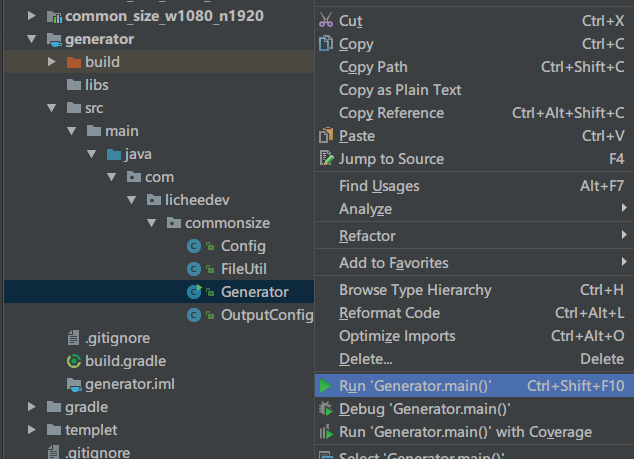
生成器配置 generator_config.properties
最小宽度列表 smallest_width_list.txt
# 设计图参考宽度数值,单位不限,可以填多个,分别以英文逗号,隔开
design_width_list=750,1080
# 最小宽度列表路径
smallest_width_list=smallest_width_list.txt
# dp 资源范围
dp_range=-360,1080
# sp 资源范围
sp_range=1,100
# 资源文件名
file_name=sw_dimens.xml
# sp 资源命名规则,{x}为要替换的数值,负数会在前面加上"_"
dp_res_reg=sw_{x}dp
# sp 资源命名规则,{x}为要替换的数值
sp_res_reg=sw_{x}sp
# 只删除目标 module
just_delete=false
# 缩进空格长度
intent_length=4
