Android-StatefulLayout
StatefulLayout
implementation 'cz.kinst.jakub:android-stateful-layout-base:2.0.7'
This is a base class you should use if you want to have completely custom set of states/views. You can either inherit and add custom states in constructor
(see SimpleStatefulLayout as an example) or you can use directly StatefulLayout and add states dynamically in your code via setStateView(). Raw StatefulLayout
contains only one state - StatefulLayout.State.CONTENT with whatever child is inside the XML content of the tag.
Example
<cz.kinst.jakub.view.StatefulLayout
    android:id="@+id/stateful_layout"
    android:layout_width="match_parent"
    android:layout_height="match_parent">

    <!--Your Content Here-->

</cz.kinst.jakub.view.StatefulLayout>
// in onCreate()
statefulLayout.setStateView(STATE_NO_PERSMISSION, LayoutInflater.from(this).inflate(R.layout.state_no_permission, null));
statefulLayout.setStateView(STATE_PROGRESS, LayoutInflater.from(this).inflate(R.layout.state_progress, null));
API
setStateView(String state, View view)Adds a new state and with a corresponding ViewsetState(String state)Changes current stategetState()Returns current view state (String ID)setOnStateChangeListener(OnStateChangeListener listener)Sets a listener on state change eventsetStateController(StateController stateController)Sets a state controller object. See below.
StateController
If you don't want to directly manipulate with the view (MVVM/MVP scenario) you can create an instance of StateController
and bind it to StatefulLayout (e.g. using Data Binding). StateController allows you to setup different states as well as control current state itself.
See example below or DataBindingControllerActivity in sample project.
<cz.kinst.jakub.view.StatefulLayout
    android:layout_width="match_parent"
    android:layout_height="match_parent"
    app:stateController="@{viewModel.stateController}">
</cz.kinst.jakub.view.StatefulLayout>
stateController = StatefulLayout.StateController.create()
                .withState(STATE_NO_PERSMISSION, LayoutInflater.from(this).inflate(R.layout.state_no_permission, null))
                .withState(STATE_PROGRESS, LayoutInflater.from(this).inflate(R.layout.state_progress, null))
                .build();

//...

stateController.setState(STATE_PROGRESS);
SimpleStatefulLayout
implementation 'cz.kinst.jakub:android-stateful-layout-simple:2.0.7'
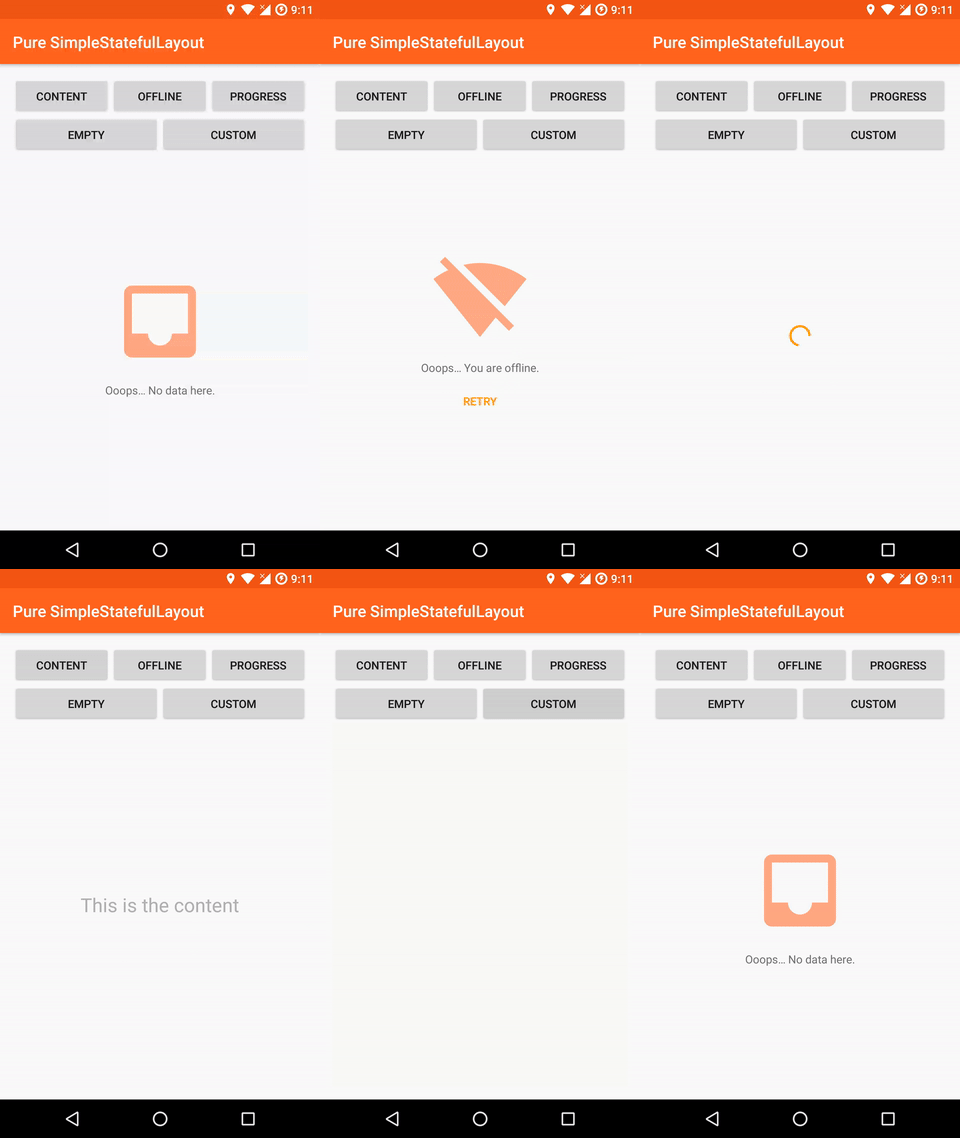
SimpleStatefulLayout extends StatefulLayout and adds couple of useful states for most apps - State.OFFLINE, State.PROGRESS, State.EMPTY. It provides customizable layout
placeholder for these states as well as a way to provide completely custom layouts for the states.
You can also customize this by extending the class or adddd states by using setStateView().
Example
<cz.kinst.jakub.view.SimpleStatefulLayout
    android:id="@+id/stateful_view"
    android:layout_width="match_parent"
    android:layout_height="match_parent">

    <!--Your Content Here-->

</cz.kinst.jakub.view.SimpleStatefulLayout>
// in onCreate()
statefulLayout.showProgress();
// load data
statefulLayout.showContent();
Optional Attributes
app:offlineTextCustom text to show when in OFFLINE stateapp:offlineRetryTextText for a retry button in OFFLINE stateapp:emptyTextCustom text to show when in OFFLINE stateapp:offlineImageDrawableCustom image to show above the offline state text (if not using custom layout)app:emptyImageDrawableCustom image to show above the empty state text (if not using custom layout)app:offlineLayoutCustom layout to show when in OFFLINE stateapp:emptyLayoutCustom layout to show when in EMPTY stateapp:progressLayoutCustom layout to show when in PROGRESS stateapp:stateInitial state of the view (content,progress,offline,empty)app:stateTextAppearanceWhen not using custom layouts, this is the way to style the TextViews in OFFLINE and EMPTY states.
API
showContent()showProgress()showEmpty()showOffline()setEmptyText(String text)If using default layouts, this will set the text displayed in the EMPTY statesetOfflineText(String text)If using default layouts, this will set the text displayed in the OFFLINE statesetOfflineRetryText(String text)If using default layouts, this will set the text of a retry button displayed in the OFFLINE statesetOfflineRetryOnClickListener(OnClickListener listener)If using default layouts, this will set the click listener to a retry button displayed in the OFFLINE statesetEmptyImageDrawable(Drawable drawable)Sets custom image shown above empty text when not using custom layoutsetEmptyImageResource(int resourceId)Sets custom image shown above empty text when not using custom layoutsetOfflineImageDrawable(Drawable drawable)Sets custom image shown above offline text when not using custom layoutsetOfflineImageResource(int resourceId)Sets custom image shown above offline text when not using custom layoutsetTransitionsEnabled(boolean enabled)Enables/disables transitions between states
License
Copyright 2017 Jakub Kinst (jakub@kinst.cz)

Licensed under the Apache License, Version 2.0 (the "License");
you may not use this file except in compliance with the License.
You may obtain a copy of the License at

  http://www.apache.org/licenses/LICENSE-2.0

Unless required by applicable law or agreed to in writing, software
distributed under the License is distributed on an "AS IS" BASIS,
WITHOUT WARRANTIES OR CONDITIONS OF ANY KIND, either express or implied.
See the License for the specific language governing permissions and
limitations under the License.
