StackDrawer
一款实现仿 IOS 通知栏的折叠/展开效果的组件,欢迎 Star,欢迎 Fork,谢谢~
功能介绍
- 折叠、展开动效
- 支持自定义折叠数量
- 支撑大量数据源的滚动复用 View 机制
- 支持多类型 item 布局
- 局部刷新
- item 动画
效果

使用方式
1. 如何引入
Gradle 依赖引入
step 1
Add the JitPack repository to your build file
    allprojects {
            repositories {
                ...
                maven { url 'https://jitpack.io' }
            }
        }
Step 2
Add the dependency
dependencies {
             implementation 'com.github.itlwy:StackDrawer:v1.0.0'
    }
2. xml 布局引入
  <com.lwy.stacklib.view.StackLayout
                android:id="@+id/stacklayout"
                android:layout_width="match_parent"
                android:layout_height="wrap_content"/>
3. 初始化 Adapter
这里完全仿 RecycleView 模式进行
- 定义 Adapter
class MyAdapter extends StackLayout.Adapter<NestingStackActivity.MyAdapter.CustomViewHolder> {
        private List<String> datas;

        ...

        @Override
        public NestingStackActivity.MyAdapter.CustomViewHolder onCreateViewHolder(@NonNull ViewGroup parent, int viewType) {
            View view = View.inflate(NestingStackActivity.this, viewType, null);
            ViewGroup.LayoutParams param = new ViewGroup.LayoutParams(ViewGroup.LayoutParams.MATCH_PARENT,
                    ViewGroup.LayoutParams.WRAP_CONTENT);
            view.setLayoutParams(param);
            return new NestingStackActivity.MyAdapter.CustomViewHolder(view, this);
        }

        @Override
        public void onBindViewHolder(@NonNull NestingStackActivity.MyAdapter.CustomViewHolder holder, int position) {
            holder.bindViews(position);
        }

        @Override
        public int getItemViewType(int position) {
//            if (position == 1) {
//                return R.layout.item_big;
//            } else {
            return R.layout.item;
//            }
        }

        @Override
        public int getItemCount() {
            return this.datas.size();
        }
    }
- 定义 ViewHolder
 class CustomViewHolder extends StackLayout.ViewHolder {

            private final View itemLLt;
            private final TextView tv;
            private final MyAdapter adapter;

            public CustomViewHolder(View itemView, MyAdapter adapter) {
                super(itemView);
                this.adapter = adapter;
                itemLLt = itemView.findViewById(R.id.item_llt);
                tv = itemView.findViewById(R.id.tv);
            }

            public void bindViews(final int position) {
                tv.setText(adapter.datas.get(position));
                itemLLt.setOnClickListener(new View.OnClickListener() {
                    @Override
                    public void onClick(View v) {
                        if (position == 0) {
                            adapter.getView().switchStatus();
                        } else {
                            Toast.makeText(NestingStackActivity.this, "点击了" + position, Toast.LENGTH_LONG).show();
                        }

                    }
                });
            }

        }
- 使用
 stackLayout = findViewById(R.id.stacklayout);
    stackLayout.nick = "first stacklayout";
//        stackLayout.setCollapseGap(3);
    List<String> datas = generateList();
    stackLayout.setAdapter(new NestingStackActivity.MyAdapter(datas));
    stackLayout.setStatus(StackLayout.EXPAND);
4. 缓存复用
如果数据量大而需要滚动,直接将 StackLayout 包裹进 ScrollView 等是 OK 的,但是要想和 RecycleView 一样可以把滚出屏幕不可见的 View 回收再利用以保持同一时间有限数量 View 来优化效果,可以配合StackScrollView这一滚动组件实现,改变后的布局
<com.lwy.stacklib.view.StackScrollView
        android:layout_width="match_parent"
        android:layout_height="match_parent">

        <LinearLayout
            android:layout_width="match_parent"
            android:layout_height="wrap_content"
            android:orientation="vertical">

            <com.lwy.stacklib.view.StackLayout
                android:id="@+id/stacklayout"
                android:layout_width="match_parent"
                android:layout_height="wrap_content"/>

            <com.lwy.stacklib.view.StackLayout
                android:id="@+id/stacklayout2"
                android:layout_width="match_parent"
                android:layout_height="wrap_content"/>

        </LinearLayout>


    </com.lwy.stacklib.view.StackScrollView>
如上,StackScrollView是支持里面有多个StackLayout的,同时也不需要是直接子类,可以是子孙;事实上,你只需要用StackScrollView将StackLayout包裹起来即可实现缓存复用,不需要其他操作
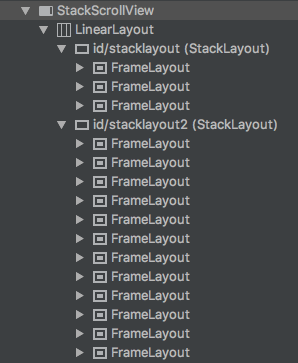
如上,折叠收起后(第一个 StackLayout)只会有折叠数量的 view 渲染,展开后(第二个 StackLayout)也只会渲染屏幕可见区域范围的 view,当发生滑动会把移出的 view 移出至缓存,需要进入屏幕的从缓存中找类型相同的直接复用,无则新建,这样就可以解决大量 view 的内存和滑动不流畅问题了
实现思路
折叠效果
由于要实现的折叠效果是仿 IOS 通知栏的效果,即:收起时,下方的卡片需要往上方卡片的下面塞进去的效果
自定义 ViewGroup 重写 onLayout 方法,从上往下布置 child 时,增加一个偏移量控制因子,来使得每个卡片往上偏移
在实现下方卡片往上方卡片偏移后,需要下方的 VIew 层级上要在上方的 View 的下一层,这样才能塞进去的效果
实现上述 2 点也就完成了预期效果,重要的代码如下
@Override
protected void onLayout(boolean changed, int l, int t, int r, int b) {
    ...
    for (int i = 0; i < count; i++) {
        // obtainViewHolder(...)
        addView(viewHolder.itemView, 0);  // 关键代码 1 通过往头插入 view 以实现先插入的位于最后,即 view 层级的顶部
        int offset = 0;
        // 这里的 offset 主要用于实现折叠效果的 layout 偏移量
        if (i > 0) {
            if (i < collapseCount) {
        // 完全收起时,藏在第一个 view 下面的
                if (top - collapseStatusHeight < 0) {
                    // 当此时要布局的 view 的 top 在完全折叠状态下的高度里面时
                    offset = (int) ((height - (collapseCount - i - 1) * collapseGap) * ratio);
                } else {
                    // 当此时要布局的 view 的 top 在完全折叠状态下的高度外时
            	    offset = (int) ((top - collapseStatusHeight + height) * ratio);
                }
            } else {
                offset = (int) ((top - collapseStatusHeight + height) * ratio);
            }
        }
        viewHolder.itemView.layout(left, top - offset, left + width, top - offset + height);  // 关键代码 2 对正常布局的 top、bottom 进行 offset 的偏移 来产生收起、展开效果
    }
    ...
}
支撑大数据源集合的 View 的缓存复用机制
简单起见,想直接利用 ScrollView 的滚动能力,但是其无像 RecycleView 的高效复用能力,所以直接对其进行扩展,核心是将其可视高度、滚动的距离这 2 个变量传递给被包裹的 StackLayout,StackLayout 再根据其在 ScrollView 的 top 位置,也即containerScrollY、containerHeight、topAtPosition这三个变量,在 onLayout 环节进行布局时判断是否滚出不可见

图 1 - 初始状态

图 2 - 向上滚动状态
依赖
- implementation 'com.android.support:appcompat-v7:28.0.0'
License
   Copyright 2020 lwy

Licensed under the Apache License, Version 2.0 (the "License");
you may not use this file except in compliance with the License.
You may obtain a copy of the License at

   http://www.apache.org/licenses/LICENSE-2.0

Unless required by applicable law or agreed to in writing, software
distributed under the License is distributed on an "AS IS" BASIS,
WITHOUT WARRANTIES OR CONDITIONS OF ANY KIND, either express or implied.
See the License for the specific language governing permissions and
limitations under the License.
