MyToast
Introduction: Toast 单例化,以及提供成功和失败 UI 的吐司,以及封装 api
Tags:
吐司-toast-toast 的封装,包括单例化,成功和失败的提示吐司,解决小米手机不弹出吐司的坑爹问题.

Deprecated
此库不再维护,新库地址请看: https://github.com/hss01248/ToastFinal
特点
1.可以选择使用系统 toast 还是自定义队列的 toast.在 init 方法里指定就可以了.
2.兼容小米手机,处理了其 toast 不可见的问题: miui8 以下,使用自定义队列的 toast, miui8 以上,使用系统吐司.
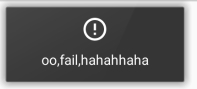
3.提供了成功和失败的两个自定义 ui 的吐司.这两个状态吐司会按指定时长显示.(默认 short)
使用
拷贝 demo 中提供的包装类MyToast来使用,作为包装层,
避免直接使用库内部的类(ToastUtil 和 CustomToastUtil).
添加 gradle 依赖:
Step 1. Add the JitPack repository to your build file
gradle
Add it in your root build.gradle at the end of repositories:
allprojects {
    repositories {
        ...
        maven { url "https://jitpack.io" }
    }
}
Step 2. Add the dependency
dependencies {
        compile 'com.github.glassLake:MyToast:1.0.1'
}
提供有以下方法:
初始化:
Application 初始化时传入相应参数:
init(@NonNull Application context, @NonNull Handler mainHandler, boolean isDebugMode,boolean isUseCustomToast)
使用时静态方法调用:
showToast(String text)

cancelToast()

showDebugToast( String text)

showLongToast( String text)

showSuccessToast(String text)

showFailToast(String text)
成功和失败状态吐司的 ui:
带有阴影效果