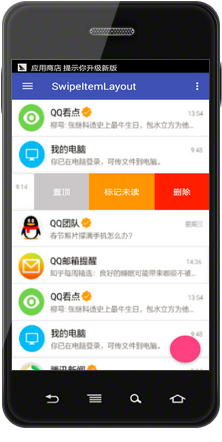
swipeitemlayout
轻量级 RecyclerView 左滑实现,以及 ExpandableListView、ListView 的左滑实现
-------------------------- 2017-10-23 ---------------------------------
最近项目有用到 RecyclerView 左滑,代码稍作修改。具体为 SwipeItemLayout-2017-10-23.java。 左滑+长按拖拽都可以不会冲突,先添加 ItemTouchHelper 做长按拖拽,再添加 addOnItemTouchListener(new SwipeItemLayout.OnSwipeItemTouchListener(this))即可。 项目太赶没时间维护,有兴趣的朋友可以看看。
使用方法稍有不同,具体如下:
//main 部分
<RelativeLayout
    app:layout_itemType="main"
    android:layout_width="match_parent"
    android:layout_height="wrap_content">

</RelativeLayout>

//menu 部分
<Button
    app:layout_itemType="menu`"
    android:layout_width="60dp"
    android:layout_height="match_parent"/>

<Button
    app:layout_itemType="menu`"
    android:layout_width="60dp"
    android:layout_height="match_parent"/>
-------------------------- 2017-4-20 ---------------------------------
RecyclerView 左滑:http://www.jianshu.com/p/f2a9b860858e
ExpandableListView、ListView 左滑:http://www.jianshu.com/p/a00073b55f77
RecyclerView 左滑,不需要继承特地的 adapter,不需要使用重写过的 RecyclerView,只需要一个类即可。
以 QQ 的左滑为参考设计的,与 SwipeRefreshLayout 无冲突。
使用方法如下:
1、recyclerView.addOnItemTouchListener(new SwipeItemLayout.OnSwipeItemTouchListener(this));
2、item layout 文件 以 SwipeItemLayout 为 item 的 root view,添加两个 ViewGroup,第一个为 main 部分,即显示在中心,第二个为 menu 部分,即显示在右侧
3、click、long click 点击效果以及 listener 将 item 里的 child 当作普通的 view 来对待即可。使用 setOnClickListener 以及 setOnLongClickListener。至于显示效果,通常怎么设置,这里也怎么设置。
RecyclerView 与 ListView 左滑效果图: