kmvvm
Introduction: Kotlin+Flow+Retrofit+OKHttp+ViewBanding+ViewModel+LiveData 封装的 MVVM 框架,支持协程方式访问网络请求,kotlin 最新的编译时框架 ksp,可定义全局加载失败页面,并支持全局刷新数据的点击事件,还可定义全局列表的空页面
Tags:





支持 Flow+Retrofit+OkHttp 实现链式 http 请求
支持 Rxjava+Retrofit+OkHttp 实现链式 http 请求
全局配置网络加载错误页面,并支持重新加载数据
全局配置列表空页面
封装基类:BaseActivity、BaseVMActivity、BaseFragment、BaseVMFragment、RecycleAdapter、BaseViewModel
引入 LifeCycle,将 ViewModel 和 Activity 的生命周期绑定在一起
使用 startup 库将在 Application 中初始化移至到KotlinMvvmInitializer中,从而不用封装 BaseApplication
KSP(编译时注解)封装注解:Title、OnClickFirstDrawable、OnClickFirstText、OnClickSecondDrawable、OnClickSecondText、Prefs、PrefsField、StatusBar、FlowError、GlobalConfig、ServiceApi
封装工具扩展类:ActivityExt、AnnotationExt、CalendarExt、CommonExt,ContextExt、DateExt、EditTextExt、EncryptionExt、FileExt、GsonExt、LogExt、RxJavaExt、SnackbarExt、SoftInputExt、StringExt、TextViewExt、ToastExt、TransformExt、ViewExt、ViewGroupExt
架构图
最低兼容:21
release 版本

Gitee
Github
CHANGE LOG
Gradle
1. 在根目录的 build.gradle 中添加
plugins {
    alias(libs.plugins.android.application) apply false
    alias(libs.plugins.kotlin.android) apply false
    alias(libs.plugins.android.library) apply false
    alias(libs.plugins.kotlin.jvm) apply false
    alias(libs.plugins.ksp) apply false
    alias(libs.plugins.kapt) apply false
    alias(libs.plugins.kotlin.multiplatform) apply false
    alias(libs.plugins.kotlin.plugin.serialization) apply false
}
2. 在 app 的 build.gradle 中添加
plugins {
    alias(libs.plugins.ksp)
    alias(libs.plugins.kapt)
    alias(libs.plugins.kotlin.plugin.serialization)
}
3. 在 app 的 gradle.properties 中添加
- 停用 ksp 增量编译
ksp.incremental=false
4. 在 app 的 build.gradle 的 android 下添加
buildFeatures {
    viewBinding = true
}
5. 添加依赖
implementation "com.github.catchpig.kmvvm:mvvm:last_version"
ksp "com.github.catchpig.kmvvm:compiler:last_version"
需要使用下载功能,请单独添加如下依赖
implementation "com.github.catchpig.kmvvm:download:last_version"
使用
1. 配置全部参数
interface IGlobalConfig {
    /**
     * 标题栏高度
     * @return Int
     */
    @DimenRes
    fun getTitleHeight(): Int

    /**
     * 标题栏的返回按钮资源
     * @return Int
     */
    @DrawableRes
    fun getTitleBackIcon(): Int

    /**
     * 标题栏背景颜色
     * @return Int
     */
    @ColorRes
    fun getTitleBackground(): Int

    /**
     * 标题栏文本颜色
     * @return Int
     */
    @ColorRes
    fun getTitleTextColor(): Int

    /**
     * 标题字体样式
     * @return Int
     */
    @TextStyle
    fun getTitleTextStyle(): Int

    /**
     * 标题栏下方是否需要横线
     * @return Boolean
     */
    fun isShowTitleLine(): Boolean

    /**
     * 标题栏下方横线颜色
     * @return Int
     */
    @ColorRes
    fun getTitleLineColor(): Int

    /**
     * loading 的颜色
     * @return Int
     */
    @ColorRes
    fun getLoadingColor(): Int

    /**
     * loading 的背景颜色
     * @return Int
     */
    @ColorRes
    fun getLoadingBackground(): Int

    /**
     * RecyclerView 的空页面 ViewBinding
     * @param parent ViewGroup
     * @return ViewBinding
     */
    fun getRecyclerEmptyBanding(parent: ViewGroup): ViewBinding

    /**
     * 网络请求失败的显示页面
     * @param layoutInflater LayoutInflater
     * @param any Any BaseActivity or BaseFragment
     * @return ViewBinding
     */
    fun getFailedBinding(layoutInflater: LayoutInflater, any: Any): ViewBinding?

    /**
     * 失败页面,需要重新加载的点击事件的 id
     * @return Int
     */
    @IdRes
    fun onFailedReloadClickId(): Int

    /**
     * 刷新每页加载个数
     * @return Int
     */
    fun getPageSize(): Int

    /**
     * 刷新起始页的 index(有些后台设置的 0,有些后台设置 1)
     */
    fun getStartPageIndex(): Int
}
- 实现IGlobalConfig 接口,并在实现类上加上注解GlobalConfig
使用示例:
@GlobalConfig
class MvvmGlobalConfig : IGlobalConfig {
    override fun getTitleHeight(): Int {
        return R.dimen.title_bar_height
    }

    override fun getTitleBackIcon(): Int {
        return R.drawable.back_black
    }

    override fun getTitleBackground(): Int {
        return R.color.colorPrimary
    }

    override fun getTitleTextColor(): Int {
        return R.color.white
    }

    override fun getTitleTextStyle(): Int {
        return TextStyle.BOLD
    }

    override fun isShowTitleLine(): Boolean {
        return true
    }

    override fun getTitleLineColor(): Int {
        return R.color.color_black
    }

    override fun getLoadingColor(): Int {
        return R.color.color_black
    }

    override fun getLoadingBackground(): Int {
        return R.color.white
    }

    override fun getRecyclerEmptyBanding(parent: ViewGroup): ViewBinding {
        return LayoutEmptyBinding.inflate(LayoutInflater.from(parent.context), parent, false)
    }

    override fun getFailedBinding(layoutInflater: LayoutInflater, any: Any): ViewBinding? {
        return when (any) {
            is BaseActivity<*> -> {
                LayoutActivityErrorBinding.inflate(layoutInflater)
            }
            is BaseFragment<*> -> {
                LayoutFragmentErrorBinding.inflate(layoutInflater)
            }
            else -> {
                null
            }
        }
    }

    override fun onFailedReloadClickId(): Int {
        return R.id.failed_reload
    }

    override fun getPageSize(): Int {
        return 16
    }

    override fun getStartPageIndex(): Int {
        return 1
    }
}
2. Activity
- 使用 MVVM 的继承 BaseVMActivity
- 不使用 MVVM 的继承 BaseActivity
2.1 标题注解使用
使用示例
Title 其他注解参数,请看下方注解详情
//设置标题的文字
@Title(R.string.child_title)
class ChildActivity : BaseVMActivity<ActivityChildBinding, ChildViewModel>()
如果标题栏文字要根据接口显示不同的文字,也有接口设置
class ChildActivity : BaseVMActivity<ActivityChildBinding, ChildViewModel>() {
    @OnClickFirstDrawable(R.drawable.more)
    fun clickFirstDrawable(v: View) {
        updateTitle("更改标题")
    }
}
2.2 状态栏注解使用
使用示例
StatusBar 其他注解参数,请看下方注解详情
//弃用注解
@StatusBar(hide = true)
class FullScreenActivity : BaseActivity<ActivityFullScreenBinding>()
2.3 标题右侧文字或图标按钮注解使用
使用示例
注解修饰的方法只能可以带 View 参数,也可以不带 View 参数,看自身的需求
@Title(R.string.child_title)
class ChildActivity : BaseVMActivity<ActivityChildBinding, ChildViewModel>() {
    @OnClickFirstDrawable(R.drawable.more)
    fun clickFirstDrawable(v: View) {
        SnackbarManager.show(bodyBinding.root, "第一个图标按钮点击生效")
        updateTitle("nihao")
    }

    @OnClickFirstText(R.string.more)
    fun clickFirstText() {
        SnackbarManager.show(bodyBinding.root, "第一个文字按钮点击生效")
        updateTitle("12354")
    }

    @OnClickSecondDrawable(R.drawable.more)
    fun clickSecondDrawable(v: View) {
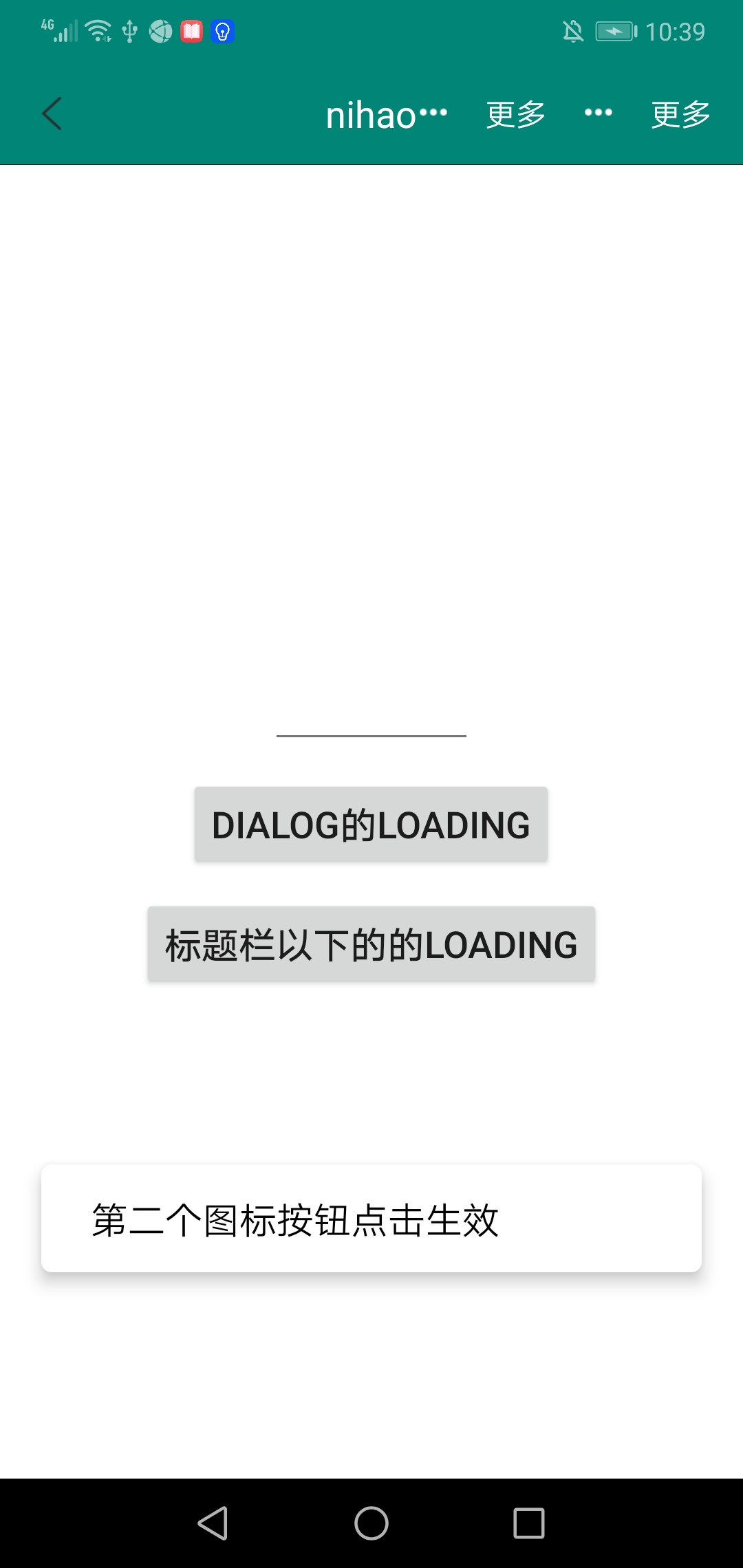
        SnackbarManager.show(bodyBinding.root, "第二个图标按钮点击生效")
        updateTitle("nihao")
    }

    @OnClickSecondText(R.string.more)
    fun clickSecondText() {
        SnackbarManager.show(bodyBinding.root, "第二个文字按钮点击生效")
        updateTitle("12354")
    }
}
2.4 提示框
- Android 11 之后,Toast 已经不支持自定义 Toast,原生的 Toast 是很难看的
- 本框架使用 SnackBar 做提示框
使用示例
@OnClickSecondDrawable(R.drawable.more)
fun clickSecondDrawable(v: View) {
    snackBar("第二个图标按钮点击生效")
}
2.5 加载失败页面
- 网络请求失败可展示失败页面,并有刷新按钮可以重新加载数据
- 在 lifecycleLoadingView 扩展函数中将 showFailedView 设置为 true,数据请求失败了,就会显示失败页面
- 在onFailedReload 的闭包中再次调用网络请求的接口,就可以重新再加载数据了
/**
 * 加载失败后展示失败页面,点击自定义失败页面的刷新按钮,重新请求数据
 * @param autoFirstLoad Boolean 第一次是否自动加载
 * @param block [@kotlin.ExtensionFunctionType] Function1<View, Unit>
 */
fun onFailedReload(autoFirstLoad: Boolean = true, block: View.() -> Unit) {
    .....
}
override fun initFlow() {
    onFailedReload {
        loadingViewError(bodyBinding.root)
    }
}

fun loadingViewError(v: View) {
    viewModel.loadingViewError().lifecycleLoadingView(this, showFailedView = true) {
        snackBar(this)
    }
}
3. Fragment
- 使用 MVVM 的继承 BaseVMFragment
- 不使用 MVVM 的继承 BaseFragment
3.1 提示框
- Android 11 之后,Toast 已经不支持自定义 Toast,原生的 Toast 是很难看的
- 本框架使用 SnackBar 做提示框
使用示例
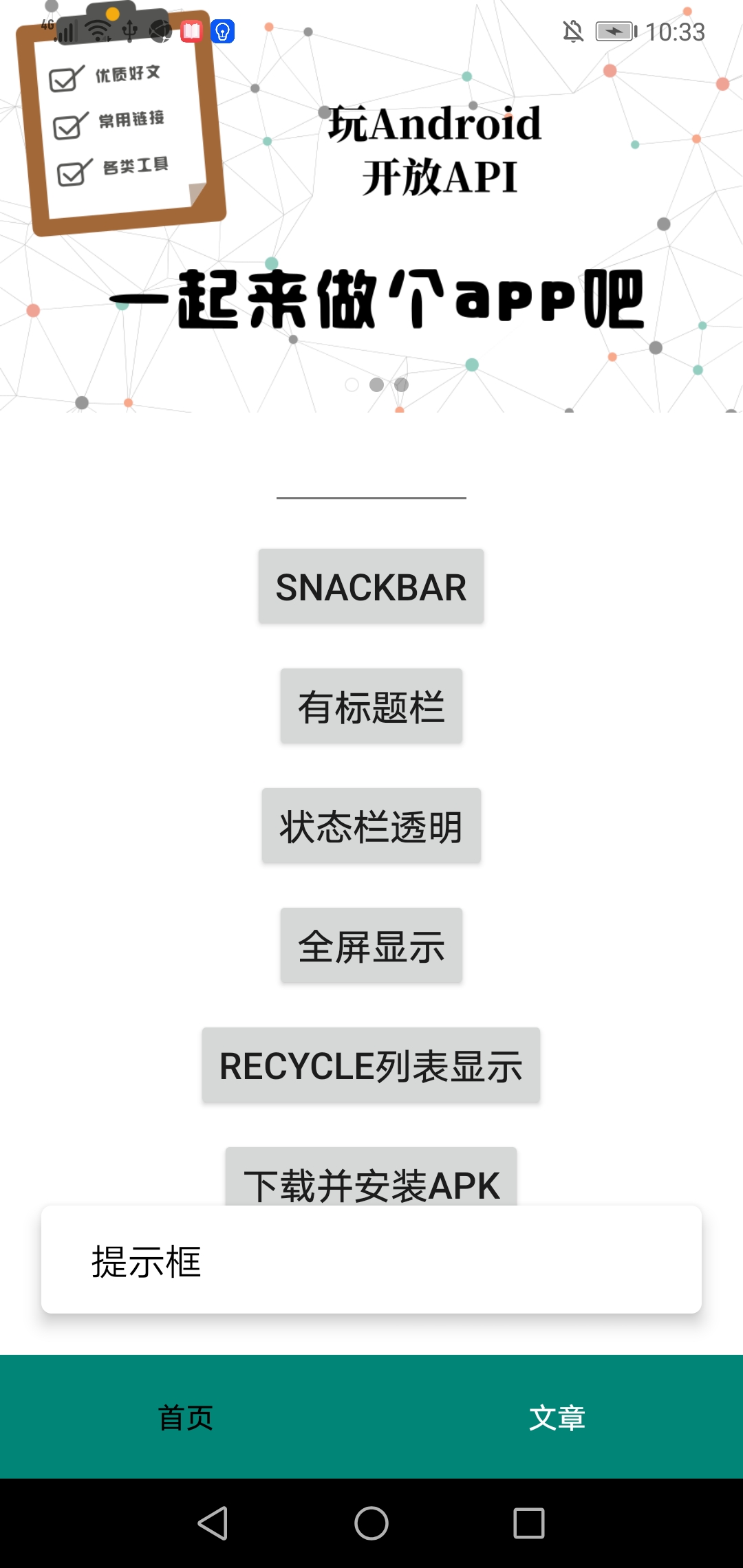
snackbar.setOnClickListener {
    snackBar("提示框")
}
3.2 加载失败页面
- 网络请求失败可展示失败页面,并有刷新按钮可以重新加载数据
- 在 lifecycleLoadingView 扩展函数中将 showFailedView 设置为 true,数据请求失败了,就会显示失败页面
- 在onFailedReload 的闭包中再次调用网络请求的接口,就可以重新再加载数据了
/**
 * 加载失败后展示失败页面,点击自定义失败页面的刷新按钮,重新请求数据
 * @param autoFirstLoad Boolean 第一次是否自动加载
 * @param block [@kotlin.ExtensionFunctionType] Function1<View, Unit>
 */
fun onFailedReload(autoFirstLoad: Boolean = true, block: View.() -> Unit) {
    .....
}
override fun initFlow() {
    onFailedReload {
        loadBanners()
    }
}

private fun loadBanners() {
    viewModel.queryBanners().lifecycleLoadingDialog(this, true) {
        val images = mutableListOf<String>()
        this.forEach {
            images.add(it.imagePath)
        }
        bodyBinding.banner.run {
            setImages(images)
            start()
        }
    }
}
4. RecycleView
Adapter 可以继承RecycleAdapter 来使用,RecycleAdapter 使用了 ViewBanding,只需要实现以下两个个方法
- RecyclerAdapter 可以调用 setShowEmptyEnabled()方法来设置全局的空页面是否可用
使用示例
class UserAdapter(iPageControl: IPageControl) :
    RecyclerAdapter<User, ItemUserBinding>(iPageControl) {

    override fun viewBinding(parent: ViewGroup): ItemUserBinding {
        return ItemUserBinding.inflate(LayoutInflater.from(parent.context), parent, false)
    }

    override fun bindViewHolder(holder: CommonViewHolder<ItemUserBinding>, m: User, position: Int) {
        holder.viewBanding {
            name.text = m.name
        }
    }
}
5.刷新分页控件(RefreshRecyclerView)
- RefreshRecyclerView 集成了 RefreshLayoutWrapper+RecyclerView
不用关心分页的逻辑,分页的刷新逻辑实现都在RefreshLayoutWrapper
- 只需要设置 LayoutManager 和 RecyclerAdapter,提供了 setLayoutManager 和 setAdapter 方法
- 在获取到数据的时候调用 updateData 方法
- 获取数据失败的时候调用 updateError 方法
- 如果使用了 lifecycleRefresh 方法,updateData 方法和 updateError 方法都不用关心
- 提供自定义属性 recycler_background(设置 RecyclerView 的背景色)
<declare-styleable name="RefreshRecyclerView">
    <attr name="recycler_background" format="color" />
</declare-styleable>
使用示例
<LinearLayout xmlns:android="http://schemas.android.com/apk/res/android"
    xmlns:app="http://schemas.android.com/apk/res-auto" android:layout_width="match_parent"
    android:layout_height="match_parent" android:orientation="vertical">

    <TextView android:layout_width="match_parent" android:layout_height="50dp"
        android:background="@color/colorPrimary" android:gravity="center" android:text="文章"
        android:textColor="@color/color_white" />

    <com.catchpig.mvvm.widget.refresh.RefreshRecyclerView android:id="@+id/refresh"
        android:layout_width="match_parent" android:layout_height="match_parent"
        app:recycler_background="#445467">

    </com.catchpig.mvvm.widget.refresh.RefreshRecyclerView>
</LinearLayout>
bodyBinding.refresh.run {
    setOnRefreshLoadMoreListener { nextPageIndex ->
        viewModel.queryArticles(nextPageIndex).lifecycleRefresh(this@ArticleFragment, this)
    }
}
6. 网络请求
6.1 只需要是接口类上加上注解ServiceApi,并使用 NetManager.getService()获取对应的接口类
如果 rxJava 为 true,必须要引入 RxJava 的依赖包和 adapter-rxjava3 依赖包
implementation("com.squareup.retrofit2:adapter-rxjava3:$retrofit2_version")

    //rxjava3
implementation "io.reactivex.rxjava3:rxjava:$rxjava_version"
implementation "io.reactivex.rxjava3:rxandroid:$rxandroid_version"
设置 SSL 证书
- NetManager.setSslSocketFactory( serviceClass: Class<*>, //使用了@ServiceApi 注解的 class sslSocketFactory: SSLSocketFactory, trustManager: X509TrustManager)
使用示例
@ServiceApi(
    baseUrl = "https://www.wanandroid.com/",
    responseConverter = ResponseBodyConverter::class,
    interceptors = [RequestInterceptor::class],
    debugInterceptors = [OkHttpProfilerInterceptor::class],
    rxJava = true,
    debug = true //debugInterceptors 是否生效,NetManager.setDebug(true)和 debug 都为 true 的时候,debugInterceptors 才生效
)
interface WanAndroidService {
    @GET("banner/json")
    suspend fun banner(): List<Banner>
}
object WanAndroidRepository {
    private val wanAndroidService = NetManager.getService(WanAndroidService::class.java)
    fun getBanners(): Flow<MutableList<Banner>> {
        //这里如果用 flowOf 的话,方法上面必须加上 suspend 关键字
        return flow {
            emit(wanAndroidService.queryBanner())
        }
    }
}
class IndexViewModel : BaseViewModel() {
    fun queryBanners(): Flow<MutableList<Banner>> {
        return WanAndroidRepository.getBanners()
    }
}
//Activity 或者 Fragment
viewModel.queryBanners().lifecycle(this) {
    val images = mutableListOf<String>()
    this.forEach {
        images.add(it.imagePath)
    }
    bodyBinding.banner.run {
        setImages(images)
        start()
    }
}
6.2 Response 转换器
6.2.1 一般 Response 发返回结果会是如下
{
  code: "SUCCESS",
  errorMsg: "成功",
  data: ...
}
6.2.2 在 code 返回 SUCEESSD 的时候, 我们在 Retrofit 的 Api 接口里面只想拿到 data 的数据做返回,我们想在 Converter 里面处理掉 code 返回错误码的逻辑,就可以继承BaseResponseBodyConverter,内部已经实现了将 response 转化为 data 的逻辑
代码示例
class ResponseBodyConverter :
    BaseResponseBodyConverter() {
    override fun getResultClass(): KClass<out BaseResponseData<JsonElement>> {
        return Result::class
    }

    /**
     * 错误处理
     * @param errorCode 错误码
     * @param msg 错误信息
     * @param data 错误数据
     * @return Exception
     */
    override fun handlerErrorCode(errorCode: String, msg: String, data: Any?): Exception {
        return NullPointerException()
    }
}
6.2.3 再将实现了 BaseResponseBodyConverter 的类加到 ServiceApi 注解的 responseConverter 属性上
6.2.4 如果想直接拿 response 的结果作为网络请求的返回值,可以直接将SerializationResponseBodyConverter加到 ServiceApi 注解的 responseConverter 属性上
6.3 FlowExt 中扩展了网络请求方法(带 lifecycleScope)
刷新+RecycleView 的网络请求封装
- lifecycleRefresh(
base: BaseView,
refreshLayoutWrapper: RefreshRecyclerView,
callback: (MutableList
.() -> Unit)? = null ) - repeatOnLifecycleRefresh(
base: BaseView,
refreshLayoutWrapper: RefreshRecyclerView,
state: Lifecycle.State = Lifecycle.State.STARTED,
callback: (MutableList
.() -> Unit)? = null )
- lifecycleRefresh(
base: BaseView,
refreshLayoutWrapper: RefreshRecyclerView,
callback: (MutableList
不带 loading 的网络请求封装
- lifecycleNull( base: BaseView, showFailedView: Boolean = false, errorCallback: ((t: Throwable) -> Unit)? = null, callback: T?.() -> Unit )
- repeatOnLifecycleNull( base: BaseView, showFailedView: Boolean = false, state: Lifecycle.State = Lifecycle.State.STARTED, errorCallback: ((t: Throwable) -> Unit)? = null, callback: T?.() -> Unit )
- lifecycle( base: BaseView, showFailedView: Boolean = false, errorCallback: ((t: Throwable) -> Unit)? = null, callback: T.() -> Unit )
- repeatOnLifecycle( base: BaseView, showFailedView: Boolean = false, state: Lifecycle.State = Lifecycle.State.STARTED, errorCallback: ((t: Throwable) -> Unit)? = null, callback: T.() -> Unit )
- lifecycle( baseViewModel: BaseViewModel, showFailedView: Boolean = false, errorCallback: ((t: Throwable) -> Unit)? = null, callback: T.() -> Unit )
带 loadingView 的网络请求封装
- lifecycleLoadingDialogNull( base: BaseView, showFailedView: Boolean = false, errorCallback: ((t: Throwable) -> Unit)? = null, callback: T?.() -> Unit )
- repeatOnLifecycleLoadingDialogNull( base: BaseView, showFailedView: Boolean = false, state: Lifecycle.State = Lifecycle.State.STARTED, errorCallback: ((t: Throwable) -> Unit)? = null, callback: T?.() -> Unit )
- lifecycleLoadingDialog( base: BaseView, showFailedView: Boolean = false, errorCallback: ((t: Throwable) -> Unit)? = null, callback: T.() -> Unit )
- repeatOnLifecycleLoadingDialog( base: BaseView, showFailedView: Boolean = false, state: Lifecycle.State = Lifecycle.State.STARTED, errorCallback: ((t: Throwable) -> Unit)? = null, callback: T.() -> Unit )
- lifecycleLoadingDialog( baseViewModel: BaseViewModel, showFailedView: Boolean = false, errorCallback: ((t: Throwable) -> Unit)? = null, callback: T.() -> Unit )
带 loadingDialog 的网络请求封装
- lifecycleLoadingViewNull( base: BaseView, showFailedView: Boolean = false, errorCallback: ((t: Throwable) -> Unit)? = null, callback: T?.() -> Unit )
- repeatOnLifecycleLoadingViewNull( base: BaseView, showFailedView: Boolean = false, state: Lifecycle.State = Lifecycle.State.STARTED, errorCallback: ((t: Throwable) -> Unit)? = null, callback: T?.() -> Unit )
- lifecycleLoadingView( base: BaseView, showFailedView: Boolean = false, errorCallback: ((t: Throwable) -> Unit)? = null, callback: T.() -> Unit )
- repeatOnLifecycleLoadingView( base: BaseView, showFailedView: Boolean = false, state: Lifecycle.State = Lifecycle.State.STARTED, errorCallback: ((t: Throwable) -> Unit)? = null, callback: T.() -> Unit )
- lifecycleLoadingView( baseViewModel: BaseViewModel, showFailedView: Boolean = false, errorCallback: ((t: Throwable) -> Unit)? = null, callback: T.() -> Unit )
7. 日志
不需要在 Application 中初始化,因为 LogUtils 已经在KotlinMvvmInitializer 中初始化了
- 可以使用 LogUtils.getInstance().i,LogUtils.getInstance().d 等打印日志(不建议)
- 也可以使用 LogExt 的扩展方法打印日志(建议)
- 可自定义日志打印适配(默认适配器 AndroidLogAdapter)
8. 注解使用
9. 文件下载器
10. 工具库
混淆
-keep class com.catchpig.annotation.enums.**
-keep class com.google.android.material.snackbar.Snackbar {*;}
-keep @com.catchpig.annotation.ServiceApi class * {*;}
-keep public class **.databinding.*Binding {*;}
-keep class **.*_Compiler {*;}
#序列化混淆
-if @kotlinx.serialization.Serializable class **
-keepclassmembers class <1> {
static <1>$Companion Companion;
}
# Keep `serializer()` on companion objects (both default and named) of serializable classes.
-if @kotlinx.serialization.Serializable class ** {
static **$* *;
}
-keepclassmembers class <1>$<3> {
kotlinx.serialization.KSerializer serializer(...);
}
# Keep `INSTANCE.serializer()` of serializable objects.
-if @kotlinx.serialization.Serializable class ** {
public static ** INSTANCE;
}
-keepclassmembers class <1> {
public static <1> INSTANCE;
kotlinx.serialization.KSerializer serializer(...);
}
# @Serializable and @Polymorphic are used at runtime for polymorphic serialization.
-keepattributes RuntimeVisibleAnnotations,AnnotationDefault
第三方库
SmartRefreshLayout-刷新控件
Immersionbar-状态栏
RxJava3
RxAndroid
OkHttp
Retrofit
Gson
kotlinpoet - kt 代码生成工具
AndroidUtilKTX - 工具类
LoadingView - Loading 动画
coroutines - 协程
serialization-序列化
其他
QQ 交流群(228014675)