CanPhotos
Introduction: 使用 fresco 选取多张图片并可预览图片
Tags:
使用 fresco 选取多张图片并可预览图片
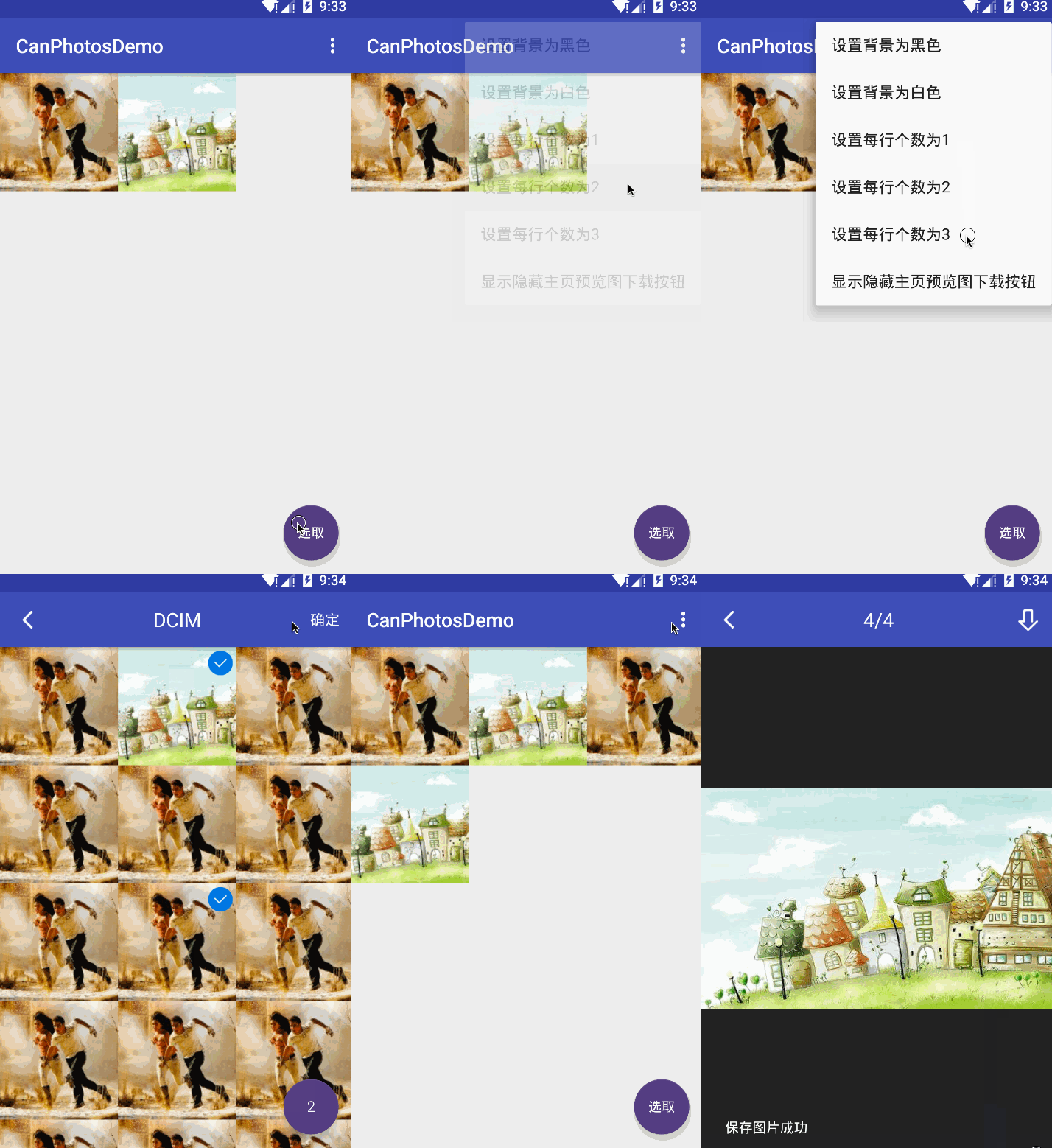
##添加依赖
compile 'com.canyinghao:canphotos:1.0.1'
使用方式
1. 使用方法
CanPhotos 是一个图片多选控件,图片加载框架只能使用 fresco,要换的话比较麻烦,不建议换。
进入多选界面方法:CanPhotoHelper.getInstance().gotoPhotoSelect(context, null, 5),第一个参数当前 Activity ;第二个参数一个 ArrayList
进入预览界面方法:CanPhotoHelper.getInstance().gotoPreview(context, arrayList, position, saveFile);第一个参数当前 Activity;第二个参数一个 ArrayList
其它方法有设置背景色,一行显示几项等。Toolbar、FloatingActionButton 的颜色自行在 style 里配置 Theme 时配置。注意,使用 fresco 需要在使用之前先执行 Fresco.initialize(this),最好写在 Application 里。
public class MainActivity extends AppCompatActivity {
    private Toolbar toolbar;
    private RecyclerView recyclerView;

    private CanRVAdapter adapter;

    private AppCompatActivity context;

    private int H;

    private File saveFile;

    @Override
    protected void onCreate(Bundle savedInstanceState) {
        super.onCreate(savedInstanceState);
        setContentView(R.layout.activity_main);
        context = this;
        toolbar = (Toolbar) findViewById(R.id.toolbar);
        recyclerView = (RecyclerView) findViewById(R.id.recyclerView);

        setSupportActionBar(toolbar);

        H = CanPhotoHelper.getInstance().getScreenDisplayMetrics(context).widthPixels / 3;

        FloatingActionButton fab = (FloatingActionButton) findViewById(R.id.fab);
        fab.setOnClickListener(new View.OnClickListener() {
            @Override
            public void onClick(View view) {

                CanPhotoHelper.getInstance().gotoPhotoSelect(context, null, 5);
            }
        });

        recyclerView.setLayoutManager(new GridLayoutManager(this, 3, GridLayoutManager.VERTICAL, false));


        adapter = new CanRVAdapter<String>(recyclerView, R.layout.item_album) {
            @Override
            protected void setView(CanHolderHelper helper, int position, String url) {

                SimpleDraweeView image = helper.getView(com.canyinghao.canphotos.R.id.image);


                ViewGroup.LayoutParams params = image.getLayoutParams();
                params.height = H;
                image.setLayoutParams(params);

                if (!url.contains("://")) {
                    url = "file://" + url;
                }

                CanPhotoHelper.getInstance().setDraweeImage(image, url, 0, 0);
            }

            @Override
            protected void setItemListener(CanHolderHelper viewHelper) {

            }


        };
        recyclerView.setAdapter(adapter);

        adapter.setOnItemListener(new CanOnItemListener() {

            public void onRVItemClick(ViewGroup parent, View itemView, int position) {


                ArrayList<String> arrayList = CanPhotoHelper.getInstance().getLocalPreviewList((ArrayList<String>) adapter.getList());


                CanPhotoHelper.getInstance().gotoPreview(context, arrayList, position, saveFile);
            }


        });


        TextDrawable textDrawable = TextDrawable
                .builder()
                .beginConfig()
                .fontSize(40)
                .endConfig()
                .buildRound("选取",
                        Color.TRANSPARENT);


        fab.setImageDrawable(textDrawable);

        adapter.addLastItem("http://www.it.com.cn/dghome/img/2009/06/23/17/090623_tv_tf2_13h.jpg");
        adapter.addLastItem("http://www.hq.xinhuanet.com/photo/2008-11/12/xinsrc_5831105121112593526741.jpg");

    }


    @Override
    protected void onActivityResult(int requestCode, int resultCode, Intent data) {
        super.onActivityResult(requestCode, resultCode, data);

        if (resultCode == RESULT_OK) {


            if (data != null && data.hasExtra(CanPhotoHelper.PHOTO_COLLECTION)) {

                ArrayList<String> list = data.getStringArrayListExtra(CanPhotoHelper.PHOTO_COLLECTION);

                adapter.addMoreList(list);
            }


        }
    }

    @Override
    public boolean onCreateOptionsMenu(Menu menu) {
        // Inflate the menu; this adds items to the action bar if it is present.
        getMenuInflater().inflate(R.menu.menu_main, menu);
        return true;
    }

    @Override
    public boolean onOptionsItemSelected(MenuItem item) {

        int id = item.getItemId();


        switch (id) {

            case R.id.action_1:

                CanPhotoHelper.getInstance().setBackGroundColor(Color.parseColor("#222222"));

                break;
            case R.id.action_2:

                CanPhotoHelper.getInstance().setBackGroundColor(Color.parseColor("#eeeeee"));

                break;
            case R.id.action_3:
                CanPhotoHelper.getInstance().setSpanCount(1);
                break;
            case R.id.action_4:
                CanPhotoHelper.getInstance().setSpanCount(2);
                break;

            case R.id.action_5:
                CanPhotoHelper.getInstance().setSpanCount(3);
                break;

            case R.id.action_6:
                if (saveFile != null) {
                    saveFile = null;
                } else {
                    saveFile = Environment.getExternalStorageDirectory();
                }
                break;
        }

        return super.onOptionsItemSelected(item);
    }
}
此项目使用的依赖有
 compile 'com.android.support:design:23.0.1'
 compile 'com.android.support:appcompat-v7:23.0.1'
 //   facebook 图片加载库
 compile 'com.facebook.fresco:fresco:0.8.1'
 //  viewpager 指示器
 compile 'me.relex:circleindicator:1.1.5@aar'
 compile 'com.pnikosis:materialish-progress:1.7'
 compile 'com.canyinghao:can-adapter:1.0.1'
开发者

canyinghao:
License
Copyright 2016 canyinghao

Licensed under the Apache License, Version 2.0 (the "License");
you may not use this file except in compliance with the License.
You may obtain a copy of the License at

   http://www.apache.org/licenses/LICENSE-2.0

Unless required by applicable law or agreed to in writing, software
distributed under the License is distributed on an "AS IS" BASIS,
WITHOUT WARRANTIES OR CONDITIONS OF ANY KIND, either express or implied.
See the License for the specific language governing permissions and
limitations under the License.
