CanDialog
Introduction: 仿照系统 Dialog 所写,继承于 FrameLayout,添加一些动画,一些显示类型。
Tags:
仿照系统 Dialog 所写,继承于 FrameLayout,添加一些动画,一些显示类型。
添加依赖
compile 'com.github.canyinghao:CanDialog:5.0.2'
使用方式
1. 使用方法
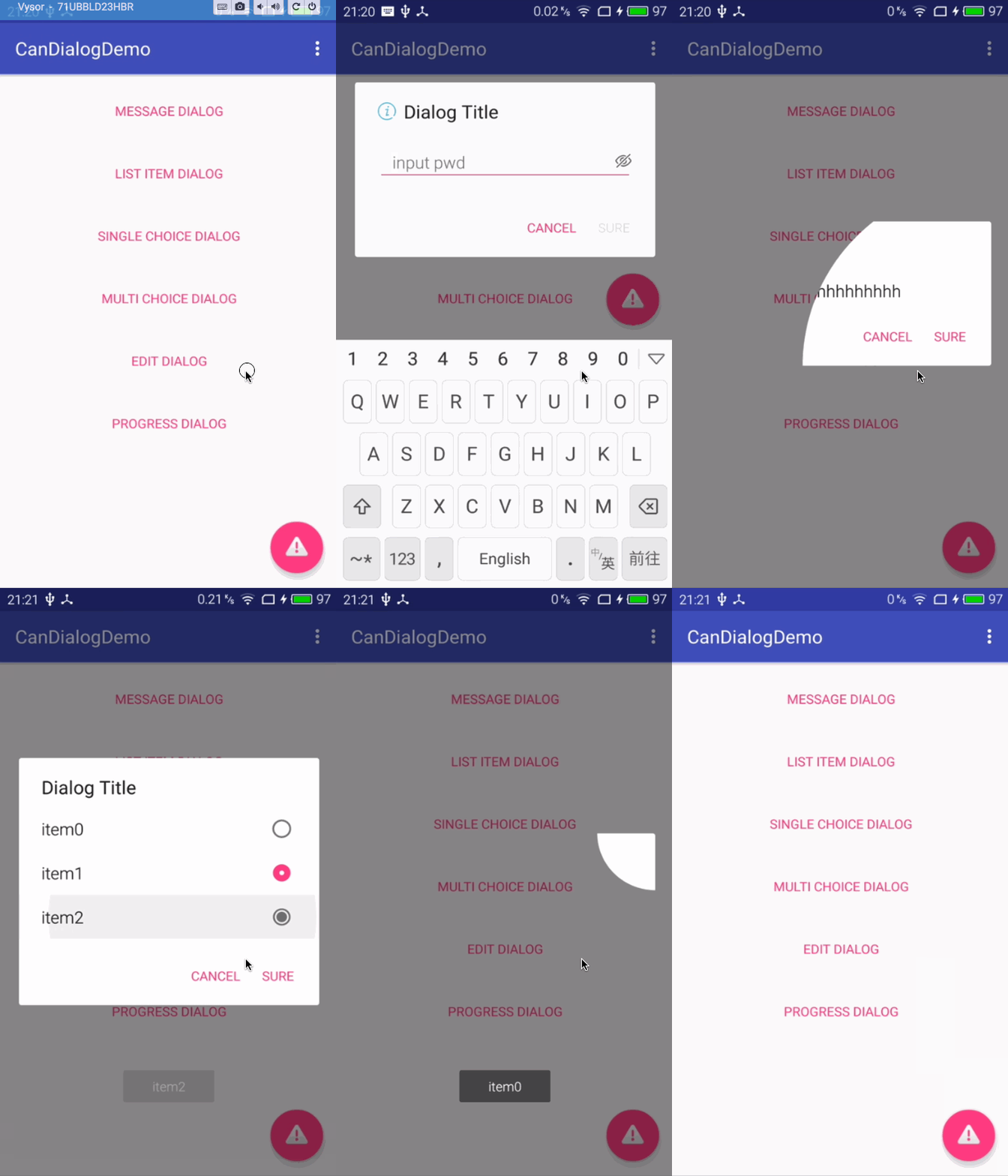
CanDialog 是一个继承 FrameLayout,将 view 添加到 getWindow().getDecorView()里面,仿照系统 AlertDialog 写成的。使用方式与 AlertDialog 大同小异。增加了两种动画效果,增加了一个输入框的布局和一个加载中的布局,还加了一些 svg 动画。Button 点击后是否可取消,可以直接传参确定。button 点击事件中能够返回单选、多选、输入框的结果。
  @OnClick({R.id.fab, R.id.button1, R.id.button2, R.id.button3, R.id.button4, R.id.button5, R.id.button6})
    public void click(View v) {
        switch (v.getId()) {

            case R.id.fab:


                new CanDialog.Builder(this)
                        .setIconType(CanDialog.ICON_WARNING)
                        .setTitle("Dialog Title")
                        .setMessage("Dialog Message")
                        .setCircularRevealAnimator(CanDialog.CircularRevealStatus.BOTTOM_RIGHT)
                        .setNegativeButton("cancel", true, null)
                        .setPositiveButton("sure", true, null)
                        .show();


                break;

            case R.id.button1:

                new CanDialog.Builder(this)
                        .setTitle("Dialog Title")
                        .setMessage("Dialog Message")
                        .setCircularRevealAnimator(CanDialog.CircularRevealStatus.TOP_RIGHT)
                        .show();
                break;
            case R.id.button2:

                new CanDialog.Builder(this)
                        .setTitle("Dialog Title")

                        .setItems(new String[]{"item0", "item1", "item2"}, new CanDialogInterface.OnClickListener() {
                            @Override
                            public void onClick(CanDialog dialog, int position, CharSequence text, boolean[] checkitems) {
                                App.showToast(text.toString());
                                dialog.dismiss();
                            }
                        })
                        .setCancelable(true)
                        .setCircularRevealAnimator(CanDialog.CircularRevealStatus.TOP_LEFT)
                        .show();


                break;
            case R.id.button3:

                new CanDialog.Builder(this)
                        .setTitle("Dialog Title")
                        .setSingleChoiceItems(new String[]{"item0", "item1", "item2"}, 1, new CanDialogInterface.OnClickListener() {
                            @Override
                            public void onClick(CanDialog dialog, int position, CharSequence text, boolean[] checkitems) {

                                App.showToast(text.toString());

                            }
                        })
                        .setNegativeButton("cancel", true, null)
                        .setPositiveButton("sure", true, new CanDialogInterface.OnClickListener() {
                            @Override
                            public void onClick(CanDialog dialog, int checkItem, CharSequence text, boolean[] checkItems) {
                                App.showToast("select " + checkItem);

                            }
                        })
                        .setTileAnimator()
                        .setCancelable(true)
                        .show();

                break;
            case R.id.button4:


                new CanDialog.Builder(this)
                        .setTitle("Dialog Title")
                        .setMultiChoiceItems(new String[]{"item0", "item1", "item2"}, new boolean[]{false, false, false}, new CanDialogInterface.OnMultiChoiceClickListener() {
                            @Override
                            public void onClick(CanDialog dialog, int position, boolean flag) {

                                App.showToast("item" + position + flag);


                            }
                        })
                        .setNegativeButton("cancel", true, null)
                        .setPositiveButton("sure", true, new CanDialogInterface.OnClickListener() {
                            @Override
                            public void onClick(CanDialog dialog, int checkItem, CharSequence text, boolean[] checkItems) {


                                String msg = "";
                                for (boolean check : checkItems) {
                                    msg += check + "  ";
                                }
                                App.showToast(msg);
                            }
                        })
                        .setCircularRevealAnimator(CanDialog.CircularRevealStatus.BOTTOM_LEFT)
                        .setCancelable(false)
                        .show();


                break;

            case R.id.button5:


                new CanDialog.Builder(this)
                        .setIconType(CanDialog.ICON_INFO)
                        .setTitle("Dialog Title")
                        .setEditDialog("input pwd", true, 8, 0)
                        .setNegativeButton("cancel", true, null)
                        .setPositiveButton("sure", false, new CanDialogInterface.OnClickListener() {
                            @Override
                            public void onClick(CanDialog dialog, int position, CharSequence text, boolean[] checkitems) {


                                dialog.setAnimationMessage(CanDialog.ANIM_INFO_SUCCESS, "Password is " + text.toString());
                                dialog.setPositiveButton("sure", true, null);


                            }
                        })
                        .setCircularRevealAnimator(CanDialog.CircularRevealStatus.BOTTOM_RIGHT)
                        .setCancelable(true)
                        .show();

                break;


            case R.id.button6:


                startActivity(new Intent(MainActivity.this, ProgressActivity.class));

                break;


        }


    }
2. 注意事项
可以兼容到 9+。
使用的其它库:
compile 'com.android.support:design:24.2.0'
compile 'com.android.support:appcompat-v7:24.2.0'
compile 'com.android.support:cardview-v7:24.2.0'
compile 'com.canyinghao:cananimation:1.0.3'
compile 'com.canyinghao:caneffect:1.0.3'
compile 'com.nineoldandroids:library:2.4.0'
3.更新日志
- 更新 1.0.5
- 更新依赖库
- 使其兼容到 9+
- 更新 1.0.4
- Android studio 升到 2.0 以后,出错问题。
开发者

canyinghao:
License
Copyright 2016 canyinghao

Licensed under the Apache License, Version 2.0 (the "License");
you may not use this file except in compliance with the License.
You may obtain a copy of the License at

   http://www.apache.org/licenses/LICENSE-2.0

Unless required by applicable law or agreed to in writing, software
distributed under the License is distributed on an "AS IS" BASIS,
WITHOUT WARRANTIES OR CONDITIONS OF ANY KIND, either express or implied.
See the License for the specific language governing permissions and
limitations under the License.
