PasswordEditText
Introduction: Custom EditTextView to show/hide password with icon
Tags:
Custom EditTextView to show/hide password with customizable icon.
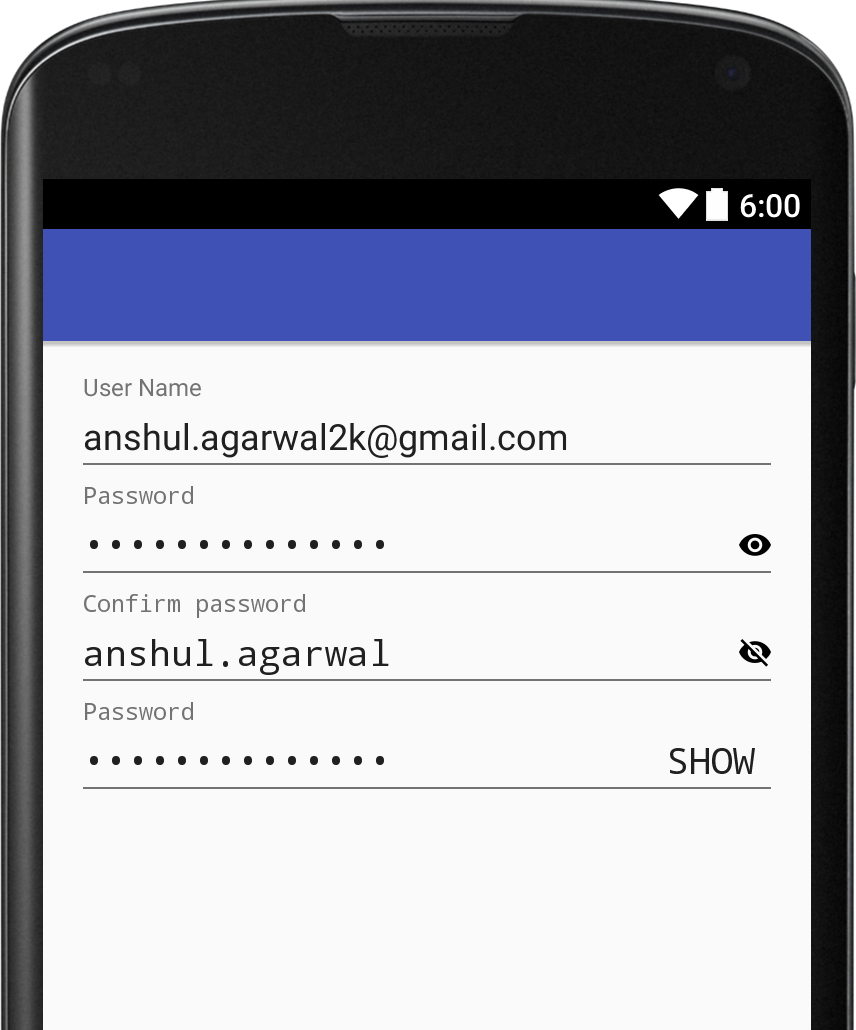
How to use
 <in.anshul.libray.PasswordEditText
            android:layout_width="match_parent"
            android:layout_height="wrap_content"
            app:hide_drawable="@drawable/hide_password"
            app:password_visible="true"
            android:hint="Confirm password"
            app:show_drawable="@drawable/show_password" />
Instead of drawable you can also use Text
 <in.anshul.libray.PasswordEditText
            ...
            app:show_as_text="true"
            app:show_text="@string/show_text"
            app:hide_text="@string/hide_text"/>
Customise
app:show_drawable="@drawable/show_password"app:hide_drawable="@drawable/hide_password"
Defualt Password Visiblity can be set using attr
app:password_visible="true"

Download
Include jitpack.io inside of root project build.gradle:
allprojects {
        repositories {
            ...
            maven { url "https://jitpack.io" }
        }
    }
After that you can easily include the library in your app build.gradle:
dependencies {
            compile 'com.github.anshulagarwal06:PasswordEditText:v1.0'
    }
That's it build your project.
