DrawBox










DrawBox is a Kotlin Multiplatform drawing SDK for Compose Multiplatform. It helps developers embed editable drawing, annotation, diagramming, and export capabilities across Android, iOS, Web, and Desktop from one shared Kotlin codebase.
Maintainer response policy: issues and pull requests receive a first response within 7 days. Security reports go through SECURITY.md.
Try it Live
Run the sample right in your browser — no install required:

Features
Cross-platform, one codebase
- Ships to Android, iOS, Desktop (JVM), Web (WASM), and Kotlin/JS browser from a single shared module.
- Pure Compose Multiplatform — no per-platform UI forks.
Drawing primitives
- Freehand pen with pressure / tilt / azimuth sampling on Apple Pencil and S Pen (mouse and capacitive touch default to unit pressure with zero overhead).
- Shape tools: rectangle, circle, triangle, arrow, line — each with stroke, fill, corner radius, and dashed / dotted stroke styles.
- Independent fill + stroke per shape, including explicit "no fill" and "no stroke" states.
Rich elements
- Image element — place, transform, rotate, and export bitmaps; bytes are the source of truth, decoded lazily with a mip-level cache so panning large images stays smooth.
- Text element — block-level plain text with inline editor, font family / size / alignment controls, and SVG export.
- Connectors with auto-snapping endpoints that anchor to the facing side midpoint of the target shape and follow rotation.
Editing
- Infinite canvas with zoom, pan (space-bar / middle-mouse / two-finger / scroll wheel), and a world-space cursor overlay that scales with zoom.
- Object eraser tool with lazy history snapshots — a full sweep across N elements undoes as a single revision.
- Full undo / redo, multi-select with drag and scale.
Import / export
- SVG export for vector output.
- PNG export for raster output.
- JSON import + export of the entire drawing state — round-trippable, human-editable. See
samples/for ready-made examples. - Image insertion from the native picker, drag-and-drop (Desktop), or clipboard paste (Desktop, Web, Android, iOS).
Architecture
- MVI pattern with immutable state, sealed
Intent/Event/Mode/Statetypes. 2.0public surfaces (DrawBoxController,Mode,Intent,Event,State) frozen under semver; incubating surfaces opt in via explicit annotations.
Demo
A short walkthrough of the SDK in action — pen, shapes, transforms, and the import / export pipeline.
More demo footage
Drawing and shape editing — pen pressure, shapes with independent fill / stroke, multi-select transforms.
Import / export round-trip — JSON in, edits, JSON out, plus SVG and PNG export.
Sample app — settings drawer
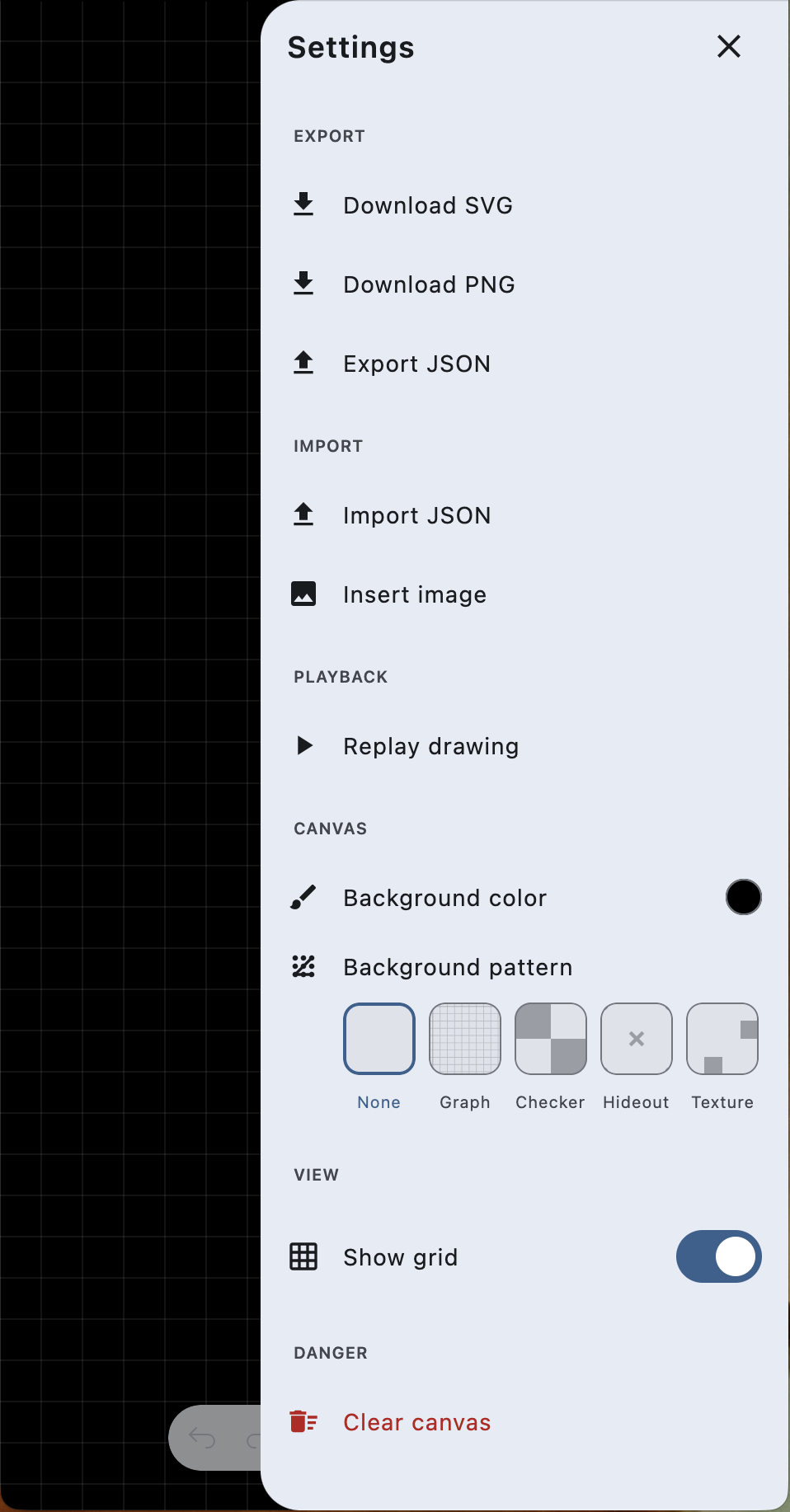
The bundled sample exposes the full SDK surface through a single settings drawer so you can probe each capability without writing host code.
| Section | What it controls |
|---|---|
| Export | Download SVG writes the current scene as scalable vector XML. Download PNG rasterises the visible canvas. Export JSON serialises the entire scene (background, elements, styles) to a portable text file. |
| Import | Import JSON loads a previously exported scene or any compatible JSON payload (try the files in samples/). Insert image opens the platform-native picker and places the chosen bitmap as an editable Element.Image. |
| Playback | Replay drawing re-plays the strokes in the order they were created — useful for tutorials, time-lapses, or debugging stroke ordering. |
| Canvas | Background color swaps the canvas tint. Background pattern toggles between None, Graph, Checker, Hideout, and Texture — all tileable SVG patterns rendered through Skia. |
| View | Show grid toggles a world-space grid overlay that scales with zoom. |
| Danger | Clear canvas removes every element. Snapshot-backed, so a single undo restores the cleared scene. |
Built entirely from JSON
Drawings are serialised as plain JSON ({ "bgColor": "...", "elements": [...] }), which means a flowchart can be authored or programmatically generated and then imported into the SDK. The two scenes below were rendered by importing the sample files in samples/ — no manual drawing involved.
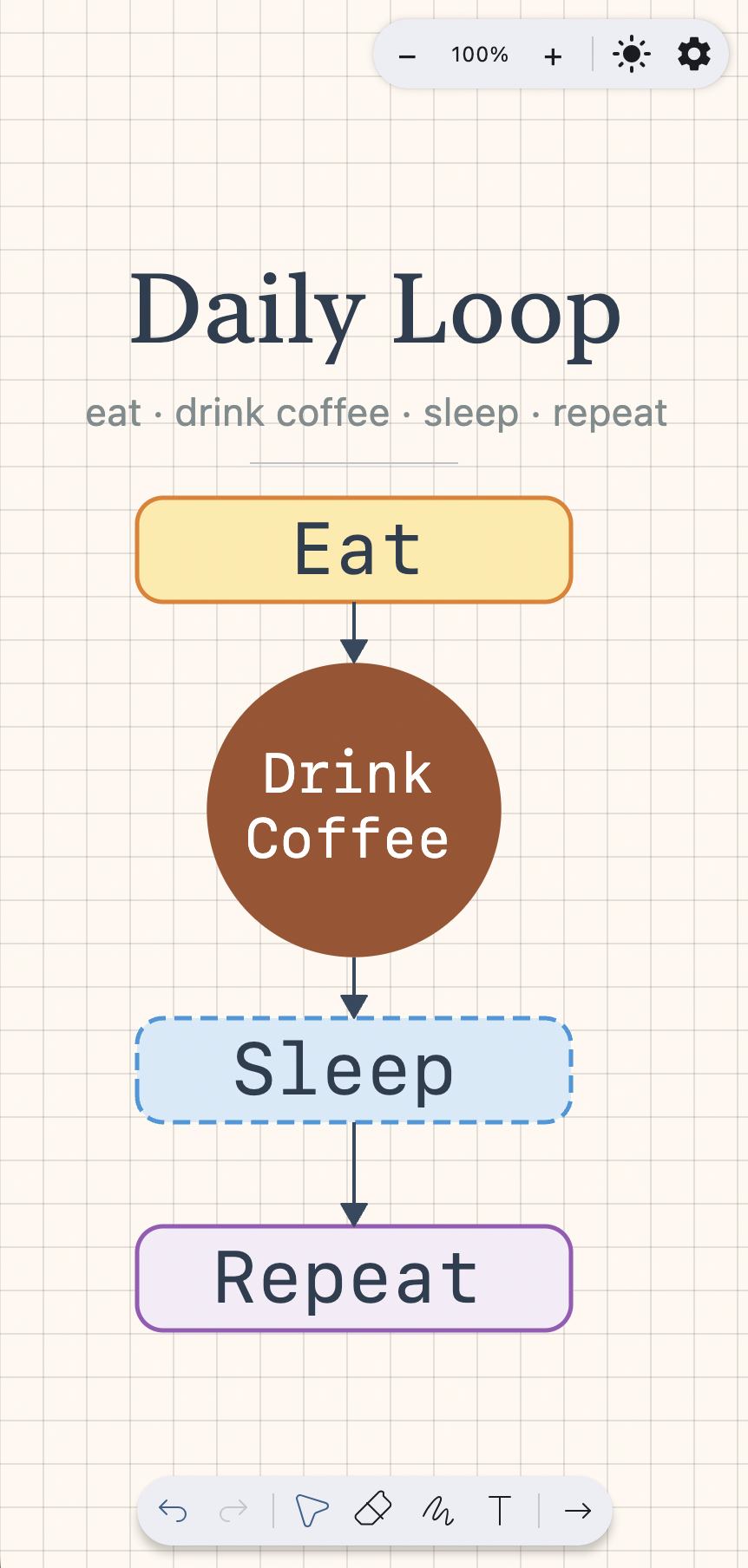 samples/DrawBox-daily-loop.json — portrait flow with mixed shapes, dashed strokes, a curved loop-back arrow, multi-line text, and connector bindings that auto-snap to the bound shape's facing side.
|
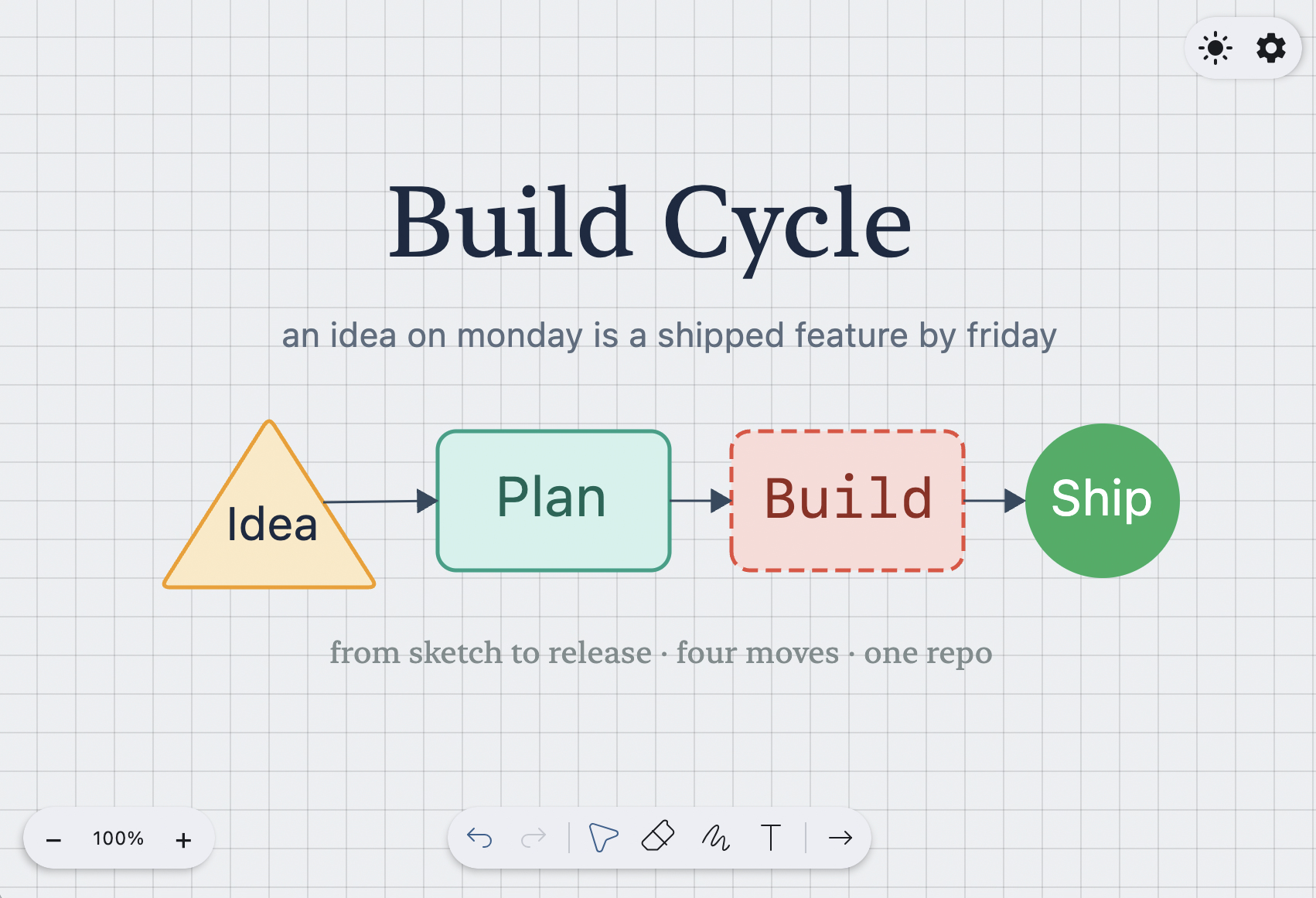 samples/DrawBox-build-cycle.json — landscape pipeline exercising every shape type (triangle, rectangle, circle), all three stroke styles (solid, dashed, dotted), and three font families (serif, sans, mono).
|
To try them yourself: open the sample app, tap Settings → Import → Import JSON, and paste the contents of either file.
Usage
Basic Setup
@Composable
fun DrawingScreen() {
    val controller = rememberDrawBoxController()
    val state by controller.state.collectAsState()

    Column(modifier = Modifier.fillMaxSize()) {
        DrawBox(
            state = state,
            onIntent = controller::onIntent,
            modifier = Modifier.fillMaxSize().weight(1f)
        )
    }
}
Controller API
// Drawing Modes
controller.setMode(Mode.PEN)          // Freehand drawing
controller.setMode(Mode.RECTANGLE)    // Rectangle shapes
controller.setMode(Mode.CIRCLE)       // Circle shapes
controller.setMode(Mode.TRIANGLE)     // Triangle shapes
controller.setMode(Mode.ARROW)        // Arrows
controller.setMode(Mode.LINE)         // Lines

// Customization
controller.setColor(Color.Blue)       // Set stroke color
controller.setStrokeWidth(5f)         // Set stroke width
controller.setOpacity(0.8f)           // Set transparency (0.0-1.0)
controller.setBgColor(Color.White)    // Set background color

// History Management
controller.undo()                     // Undo last action
controller.redo()                     // Redo last undone action
controller.reset()                    // Clear canvas

// Export & Import
controller.exportPath()               // Export as JSON
controller.exportSvg()                // Export as SVG
controller.importPath(jsonString)     // Import from JSON
controller.exportPng(textMeasurer = textMeasurer) // Export as PNG (headless raster)

// State Monitoring
controller.canUndo.collect { ... }    // Monitor undo availability
controller.canRedo.collect { ... }    // Monitor redo availability
controller.events.collect { event ->  // Listen to events
    when (event) {
        is Event.SvgExported -> saveFile(event.svg)
        is Event.PngExported -> saveFile(event.bytes)
        is Event.Error -> showError(event.message)
        else -> {}
    }
}
Download
Latest Version: 2.1.0 (KMP Preview)
 or grab via Gradle:
Gradle (KTS)
repositories {
    mavenCentral()
}

dependencies {
    implementation("io.ak1:drawbox:2.1.0")
}
Gradle (Groovy)
repositories {
    mavenCentral()
}

dependencies {
    implementation 'io.ak1:drawbox:2.1.0'
}
Maven
<dependency>
  <groupId>io.ak1</groupId>
  <artifactId>drawbox</artifactId>
  <version>2.1.0</version>
</dependency>
Ivy
<dependency org='io.ak1' name='drawbox' rev='2.1.0'>
  <artifact name='drawbox' ext='pom' ></artifact>
</dependency>
Full version history and the
1.x → 2.xmigration guide live in CHANGELOG.md.
What's New in 2.1.0-alpha01
First pre-release of the 2.1 line. The frozen 2.0 surfaces (DrawBoxController, Mode, Intent, Event, State) are extended only — see the migration guide for the one structural change inside Element.Path made to accommodate pen-pressure data.
Highlights
- Image element (
Element.Image,Mode.IMAGE) — place, transform, and export bitmaps as first-class canvas elements. - Text element (
Element.Text,Mode.TEXT) — block-level plain text with inline editor, font controls, and SVG export. - Pen pressure sampling on PEN and ERASER modes. New
Element.PathSamplecarriesposition,width, and optionaltilt/azimuthfrom Apple Pencil and S Pen. Mouse / capacitive touch defaults to unit pressure with zero overhead. - Cross-platform image inputs under
io.ak1.drawbox.input:pasteImageFromClipboard(...)— JVM, Web (WasmJS + JS), Android, iOS.Modifier.imageDragAndDropTarget(...)— real on Desktop; documented stubs on iOS / Web pending Compose Multiplatform API support.- iOS PHPicker wired for native image insertion.
- Kotlin/JS browser target alongside the existing Android / iOS / JVM / WASM artifacts.
- Independent fill + stroke on
Element.Shapewith explicit "none" states for both. - Connector side-anchoring — arrow endpoints snap to the facing side midpoint of their bound shape, rotation-aware.
- Async + downsampled image decode with a mip-level cache (internal perf, no API change).
- Roborazzi-based snapshot test harness covering a complex multi-element scene.
See CHANGELOG.md for the full list and the 2.0.x → 2.1.x migration guide.
Thanks to
RangVikalp for the beautiful color picker used in DrawBox
Community & maintenance
- Response SLO — issues and pull requests receive a first response within 7 days. Triage labels (
needs-repro,bug,enhancement,android-1.x,fixed-in-2.x) route incoming reports quickly. - Release cadence — minor versions target a quarterly cadence; every release ships a CHANGELOG entry and a migration note when the public surface moves.
- Roadmap — the 12–18 month direction (accessibility, benchmarking, extensibility, natural-language drawing) lives in ROADMAP.md.
- Contributing — start with issues tagged
good first issue. Larger changes go through a short RFC indocs/rfcs/. - Governance — code of conduct in CODE_OF_CONDUCT.md; security disclosure in SECURITY.md.
Security
Please report vulnerabilities privately. See SECURITY.md for the supported versions, reporting channel, and disclosure policy.
License
Licensed under the Apache License, Version 2.0, click here for the full license.
Author & support
This project was created by Akshay Sharma.

If you appreciate my work, consider buying me a cup of :coffee: to keep me recharged :metal: by PayPal
I love using my work and I'm available for contract work. Freelancing helps to maintain and keep my open source projects up to date!
