omni-browser

Omni Browser
A premium, privacy-first Android browser built with Jetpack Compose & Mozilla GeckoView.










[!CAUTION] 🧪 Experimental Software — Use With Caution
Omni Browser is currently in active development and experimental phase. Features may be incomplete, unstable, or subject to significant change without notice. You may encounter bugs, crashes, or unexpected behaviour.
- ⚠️ Not recommended as your sole/primary browser yet
- 🐛 Bugs are expected — please report them
- 🔄 APIs and features may change between releases
- 💾 Back up any important data stored in the app (vault, notes)
We appreciate your patience and feedback as we work toward a stable release. 🙏
| Home | Quick Tools | Browser Menu |
|---|---|---|
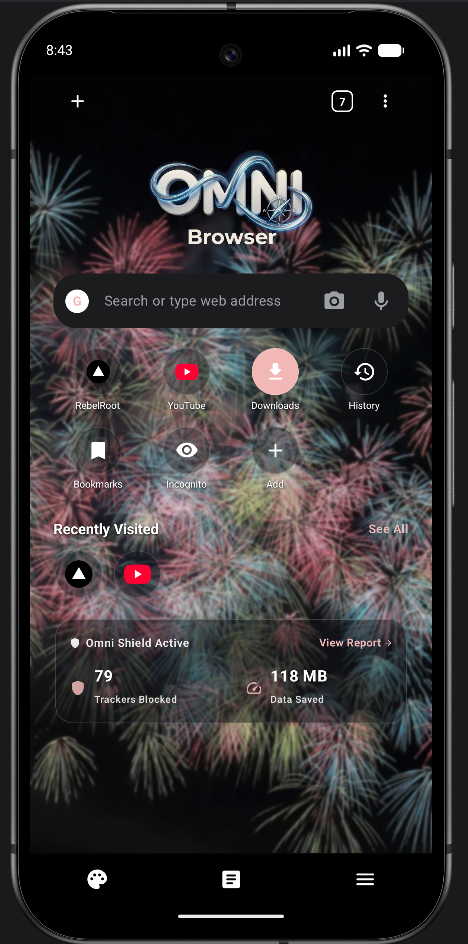 |
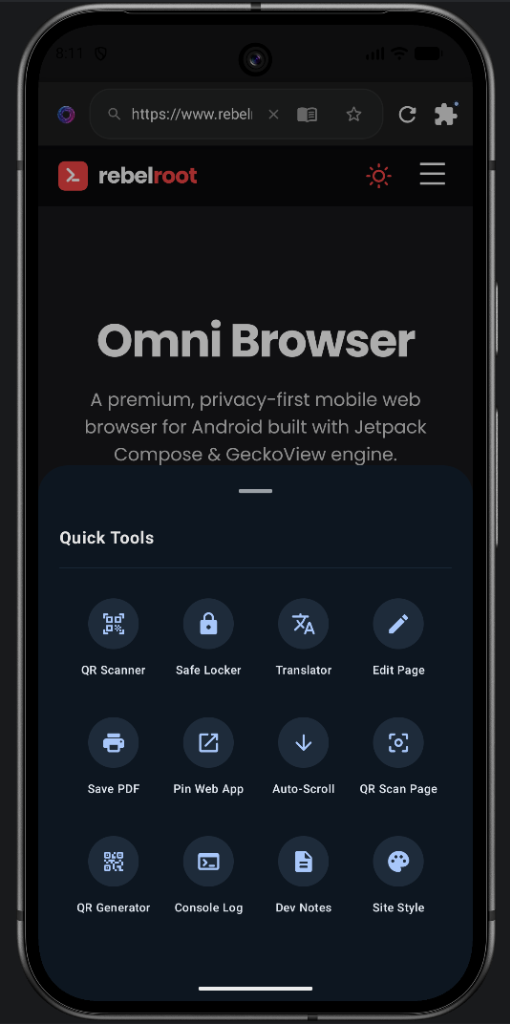 |
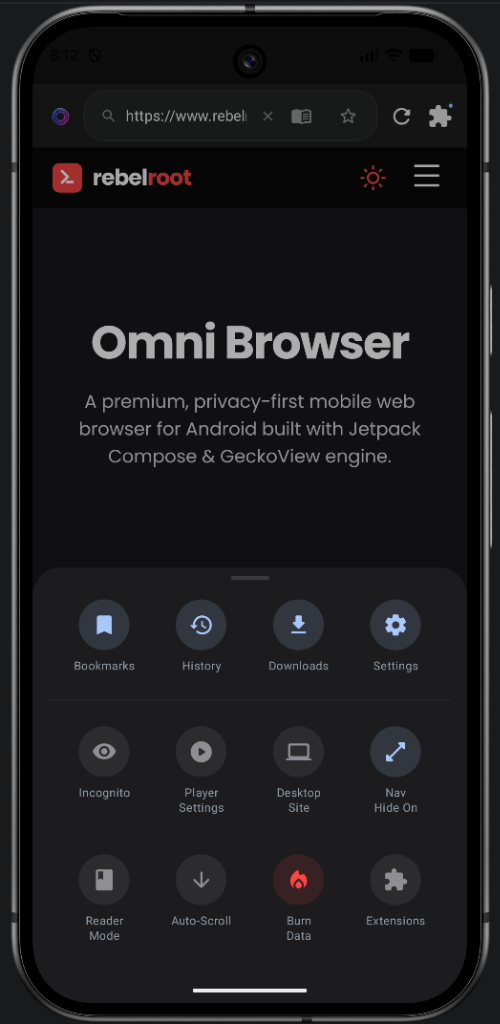 |
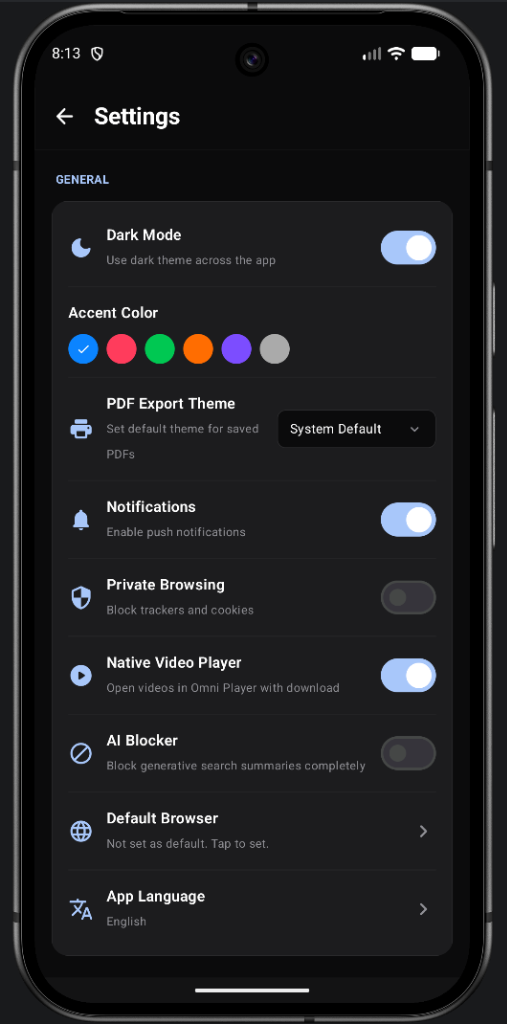
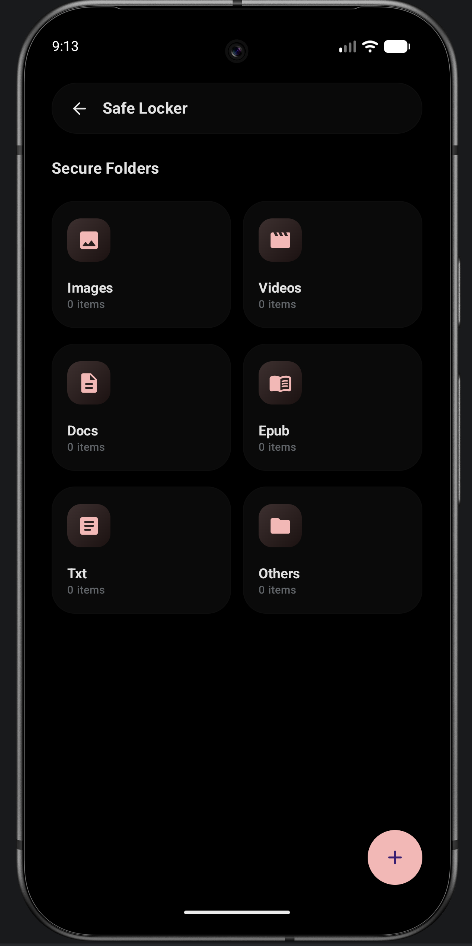
| Extensions | Settings | Safe Locker |
|---|---|---|
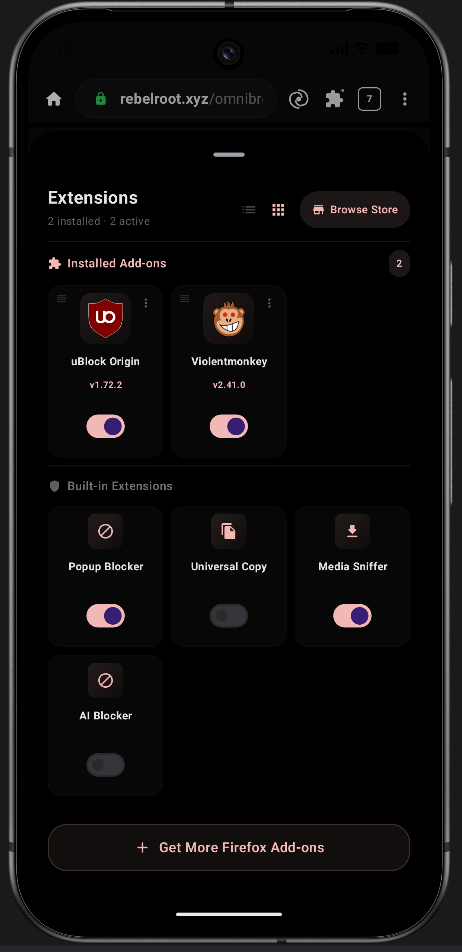 |
 |
 |
✨ Overview
Omni Browser is a state-of-the-art mobile web browser built by RebelRoot — an independent development collective focused on privacy, performance, and open-source freedom.
Powered by Mozilla GeckoView (the same engine behind Firefox), Omni delivers desktop-grade browsing, native Firefox WebExtension support, hardware-decoded media playback, and a built-in tools suite (QR tools, translator, developer console, PDF export) — all wrapped in a premium OLED-dark Jetpack Compose interface.
⚡ Features
🏠 Home & Navigation
| Feature | Details |
|---|---|
| Smart Home Screen | Search bar, quick-access site shortcuts, Discover news feed (Trending, World, Technology, Sports) |
| Quick Access Grid | Pinned shortcuts to RebelRoot, Twitter, Spotify, Amazon, Pinterest + Downloads, History, Bookmarks |
| Incognito Shortcut | One-tap incognito launch directly from the home screen |
| Multi-Tab | Chrome-like tab strip with open tab count indicator |
🛡️ Privacy & Security
| Feature | Details |
|---|---|
| Built-in Ad Blocker | Host-based ad, tracker & telemetry blocker with configurable filter lists (EasyList, uAssets, StevenBlack & more) |
| Incognito Mode | Fully isolated private session — no history, cookies, or cache saved |
| Extensions in Incognito | All extensions work inside private tabs |
| Burn Data | One-tap wipe of all history, cache, cookies, and session data |
| Safe Locker | Biometric AES-256 hardware-backed encrypted vault for private files |
🔌 Extensions
| Extension | Details |
|---|---|
| uBlock Origin | Installable from AMO — efficient wide-spectrum content blocker, easy on CPU and memory |
| Universal Text Copy | Bypass website restrictions to force-enable text selection & copying |
| Aggressive Media Grabber | Sniff and capture HLS/DASH streams and dynamic segments |
| AI Blocker | Block AI Overview summaries and assistant panels on search engines |
| Install from Store | Install any Firefox Android .xpi add-on from addons.mozilla.org |
🛠️ Quick Tools Panel
| Tool | Details |
|---|---|
| QR Scanner | Scan QR codes and barcodes via camera |
| Translator | Online translation via the Google Translate endpoint |
| Edit Page | Inject custom JS/CSS to modify any web page live |
| Save PDF | Export any page as a PDF document |
| Pin Web App | Add any website to the home screen as a PWA-style shortcut |
| Auto-Scroll | Hands-free automatic page scrolling |
| QR Scan Page | Scan QR codes found on the current web page |
| QR Generator | Generate QR codes from any text or URL |
| Console Log | Live JavaScript developer console REPL |
| Dev Notes | Secure offline scratchpad for developer notes |
| Site Style | Apply custom visual styles to any site |
🎥 Media
| Feature | Details |
|---|---|
| Stream Sniffer | Captures HLS, DASH, MP4, and MSE streams automatically |
| Omni Player | ExoPlayer with swipe gestures, speed control, PiP, background audio |
| Player Settings | Configurable player behavior from the browser menu |
⚙️ Settings
| Setting | Details |
|---|---|
| Dark Mode | OLED-black dark theme across the entire app |
| Accent Color | Choose from 5 accent colors (blue, red, green, orange, purple) |
| PDF Export Theme | System Default / Light / Dark PDF rendering |
| Native Video Player | Open videos in Omni Player with auto-download support |
| Private Browsing | Block all trackers and cookies globally |
| AI Blocker | Block generative search summaries completely |
| Default Browser | Set Omni as your system default browser |
| App Language | Multi-language support with global locale switching |
🔄 Omni Sync
| Feature | Details |
|---|---|
| Firefox Cloud Sync | Not available. Mozilla grants Firefox Accounts OAuth and Sync access only on request and does not grant it to third-party browsers, so Omni cannot join Mozilla's cloud. |
| Omni Sync Mesh | Zero-cloud 100% E2EE local Wi-Fi sync between Omni and desktop Firefox (requires the desktop Omni Sync Extension) |
| CRDT Conflict Resolution | Base-62 fractional indexing ensures tree invariant preservation and zero collisions |
| Privacy Isolation | Incognito tabs and private sessions are strictly excluded from all sync engines |
📐 Architecture
Omni Browser uses a clean MVVM + Unidirectional Data Flow architecture, binding Jetpack Compose UI directly to GeckoView through a central BrowserViewModel.
graph TD
    subgraph UI["UI Layer (Jetpack Compose)"]
        BS[BrowserScreen.kt]
        OS[OnboardingScreen.kt]
        SS[SettingsScreen.kt]
    end

    subgraph VM["ViewModel Layer"]
        BVM[BrowserViewModel.kt]
        STATE[TabState / UiState]
    end

    subgraph Engine["Engine Layer (GeckoView)"]
        GR[GeckoRuntime]
        GS[GeckoSession]
        GV[GeckoView]
        WEC[WebExtensionController]
    end

    subgraph Ext["Built-in Extensions"]
        MG[Aggressive Media Grabber]
        UC[Universal Copy]
        AIB[AI Blocker]
    end

    subgraph Svc["Services"]
        DL[Download Engine]
        TL["Translator (online)"]
        VPN[WireGuard VPN]
        VAULT[Biometric Vault]
        PDF[PDF Export]
    end

    BS -->|Events| BVM
    BVM -->|State| STATE
    STATE -->|Recompose| BS
    BVM --> GR
    GR --> GS
    GS --> GV
    GR --> WEC
    WEC --> MG & UC & AIB
    GS -->|Delegates| BVM
    BVM --> DL & TL & VPN & VAULT & PDF
See docs/ARCHITECTURE.md for the full component breakdown.
Repository Structure
omni-browser/
├── app/src/main/
│   ├── assets/web_extensions/        # Bundled WebExtensions (uBlock, Grabber, Copy, AI)
│   ├── java/com/rebelroot/omni/
│   │   ├── browser/                  # Core browser screen + ViewModel
│   │   │   └── extensions/           # Extension manager classes
│   │   ├── media/player/             # ExoPlayer + MSE stream interceptor
│   │   ├── onboarding/               # Language selection & onboarding slides
│   │   ├── privacy/                  # Biometric Locker vault
│   │   ├── settings/                 # Settings screen composable
│   │   ├── tools/                    # QR, Translator, PDF, Console, Dev Notes
│   │   ├── ui/theme/                 # Colors, typography, shapes
│   │   └── vpn/                      # WireGuard VPN manager
├── images/
│   ├── screenshots/                  # 📸 App screenshots
│   │   ├── home_v2.png
│   │   ├── quick_tools.png
│   │   ├── browser_menu.png
│   │   ├── extensions_v2.png
│   │   ├── settings.png
│   │   └── safe_locker_v2.png
│   └── demo.gif                      # 🎬 Screen recording demo
├── docs/
│   ├── ARCHITECTURE.md
│   └── SECURITY.md
├── CHANGELOG.md
├── CONTRIBUTING.md
├── PRIVACY_POLICY.md
└── LICENSE
🛠️ Build & Installation
Prerequisites
- Android Studio Ladybug or newer
- JDK 17 (
JAVA_HOMEmust be set) - Android SDK — Target API 35 (Android 15)
- Device running Android 8.0+ (API 26+)
Build Commands
# Clone
git clone https://github.com/REBEL-ROOT/omni-browser.git
cd omni-browser

# Compile check
./gradlew compileArmDebugKotlin compileAarch64DebugKotlin

# Debug APK
./gradlew assembleDebug
# → app/build/outputs/apk/arm/debug/app-arm-debug.apk
# → app/build/outputs/apk/aarch64/debug/app-aarch64-debug.apk

# Release bundle (AAB)
./gradlew bundleRelease
# → app/build/outputs/bundle/release/app-release.aab
Pre-built Releases
Download the latest signed APK from our Releases Page.
🤝 Contributing
We welcome contributions from the open-source community! Please read CONTRIBUTING.md before submitting a PR.
git checkout -b feature/your-feature
# make changes
git commit -m "Add: short description"
git push origin feature/your-feature
# open a Pull Request
We especially need help with:
- 🌐 Translations & localization
- 🧪 Unit and UI test coverage
- 📖 Documentation improvements
- 🐛 Bug reports and fixes
👥 Contributors
Core Team

ParasxAgarwal |

rohit-verma-11 |

RebelRoot |

prince-kumar-12 |

Kushagra Garg |
Contributors

Baba01hacker666 |
Bug Hunters & QA Contributors
Special thanks to the following community members who have helped debug the project, perform extensive testing, and present critical issues:
| Rank | Contributor | Contribution Evidence |
|---|---|---|
| 1 |  HikaruIchijyo |
Closed Issues (#23, #24, #25, #27, #28, #31, #37, #38, #40, #52, #53) — Very extensive testing and UI/UX feedback. #31 alone had multiple concrete improvements with reference screenshots, many of which were marked completed. |
| 2 |  Tr4p-kun |
Closed Issues (#10, #11, #12, #13) — Multiple detailed bug reports, proper reproduction steps, device/version information, and screenshots/videos. |
| 3 |  trinadhthatakula |
Closed Issues (#34) — Exceptional technical investigation of the versionCode regression, including release-by-release analysis, affected users, reproduction, and a proposed fix. |
| 4 |  abhishekjena601-source |
Closed Issues (#73, #77) — Repeated testing/feedback across media player, dark mode, pull-to-refresh, toolbar/UI, and other areas. |
| 5 |  MalikSabahatAli |
Closed Issues (#61) — Excellent cross-site investigation of the .pk/.bin navigation bug, testing multiple domains and comparing behavior against Chrome. |
| 6 |  jd0spec |
Closed Issues (#51) — Detailed analysis of Omni's video-player architecture and playback continuity, with comparison against Quetta and a concrete technical direction. |
| 7 |  DarkHorse313 |
Closed Issues — Provided multiple valuable bug reports and detailed testing feedback on closed issues. |
| 8 |  Sunnu126 |
Closed Issues (#49) — Detailed extension toggle bug report on Samsung S20 FE 5G (Android 13). |
| 9 |  Phinixprono123 |
Closed Issues (#54) — Crucial compatibility bug report regarding settings crash on Vivo Y85 (Android 8.1 Oreo). |
| 10 |  Atrium0495 |
Closed Issues (#71) — Real tablet testing with screenshots identifying layout and accessibility problems. |
📺 Community Showcases & Reviews
Special thanks to content creators who have featured, demonstrated, or reviewed Omni Browser:
| Creator | Showcase |
|---|---|
 odorizzioficial |
YouTube Showcase Video — Detailed video demonstration and overview of Omni Browser's features. |
📄 License & Trademark
This project is licensed under the GNU General Public License v3 (GPLv3).
Omni Browser — Copyright (C) 2026 RebelRoot Ltd
This is free software: you can redistribute it and/or modify it
under the terms of the GPLv3. See LICENSE for details.
[!IMPORTANT] Forking & Redistribution Terms: Pursuant to GPLv3 Section 7(b), any derivative works, forks, or hosted versions of this software must retain original author attribution and link back to this repository. You must also rebrand the application (use your own logo and name) to respect the Trademark & Attribution Policy.
🔒 Security
To report a vulnerability, use GitHub's private Security Advisory system — do not open a public issue. See docs/SECURITY.md.
