MiAuto
Xiaomi CarWith, OPPO Car+, vivo Jovi InCar and other ICCOA CarLink phones, on your car's head unit. Wireless.
MiAuto runs on the car, advertises itself as an ICCOA CarLink-capable head unit, and pairs with a phone that already supports it — Xiaomi CarWith, OPPO Car+ 车联, vivo Jovi InCar and others. Your phone keeps its own maps, music and calling apps — nothing extra is installed on the phone, and the car needs no companion account, dongle, cable, root or firmware modification.
This repository is built on DiAuto Pro, which is an independent fork of DiAuto, which in turn is an independent fork of Open Headunit. The car-side shell, the settings tree and the BYD cluster / HUD outputs come from that lineage; the phone-side protocol has been replaced with ICCOA CarLink — the one protocol that Xiaomi CarWith, OPPO Car+ and vivo Jovi InCar all speak. See Credits and license below.
Download & installation · Latest release
What's new in 0.1.3
Two fixes taken from guo-zhc/MiAuto, an independent fork of this project's 0.1.1:
- The canvas is now measured, not assumed. It used to be reported long-side-first with a
hardcoded
1920x720fallback, which is wrong on a portrait head unit: stretched picture and touches that land elsewhere. It now comes from the real display, ordered by the screen-orientation setting, and the SDK is re-initialised when it changes. - Reconnect backoff. Consecutive wireless bring-up failures (
10003/10006/10008) now wait 1.2 → 2.4 → 4.8 s (capped at 8 s) instead of hammering the radio every 1.2 s while the phone's P2P group is still tearing down.
Details, including what was and was not verified, are in CHANGELOG.md.
What's new in 0.1.2
A phone that connects now actually reaches the projection screen — 0.1.1 read the SDK's
parameter argument as if it were the connection state, so every success was treated as "still
advertising".
- State codes are now taken from the SDK itself; the projection screen opens on connect and is no longer torn down by the 30-second re-advertise watchdog.
- The car no longer advertises a SoftAP capability a sideloaded APK can never have, which was stalling phones at 10% of negotiation.
- Leaving and re-entering projection no longer leaves a black screen (the rebuilt Surface is now re-bound after pausing the old one).
- Touch on the car screen is forwarded to the phone (ICCOA UIBC).
- 32-bit / x86 head units are told their CPU cannot run the protocol stack, instead of crashing on
launch with
UnsatisfiedLinkError.
Details, including what was and was not verified, are in CHANGELOG.md.
What's new in 0.1.1
Wording only — behaviour is identical to 0.1.0.
- ICCOA CarLink is a standard jointly initiated by Xiaomi, OPPO and vivo, so the home screen, the About and Support screens and the legal notice now name Xiaomi CarWith, OPPO Car+ and vivo Jovi InCar together instead of Xiaomi alone.
- The legal notice now explains what ICCOA CarLink is, and lists OPPO and vivo alongside Xiaomi, ICCOA, Google and BYD.
- Added Traditional Chinese home-screen strings; a zh-TW device used to fall back to English.
What's new in 0.1.0
First public release.
- Wireless ICCOA CarLink reception on the car — Xiaomi CarWith, OPPO Car+ and vivo Jovi InCar phones included — with a 6-digit pairing code shown on the car screen and confirmed on the phone.
- A 30-second re-advertise watchdog: while the car is unconnected it restarts its advertisement, which brings back a pairing prompt that was dismissed on the phone without restarting the app.
- The full settings tree inherited from the base project — connection, display, video, input, audio, backup, reset and diagnostics.
- The inherited instrument cluster and HUD projection paths, kept for cars that expose those areas and off by default.
- Its own package name (
com.miauto.app) and its own release signing key, so MiAuto installs next to other receiver apps on the same head unit.
Headline features
Each item below is described with its actual state, not just its promise.
1. Phone connectivity on the car
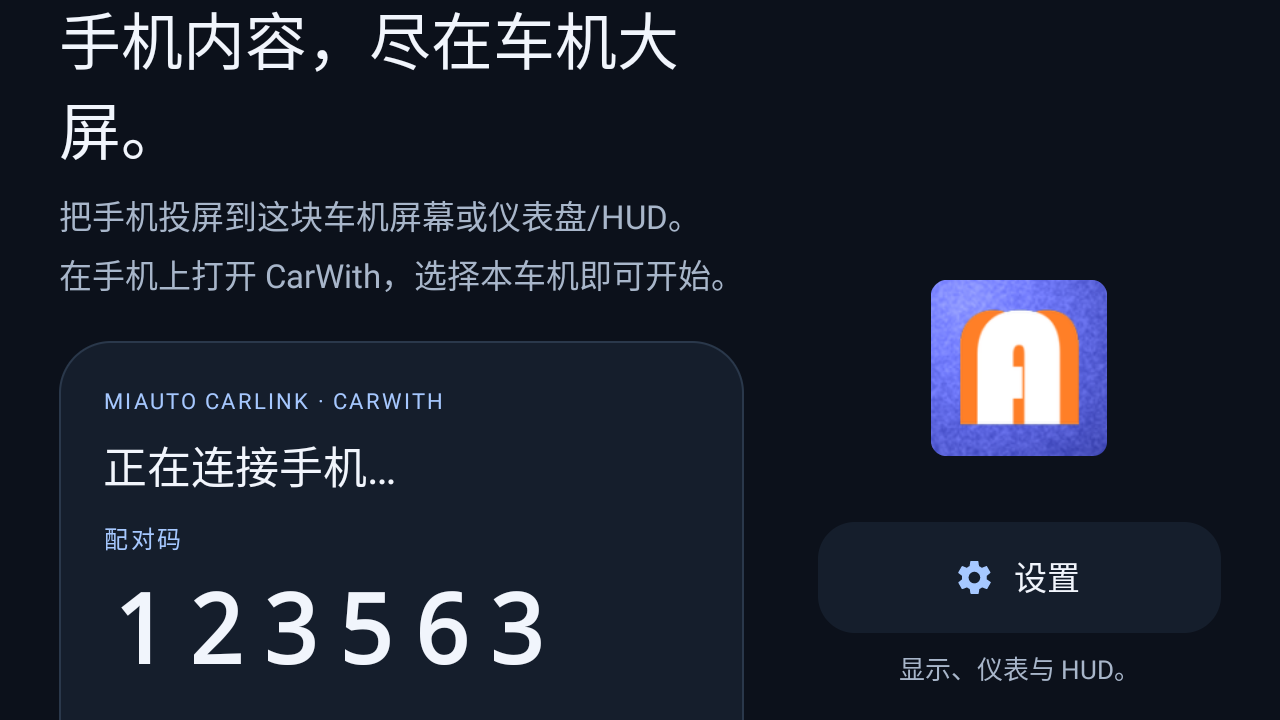
The app advertises an ICCOA CarLink head unit — the kind Xiaomi CarWith, OPPO Car+ and vivo Jovi InCar all connect to; the phone finds it in the nearby-device list, a 6-digit code is confirmed on the phone, and the phone screen appears on the car. There is no button to press on the car side for a normal first pairing.
The car-side codebase still contains the Android Auto half of the base project. It is kept only as a foreground keep-alive, and its Android-Auto-only side effects are deliberately disabled through a build flag, because the ones that matter here would fight the CarWith session for the Wi-Fi Direct group and the local hotspot it needs for its data channel.
2. A pairing prompt that comes back
The failure mode worth engineering against is a pairing prompt the user dismissed on the phone. The car is still advertising, but the phone will not show the dialog again by itself, and the previous behaviour was that the app had to be restarted.
MiAuto re-advertises every 30 seconds while it is not connected:
| Mechanism | Behaviour |
|---|---|
| Watchdog | 30 s timer; on expiry, if still unconnected, re-advertise and schedule the next round |
| Re-advertise is stop-then-start | Repeating an unchanged advertisement is ignored, so the advertisement is restarted instead |
| Never interrupts a session | Skipped while a session is coming up or when a cast is running |
| Timer resets on a new code | The user gets the full 30 seconds to confirm |
| Manual entry point | A refresh button on the home screen retries immediately; visible only while unconnected |
3. Instrument cluster and HUD paths
The base project targets the instrument cluster area that BYD already exposes to third-party apps, plus the windshield navigation outputs (arrows, distance, street names). Both paths are carried over into MiAuto for cars that expose them.
The cluster mirror is experimental and off by default. Where the cluster area is not shared with apps, the setting reports the feature as unavailable rather than failing. Cluster projection is opt-in per car; the mirror timing control below it is intentionally always shown, because a control that hides itself is indistinguishable from a feature that was never built.
These two paths are carried over and are not yet verified with MiAuto's protocol stack.
Features
- Wireless reception for ICCOA CarLink phones (Xiaomi CarWith, OPPO Car+, vivo Jovi InCar and others); the phone stays in a pocket or on a wireless charger.
- Automatic pairing code, with the 30-second re-advertise watchdog described above.
- Full settings tree: connection, display, video, input, audio, backup, reset and diagnostics.
- Instrument cluster mirror and windshield HUD navigation, for cars that expose those areas.
- Car-friendly home screen: large pairing digits, a refresh button, one entry into settings.
- Own package name and signing key, so it coexists with other receiver apps.
- English and Simplified Chinese download page; the app itself ships the community translations inherited from the base project.
Compatibility and setup
Verified on a Newland NLS-MT9055-GL running Android 11 (arm64): the app installs, starts, advertises, shows a pairing code, completes a CarWith session, and the pairing code survives a cold start.
Not yet verified: installation and pairing on a BYD or other production head unit, and the instrument cluster / HUD projection paths. If you run one of those setups, expect to be an early tester, and please report what you see.
A phone that supports ICCOA CarLink is required: Xiaomi CarWith, OPPO Car+ 车联, vivo Jovi InCar, or an equivalent screen-mirroring entry in Settings. This is not Android Auto and not Apple CarPlay.
See the installation guide, including permissions and installation routes. APK installation must be allowed by your head unit. Set up while parked.
Build
Requires JDK 17, Android SDK 36, NDK 29.0.14206865, and CMake 3.22.1.
Set ANDROID_HOME or an untracked local.properties with sdk.dir=....
./gradlew :app:testGithubDebugUnitTest :app:assembleGithubDebug :app:assembleGithubRelease
APKs are under app/build/outputs/apk/github/.
The CarWith / CarLink protocol layer is not in this repository
ICCOA CarLink — the protocol behind CarWith, Car+ and Jovi InCar — is consumed as a prebuilt
SDK that is absent from git (see app/libs/README.md). The compile-time
half of it is a signature-only stub jar, app/stubs/icar-sdk-stubs.jar, which is committed —
it is used for type checking and never enters the APK.
Without the SDK dex the build still succeeds, but the resulting APK has no CarWith support.
When the SDK dex is present, injectIccoaDex appends it to the packaged APK as the next free
classesN.dex, then zipaligns and re-signs, because writing to the zip invalidates whatever
AGP signed. The task is a finalizer and therefore idempotent: it removes any previously
injected copy that is byte-identical to the SDK dex before appending, so repeated builds do not
inflate the APK.
Signing
Release builds are signed when an untracked key.properties provides:
storeFile=/absolute/path/to/your-release-keystore.jks
storePassword=YOUR_PRIVATE_PASSWORD
keyAlias=YOUR_KEY_ALIAS
keyPassword=YOUR_PRIVATE_PASSWORD
storeFile may be relative to either the repository root or the app/ module; both locations
are tried. Never commit signing keys or passwords. Your self-built APK will not upgrade a
public release unless it is signed with the same key.
Application IDs
| Build | Application ID | Label |
|---|---|---|
| Release | com.miauto.app |
MiAuto |
| Debug (coexist) | com.miauto.app.debug |
MiAuto |
The debug ID lets a test build sit next to a stable install on the same head unit.
Only the github flavor is covered by this repository's CI.
Website
The static download page lives under site/ and is generated by scripts/build_site.py.
Edit site/content.json and the BASE / REPO / VERSION constants near the top of that
script, then run:
python3 scripts/build_site.py
Do not hand-edit site/*/index.html — the next build overwrites them.
GitHub Actions deploys only site/ to GitHub Pages.
Credits and license
MiAuto is built on DiAuto Pro, an independent fork of DiAuto, which is an independent fork of Open Headunit, based on work by its contributors and Michael Reid.
Thanks are also due to guo-zhc/MiAuto, an independent fork of this project's 0.1.1 that took it much further. Two of its solutions are used here — measuring the real display at runtime with orientation-aware canvas ordering, and the re-advertise backoff — and both were correct calls this project had missed. It is AGPL-3.0, same as this repository.
MiAuto is licensed AGPL-3.0. See LICENSE and the original copyright notices in
COPYRIGHT_MICHAEL_REID_GPLv3AFFERO.txt. This repository contains the source for the
published app.
This is an independent community project. It is not affiliated with, authorised by or endorsed by Xiaomi, OPPO, vivo, ICCOA, Google or BYD. Android Auto, CarWith, Car+, Jovi InCar and all product and company names mentioned are trademarks of their respective owners.
