PalmClaw

 PalmClaw
An AI agent framework that runs natively on your Android phone.








⬇️ Just want to download? Jump to Quick Start
PalmClaw is an open-source agent framework inspired by OpenClaw and built to run directly on Android phones without a separate PC.
It keeps sessions, context management, memory, skills, tools, and the agent loop on the device, while model inference comes from a user-configured LLM API.
- 📱 Run and configure the agent directly in the Android app.
- 🛠️ Access mobile capabilities through structured device tools.
- 🔒 Keep actions controlled through schemas, permissions, confirmations, and workspace boundaries.
✨ Key Features
📱 On-device agent framework
Run sessions, context management, memory, skills, tools, and the agent loop directly on the phone.🛠️ Structured device tools
Access files, personal data, hardware, web, communication, and automation through typed operations and structured results.🔐 Explicit execution boundaries
Check schemas, Android permissions, user confirmations, and workspace paths before device actions are executed.🧠 Persistent sessions and context
Keep conversation history, tool traces, attachments, session workspaces, and reusable memory across turns.📡 Channels and automation
Receive tasks from local chat or connected channels, and run scheduled work through Cron, heartbeat, and Always-on mode.🔌 Extensible integrations
Use built-in or custom LLM providers, MCP servers, and bundled or installed skills.
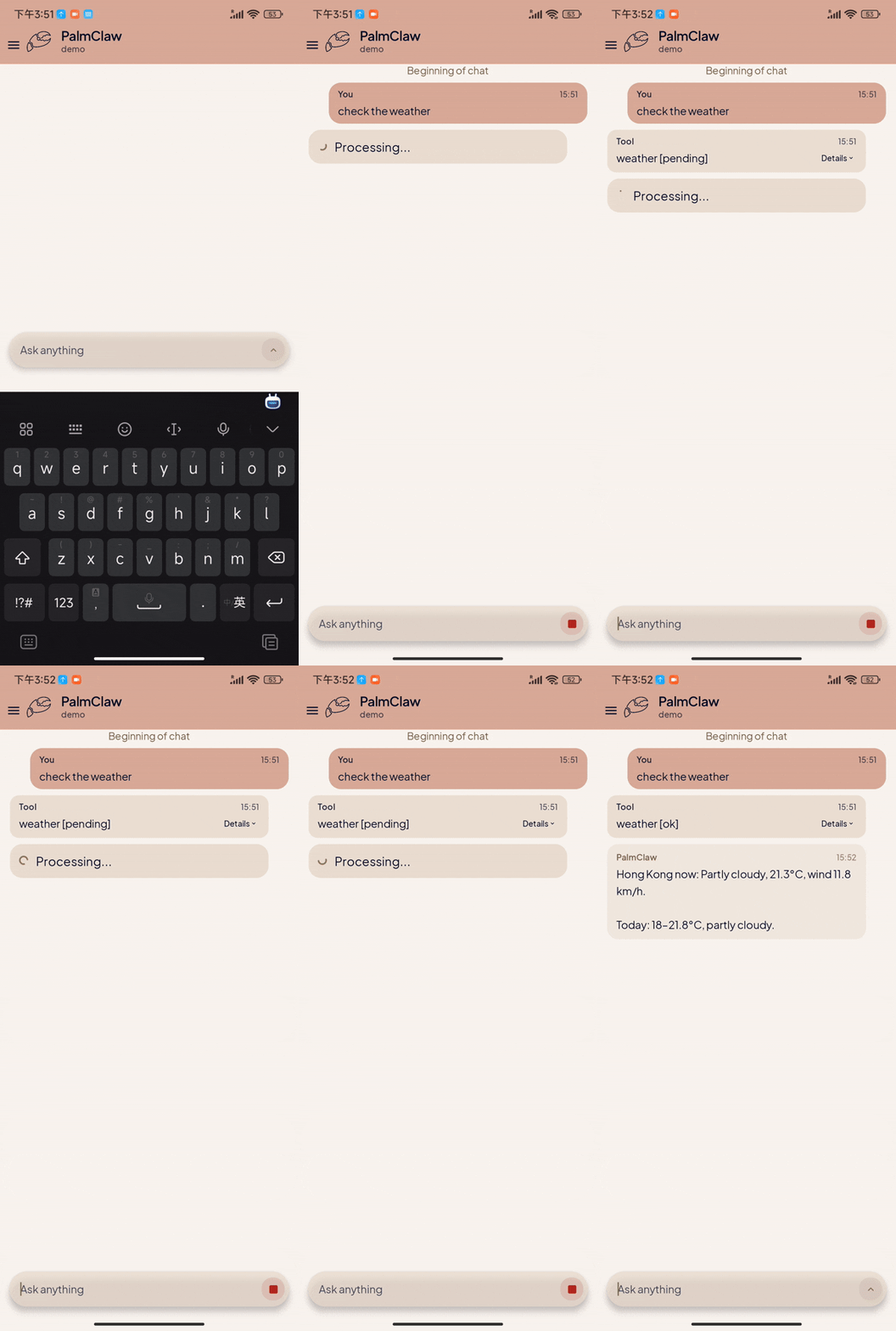
🎬 Demos
 |
 |
 |
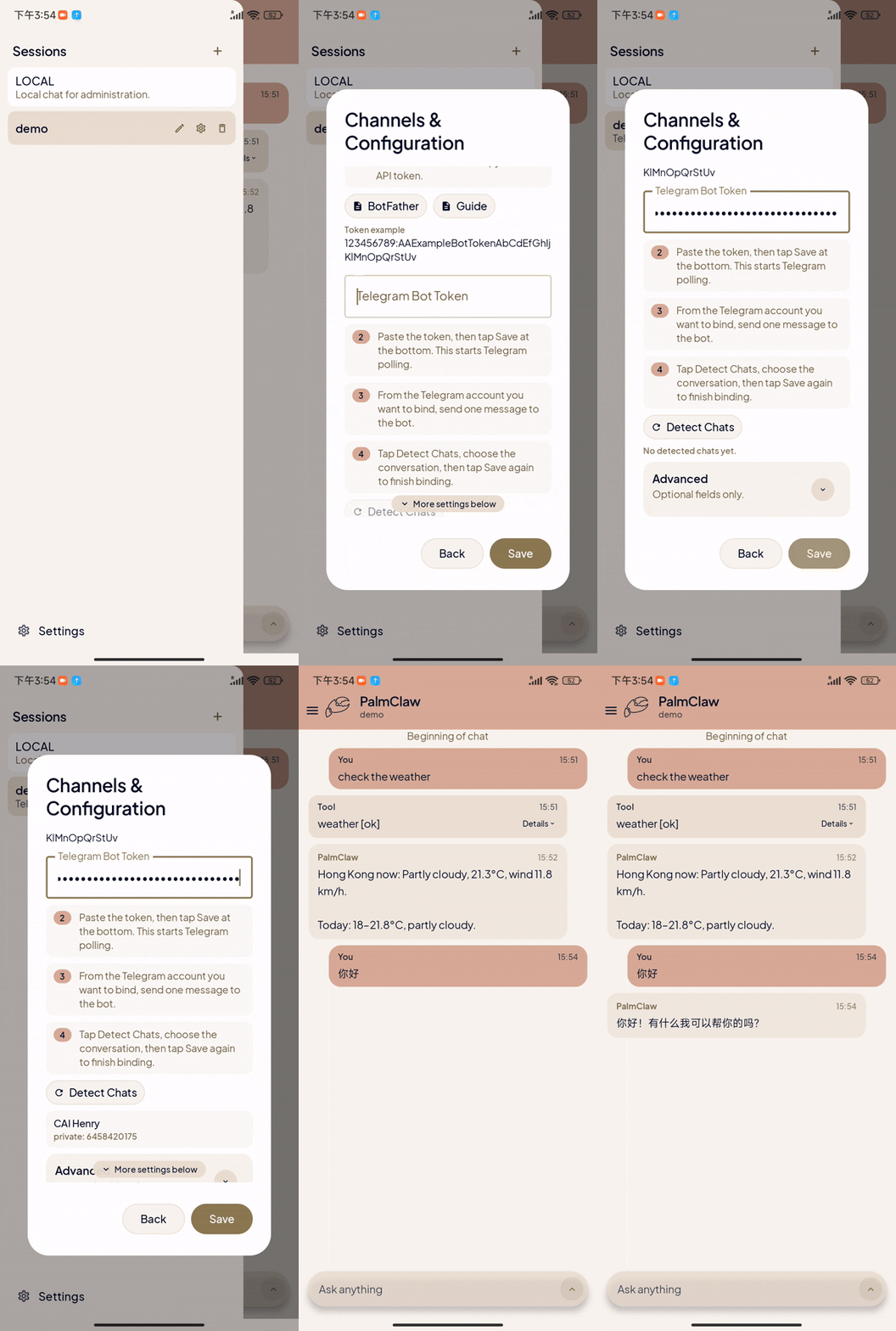 |
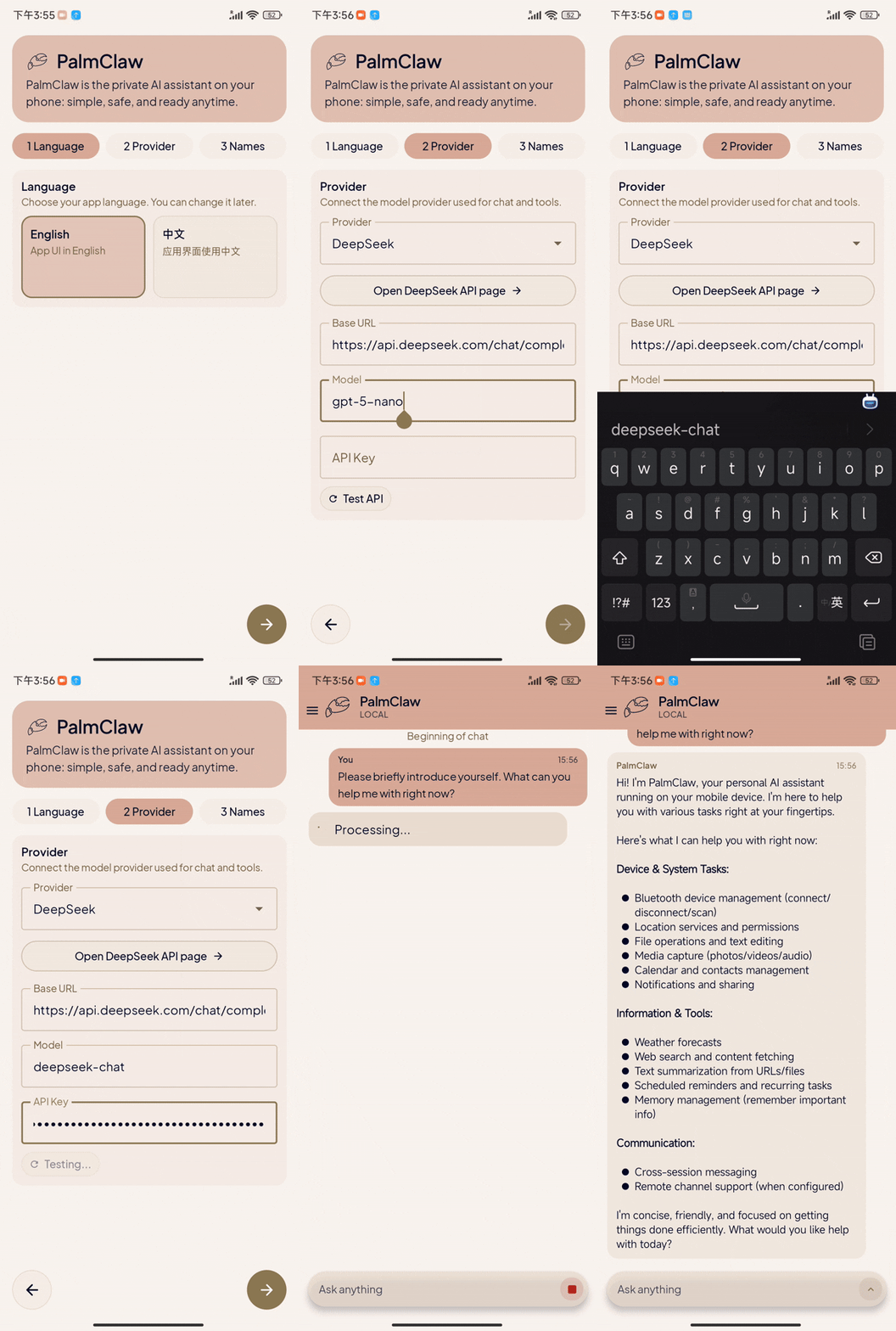
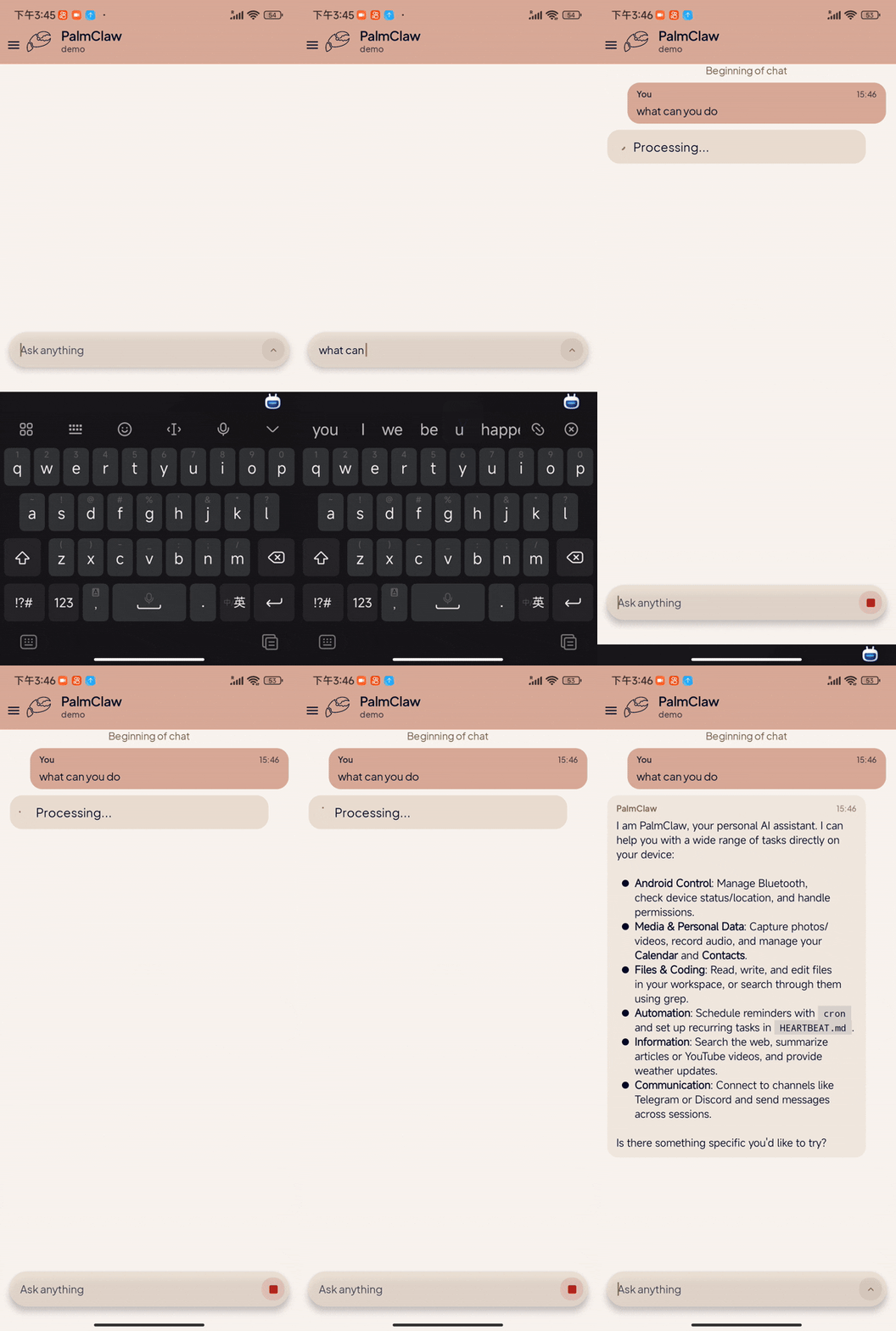
| Initial Setup | Core Features | Tool Usage | Channels Setup |
📰 News
- 🚀 [2026.08.26] v0.3.1 Native Tools, Runtime Reliability & MCP Update: Expanded workspace files and native tools; strengthened Cron, Always-on, channels, and MCP; improved provider endpoint compatibility and chat response timing; and increased coverage to 769 tests.
- 🎉 [2026.08.23] Paper Accepted! We are happy to share that PalmClaw: A Native On-Device Agent Framework for Mobile Phones has been accepted to EMNLP 2026 System Demonstrations!
- 📄 [2026.07.16] Paper Release: Our paper, PalmClaw: A Native On-Device Agent Framework for Mobile Phones, is now available on arXiv.
- 🚀 [2026.06.16] v0.2.1 Runtime, Chat UX & Skills Update: Unified the gateway runtime, improved per-session processing and chat scrolling, added ClawHub browsing and review flows, split major UI state, expanded channel/tool settings, and raised coverage to 306 tests.
- 🎨 [2026.04.06] v0.1.5 UI Refactor, Settings & Permissions Update: Refined the UI and settings flow, unified permission handling, and fixed session, file, and MCP permission issues.
- 📡 [2026.03.28] v0.1.4 Channels, UI & Auto Update: Improved channel stability, cleaned up UI details, and added automatic update checks and downloads.
- 🔌 [2026.03.25] v0.1.3 Custom Provider & Auto-Detect Update: Added custom provider names and improved endpoint auto-detection.
- ⚙️ [2026.03.24] v0.1.2 Provider & Settings Refresh: Added more provider presets and refined model setup and settings UX.
- 🌏 [2026.03.21] v0.1.1 Chinese Docs & UX Update: Added a Chinese README, improved Chinese errors, and fixed the MiniMax endpoint.
- 🚀 [2026.03.16] Initial Release: PalmClaw v0.1.0 is now live! 🎉
🛣️ Roadmap
- Improve engineering quality and expand test coverage.
- Add a process-wide single runtime owner and keep Always-on as a foreground-service shell.
- Add per-session turn coordination so long tasks in one session do not block all sessions.
- Add a lightweight composition root and split major UI state into focused slices.
- Add 769 unit/instrumentation tests across runtime, UI state, tools, channels, storage, providers, and skills.
- Improve tools.
- Build a visual tool management page.
- Add configurable web search providers.
- Add immediate tool enable/disable behavior.
- Improve skills.
- Build visual skill management for installed/local skills.
- Integrate ClawHub browsing, search, download, and pre-install review.
- Improve chat UX and settings UX.
- Add a startup screen for lightweight preloading.
- Improve session switching, recent-message loading, older-history paging, and scroll stability.
- Preserve settings page position when entering and leaving detail pages.
- Continue skill work.
- Add visual skill editing.
- Support desktop skill -> mobile-ready skill conversion.
- Add more channel integrations.
- Expand Android-native capabilities.
- Enable automation through accessibility and screen capture.
- Add more local app integrations.
- Add an optional Termux Bridge for local command execution through a user-installed Termux app, with explicit opt-in, timeouts, output limits, and user confirmation for risky operations.
- Continue improving the harness architecture and agent loop, inspired by Claude Code.
📑 Table of Contents
- 📌 Overview
- ✨ Key Features
- 🎬 Demos
- 📰 News
- 📑 Table of Contents
- 🚀 Quick Start
- 🔌 Channels Configuration
- ⚙️ How PalmClaw Works
- 🗂️ Repository Structure
- 🤝 Community
- 📝 Citation
- ⚖️ License
🚀 Quick Start
👤 For Normal Users
- Download the latest APK from the Releases page.
- Install the APK on your Android phone.
- Open PalmClaw and follow the in-app onboarding guide.
- Finish provider setup, then start chatting in the local session!
Scan to download the latest APK | Scan to join the WeChat Group
[!IMPORTANT] PalmClaw does not include hosted model access by default. You need to configure your own provider API key during setup.
🛠️ For Developers
- Install Android Studio and JDK 17.
- Clone the repository:
git clone https://github.com/ModalityDance/PalmClaw.git
cd PalmClaw
- Open the project in Android Studio and wait for Gradle sync.
- Ensure
local.propertiespoints to your Android SDK path. - Run the app on a physical device or emulator.
[!NOTE]
local.propertiesis machine-specific and should not be committed.
🔌 Channels Configuration
PalmClaw currently supports these channels:
Telegram
- Set
Channel = Telegram. - Fill
Telegram Bot Tokenand save. - Send one message to your bot in Telegram.
- Tap
Detect Chats. - Select detected chat, then save binding.
Discord
- Set
Channel = Discord. - Fill
Discord Bot Token. - Set target
Discord Channel ID. - Choose response mode (
mentionoropen), optionally set allowed user IDs. - Save binding.
[!TIP] Invite the bot to the target server/channel first.
If using
mentionmode, mention the bot once to trigger replies in guild channels.
Slack
- Set
Channel = Slack. - Fill
Slack App Token (xapp...)andSlack Bot Token (xoxb...). - Set target
Slack Channel ID. - Choose response mode (
mentionoropen), optionally set allowed user IDs. - Save binding.
[!IMPORTANT] Slack prerequisites:
- Socket Mode enabled
- App token with
connections:write- Bot token with required message/reply scopes
Feishu
- Set
Channel = Feishu. - Fill
Feishu App IDandFeishu App Secret, then save once in PalmClaw. - In Feishu Open Platform, make sure Bot capability is enabled. In
Events & Callbacks, selectLong Connection, then addim.message.receive_v1. - In
Permission Management, addim:message(send messages) andim:message.p2p_msg:readonly(receive messages). If you test by@-mentioning the bot in a group, also addim:message.group_at_msg:readonly. - Publish the app, open it in Feishu, and confirm the
Long Connectionconfiguration while PalmClaw is still running. - Send one message to the bot from Feishu.
- Tap
Detect Chats. - Select detected target (
open_idfor private chat,chat_idfor group), then save again. - Optional: set
Allowed Open IDs.
If outbound works but inbound does not, the usual cause is that the receive permission, event subscription, publish/open step, or Long Connection confirmation is still incomplete.
- Set
Channel = Email. - Enable consent.
- Fill IMAP settings: host, port, username, password.
- Fill SMTP settings: host, port, username, password, from address.
- Save once to start mailbox polling.
- Send one email to this mailbox from target sender.
- Tap
Detect Senders. - Select sender and save again.
- Optional: toggle auto-reply on/off.
WeCom
- Set
Channel = WeCom. - Fill
WeCom Bot IDandWeCom Secret. - Save once to start long connection.
- Send one message to the bot from WeCom.
- Tap
Detect Chats. - Select detected target and save again.
- Optional: set
Allowed User IDs.
[!NOTE] Recommended order for any channel:
⚙️ How PalmClaw Works
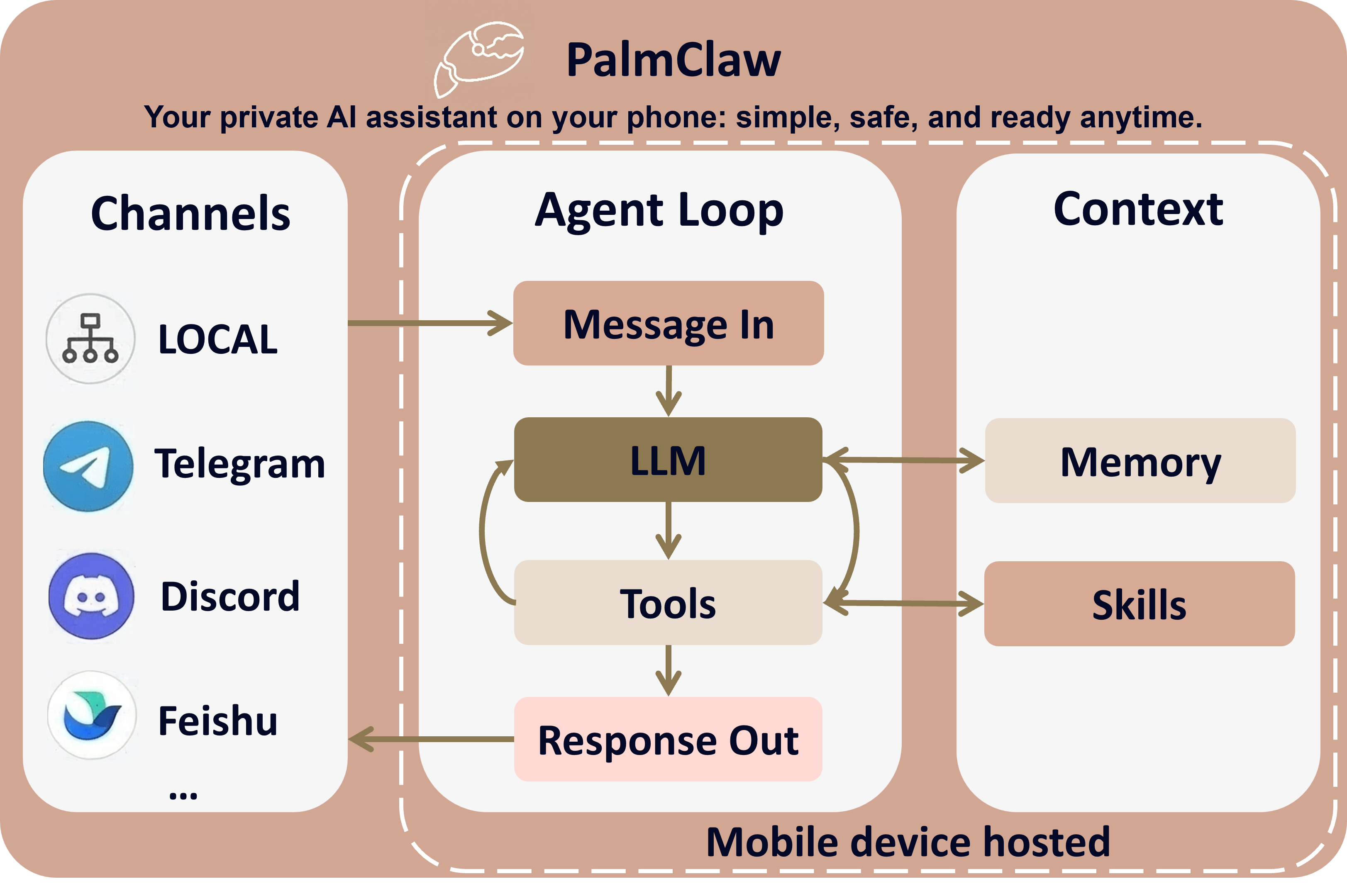
- 📩 Message in: input comes from local chat or connected channels.
- 🤖 Agent loop: LLM decides, calls tools when needed, then generates response.
- 🧠 Context: memory + skills guide every turn.
- 📤 Response out: result is written to the session and sent back to the channels.
🗂️ Repository Structure
PalmClaw/
├─ app/
│  ├─ src/main/java/com/palmclaw/
│  │  ├─ agent/             # context construction and agent loop
│  │  ├─ runtime/           # runtime ownership, control, Always-on, automation
│  │  ├─ tools/             # built-in tools and Android platform gateways
│  │  ├─ mcp/               # MCP transport, lifecycle, and capabilities
│  │  ├─ channels/          # remote messaging channel adapters
│  │  ├─ providers/         # LLM protocols and endpoint resolution
│  │  ├─ storage/           # Room database and repositories
│  │  ├─ workspace/         # session workspaces and path boundaries
│  │  ├─ memory/            # persistent agent memory
│  │  ├─ skills/            # skill loading and compatibility
│  │  ├─ ui/                # Compose UI and UI coordinators
│  │  └─ ...                # config, cron, heartbeat, attachments, and bus
│  ├─ src/main/assets/      # templates and bundled skills
│  ├─ src/test/             # JVM unit tests
│  └─ src/androidTest/      # Android instrumentation tests
├─ docs/
│  ├─ engineering/          # architecture, roadmap, and testing guidance
│  └─ assets/               # brand, site, and promotional assets
├─ gradle/                  # Gradle wrapper files
├─ README.md
└─ README.zh-CN.md
🤝 Community
We welcome researchers, builders, and mobile AI practitioners to join the PalmClaw community. 🌍
Thanks to all contributors.
📝 Citation
If you find PalmClaw useful in your research, please cite our paper:
@misc{cai2026palmclawnativeondeviceagent,
      title={PalmClaw: A Native On-Device Agent Framework for Mobile Phones},
      author={Hongru Cai and Yongqi Li and Ran Wei and Wenjie Li},
      year={2026},
      eprint={2607.13027},
      archivePrefix={arXiv},
      primaryClass={cs.CL},
      url={https://arxiv.org/abs/2607.13027},
}
⚖️ License
This project is offered under a dual licensing model:
Open Source License: See LICENSE
This is the default license for the project. It ensures that any modifications made to the code, when used to provide a service over a network, must also be released under the AGPLv3.Commercial License: See LICENSE-COMMERCIAL
For organizations or individuals who wish to integrate this software into proprietary products or services without being bound by the AGPLv3's copyleft requirements (e.g., keeping modifications private), a commercial license is available.



Thanks for visiting PalmClaw!
