VerificationCodeView
更多:我的 CSDN 博客
联系: QQ 839539179 WEIXIN tuojie003
VerificationCodeView —正方形验证码输入框
示例:
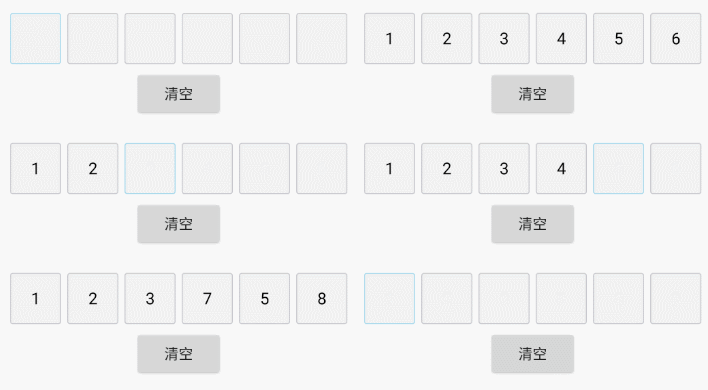
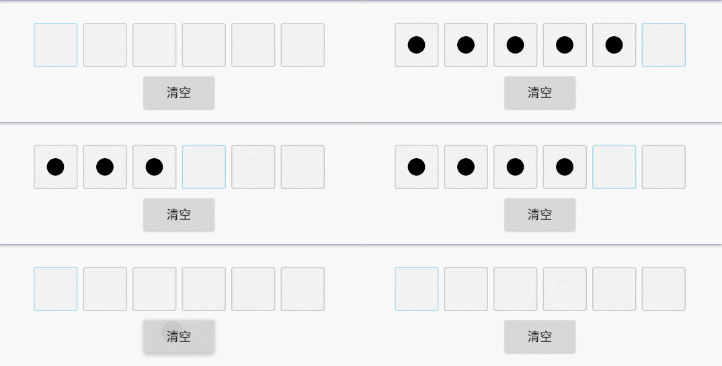
apk 演示:点击下载
特性
自定义属性
| name | 说明 | format | 默认值 |
|---|---|---|---|
| icv_et_number | 输入框的数量 | integer | 1 |
| icv_et_width | 输入框的宽度 | dimension | 42dp |
| icv_et_divider_drawable | 输入框之间的间隔 | reference | |
| icv_et_text_color | 输入框文字颜色 | color | Color.WHITE |
| icv_et_text_size | 输入框文字大小 | dimension | 16sp |
| icv_et_bg_focus | 输入框获取焦点时边框 | reference | |
| icv_et_bg_normal | 输入框没有焦点时边框 | reference | |
| icv_et_pwd | 是否是密码模式 | boolean | false |
| icv_et_pwd_radius | 密码模式时圆的半径 | dimension | reference |
可使用方法
| method_name | description | return_type |
|---|---|---|
| getInputContent | 获取输入内容 | String |
| clearInputContent | 清空输入内容 | Void |
| setEtNumber(int etNumber) | 设置输入框个数 | Void |
| getEtNumber | 获取输入框个数 | int |
| getEditText | 获取 EditText 提供给外界设置键盘弹出 | EditText |
| setPwdMode | 动态设置是否是密码模式 | void |
| setInputCompleteListener(InputCompleteListener listener) | 设置输入和删除时的监听 | Void |
原理说明
该项目是一个继承于 RelativeLayout 的组合控件型的自定义 View,在布局中文件中使用了一个透明的 EditText 来接受用户的输入事件, 在布局文件的 LinearLayout 中动态添加正方形输入框,正方形输入框其实是一个个的 TextView。
使用方法
1 Gradle 引用
implementation 'com.jacktuotuo.customview:verificationcodeview:1.0.5'
2 xml 中使用
- 简单配置
<com.tuo.customview.VerificationCodeView
        android:id="@+id/icv_1"
        app:icv_et_number="5"
        android:layout_width="wrap_content"
        android:layout_height="wrap_content" />
- 个性化配置
<com.tuo.customview.VerificationCodeView
        android:id="@+id/icv"
        android:layout_width="match_parent"
        android:layout_height="50dp"
        android:layout_centerHorizontal="true"
        android:layout_marginLeft="10dp"
        android:layout_marginRight="10dp"
        android:layout_marginTop="26dp"
        app:icv_et_bg_focus="@drawable/shape_icv_et_bg_focus"
        app:icv_et_bg_normal="@drawable/shape_icv_et_bg_normal"
        app:icv_et_divider_drawable="@drawable/shape_divider_identifying"
        app:icv_et_number="6"
        app:icv_et_pwd="true"
        app:icv_et_pwd_radius="10dp"
        app:icv_et_text_color="#000000"
        app:icv_et_width="50dp" />
3 java 代码中使用
VerificationCodeView codeView = new VerificationCodeView(context);
codeView.setEtNumber(number);
codeVidw.setPwdMode(true/false)
Update Log
version 1.0.1
- 支持 Java 代码中动态设置输入框个数
- 支持 xml 中只配置宽高,输入框个数默认为 1
version 1.0.2
- 修复设置字体大小的 bug
version 1.0.3
- 支持密码模式
version 1.0.4
- 解决个别系统使用自动复制粘贴验证码时出现的 bug
- 解决 Google 和华为键盘删除键无效的 bug
version 1.0.5
- 解决一次删除两个数字的 bug,模拟器使用时,请使用 Backspace 代替回退键
TODO
version-1.0.1
- 支持在 Java 中动态设置输入框个数
version-1.0.2
- 修改字体大小 Bug
version-1.0.3
- 支持密码模式
version-1.0.4
- 解决个别系统使用自动复制粘贴验证码时出现的 bug
- 解决 Google 和华为键盘删除键无效的 bug
version 1.0.5
- 解决一次删除两个数字的 bug
License
Copyright 2017 JackTuoTuo
Licensed under the Apache License, Version 2.0 (the "License"); you may not use this file except in compliance with the License. You may obtain a copy of the License at
http://www.apache.org/licenses/LICENSE-2.0
Unless required by applicable law or agreed to in writing, software distributed under the License is distributed on an "AS IS" BASIS,WITHOUT WARRANTIES OR CONDITIONS OF ANY KIND, either expressor implied.See the License for the specific language governing permissions and limitations under the License.
