HokoBlurDrawable
HokoBlurDrawable is an Android component which provides dynamic blur effect.
💡 Due to compatibility issues and the inability to address external clipping and other rendering problems, the chosen implementation approach for this project has proven to be ineffective in subsequent system versions. As a result, this project will no longer be maintained. Thank you all for your attention and support. 💡
1. Introductions
Function:
Dynamic blur, real-time blurring of the background。
Features:
- Multiple algorithms: Box、Stack and Gaussian algorithms. Provide different blur effect;
- 🚀iOS-like dynamic backgroud blur: Compared to using RenderScript to process bitmaps, the component has better performance and effect.
2. Dynamic background blur
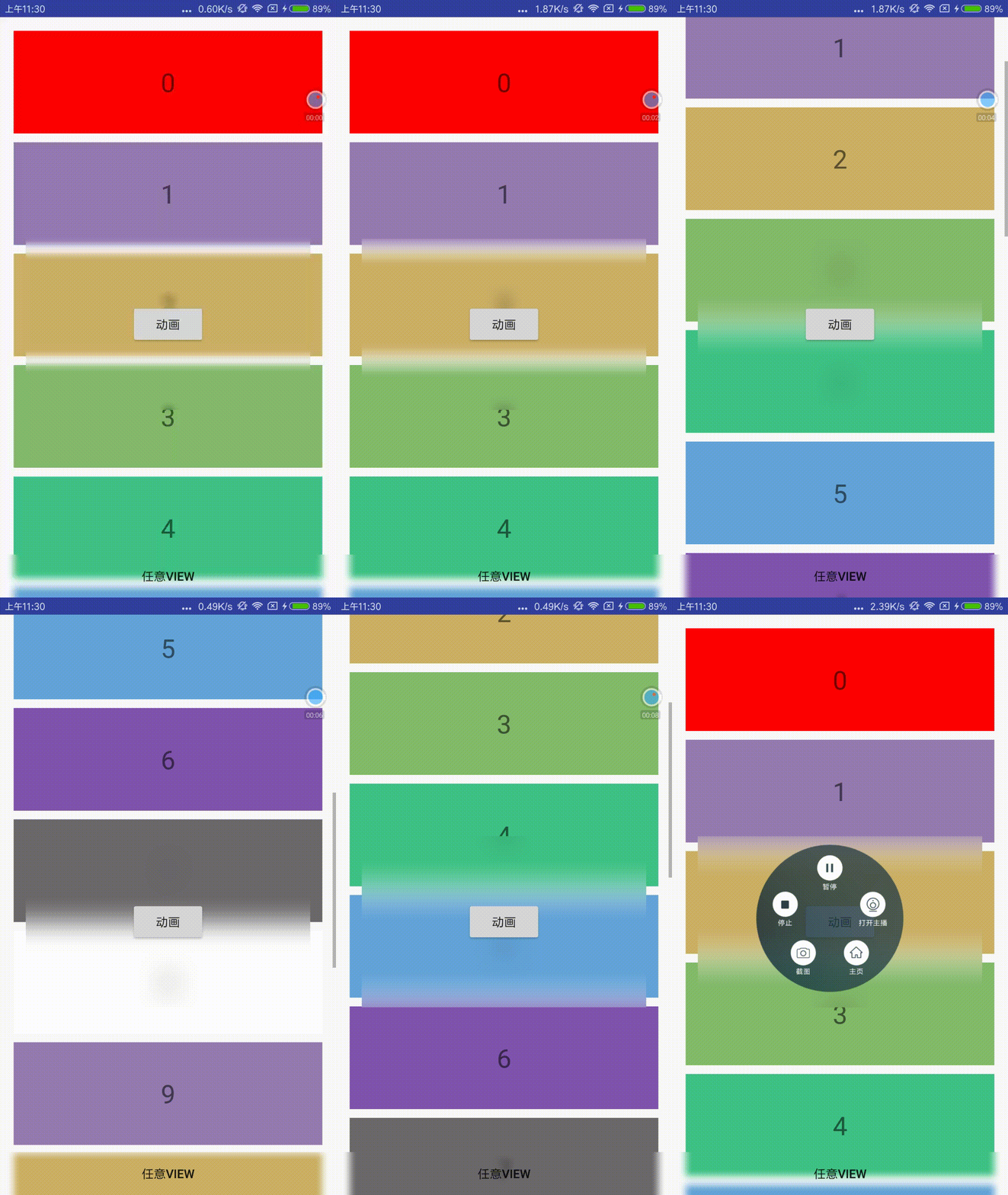
Dynamic Blur provides real-time background blurring of View and ViewGroup, not for Bitmap implementations. The component will blur the area where the View is located.
Add dependency
implementation 'com.hoko:blur-drawable:0.0.1'
To add background blur to the View, just set the BlurDrawable to the View background.
final BlurDrawable blurDrawable = new BlurDrawable();
View view = findViewById(R.id.test_view);
view.setBackgroundDrawable(blurDrawable);
Change the blur parameters:
blurDrawable.mode(mode)
blurDrawable.radius(radius)
blurDrawable.sampleFactor(factor)
Add blur color mixture(OverlayColor)
blurDrawable.mixColor(color)
blurDrawable.mixPercent(percent) //0 ~ 1.0
DISABLE/ENABLE background blur
blurDrawable.disableBlur();
blurDrawable.enableBlur();
HokoBlur already contains three common ViewGroups that implement background blur, including BlurFrameLayout, BlurLinearLayout, and BlurRelativeLayout.
// blur animation
ValueAnimator animator = ValueAnimator.ofInt(0, 20);
animator.setDuration(2000);
animator.addUpdateListener(new ValueAnimator.AnimatorUpdateListener() {
    @Override
    public void onAnimationUpdate(ValueAnimator animation) {
        mFrameLayout.getBlurDrawable().setBlurRadius((Integer) animation.getAnimatedValue());
    }
});
动态模糊组件 HokoBlur
1. 描述
组件主要提供以下功能:
动态模糊,对背景的实时模糊。
组件主要的特性:
- 多种算法,包括 Box、Stack 和 Gaussian 算法,满足不同的模糊效果;
- 🚀类似 iOS 的动态背景模糊,相比使用 RenderScript 处理 Bitmap 的动态模糊方案,具有更好的效果和性能
2. 动态模糊
动态模糊提供了对 View 以及 ViewGroup 的实时背景模糊,并不是针对 Bitmap 的实现。组件将会对 View 所在区域进行模糊。
添加依赖
implementation 'com.hoko:blur-drawable:0.0.1'
为 View 添加背景模糊,只需要将 BlurDrawable 设置为 View 背景即可。
final BlurDrawable blurDrawable = new BlurDrawable();
View view = findViewById(R.id.test_view);
view.setBackgroundDrawable(blurDrawable);
模糊参数的调整,可以这样操作:
blurDrawable.mode(mode)
blurDrawable.radius(radius)
blurDrawable.sampleFactor(factor)
为模糊效果添加混合蒙版(OverlayColor)
blurDrawable.mixColor(color)
blurDrawable.mixPercent(percent) //0 ~ 1.0
禁用/开启背景模糊
blurDrawable.disableBlur();
blurDrawable.enableBlur();
组件已包含实现背景模糊的三种常用 ViewGroup,包括 BlurFrameLayout、BlurLinearLayout 和 BlurRelativeLayout。
使用示例:
// 模糊动画
ValueAnimator animator = ValueAnimator.ofInt(0, 20);
animator.setDuration(2000);
animator.addUpdateListener(new ValueAnimator.AnimatorUpdateListener() {
    @Override
    public void onAnimationUpdate(ValueAnimator animation) {
        mFrameLayout.getBlurDrawable().setBlurRadius((Integer) animation.getAnimatedValue());
    }
});
gif 图较大,稍等片刻
