asoft-ios-android
Download the app · Tested phones · If something goes wrong · Windows version
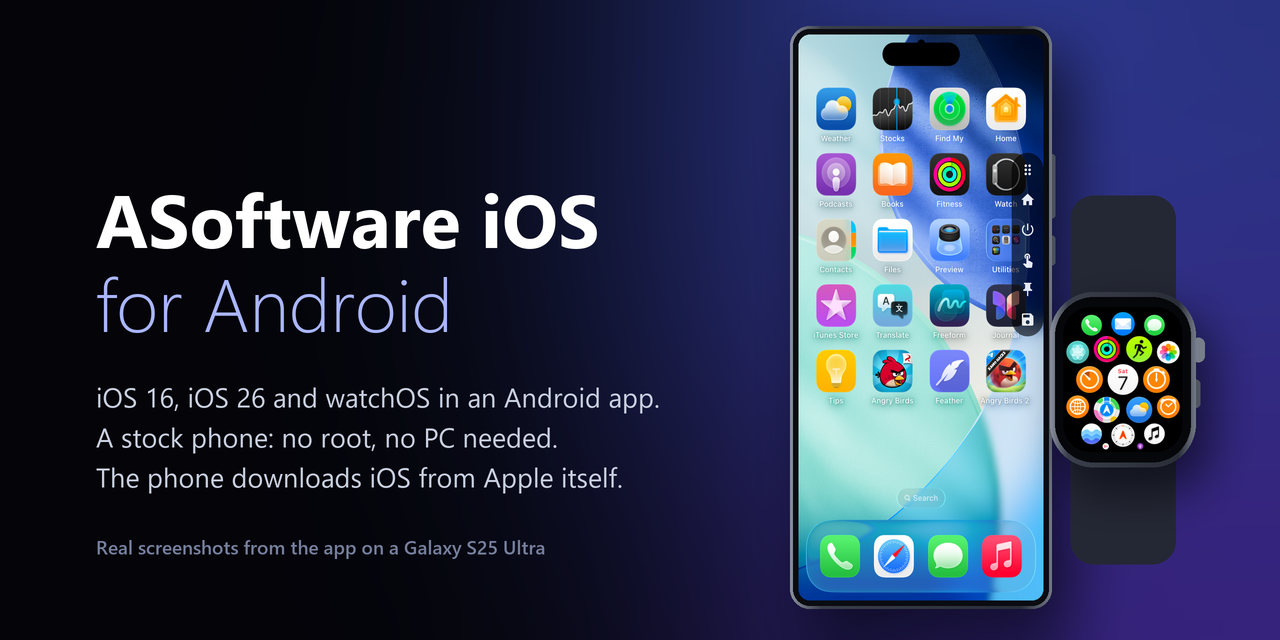
Real iOS in an Android app. iOS 16 runs on most 64-bit phones; iOS 26 and watchOS run on phones whose GPU passes the app's check, which today means most Snapdragon phones (Adreno). A normal phone is enough: no root, no unlocked bootloader, no Termux and no PC. The app downloads iOS from Apple's own servers and builds it on the phone.
It is a research preview: slow next to a real iPhone, a setup takes hours, and some phones hit problems that are not solved yet (listed below). The app and this repository contain no Apple files.
| What the phone needs | Free space while it installs | Space it keeps | |
|---|---|---|---|
| iOS 16 | 64-bit Android 10 or newer. No GPU needed. 6 GB of RAM or more is comfortable; 4 GB phones run it, slowly. | about 26.5 GB | about 6.5 GB, and about 4 GB for its save |
| iOS 26 | the same, plus a GPU that passes the app's GPU check, and 7 GB of RAM or more (12 GB is comfortable) | about 46 GB | about 12 GB |
| watchOS | the same GPU check as iOS 26, and 5 GB of RAM or more | about 20 GB | about 4 GB |
- The GPU check runs before anything is downloaded and takes about 10 seconds. It says plainly whether iOS 26 and watchOS will run on your phone, will never run on it, or are not supported on it yet.
- Adreno GPUs (Snapdragon) run through the Turnip driver that comes with the app. Some of them (for example the Adreno 750 and the 6xx series) run in a compatibility mode that can stop after long use; the app saves before that when it can.
- Mali (most Exynos, MediaTek and Tensor phones), Xclipse and PowerVR GPUs do not run iOS 26 or watchOS yet. iOS 16 runs on them, because it draws on the CPU.
- Newer CPUs are much faster. iOS's code runs natively only on cores with the ARMv8.2 features listed further down (most phones from 2019 on); on older cores (Cortex-A73, A53) everything is emulated and several times slower.
- DEVICES.md lists the phones people have run it on, with the speed they saw. After iOS has run for ten minutes on a phone that is not on the list, the app offers to add it.
Install
- Download
ASoftware-iOS-Android-<version>.apk(about 110 MB) from Releases and install it. Android asks once to allow installs from your browser or file manager. - Open the app, tap Set up, and start iOS 16, iOS 26 or watchOS.
- Leave the phone on its charger and on Wi-Fi, with the app open. If it waits for you, tap Resume: what is done stays done.
- When it is done, tap the system on the home screen to start it.
How long it takes depends on the phone. On a Galaxy S25 Ultra, iOS 16 takes about 1.5 hours from Apple, watchOS about an hour and iOS 26 a few hours. On reporters' phones iOS 16 alone has taken from about an hour to more than 16 hours.
While it installs
These are the things that stop most setups, from the reports we get:
- Android closes the app. Some phones (Xiaomi, OPPO, realme, vivo, Tecno, Samsung's sleeping apps) end long-running apps. Lock ASoftware in the recent apps (hold its card, tap the lock), set its battery use to No restrictions, and do not press Clear all. When Android closes it for low memory, the next try of that step uses less memory.
- Not enough room. The numbers in the table are what the build needs at its biggest moment. The app checks before each step and says how much is missing.
- The battery. Below 15 % and not on the charger, the setup waits for the charger.
- Heat. When Android reports the phone's heat as severe or worse, the setup pauses until Android says it has cooled down. Some phones report severe while only warm on the charger.
- iOS 26's second boot. The last big step, Second boot: DataMigration, is iOS setting itself up. It takes about an hour on a fast phone and longer on others. The bar stops at 85 % after an hour; the minutes in the text are the real progress. On some phones it never finishes: that is #16, still open.
Using it
- A side bar on the right edge has Home, the side button, a touch lock, screen pinning and saves. Tap its handle to show or hide it, drag it to move it. A long press on a button says what it does.
- The phone's volume keys are iOS's, Android's back gesture is iOS's edge swipe, and turning the phone's screen off locks iOS.
- Closing the app (swiping it away, or Save and close) keeps iOS as it is: next time it is back in seconds instead of a boot of a few minutes. Named saves are in the side bar's save button.
- Each system's menu on the home screen (the three dots) has its memory size, Erase, Remove from this phone, and for iOS 26 Install an .ipa… (decrypted .ipa files; App Store downloads are encrypted and do not run).
- Not working yet: the App Store and Apple ID, sound, and GPU acceleration on iOS 16.
If something goes wrong
- Read the message: the app says why it stopped, and for most stops what to do.
- Send the log: on the home screen, Settings > Logs > App log > Share as a file, and attach it to an issue. When the app offers a report after a stop, Report on GitHub opens an issue with everything filled in. The app sends nothing by itself.
- The open problems most reports are about:
Test builds for specific problems appear as pre-releases on the Releases page.
The rest of this page is the technical detail: which hardware features matter and why, what each setup step does, building the app, and the licenses.
Which phones, in detail
Nothing in it is specific to one phone. It is developed and measured on a Galaxy S25 Ultra (Snapdragon 8 Elite, 12 GB RAM); everything else in DEVICES.md comes from users' reports.
- CPU. The native EL0 engine runs iOS's own code on the phone's CPU when the cores have LSE atomics, RDM, dot product, FP16, RCpc and DC CVAP. Without them QEMU emulates everything. Speed is mostly the big cores: a phone with half its cores small is slower whatever its ARM version.
- GPU. iOS 26 and watchOS draw through the phone's GPU. On an Adreno the app uses Mesa's Turnip, which it carries. Without sparse binds from host memory the GPU runs in the compatibility mode. A phone without an Adreno passes the check only when its own Vulkan driver lacks nothing but sparse binds; that route is experimental.
- RAM. iOS 26's memory is 3, 4 or 6 GB and watchOS's 2 or 3 GB, set in their menu on the home screen; the smaller ones are the default on a phone under 10 GB. Below 7 GB of phone RAM (iOS 26) or 5 GB (watchOS) the app warns but does not refuse. On the S25 Ultra iOS 26 left Android 1.5 GB at 3 GB and 0.8 to 1.0 GB at 6 GB.
- Free memory for iOS (home screen, Settings): while iOS runs, the background processes of other
apps are ended every 90 s, so Android does not close iOS for lack of memory. Android 14 and later
let an app end only its own, so there the app asks adb's shell on the phone itself (
am kill-all) over Wireless debugging: pair once (Settings on the home screen > Wireless debugging; the code from Developer options goes into a notification of the app). Wireless debugging needs Wi-Fi and is off again after a restart of the phone until it is turned on.
What works, in detail
iOS 16
- iOS 16.7 (20H392) full screen, touch, iOS's own keyboard, Safari with HTTPS pages.
- Side bar: Home, the side button (lock or wake iOS), a touch lock (touches stop reaching iOS), pin (Android's screen pinning: the phone's edge swipes no longer pull down the notification shade or go home over iOS), saves.
- Quick boot: swiping the app away, or Save and close, keeps iOS as it is; it comes back in about 10 s instead of a boot of 2 to 4 minutes. Named saves (about 3 GB each) can be taken and loaded.
- Turn off (in the side bar's saves, or on the home screen) shuts iOS down without a save; the next start boots. The notification has only Save and close. The last quick save stays as a way back: Go back, on the home screen or in the saves, returns to it with the memory it was saved with, until the next Save and close replaces it.
- Settings and apps you add stay on the phone's own copy of the disk.
iOS 26 (preview)
iOS 26.6.2 in Apple's research VM (vphone600), drawing on the phone's GPU: Metal is translated to Vulkan (reims-vgpu, metal2vulkan). Home screen, apps, touch, keyboard, Liquid Glass; quick boot and saves as for iOS 16. It boots in about 3 minutes and is slow for about 15 minutes after a boot. The app saves by itself once iOS has settled after a boot, and before QEMU reaches Android's limit on memory mappings. The screen is 2x by default (faster); 3x (sharp) is in iOS 26's menu on the home screen. On a disk set up with Always On Display, the side button takes iOS to it and a touch there wakes it; iOS's own Auto-Lock is set to Never there, because the app cannot see iOS go to its Always On Display by itself.
watchOS (preview)
watchOS 27.2 as an Apple Watch Series 9, on the phone's GPU like iOS 26, in a drawn watch: tap the crown to press it, drag it to turn it; the side button is under it. Its own disk and saves. The first start boots in 5 to 7 minutes (longer on a hot phone); a save comes back in about 5 s with the right time. Set up installs it from Apple, with or without iOS 26.
Installing on the phone from Apple, in detail
Set up builds iOS 16, iOS 26 and watchOS on the phone itself from Apple's files, the way the Windows installers do: no PC, no adb.
iOS 16
- It downloads only the parts of Apple's iOS 16.7.16 IPSW (iPhone X) the disk is made of, 5.8 GB, straight from Apple's servers: 8 connections, 32 MB pieces written in place, each part checked against the IPSW's own CRC-32. It picks the fastest of Apple's servers, goes on after an app kill, a restart or a lost network, can wait for Wi-Fi (Download on Wi-Fi only), and has Pause and Cancel on its notification.
- Then the Windows installer's helper VM (a small arm64 Linux that comes with the app) runs in the
app's QEMU: it makes the kernel with the iPhone's device tree and builds the iOS disk from the
downloaded images, as
Build-iOSDisk.ps1does on Windows. The disk is packed and set up like one brought from a PC, then iOS is started once until its lock screen and saved, so your first start takes seconds. - It needs about 26.5 GB free at its height (with less, the downloaded files go as soon as the disk no longer needs them) and leaves about 6.5 GB, plus about 4 GB for the save. On the S25 Ultra the whole setup takes about 1.5 hours from Apple (51 minutes with the files already on the phone: the disk 20, the first start 29).
iOS 26 and watchOS
- First the GPU check (above). When it fails, the screen says whether iOS 26 will not run on this phone or is not supported yet, with its log to copy or share (please send it).
- Their shared part comes once, whichever is installed first: cloudOS 26.4's kernel, firmware and GPU driver from Apple, about 1 GB.
- Then each OS's own IPSW parts from Apple, and the helper VM builds its disk with the Windows installers' own steps. iOS 26 is then started once through its first-boot work (iOS's data migration, about an hour on a fast phone), watchOS until its watch face.
- watchOS: about 5 GB from Apple, about an hour, about 20 GB free at its height, keeps about 4 GB. iOS 26: about 10.2 GB from Apple, a few hours, about 46 GB free at its height, keeps about 12 GB (on the S25 Ultra 99 minutes with the files already on the phone: the disk 31, the data migration 45).
- Besides Apple's servers they fetch, from GitHub: a small iOS sysroot (bash and file tools the disk steps run, jprx/darwin-vm), our device-tree fix-up (qemu-sptm), the GPU compiler plugin (vphone-cli's open-source GraphicLoader with our patch, an asoft-ios release), and the FCS key list blacktop/ipsw carries, used when Apple's key service does not answer.
The app and this repository hold no Apple file: what is built comes from Apple's servers on the phone.
Setting it up from a PC
- On a Windows PC, install ASoftware iOS with iOS 16.
- Install this app on the phone (iOS 16 needs about 6.5 GB, and 4 GB more for a save).
- On the PC, run
Send-ToPhone.cmdfrom the ASoftware iOS folder. It packs that iOS intoASoftware-iOS16.asoft(about 6.5 GB) and, with the phone on USB and USB debugging on, sends it to the app. Otherwise copy the file to the phone. - In the app: Set up > From your PC > Choose file… (or Import, when the file is already there), then Start iOS 16. The first start takes a few minutes (2 to 4 on our phone).
The file is made on your PC from what the Windows installer downloaded from Apple. Neither this repository nor the app holds any Apple file. Do not share the file.
How it works
QEMU runs as the app's child process. A locked phone gives an app no hypervisor, so QEMU emulates XNU's kernel, but the iOS processes themselves run on the phone's CPU: the native EL0 engine maps each iOS address space into a helper process and runs its arm64 code there, trapping to QEMU for system calls and page faults. On CPUs without the ARMv8.2 features above the engine stays off and QEMU emulates everything. iOS 16's screen is read straight from the guest's RAM into a GLES texture each display frame. Input goes over QMP.
Building
- iOS 16's QEMU and
qemu-img: qemu-sptm, branchasoft-android-ios16, built in Termux on the phone (-D__TERMUX__ -O2 -fno-emulated-tls).pull-libs.shcopies them (aslibqemu.so,libqemuimg.so) and their Termux libraries intoapp/src/main/jniLibs. - iOS 26's QEMU (
libqemu26.so): branchasoft-androidwith reims-vgpu and metal2vulkan linked in, built with the NDK; Turnip and the Vulkan loader beside it.pull-libs26.shputs them inapp/src/main/jniLibs26. - The setup from Apple:
pull-setup.sh [ASOFT_IOS_CHECKOUT]copies the helper VM (Image.gz,initrd.gz;Image16k.gzfrom$KERNEL16K, built withsetup/helper-kernel16k.config), the iOS 16 kernel, the tools that makepayload.binandasoft-setup.json(the member and step list the installers share), and for iOS 26 and watchOS the Windows installers' Linux step bodies and scripts (ios26/,watchos/there) with this repository'ssetup/phonejobs, intoapp/src/main/assets. - The app:
./gradlew assembleDebug(Android Studio's JDK, SDK 36, NDK 29). A release build is signed when~/.android/asoft-ios-release.properties(or$ASOFT_SIGNING) names a key. - Tests and measurements on a phone over adb:
dev/(dev/test-*.sh; input goes to the phone only while the app is on top and the phone is unlocked).
Licenses
The app's code: MIT (LICENSE). The APK also carries:
- QEMU 11.1 (GPL v2): source at https://github.com/alpersamur3/qemu-sptm, branches
asoft-android(iOS 26 and watchOS) andasoft-android-ios16(iOS 16). - reims-vgpu and metal2vulkan (GPL v2 or later, or LGPL v3 or later): sources at
https://github.com/alpersamur3/reims-vgpu and https://github.com/alpersamur3/metal2vulkan, branch
asoft-android. - Mesa's Turnip Vulkan driver (MIT) and the Khronos Vulkan loader (Apache 2.0).
- For the setup from Apple: our XNU kernel for iOS 16 (Apple Public Source License 2.0; built from
Apple's XNU with the patches in asoft-ios
xnu/), and the Windows installer's helper VM (installer/helperthere): Linux 6.12 (GPL v2; kernel.org's 6.12.114 withinstaller/helper/kernel.config, and for the phone's engine alsosetup/helper-kernel16k.confighere), Ubuntu 24.04 arm64 packages under their own licenses (sources at https://launchpad.net/ubuntu), and apfs-fuse (GPL v2, https://github.com/sgan81/apfs-fuse). - Termux packages QEMU links (GLib, GnuTLS, Nettle, libslirp, pixman, zstd and others, under their own licenses): sources at https://github.com/termux/termux-packages.
- Conscrypt (Apache 2.0, https://github.com/google/conscrypt): TLS 1.3 for the pairing with Wireless
debugging. The adb client itself (
Adb*.java,Spake2.java) is the app's own, written after AOSP's adb (Apache 2.0); SPAKE2's two points are BoringSSL's.
Not affiliated with Apple. iOS is Apple's.