UrTV
تلفزيونك · UrTV
واجهة رئيسية عربية وشاشة توقف سعودية لتلفزيونات Android TV و Google TV، وتسريع آمن للتلفزيون.
تركّبها من التلفزيون نفسه بزر واحد، أو من جوالك أو كمبيوترك.
An Arabic home screen and a Saudi screensaver for Android TV / Google TV, and a safe speed-up.
Set it up from the TV itself with one button, or from your phone or computer.






| الطريقة | تحتاج | المدة |
|---|---|---|
| ① التلفزيون وحده (الأسهل) | التلفزيون والريموت | ١٠–٢٠ دقيقة |
| ② من جوال أندرويد أو آيفون | جوال على نفس الواي فاي | مثل الكمبيوتر (الآيفون أبطأ) |
| ③ من كمبيوتر | كمبيوتر على نفس الواي فاي ومساعد ذكي | ٤٠ دقيقة |
مهم: تثبيت التطبيق وحده ما يخلّيه الشاشة الرئيسية. اللي يحوّل التلفزيون ويسرّعه هو الإعداد («جهّز كل شي» أو الأوامر)، وتقدر ترجع كل شي مثل ما كان بأي وقت.
① التلفزيون وحده
- فعّل التصحيح: الإعدادات ← تفضيلات الجهاز ← حول ← اضغط OK على Build سبع مرات، ثم خيارات المطوّر ← شغّل تصحيح USB.
- ثبّت تطبيق Downloader من متجر التلفزيون، واكتب فيه الرمز 9378345 ← تثبيت (اسمح له بتثبيت التطبيقات لو سألك).
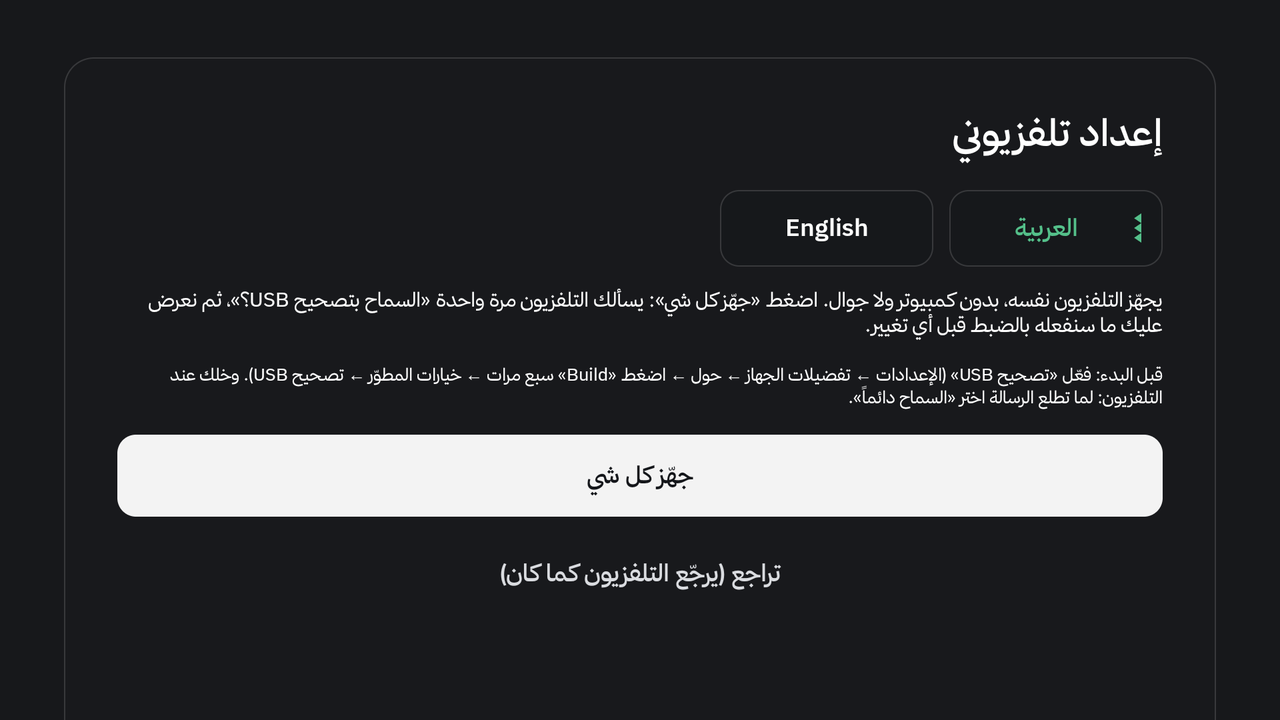
- افتح «إعداد تلفزيوني» من صف التطبيقات ← اضغط «جهّز كل شي».
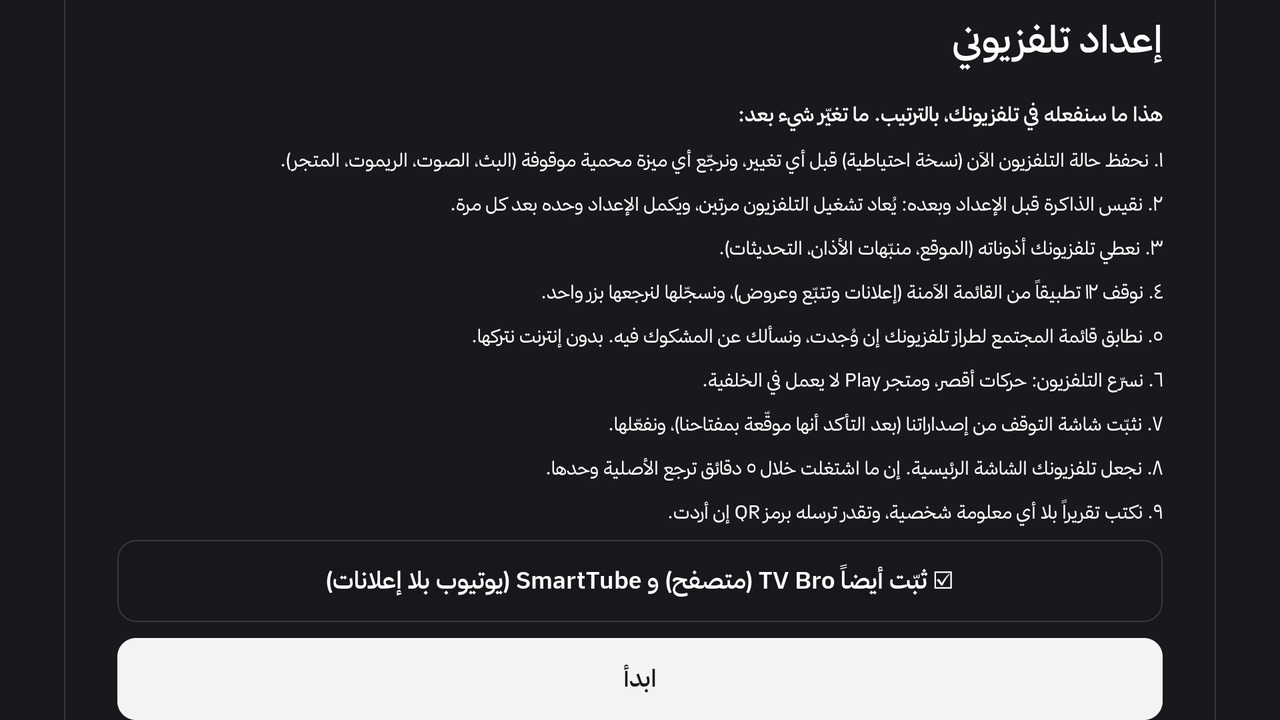
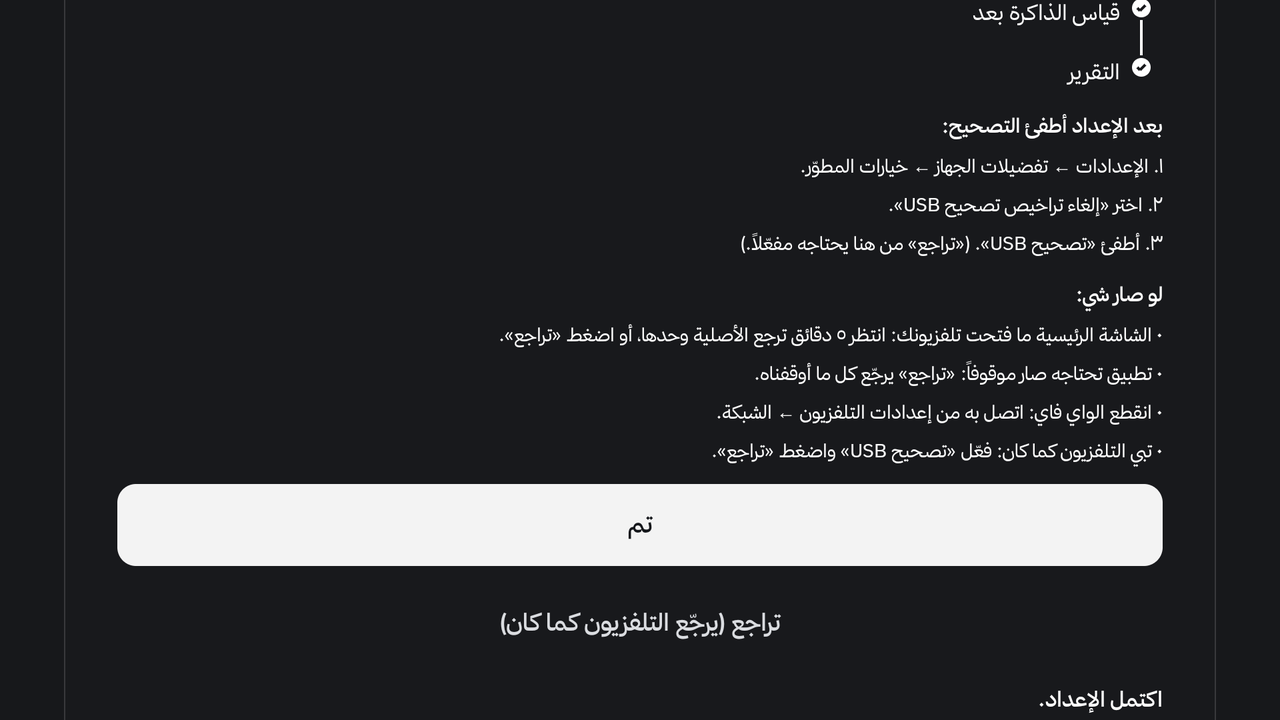
- التلفزيون يسألك «السماح بتصحيح USB؟» ← السماح دائماً. تطلع لك الخطة بأرقام تلفزيونك قبل أي تغيير ← «ابدأ»، وخلّه يكمل (يعيد التشغيل مرتين ويكمل وحده).
| الشاشة الأولى | الخطة قبل أي تغيير | النهاية |
|---|---|---|
 |
 |
 |
② من جوال أندرويد أو آيفون
- التلفزيون: فعّل التصحيح مثل الخطوة ١ فوق.
- أندرويد: ثبّت Termux وشغّل نفس أوامر الكمبيوتر من الجوال.
- آيفون / آيباد: ثبّت iSH (أبطأ).
- الخطوات كاملة:
docs/PHONE-SETUP.md.
③ من كمبيوتر (مع مساعد ذكي)
- التلفزيون: فعّل التصحيح مثل الخطوة ١ فوق.
- الكمبيوتر، على نفس الواي فاي، وعليه واحد من هذي:
| Codex (OpenAI) | Claude Code (Anthropic) |
|---|---|
| مجاني بحساب ChatGPT | يحتاج اشتراك Claude Pro (20$ بالشهر) |
| حمّل تطبيق Codex | حمّل تطبيق Claude ← تبويب Code |
| الموافقات: اختر «Approve for me» | الموافقات: Allow للمهمة كلها |
ويندوز: ركّب Git وPython أول (winget install --source winget Git.Git Python.Python.3.12). Gemini CLI مجاني وناس قالوا يشتغل؛ ما جرّبناه.
- الصق هذا:
ركّب تلفزيوني من https://github.com/tshi-dev/UrTV: انسخ المستودع واتبع
docs/SETUP-PROMPT.mdخطوة بخطوة. أنت على كمبيوتر متصل بنفس شبكة الواي فاي حقت التلفزيون.
بعد التثبيت
- وش يصير بعد اللصق؟ يسألك عن مدينتك وأنديتك، والتلفزيون يسألك «السماح» مرة، وبعدها خلّه يشتغل.
- بترجعه مثل ما كان؟ نعم بأي وقت: زر «تراجع» في «إعداد تلفزيوني»، أو
optimize/reset.sh. - نزلت نسخة جديدة؟ «تحديث تلفزيوني» من التلفزيون (ضغطة طويلة على أي تطبيق)، وإعداداتك باقية.
- تحديث للنظام وقف تطبيقنا؟ أعد الإعداد: «جهّز كل شي» أو
optimize/run.sh again.
وش فيه
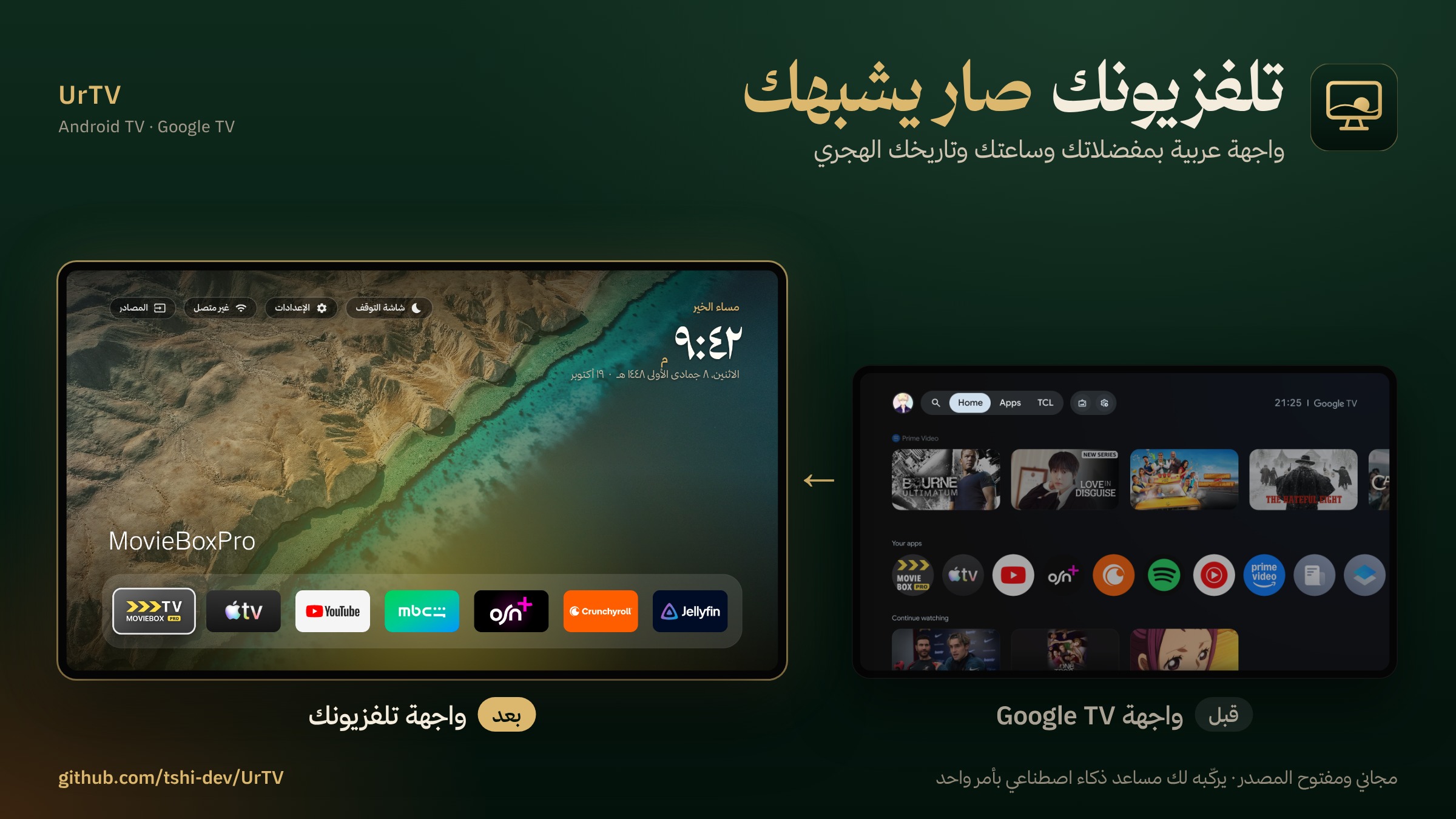
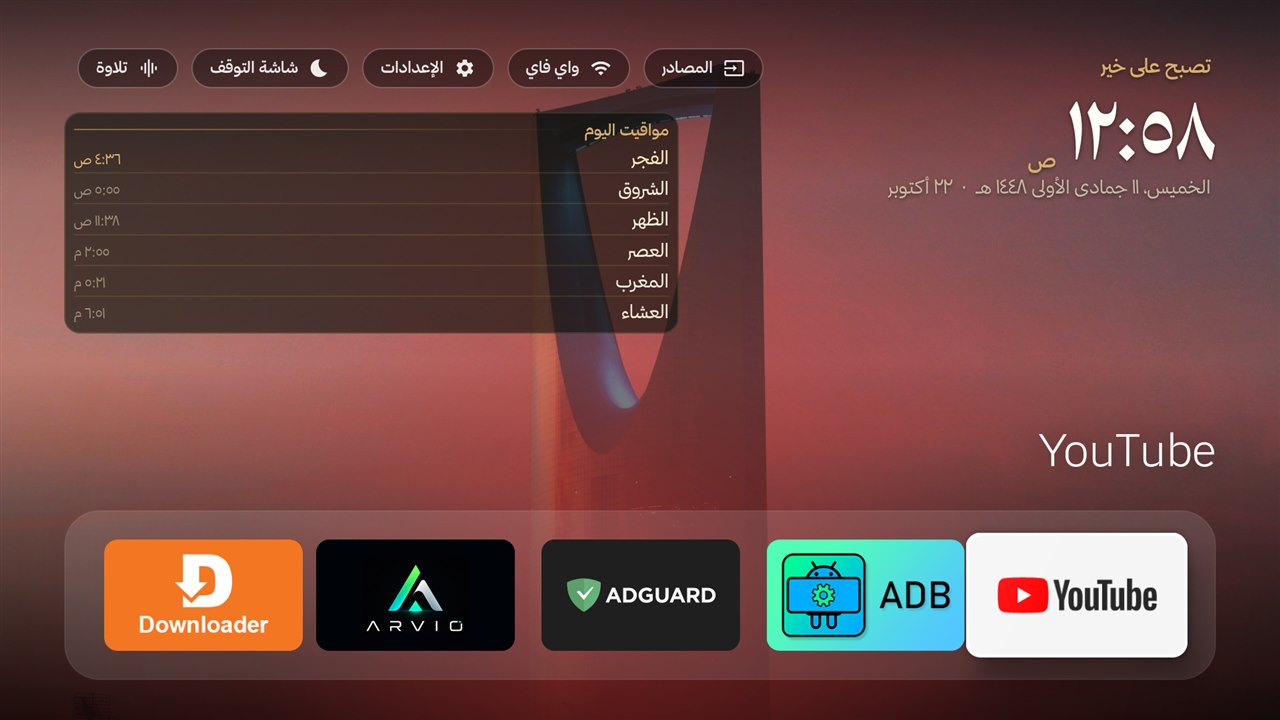
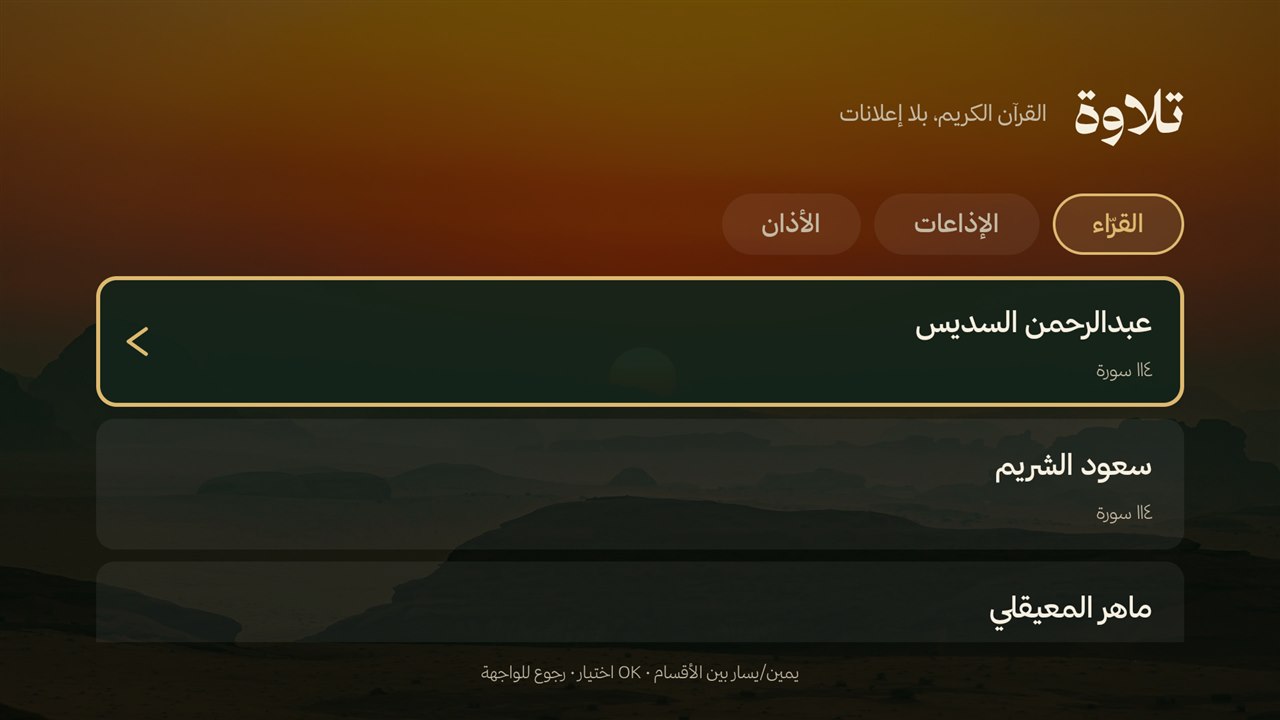
- الشاشة الرئيسية «تلفزيونك»: عربية ونظيفة، مفضلتك، المهام، تلاوة وأذان، والمباريات.
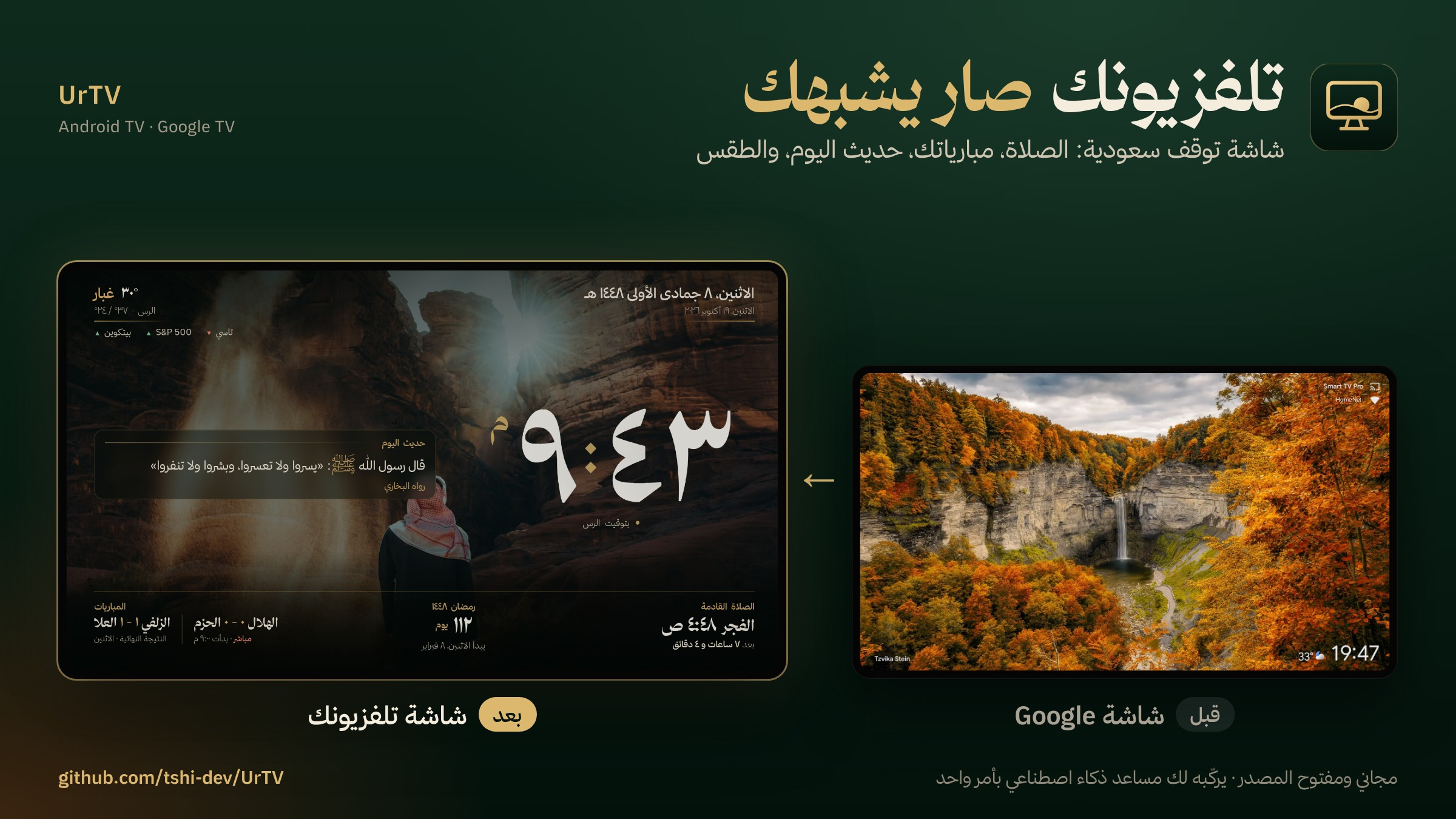
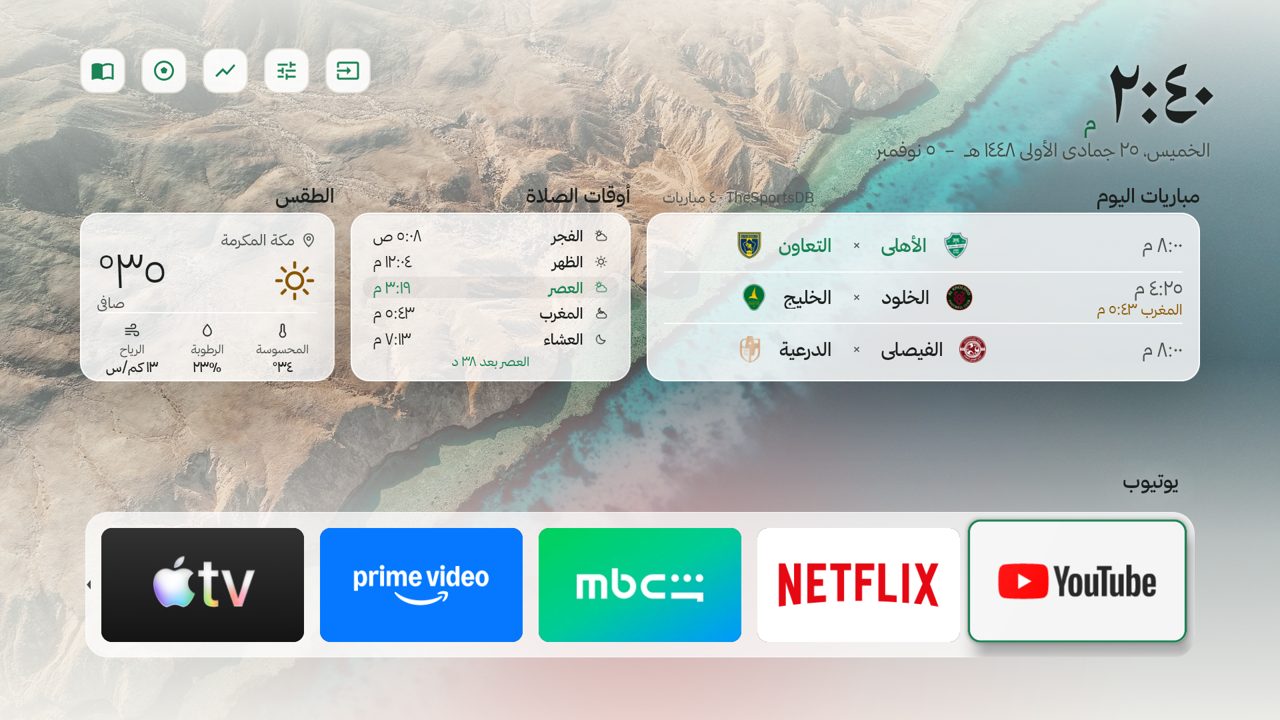
- شاشة التوقف: الساعة والهجري ومواقيت الصلاة والإقامة، ومبارياتك، والطقس، والأسواق، وصور سعودية أو صورك.
- تلاوة وأذان: ٤٢ قارئاً، والإذاعات، والأذان بتوقيت أم القرى (٢١ أذاناً).
- «تلفزيونك»: افتح التطبيق وتدخل الأسواق أو المباريات أو الألعاب أو الإعدادات بضغطة.
- ثماني ألعاب عائلية: «الأسرع» من الجوالات، وسبع بريموت واحد: خمس خانات، الكلمة المفقودة، واحد مو معنا، بدون كلام، خلية الحروف، خمّن الكلمة، ودومينو.
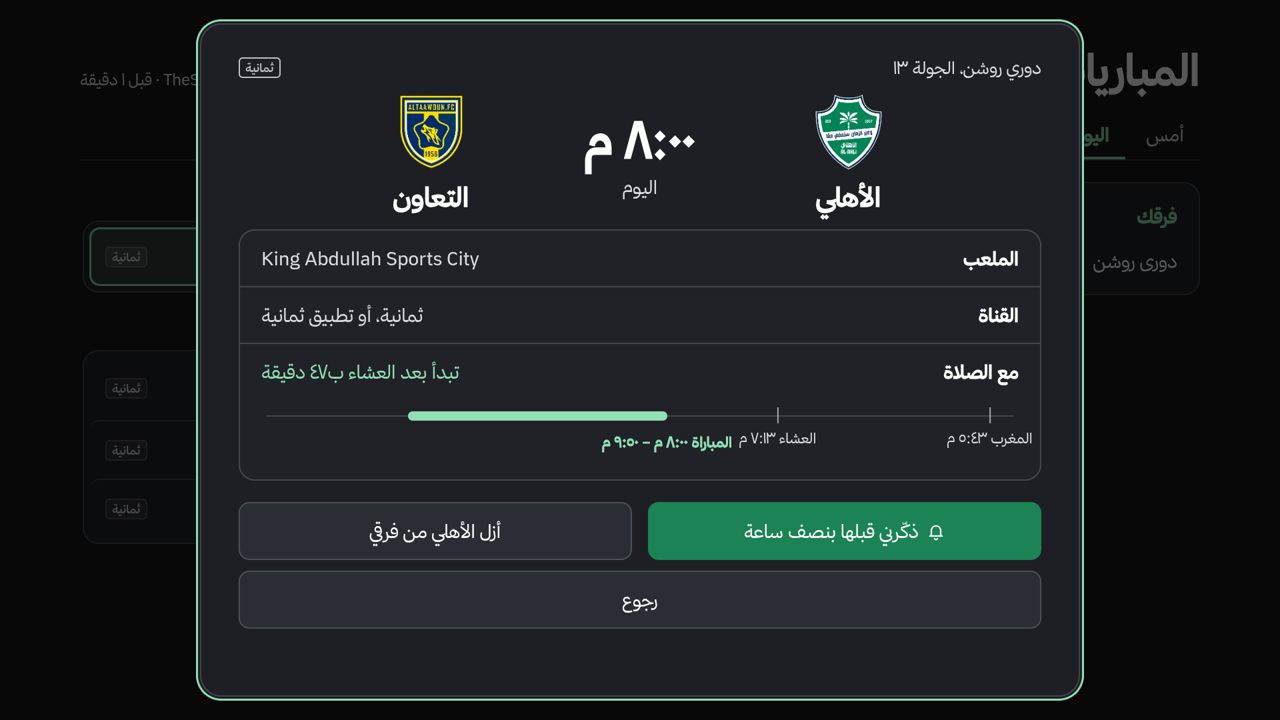
- المباريات: من بطاقة المباراة «شاهد المباراة» يفتح UrTV Player عليها، ودوريات أكثر.
- UrTV النظيف: الأساسيات فقط في الرئيسية وشاشة التوقف، مع سطر الصلاة القادمة أو بطاقة صلاة، وكل شي يرجع بضغطة.
- توحيد المظهر: الأزرار والبطاقات وشريط التطبيقات بمادة وحدة في كل شكل.
- تخلّص من واجهة المصنع: تعطيل (ما يحذف) واجهة المصنع بتأكيدين وبضغطة ترجع؛ بعض التلفزيونات ما تعرض سؤال التصحيح لتطبيقنا، وUrTV يشتغل بدونها.
- قبل ما تحذف UrTV: إذا كنت شغّلت «تخلّص من واجهة المصنع» فلا تحذف التطبيق قبل ما ترجّعها (الإعدادات ← الشاشة الرئيسية ← «رجّع واجهة المصنع»، أو «إعداد تلفزيوني» ثم «تراجع»)، وإلا يبقى التلفزيون بلا شاشة رئيسية وتطلع شاشة سوداء. في الإعدادات صف «قبل ما تحذف التطبيق…» يقول لك هذا، وفيه زر الرجوع.
- التحكم من الجوال: صفحة جوال جديدة: ريموت، وكتابة عربية، ورسالة ورسم على الشاشة، وصورك.
- تسريع آمن: يوقف الإعلانات والتتبع بشكل يرجع، وما يلمس AirPlay ولا البث ولا الصوت.
كل ميزة بالتفصيل: docs/FEATURES.md. كل إعداد بأمره: docs/SETTINGS.md
مساعدة
- صار شي؟ «أرسل تقرير» في الإعدادات (رمز QR، بدون أي معلومة شخصية)، أو
optimize/share.sh --problem. - أسئلة التثبيت بدون كمبيوتر:
docs/PHONE-SETUP.md.
Install: pick a way
| Way | You need | Time |
|---|---|---|
| ① The TV alone (easiest) | the TV and its remote | 10–20 min |
| ② From a phone, Android or iPhone | a phone on the same Wi-Fi | like the computer (an iPhone is slower) |
| ③ From a computer | a computer on the same Wi-Fi and an AI agent | 40 min |
Important: installing the app alone does not make it the Home screen. The setup («جهّز كل شي», or the commands) switches the TV over and speeds it up, and you can put everything back as it was at any time.
The full steps for each way, with pictures, are in the Arabic guide above. In short: turn on USB debugging, install the Downloader app and type 9378345, then open «إعداد تلفزيوني» and press «جهّز كل شي». From a phone, see docs/PHONE-SETUP.md. From a computer, paste this into your AI agent:
Set up my TV with https://github.com/tshi-dev/UrTV: clone it and follow
docs/SETUP-PROMPT.mdstep by step. You are on a computer on the same Wi-Fi as the TV.
After installing
- What happens after pasting? It asks your city and clubs, the TV asks «Allow» once, then leave it running.
- Put it back as it was? Yes, any time: «تراجع» in «إعداد تلفزيوني», or
optimize/reset.sh. - A new version? «تحديث تلفزيوني» on the TV (long OK on any app); your settings stay.
- A system update locked our app out? Run the setup again: «جهّز كل شي» or
optimize/run.sh again.
What you get
 |
 |
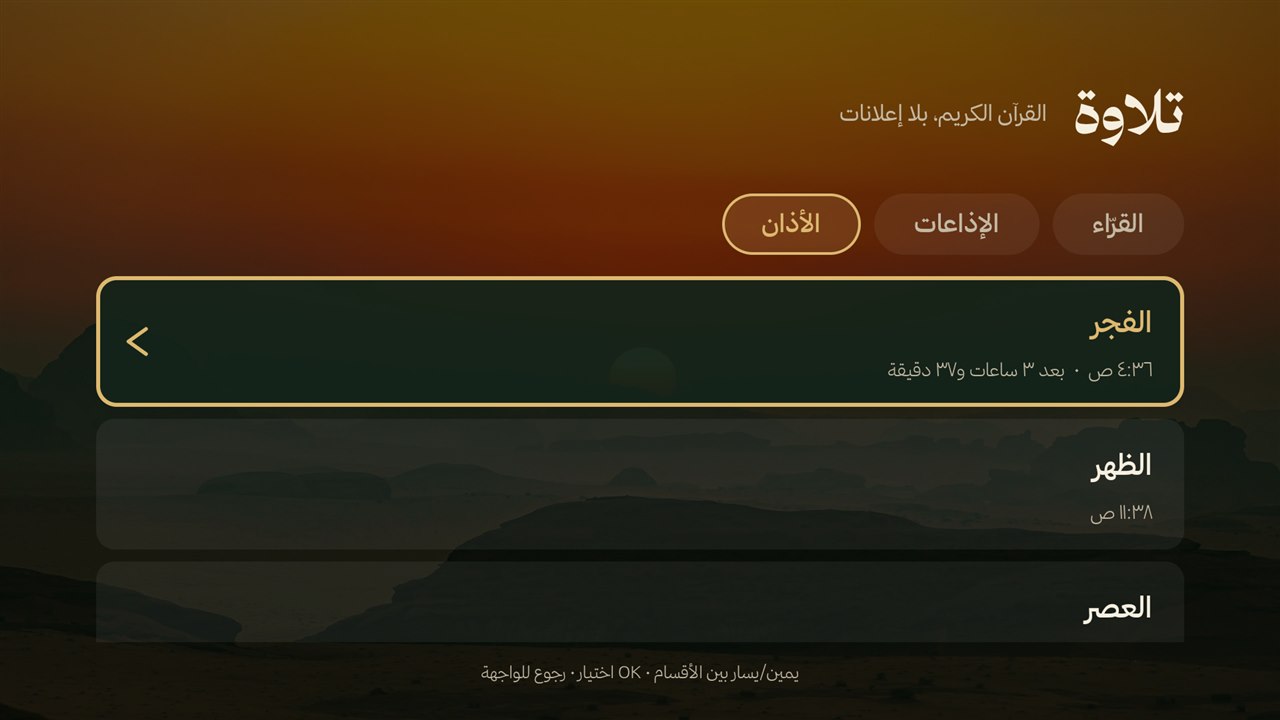 |
| Home screen «تلفزيونك» | «تلاوة وأذان» | The adhan, Umm al-Qura times |
- Home screen: a clean Arabic launcher: favourites, all apps, tasks, «تلاوة وأذان», the day's matches.
- Screensaver: clock, Hijri date, prayer times and iqama, your teams' matches, weather, markets, over Saudi landscapes or your own photos.
- «تلاوة وأذان»: 42 reciters, live Quran radio, the five adhans at Umm al-Qura times (21 recordings). More: docs/TILAWAH.md.
- «تلفزيونك» (Your TV): open the app and go into Markets, Matches, Games or Settings in one press.
- Eight family games: «The Fastest» from the phones, and seven with one remote: Five Boxes, Missing Word, Odd One Out, Without Words, Letter Hive, Word Guess and Dominoes.
- Matches: «Watch the match» from a match's card opens UrTV Player on it, with more leagues.
- Clean UrTV: the essentials only on the home and the screensaver, with the next-prayer line or a prayer card; one press brings everything back.
- One look: the buttons, the cards and the apps bar share one material in every look.
- Get rid of the factory interface: turn it off (never delete it) with two confirmations and one press to undo; some TVs do not show the debugging question to our app, and UrTV works without it.
- Before you delete UrTV: if you turned on «Get rid of the factory interface», bring it back first (Settings → Home screen → «Bring back the factory interface», or «TV setup» then «Undo») or the TV is left with no home screen and shows a black screen. The settings row «قبل ما تحذف التطبيق…» (Before you delete the app…) says so and has the button.
- From the phone: a redesigned phone page: a remote, Arabic typing, a message or a drawing on the screen, your photos.
- Safe speed-up: ads and tracking off, reversibly; AirPlay, casting and voice are never touched.
Every feature: docs/FEATURES.md (Arabic). Every setting with its command: docs/SETTINGS.md
Latest additions
 |
 |
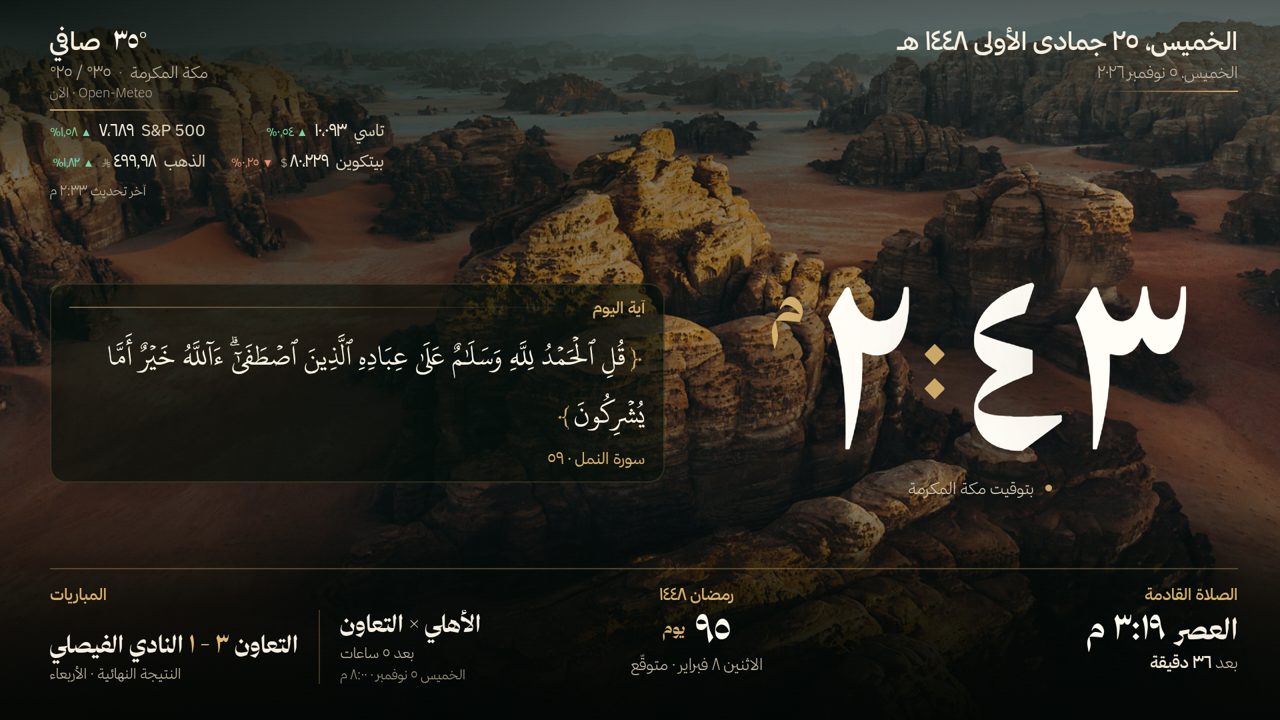 |
| The home with the day's matches | A match's card | The screensaver |
Help
- Something went wrong? «أرسل تقرير» in the settings (a QR code, nothing personal), or
optimize/share.sh --problem. - No computer: docs/PHONE-SETUP.md · Security: SECURITY.md
For agents and developers
- AI agents: read AGENTS.md first, then docs/SETUP-PROMPT.md or docs/SETTINGS.md.
- Scripts, the screen's settings, the data and the build: docs/DEVELOPERS.md.
- What the apps send over the network: docs/NETWORK.md · TV models: docs/TVS.md · what we learned on real TVs: docs/OPTIMIZE.md.
- Download the apps: the latest release. Release tags and build numbers: docs/DEVELOPERS.md.
- CHANGELOG.md · CONTRIBUTING.md
Credits
UrTV is MIT-licensed; the launcher is adapted from tv-home (MIT).
Photos: Unsplash photographers, listed in docs/PHOTO-CREDITS.md. Fonts: Thmanyah, and
Noto Naskh Arabic for ﷺ ﴿﴾ (OFL, assets/fonts/). Quran text: KFGQPC Uthmanic Hafs 3.0 font and text, King Fahd Glorious Quran Printing Complex (free to use and distribute unmodified, notice); «التفسير الميسر» (King Fahd Complex) via api.alquran.cloud.
Quran recitations and live streams: mp3quran.net and qurango.net;
the Saudi Quran Radio stream is the Saudi Broadcasting Authority's own (Radio+). Adhan recordings: the
Azaan of World Mosques collection on Archive.org
(Public Domain Mark 1.0).
Home screen adapted from mihirgupta0900/tv-home (MIT,
android/launcher/LICENSE-tv-home). Package ratings from UAD-ng.