pairfob



English | 简体中文
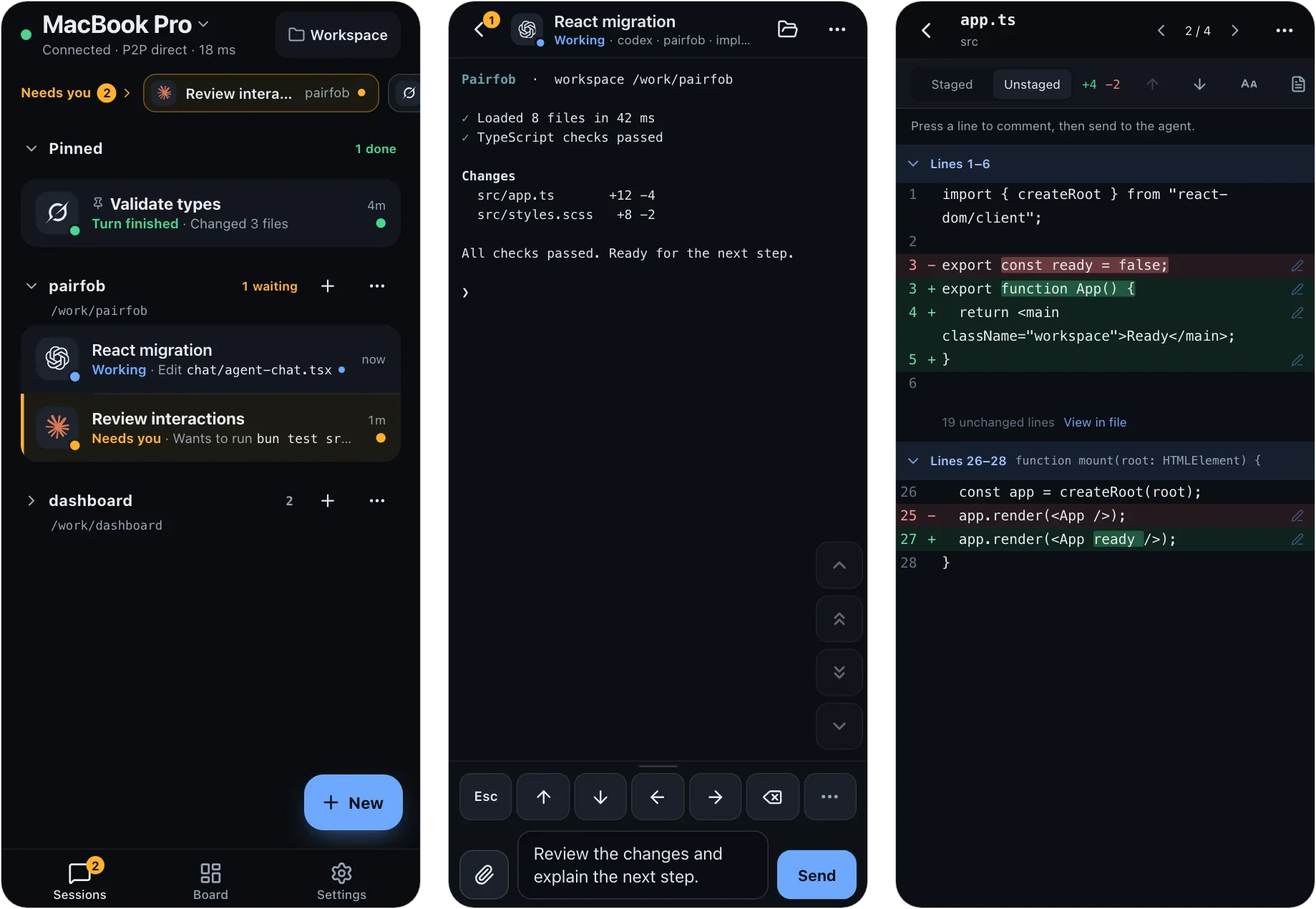
Control the coding agents on your computer from your phone. Codex, Claude, Grok and the rest keep running on the computer; after pairing once, a phone, tablet or another computer opens the same live sessions, not copies. The computer only dials out — no inbound ports, no VPN — and the session is end-to-end encrypted.
Install and pair
Pairfob runs on macOS and Linux; Windows is not supported. The phone only needs a browser, and no Pairfob account is required. Keep the computer awake and online while you use it.
Install on the computer. The script installs Pairfob, adds the latest stable Herdr if it is missing, and sets Pairfob to start at login.
curl -fsSL https://pairfob.com/install.sh | shIf it says the install directory is not on your
PATH, run the one-line fix it prints. Flags, install locations and uninstall: Install.Pair the phone. On the computer, run
pairfob pair. It shows a QR code and a code you can type instead.pairfob pairOn the phone, open pairfob.com/pair, scan the QR code (or type the code), then press Enter once on the computer.
Open a session. Tap a session in the phone's list to attach to it. To start one, choose Create, enter the project's absolute path on the computer, and pick an agent or Terminal.
Sessions come from Herdr: those started from the phone or
inside herdr appear in the list, while an agent started in another terminal
does not appear. Pairfob does not install or sign in to AI agents — do that on
the computer first; Terminal works without one. Full walkthrough:
Get started.
Already living in Herdr? herdr plugin install arronKler/pairfob adds Pairfob:
Pair a device to Herdr's action menu and installs the same verified binary on
first use. See plugin/herdr/.
Versioned macOS and Linux binaries, SHA-256 checksums and release notes are on GitHub Releases.
What you can do
- Respond when an agent needs you. A Needs you strip and optional push notifications show waiting agents; open one to answer its prompt.
- Work in the live session. Auto picks Control (terminal view, system keyboard, keypad), Terminal (the real PTY, for vim and full-screen TUIs) or Chat (message the agent and read its replies).
- Review and hand over files. Browse files, read git status and diffs, comment on diff lines, and upload photos, PDFs or other files into the draft.
- Shape the workspace. Start conversations, tabs, splits and worktrees, and see a tab's real pane layout on the Board.
- Use several computers and devices. One phone switches between computers; each computer can have several paired devices.
- Track quota. Subscription allowance for Codex, Claude Code, Copilot, Cursor, Grok and more, collected on the computer.
The app speaks English and 中文. Details: Using the app.
Android beta (optional)
The phone works in a browser. For an installed app, the optional Android beta is a sideloaded APK for Android 7.0 and newer — it is not on the Play Store. Install steps, updates, signing checksum and current limits: Android beta. Downloads: GitHub Releases.
Security
- Pairing uses SPAKE2+ with a code both sides confirm; session keys are hardened with Argon2id.
- Keys live only on the computer and paired devices. The relay at
pairfob.comforwards ciphertext frames it cannot read. - Direct when possible. An established session upgrades to a WebRTC DataChannel and keeps the relay as fallback.
- Nothing exposed. The computer only dials out; Herdr is never reachable from the internet.
See What the relay cannot see and report vulnerabilities privately via SECURITY.md.
Computer commands
pairfob          # status: service, paired devices, Herdr
pairfob pair     # pair a phone, tablet or another computer
pairfob list     # paired devices
pairfob forget 1 # unpair by index or name
pairfob doctor   # diagnose this computer; changes nothing
pairfob update   # update to the latest release and restart
A second computer runs the same installer, then pairs from the phone with Settings → Switch computer → Add a computer. Machines that Herdr already reaches over SSH can be added from the phone's Computers page without a pairing code. Full CLI, service, setup and quota commands: Computer commands.
How it works
phone  --HTTPS/WSS pairfob.v2-->  pairfob.com (Worker + Durable Object)
pairfob --outbound WSS---------->  same room  --opaque FWD-->  phone
          \-- WebRTC DataChannel after authenticated setup --/
pairfob --loopback-------------->  Herdr
Sessions run in Herdr; the installer sets it up for you.
The phone reads the rendered pane and sends keys back to the PTY; it is not a
terminal emulator of its own. pairfob.com is the project's official instance.
Protocol specs live in proto/, including
direct transport.
| Path | What it is |
|---|---|
cmd/pairfob |
the computer daemon and CLI |
internal/ |
pairing, sessions, RPC, Herdr adapter, protocol primitives |
pwa/ |
the phone app (React + TypeScript, built with bun) |
workers/pairfob-origin |
the relay: Cloudflare Worker + Durable Object |
site/ |
homepage and documentation sources |
proto/ |
frozen envelope, RPC schema and test vectors |
plugin/herdr |
Herdr plugin entrypoints |
Develop
(cd pwa && bun install --frozen-lockfile)
./scripts/dev-up.sh     # local origin + pairfob + PWA on loopback
./scripts/verify.sh     # full gate: Go, PWA, Worker, site tests and builds
./scripts/dev-down.sh
Set PAIRFOB_DEV_FAKE_RUNTIME=1 for demo data without Herdr. Real-phone
testing, verification scope, protocol invariants and releases:
docs/develop.md.
Contributing
Issues and pull requests are welcome at
github.com/arronKler/pairfob. Run the
checks that match your change (see
docs/develop.md) and list them in the PR. The
envelope, vectors and RPC fields under proto/ are frozen by design; please
open an issue before proposing a change there.
Star History
License
Apache License 2.0. See NOTICE.
