tv-vibehack
Your TV, minus the ads.
Strip the bloatware from any Android TV or Google TV over Wi-Fi, and replace the ad-filled home screen with a clean launcher that looks like an Apple TV. No root, no cable, nothing uninstalled, and a one-line restore if you change your mind.
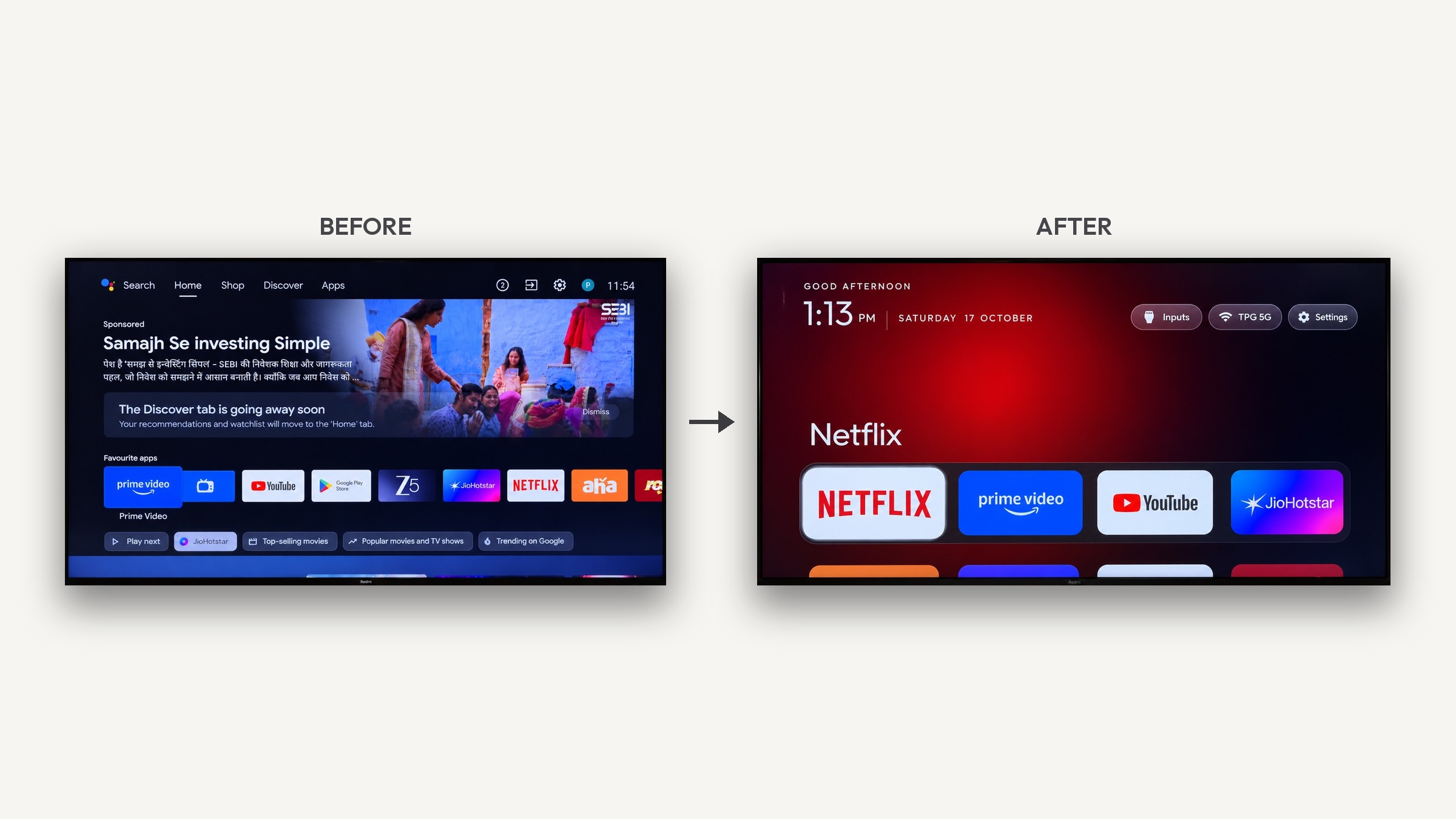
It started as an afternoon fixing my parents' Mi TV, which showed them an advert before they could reach Netflix. The whole thing was done with Claude Code talking to the real TV, and the prompt that did it is in this repo so you can do the same with yours.
Table of contents
- How it works
- Quick start
- What you get
- Supported TVs
- Doing it by hand
- The launcher
- Troubleshooting
- Questions people ask
- Contributing
- Licence
How it works
Android TVs have the same debug bridge as Android phones. Once you switch on USB debugging in the TV's developer options, the TV listens on your Wi-Fi and asks you once to allow your computer. After that, everything is standard Android tooling:
- Back up the list of installed packages and settings.
- Disable the manufacturer's telemetry, ad services, content rows and preloaded junk with
pm disable-user. Nothing is uninstalled, so a restore script can undo every step. - Install a small native launcher and make it the default home screen.
The bloat differs by brand, which is why the prompt asks your coding assistant to discover it on your TV and ask you before touching anything you might use.
Quick start
You need a computer on the same Wi-Fi as the TV and a coding assistant with shell access (Claude Code, or anything similar).
1. On the TV Settings → Device Preferences → About → press OK on Build seven times → go back → Developer options → turn on USB debugging. Some TVs also show a Network or ADB debugging toggle; turn it on too. Keep the TV switched on.
2. On your computer
Open your assistant, paste the prompt from PROMPT.md, and fill in your TV model.
3. Follow along Accept the "Allow USB debugging?" prompt when it appears on the TV, then answer the checklist questions: which streaming apps you use, which four go in the dock, whether to keep the voice assistant, Chromecast and firmware updates.
That's it. The assistant backs up, debloats, builds and installs the launcher, and checks every step with screenshots pulled from the TV. On a 1 GB Mi TV the whole thing took one afternoon the first time; with this repo as context, people report about fifteen minutes.
What you get
A home screen that is yours again:
- Pitch-black background and a dock of your four favourite apps at the bottom, in a lighter rounded band, exactly where Apple TV puts it.
- A top shelf showing the focused app's name in large type, with an ambient glow in a colour taken from the app's own artwork.
- The rest of your apps in a grid that slides up when you press Down.
- One floating glass highlight that springs from tile to tile instead of each tile drawing its own border. The focused tile lifts slightly and shows its name.
- Three frosted buttons: Inputs (a dropdown of HDMI ports, AV and Live TV), Wi-Fi (showing the network you're on) and Settings.
- A greeting, a large thin clock and the date, set in Outfit.
- A matching Clock screensaver, optional, that drifts around the screen so nothing burns in.
And a TV that stops working against you: no sponsored rows, no "Discover" nags, no analytics phoning home, no apps you never asked for.
Supported TVs
Anything running Android TV or Google TV: Xiaomi and Redmi, TCL, Hisense, Sony, OnePlus, Realme, Nvidia Shield and most others.
Not supported: Samsung (Tizen), LG (webOS) and Amazon Fire TV. They run different systems or won't let a third-party launcher take over Home.
Lists that people have tested and contributed live in examples/:
| TV | OS |
|---|---|
| Xiaomi Mi TV 4A (MiTV-MOOQ1) | Android TV 10 |
| Xiaomi MiTV-AXSO0 | Android TV 9 |
| TCL 55" 4K Google TV, 2023 (G10) | Google TV 12 |
| SANYO ATV R2 | Android TV 9 |
| OnePlus TV (D00) | Google TV 14 |
Your TV not here? The prompt works regardless, it discovers the bloat itself. If you add your list afterwards, the next person with your model skips that step. See Contributing.
Doing it by hand
Everything the assistant does, you can run yourself. The tools need Python 3 and nothing else.
python3 -m venv tools/venv && tools/venv/bin/pip install -r tools/requirements.txt
export TV_HOST=192.168.1.50                                   # your TV's IP address

tools/venv/bin/python -I tools/tv.py --probe                 # model, Android version, firmware
tools/venv/bin/python -I tools/tv.py 'pm list packages'      # run one shell command on the TV
printf 'cmd1\ncmd2\n' | tools/venv/bin/python -I tools/tv.py --batch   # several, one connection

tools/disable.sh examples/xiaomi-mi-tv-4a/debloat.txt        # apply a debloat list
tools/restore.sh examples/xiaomi-mi-tv-4a/debloat.txt        # undo it and restore the stock launcher
| Tool | What it does |
|---|---|
tools/tv.py |
A pure-Python ADB client: shell, batch, push, pull. Works where the stock adb binary is blocked. |
tools/b64push.py |
Uploads larger files such as APKs as base64 chunks and verifies the checksum. |
tools/disable.sh / tools/restore.sh |
Apply or undo a debloat list. PowerShell versions sit next to them. |
Windows
The PowerShell scripts work without WSL or Git Bash. With Android Studio installed nothing else is needed: the install script uses Android Studio's bundled JDK and the default SDK location.
python -m venv tools\venv; tools\venv\Scripts\python.exe -m pip install -r tools\requirements.txt
powershell -ExecutionPolicy Bypass -File launcher\build-and-install.ps1 -TvHost 192.168.1.50
powershell -ExecutionPolicy Bypass -File tools\disable.ps1 -TvHost 192.168.1.50 examples\xiaomi-mi-tv-4a\debloat.txt
powershell -ExecutionPolicy Bypass -File tools\restore.ps1 -TvHost 192.168.1.50 examples\xiaomi-mi-tv-4a\debloat.txt
The install script stops before touching the stock launcher if the install or the home-screen
switch fails. Git Bash also works; the .sh scripts detect a Windows venv and disable MSYS path
rewriting themselves.
The launcher
A small native Android TV app (com.gathin.tvhome, about 1.6 MB), written in plain Java with
AndroidX RecyclerView and nothing heavier. It is built for sets with 1 GB of RAM: no blur, no
video, no network, no background services.
Configure it in launcher/app/src/main/res/values/config.xml:
the dock order, apps to hide, your TV's Live TV package, and the number of columns.
Build and install with one command:
TV_HOST=192.168.1.50 launcher/build-and-install.sh
It needs JDK 17 and the Android SDK (platform 34, build-tools 34.0.0). On macOS:
brew install openjdk@17 android-commandlinetools
sdkmanager "platforms;android-34" "build-tools;34.0.0"
Without Homebrew, the script also finds a JDK 17 known to /usr/libexec/java_home and an SDK in
~/Library/Android/sdk, Android Studio's default. A release build (./gradlew assembleRelease)
is smaller and faster on 1 GB sets; sign it yourself before installing.
Navigation is deliberate: Up and Down move exactly one row, Up from the dock goes to the top buttons, the ends of the button row don't fall through to tiles, and the last focused app is remembered when you come back, even after the app list changes.
Optional: the Clock screensaver
A large thin clock and the date over an ambient glow, in the launcher's style. Every minute the clock drifts to a new spot and the glow shifts colour. The system runs it only while the TV is idle. Turn it on over ADB, or pick "Clock" in the TV's screensaver settings:
tools/venv/bin/python -I tools/tv.py 'settings put secure screensaver_components com.gathin.tvhome/.ClockDream; settings put secure screensaver_enabled 1'
It starts after the TV's "screen off" idle time (settings get system screen_off_timeout).
Troubleshooting
Things that bit us or contributors, so they don't bite you.
Connecting
- macOS:
adb connectsays "No route to host" although the port is open. Recent macOS treats the Google-signedadbas its own app under Local Network privacy and silently blocks it.tools/tv.pyavoids the binary entirely. - No "wireless debugging" toggle on some TVs, Xiaomi among them. USB debugging alone opens network ADB on port 5555.
- Windows PowerShell 5.1 adds a byte-order mark to text piped into a program, which turned the
first batch command into gibberish.
tv.pynow strips it, and the.ps1scripts pipe clean UTF-8. - Git Bash rewrites paths like
/data/local/tmpinto Windows paths. The scripts setMSYS_NO_PATHCONV=1for you. SetJAVA_HOMEandANDROID_HOMEbefore building there.
Working on the TV
- Chained
pmcommands (pm disable a; pm disable b) may silently stop after the first. Run one per shell call;--batchdoes exactly that. - Large pushes hang through the Python client. Use
tools/b64push.pyfor APKs. - Screenshots come out empty while Live TV or an HDMI input is on screen, seen on TCL. Press
Home before
screencap. - Disable the stock launcher only after the new one is installed, or the Home button lands on a factory test app.
- No on-screen keyboard after switching launchers, seen on Xiaomi: the default input method
pointed at a Baidu keyboard that isn't installed. Fix:
tools/tv.py 'ime set com.google.android.inputmethod.latin/com.android.inputmethod.latin.LatinIME' - Third-party launchers often charge for basics like a custom wallpaper. That's why this repo has its own.
Questions people ask
Is this safe? Can it brick the TV?
No. Nothing is flashed, rooted or deleted. Packages are disabled for the user profile, which
lives in the data partition, not in the system image. The firmware is untouched. If something
goes wrong, tools/restore.sh puts everything back, and even without the tools you can re-enable
apps from the TV's own settings.
What about firmware updates? Most lists disable the manufacturer's update service, so updates only arrive when you re-enable it on purpose. If an update does land, the worst case is that a package comes back enabled and you re-run the script.
Won't the apps break as their APIs change? The streaming apps still update through the Play Store, which is left alone. The launcher doesn't talk to them; it lists what's installed and launches it, using Android launcher intents that have been stable for over a decade.
How did it get access? Isn't that a security hole? Through the Android Debug Bridge, with one explicit "allow this computer" tap on the TV, the same as developing an Android app. The TV only trusts the key you approved. You can switch USB debugging off again afterwards and the launcher keeps working.
Can I just download the launcher APK? Build it yourself with the one-line script above; it takes about a minute and you control what goes on your TV. We don't publish prebuilt binaries.
Contributing
The most useful contribution is your TV's debloat list, so the next person with that model doesn't have to rediscover it. Launcher improvements and sharper prompt wording are welcome too. See CONTRIBUTING.md for the format and the testing we ask for.
Licence
MIT, see LICENSE. The Outfit typeface is under the SIL Open Font License, see
launcher/FONT-LICENSE-OFL.txt.
