eleven

Eleven

An agent-first reverse-engineering app for macOS, Windows and Linux.
English · 简体中文 · 繁體中文 · 日本語 · 한국어 · Türkçe · Русский · Tiếng Việt · ไทย · Deutsch · Español · Français · Українська · Polski · Português (Brasil) · العربية · فارسی · Bahasa Indonesia · Italiano
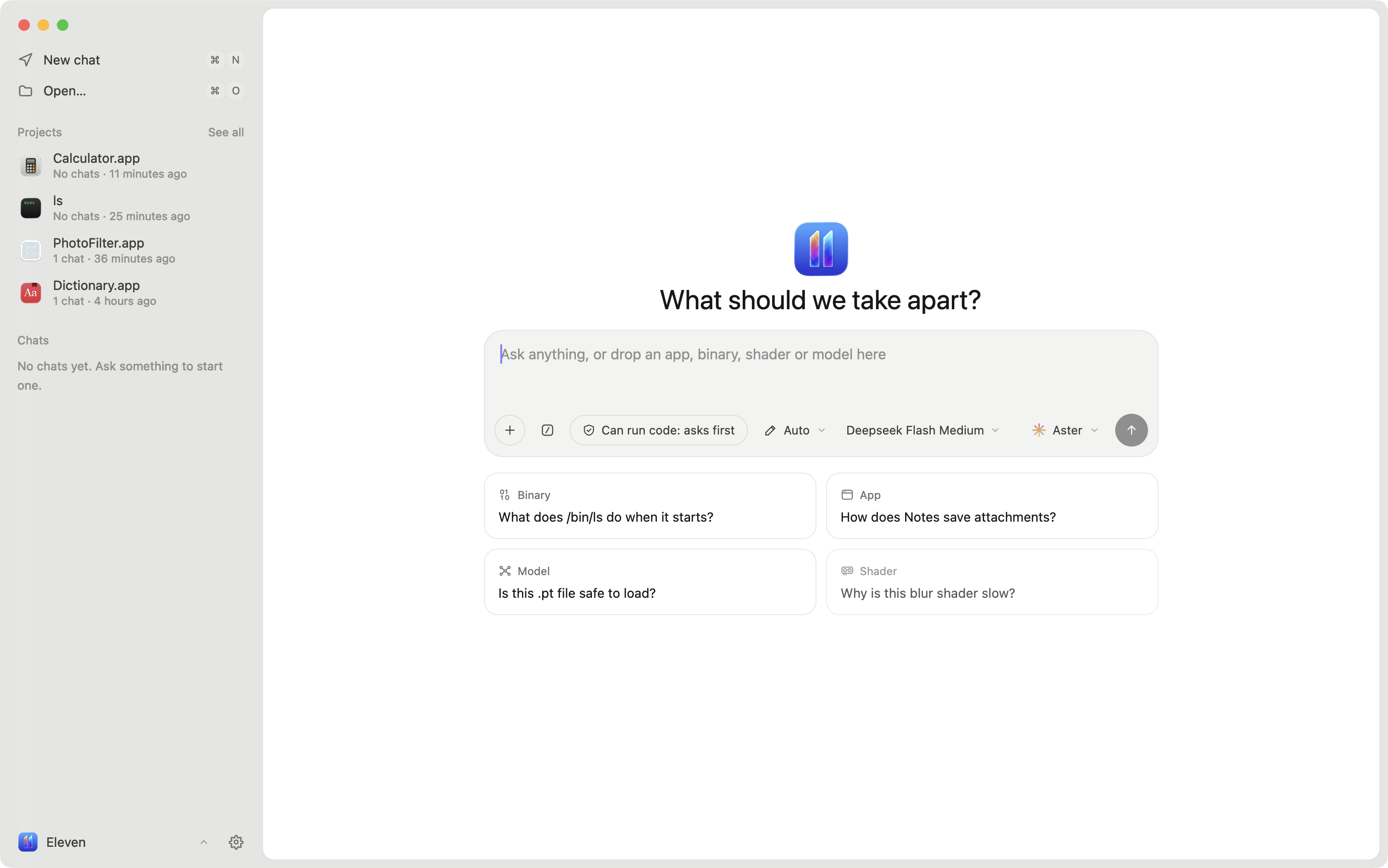
Eleven is a reverse-engineering app built around agents. Drop in an app, a binary, an Android APK, a GPU kernel, a shader or a model and ask what it does. Any agent that speaks the Agent Client Protocol can read the code, follow references, rename functions, leave notes and suggest patches, while you watch and approve in the same window.
Native code is read by Ghidra through REA, or by Rizin when you want files to open in seconds. Android apps are read by jadx. The UI is React rendered natively on GPUI by GPUIX.
- Bring your own agent. Aster, Claude, Codex, Gemini, Cursor, Copilot, OpenCode and any other ACP agent. Run several on the same project, each in its own chat.
- Agents drive the window. Eleven serves its own MCP tools so an agent can open a function, switch views, rename, add notes, change types and propose patches.
- Ask about any code. Select lines in pseudocode, assembly or a source file and ask, explain or copy them. The answer opens under the lines, and a suggested rename arrives as a card you accept or decline.
- You stay in control. Every change by you or an agent is logged with its author and can be undone. Byte patches from agents arrive as suggestions you accept or decline.
- Mach-O, ELF and PE. Functions, pseudocode, assembly, control-flow graph, cross-references, strings, segments and hex. Change a line's type (code, procedure, data, string) and number format with Hopper's keys.
- Android apps. APKs open with Java from jadx, smali from apktool when it's installed, string resources, and the manifest,
res, assets and native libraries in a Resources list. Split bundles (.xapk,.apks) open with every split in place. - Source files. Eleven finds the source files a binary was built from, reads Swift types straight from the binary, and has your agent recreate a whole file, with each function linked back to its address.
- Rewrite in any language. Show a function's pseudocode rewritten by your agent in C, C++, Rust, Go, Swift, Python, TypeScript, Java, C# or Zig.
- GPU kernels. CUDA and HIP fat binaries open as highlighted PTX, with notes beside each block and rewrites in CUDA C++, HIP C++ or Metal.
- Shaders, models and GPU profiles. Metal shaders and ML model files (GGUF, safetensors, PyTorch, ONNX) open in the workbench, linked to the code that loads them. Profile with Instruments.
- Projects. A project is one app or binary and holds its chats, agents, renames, bookmarks, notes and patches. Press ⌘S to save it as a single
.elevenfile you can share. Nothing is written there until you do. - Patching. Edit bytes at an address and write a patched copy. The original is never touched.
- Diffing. Compare two builds by function and read the changes like a code review.
- Debugging. Run a program under LLDB, break on the function you are looking at, step and read locals.
- Playbooks. Built-in skills such as first look, name functions, trace a feature and network map work with any agent.
- Export. Pseudocode, assembly, control-flow graphs as PDF and Objective-C class inventories.
Support Eleven
Eleven is free and built by one person. If it saves you time, sponsoring on GitHub keeps it going. It pays for signed releases and the debugger, and you can see what's coming next.
Install
macOS 14 or later on Apple Silicon:
curl -fsSL https://eleven.chizi.app/install.sh | bash
This installs Eleven.app into /Applications. The app is signed and notarized by Apple.
Windows x64, in PowerShell:
irm https://eleven.chizi.app/install.ps1 | iex
Linux x64: download the AppImage or the .tar.gz from the latest release.
On first run Eleven walks you through picking an engine and an agent, and installs what's missing for you:
- Rizin opens most apps in seconds.
- Ghidra 12.x with Java 21 is slower and gives the clearest pseudocode. Eleven downloads both, or uses copies it finds in
~/.local/share,~/ApplicationsorGHIDRA_INSTALL_DIR. - An agent. Eleven installs ACP adapters when they are needed.
Android apps also need jadx. apktool is optional and adds smali.
Build from source
You need Bun, Node 20 or newer, Ghidra and a JDK as above, and a checkout of REA 6.x next to this repo (../rea), or ELEVEN_REA pointing at one.
git clone https://github.com/Zfinix/eleven
git clone https://github.com/Zfinix/rea
cd eleven/app
bun install
bun run dev
| Command | What it does |
|---|---|
bun run dev [file] |
Runs the app with hot reload, optionally opening a file |
bunx tsc --noEmit --noUnusedLocals |
Typechecks the app, tests and scripts |
./script/test |
Runs the test suite one file at a time |
./script/bundle-macos |
Builds build/Eleven.app |
./script/bundle-windows, ./script/bundle-linux |
Builds the Windows and Linux apps on those systems |
./script/package |
Builds, signs and zips a release |
Environment
All of these are optional. Eleven finds the usual install spots on its own.
| Variable | Use |
|---|---|
GHIDRA_INSTALL_DIR |
Ghidra install to use |
JAVA_HOME |
JDK to run Ghidra with |
ELEVEN_REA |
REA to use instead of the bundled one |
ELEVEN_RIZIN |
Rizin to use |
ELEVEN_JADX |
jadx to use for Android apps |
ELEVEN_APKTOOL |
apktool to use for smali |
ELEVEN_LLDB_DAP |
lldb-dap for the debugger |
ELEVEN_SUPPORT |
Where Eleven keeps projects and settings |
ELEVEN_CACHE |
Where Eleven caches decompiled code |
ELEVEN_PROJECTS_DIR |
Where the save dialog starts (default ~/Documents/Eleven) |
ELEVEN_EXPORT_DIR |
Where exports and patched copies go (default ~/Downloads/Eleven) |
ELEVEN_SIGN_IDENTITY |
Code-signing identity for ./script/package |
Documentation
- MCP tools: every tool agents get in Eleven, what each one takes and returns, permissions and privacy.
- Skills: the built-in playbooks and how to write your own.
Repository
app/is the app: React and TypeScript on GPUIX.launch/is the launch video, made with Remotion.install.shis the installer.
See AGENTS.md for how the code is laid out and the rules it follows.
License
Eleven is released under the Apache License 2.0. Bundled third-party code is listed in THIRD_PARTY_NOTICES.md. Agent logos belong to their owners and appear only to identify those agents.
