



BitChord

An unofficial YouTube Music client for Android, built with Jetpack Compose. BitChord talks to YouTube Music's own web API (Innertube) directly — no official API key, no ads, no first-party app. Since v1.4 it can also pull bit-exact lossless audio from a configured module source, with YouTube Music as the automatic fallback.
BitChord is not affiliated with, endorsed by, or connected to YouTube or Google in any way. Use it at your own discretion.
Features
- Search, browse and play anything available on YouTube Music — songs, albums, artists, playlists.
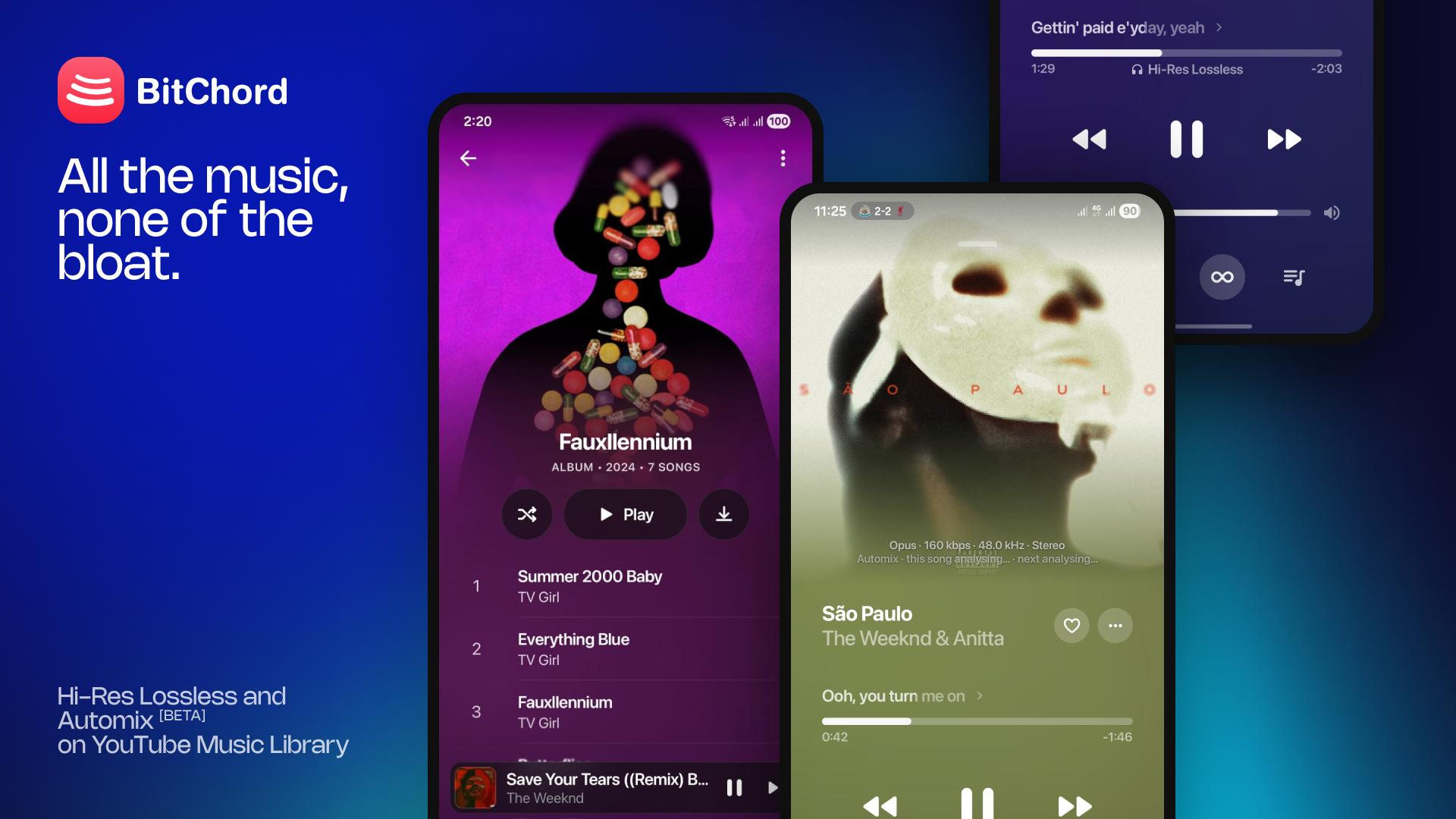
- Hi-Res lossless audio — FLAC/ALAC from a configured module source, with YouTube Music as the automatic fallback. Playback starts on whichever stream resolves fastest and upgrades to the better one in the background once it's ready.
- Automix [Beta] — DJ-style transitions in place of a plain crossfade. An on-device analyzer reads tempo, beat grid, key, song structure and vocal activity, then beat-matches, tempo-stretches and phrase-aligns the mix, with bass handoff and filter sweeps. Falls back to an equal-power crossfade when a pair can't be mixed cleanly.
- Gapless playback with true crossfade, adjustable 0–12s — two overlapping decoders on an equal-power curve, applied to manual skips as well as track ends, powered by Media3/ExoPlayer.
- Animated album canvas — motion artwork on the now-playing screen, sourced from Apple Music, Tidal and community canvases, with a full-bleed mode and a still-image fallback.
- Word-synced lyrics — word/syllable-level highlighting from BetterLyrics, LyricsPlus, SimpMusic and LRCLIB; tap a line to seek, optional back-gesture to dismiss.
- Discord Rich Presence — in-app login, live track/artist/album and progress, plus configurable status text, activity type and up to two custom buttons.
- Pluggable sources — a Sources screen to add, edit, test and health-check module sources; JS plugins run in a sandboxed QuickJS VM with no access to the Android runtime.
- Sign in with your Google account — an in-app WebView runs the real
accounts.google.comlogin (2FA and passkeys work as normal); only the resulting session cookies are captured, never the credential itself. - Offline downloads — save tracks to
Music/BitChordwith title/artist/album/cover art embedded directly into the file, so they read correctly in a file manager or another player, not just inside BitChord. - Local music library — songs, artists, albums and downloads, with artwork; anything already on the device is scanned in alongside what streams from YouTube Music.
- Scrobbling to Last.fm and ListenBrainz, with per-service timing/threshold controls.
- Per-network audio quality — separate quality ceilings for Wi-Fi and mobile data, so a lossless ceiling on Wi-Fi doesn't follow you onto a metered connection.
- Playback speed control (0.5×–2.0×) and skip silence.
- Sleep timer — fixed presets or "stop after this track".
- System equalizer integration.
- "Stats for nerds" — codec, bit depth, sample rate, channels and bitrate on the now-playing screen, with quality badges and an integrated queue.
- Dynamic, artwork-driven theming — a Material palette extracted from the current album art drives the now-playing background and backdrop washes across the app.
- Frosted-glass UI — Telegram-style translucent bars via Haze, Material 3 theming with light/dark/system modes.
- Background playback via a proper foreground media session (lock screen controls, notification, Android media controls).
How it works
BitChord doesn't use YouTube's official Data API. Instead it:
- Speaks to the same Innertube endpoints the
music.youtube.comweb client uses, via a small Ktor-based client (data/innertube). - Resolves playable audio streams with NewPipeExtractor, which handles YouTube's signature/
n-parameter throttling, falling back across several player clients (includingANDROID_MUSIC, which sidestepspo_tokenenforcement) before the extractor is asked. - Authenticates by capturing the session cookies from a real Google login (see
auth/YtMusicLoginScreen.kt) rather than reimplementing OAuth. - Tags downloaded tracks itself —
download/Mp4Tagger.kt,download/WebmTagger.ktanddownload/FlacTagger.ktwrite ID3/Vorbis-style metadata and cover art directly into the container, with no external tagging library. - Resolves each track across sources (
data/sources): a module source is tried first, YouTube Music second, always in that order. Every protocol the app speaks is one you can read in this repo — a module supplies results, never new app behaviour. - Matches a source's result to the track you actually asked for with
TrackMatcher(title, artist, album, duration and recording identity), rather than the title-only matching earlier versions used. - Analyses audio on-device for Automix through a native C++ analyzer over JNI (
app/src/main/cpp) — tempo/beat tracking, mel and vocal spectrograms, resampling — with two quantised ONNX models (beat_this_int8,vocals_umxhq_int8) run by ONNX Runtime. Nothing is uploaded; results are cached inAnalysisStore.
Download
Grab the latest signed APK from the Releases page. Sideloading requires enabling "Install unknown apps" for whichever app you download it with.
☕ Support
BitChord is free and always will be — if it's earned a spot in your rotation, you can chip in here:
Tech stack
| Layer | Choice |
|---|---|
| UI | Jetpack Compose, Material 3 |
| Playback | Media3 / ExoPlayer, MediaSessionService |
| Networking | Ktor client + kotlinx.serialization |
| Stream resolution | NewPipeExtractor, plus module sources via SourceResolver |
| Source modules | QuickJS (quickjs-kt) sandbox, Convx-compatible JS plugins |
| Automix DSP | Native C++ over JNI (CMake) — beat tracking, mel/vocal spectrograms, resampling |
| ML models | ONNX Runtime (beat_this_int8, vocals_umxhq_int8), arm64-v8a + x86_64 |
| Canvas video | Media3 HLS, Apple Music / Tidal / community canvases |
| Discord | Ktor WebSocket gateway client, token in encrypted storage |
| Images | Coil 3 + Palette |
| Blur / glass effects | Haze |
| Auth storage | AndroidX Security (encrypted prefs) |
| Scrobbling | Last.fm + ListenBrainz, over the existing Ktor client |
| Downloads / tagging | Hand-rolled MP4/WebM/FLAC muxers — no external metadata library |
Minimum SDK 26, target/compile SDK 36, Kotlin, portrait-only. Native code ships for arm64-v8a and x86_64 only — minSdk 26 already postdates the 64-bit requirement, so a 32-bit slice would double the native payload for devices that aren't in the install base.
Building from source
git clone https://github.com/kushagrasinghx/BitChord.git
cd BitChord
./gradlew assembleDevDebug
A debug build needs no extra setup. For a signed release build, create a keystore and a keystore.properties (see keystore.properties.example):
keytool -genkey -v -keystore bitchord-release.jks \
-keyalg RSA -keysize 2048 -validity 10000 -alias bitchord
Then:
./gradlew assembleProdRelease
The APK lands in app/build/outputs/apk/prod/release/. Without keystore.properties, the release build still runs but produces an unsigned APK.
Build flavors
There are two: dev and prod. They exist only so a build you're working on can sit installed alongside the one you actually listen to — dev ships under a separate application id (com.dev.bitchord), is labelled "BitChord Dev" in the launcher, and carries a small "Dev" badge next to the logo in the app. prod is the shipped package and is what releases are cut from.
The flavourless assembleDebug and assembleRelease tasks still work, but each builds both flavors; name the variant (assembleDevDebug, assembleProdRelease) to get one APK in one place.
Project structure
app/src/main/
├── cpp/ Native Automix analyzer (CMake + JNI)
├── assets/ Quantised ONNX models
└── java/com/music/bitchord/
├── auth/ Google/YT Music sign-in
├── data/ Innertube client, models, settings, local media scan, scrobbling
│ ├── canvas/ Apple Music / Tidal / community motion artwork
│ ├── discord/ Rich Presence gateway client
│ ├── lyrics/ LRCLIB, BetterLyrics, LyricsPlus, SimpMusic; LRC/TTML parsing
│ └── sources/ MusicSource abstraction, registry, resolver, matcher, JS modules
├── download/ Download queue/service, on-disk store, MP4/WebM/FLAC tagging
├── playback/ Media3 service, queue, crossfade, quality upgrade, sleep timer, cache
│ └── smart/ Automix — analysis, beat/vocal tracking, transition planning
└── ui/ Screens (home, search, library, local, sources, player), theming
Contributing
Contributions are welcome — bug fixes, features, or cleanup. Open a PR, or open an issue first for anything sizable so it can be discussed before you put work into it.
Found a bug or have a feature request? File an issue with as much detail as you can (device, Android version, steps to reproduce, logs if you have them).
⚖️ Disclaimer & Legal Notice
BitChord is an independent, community-driven third-party audio player and client. It is not associated with Google LLC, YouTube Music, Deezer, Telegram, or any of their parent companies.
- No Media Hosting: BitChord does not host, upload, or store copyrighted music files. It operates strictly as an interface to scan local device storage or stream media directly from public, public-facing, or user-authenticated APIs (such as YouTube Music's InnerTube API).
- Fair Use & API Usage: This software is created solely for personal research, educational, and fair-use purposes. The user is entirely responsible for ensuring their usage aligns with their local copyright laws and YouTube Terms of Service.
- No Ad-Blocking Guarantee: While BitChord focuses on providing a clean listening environment, it does not guarantee permanent bypasses or modifications to commercial third-party platform conditions.
- Copyleft, Not a Commercialization Ban: BitChord is free software under the GPLv3 (see below). The license does not let anyone forbid others from selling or redistributing copies — including verbatim copies — but any distribution, commercial or not, must come with the Corresponding Source under the same license.
📄 License
This project is licensed under the GNU General Public License v3.0 (GPLv3).
Copyright (C) 2026 Kushagra Singh
This program is free software: you can redistribute it and/or modify
it under the terms of the GNU General Public License as published by
the Free Software Foundation, either version 3 of the License, or
(at your option) any later version.
This program is distributed in the hope that it will be useful,
but WITHOUT ANY WARRANTY; without even the implied warranty of
MERCHANTABILITY or FITNESS FOR A PARTICULAR PURPOSE. See the
GNU General Public License for more details.
You should have received a copy of the GNU General Public License
along with this program. If not, see <https://www.gnu.org/licenses/>.
To review the full license text, please check the LICENSE file.