boot-ui



BootUI adds an embedded, local-only developer console to your application. It runs on Spring Boot (servlet or
WebFlux) and Quarkus, serving the same Vue UI and REST contract (/bootui and /bootui/api/** by default,
configurable with bootui.path / bootui.api-path) from a shared,
framework-neutral engine — add the Spring Boot starter (one for both stacks) or the Quarkus extension and BootUI
activates only in local development.
Read the documentation at https://www.julien-dubois.com/boot-ui/.
BootUI is available on Maven Central, with exact correlation, a runtime journal, Runtime Insights, run comparison, and optional Java-agent instrumentation. Follow the setup guide, read its known limitations, and share feedback in GitHub Discussions.
Try it locally
With Docker or Podman running:
docker run --rm -p 127.0.0.1:8080:8080 \
  -e BOOTUI_TRUST_CONTAINER_GATEWAY=AUTO jdubois/bootui-sample-app
Open http://localhost:8080/bootui on the same machine. The sample image follows main, not a pinned release.
The sample guide includes WebFlux and Quarkus images.
To use your own application, follow Spring Boot setup or Quarkus setup.
The Home and findings workflow below is an unreleased source preview, not part of the published dependency or an assurance about the current sample image. Build from source to preview these changes.
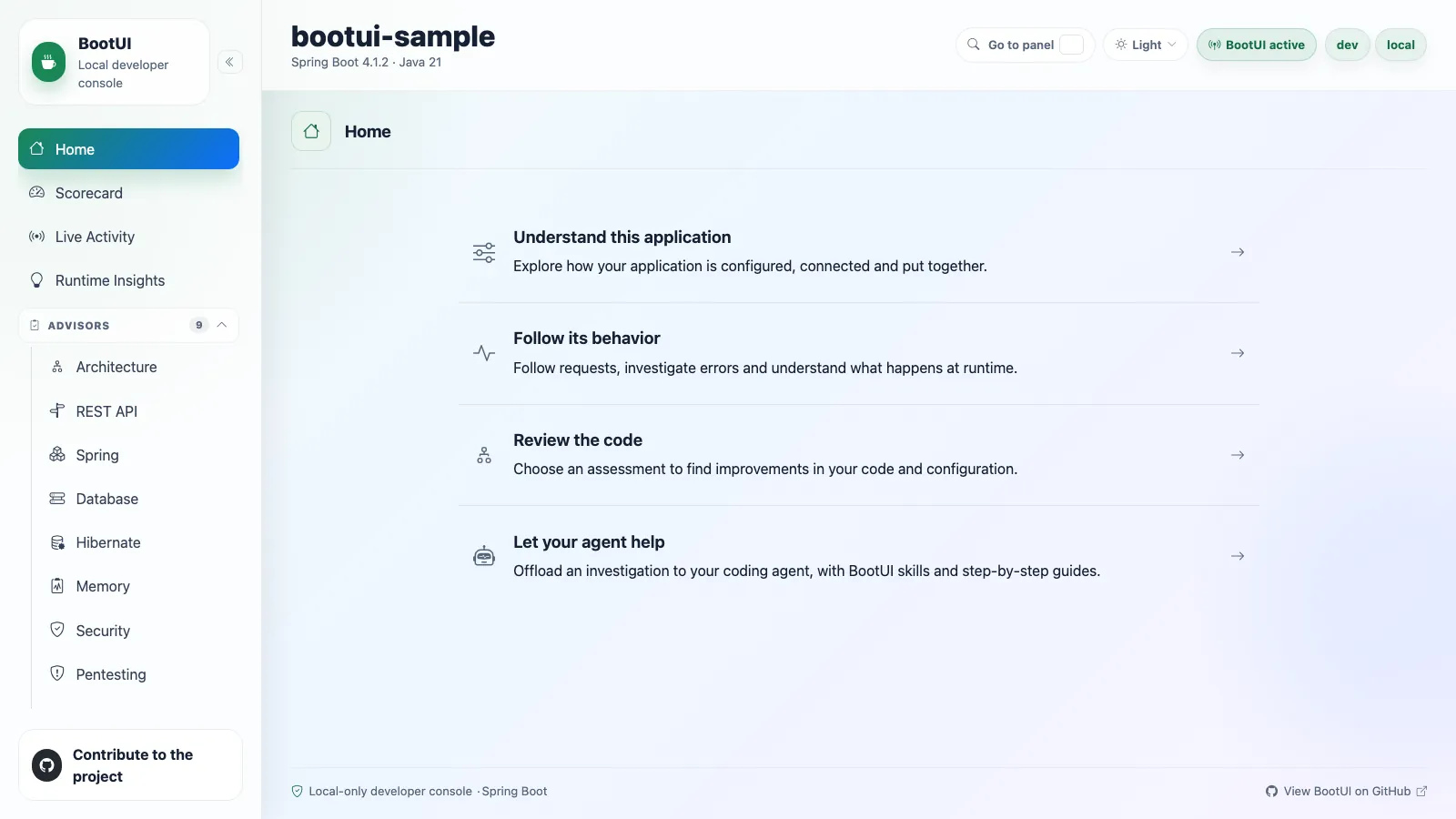
Choose a Home guide to understand the app, investigate its behavior, review the code, or delegate to your coding agent. BootUI includes an agent skill and investigation playbooks. To start an assessment yourself, open an advisor, run its scan explicitly, and open a named rule. The regular advisors offer filters, source locations where available, and previewed Markdown to copy into an editor or agent. Nothing is scanned on page load.
Quick links
| Topic | Link |
|---|---|
| Setup | https://www.julien-dubois.com/boot-ui/setup |
| Features | https://www.julien-dubois.com/boot-ui/features |
| MySQL operational view | Feature guide |
| Properties | https://www.julien-dubois.com/boot-ui/properties |
| AI agents | https://www.julien-dubois.com/boot-ui/ai-agents |
| Command line | https://www.julien-dubois.com/boot-ui/cli |
| CI/CD and GitHub Actions | CI setup guide |
| Sample app | https://www.julien-dubois.com/boot-ui/try-sample-app |
| Repository docs | https://www.julien-dubois.com/boot-ui/repository |
| Known limitations of 2.0 | Known limitations |
Use with AI agents
BootUI exposes a local, opt-in Model Context Protocol server so AI coding agents (GitHub Copilot, Claude Code, …) can run its advisors and read runtime diagnostics while fixing your code.
Install the BootUI skill in any Agent Skills-compatible coding agent:
npx skills add https://github.com/jdubois/boot-ui/tree/main/skills/bootui
The interactive installer detects supported agents and installs the canonical consumer skill. Native integrations are also available:
| Agent | Native installation |
|---|---|
| GitHub Copilot | gh skill install jdubois/boot-ui skills/bootui |
| Claude Code | /plugin marketplace add jdubois/boot-ui, then /plugin install bootui@bootui |
| Cursor | Find BootUI on Cursor Directory |
The Cursor and Claude Code plugins install the skill and configure the MCP server together. BootUI also pairs with Coffilot, a GitHub Copilot canvas extension that builds, runs, and scans your app from the GitHub Copilot App's side panel. See the AI agents guide for preview, configuration, and safety details.
Use from a terminal
The bootui CLI asks a running application one question and prints the answer, with one command per BootUI
diagnostic — the same set the MCP server exposes, projected mechanically from the same registry.
curl -fsSL https://www.julien-dubois.com/boot-ui/install.sh | sh
bootui beans --query dataSource
bootui hibernate scan --json | jq '.topFindings[]'
It needs no MCP client and no agent, prints exact JSON when piped, and exits 2 when a panel's own policy
declines the call and 3 when --fail-on <severity> finds a finding at or above that severity, or
--fail-on insufficient finds insufficient or partial evidence, so CI can branch on it. Windows has a PowerShell
installer, and JBang works too — see the
command-line guide.
Use in CI
Add the BootUI Action to a job and it automatically starts the conventional Spring Boot or Quarkus development process, runs every available local CI advisor, reports findings in the job summary, and fails on HIGH or CRITICAL findings. An optional workload can exercise that same process before assessment. The application stays on the same runner, bound to loopback; BootUI is not a remote or production scanner. Start with the GitHub Actions quick start.
Example release: BootUI 2.5.0. Use a published copy of this same release for the application and CLI. The Action is pinned to this release's signed
v2.5.0tag. The documentation and starter kit are synchronized during release preparation; a repository can contain them before publication. The documentation website publishes the kit only after the exact CI release is verified as available.
Project resources
License
Licensed under the Apache License, Version 2.0.