mixport-customs-vision-android
# Mixport Customs Vision Android
Android pilot app for Mixport's container unloading workflow. The app combines:
- live cargo tracking and pallet counting
- front FDA scanner integration for Hikrobot PDA hardware
- bilingual English / Chinese UI
- local evidence capture and offline-first session storage
- server-backed scanner cache sync with immediate online upload and offline queue recovery
- stale-scan reconciliation so historical mismatches can downgrade into audit-only logs
This repo is for the first pilot company, using the same company server stack later for API sync. The Android client does not connect directly to the production database.
- GitHub repo: kndhjk/mixport-customs-vision-android
- Latest release page: Releases
- Release artifacts: one signed, hardened
arm64-v8aAPK plusmixport-update-manifest.json - Launcher branding uses the official Mixport website icon, with adaptive-icon safe padding. Existing app-created home-screen shortcuts refresh their icon on the first launch after the branding update.
What the app does
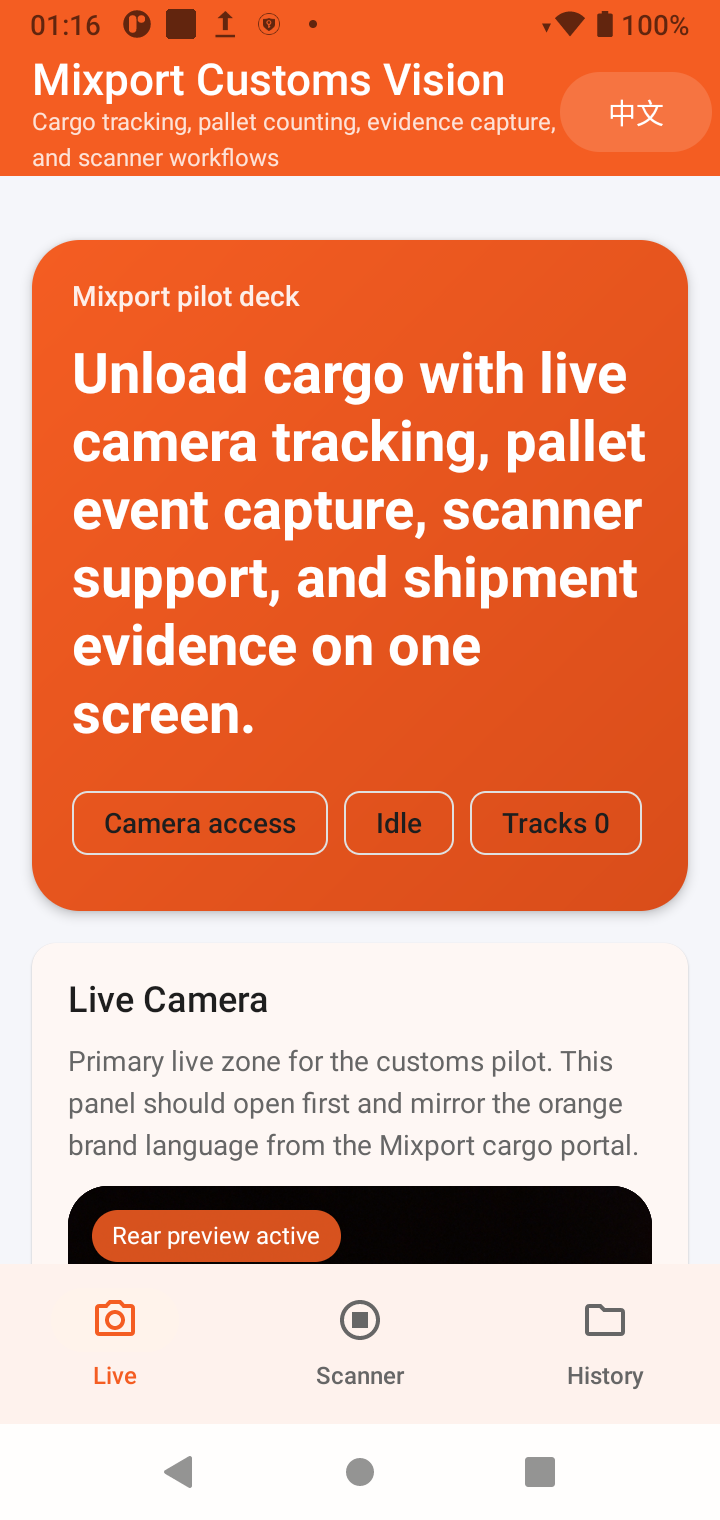
1. Live customs / unloading workflow
- opens on the
Livepage by default to avoid PDA service startup lag - shows the rear-camera preview before a session starts
- upgrades from preview-only mode to tracking / counting mode after a session starts
- records unloading sessions and pallet events
- tracks cargo movement into a pallet workflow
- keeps local history for sessions, pallets, item summaries, and event logs
- stores video evidence clips to
Movies/MixportCustoms
Live page snapshot on Hikrobot PDA:
2. FDA scanner workflow for Hikrobot PDA devices
- targets the embedded front FDA scanner head
- does not expose the rear camera or FDA video preview on the scanner page
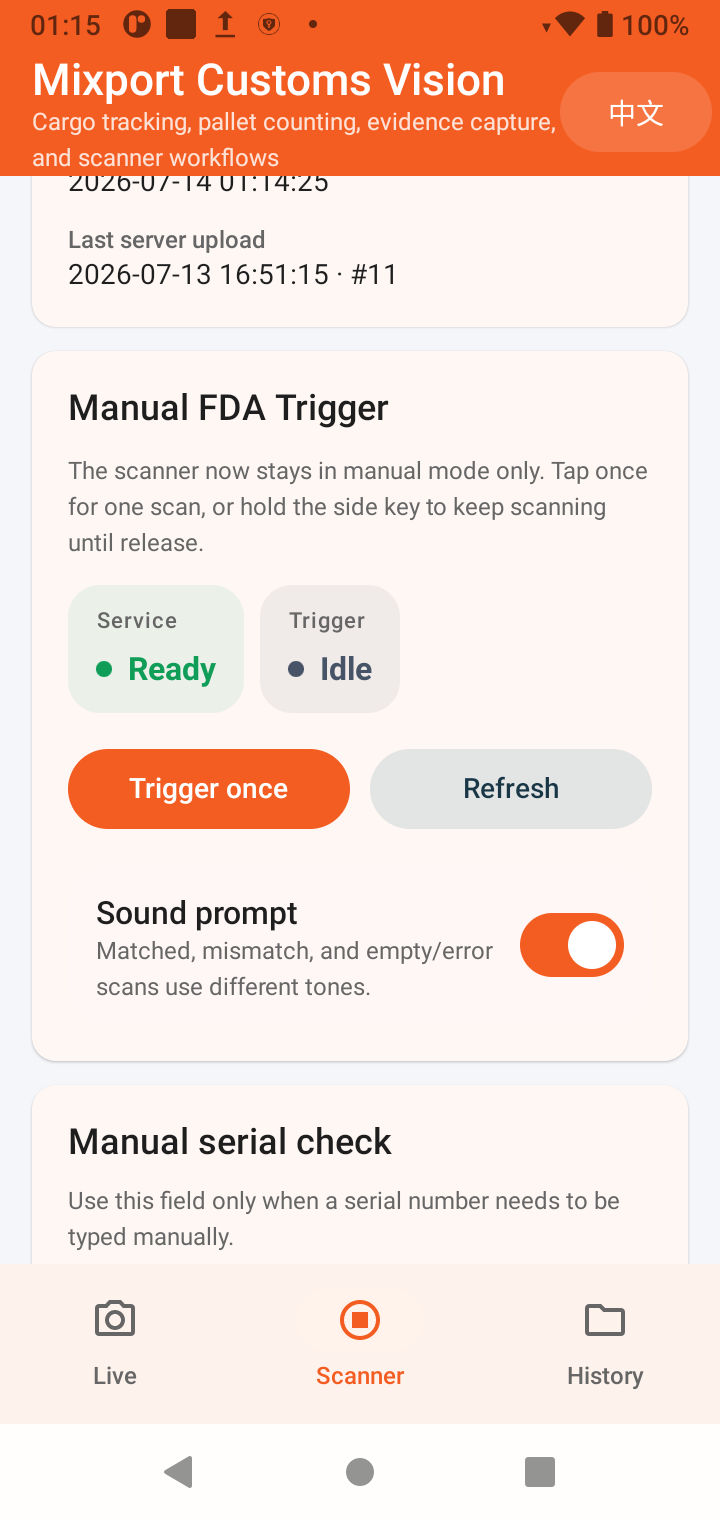
- keeps the scanner page in manual trigger mode only
- supports PDA side hardware scan keys:
- tap once: one scan
- hold the key: repeated scan until release
- keeps manual HBL / serial / container entry editable until the worker explicitly presses keyboard
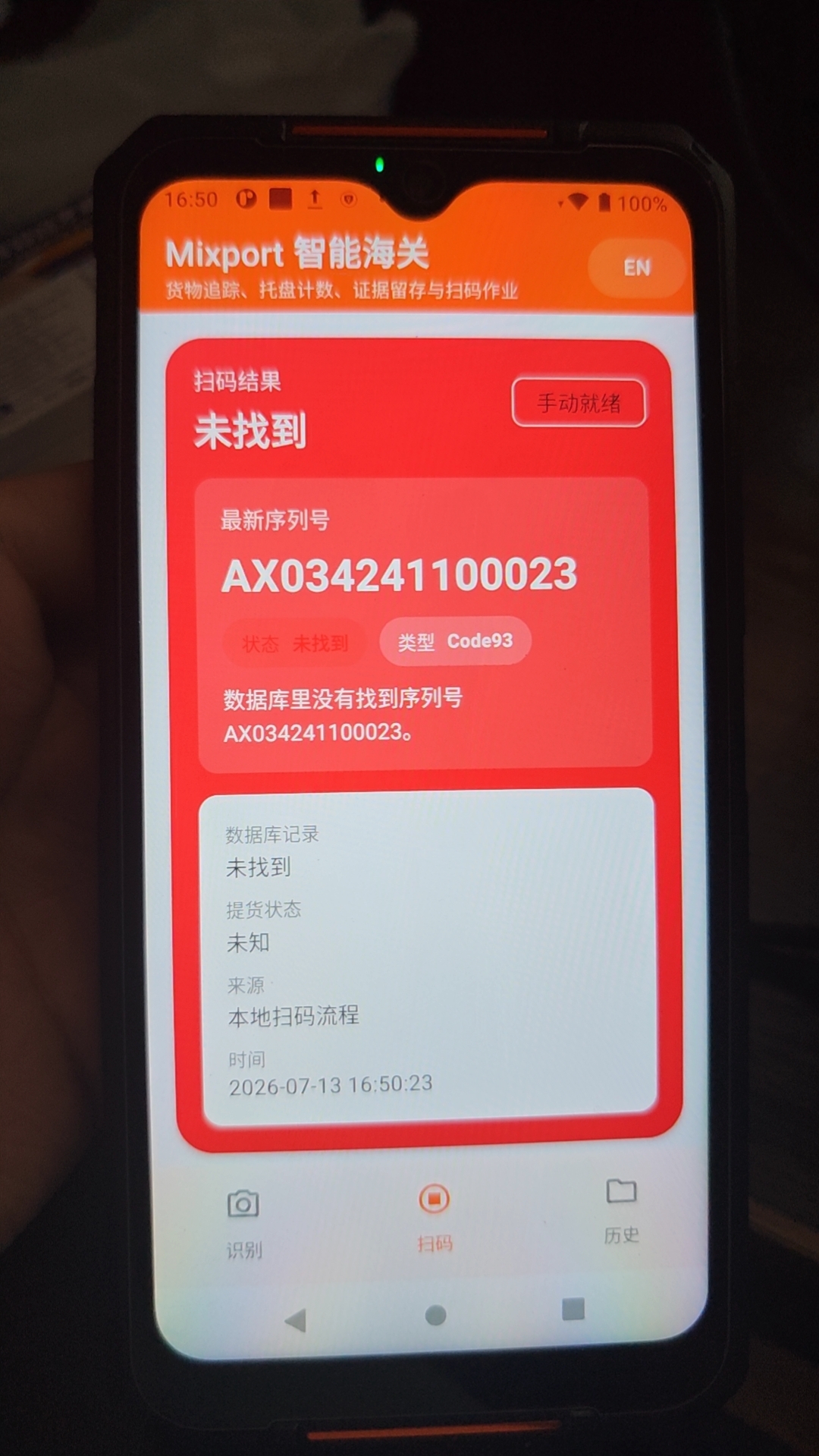
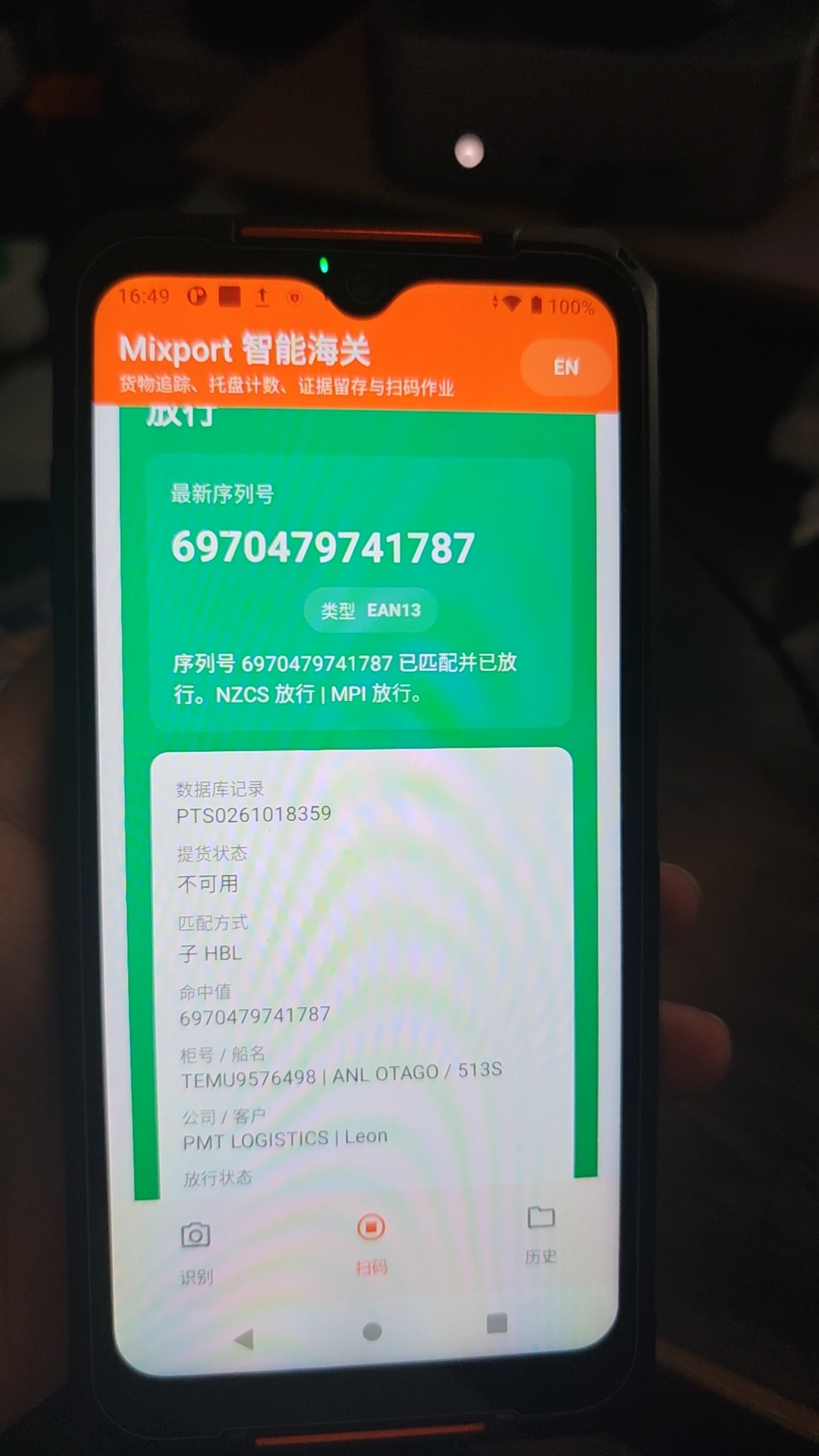
DoneorVerify now; typing no longer triggers validation after four characters - shows the scanned serial number and database comparison result at the top of the page
- shows live scan progress for the matched cargo row, including package / child-HBL completion, repeat scans, and current container scan totals
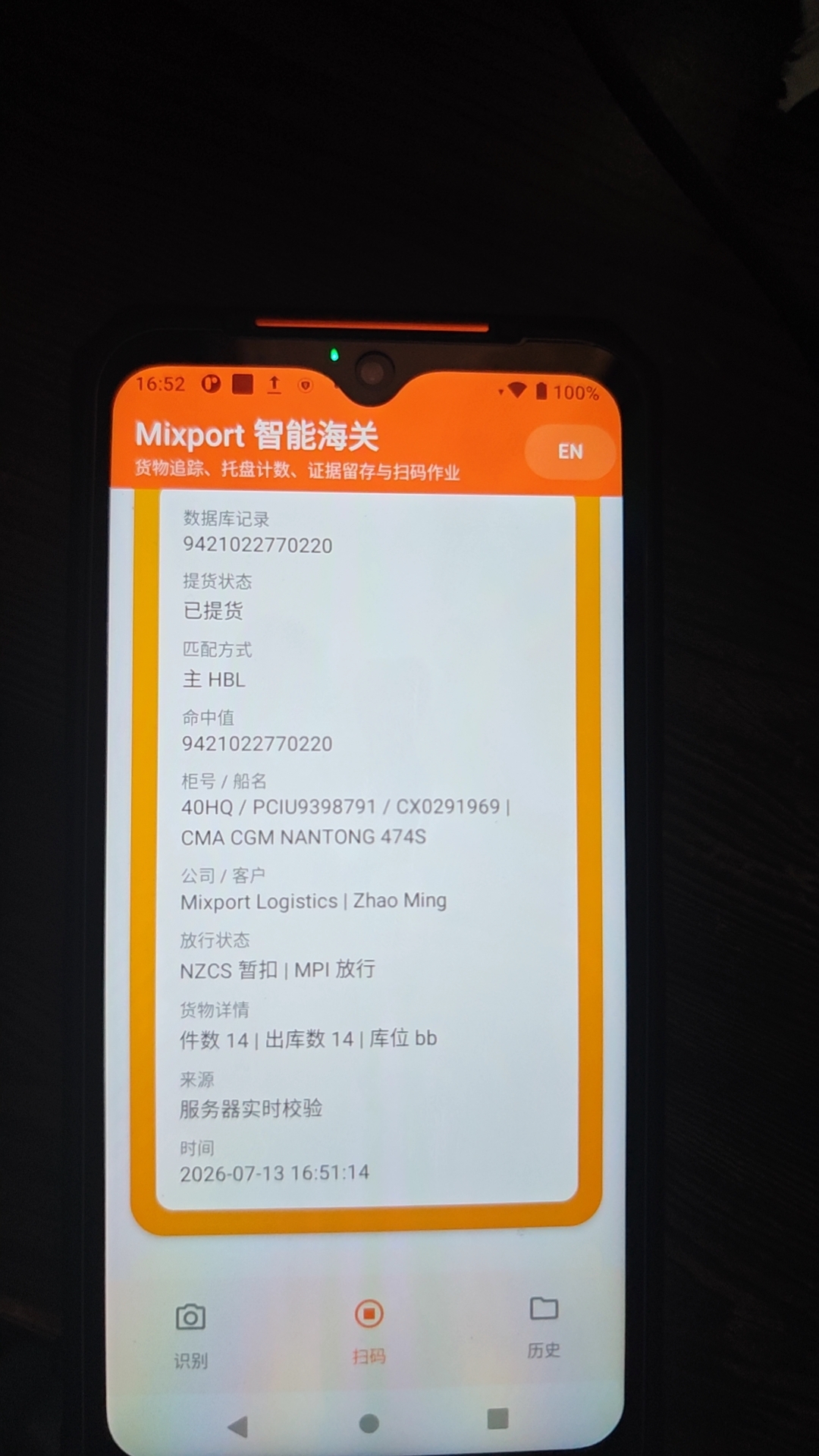
- keeps the recent-scan list lightweight on-device, then opens a full detail sheet on demand so workers can inspect matched HBLs, child HBLs, barcode codes, clearance state, counts, and local upload/audit trace without leaving the scanner page
- stores a lookup snapshot with each recent scan so the matched context can still be reviewed quickly even after the live cache refreshes later
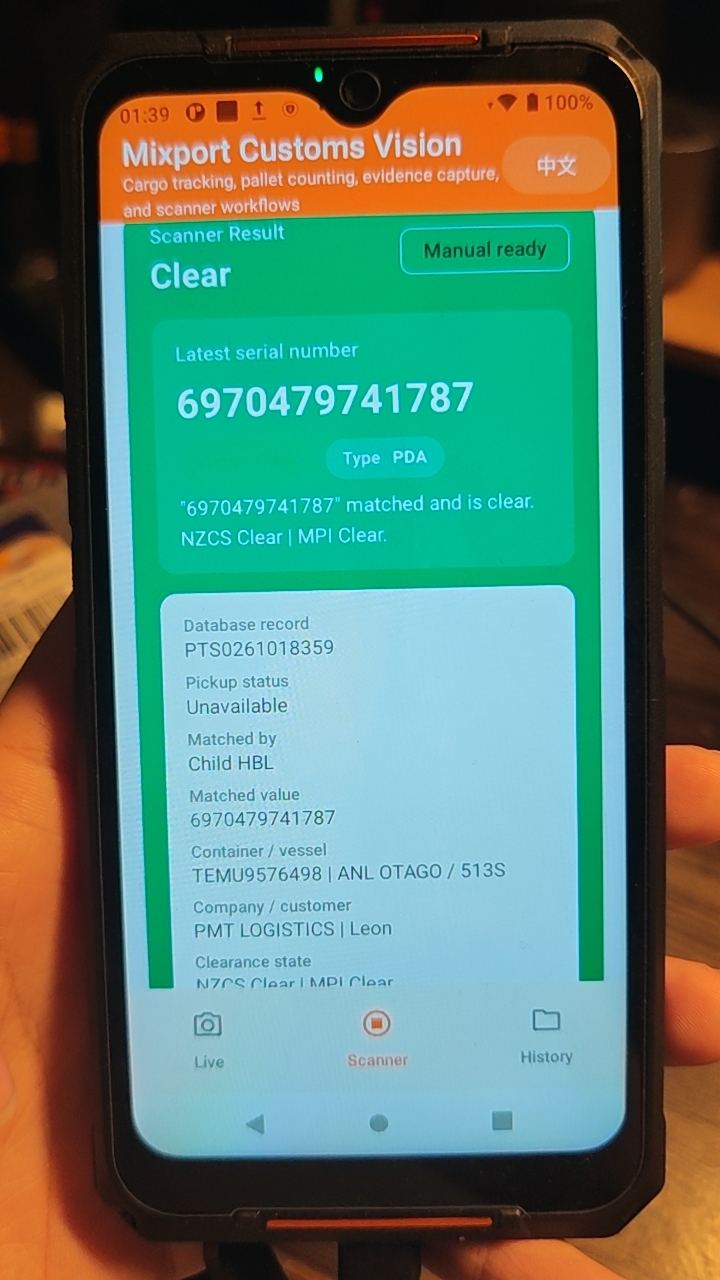
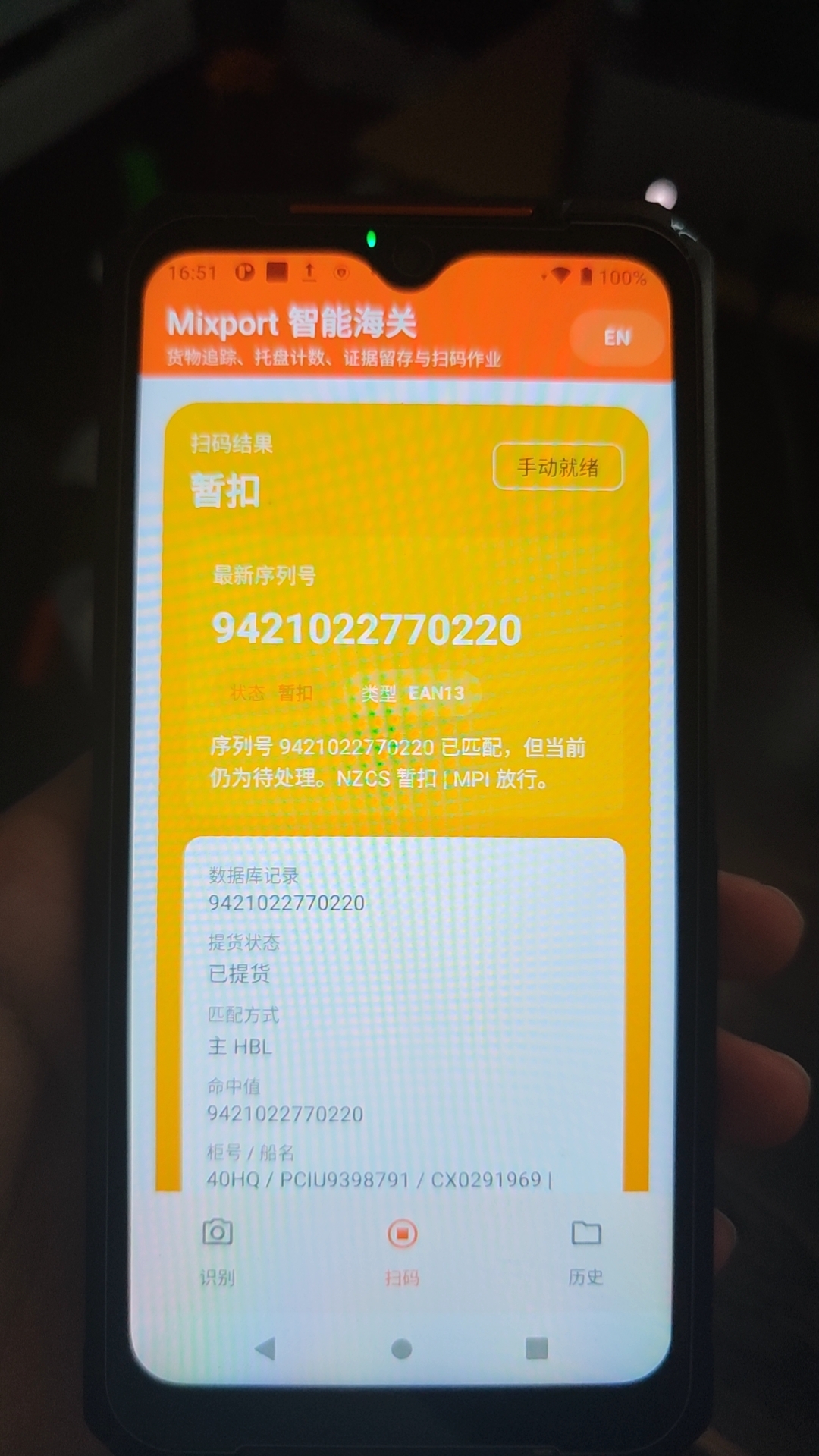
- keeps the result card green only when both
NZCSandMPIareclear - turns the result card red immediately when either
NZCSorMPIisfailed - turns the result card yellow for every remaining matched
holdcombination, includingclear + holdandhold + hold - uses deliberately different audio feedback: a bright chime for fully clear cargo, a short warning beep for hold, and a low error alert for failed / unmatched scans
- keeps worker-facing scanner UI focused on scan result, counts, and history without exposing sync-control or provisioning controls
- keeps barcode cleanup and clearance-state normalization on a tiny C/JNI bridge with Kotlin fallback, while the heavier package-size win comes from
arm64-v8a-only release packaging
Scanner page snapshot on Hikrobot PDA:
Latest field photos from the Hikrobot PDA test run:
3. Mobile recognition baseline
- live full-frame object proposals stay lightweight for phone performance
- richer OCR, color, and label logic runs only on stable cropped targets
- current baseline uses ML Kit plus heuristic pallet / cargo logic
- future model path is a quantized, crop-based transformer-friendly classifier
4. Local history / session review
- the
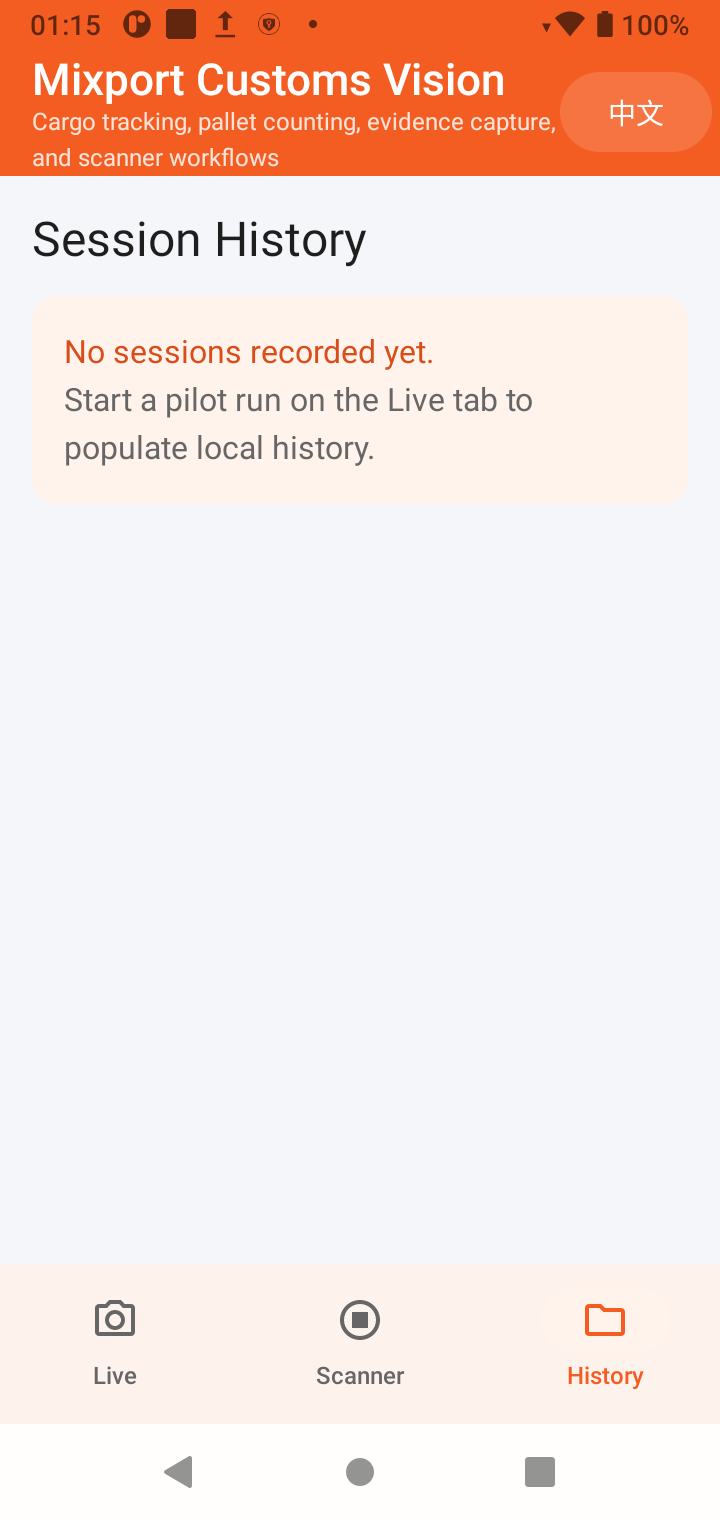
Historypage keeps an on-device session trail for offline field work - before the first unloading run, the page shows a clear empty state instead of a blank workflow
History page snapshot on Hikrobot PDA:
Pilot architecture
The current company stack is PHP + MySQL on Mixport infrastructure. The Android app is structured as:
- local capture first
- future PHP API sync second
- shared company database behind the API, not inside the mobile app
- private backend wiring stays outside this public repository
That keeps the pilot safer and makes multi-company rollout possible later through config, branding, and API separation.
Public repo safety
- no private deployment URL or bearer token is committed to this repository
- no bearer token is compiled into the APK or exposed through
BuildConfig - private sync provisioning now runs through a dedicated non-exported admin activity instead of the public launcher activity
- provisioning requests are validated for HTTPS, approved host suffixes, and device ID format before anything is written locally
- the worker-facing app UI does not expose sync credentials
- internal server wiring and dashboard-side auth details are intentionally omitted from the public docs
- release APKs are accepted only when package name, version code, SHA-256 checksum, and signing certificate all match the signed update manifest and the installed app identity
- tagged releases fail closed when the GitHub release-signing secrets are missing; unsigned APKs are never attached to a public release
Hardware notes
Hikrobot PDA scanner devices
- the scanner page is built for the PDA's front FDA hardware, not a generic rear phone camera flow
- the app expects the PDA service package to exist on the device
- front light and FDA trigger flow are controlled through the vendor broadcast/service bridge already wired in this repo
- the scanner page can refresh a private reference cache when a secure sync profile is provisioned
- pending offline scan results can upload back to a private sync service
- when a secure sync profile is provisioned, each scan verifies live first and only falls back to local cache if the server is unavailable
- reprovisioning supersedes any still-pending uploads into audit-only local history before the new endpoint becomes active
- if a barcode originally failed because the shared database had no row yet, later successful verification automatically reconciles the old failure into an audit-only log instead of leaving it as dirty sync data
- secure sync provisioning is stored locally with Android Keystore-backed encryption and never shown in the operator UI
Standard Android phones
- the
Livepage uses the rear camera and rear flash through CameraX - the rear preview can stay live before a session starts, while heavy analysis waits until the operator opens a session
- the PDA scanner page is only fully functional on supported Hikrobot hardware
Build and run
Two distribution variants now exist:
public: hardened GitHub / portfolio release, with no exported external sync-provisioning aliasfield: company-device build, with the same package name and data store, plus the controlled external provisioning alias needed for on-site rollout and updates
Prerequisites
- Android Studio with SDK 34
- Java 17
- a real Android device for camera / PDA validation
- for Hikrobot scanner validation: the vendor PDA service must already be installed on the device
Local debug build
.\gradlew.bat :app:assemblePublicDebug
.\gradlew.bat :app:assembleFieldDebug
Local release APK
.\gradlew.bat :app:assemblePublicRelease
.\gradlew.bat :app:assembleFieldRelease
Release builds target arm64-v8a only so the published secure APK does not carry unused x86/x86_64/armeabi-v7a ML Kit native payloads. Without a local release keystore Gradle can still emit an unsigned APK for controlled signing, but tagged GitHub releases require the configured stable signing identity and publish only the signed hardened public artifact. The field artifacts stay local / internal.
To enable production signing locally or in GitHub Actions, provide these values through environment variables, Gradle properties, or an untracked release-signing.local.properties file:
ANDROID_RELEASE_STORE_FILEANDROID_RELEASE_STORE_PASSWORDANDROID_RELEASE_KEY_ALIASANDROID_RELEASE_KEY_PASSWORD
Install to a connected device
C:\Users\zyzmc\AppData\Local\Android\Sdk\platform-tools\adb.exe install -r .\app\build\outputs\apk\field\debug\app-field-debug.apk
For public GitHub-release verification, install the universal public debug build locally unless a signed public release keystore is configured:
C:\Users\zyzmc\AppData\Local\Android\Sdk\platform-tools\adb.exe install -r .\app\build\outputs\apk\public\debug\app-public-debug.apk
Validation commands
.\gradlew.bat :app:lintPublicDebug
.\gradlew.bat :app:testPublicDebugUnitTest
.\gradlew.bat :app:assemblePublicDebug
.\gradlew.bat :app:assemblePublicRelease
.\gradlew.bat :app:assembleFieldDebug
.\gradlew.bat :app:assembleFieldRelease
GitHub Actions runs the same public lint, unit-test, and public/field build path for pull requests to main, not just after merge. A tagged build additionally verifies release signing, derives the APK checksum and signing-certificate fingerprint, and publishes the hardened public APK with a machine-readable update manifest.
Signed in-app updates
- Tap Updates / 检查更新 in the top bar to force a GitHub version check. The version panel distinguishes an available release, the latest installed version, and a failed network check; automatic background checks remain enabled.
- The app checks the repository's latest GitHub Release while it is in the foreground, with a 15-minute rate limit.
- The update strip stays hidden when no newer release exists, so the normal worker workflow is unchanged.
- A worker can download the update from the strip; the app then verifies the approved HTTPS host, package name, increasing version code, SHA-256 digest, manifest signer fingerprint, and compatibility with the currently installed signing identity.
- Only after every check passes does the app open Android's system package installer. Android still requires the operator to confirm the installation and, on first use, allow this app as an install source.
- The application ID and signing identity remain stable, so an in-place install keeps local SQLite history and Android Keystore-backed sync configuration.
- A corrupted cached APK is deleted and downloaded again instead of repeatedly failing on the same file.
- Public GitHub APKs contain no company endpoint or bearer token. On an already provisioned PDA, installing the public APK over the field build keeps the same application ID, signing identity, app data, and Android Keystore entry; the existing encrypted profile is loaded automatically on next launch. A fresh install, uninstall, or data clear does not recover that profile and requires authorised provisioning again. No token is embedded in the download or copied into update metadata.
Release signing values are GitHub Actions secrets. The keystore, passwords, private API endpoint, and sync token are not committed to this repository or written into the update manifest.
Scanner audio assets
The clear and failed sounds are short, offline resources so scanning does not depend on network playback. Their source and license record is maintained in docs/licenses/AUDIO_ASSETS.md. Hold uses a short Android-generated warning beep to stay recognisably different from both terminal outcomes.
The Hikrobot decode tone is disabled using both scanVoice=false and toneType=0 (OFF). On the deployed firmware, scanVoice alone does not disable the decode/repeat beep. This setting is reapplied during scanner configuration, service reconnection, and camera initialization. The first audible feedback is emitted after barcode verification: CLEAR only when both NZCS and MPI are clear, HOLD for pending/unknown clearance, and FAILED for a failed clearance or an unmatched/error result. A key press or a raw barcode read does not play a success sound. Returning to the scanner screen does not replay an earlier scan; a new result stops any still-playing previous cue before playing its own.
The scanner result is tied to the exact scan event (barcode, timestamp, and local log ID). A late sync or upload lookup cannot replace a newer result, and holding the PDA scan key no longer resets the result every repeat interval. While a scan is being verified, the result card hides the previous cargo's clearance details instead of briefly showing them as the new result. The release shrinker explicitly retains updater JSON models so GitHub update checks also work in minified APKs.
Scanner sync workflow
- Open the
Scannerpage. - Provision a device-specific secure sync profile once, outside the worker UI.
- The device refreshes the active parent / child HBL scanner dataset into local SQLite outside the worker-facing flow.
- With the network available, each scan uses live server lookup first; if the server is unreachable, the app falls back to the last synced local cache.
- The scanner result card immediately shows the matched cargo row progress plus container-level scan totals returned by the server.
- After the scan is written into the local queue, the app attempts immediate upload whenever the device still has network access and a valid sync profile.
- The scanner page also runs a lightweight foreground retry loop, so when the Hikrobot device comes back online the pending queue is retried automatically without waiting for the next scan.
- If the network is unavailable or the upload call fails, the scan stays in the local pending queue until connectivity returns.
- When a barcode later becomes valid, the app automatically reclassifies older local
MISMATCH/ERRORrows for that same code into audit-only history before upload. - Workers can tap any recent scan to open a local detail sheet with the stored lookup snapshot, live clearance summary, scan counters, and upload/audit trace, without exposing sync credentials or admin-only controls.
Secure provisioning import
For company-device rollout, use the field build and a one-time admin launch intent to open the provisioning alias plus inject the private sync endpoint and bearer token into the device keystore-backed store:
adb shell am start `
  -a nz.co.mixport.customsvision.action.APPLY_SYNC_PROVISIONING `
  -n nz.co.mixport.customsvision/.admin.ExternalSyncProvisioningAlias `
  --es nz.co.mixport.customsvision.extra.SYNC_API_BASE_URL "https://example.invalid/api/" `
  --es nz.co.mixport.customsvision.extra.SYNC_BEARER_TOKEN "replace-me" `
  --es nz.co.mixport.customsvision.extra.SYNC_DEVICE_ID "hik-001"
The provisioning flow is now split by distribution:
MainActivityignores sync provisioning extras entirely- the shared admin provisioning activity remains
android:exported="false" - the
publicbuild has no exported external provisioning alias at all - the
fieldbuild keeps a dedicated alias for company-device rollout, so internal upgrades can preserve the existing data path without reopening the public release attack surface - the request is rejected unless the URL is HTTPS and the host matches the approved allowlist
- the token is never rendered on-screen; the operator only confirms the validated host and target device ID
- applying a new profile clears cached server reference rows and supersedes still-pending uploads into local audit history before the new endpoint goes live
The app stores the imported profile locally in encrypted form, refreshes its startup cache, and keeps those values out of the visible worker flow.
Commercial sync safeguards
lookupBarcode()is live-first when a release sync profile is provisioned, so current server-side changes no longer stay hidden behind stale local cache hits.- local scanner history keeps the original failed scan for traceability, but the SQLite upload queue now adds reconciliation metadata and can mark superseded failures as
AUDIT_ONLY. - cache refresh also performs a second-pass reconciliation. If the latest scanner bootstrap now contains a previously missing barcode, the older local failure is downgraded before batch upload.
- the server upload endpoint re-verifies every uploaded barcode against the current shared database. If the row now resolves, the API stores it as
AUDIT_ONLYwith an effective matched outcome instead of polluting business mismatch/error counts. - internal scanner audit views can now distinguish effective matched rows from audit-only reconciled rows.
Problems fixed in this release
The server-side row changed, but the PDA still mismatched: fixed by preferring live verification before local cache and deleting stale cached references when the server saysfound=false.Workers could not see how many pieces or child HBLs were already scanned: fixed by returning server-side expected/completed/remaining counters plus per-container scan totals to the PDA result card.Recent scans were too dense on the main page and still did not expose the full matched record: fixed by slimming the list into worker-friendly summary cards and moving the full cargo / audit payload into an on-demand detail sheet.History entries lost too much context after the next scan: fixed by storing a per-scan lookup snapshot in local preferences while keeping the authoritative upload/audit trace in SQLite.Alias/barcode edits were not reaching devices during incremental sync: fixed by advancing the bootstrap cursor from the latestcargo_tracking, child-HBL alias, and barcode-alias timestamps.Old failed scans stayed in the business queue after a later successful scan: fixed with local and server-side reconciliation so the old row becomes audit history instead of dirty operational data.Manual upload could still over-count outdated failures: fixed by computing an effective server-side match state and excluding audit-only reconciled rows from operational scan counters.Dashboard Scan HBL bulk paste could misread spreadsheet punctuation: fixed by normalizing commas, ideographic commas, and semicolons into one cargo-row value per pasted line on the support/admin dashboards.Public APKs still carried static sync credentials: fixed by moving private sync configuration to runtime provisioning backed by Android Keystore instead ofBuildConfig.Any app could previously push sync extras through the launcher activity: fixed by moving provisioning into a dedicated non-exported admin activity with HTTPS + host-allowlist validation before local state is changed.Public release and company-device rollout previously shared the same attack surface: fixed by splitting builds into hardenedpublicand controlledfieldvariants, while keeping the same package/data path for internal upgrades.Release builds were unsigned or changed signing identity: fixed by requiring a stable secret-backed signer for every tagged release and publishing a checksum / signer manifest consumed by the in-app updater.Universal release APKs stayed too large because every ABI shipped the same ML Kit native payload: fixed by targetingarm64-v8afor release outputs and filtering app resources to English + Chinese only.Scanner result normalization should stay fast without pulling core security or sync logic into native code: fixed by keeping only barcode and clearance-state normalization on a tiny C bridge, with Kotlin fallback preserving behavior when native loading is unavailable.
Training-data intake
When real pallet images, wrapped-pallet photos, and container cargo photos are ready, initialize the intake scaffold first:
C:\Users\zyzmc\AppData\Local\Programs\Python\Python313\python.exe .\tools\dataset_intake.py --dataset-root .\training-data --init
After dropping images and annotations into training-data/raw/..., run:
C:\Users\zyzmc\AppData\Local\Programs\Python\Python313\python.exe .\tools\dataset_intake.py --dataset-root .\training-data
That generates:
training-data/manifests/inspection_dataset_manifest.jsontraining-data/manifests/inspection_tuning_profile.generated.jsontraining-data/reports/inspection_dataset_summary.md
Reference docs:
Current boundaries
- pallet and cargo recognition are optimized for on-device runtime, but the final custom-trained model is not in the repo yet
- the PDA scanner workflow depends on the vendor runtime and device firmware
- no production secrets are stored in the repo
- the first deployed signing identity must remain securely backed up; losing it prevents safe in-place upgrades on existing Android 11 field devices
Project map
app/: Android sourcedocs/api-contract.md: planned pilot sync contractdocs/sql/pilot_schema.sql: proposed server-side schemadocs/dataset-intake.md: dataset folder contractdocs/mobile-transformer-plan.md: mobile model/runtime rollout plan
Next steps toward commercial rollout
- Train a real pallet / cargo model from the incoming dataset.
- Add wrap-completion confirmation from consecutive frames.
- Tighten container-empty detection with scene-level evidence.
- Surface uploaded scanner batch summaries directly inside internal cargo dashboards.
- Provision a production keystore in GitHub Actions for signed release artifacts.
