agent-sphere










🔗 线上预览 / Live Demo → as.buukle.top
👤 演示账户 / Demo Account: demo001 / demo001
This project is an AI Agent orchestration platform. Driven by an LLM-based decision engine and combined with capabilities (built-in tools, MCP protocol, CLI execution, browser automation, etc.), it implements a primary closed loop of Perception → Planning → Execution → Feedback.
Screenshots
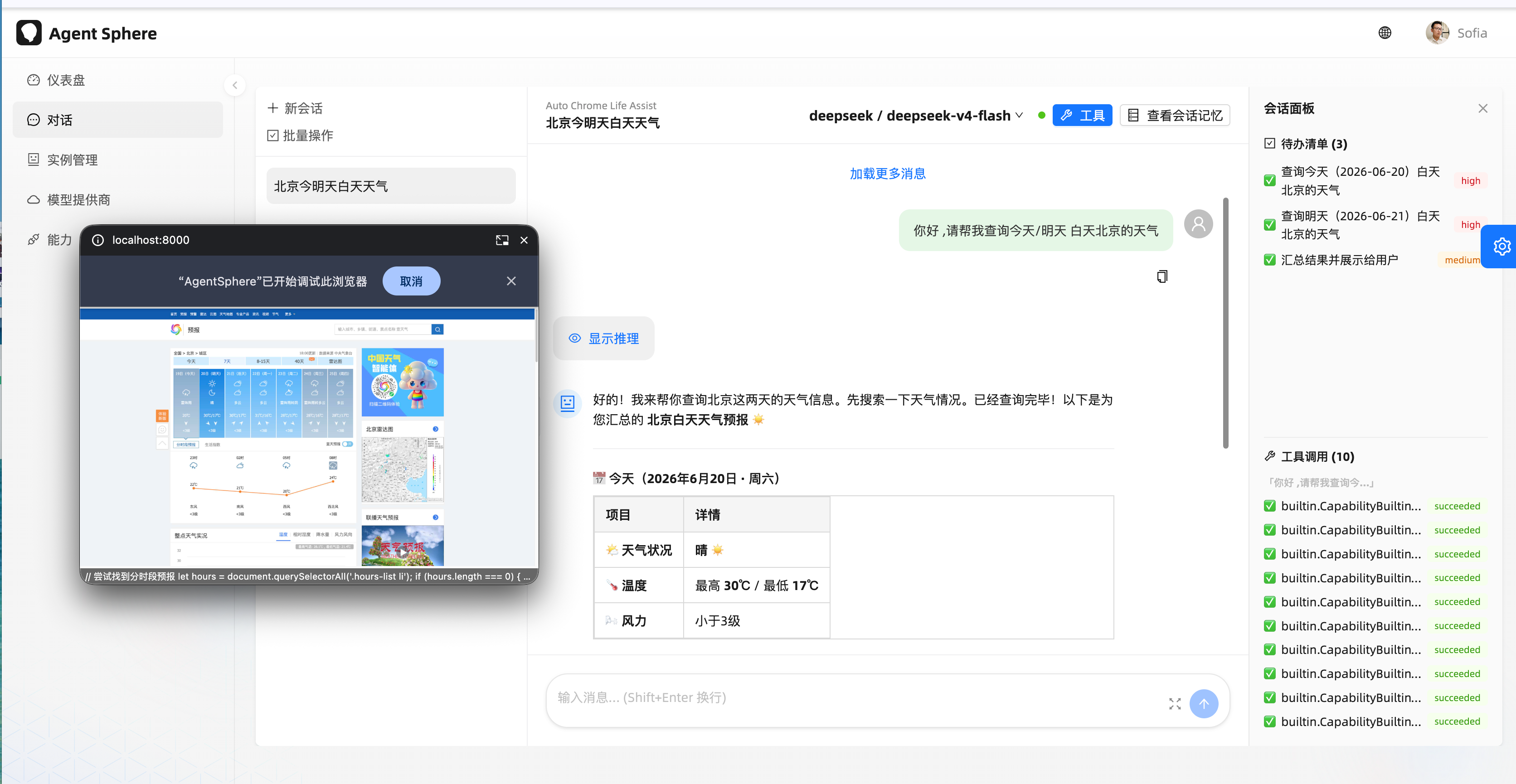
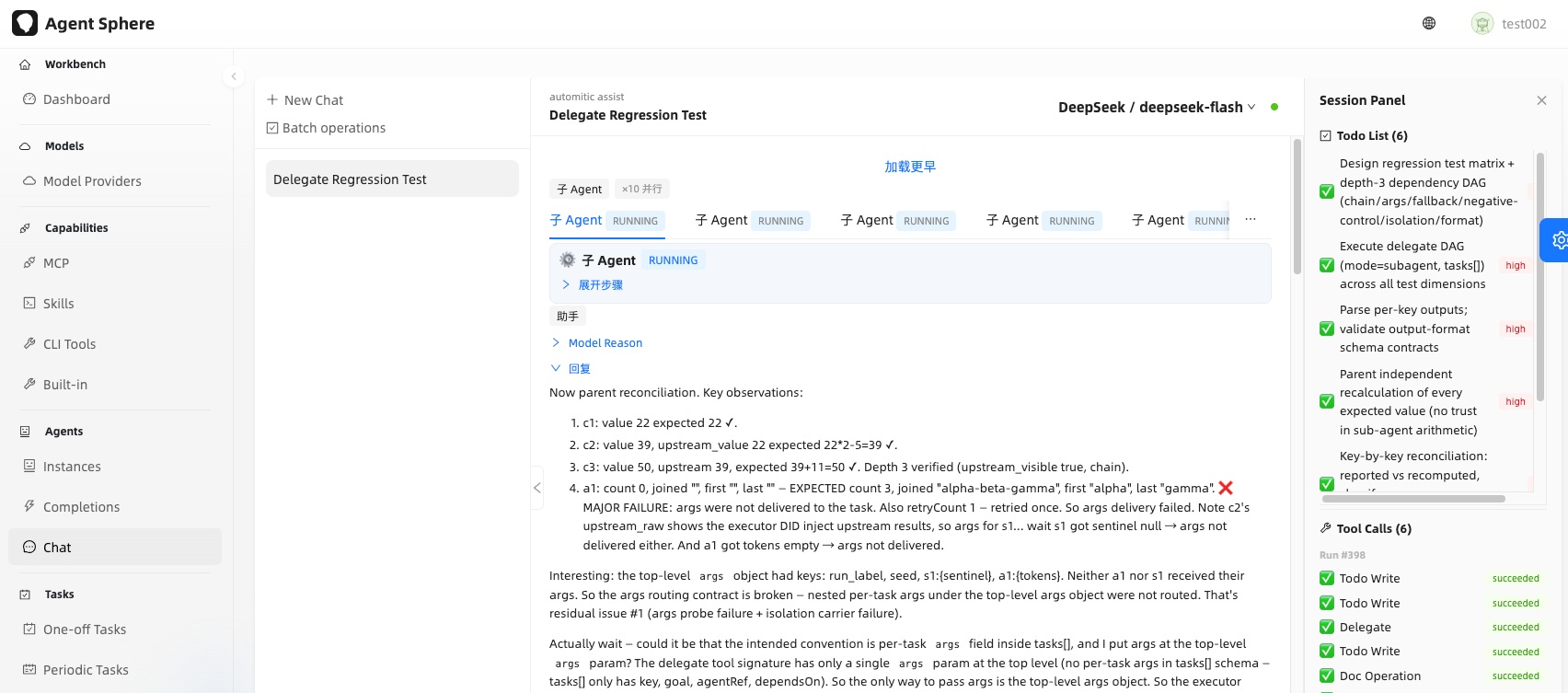
Multi-agent orchestration — the main chat renders sub-agent cards inline (live per-sub-agent steps, auto-scroll):
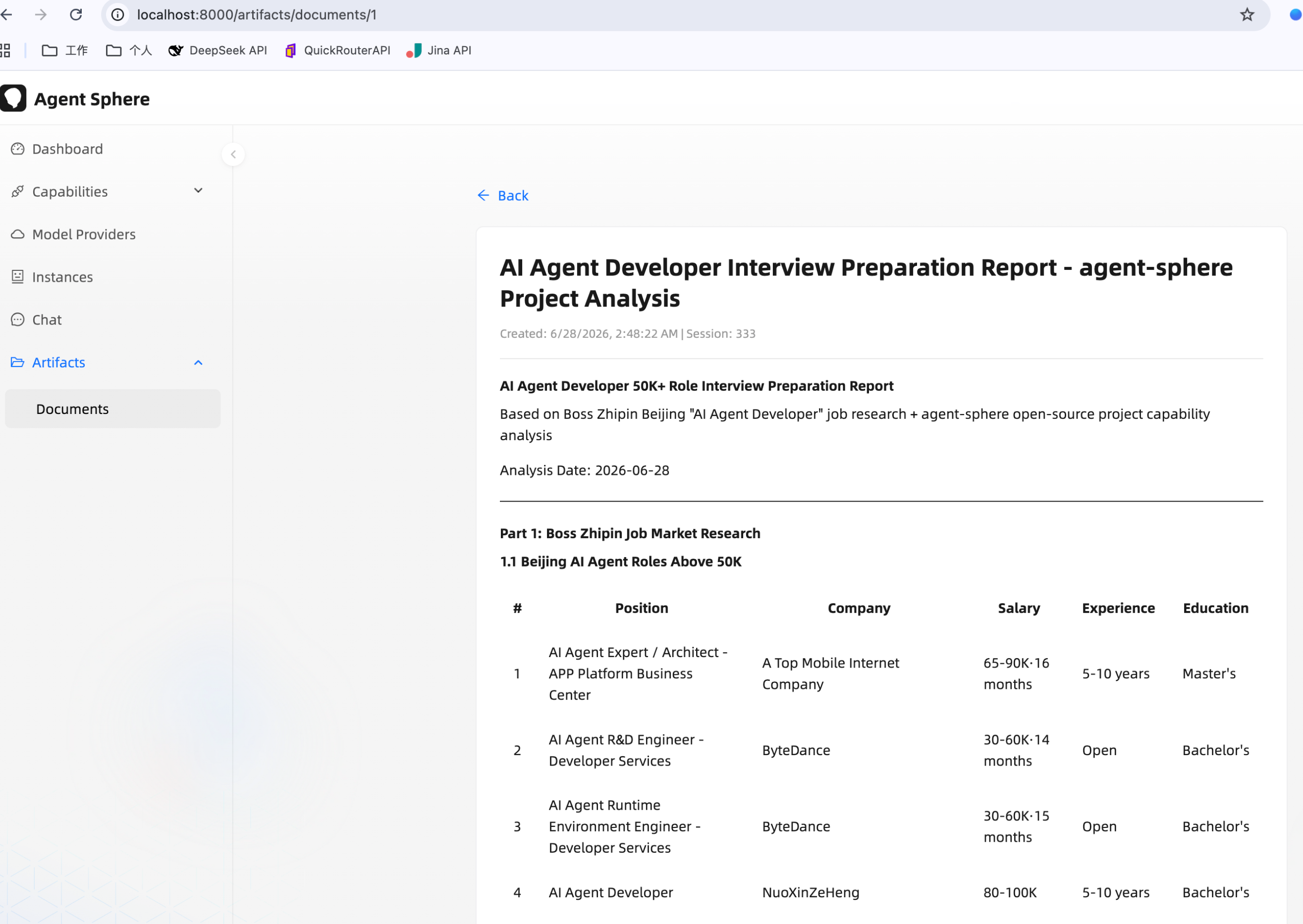
Embeddable chat widget (shadow DOM, OIDC SSO, REST + SSE timeline chat):
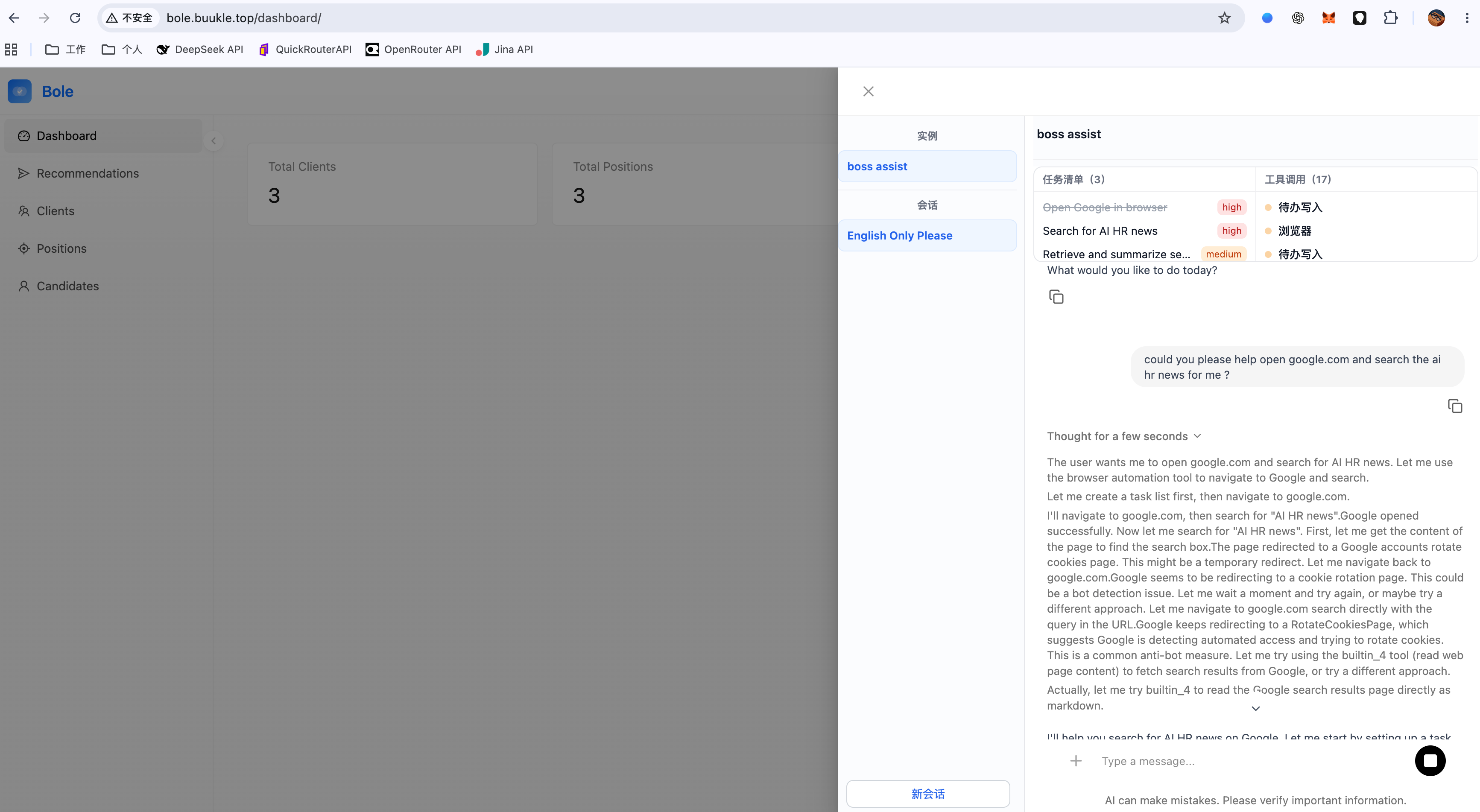
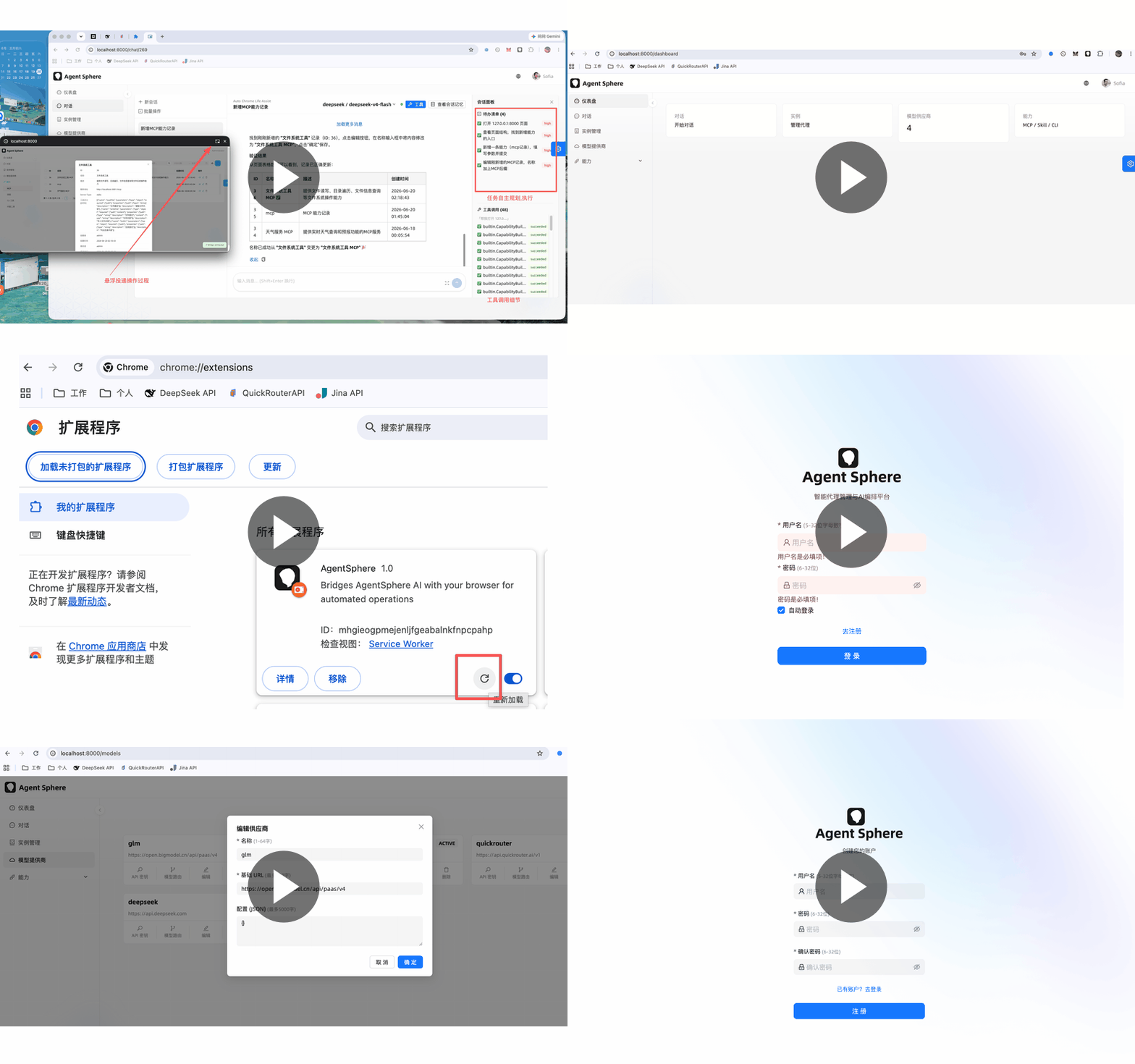
▶ Click to watch the video demo
Features
- LLM ReAct orchestration —
SessionRunnerruns aPlan → Act → Observe → Learnloop with per-turn timeout, cancellation, and automatic context compaction. - Multi-agent sub-runs — a parent run can delegate sub-tasks to sub-agents via the unified
delegatetool (SessionSubRunner); it also drives DAG orchestration (tasks[]): Kahn-layered parallel lanes, per-taskargs/dependsOndata injection throughContactEnvelope, adelegate-lane/v1output contract with per-key reconciliation, and bounded retries. - Multi-provider model routing — OpenAI / DeepSeek / BigModel (Zhipu) / relay stations / OrcaRouter, with primary + fallback route chains and graceful degradation.
- Unified capability layer — MCP servers, built-in SPI tools, CLI execution, browser automation, and composite skills, dispatched through a single
ToolExecutor. - Real browser automation — a Manifest V3 Chrome Extension bridge performs DOM operations (navigate / click / type / executeJS) with real-time execution feedback.
- Vision-based browser operation — the extension captures page screenshots (viewport + full-page) and feeds them back into the model as a visual observation (main agent, sub-agents and embeddable widget all render them inline);
clickAt(x, y)performs pixel-targeted trusted clicks at screenshot coordinates. - Image recognition (chat images) — upload images with a chat message (
/api/v1/files/upload→fileKey), rendered inline in the conversation as thumbnails with a click-to-zoom preview (main UI + widget); routes gate image support viasupports-attachmentand degrade to plain text when unavailable. - Multi-level memory — persistent runs, tool-call records with write-time JSON compression, and token-budget based context compaction.
- Human-in-the-loop clarification — the LLM pauses with a
ask_clarificationtool and resumes via AG-UI interrupt/resume (confirm/choice/input). - Suspend–resume
waittool — a non-blockingwait(builtin_10) parks the run in aWAITINGstate instead of sleeping, so the wait happens outside the 60s tool-timeout box without holding a virtual thread or a parallelism slot; a memory timer wakes it, with a cron fallback, a stuck-run reconciler and bounded resume retries (§3.8a). - Model-owned todo plan linked to skills —
todowriteis the single carrier of the plan; todo items point back at their source skill via structuredskillId/stepId(§3.8b). - Loop budget — a per-run turn budget that survives park/resume, reported to the model every turn, with a hard-close nudge near the cap and a
loopCappedflag that distinguishes a truncated run from one that legitimately finished (§3.1a). - OIDC multi-provider SSO — PKCE + JWKS-verified logins from any IdP, JIT user provisioning, plus full RBAC and audit logging.
- Per-user private resource copies — each identity provider declares a
resource_templateJSON; on a user's first login the platform asynchronously provisions a private copy (model provider / api key / model route / completions / instance / mcp / skill / document) owned by that user, with row-levelcreated_byisolation. - Capability Open API — external systems call
completionsandtasksover/api/v1/api/*withcode + subject + businessTypeidentity, plusbusinessType-scoped ownership checks and task callback URLs. - Task artifacts — tasks persist two-phase structured outputs as
agent_task_artifactrows, reviewable from the 产出 → 任务产物 page (list / detail / JSON view / copy). - Completions management — 提示工程 admin page with input/output JSON Schema, runtime config (
temperature/max_tokens/top_p/ penalties /stop/thinking), prompt versioning, and call records. - Single user-level browser connection — the Chrome extension keeps one per-user task SSE stream (no per-session following),
<all_urls>host permission, and shows the user asprovider@subject. - Embeddable chat widget — a single IIFE script that mounts into a shadow DOM and talks a typed REST + SSE timeline with self-managed Bearer auth (no CopilotKit / AG-UI runtime), embeddable in any third-party page.
- Skill Hub (composite-skill marketplace) — every skill has a
PRIVATE/PUBLICvisibility: publish it from My Skills to make it appear in the Skill Hub, which lists all users' PUBLIC skills (including your own) with keyword search and install-count ordering. Installing forks a copy into your own skills (PRIVATE by default, auto-suffixed on name collision) and increments the source'sinstall_count; your own published skills do not show an Install button. Gated bycapability:skill:publish/capability:skill:install.
1. Quick Start for Development
See: QUICK_START.md
2. Architecture
2.1 Overall Structure
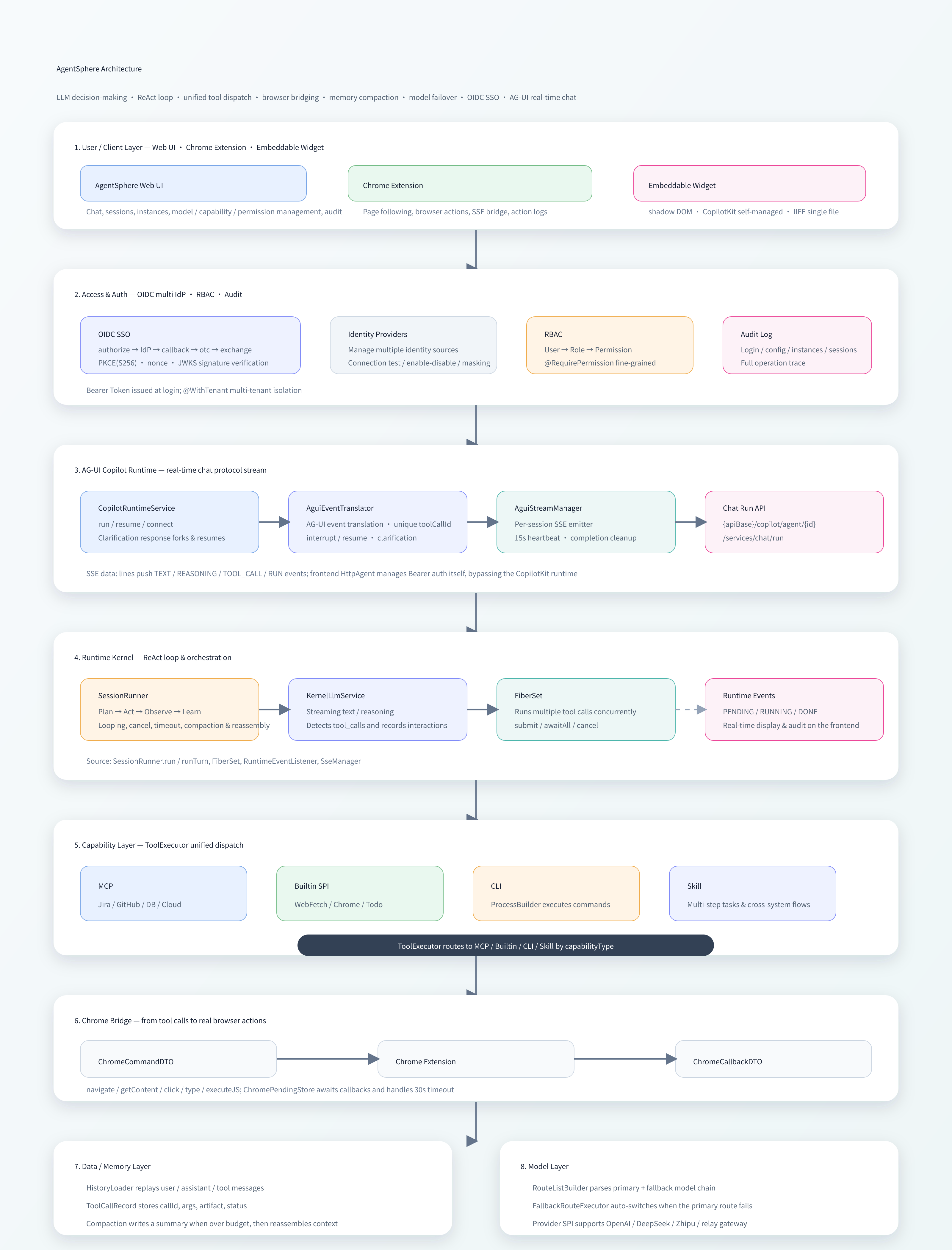
Full 4A architecture (Business / Application / Technology / Data, with ER and call-sequence diagrams): ARCHITECTURE-4A-cn.md (Chinese).
2.2 Core Components
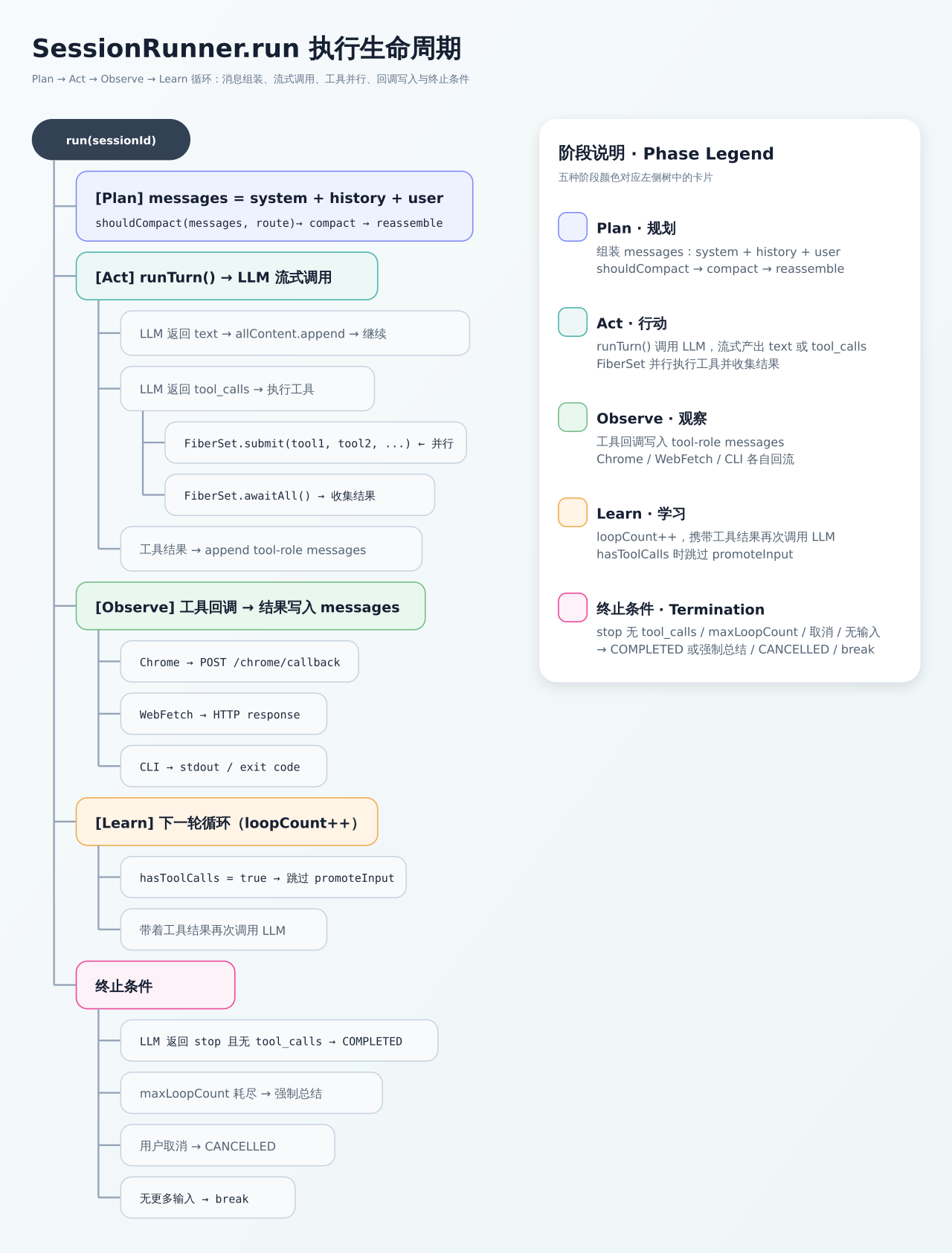
2.2.1 SessionRunner (ReAct Engine)
Manages the complete execution lifecycle of an AI session, implementing the Plan → Act → Observe → Learn loop:
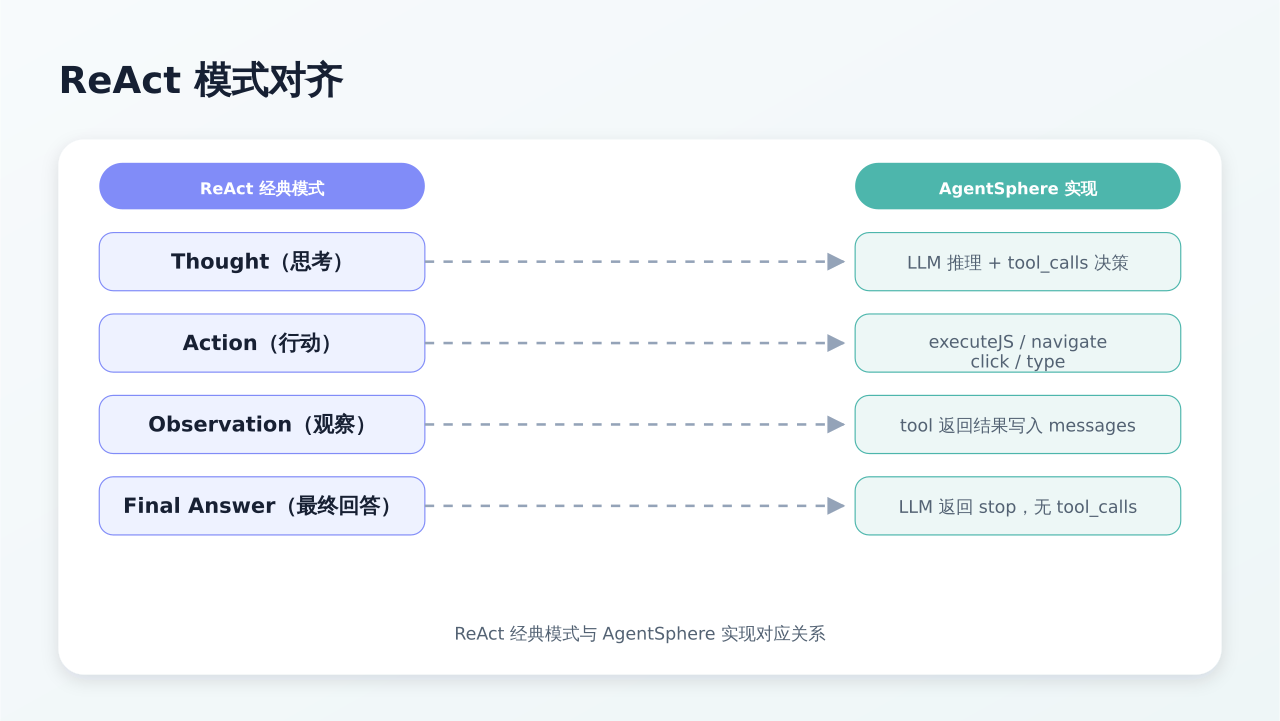
Alignment with the ReAct pattern:
2.2.2 Capability Layer
| Capability Type | Implementation | Description | Examples |
|---|---|---|---|
| MCP (Model Context Protocol) | MCP Server client | Standard protocol, connects to any MCP Server | Jira, GitHub, Slack, databases |
| Builtin (built-in tools) | SPI: CapabilityBuiltinToolSpi |
Java SPI extension | WebFetch, WebRead, Chrome, Todowrite, DocWrite, SkillManage, TextContains |
| Chrome Browser | Chrome Extension bridge | DOM operations + real-time execution feedback | Navigate, click, fill forms, executeJS, screenshot, clickAt |
| CLI (command line) | ProcessBuilder execution |
Local or remote shell | Git operations, build/deploy, system administration |
| Skill (composite skills) | Multi-step task orchestration | LLM-driven task decomposition | Cross-system workflows |
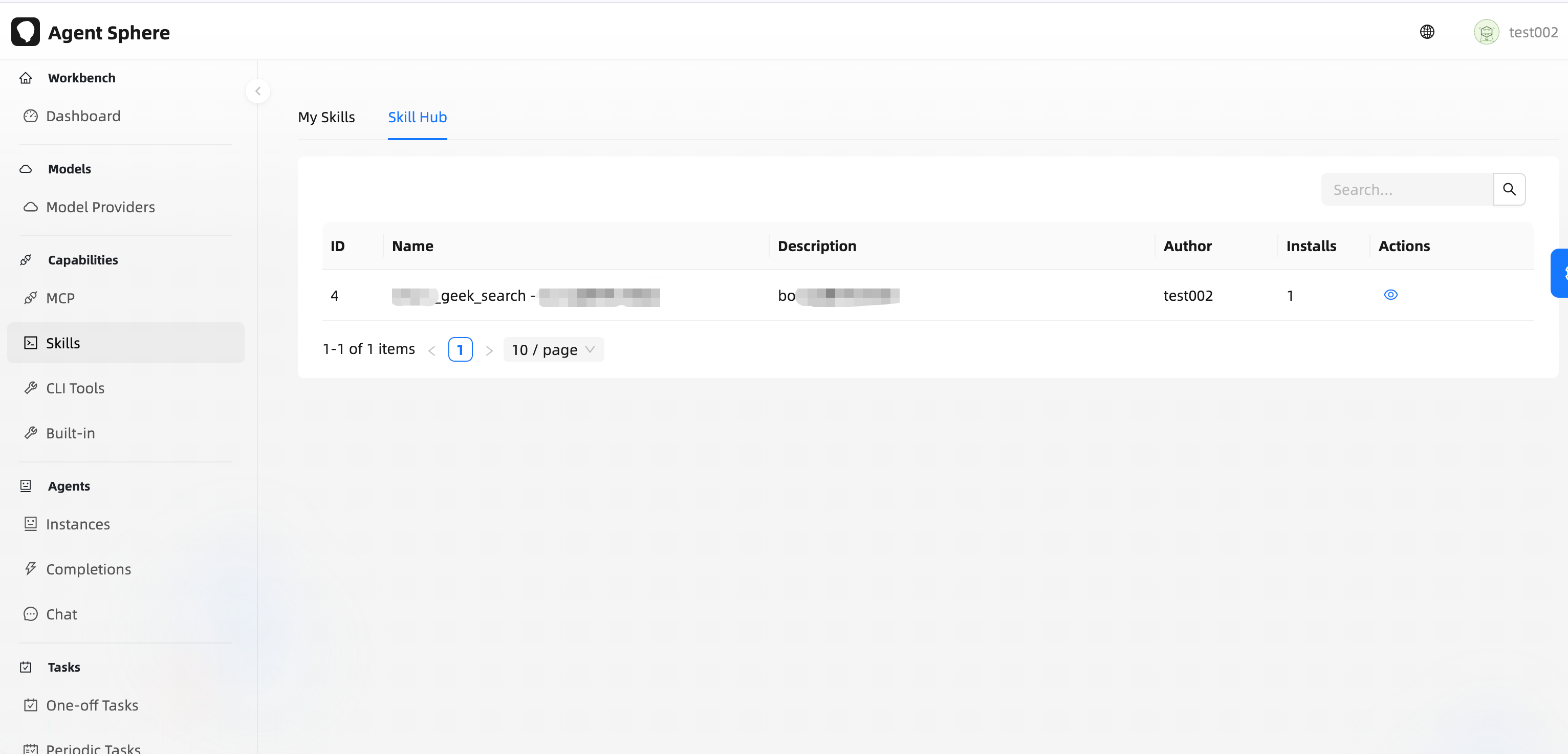
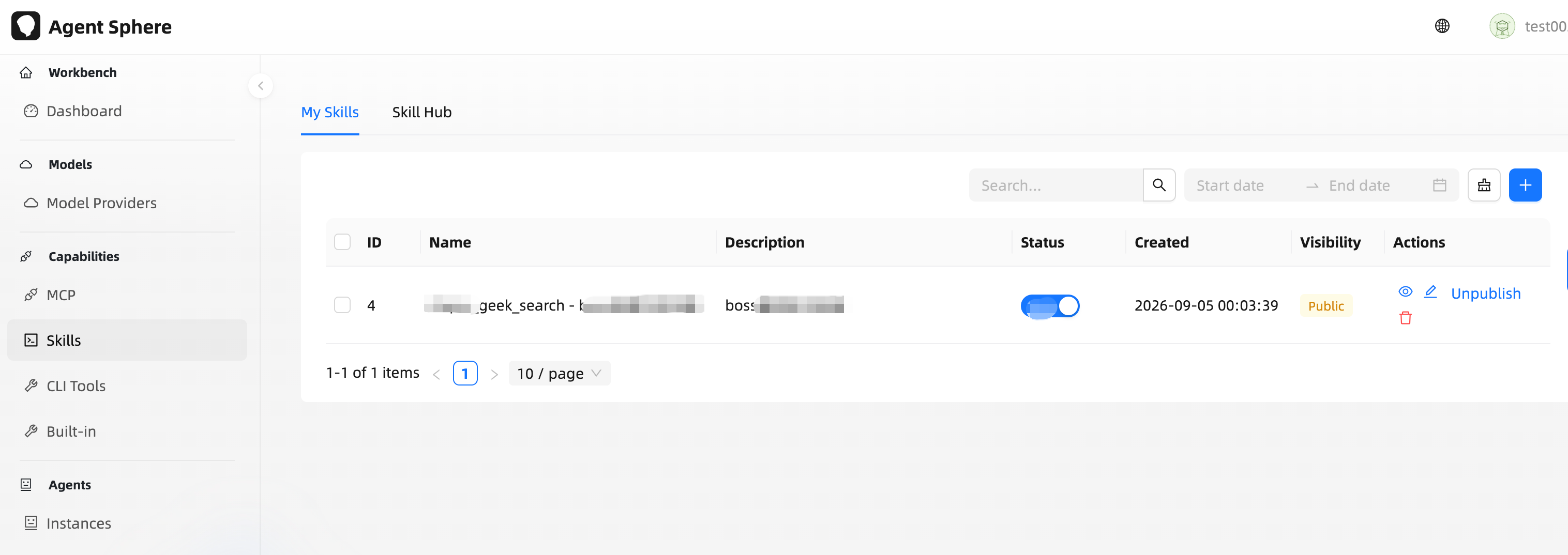
2.2.2a Skill Hub (Publish & Install)
Each skill carries a visibility: PRIVATE (author only, default) or PUBLIC (published to the Hub — publishing is immediate, no review gate). The My Skills tab toggles visibility (PUT /api/v1/capability/skill/{id}/visibility); the Skill Hub tab (GET /api/v1/capability/skill/hub, keyword + paging) lists all users' PUBLIC skills, including your own, ordered by install_count then created_at.
Backend filter: visibility='PUBLIC' AND created_by IS NOT NULL. The explicit created_by reference makes DataPermissionInterceptor skip its ownership rewrite, so the Hub is a true cross-user listing (ordinary users are otherwise row-scoped to created_by = <username>). Installing (POST /api/v1/capability/skill/{id}/install) forks the source into your own skills — a PRIVATE copy with origin_skill_id back-linking the source, name auto-suffixed on collision (e.g. skill (1)), and the source's install_count incremented. Your own published skills do not show an Install button; unpublishing never affects already-installed copies.
Skill body structure is validated — a skill's promptTemplate must follow a fixed heading schema, because ## stepN headings are what the todo/skill linkage (§3.8b) keys against:
- exactly one
# <skill name>H1, and it must come first; - at least one
## stepN <step name>; ### stepN.M <sub-step name>must sit under the## stepNwith the same number;- no heading level may be skipped (H1 → H3 without an H2 is rejected).
Legacy definitions that carry a bare {"prompt": ...} with no heading structure are rejected too — they must be normalised before they can be updated or appended to. That is intentional.
There is exactly one implementation of this rule: SkillTemplateValidator in the common module, returning either null (pass) or a violation list plus the canonical template. The only enforcement point is the service layer (CapabilitySkillServiceImpl#validateDefinition, called by both create and update), which throws BizException(PARAM_INVALID) — so both entry points (the UI form via CapabilitySkillController, and the agent's own skill_manage tool) are covered without duplicating the check. Because legacy definitions are rejected, the default resource template's sample skill must itself be compliant, since SkillInitializer reads it to seed a new account.
The canonical template is kept in sync across three places: SkillTemplateValidator.SKILL_TEMPLATE (backend), the tool description that references it, and SKILL_TEMPLATE / SAMPLE_DEFINITION in agent-sphere-ui/src/pages/capabilities/skill/index.tsx.
Versioning & auto-update — every skill carries a version (int, starts at 1; each content edit via PUT /api/v1/capability/skill/{id} bumps it). Installed copies record the source version at fork time (origin_version). On the My Skills tab you can flip Auto update on for any installed copy (PUT /api/v1/capability/skill/{id}/auto-update); a scheduler (SkillSyncRunner, default every 5 min via buukle.agent.skill.auto-update-interval) scans those copies and — when source.version > copy.origin_version — fully syncs name/description/definition from the source (a true fork-track, so local renames are overwritten). The sync uses a conditional UPDATE ... WHERE id=? AND origin_version=?, so multiple replicas never double-apply.
The scan predicate is deliberately
auto_update = true AND origin_skill_id IS NOT NULLwith no time window. The earlierSkillAutoUpdateSweeperfiltered oncreated_at >= now() - 7 days— but a copy'screated_atis its install time, so any copy installed more than 7 days ago was never scanned again. That is why auto-update appeared to "do nothing".SkillSyncRunnerTest#sweep_queryHasNoTimeWindowlocks the fix in; do not add a window back.
Sync execution records — the task's logger is suppressed by logback's com.buukle.agent.capability = WARN rule, so "did it run / how many did it sync" was unanswerable from logs. Every sweep therefore writes one capability_skill_sync_run row (V80) with trigger_type, scanned_count, updated, skipped, a per-copy skip detail, skip_reason and elapsed_ms. Skip reasons are enumerated in SkillSyncOutcome — notably SOURCE_GONE (source deleted or unpublished; the copy is left untouched) vs VERSION_NOT_AHEAD (nothing to do), which is exactly the distinction you need when nothing synced. Trigger it on demand with POST /api/v1/capability/skill/sync-now and poll GET /api/v1/capability/skill/sync-runs / GET /sync-runs/{id} — the same mirror of the session-cleanup endpoints, and the frontend reuses useRecordedTask. A kill switch (buukle.agent.skill.auto-update-enabled) and a sync-log retention window (skill.sync-log-retention-days) live in agent_system_config so they can change without a redeploy.
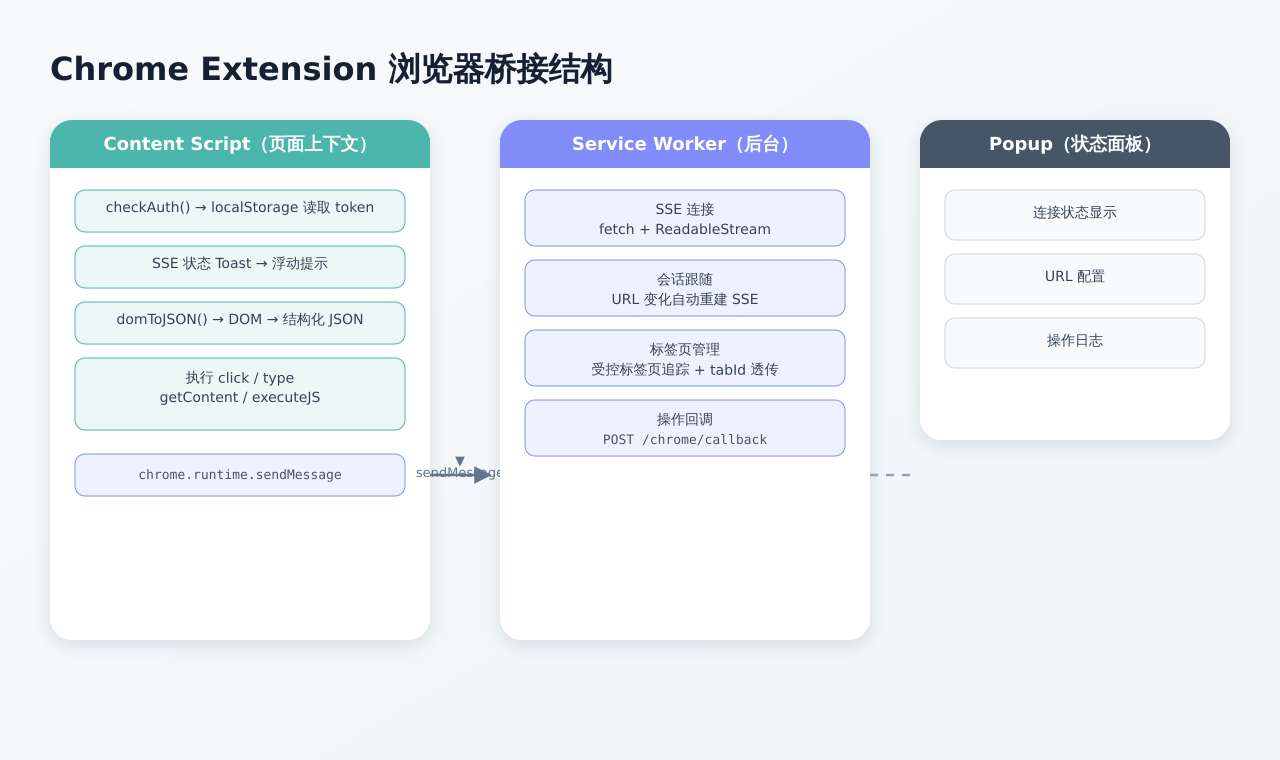
2.2.3 Chrome Extension (Browser Bridge)
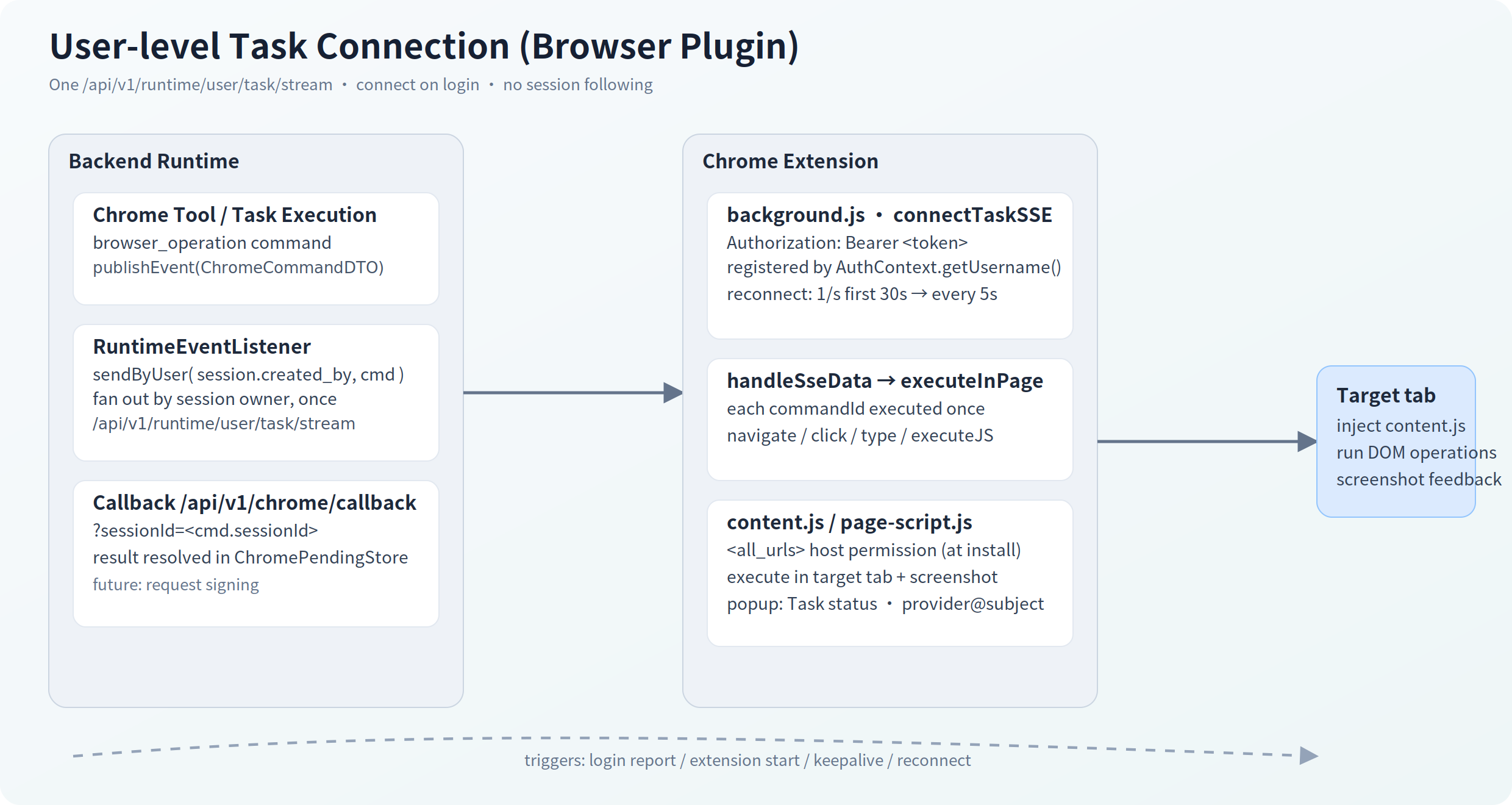
The extension bridges the backend with the user's browser for automated operations. It keeps a single user-level task SSE connection (/api/v1/runtime/user/task/stream) that delivers browser_operation commands for any of the user's sessions/runs — no per-session following. It declares <all_urls> host permission (granted at install) so it can inject a content script into any page the agent operates on.
Recent architecture notes:
- Screenshots for vision operation — the extension captures page screenshots (
Page.captureScreenshot, viewport viascreenshot(scope=viewport), full-page viascope=full) withcdp-client.js(the only place allowed to touchchrome.debugger). The base64 is stored viaPOST /api/v1/browser/screenshotand only thefileKeytravels on the callback, then the runtime injects a USER observation message (text + image_url) into the model context so vision-equipped models can plan from the real page (main and sub-agent loops share the same injection support, capped byrunner.max-screenshots-per-run).clickAt(x, y)clicks at the device pixels of the last viewport screenshot (converted to CSS px viadevicePixelRatio); non-interactive points click through with a warning. Screenshots are echoed back in the chat timeline as tool-card thumbnails (click-to-zoom), persisted from the tool artifact — live refresh and session reload both show them. - SSE lives in an offscreen document (
offscreen.html/js) — immune to MV3 service-worker suspension; the background alarm re-creates it if the browser closes it. - Native ES modules — the background service worker (
background.js,"type": "module") importslib/cdp-client.js,lib/tab-manager.js,lib/result.js,lib/offscreen-bridge.js; the execution layer iscontent.js+content-locator.js(injected in order into the isolated world). - Tab grouping — every tab the plugin navigates/opens is auto-grouped under the
AgentSpheretab group (tabGroupspermission), recreated if closed. executeJSis tiered (debugger only as last resort):chrome.scriptinginto the page MAIN world →chrome.debuggerRuntime.evaluate(bypasses CSP entirely; strict-CSP sites land here). MV3's extension CSP forbidseval()in an isolated world, so no isolated-world tier exists.
3. Algorithm — Core Algorithms
3.1 ReAct Execution Loop
The core loop of AgentSphere follows the ReAct (Reasoning + Acting) pattern, combining the LLM's reasoning ability with tool execution ability:
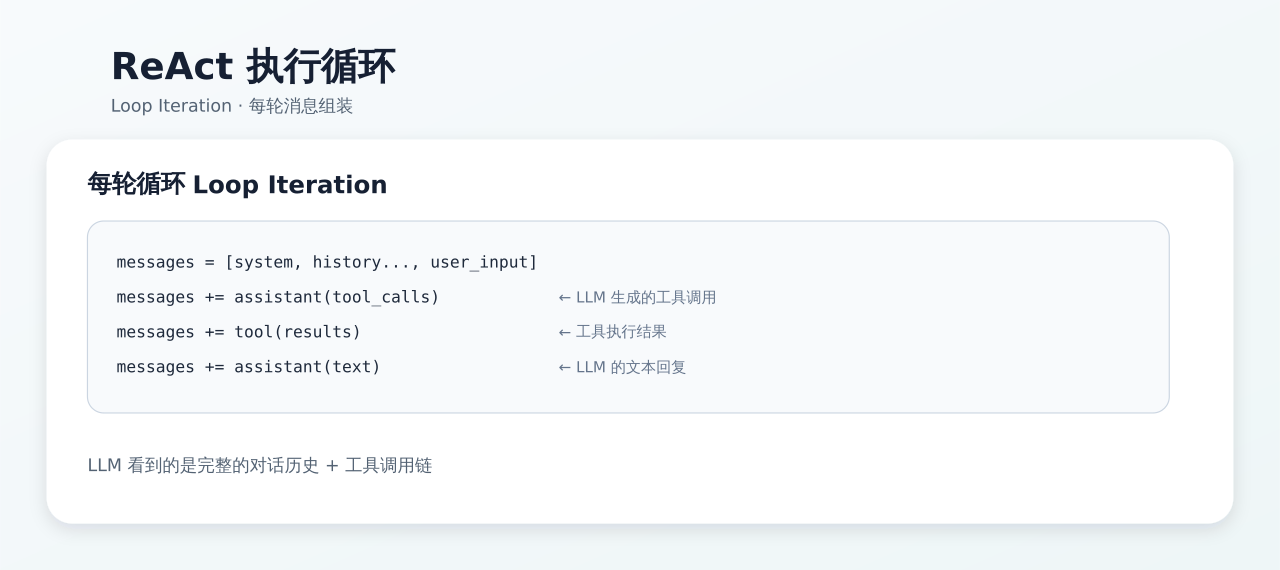
Message structure:
[
  {role: "system",    content: "You are a browser assistant..."},
  {role: "user",      content: "Help me check the weather in Guangzhou"},
  {role: "assistant", tool_calls: [{id: "call_1", name: "navigate", args: "..."}}]},
  {role: "tool",      tool_call_id: "call_1", content: '{"tabId": 42, "url": "..."}'},
  {role: "assistant", content: "The weather in Guangzhou tomorrow is..."},
  {role: "user",      content: "What should I prepare for going out tomorrow"},
  ...
]
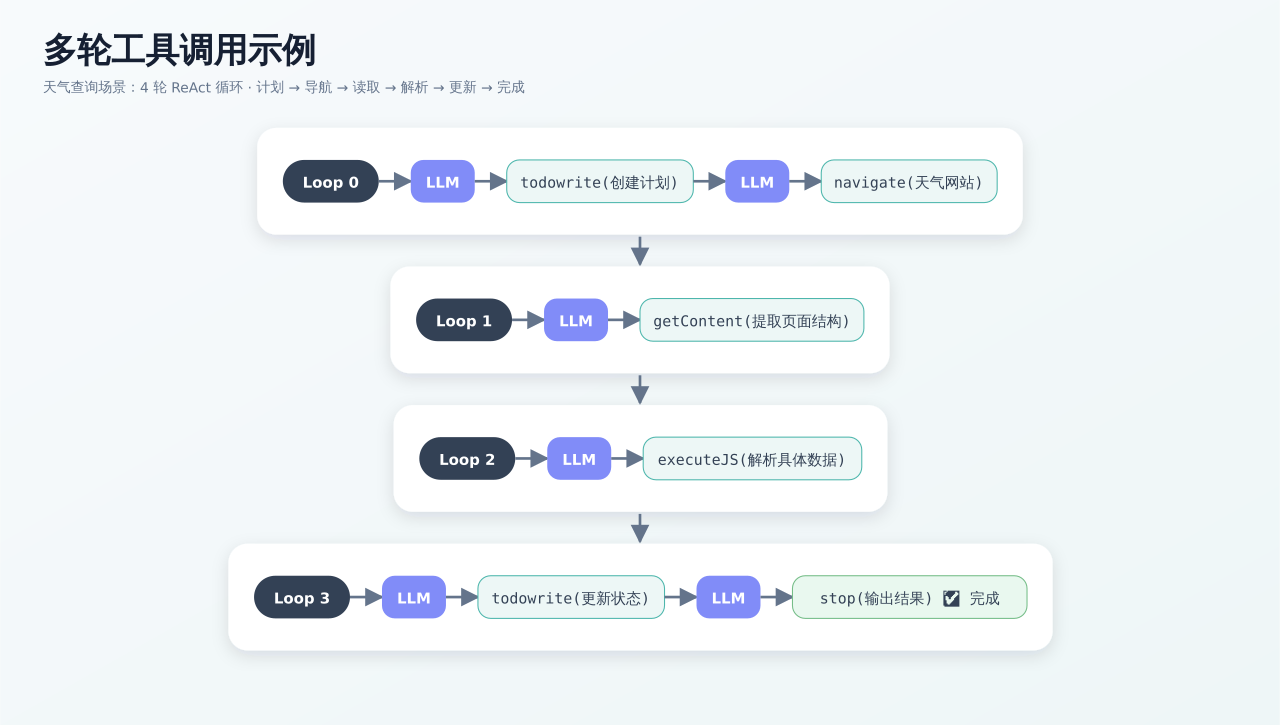
Multi-turn tool call example:
3.1a Loop Budget — count, cap, and what the model is told
The loop count is a per-run budget, not a per-call allowance. A run that suspends on wait or clarification and later resumes continues from where it left off, so a model cannot buy unlimited turns by parking repeatedly.
Resolution order — LoopLimitResolver, highest priority first:
| Priority | Source | Configured at | Default |
|---|---|---|---|
| 0 | PINNED |
the run's own loop_limit column (V88) |
— |
| 1 | INSTANCE |
agent_instance.max_loop_count |
unset |
| 2 | TASK |
runner.task-max-loop-count (task-triggered runs) |
2000 |
| 3 | CHAT |
runner.max-loop-count |
128 |
Why the budget is pinned. A run re-enters the loop from five places — first startRun, wait resume, clarification resume (×2) and the stuck-WAITING reconciler. Only the first runs on the task request thread, which is where the TaskLoopLimitHolder ThreadLocal that carries the TASK allowance lives; the other four run on scheduler threads where it is null and the budget silently fell back to the much smaller CHAT value mid-run. V82 pinned the counter (loop_count); V88 pins the denominator (loop_limit) as well, so the budget cannot drift because of a lost ThreadLocal, an instance max_loop_count edited mid-run, or a config change. The two are written by the same updateRun — no extra write. Sub-agent loops are deliberately not pinned: SessionSubRunner is a single synchronous for loop with no park/resume, so its limit cannot drift within one call.
What the model is told. Every turn appends a tail system segment reporting Loop n/total and the remaining count (both 1-based, so "0 turns remaining" can never appear); within 5 turns of the cap it adds a nudge to converge. From 3 turns before the cap it also appends a hard-close instruction to stop calling tools and deliver the answer. Both are advisory — the while (loopCount < maxLoopCount) condition is the only thing that actually enforces the cap.
Two subtleties worth knowing:
- The tail block is rebuilt every turn, not edited in place. Tool turns append assistant/tool/observation messages after it, so an in-place update would leave a stale copy stranded mid-history — contradicting itself on "turns remaining" and burning context.
- The hard-close wording deliberately says "approaching the hard loop limit" rather than "this is your final turn". Injected 3 turns early, the latter would be false, and a model told it has one turn left may keep calling tools.
loopCapped means "truncated", not "ran long". It is set only when the model was still calling tools on the final turn and got cut off. A run that simply finished on the last allowed turn is a normal completion and is not marked. This distinction matters: the task guard (§5.2) fails loop-capped tasks instead of running the structured-extraction phase, and conflating the two used to discard complete results — a run that finished with status=empty, stopReason=POOL_EXHAUSTED had its entire structured conclusion replaced by {"error": "run loop limit reached"}.
3.1b Per-turn LLM retry
A turn that errors with no output and no tool calls this attempt is retried in place, up to runner.llm-turn-max-retries attempts (default 3) with exponential backoff (1s → 2s → 4s, capped at 8s). Once a turn has produced partial text or emitted a tool call it is not retried, to avoid duplicating side effects.
The previous fixed sleep(1s) with a single retry was actively harmful against a provider that fails in bursts: fixed backoff re-hits the same instant and turns one blip into consecutive failures, and 2 attempts were not enough — production runs were killed by three failures inside 9 seconds while a run that happened to hit only two survived. Note there is no retryable/non-retryable classification yet, so a permanent error (context-length 400, auth failure) is retried too; now that the provider error is persisted (§4.2.2) this can be made precise later.
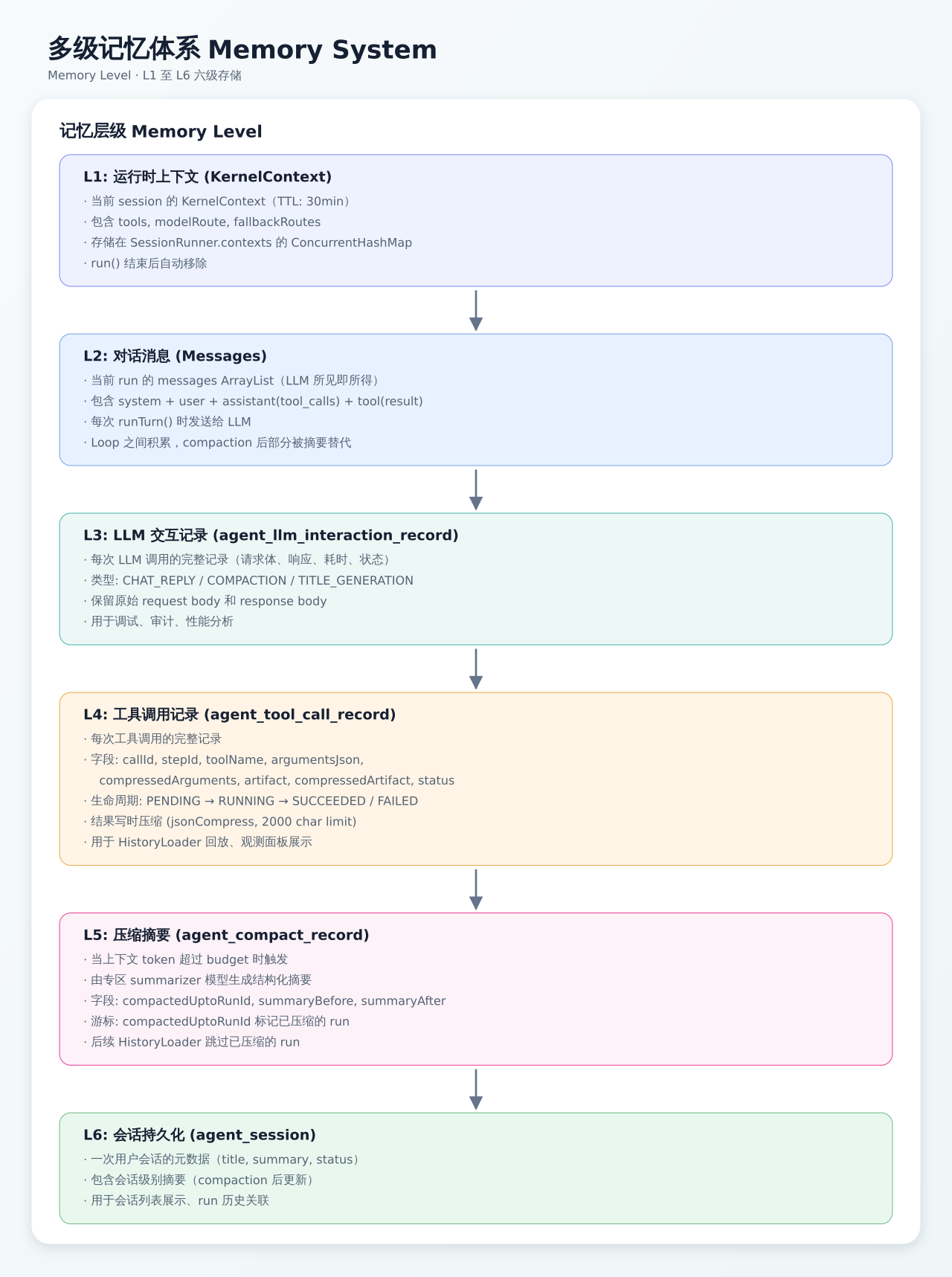
3.2 Multi-level Memory System
AgentSphere implements a multi-level memory system covering the full chain from persistence to runtime caching:
Memory Level Details
| Level | Storage | Lifecycle | Capacity | Purpose |
|---|---|---|---|---|
| L1: KernelContext | ConcurrentHashMap | During run (TTL 30min) | 1 per session | Tool list, model route |
| L2: Messages | ArrayList | During run | Dozens of turns | LLM input/output |
| L3: LLM Interaction | PostgreSQL | Permanent | Configurable | Debugging & audit |
| L4: Tool Call | PostgreSQL | Permanent | Unlimited | Replay, observation |
| L5: Compact Record | PostgreSQL | Permanent | Cumulative | Context compression |
| L6: Session | PostgreSQL | Permanent | 1 per session | Metadata |
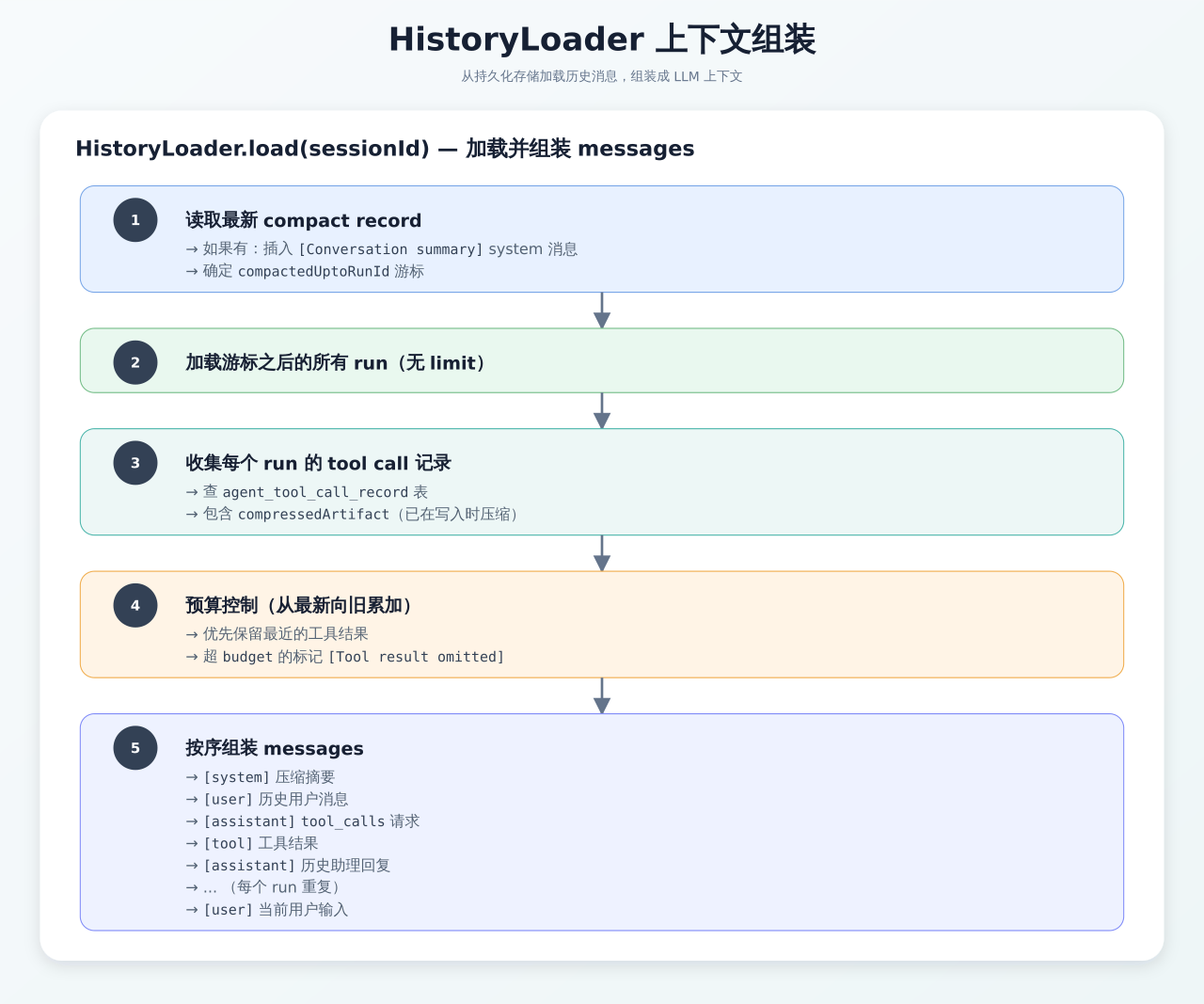
3.2.1 Context Assembly
HistoryLoader is responsible for loading historical messages from persistent storage and assembling them into the LLM context:
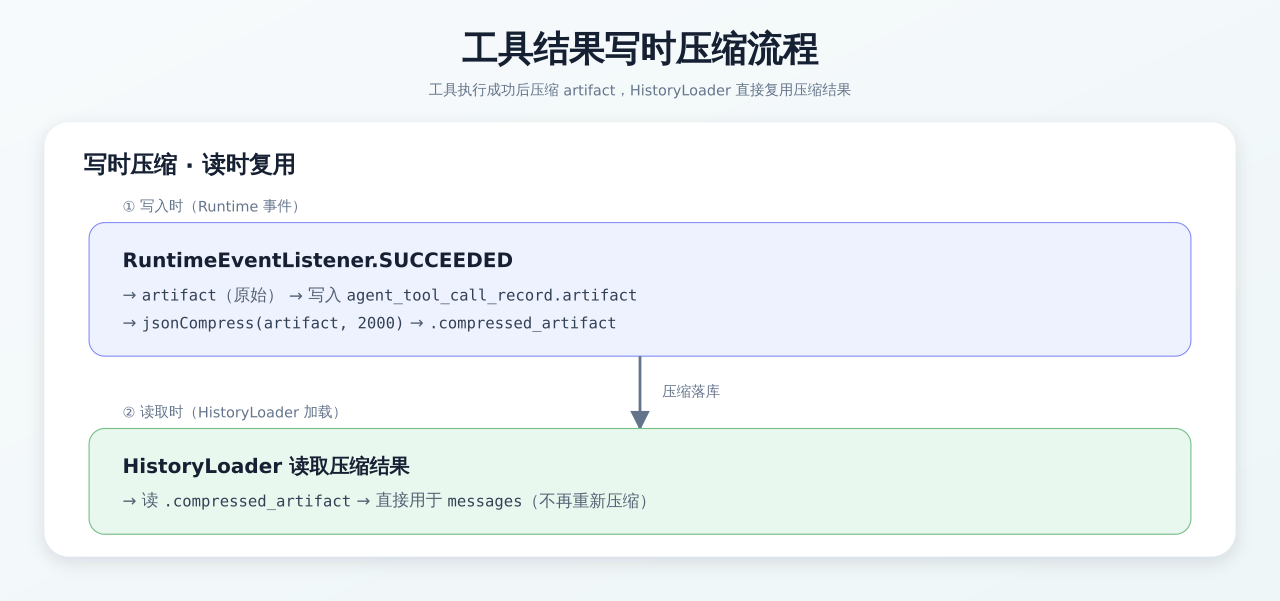
Tool result compression flow:
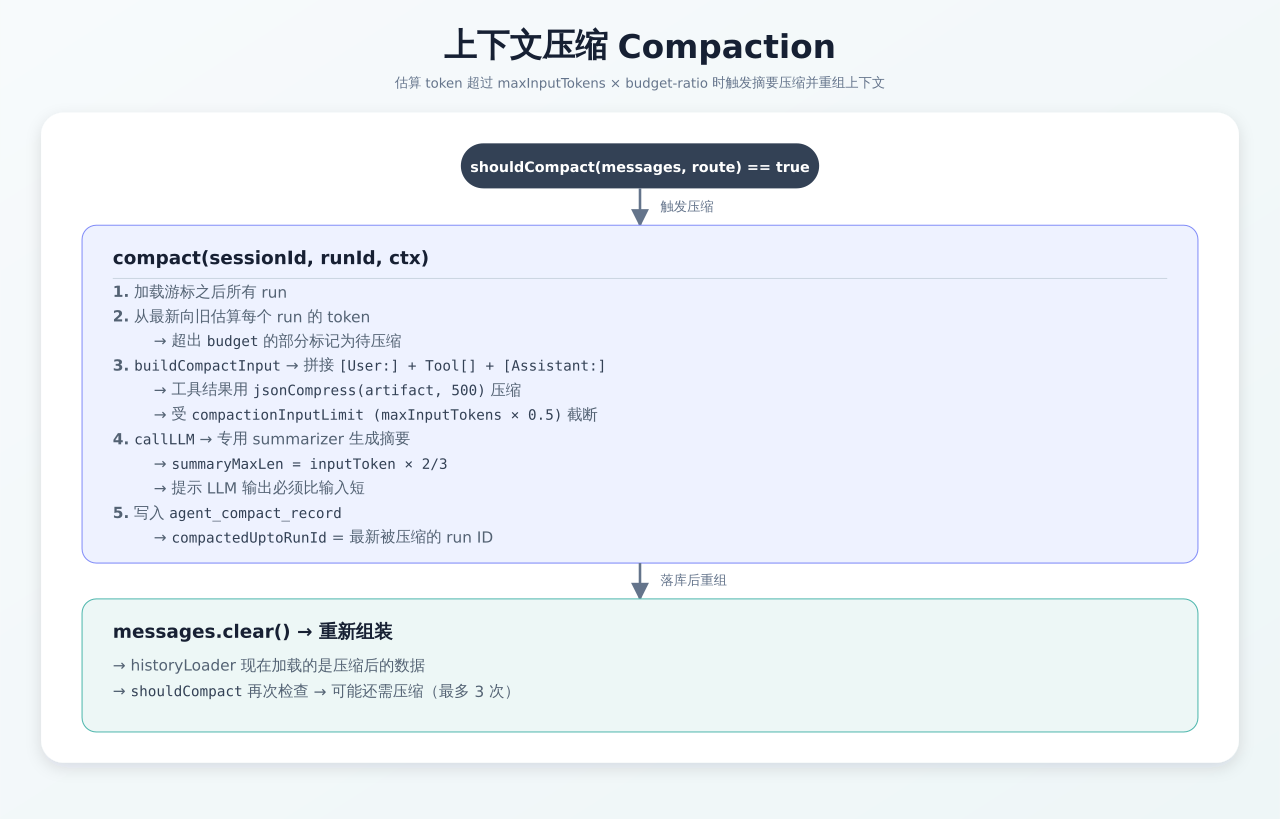
3.2.2 Context Compaction
Triggered when the estimated tokens of messages exceed maxInputTokens × budget-ratio:
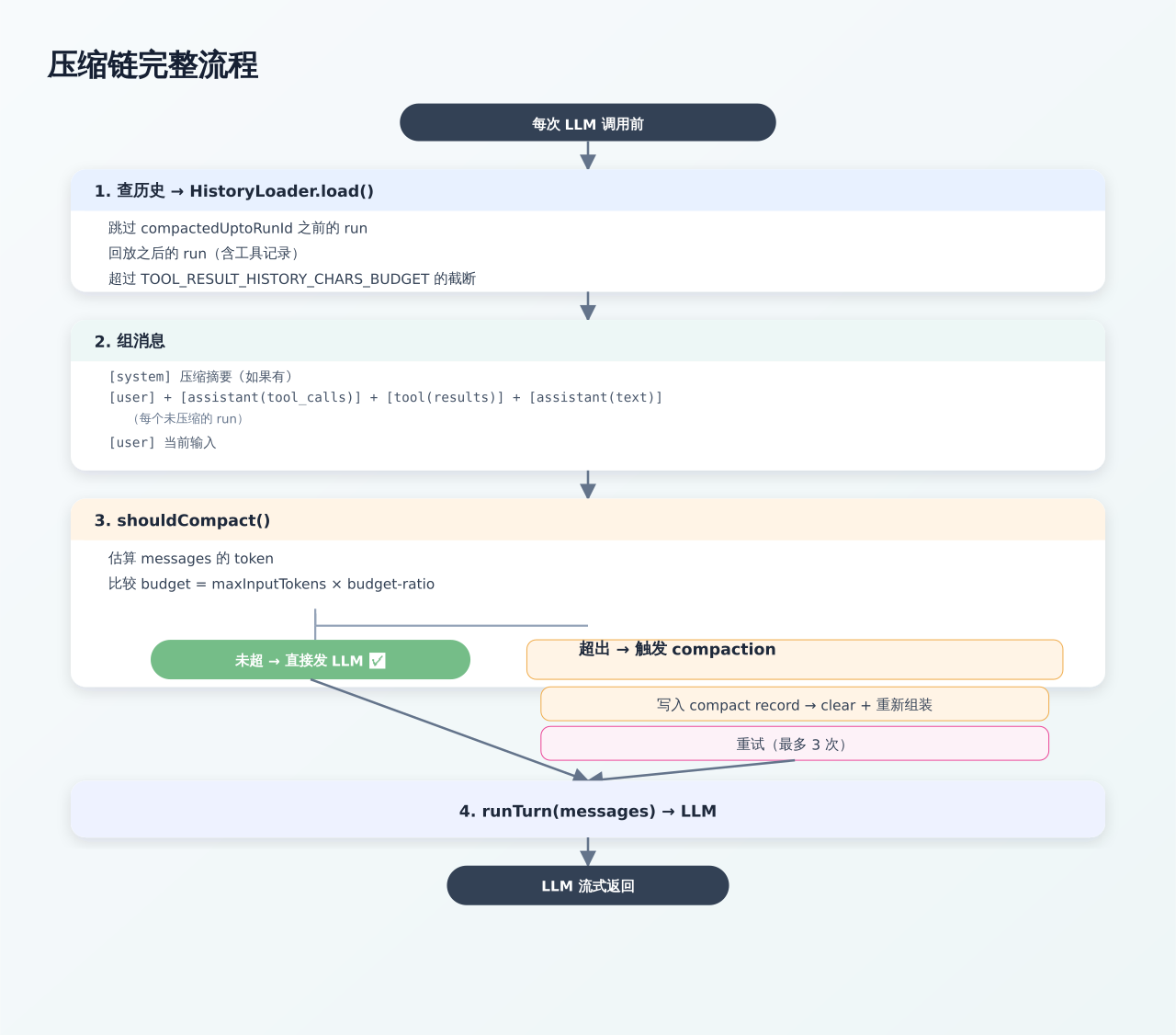
Full compression chain flow:
3.2.3 Tool Call Record State Machine
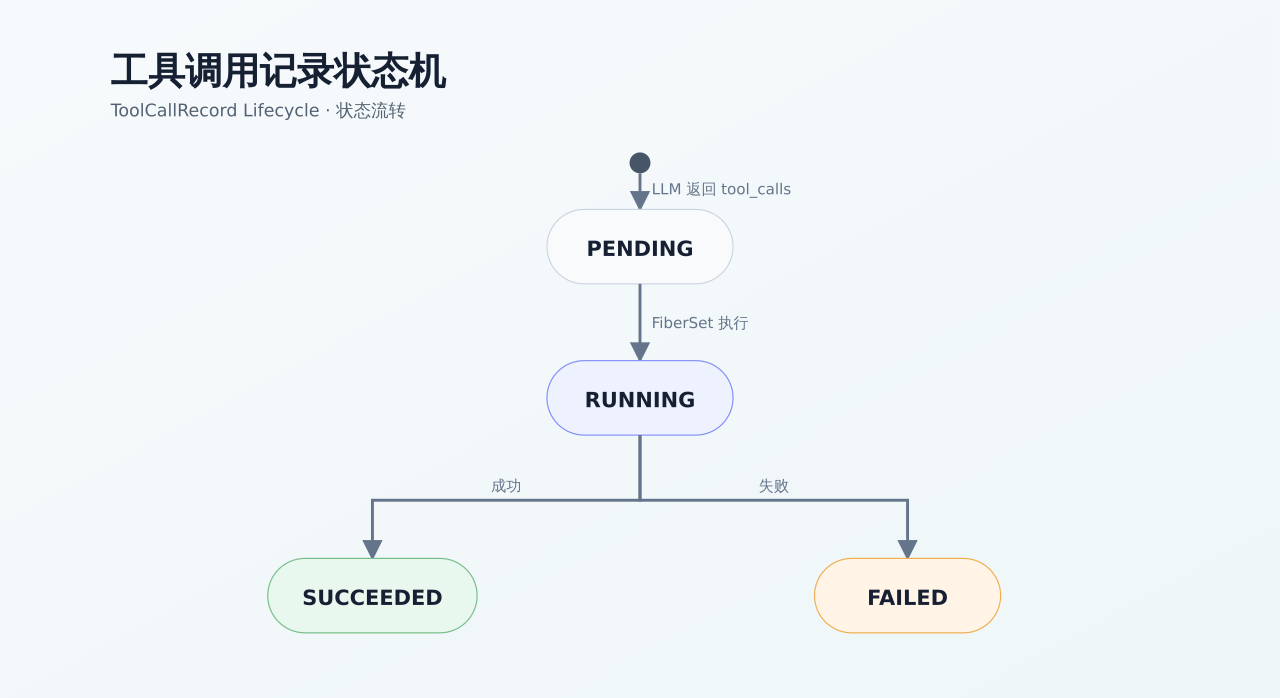
Each record contains:
callId— Tool call ID generated by the LLM (e.g.,call_abc123)argumentsJson— Original input argumentscompressedArguments— Compressed version of input JSON (write-time compression)artifact— Original return resultcompressedArtifact— Compressed version of result JSON (write-time compression)- Used by HistoryLoader for replay, observation panel display, and auditing
3.2.4 Tool Result Compression Strategy
jsonCompress(node, depth, maxValueChars) {
  if (depth > 5) return "[deep nested]";

  if (node instanceof Map) {
    // Recursively compress each value
    return map.mapValues(v -> jsonCompress(v, depth+1, maxValueChars))
  }

  if (node instanceof List) {
    if (list.size() <= 5) return list.map(v -> jsonCompress(v, depth+1))
    // Large array: keep first 3 + total count
    return { _count: 13, _showing: 3, items: [...] }
  }

  if (node instanceof String) {
    if (text.length() <= maxValueChars) return text
    // Long string: first 100 + ellipsis + last 50
    return text[0..100] + "...[+ N chars]...\n" + text[-50..-1]
  }

  return node // Number, Boolean pass-through
}
3.3 Model Routing and Fallback
AgentSphere provides a multi-level model fault-tolerance mechanism to ensure high availability of LLM calls.
Routing Configuration
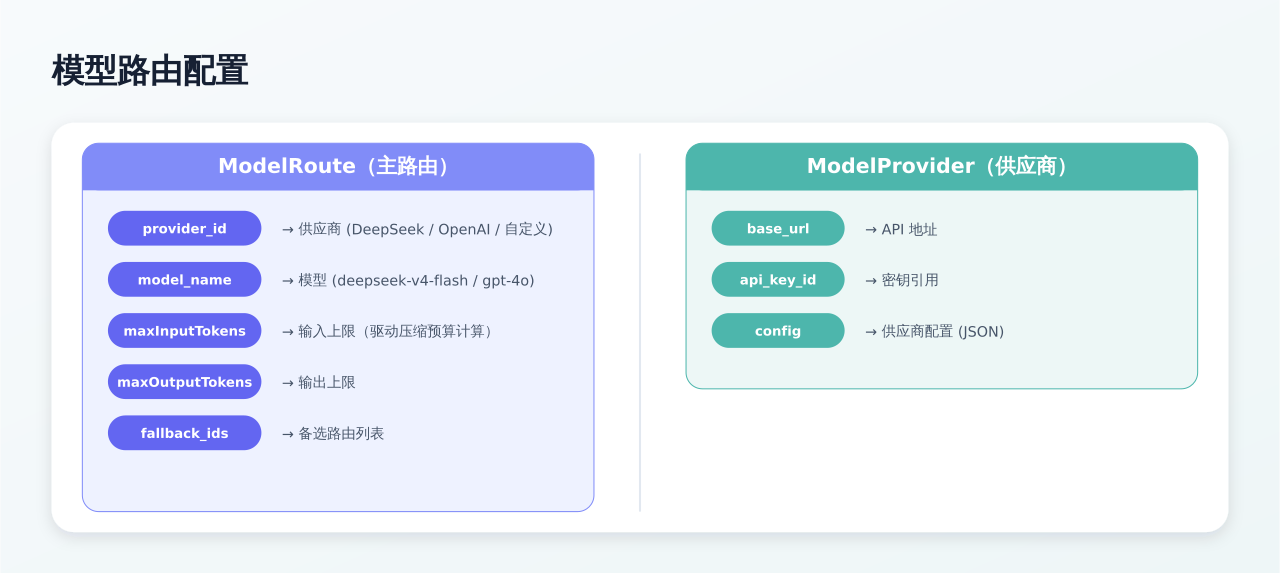
Fallback Execution Flow
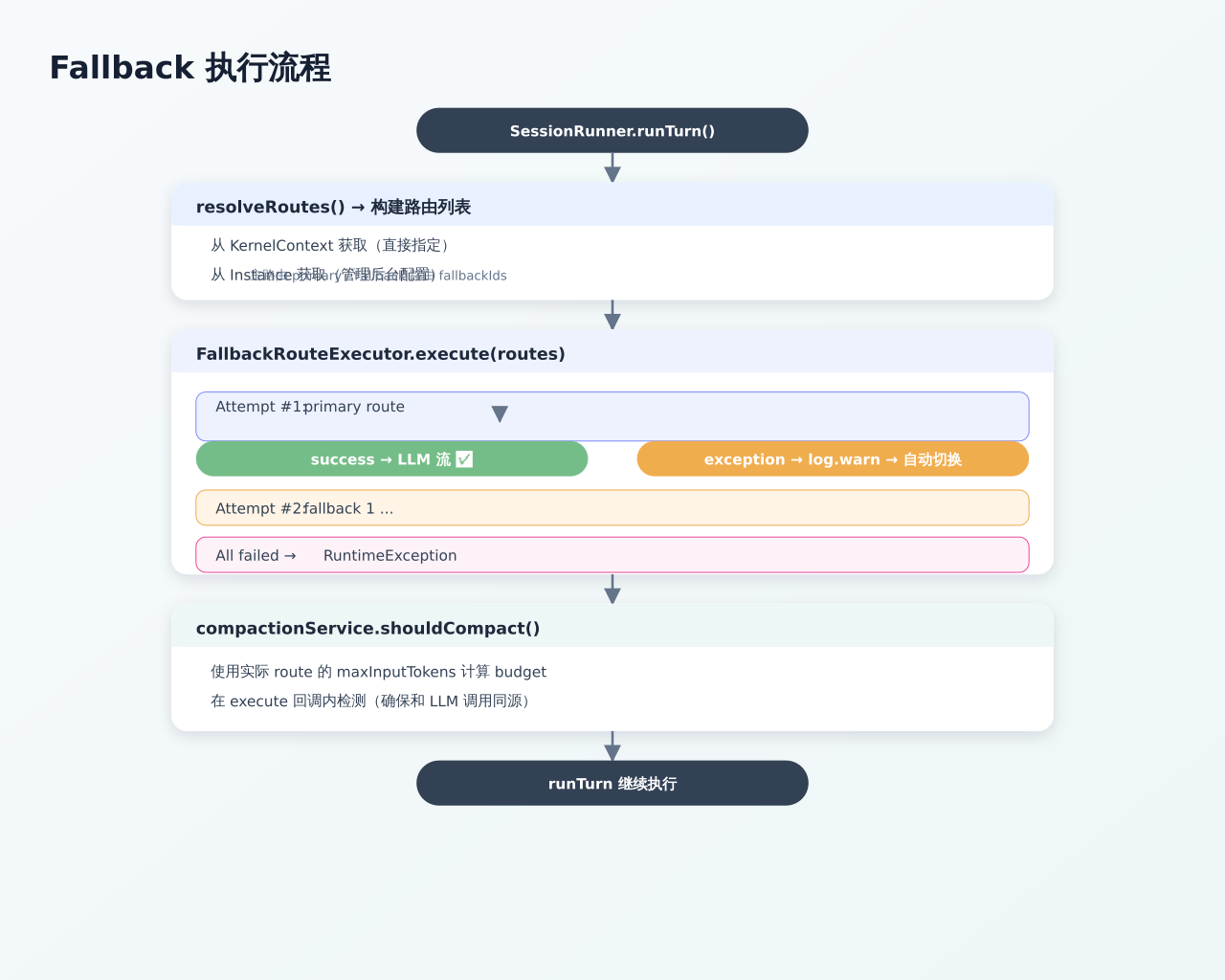
Note: The compression budget calculation is based on the actual route's maxInputTokens, detected within the execute callback. See the formula below for details.
Compression Budget Calculation
budget = maxInputTokens × budget-ratio (default 0.7)

Example:
  Route: GLM-4.1V-Thinking-Flash, maxInputTokens=1_000_000
  → budget = 1_000_000 × 0.7 = 700_000 tokens
  → When messages exceed 700K tokens → trigger compaction

Dynamic adjustment:
  budget-ratio: 0.5  → Triggers earlier (preserves more context quality)
  budget-ratio: 0.8  → Triggers later (saves compression overhead)
Timeout Parameters
| Parameter | Default | Description |
|---|---|---|
llm.connect-timeout |
30s | Timeout for connecting to LLM API |
llm.read-timeout |
60s | Timeout for reading response |
llm.stream-read-timeout |
120s | Stream read timeout |
llm.stream-timeout |
600s | Total timeout for streaming calls |
runner.turn-timeout |
660s | Total timeout for a single LLM turn (must exceed stream-timeout) |
3.4 Browser Operation Flow
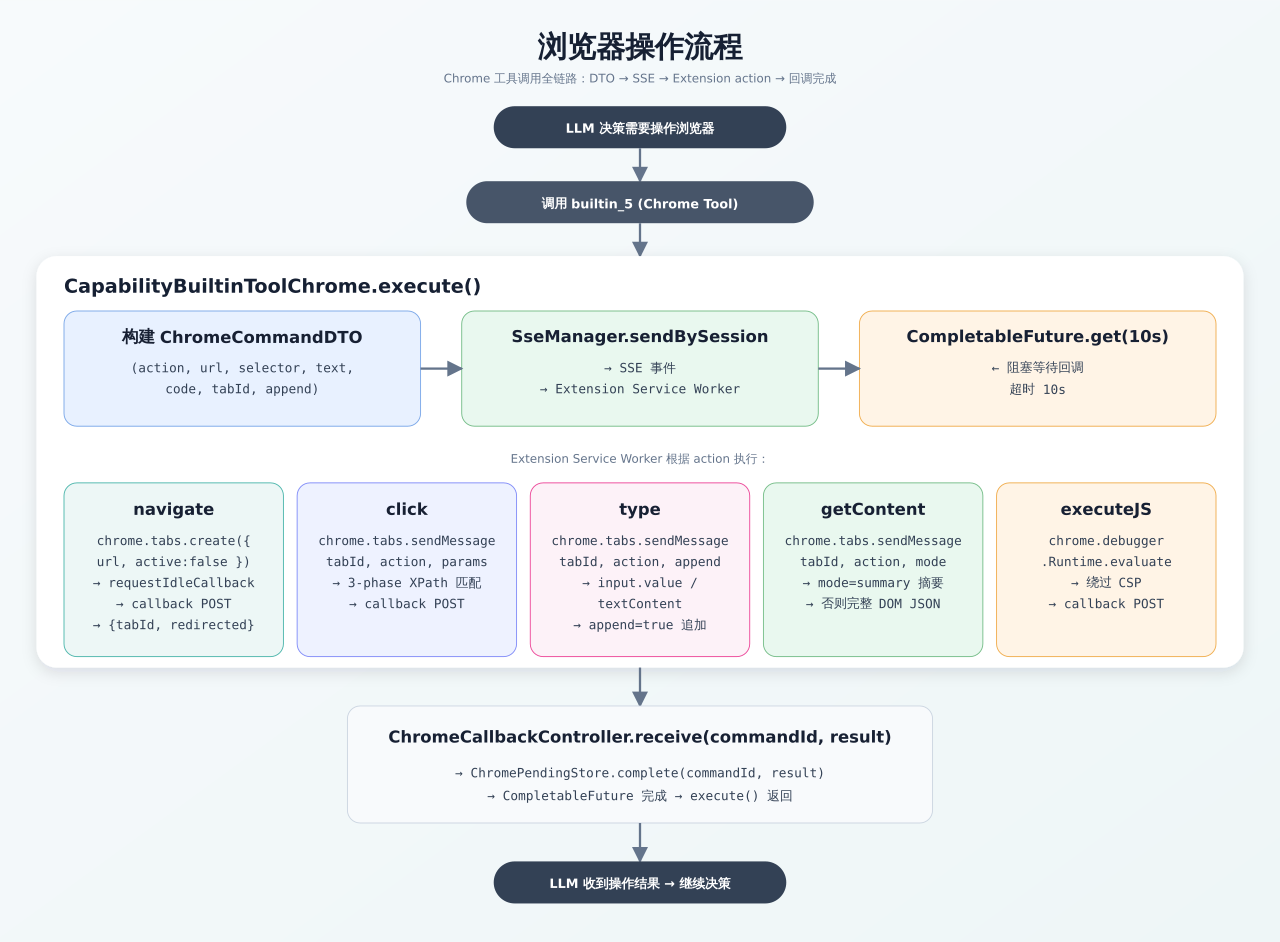
Delivery note:
browser_operationcommands are pushed once on the user-level task stream (keyed by the session owner), never duplicated on a per-session stream — the extension executes eachcommandIdexactly once and reports back via/api/v1/chrome/callback?sessionId=<cmd.sessionId>.
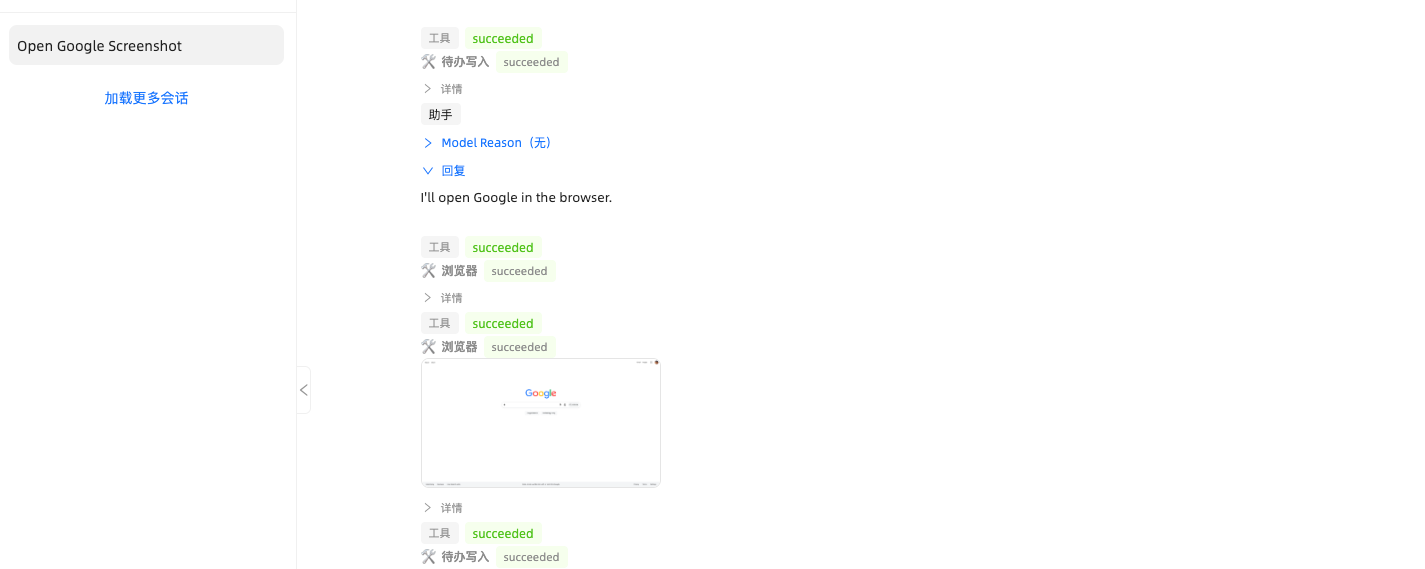
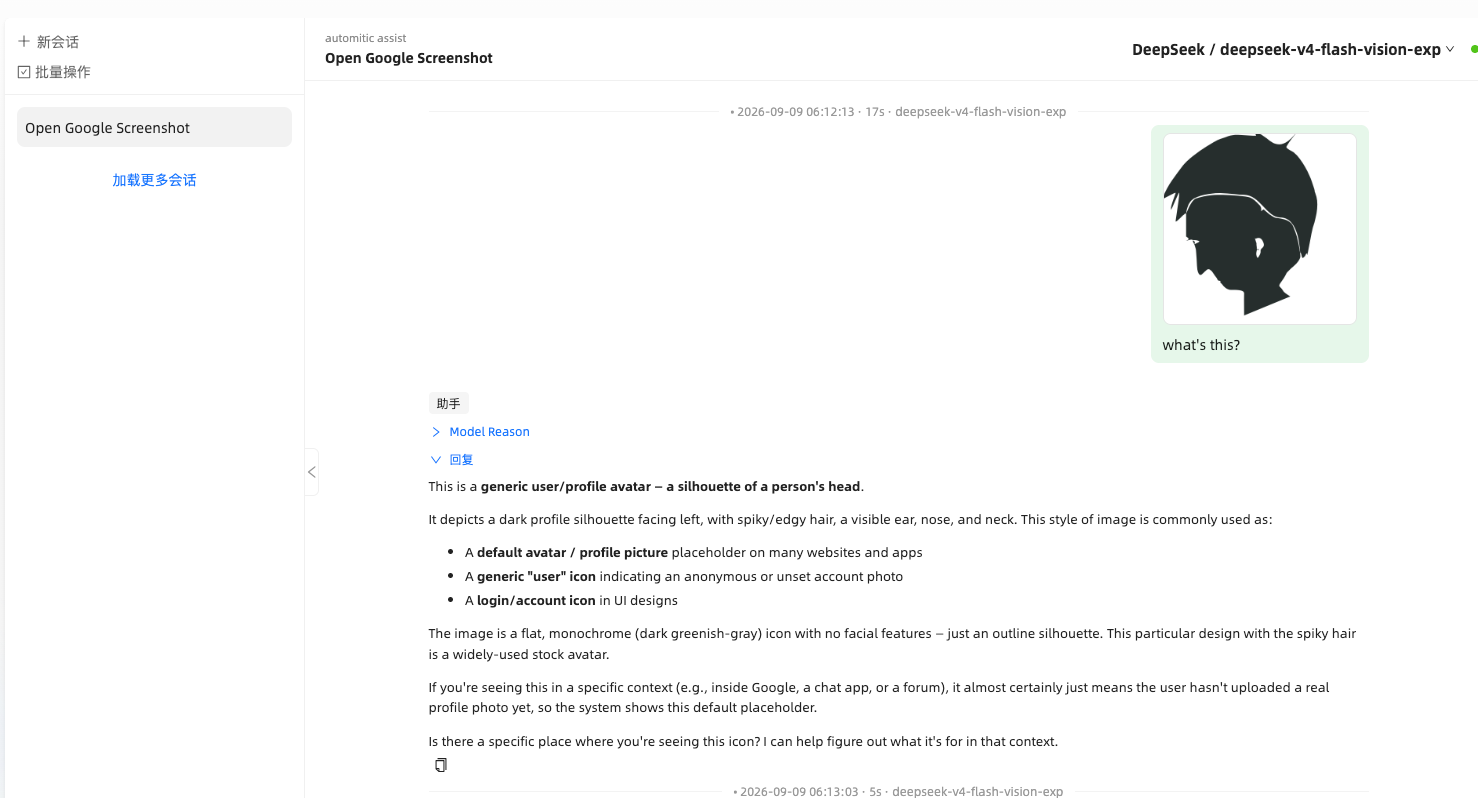
3.4a Image Recognition & Vision
Two vision paths share the same image part (text + image_url with a base64 data URL) understood by OpenAI-compatible providers:
- Chat image attachments —
POST /api/v1/files/uploadstores the file (chat-attachmentbucket) and returns afileKey; the send payload carries it, the run persists the reference (agent_run.attachments), and the timeline echoescontent.imagesso the main UI and widget render thumbnails with a click-to-zoom preview. Routes gate image support: onlysupports-attachment=trueroutes carry image parts; when no capable route exists the message degrades to plain text (with aREASONING_TOKENnotice) instead of failing. - Browser screenshots — after
screenshotthe tool result stores the image under thebrowser-screenshotbucket and itsfileKeyis injected as a USER observation message into the model's content, letting vision-equipped models plan the next action; the samefileKeyis parsed back from the tool artifact into the timeline tool card.GET /api/v1/files/{fileKey}resolves either bucket for the frontends.
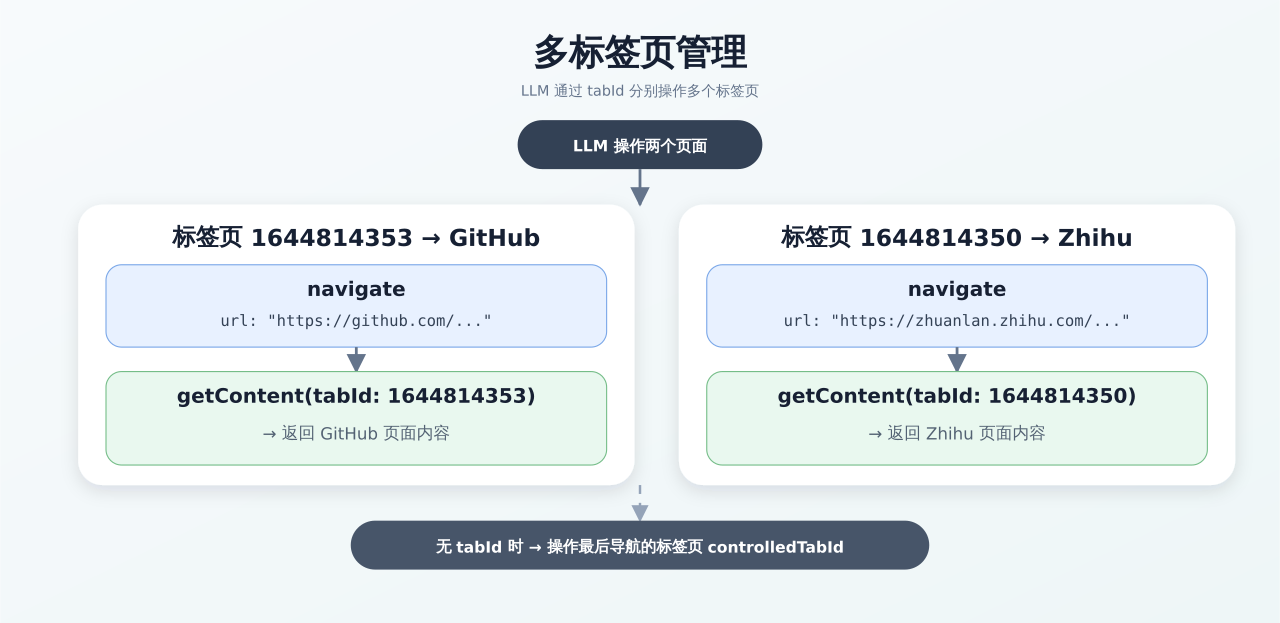
3.5 Multi-tab Management
Every tab the plugin navigates, opens, or follows (target=_blank / window.open) is aggregated into a single AgentSphere tab group (created once, recreated if the group is closed), so the browser stays organized during automation. Multi-tab following still auto-switches control to newly opened tabs.
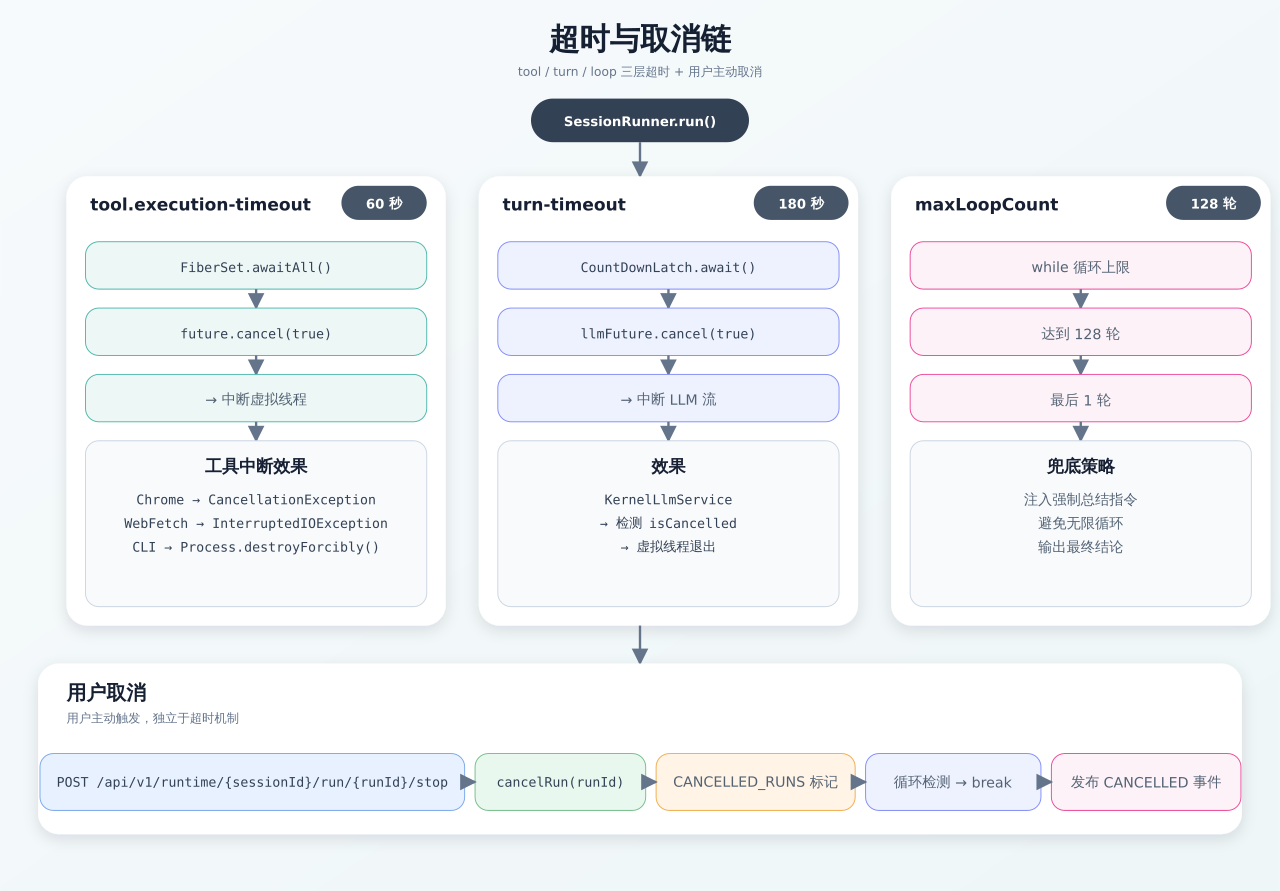
3.6 Timeout and Cancellation Chain
Stop/cancel is session-level: POST /api/v1/runtime/{sessionId}/stop stops the current run of the session regardless of which backend replica handled the request — no runId required. The cancel flag lives in Redis (runtime:cancel-session:{sessionId}) and the SessionRunner loop checks it at every cancellation point (loop top, after each turn, before/during/after tool fibers, and the LLM turn), terminating the run and publishing the cancel terminal event. The same endpoint also cancels a parked run — both AWAITING_USER (dismissing pending clarifications) and WAITING (cancelling the pending wait row). A parked run has already left the loop, so stopping it must write the terminal state directly rather than only setting the cancel flag: nothing would be left to consume that flag.
3.7 User-level Task Connection (Browser Plugin)
The extension no longer follows sessions. Instead it maintains a single per-user task SSE stream (/api/v1/runtime/user/task/stream) that receives every browser_operation command for the logged-in user (the backend fans out by the session owner, session.created_by).
- When it connects: on login (
auth/auth_tokenreported by the content script), on extension/service-worker startup, and after a failed/closed connection. The connection is held by an offscreen document (immune to MV3 service-worker suspension); the background alarm re-creates the offscreen document if the browser closed it, and the keepalive loop pulls credentials and reconnects. - Reconnect: the first 30 s retries once per second, then falls back to every 5 s; the count resets on success or a fresh login.
- Auth:
Authorization: Bearer <token>; the stream is registered underAuthContext.getUsername(), so a task's session must be owned by the same user to receive its commands. - Callbacks: command results are posted to
/api/v1/chrome/callback?sessionId=<cmd.sessionId>(the command DTO carries its own session id). Multi-replica: callbacks are broadcast over the Redis event bus so the executing replica's pending future always completes.
3.8 User Clarification (Human-in-the-Loop)
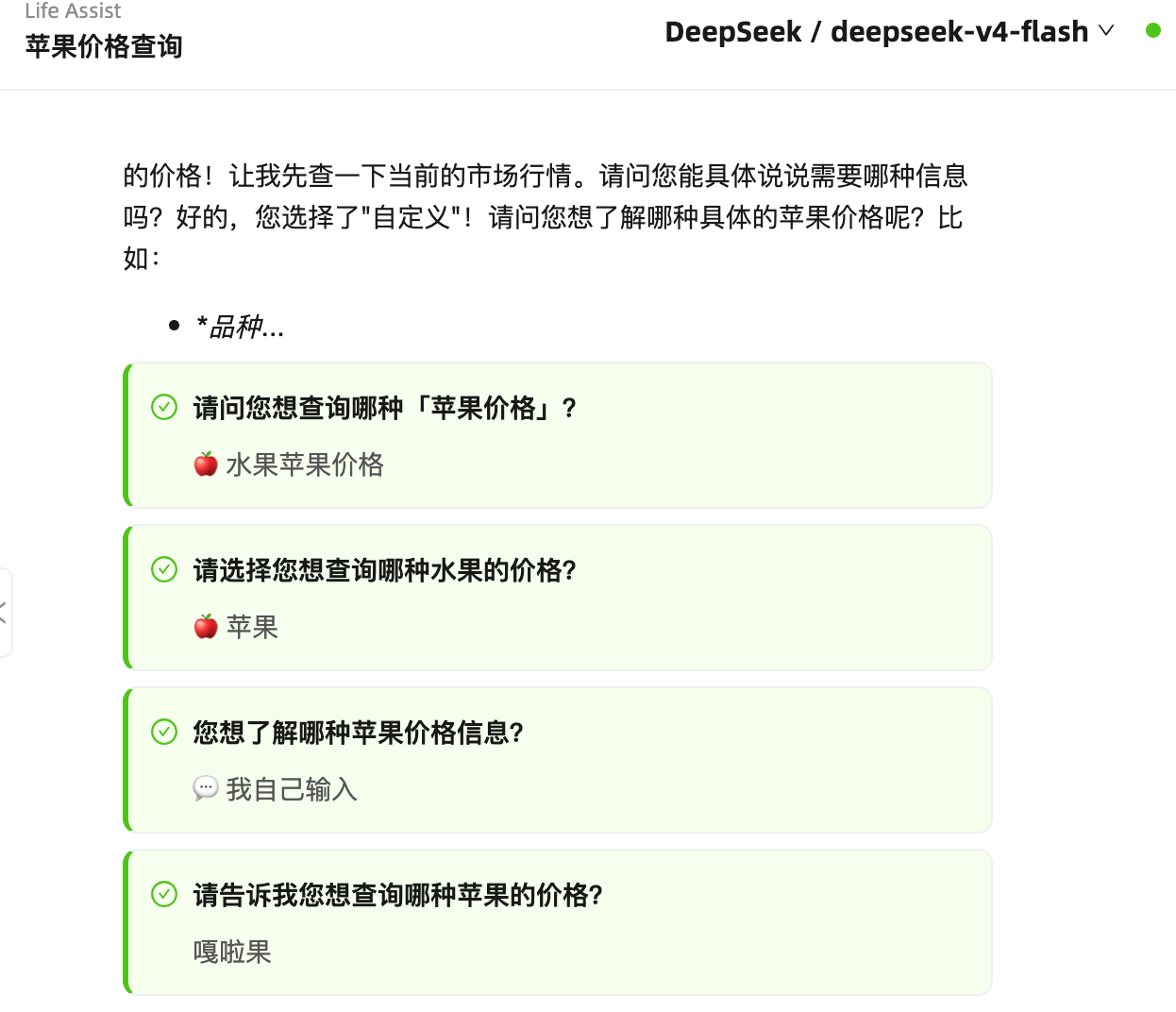
AgentSphere supports a User Clarification mechanism that enables the LLM to pause and explicitly ask the user for input when encountering ambiguous or decision-dependent situations, implementing a Human-in-the-Loop pattern.
Workflow
- LLM invocation: During execution, when the LLM needs user input (e.g., choosing between options, confirming actions, filling in missing info), it calls the built-in tool
ask_clarification. - Pause and notify: The run pauses and enters
AWAITING_USERstatus. Aclarification_pendingSSE event is pushed to the frontend along with the clarification card (type, title, options). - User response: The user can respond through the clarification card in the chat UI:
- confirm — Confirm/Cancel binary choice
- choice — Multiple choice selection
- input — Free-form text input
- Resume execution: The system receives the response and resumes the run, delivering
"[User Response to Clarification]: ..."to the LLM context. If the original run has ended, a new run is forked to continue.
Clarification Card (UI)
Cancellation
Users can cancel a pending clarification at any time:
- Cancel via card: Each clarification card has a Cancel button that sends a cancel signal and stops the run.
- Cancel via sender: The chat input shows a stop button while a run is active; clicking it issues a session-level stop (
POST /api/v1/runtime/{sessionId}/stop— no runId required), cancelling the current run and any pending clarifications. Both the main UI and the embeddable widget use this endpoint. - Auto-cancel on new message: Sending a new message while clarifications are pending automatically cancels them first.
SSE Events
| Event | Trigger | Effect |
|---|---|---|
clarification_pending |
LLM calls ask_clarification tool |
Clarification card appears |
clarification_responded |
User submits response | Card shows ✓, run resumes |
clarification_expired |
30-minute TTL reached | Card grays out |
clarification_dismissed |
Run cancelled while awaiting | Card shows dismissed |
3.8a Wait Tool (Suspend–Resume)
wait (builtin_10) is a built-in that does not block. The tool body only writes one agent_pending_wait row and returns {"status":"waiting"} immediately; SessionRunner then breaks out of the loop and the run sits in the parked state WAITING until the timer fires, at which point the original run is resumed.
Why park instead of sleep. A regular tool must finish inside one tool.execution-timeout (60s) box, so "wait longer than 60s" is simply unsatisfiable. Parking puts the wait outside that box: it holds no virtual thread, no maxParallel semaphore slot, and no tool/step timeout. FiberSet needs no change at all — the suspension decision lives entirely outside the loop, exactly as ask_clarification proved.
How the model is told. Waking is not guaranteed, so the description forces the model to re-read the result with getContent first and forbids repeating the same wait — the same "re-verify after waiting" discipline getContent(mode=ready) uses.
| Property | Value |
|---|---|
| Row status lifecycle | PENDING → RESUMED (claimed) / CANCELLED / FAILED |
| Bounds | clamped to MIN_WAIT_MS = 100 … MAX_WAIT_MS = 600000 (10 min) |
| Wake path 1 | PendingWaitWakeScheduler — one in-memory timer per row |
| Wake path 2 | WaitWakeTask — cron every 10s, Redisson lock scheduler:pending-wait (a replica restart loses the in-memory timers) |
| Rescue | WaitingRunReconciler — sweeps WAITING runs older than wait.reconcile-stale-minutes |
| Resume retries | up to MAX_RESUME_ATTEMPTS = 5 |
Both wake paths claim with a single conditional UPDATE ... WHERE status='PENDING', never "select then update" — without the CAS, a timer and the cron firing at the same moment would resume the same run twice. The CAS is also what forces a failure path: once a row is RESUMED, listDue and claimForResume will never pick it up again, so a resume that throws would strand the run in WAITING forever. resumeFromWait therefore returns a ResumeOutcome (RESUMED / SKIPPED / ERROR) instead of swallowing the exception, and the caller decides: ERROR requeues the row to PENDING with attempts+1 plus a last_error, and once the retry budget is exhausted the row is marked FAILED and the run receives a terminal event so the UI does not hang on "running".
Two boundaries that are easy to get wrong:
- Once
asyncHandleUserMessagereturns, the resume is committed — nothing may roll the run back toWAITINGafterwards. Rolling back would put the row back inPENDING, let the cron claim it again, and submit a second concurrent loop for the same run. Failures before the submit must roll back, or the run is leftRUNNINGwith no loop driving it and every later retry is misjudged asSKIPPED. - The tool-success bookkeeping event is best-effort: it swallows its own exceptions and can never fail the resume.
WAITING is a real run state, so it is wired through the whole state machine — the run row, the run_waiting SSE event, the UI, the stop button and the session-cleanup guard. Two deliberate asymmetries: WAITING is in the frontend's pull-trigger set (so the panel refreshes to "waiting") but not in the terminal set (so the composer stays locked), and the stop button must set the terminal state directly rather than only setting a cancel flag, because the parked loop has already exited and nothing would consume that flag. Sub-agents must have wait stripped from their toolset — the suspension decision exists only in the main loop, so leaving it enabled creates a pending row that nobody ever claims.
3.8b Todo Plan & Skill Linkage
The todo list is the single source of the plan, maintained by the model through the todowrite tool and persisted in agent_session_todo. Reading a skill is a pure read: it never mutates the plan. (An earlier implementation seeded todos from a skill on get; it was removed because it replaced the model's own plan as an invisible side effect.)
todowrite is a full replacement — the model must resend the complete list every time, since a delete-then-insert implementation would otherwise silently drop items the model omitted.
| Scenario | Behaviour |
|---|---|
| No skill | The model builds its own plan. |
| The skill is the whole plan | Todos are laid out as N. <title> / N.M <title> from ## stepN / ### stepN.M. |
| The skill covers some steps | The existing plan is kept; only the source fields are back-filled. |
Each todo item carries a structured source pointer rather than a text link: skillId + stepId (V84, agent_session_todo.skill_id / step_id, with stepId holding the raw identifier as it appears in the heading). When the model works an item it looks the body back up with skill_library(action=get, skillId=…, sectionHeading=stepId) — heading matching is a case-insensitive substring match, and requesting an H2 section returns its H3 children with it. A sub-agent inherits the full toolset and the parent model route, with an optional agentRef=instance:<id> prefixing its system prompt.
No aggregation is needed when several skills are involved: every item carries its own source pointer, so there is no longer a "current skill" to keep in sync.
3.9 Delegate: Multi-Agent Delegation & DAG Orchestration
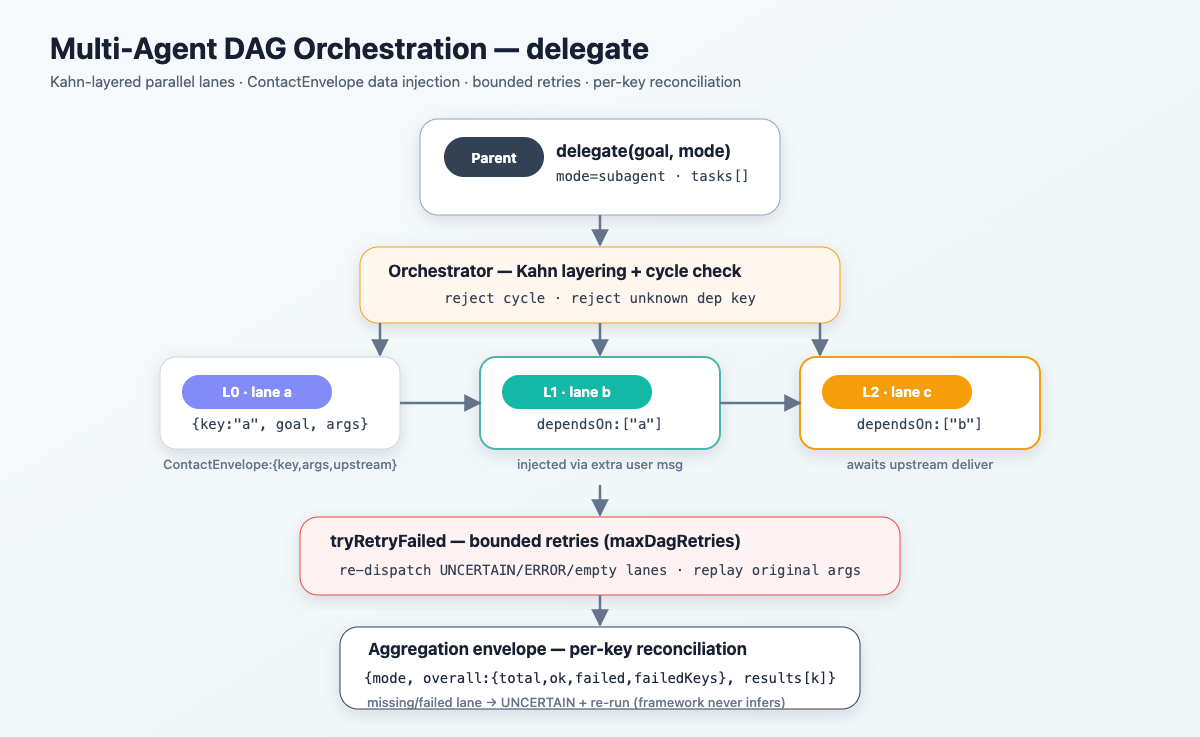
delegate is the single pseudo-tool execution entry for delegated work, always wired to the main agent (whenever delegate.enabled) and to skill execution. Skills are not direct tools: the agent first discovers/inspects a skill via skill_library (builtin_8), then executes it through delegate — the two-stage discover → execute flow (see DELEGATE WORKFLOW in the system prompt).
Execution modes
mode=main— run inline in the current loop: no sub-agent, no depth increase. Default unless isolation is warranted.mode=subagent— isolate into aSessionSubRunnersub-agent: a restricted child LLM loop with its own reasoning/reply and tool calls. It inherits the full toolset and the parent model route; an optionalagentRef=instance:<id>prefixes its system prompt. Rendered as inline sub-agent cards in the chat and the widget.
Isolation is reserved for noisy intermediate context, long-running work, or independent parallel lanes; simple work should be finished inline.
Task DAG (tasks[], requires mode=subagent)
- Each task has
key/goal(required), optional per-taskargs,agentRef, anddependsOn(upstream task keys). - The orchestrator runs a Kahn topological layering: lanes in the same layer run in parallel (up to
maxParallel); a lane is dispatched only once all itsdependsOnlanes delivered OK (DELIVERED_OK). Cycles and unknown dependency keys are rejected up front. - Data injection — each lane receives a
ContactEnvelope(v1-delegate-contact):{laneKey, args, upstream, upstream_visible, upstream_raw, truncated}. Task-privateargsand the resolved upstream results are injected as deterministic JSON (rendered as an extra user message, with a recursive inline fallback inSubAgentPolicy); oversized upstream is truncated per-key, but the envelope itself always stays complete and parseable.
Lane output contract (delegate-lane/v1)
Business fields stay at the top level; all framework fields live under a top-level _meta object:
{"<business fields>": "...",
 "_meta": {"contract":"delegate-lane/v1",
           "status":"OK|ERROR|UNCERTAIN",
           "verdict":"COMPUTED|UPSTREAM_MISSING|CLAIM_UNVERIFIABLE",
           "errorCategory":"...", "upstream_visible":true,
           "upstream_raw":"...", "retryCount":0, "reason":"..."}}
Delivery is gated only on _meta.status=="OK"; a lane without _meta is treated as UNCERTAIN (strict mode — bare business JSON never counts as delivered). The framework never reads or writes top-level business keys.
Orchestration pipeline
- Cycle detection and dependency-key validation.
runDagLayers— first pass with unbounded dependency layering; a lane already dispatched (whatever its outcome) is never re-dispatched here.tryRetryFailed— bounded retries (maxDagRetries): only re-dispatches lanes that returned UNCERTAIN/ERROR/empty, each with a targeted corrective hint (replaying the original args).- Aggregation envelope —
{mode, overall, results[]}:overall = {total, ok, failed, failedKeys, fencedKeys}; the parent reconciles per-key, treating any missing/failed lane asUNCERTAINto re-run — never inferred.- each
results[k]={key, result, meta, raw, durationMs, retryCount, fenced};resultis the business JSON with the top-level_metastripped (nullon failure),metaholds the framework metadata,rawis the original lane text.
Key delegate.* config: enabled, maxDagTasks, maxDagRetries, maxParallel, maxNestedDepth, maxSubLoopCount, executionTimeout, and prompt/envelope byte budgets.
4. Administration — Operations and Management
4.1 Configuration Reference
The keys you are most likely to touch, all under buukle.agent.*. This is a subset — the complete reference (every buukle.agent.* and hri-ai.* key, including wait, mcp, audit, crypto, lock, delegate and the web-fetch/Jina tuning blocks) is in CONFIG_REFERENCE.md, which is the source of truth.
| Config Item | Default | Description |
|---|---|---|
session.idle-timeout |
30m | Session idle timeout |
session.max-concurrent-runs |
10 | Maximum concurrent executions |
runner.max-loop-count |
128 | Maximum loop count per run (§3.1a) |
runner.task-max-loop-count |
2000 | Higher loop limit for task-triggered runs (§3.1a) |
runner.turn-timeout |
660s | Single LLM turn timeout (must exceed stream-timeout) |
runner.llm-turn-max-retries |
3 | Per-turn retries with exponential backoff (§3.1b) |
runner.compaction.budget-ratio |
0.7 | Compaction trigger threshold (ratio of maxInputTokens) |
llm.stream-timeout |
600s | Total streaming call timeout |
tool.max-parallel |
3 | Maximum parallel tool executions |
distributed.owner-lease |
5m | Session executor owner lease (multi-replica takeover) |
distributed.orphan-sweep-interval |
30s | Orphan-run sweep interval (stale owner → FAILED → re-wake) |
hri-ai.tasks.min-timeout-seconds |
10800 | Task timeout floor, 3h (§5.2) |
4.2 Observability
AgentSphere provides a three-tier observation system:
4.2.1 Real-time Events (SSE Events)
Real-time push of LLM call chain:

content_token     → "The weather in Guangzhou tomorrow..."
reasoning_token   → "🤔 The user is asking about weather, I need to open a weather website"
                  → "⚙️ navigate: calling..."
                  → "⚙️ navigate: succeeded ✅"
                  → "⚙️ getContent: calling..."
                  → "⚙️ getContent: succeeded ✅"
                  → "⏹️ Run cancelled" or "✅ Run completed"
| SSE Event | Trigger | Frontend Effect |
|---|---|---|
content_token |
LLM text generation | Typewriter effect |
reasoning_token |
LLM reasoning, tool status | Reasoning panel |
browser_operation |
Chrome operation command | Extension execution |
run_running |
Run starts | Status indicator |
run_completed |
Run completes | Completion notification |
run_failed |
Run fails | Error prompt |
run_cancelled |
Run cancelled | Cancellation notice |
run_awaiting_user |
Run pauses for clarification | Set to AWAITING_USER |
run_waiting |
Run parks on the wait tool |
Set to WAITING (auto-resumes when the timer fires) |
tool_call_started |
Tool PENDING | Tool call list |
tool_call_in_progress |
Tool running | Running icon |
tool_call_succeeded |
Tool completes | ✅ icon |
tool_call_failed |
Tool fails | ❌ icon |
compaction_running |
Compaction starts | Reasoning panel |
compaction_completed |
Compaction completes | Reasoning panel |
compaction_failed |
Compaction fails | Reasoning panel |
session_updated |
Session title changes | Live title sync |
clarification_pending |
LLM asks for user input | Clarification card (confirm/choice/input) |
clarification_responded |
User responds | Card shows ✓, run resumes |
clarification_expired |
Clarification TTL expires | Card shows expired |
clarification_dismissed |
Run cancelled while waiting | Card shows dismissed |
Sub-agent activity reuses the same content_token / reasoning_token / tool_call_* events, distinguished by a subAgentRunId on the payload; the frontend aggregates these live into the inline sub-agent cards.
Model reasoning (
reasoning_token) is persisted toagent_run.reasoningat run end, so both the main UI and the embeddable widget render the thinking in session history (not only live). The widget drives it live through the same per-session/api/v1/runtime/{sessionId}/streamSSE channel.
4.2.2 Run Activity API
Provides complete tool call history querying:
GET /api/v1/instance/runs/{runId}/activities?offset=0&limit=20

Response:
{
  "total": 20,
  "records": [
    { "activityType": "llm_interaction",
      "modelName": "deepseek-v4-flash",
      "interactionType": "CHAT_REPLY",
      "durationMs": 2588,
      "requestBody": "{...}",
      "responseBody": "{...}",
      "success": true },
    { "activityType": "tool_call",
      "toolName": "builtin_5",
      "displayName": "builtin.CapabilityBuiltinToolChrome",
      "argumentsJson": "{...}",
      "artifact": "{...}",
      "status": "SUCCEEDED" }
  ]
}
Run interactions (list view):
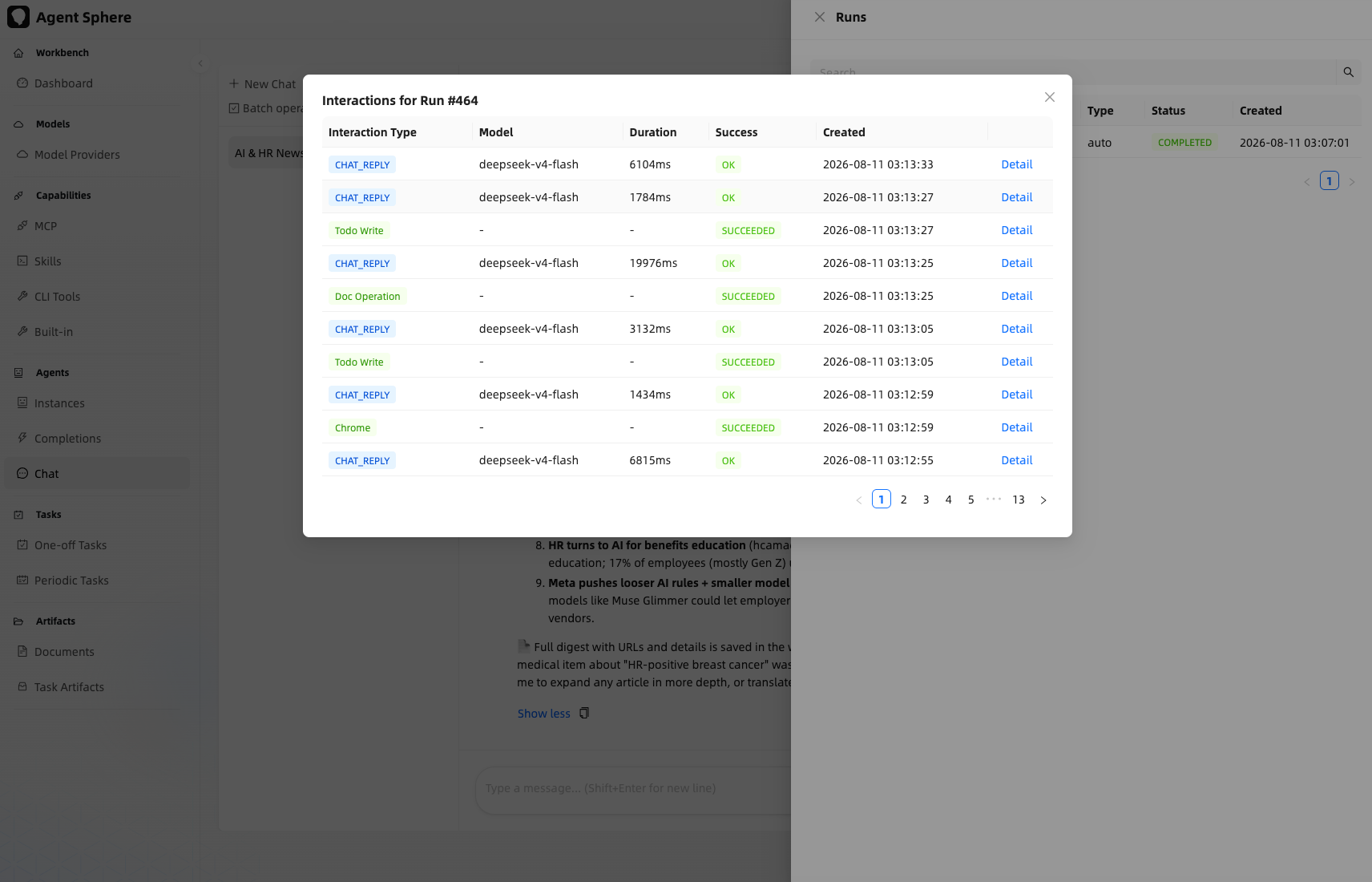
Run interaction detail:
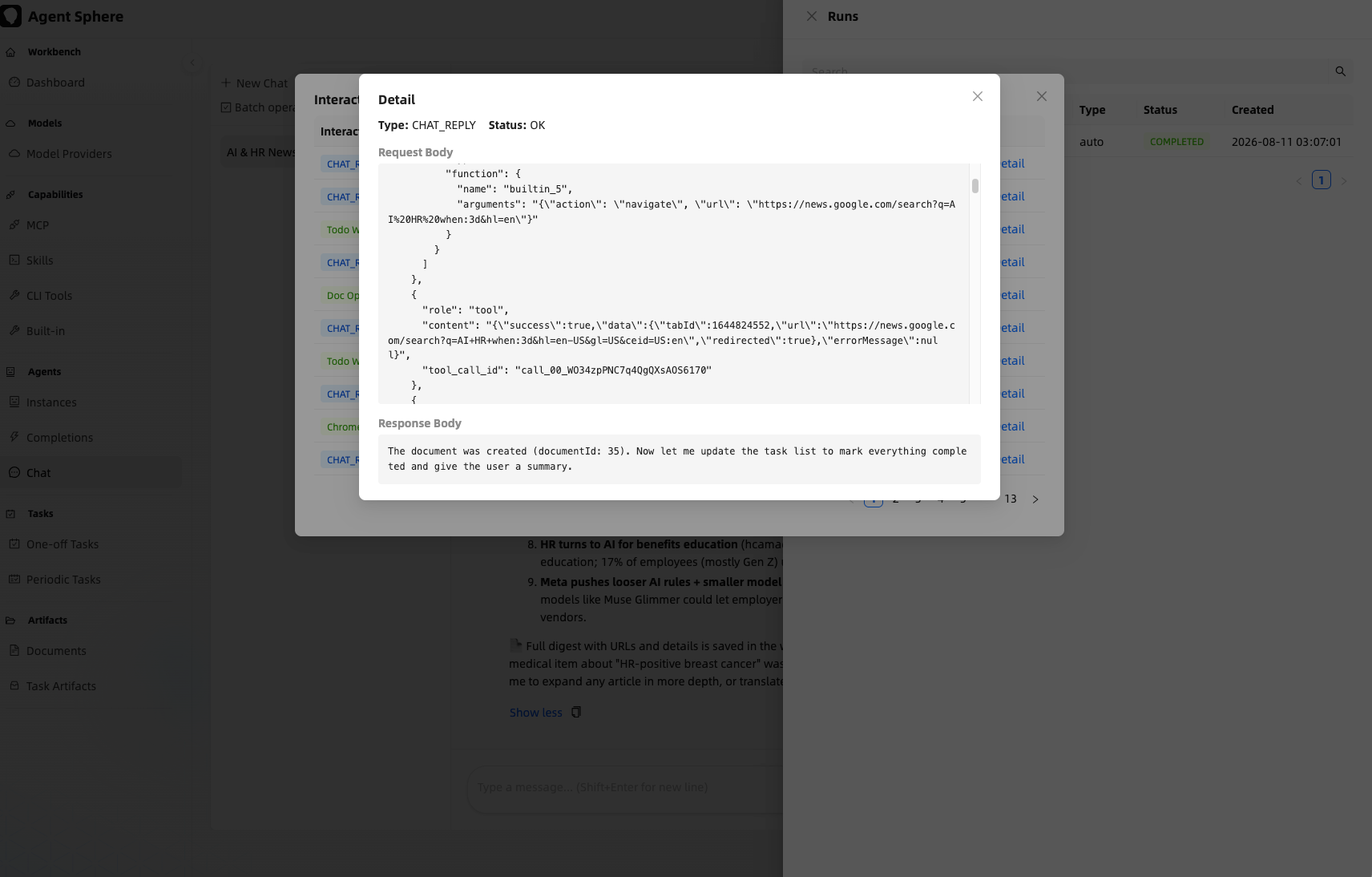
Why a run failed is persisted (agent_run.error_message, V87). Every terminal FAILED publisher already carries a reason in its event — a failed LLM turn, a submit-time validation/context failure, the orphan sweeper, and the stuck-WAITING rescuer — so RuntimeEventListener's FAILED branch is the single sink that writes it down. Before this, the listener wrote only the status and dropped the event's errorMessage, and the table had no column for it, so a failed run left no reason at all.
Troubleshooting heuristics — the interactions table is the other half of the story, but it is easy to misread:
- A model endpoint returning an immediate error shows up as
prompt_tokens IS NULL AND duration_ms < 1000on aCHAT_REPLYrow. That signature is how a burst of upstream failures is identified. response_body = '{}'is not an error signal. A turn that returns only tool calls with no prose legitimately has an empty body; that is a normal turn.- Provider errors arrive as an event, not an exception, so
successused to staytruefor exactly the failures that kill runs.KernelLlmServicenow records the event error too, which also flips the corresponding assistant timeline row to failed. That is intended — the turn genuinely failed, even if a retry later recovered the run.
4.2.3 Session Panel
| View | Content |
|---|---|
| Run List | View historical runs by session, showing userMessage + assistantReply |
| Tool Call List | Latest tool call records for the current session (sorted by creation time descending) |
| Todo List | Todo checklist for the current session, with status tracking |
| Operation Log | Historical operation records in the Chrome Extension popup |
4.3 Logging System
| Logger | Level | Purpose |
|---|---|---|
ControllerLogAspect |
INFO | API request/response logging |
ChromeCallbackController |
WARN | Browser operation failures |
FiberSet |
WARN | Tool timeout/failure |
SessionRunner |
INFO | Execution turns and status |
LlmInteractionPersistListener |
DEBUG | LLM interaction record persistence |
RuntimeEventListener |
DEBUG | Tool call lifecycle events |
4.4 Key Deployment Steps
# 1. Build the backend
cd agent-sphere
mvn compile -pl agent-sphere-bootstrap -am

# 2. Start the backend
mvn spring-boot:run -pl agent-sphere-bootstrap

# 3. Start the frontend
cd agent-sphere-ui
npm run dev

# 4. Load the Chrome Extension
# Chrome → chrome://extensions → Developer mode → Load unpacked
# Select the agent-sphere-chrome-extension directory
# (declares <all_urls>: read & change data on all sites, granted at install)
# Runtime files: manifest.json, background.js (ESM) + lib/*, content.js + content-locator.js,
# page-script.js (MAIN-world auth/session bridge), offscreen.html/js (SSE host), popup.html/js.
# Permissions include `offscreen` and `tabGroups` (plugin tabs auto-group under "AgentSphere").

# 5. Configure URLs
# Click the extension icon → Settings Tab
# Frontend URLs (widget host pages, multiple allowed): https://bole.buukle.top
# Main URL (main site):                             https://as.buukle.top
# Backend URL:                                      https://as.buukle.top
# The popup shows a single "Task" connection badge; the User row shows provider@subject
Updating the extension. It is installed via Load unpacked and
manifest.jsonhas noupdate_url, so Chrome does not auto-update it. To update: download the latest zip from the GitHub Release, replace the directory, thenchrome://extensions→ Reload (or restart Chrome). The popup shows the current version and turns on a banner when the backend'splugin.min-extension-versionis higher than the installed one. Settings saved before the https switch are migrated automatically on the next service-worker start — only the two former default addresses (http://bole.buukle.top,http://as.buukle.top) are rewritten; custom URLs are kept.
4.5 Architecture Decision Records (ADR)
| Decision | Solution | Reason |
|---|---|---|
| SSE vs WebSocket | Server-Sent Events | One-way push requires no client confirmation, natively supported by browsers |
| fetch+ReadableStream vs EventSource | fetch + ReadableStream | EventSource cannot carry Authorization headers in MV3 Service Worker |
| Virtual Threads | Java 21 Virtual Threads | Simplifies concurrency model, one virtual thread per tool |
| Chrome Extension standalone deployment | Independent project | Decoupled from Web UI, permission isolation |
| Multi-emitter SSE | List<SseEmitter> per session |
Web UI and Extension share the same SSE channel |
| FiberSet cancel(true) | CompletableFuture.cancel(true) |
Effectively interrupts blocking virtual threads on timeout |
| Tool result write-time compression | RuntimeEventListener compresses then writes to compressed_artifact |
HistoryLoader reads without re-compression, reducing redundant computation |
| Token budget-based compaction trigger | shouldCompact inside runTurn's execute callback |
Uses the actual called model route's maxInputTokens for accuracy |
| Compaction cursor | compactedUptoRunId marks compacted runs |
HistoryLoader skips compacted runs, only loads subsequent ones |
| Compaction protection loop | Max 3 retries | Prevents infinite loops when compaction fails due to network fluctuations |
| Redis event bus | Redisson RTopic topics (runtime.events / runtime.agui / runtime.chrome.*) |
Multi-replica SSE / AG-UI / Chrome delivery; SSE event cache in Redis for cross-replica reconnect replay (single-writer, write-before-publish) |
| Distributed runtime state | Redis state + owner lease (SessionRunCoordinator), Redis queue/steer (SessionInputManager), Redis cancel sets, OrphanRunSweeper |
Run executes on one replica but input/state/cancel survive; stale owner → run FAILED → re-wake. Makes replicas: 2 safe |
| Session-level stop | POST /api/v1/runtime/{sessionId}/stop |
Cancel by session, no runId; works across replicas (loop checks Redis cancel set, incl. parked AWAITING_USER runs) |
| Task polling DB-ized | @Scheduled sweep + conditional claim (polled_at/poll_phase) + single-winner terminal update |
Task polling survives replica restarts; no in-memory poller |
4.6 Performance Optimizations
4.6.1 Virtual Thread Concurrency
The runtimeAsyncExecutor was changed from a fixed thread pool (8 core threads) to per-task virtual threads. Previously, the thread pool bottleneck limited concurrent chat sessions to 8 — all pool threads blocked waiting for LLM streaming responses, causing subsequent requests to queue or get rejected. Virtual threads resolve this by being unmounted from the carrier thread during I/O waits, allowing hundreds of concurrent LLM streaming sessions without consuming OS thread resources.
File: AsyncConfig.java
4.6.2 LLM Stream Timeout Fix
Restructured KernelLlmService.stream() so the CountDownLatch.await(timeout) runs independently from the blocking modelProviderSpi.stream() call. Previously, if the HTTP stream hung, the timeout could never fire because the latch wait was placed after the blocking call.
The fix: the streaming call runs on a separate virtual thread while the current thread waits for the latch with the configured stream-timeout. On timeout, the CompletableFuture completes exceptionally immediately, freeing the caller.
File: KernelLlmService.java
4.6.3 HTTP Stream Read Timeout
Added a read timeout mechanism in ModelProviderServiceImpl.streamEvents():
- Changed from synchronous
httpClient.send()tosendAsync().orTimeout()for initial response timeout - Added a scheduled
Thread.interrupt()for the streaming body read loop - Both use the
stream-read-timeout(default 120s) configuration value
File: ModelProviderServiceImpl.java
4.7 Capability Extension
Adding a New Built-in Tool
@Component
public class CapabilityBuiltinToolMyTool implements CapabilityBuiltinToolSpi {
    @Override
    public BuiltinToolEnum getToolType() { return BuiltinToolEnum.MY_TOOL; }

    @Override
    public ToolInfoVO getInfo() {
        ToolInfoVO info = new ToolInfoVO();
        info.setName(BuiltinToolConstants.NAME_PREFIX + "MyTool");
        info.setDescription("Description for LLM");
        info.setParamSchema(ToolSchemaUtil.generateParamSchema(MyToolDTO.class));
        info.setResponseSchema(ToolSchemaUtil.generateParamSchema(MyToolResultVO.class));
        return info;
    }

    @Override
    public ExecuteResult execute(ExecuteContext ctx) {
        MyToolDTO dto = (MyToolDTO) ctx;
        // Implementation logic
        return new MyToolResultVO(/* result */);
    }
}
4.8 RBAC (Role-Based Access Control)
AgentSphere provides a complete RBAC permission system for multi-user management, supporting fine-grained permission control at the API level.
Permission Model
| Component | Description |
|---|---|
| User | System users, each assigned one or more roles |
| Role | A named collection of permissions, e.g., "Admin", "Operator", "Viewer" |
| Permission | Single API operation, encoded as domain:action (e.g., admin:user:read, instance:run:write) |
The permission check is enforced at the controller layer via @WithTenant and AuthContext to ensure multi-tenant data isolation.
Row-level data isolation: beyond RBAC, non-super-admin reads are rewritten by DataPermissionInterceptor to append AND created_by = <username> on every SELECT (except agent_user). This is what keeps each user's private resource copy (instances, completions, tasks, task artifacts, …) isolated.
Administration UI
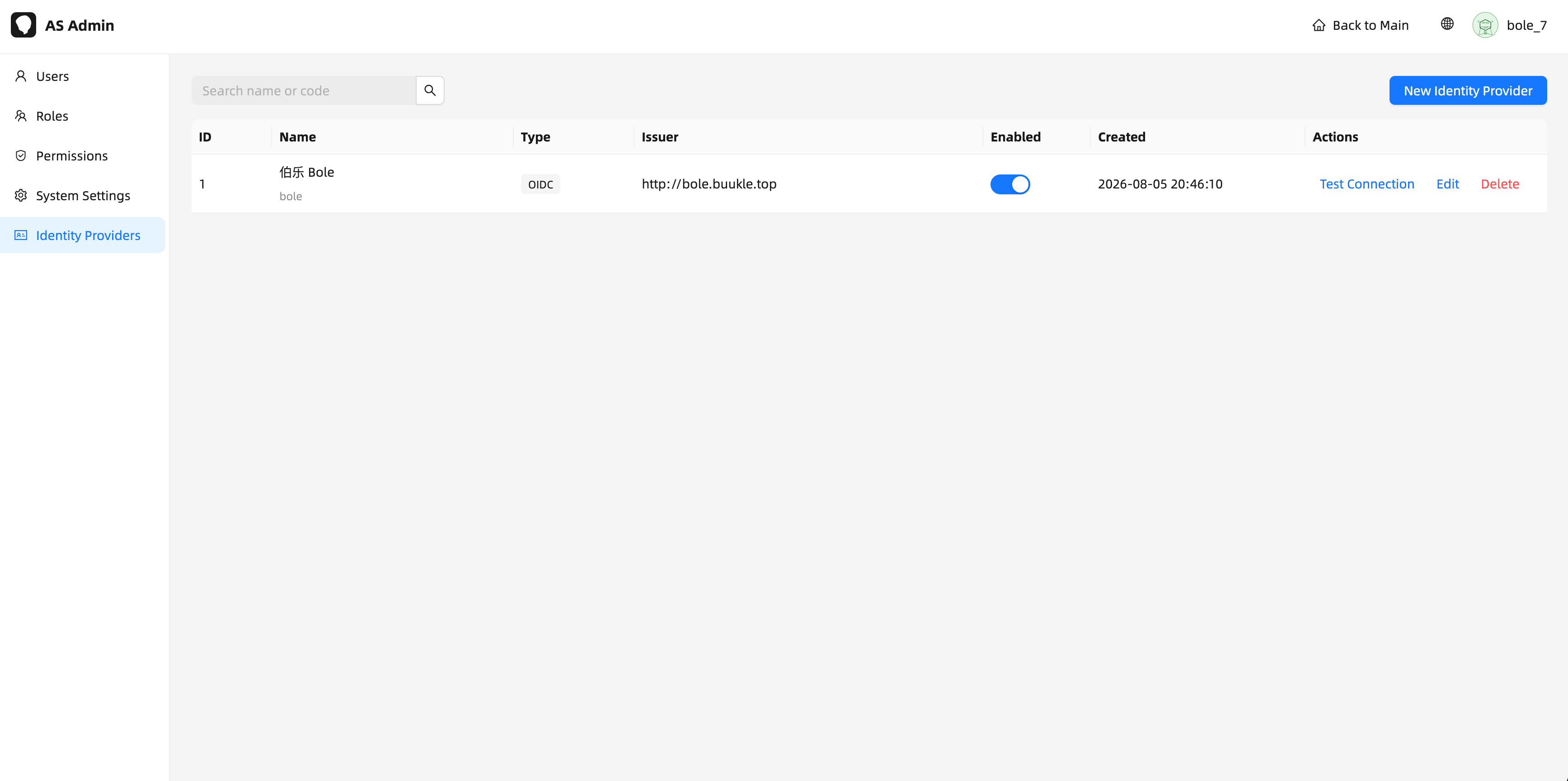
RBAC, system configuration, and OIDC identity providers are all managed from a single System Admin console (users, roles, permissions, identity providers / SSO, system config):
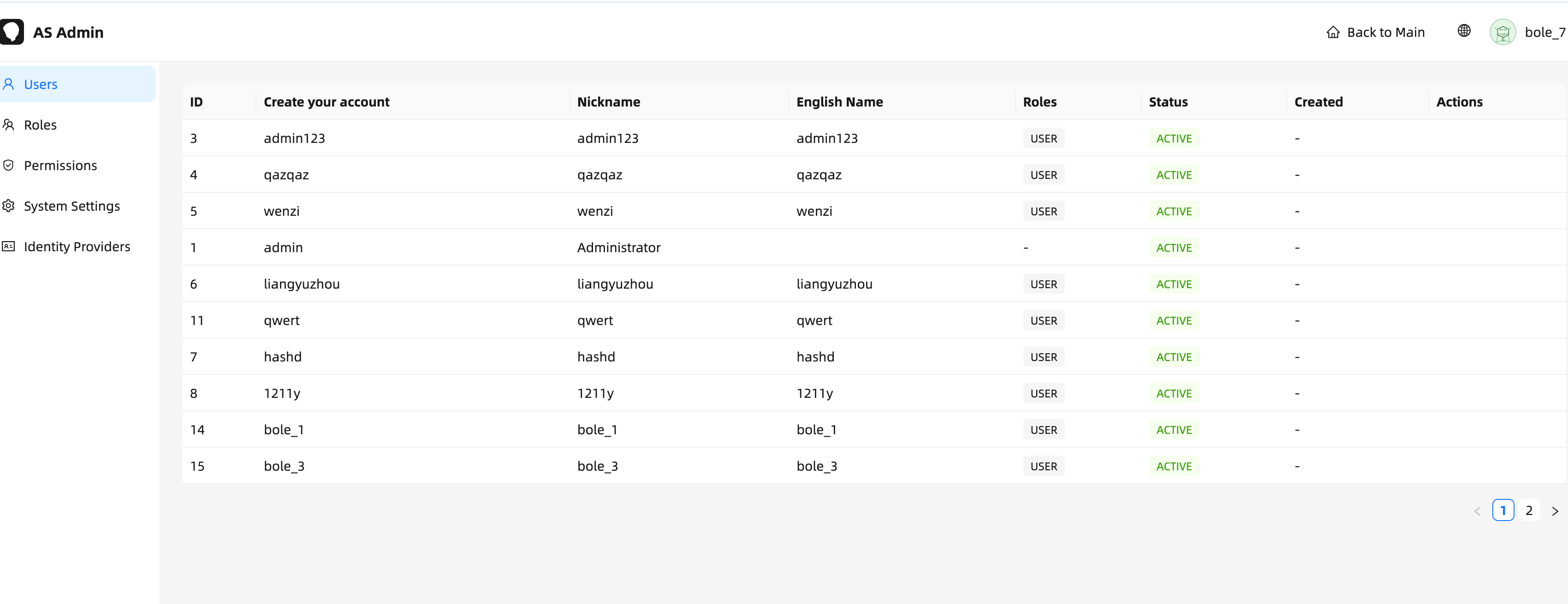
- User Management — create/view users and assign roles
- Role Configuration — create roles and bundle permissions
- Permission Assignment — grant/revoke
domain:actionpermissions per role
Skill Hub permissions: capability:skill:publish (publish/unpublish a skill to the Hub) and capability:skill:install (fork a Hub skill into your own skills) — both seeded to the USER role.
4.9 Audit Log
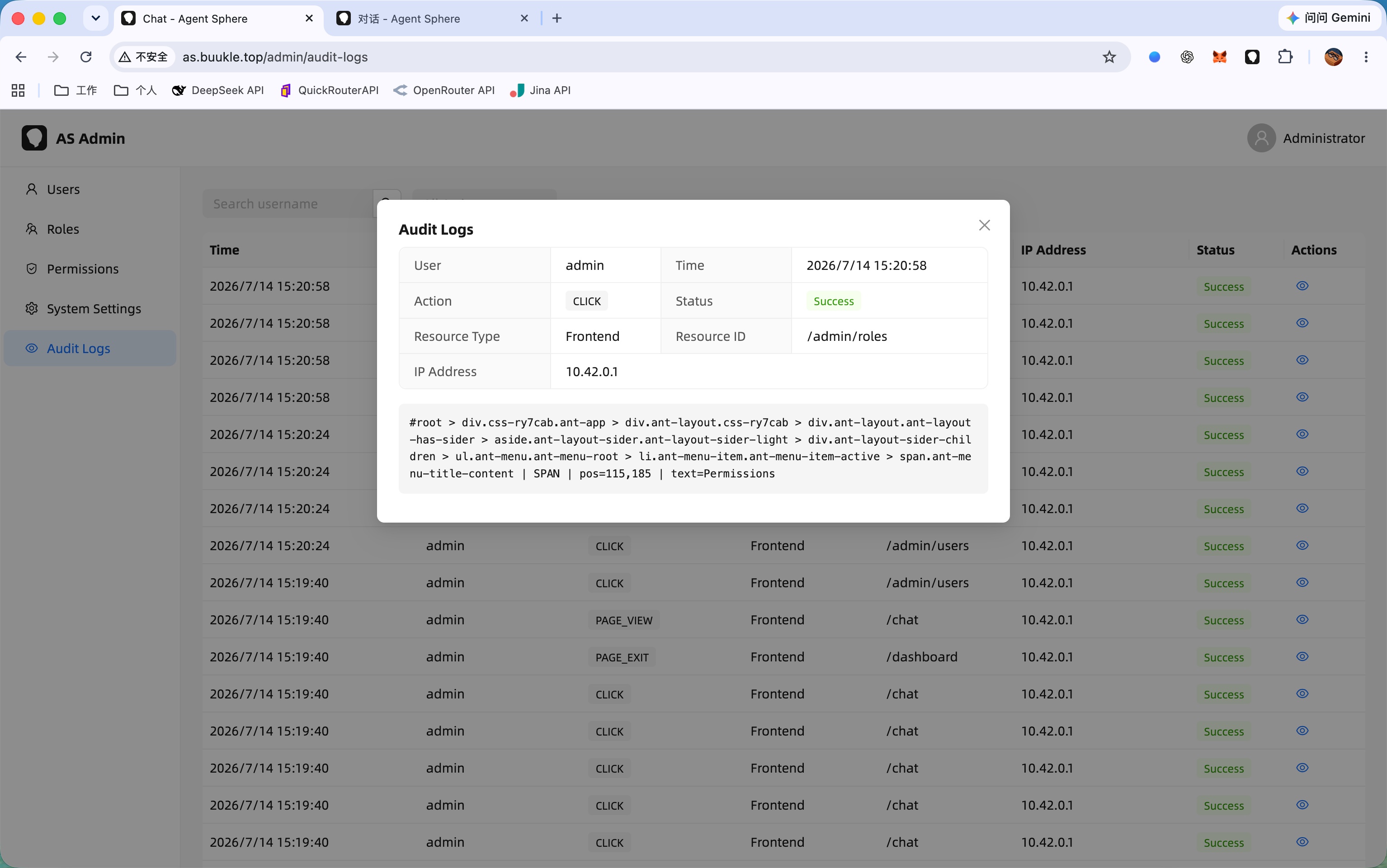
AgentSphere records all user operations as audit logs for security review and troubleshooting.
Recorded Operations
| Category | Operations |
|---|---|
| User Management | Login, logout, password change, profile update |
| Role/Permission | Role create/update/delete, permission assignment |
| Instance | Create/update/delete agent instances |
| Model Provider | Provider create/update/delete, API key management |
| Capability | MCP/Skill/CLI capability create/update/delete |
| Session | Session create/delete, message sending |
Audit Log UI
4.10 Multi Authentication Sources (OIDC SSO)
AgentSphere supports multiple OIDC identity providers so third-party business systems can sign users in without managing passwords locally. Each provider maps to an independent local user (provider_code + subject); no cross-provider merging is performed.
SSO Login Flow
- User clicks sign-in →
GET /api/v1/auth/sso/authorize?provider=<code>&redirect_uri=... - Backend validates the provider is enabled, generates PKCE (
S256) +state+nonce, and redirects to the IdP. - IdP authenticates → redirects back to the backend callback (
/api/v1/auth/sso/callback). - Backend exchanges the code, verifies the id_token (issuer / audience / RS256 signature via JWKS), JIT-provisions the user, and redirects with a one-time
otc. POST /api/v1/auth/sso/exchangeswapsotcfor a local token.
Managing Identity Providers
Open System Admin → Identity Providers to manage providers from the UI (no SQL) — the same admin console shown in §4.8:
| Field | Description |
|---|---|
| Code | Unique provider identifier — must match the provider passed to authorize (e.g. business) |
| Name | Display name |
| Issuer | OIDC issuer URL |
| Client ID / Client Secret | Confidential-client credentials; the secret is encrypted at rest (AES-GCM) and only a masked value is ever returned |
| Authorization / Token Endpoint | IdP endpoints |
| JWKS URL | Public key set used to verify id_token signatures |
| Scopes | e.g. openid email profile |
| Enabled | Toggle login for this source on/off |
Each provider can be connection-tested (POST /api/v1/admin/identity-providers/{id}/test): it fetches the JWKS and hits the token endpoint with an intentionally-invalid grant — any 4xx means reachable, network errors/5xx fail.
Permissions: admin:identity-provider:read/create/update/delete (seeded to ADMIN and USER roles).
IdP Requirements
- OIDC authorization code flow with a confidential client (client secret).
- PKCE (
S256) andnoncesupport. - id_token signed with RS256, verifiable via the public JWKS URL.
- Redirect URI registered at the IdP:
<backend-origin>/api/v1/auth/sso/callback.
Default Role & Resource Template
| Field | Description |
|---|---|
default_role_id |
Role granted to newly provisioned SSO users (replaces the default USER role) |
resource_template |
JSON array (see §4.12); empty uses the built-in default |
On a user's first login the callback provisions the local user (with the default role) and then asynchronously generates the user's private resource copy from the provider template — model provider, api key, model route, completions (with schema/prompt), instance (auto-bound with the built-in browser tool), MCP, skill, and document — each owned by the user (created_by = username). Provisioning never blocks login; a failure is logged and the user keeps their account. Row-level isolation (every SELECT is rewritten with AND created_by = <username>) keeps each user's copy private.
Display Name (provider@subject)
The identity provider's preferred_username/name is stored as display_subject and refreshed on every login. The UI (main site and admin console) shows the user as provider@subject (e.g. bole@elvin); GET /api/v1/sso/me returns {providerCode, subject}.
4.11 Embeddable Chat Widget
agent-sphere-copilot-widget is a standalone embeddable chat widget that third-party business sites can drop into any page. It bundles React into a single IIFE script, mounts into a shadow DOM, and authenticates through the OIDC SSO above — no CopilotKit / AG-UI cloud-runtime (auth and chat are fully self-managed). Chat is a typed REST + SSE timeline (same shape as the main UI chat page) driven by a per-session SSE stream.
Embed
<script src="https://as-widget.buukle.top/agent-sphere-widget.js"></script>
<script>
  window.AgentSphereWidget.init({
    apiBase: 'https://as.buukle.top/api/v1', // AgentSphere backend
    provider: 'business',                    // identity provider code
    autoLogin: true,                         // silent OIDC probe on load
    title: 'Agent Sphere 助手',
  });
</script>
| Option | Default | Description |
|---|---|---|
apiBase |
/api/v1 |
Backend API base (use an absolute URL when cross-origin) |
provider |
business |
OIDC provider code from the Identity Providers page |
autoLogin |
true |
Attempt silent sign-in (prompt=none) on load |
title |
Agent Sphere 助手 |
Widget header title |
mountTo |
undefined |
Optional DOM element. When set, the widget fills the container (static); otherwise it renders a fixed bottom-right floating bubble |
Screenshots
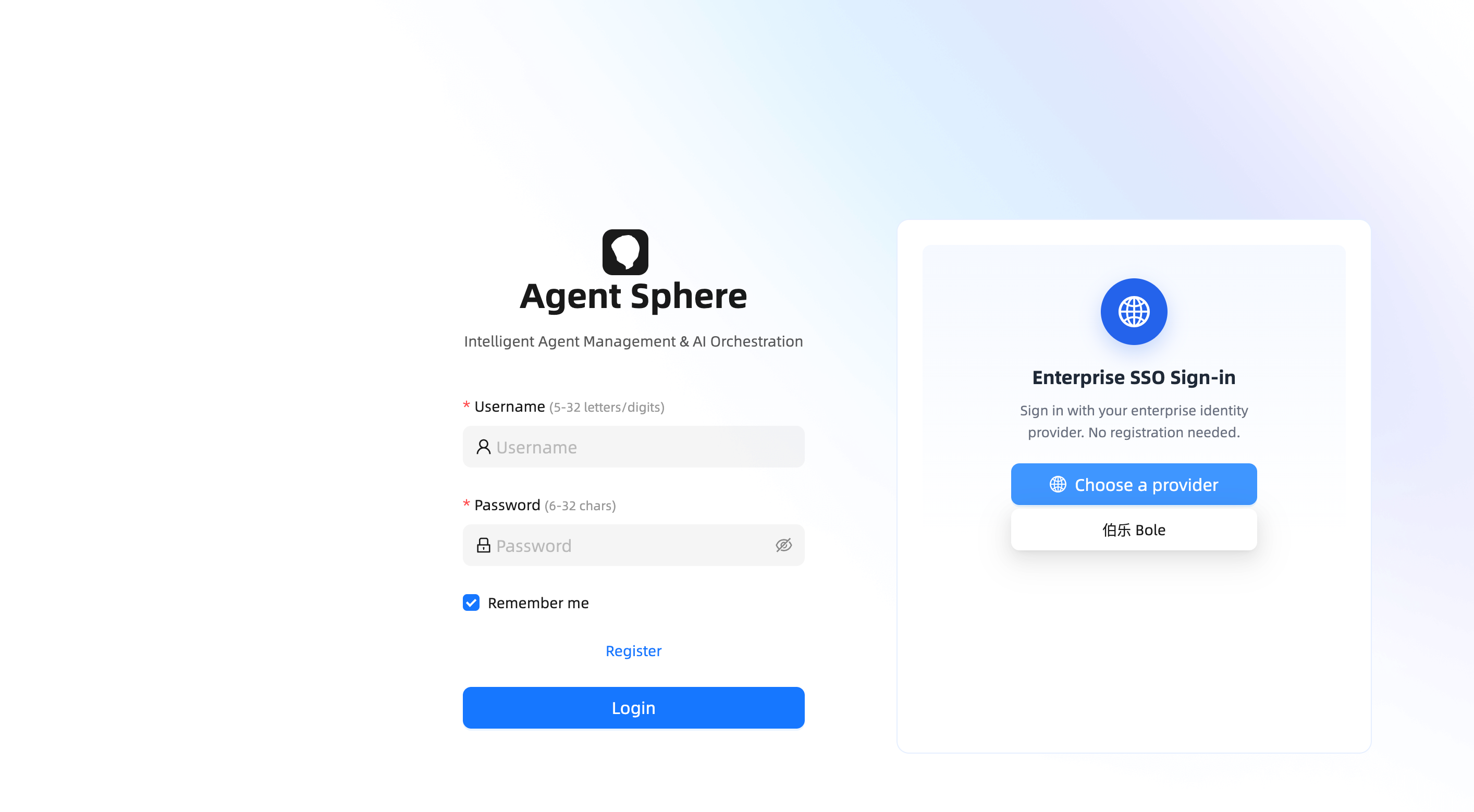
SSO login screen (select an identity provider):
Multiple identity providers configured:
Embedded into a third-party system page (mountTo):
How It Works
- OIDC SSO: consumes
?otc=→POST /auth/sso/exchange→ stores the user+token insessionStorage(agent-sphere-widget:agent-user);?otc=/?error=are stripped from the URL after handling.autoLoginperforms a one-shot silent probe (prompt=none) via a hidden same-origin iframe (no page redirect); the login screen lets the user pick an enabled identity provider. - Agent & session lists: instances (enabled) come from
/instance/instances(paged) and sessions from/instance/sessions(offset paged). Sessions support create, inline rename (✓/✕), and archive (two-step inline confirm), all with infinite-scroll pagination. - Timeline channel (REST + SSE): the widget renders a typed timeline —
GET /instance/sessions/{sid}/timeline(paged bybeforeSeq/afterSeq, limit 5–50) returns rows keyed byseq+kind(user/assistant/tool/clarification/subagent/run_status/error). A live SSE streamGET /runtime/{sid}/stream(Bearer) drives the same rows. - SSE typewriter & merge:
content_token/reasoning_tokenpush onto the matchingseq+kind==='assistant'row'sreply/thinking; sub-agent rows aggregate live steps (LLM reasoning/reply +tool_call_*). Terminal / tool / clarification events (run_completed/failed/cancelled/awaiting_user,tool_call_*,clarification_*) trigger anafterSeqrefresh for an authoritative merge —mergeTimelinededupes byseq, and placeholder sub-agent rows carry negativeseq<0until replaced by real rows. - Send / stop / clarify: sending posts
POST /runtime/{sid}/chat→{runId,status}(the rest arrives via SSE + refresh). A RUNNING dot shows while active and the send button becomes stop →POST /runtime/{sid}/stop(session-level, no runId). Clarification options are answered inline viaPOST /runtime/{sid}/run/{runId}/clarify. - WidgetTimeline rendering: self-built row renderer — copy buttons on user/assistant rows, collapsible model-reason sections, tool cards (browser screenshots render inline, click-to-zoom lightbox), inline clarification options (confirm/choice/input), collapsible sub-agent cards with live steps (single-open tool detail, auto-scroll), RUNNING wobble dot, and "load older" pagination. Chat image attachments render as thumbnails with a click-to-zoom preview.
- Hosted mode: passing
mountTorenders the widget statically inside your layout (e.g. inside a drawer or a section) instead of a floating bubble.
The widget builds two IIFE bundles: agent-sphere-widget.js (full chat UI) and agent-sphere-auth.js (a lightweight, no-React SSO silent-login entry for host pages that already show chat elsewhere).
Development
cd agent-sphere-copilot-widget
npm install
npm run dev        # vite dev on :5173, proxies /api -> localhost:8080
npm run build      # tsc + vite lib IIFE -> dist/agent-sphere-widget.js + dist/agent-sphere-auth.js
Gotcha: rollup 4 ships platform-specific binaries as optional dependencies. Never copy
node_modules/package-lock.jsonacross machines — ifCannot find module @rollup/rollup-*appears, runrm -rf node_modules package-lock.json && npm ion the target machine.
4.12 Resource Template Reference
Each identity provider carries a resource_template JSON array. On a user's first login the coordinator dispatches each entry by its type to the matching initializer (new types are zero-code — just add a ResourceInitializer bean). Entries are processed in order and may reference earlier ones by name.
type |
Fields | Notes |
|---|---|---|
model_provider |
name, baseUrl |
idempotent by name |
api_key |
provider (ref), alias |
creates a placeholder key and sets it active; replace with a real key afterwards |
model_route |
provider (ref), modelName, company, weight |
|
completions |
name, businessType, route (ref), config, promptSystem, promptUser, inputSchema, outputSchema |
creates a prompt v1 and activates it |
instance |
name, businessType, route (ref) |
auto-binds the built-in browser tool |
mcp |
name, serverUrl, serverType |
|
skill |
name, definition |
|
document |
title, content |
The built-in default template (used when the provider leaves resource_template empty) provisions a DeepSeek model + key + deepseek-v4-flash route, seven business completions (resume_parse / five_dim_match / outreach / nl_search / org_collect / recommend_reason / interview_questions), a sourcing instance, an MCP, a skill, and a usage document. It can be viewed from the Identity Provider edit form (查看样例).
4.13 Local OIDC Mock (Development)
agent-sphere/local-dev/mock-oidc-server.mjs is a zero-dependency OIDC IdP for local SSO testing. Each start it generates a random mock user identity (subject, preferred_username, email, name) so every boot provisions a fresh SSO user.
node agent-sphere/local-dev/mock-oidc-server.mjs      # listens on :9000
# MOCK_IDP_PORT / MOCK_IDP_ISSUER / MOCK_IDP_CLIENT_ID / MOCK_IDP_CLIENT_SECRET
# MOCK_IDP_SUBJECT / MOCK_IDP_PREFERRED_USERNAME / MOCK_IDP_EMAIL / MOCK_IDP_NAME  # pin a fixed identity
The RSA key is intentionally fixed across restarts so the backend's cached JWKS keeps verifying id_tokens (avoids S0006). Point the agent_identity_provider row at it (code=bole, issuer=http://localhost:9000, endpoints under /oauth2/..., jwks_url=http://localhost:9000/jwks, scopes openid email profile, enabled).
4.14 Session Data Cleanup (Disk Reclamation)
agent_session_cleanup_run tracks a scheduled job (SessionCleanupTask) that hard-deletes expired session data so the database stops growing. It is the one sanctioned exception to "never hard-delete": agent_llm_interaction_record stores full request/response/reasoning text, so a logical delete_flag update would leave every byte on disk. The cleanup SQL therefore bypasses MyBatis-Plus on purpose and deliberately does not filter on delete_flag — already-logically-deleted rows occupy space too.
What counts as expired — session.created_at < cutoff AND session.updated_at < cutoff, plus two NOT EXISTS guards for PENDING/RUNNING runs and QUEUED/RUNNING tasks, so an in-flight execution is never deleted out from under itself. A long-running task only updates the task/run rows and never the session row, so elapsed time alone is not a sufficient signal. AWAITING_USER is intentionally not guarded — a clarification nobody ever answers would otherwise block cleanup forever. Parked WAITING runs are guarded.
Delete order is a foreign-key contract. Only two real FKs exist and neither cascades (agent_run.session_id → agent_session, agent_task_artifact.task_id → agent_task); the mapper's method order is the execution order, and a unit test asserts it with InOrder. Reordering it breaks production with violates foreign key constraint.
Every run is recorded. Both the cron and the manual endpoint write a row to agent_session_cleanup_run, and the RUNNING row is inserted before the lock is taken — so "lock was busy" and "kill switch off" also leave a trace (status=SKIPPED plus a skip_reason); otherwise nobody could explain why the disk did not shrink. Terminal states are SUCCESS (with per-table table_stats), SKIPPED, and FAILED (with error_message, and the exception is still rethrown). Previews are recorded too — an irreversible delete needs its audit trail. The run table prunes itself as the job's final phase.
Manual trigger is asynchronous: POST /api/v1/instance/session-cleanup only submits — it inserts the RUNNING record on the request thread and returns immediately, with the work running on runtimeAsyncExecutor, because a round can span 200×50 sessions. Poll GET /api/v1/instance/session-cleanup/runs (and /runs/{id}) for progress and result; a stale flag computed from finished_at keeps a crashed process's zombie RUNNING row from being mistaken for an in-flight cleanup. dryRun defaults to true — the request body must explicitly set "dryRun": false to actually delete.
Retention days and a kill switch live in agent_system_config (config_group='session') so they can change without a redeploy, while the cron, batch size and sleep interval live under buukle.agent.session in application.yml. Like the skill-sync job, the task takes a Redisson lock (scheduler:session-cleanup) because replicas: 2. Note that a hard delete only frees space for reuse inside PostgreSQL; the data files stay the same size on disk, so the job logs a VACUUM (FULL, ANALYZE) hint rather than running it (which would take an ACCESS EXCLUSIVE lock).
5. Capability Open API (External Integration)
External systems (e.g. a business recruiting platform) can call AgentSphere capabilities directly over /api/v1/api/*. Every request authenticates the caller identity as code + subject + businessType:
code— identity provider code (e.g.business);subject— the SSO subject of that provider. The backend looks up the provisionedagent_sphereuser via/sso/me-style resolution; unknown identities get401.businessType— the resource's business key. Completions/instances are matched by owner +businessType(session-layer ownership), so a caller only sees the resources of their own user copy.Authorizationheader is not required on these routes (the caller identity is the business layer); signing is planned for a later version.
5.1 Completions
POST /api/v1/api/completions runs a single LLM call against the caller's completions matching businessType.
curl -X POST http://localhost:8080/api/v1/api/completions \
  -H 'Content-Type: application/json' \
  -d '{
    "code": "business",
    "subject": "elvin",
    "businessType": "resume_parse",
    "input": { "resumeText": "张三,6 年经验...", "candidateId": 1001 }
  }'
{
  "content": "{\"name\":\"张三\",\"summary\":\"...\"}",
  "model": "deepseek-v4-flash",
  "usage": { "prompt_tokens": 42, "completion_tokens": 96, "total_tokens": 138 }
}
5.2 Tasks
# Submit a task
curl -X POST http://localhost:8080/api/v1/api/tasks \
  -H 'Content-Type: application/json' \
  -d '{
    "code": "business",
    "subject": "elvin",
    "businessType": "sourcing",
    "goal": "整理候选人张三的公开画像",
    "context": { "company": "某互联网公司", "years": 6 },
    "expectedOutput": { "type": "object", "required": ["summary"] },
    "config": { "pollInterval": "2s" },
    "callbackUrl": "https://bole.example.com/task-callback"
  }'

# Query / stop
curl "http://localhost:8080/api/v1/api/tasks/7?code=business&subject=elvin&businessType=sourcing"
curl -X POST "http://localhost:8080/api/v1/api/tasks/7/stop?code=business&subject=elvin&businessType=sourcing"
Response is a TaskVO (id, status QUEUED/RUNNING/COMPLETED/FAILED/CANCELLED, sessionId, runId, resultJson, …). When callbackUrl is set, the backend POSTs task progress/final results there. Completed tasks persist two-phase structured outputs as task artifacts (see below).
Task phases. A task advances through execute → extract → refine, tracked in poll_phase:
execute— the real work run. When it reachesCOMPLETED, the poller moves on; when it was truncated by the loop cap (loop_capped), the task is failed instead and extraction is skipped, because a half-finished run must not masquerade as a complete one. That failure still returns the run's own output (plus a human-readableremark) so the caller can see what the run actually produced.extract— a second run re-formats the conversation into theexpectedOutputJSON Schema. Its output is validated against the contract; on failure the task moves torefine.refine— one correction round fed the validation errors. If it still fails, the last output is returned as-is rather than retrying forever.
Each artifact is stored in agent_task_artifact with the phase that produced it.
Timeout. Effective timeout = max(taskTimeoutSeconds, hri-ai.tasks.min-timeout-seconds), falling back to hri-ai.tasks.max-poll-seconds (3600s) when the caller omits taskTimeoutSeconds; the floor defaults to 0 (disabled). Exceeding it fails the task with task poll timeout.
The floor exists because the default alone does nothing in practice: every task carries its own task_timeout_seconds, and callers overwhelmingly send an explicit 3600 — so raising max-poll-seconds would only affect tasks that omit the field. min-timeout-seconds is the only place that can raise the real timeout without changing the caller. It defaults to 10800s (3h), chosen from the observed distribution (mean 838s, max 9818s, nothing above 3h). The trade-off is that the server overrides an explicit caller value, which is deliberate.
The same resolved value also sets the task-level MCP credential TTL (timeout + 15 min) — deliberately a single chokepoint, so the credential can never expire before the task it belongs to.
5.3 Task Artifacts (任务产物)
Refined outputs from the extract / refine phases (§5.2) are stored in agent_task_artifact — each row records which phase produced it — and exposed on the admin side:
GET /api/v1/admin/task-artifacts— paged list (keyword,taskId,page,size), gated byadmin:tasks:read, row-scoped bycreated_by.GET /api/v1/admin/task-artifacts/{id}— detail with the fullcontentJSON andschemaRef.
The frontend 产出 → 任务产物 page lists them (task goal, type, schema ref, run id, status, created time) and shows the detail drawer with a formatted JSON view and one-click copy.
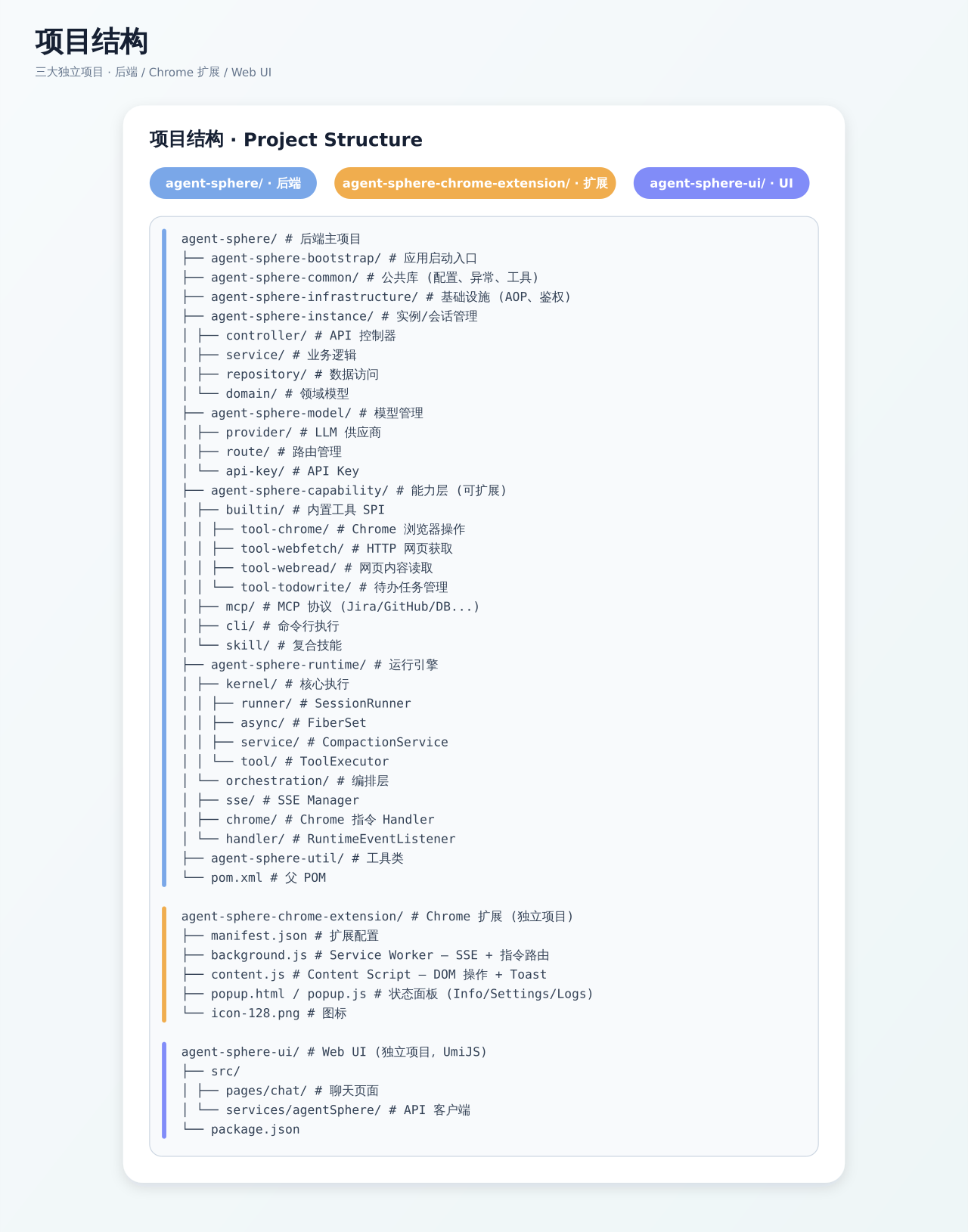
6. Project Structure
7. Tech Stack
| Domain | Technology |
|---|---|
| Backend Runtime | Java 21, Spring Boot 3.4, Virtual Threads |
| Database | PostgreSQL, Flyway migrations |
| Cache/Distributed Lock | Redis (Redisson) |
| Frontend | React, UmiJS, Ant Design Pro |
| Chat Widget | React, shadow DOM, single IIFE script — self-built typed REST + SSE timeline chat (no CopilotKit / AG-UI) |
| Chrome Extension | Manifest V3, Service Worker, Content Script |
| Auth | OIDC multi-provider SSO (PKCE / JWKS), RBAC, audit log |
| Real-time Communication | SSE (Server-Sent Events), multi-emitter broadcast |
| Tool Protocol | MCP (Model Context Protocol, Streamable HTTP) |
| API Security | Bearer Token, @WithTenant multi-tenancy, row-level created_by isolation |
| LLM Integration | SPI provider abstraction, automatic fallback routing |
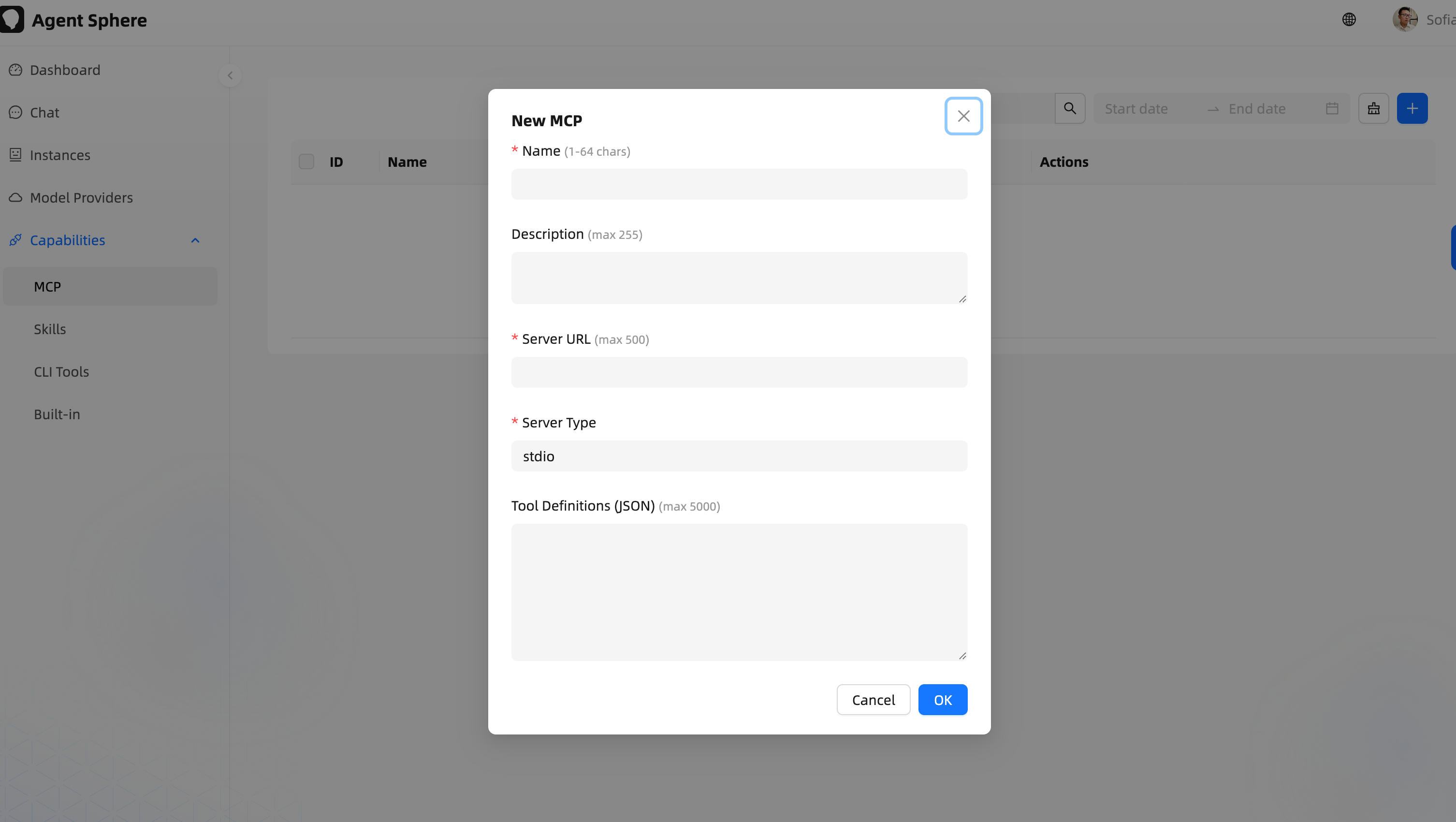
8. MCP Integration Example
AgentSphere supports connecting to any external service via the MCP protocol. Taking Jira as an example:
# 1. Deploy the Jira MCP Server
npx @roovet/jira-mcp --port 3100

# 2. Add the MCP capability in the AgentSphere admin console
curl -X POST /api/v1/capability/mcp \
  -d '{"name":"Jira MCP","serverUrl":"http://localhost:3100","serverType":"streamable-http"}'

# 3. Bind it to an Agent instance
curl -X POST /api/v1/instance/instance-capabilities \
  -d '{"instanceId":1,"capabilityType":"mcp","capabilityId":1}'

# 4. Users simply send instructions in the chat
# "Help me check my unfinished tasks on Jira"
# → LLM calls MCP tool → Jira API → returns result
9. License
MIT License
Copyright (c) 2026 Buukle
