agentic-stack
Keep one portable memory-and-skills layer across coding-agent harnesses, so switching tools doesn't reset how your agent works.
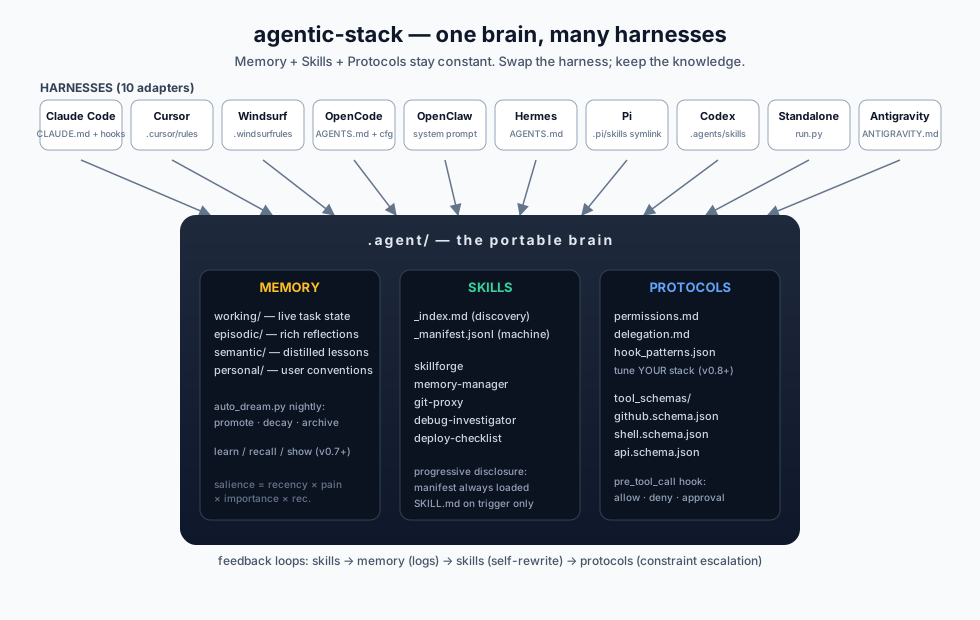
A portable .agent/ folder (memory + skills + protocols) that plugs into Claude Code, Cursor, Windsurf, OpenCode, OpenClaw, GitHub Copilot CLI, Google Gemini CLI, Hermes, Pi Coding Agent, Codex, Autohand Code CLI, Antigravity, or a DIY Python loop — and keeps its knowledge when you switch.
It also includes a local data layer so you can monitor the whole suite of agents from one place: harness activity, cron runs, active agents, token/cost estimates, KPI summaries, user-defined resource categories, and screenshot-ready daily dashboards.
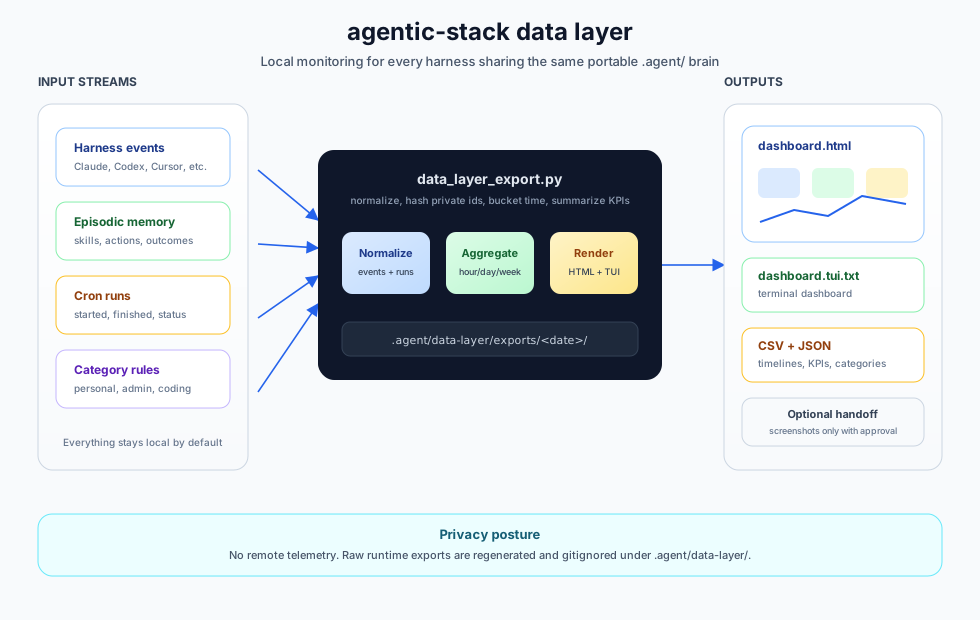
And it can turn approved, redacted runs into local flywheel artifacts: trace records, context cards, eval cases, training-ready JSONL, and readiness metrics without training a model or sending telemetry.

New in v0.20.0 — orchestration, gated evolution, Markdown memory tracks
The brain now covers orchestration, self-evolution, and portable memory in the same file-backed, stdlib-only, host-agent-reviewed style:
- DAG orchestration —
plan.pyvalidates a goal as a dependency graph, matches nodes to agents fromprotocols/agents.json(Claude Code, Codex, OpenCode, Gemini, Copilot, Pi, Hermes, OpenClaw, shell, custom), dispatches with bounded subprocesses, judges completion by evidence (exit status, truncation,NEED_INPUT:markers, per-nodeverify), writes exception reports with three resolutions (continue / abandon / replan), keeps every prompt, output, transcript and verdict on disk, and lets later runs consume earlier nodes viaref:. Playbooks save a run as a template; personas assemble a lead role plus specialist roster; campaigns run unattended with a model-free monitor and a report gate. → docs/orchestration.md - Gated evolution — four strategy seats (memory / planning / capability /
action) around the conductor, and
evolve.py: diagnose failures from episodic memory, scaffold a candidate, paired screen on a fixed task sample (validity + activation gates, t ≥ 1.96), gene bank per (where, pathology) cell, install with backup. Nothing unscreened touches the live harness. → docs/evolution.md - Markdown memory tracks — episodes (user), agent cases, foresight with a
validity window, weekly model-free reflection that consolidates and
deprecates (never deletes), source-backed knowledge pages, a stdio MCP
server (
mem_context,mem_search,mem_save_turn,mem_save_fact,mem://profile,mem://search) for any host, and Claude Code SessionStart / UserPromptSubmit / Stop / SessionEnd hooks. → docs/memory-tracks.md - Skill forge — task-aware retrieval fused across local, memory-derived and hub catalogs; quality facets with issue flags and admission rules; explicit, validated update operations with lineage; task-intent clustering of agent cases into candidate skills.
- One CLI contract — every new tool emits
{"ok", "data", "meta"}/{"ok": false, "error": {...}}when piped, uses stable exit codes, and redacts credentials on the way out.sync.pymoves the brain between devices over git. → docs/contracts.md - An agent can install the stack by reading docs/agent-install/SKILL.md.
python3 .agent/tools/plan.py validate --file plan.json && python3 .agent/tools/plan.py new --file plan.json
python3 .agent/tools/plan.py run <run_id> --yes && python3 .agent/tools/plan.py report <run_id>
python3 .agent/tools/evolve.py diagnose && python3 .agent/tools/evolve.py screen <cid> --n 4
python3 .agent/tools/track.py search episode "supabase migration"
claude mcp add agentic-memory -- python3 "$PWD/.agent/tools/memory_mcp.py"
New in v0.19.1 — memory and upgrade fixes
Patch release. Four correctness fixes:
- Recall skips superseded lessons. Retrieval and rendering now share one
superseded_by_map, so recall no longer returns stale guidance next to its replacement. upgradecopies loop skills to the right path. Newloop-*skills landed at.agent/skills/skills/loop-x/; they now land at.agent/skills/loop-x/.- UTF-8 everywhere in
learn.py. Non-ASCII claims print and persist correctly regardless of host locale. - No leaked file handle when checking whether a lesson was already appended.
Bounded agentic loops (v0.19.0)
Portable loop contracts live under .agent/loops and use a maker →
deterministic verifier → independent checker lifecycle:
agentic-stack loop init /path/to/your-project
agentic-stack loop validate /path/to/your-project
agentic-stack loop run ci-sweeper "make the failing test green" /path/to/your-project --yes
agentic-stack loop status /path/to/your-project
L2/L3 action loops use owned Git worktrees, finite attempts/runtime/output/token
budgets, deny-path gates, resumable checkpoints, and privacy-safe local events.
The supervisor bounds and audits child processes; it is not an operating-system sandbox. Use harness-native sandboxes and approvals for stronger isolation.
Schedulers should invoke one bounded loop run command at a time and inspect
its exit status before starting another run.
Earlier releases — Brain memory bridge (v0.18.0), Mission Control and lesson retraction (v0.17.0), safe project upgrades (v0.16.0), data layer and flywheel (v0.11.0), harness manager (v0.9.0) — are in CHANGELOG.md.

 Made by https://x.com/Av1dlive
Quickstart
macOS / Linux
# tap + install (one-time — both lines required)
brew tap codejunkie99/agentic-stack https://github.com/codejunkie99/agentic-stack
brew install agentic-stack

# drop the brain into any project — the onboarding wizard runs automatically
cd your-project
agentic-stack claude-code
# or: cursor | windsurf | opencode | openclaw | copilot-cli | gemini | hermes | pi | codex | autohand-code | standalone-python | antigravity
Windows (PowerShell)
# clone + run the native installer
git clone https://github.com/codejunkie99/agentic-stack.git
cd agentic-stack
.\install.ps1 claude-code C:\path\to\your-project
Already installed?
brew update && brew upgrade agentic-stack
agentic-stack dashboard
Clone instead?
git clone https://github.com/codejunkie99/agentic-stack.git
cd agentic-stack && ./install.sh claude-code         # mac / linux / git-bash
# or on Windows PowerShell: .\install.ps1 claude-code
# adapters: claude-code | cursor | windsurf | opencode | openclaw | copilot-cli | gemini | hermes | pi | codex | autohand-code | standalone-python | antigravity
Once installed: manage what's wired
After the first ./install.sh <adapter>, manage your project with
verb-style subcommands (works with both install.sh and install.ps1):
./install.sh dashboard           # TUI dashboard: health, verify, memory, team, skills, instances
./install.sh mission-control     # beta local web dashboard; Ctrl-C turns it off
./install.sh brain status        # optional external Brain CLI integration
./install.sh add cursor          # add a second adapter (Claude Code + Cursor in same repo)
./install.sh status              # one-screen view: which adapters, brain stats
./install.sh doctor              # read-only audit; green / yellow / red per adapter
./install.sh manage              # interactive TUI: header pane + menu loop for add/remove/audit
./install.sh transfer            # onboarding-style wizard: export/import memory as a curl bridge
./install.sh upgrade --dry-run   # preview safe .agent infrastructure refresh
./install.sh upgrade --yes       # copy latest harness/memory/tools + new skills
./install.sh sync-manifest       # rebuild .agent/skills/_manifest.jsonl from SKILL.md frontmatter
./install.sh remove cursor       # confirm prompt + delete; no quarantine, no undo
PowerShell uses the same verbs, for example .\install.ps1 dashboard.
Bare ./install.sh (no arguments) opens a multi-select wizard on
a fresh project — check every harness you actually use, hit enter,
each one gets installed. The wizard auto-detects harnesses already on
disk and pre-checks them. On a project that already has an
install.json, bare interactive ./install.sh opens the dashboard.
In non-TTY shells (CI), it stays script-safe and prints the available
subcommands instead of opening a TUI.
Upgrading from pre-v0.9? Run ./install.sh doctor first — it
synthesizes install.json from on-disk adapter signals so the new
backend can track them. Installing on top without migration would
orphan the prior installs.
Upgrading an already-installed project after brew upgrade? Run
agentic-stack upgrade --dry-run in the project first, then
agentic-stack upgrade --yes to refresh only skeleton-owned .agent
infrastructure (harness/**/*.py, top-level memory/*.py, tools/*.py,
the generated skill index, and new skill directories). It does not rewrite
CLAUDE.md, .claude/settings.json, personal/semantic/episodic/working
memory, candidates, or existing skill directories. agentic-stack sync-manifest is available as a repair command if _manifest.jsonl drifts
from installed SKILL.md files.
Optional: external Brain integration
codejunkie99/brain is the
git-backed long-term memory binary and MCP server. agentic-stack now treats it
as an optional external memory layer instead of vendoring its Rust workspace.
Install Brain first:
brew install codejunkie99/tap/brain
Then check or wire it from a project:
agentic-stack brain status
agentic-stack brain onboard --agents codex,cursor --yes
agentic-stack brain ask "auth decisions"
agentic-stack brain note "Use PKCE for local OAuth flows."
agentic-stack brain mcp-command
Installed .agent/ projects also get python3 .agent/tools/brain_bridge.py
and a brain seed skill so host agents can query or write Brain memory when a
task needs cross-harness long-term recall.
Onboarding wizard
If you ran bare ./install.sh (no adapter name), the wizard starts
with a multi-select harness step: it lists all 13 adapters, pre-
checks any it detects on disk, and installs each one you confirm with
space + enter. After the install(s), the preferences flow runs.
If you ran ./install.sh <adapter> directly, only the preferences
flow runs.
Either way, the preferences step populates
.agent/memory/personal/PREFERENCES.md — the first file your AI reads
at the start of every session — and writes a feature-toggle file at
.agent/memory/.features.json.
Six preference questions (each skippable with Enter):
| Question | Default |
|---|---|
| What should I call you? | (skip) |
| Primary language(s)? | unspecified |
| Explanation style? | concise |
| Test strategy? | test-after |
| Commit message style? | conventional commits |
| Code review depth? | critical issues only |
Plus one Optional features step (opt-in, off by default):
| Feature | Default |
|---|---|
Enable FTS memory search [BETA] |
no |
Enable tldraw visual canvas [BETA] |
no |
Flags:
agentic-stack claude-code --yes          # accept all defaults, beta off (CI/scripted)
agentic-stack claude-code --reconfigure  # re-run the wizard on an existing project
Edit .agent/memory/personal/PREFERENCES.md any time to refine your
conventions, or .agent/memory/.features.json to flip feature toggles.
Transfer wizard
Move the portable parts of one project brain into Codex, Cursor, Windsurf, or a terminal-only project with the onboarding-style TUI:
./install.sh transfer
The wizard turns a plain-language intent into a transfer plan, lets you
review target harnesses and memory scopes, blocks secret-like content before
export, and emits a one-line curl command the next environment can run.
For move my memory, it includes preferences, accepted lessons, skills,
working memory, episodic/history logs, and candidate lessons. The importer
unpacks the bundle, verifies its SHA-256 digest, merges preferences and
accepted lessons, copies selected skills, restores selected memory files,
and installs the matching adapter files.
For scripted handoff:
./install.sh transfer export --intent "move my preferences and lessons into Codex" --print-curl
./install.sh transfer import --payload-file transfer.txt --sha256 <digest> --target codex
Review protocol (host-agent CLI)
The nightly auto_dream.py cycle only stages candidate lessons. It
does not mark anything accepted or modify semantic memory. Your host
agent does the review in-session:
# list pending candidates, sorted by priority
python3 .agent/tools/list_candidates.py

# accept with rationale (required)
python3 .agent/tools/graduate.py <id> --rationale "evidence holds, matches PREFERENCES"

# reject with reason (required); preserves decision history
python3 .agent/tools/reject.py <id> --reason "too specific to generalize"

# requeue a previously-rejected candidate
python3 .agent/tools/reopen.py <id>

# retract an accepted lesson from future recall/context (append-only audit)
python3 .agent/tools/retract_lesson.py <lesson_id> --rationale "obsolete after migration"
Graduated lessons land in semantic/lessons.jsonl (source of truth) and
are rendered to semantic/LESSONS.md. Rejected candidates retain full
decision history so recurring churn is visible, not fresh. Retracted lessons
stay in history with status=retracted but are excluded from proactive recall.
See docs/architecture.md for the full lifecycle.
What this is
Every guide shows the folder structure. This repo gives you the folder structure plus the files that actually go inside: a working portable brain with fourteen seed skills, four memory layers, enforced permissions, a nightly staging cycle, host-agent review tools, and adapters for multiple harnesses.
- Memory —
working/,episodic/,semantic/,personal/. Each layer has its own retention policy. Query-aware retrieval (salience × relevance); nightly compression into reviewable candidates. - Review protocol —
auto_dream.pystages candidate lessons mechanically. Your host agent reviews them via CLI tools (graduate.py,reject.py,reopen.py) and commits decisions with a required rationale. No unattended reasoning, no provider coupling. - Skills — progressive disclosure. A lightweight manifest always
loads; full
SKILL.mdfiles only load when triggers match the task. Every skill ships with a self-rewrite hook. The bundleddesign-mdskill teaches agents to use a rootDESIGN.mdas the visual source of truth for UI and Google Stitch workflows. - Protocols — typed tool schemas, a
permissions.mdthat the pre-tool-call hook enforces, and a delegation contract for sub-agents. - Data layer — local-only dashboard exports across every harness sharing
.agent/: agent events, cron timelines, KPI summaries, tokens/cost estimates, task categories, harness mix,dashboard.html, and daily report handoff. - Data flywheel — approved, redacted runs can become trace records, context cards, eval cases, training-ready JSONL, and readiness metrics without training a model or sending telemetry.
Memory search [BETA]
Opt-in FTS5 keyword search over all memory documents:
# enable during onboarding (or set manually in .agent/memory/.features.json)
python3 .agent/memory/memory_search.py "deploy failure"
python3 .agent/memory/memory_search.py --status
python3 .agent/memory/memory_search.py --rebuild
Falls back to ripgrep (rg) if installed, then to grep — both
restricted to .md / .jsonl so source files never pollute results.
The index is stored at .agent/memory/.index/ and gitignored.
Repo layout
.agent/                         # the portable brain (same across harnesses)
├── AGENTS.md                   # the map
├── harness/                    # conductor + hooks (standalone path)
│   ├── dag.py                  # orchestration library (v0.20)
│   ├── seats.py                # memory / planning / capability / action seats (v0.20)
│   └── hooks/
│       ├── claude_code_session.py    # SessionStart / UserPromptSubmit / Stop / SessionEnd (v0.20)
│       ├── claude_code_post_tool.py  # rich PostToolUse logging (v0.8+)
│       ├── copilot_cli_post_tool.py  # Copilot CLI postToolUse logging
│       ├── pi_post_tool.py     # Pi tool_result logging
│       ├── pre_tool_call.py    # permissions enforcement
│       ├── post_execution.py   # log_execution() entry point
│       └── on_failure.py       # failure write + repeated-failure rewrite flag
├── memory/                     # working / episodic / semantic / personal
│   ├── auto_dream.py           # staging-only dream cycle
│   ├── cluster.py              # content clustering + pattern extraction
│   ├── promote.py              # stage candidates
│   ├── validate.py             # heuristic prefilter (length + exact duplicate)
│   ├── review_state.py         # candidate lifecycle + decision log
│   ├── render_lessons.py       # lessons.jsonl → LESSONS.md
│   ├── memory_search.py        # [BETA] FTS5 search (opt-in)
│   ├── tracks.py               # Markdown daily-log tracks: episodes / cases / foresight (v0.20)
│   ├── reflect_episodes.py     # weekly model-free consolidation (v0.20)
│   └── knowledge/              # source-backed topic pages (v0.20)
├── loops/                      # bounded loop contracts (budget, constraints, loops)
├── evolve/                     # eval task cards, runner, candidates, gene bank (v0.20)
├── playbooks/  personas/       # saved plans and assembled personas (v0.20)
├── skills/                     # _index.md + _manifest.jsonl + SKILL.md files (+ orchestrator, evolver)
├── protocols/                  # permissions + tool schemas + delegation
│   ├── agents.json             # agent registry: capability cards + execution adapters (v0.20)
│   └── hook_patterns.json      # user-owned high/medium-stakes regex (v0.8+)
└── tools/                      # host-agent CLI + memory_reflect + skill_loader
    ├── learn.py                # one-shot lesson teaching (stage + graduate)
    ├── recall.py               # surface lessons relevant to an intent
    ├── show.py                 # colorful brain-state dashboard
    ├── data_layer_export.py    # local cross-harness dashboard/data export
    ├── data_flywheel_export.py # approved runs -> traces/cards/evals/JSONL
    ├── brain_bridge.py         # bridge to external Brain CLI/MCP memory
    ├── list_candidates.py
    ├── graduate.py
    ├── reject.py
    ├── reopen.py
    └── retract_lesson.py       # append-only semantic lesson retraction

adapters/                       # one small shim per harness, each with adapter.json manifest
├── claude-code/   (CLAUDE.md + settings.json hooks — $CLAUDE_PROJECT_DIR wired, closes #18)
├── copilot-cli/   (AGENTS.md + .github/instructions/ + .github/hooks/ + .github/skills/ mirror)
├── cursor/        (.cursor/rules/*.mdc)
├── gemini/        (gemini.md + .gemini/skills mirror)
├── windsurf/      (.windsurf/rules/*.md + legacy .windsurfrules)
├── opencode/      (AGENTS.md + opencode.json)
├── openclaw/      (AGENTS.md + system-prompt include; auto-registers per-project agent)
├── hermes/        (AGENTS.md)
├── pi/            (AGENTS.md + .pi/skills symlink)
├── codex/         (AGENTS.md + .agents/skills symlink)
├── autohand-code/ (AGENTS.md + .autohand/skills symlink)
├── standalone-python/  (DIY conductor entrypoint)
└── antigravity/   (ANTIGRAVITY.md)

harness_manager/                # v0.9.0 manifest-driven Python backend
├── schema.py                   # adapter.json validator (path-safe on POSIX + Windows)
├── install.py                  # applies file entries per merge_policy
├── state.py                    # install.json read/write with fcntl/msvcrt locking
├── doctor.py                   # read-only audit + pre-v0.9 migration synthesis
├── remove.py                   # safe uninstall with shared-file detection + ownership handoff
├── dashboard_tui.py            # project dashboard for health/verify/memory/team/skills/instances
├── mission_control.py          # beta local web dashboard entrypoint
├── brain.py                    # optional external Brain CLI integration
├── mission_control_collectors.py
├── mission_control_render.py
├── mission_control_server.py
├── mission_control_static.py
├── post_install.py             # named built-ins (openclaw_register_workspace)
├── manage_tui.py               # interactive menu loop for add/remove/audit
├── transfer_tui.py             # onboarding-style memory transfer wizard
├── transfer_plan.py            # natural-language target/scope planning
├── transfer_bundle.py          # export/import bundle codec + merge logic
├── skill_manifest.py           # rebuilds skills/_manifest.jsonl from SKILL.md
├── upgrade.py                  # safe .agent infrastructure refresh
├── status.py                   # one-screen installed-adapter view
├── loops/                      # loop supervisor: runner, process, worktrees, storage
└── cli.py                      # argparse dispatcher for install.sh / install.ps1

docs/                           # architecture, getting-started, per-harness
tests/                          # pytest suite, incl. test_claude_code_hook.py (62 checks)
schemas/data-layer/             # local dashboard/event schemas
examples/data-layer/            # sanitized data-layer shapes
schemas/flywheel/               # data-flywheel artifact schemas
examples/flywheel/              # sanitized approved-run examples
install.sh                      # mac / linux / git-bash installer (thin Python dispatcher)
install.ps1                     # Windows PowerShell installer (thin Python dispatcher)
Formula/agentic-stack.rb        # Homebrew formula
CHANGELOG.md                    # per-version release notes (v0.1.0 onward)
onboard.py                      # onboarding wizard entry point
onboard_features.py             # .features.json read/write
onboard_ui.py                   # ANSI palette, banner, clack-style layout
onboard_widgets.py              # arrow-key prompts (text, select, confirm)
onboard_render.py               # answers → PREFERENCES.md content
onboard_write.py                # atomic file write with backup
verify_codex_fixes.py           # v0.8.0 regression checks
Supported harnesses
| Harness | Config file it reads | Hook support |
|---|---|---|
| Claude Code | CLAUDE.md + .claude/settings.json |
yes (PostToolUse, Stop) |
| GitHub Copilot CLI | AGENTS.md + .github/instructions/*.instructions.md |
yes (postToolUse, sessionEnd) |
| Cursor | .cursor/rules/*.mdc |
no (manual reflect calls) |
| Google Gemini CLI | gemini.md + .gemini/skills/ |
no (manual reflect calls) |
| Windsurf | .windsurf/rules/*.md + legacy .windsurfrules |
no (manual reflect calls) |
| OpenCode | AGENTS.md + opencode.json |
partial (permission rules) |
| OpenClaw | AGENTS.md (auto-injected) + per-project openclaw agents add --workspace |
varies by fork |
| Hermes Agent | AGENTS.md (agentskills.io compatible) |
partial (own memory) |
| Pi Coding Agent | AGENTS.md + .pi/skills/ + .pi/extensions/ |
yes (tool_result event) |
| Codex | AGENTS.md + .agents/skills/ |
no (manual reflect calls) |
| Autohand Code CLI | AGENTS.md + .autohand/skills/ |
no (manual reflect calls) |
| Standalone Python | run.py (any LLM) |
yes (full control) |
| Antigravity | ANTIGRAVITY.md |
yes (system context) |
Seed skills
- skillforge — creates new skills from recurring patterns
- memory-manager — runs reflection cycles, surfaces candidate lessons
- git-proxy — all git ops, with safety constraints
- debug-investigator — reproduce → isolate → hypothesize → verify
- deploy-checklist — the fence between staging and production
- design-md — uses Google Stitch-style
DESIGN.mdfiles as portable design-system context for UI, frontend, and component work - data-layer — exports local dashboard data, cron timelines, KPIs, and daily reports across harnesses
- data-flywheel — approved runs into context cards, evals, redacted traces, training-ready JSONL, and flywheel metrics
- tldraw — opt-in beta skill for live canvas diagrams with a local
snapshot store under
.agent/skills/tldraw/ - brain — queries and writes the optional external Brain memory through
brain_bridge.py - loop-triage / loop-verifier / loop-constraints / loop-guard — read
.agent/loopscontracts: read-only triage, deterministic verification, path and approval gates, and pause/budget/stagnation decisions
How it compounds
- Skills log every action to episodic memory.
auto_dream.pyclusters recurring patterns into candidate lessons.- The host agent reviews candidates with
graduate.py/reject.py. - Graduated lessons append to
lessons.jsonl;LESSONS.mdre-renders. - Future sessions load query-relevant accepted lessons automatically.
on_failureflags skills that fail 3+ times in 14 days for rewrite.git log .agent/memory/becomes the agent's autobiography.- Data-layer exports turn local activity into dashboard-ready monitoring.
- Approved, redacted runs can be exported into
.agent/flywheel/artifacts for retrieval, evals, prompt shrinking, and optional future adapters.
Export approved runs into a data flywheel
Put sanitized human-approved runs in:
.agent/flywheel/approved-runs.jsonl
Then run:
python3 .agent/tools/data_flywheel_export.py
Outputs land in .agent/flywheel/exports/<date>/:
trace-records.jsonltraining-examples.jsonleval-cases.jsonlcontext-cards/<domain>/<workflow>.mdflywheel-metrics.json
This is local-only and model-agnostic. It creates training-ready artifacts; it does not train a model.
Run the staging cycle nightly
crontab -e
0 3 * * * python3 /path/to/project/.agent/memory/auto_dream.py >> /path/to/project/.agent/memory/dream.log 2>&1
auto_dream.py resolves its paths absolutely and performs only mechanical
file operations (cluster, stage, prefilter, decay). No git commits, no
network, no reasoning — safe to run unattended.
Monitor your agent suite
Generate a local dashboard for all harnesses writing to the same .agent/
brain:
python3 .agent/tools/data_layer_export.py --window 30d --bucket day
Or let the injected data-layer skill pass the user's words through:
python3 .agent/tools/data_layer_export.py show me last 7 days by hour
Outputs land in .agent/data-layer/exports/<date>/, including
dashboard.html, dashboard.tui.txt, and daily-report.md. The command also
prints the onboarding-style terminal dashboard directly inside your coding tool.
Optional local inputs let you add scheduled runs and categories:
.agent/data-layer/cron-runs.jsonl
.agent/data-layer/category-rules.json
.agent/data-layer/harness-events.jsonl
Use this to track crons by day, active agents, token/cost estimates by hour/day/week/month, harness mix across Claude/Hermes/OpenClaw/Codex/etc., success/error rates, run cadence, workflow breadth, and user-defined categories like personal, admin, work, financial, and coding. The data layer is local-only; screenshot delivery requires explicit user approval and a user-configured channel.
See docs/data-layer.md.
License
Original Agentic Stack code and documentation authored by Avidlive are licensed under the Apache License 2.0. Third-party components remain under their own licenses and are not relicensed by this repository. See the licensing guide and NOTICE.
Credits
Based on the article "The Agentic Stack" by @AV1DLIVE — follow for updates and collabs. Coded using Minimax-M2.7 in the Claude Code harness; PR review by Macroscope and Codex. Patterns from Gstack, Claude Code's memory system, and conversations in the agent-engineering community. Built with the hypothesis that harness-agnosticism is the point.
